Commercial-grade USB power meters make it easier to verify charger performance, troubleshoot USB-C connections, and measure the power reaching phones, laptops, power banks, and other devices.
We compared 10 capable testers across measurement range, USB-C Power Delivery support, display quality, E-Marker detection, portability, and practical diagnostic features to help you choose the right tool for your bench or toolkit.
Best 10 Commercial-Grade USB Power Meters Picks for 2026
Top Precision Pick

- 20-bit ADC with ARM Cortex-M4 processing
- Supports PD3.2 and up to 240W PD
- PC analysis with up to 10 million data points
Best For: Advanced USB-C diagnostics and protocol analysis
Most Versatile Analyzer

- USB-A, Micro-USB, and USB-C interfaces
- Supports numerous fast-charge protocols
- Adds ripple, waveform, cable, and E-Marker testing
Best For: Mixed-interface charging and cable diagnostics
Best High-Power Value

- Tests USB-C power up to 240W
- Shows key readings on a color display
- Measures bidirectional current
Best For: Everyday high-power USB-C charging checks
Best for Pass-Through Testing

- Monitors connections up to 240W
- Passes USB data and Alt Mode video
- Compact design with rotating OLED display
Best For: USB-C docks, chargers, and active pass-through setups
Best for USB-C PD troubleshooting

- Measures up to 240W with USB PD 3.1 EPR support
- Bi-directional voltage and current testing
- Passes USB 10Gbps data and DP Alt Mode signals
Best For: IT professionals testing USB-C chargers, docks, hubs, and cables
Best for protocol and cable analysis
USB-C Tester with E-Marker Reading
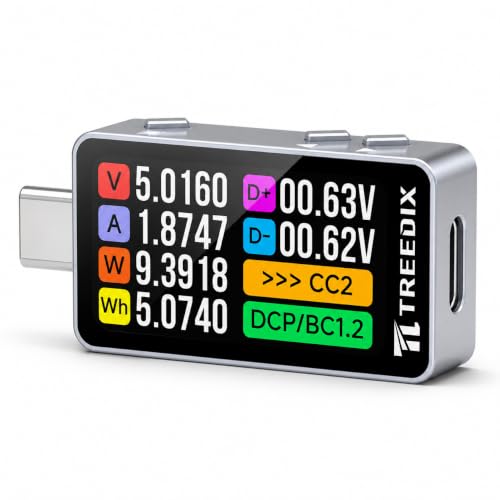
- Detects multiple USB-C fast-charging protocols
- Reads detailed E-Marker cable information
- Plots voltage and current over time
Best For: Charger, cable, and power-bank diagnostics
Best for high-current USB-C testing

- Measures up to 12A and 30V
- Supports a broad range of fast-charging protocols
- Offers selectable voltage and current curve monitoring
Best For: Higher-current USB-C charger and power-bank testing
Versatile Bench Tester
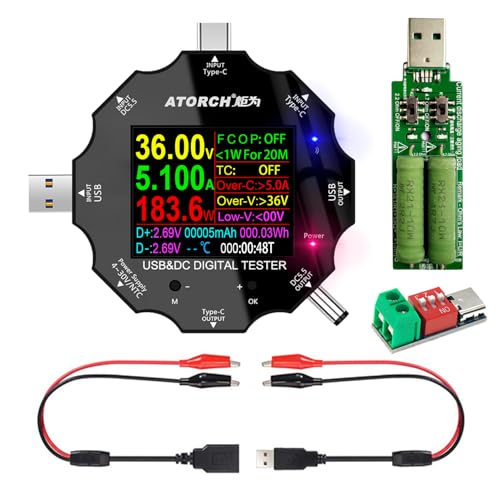
- Tests USB, USB-C, DC5.5, and micro USB
- Eight IPS color-screen display interfaces
- Supports PD/QC protocols and safety protection
Best For: Mixed USB and DC device testing
Everyday Charging Analyst
YOJOCK 2-in-1 USB-C Power Meter

- Measures 3.6–32V and up to 8A
- Supports PD, QC, BC1.2, USB-A, and USB-C
- Tracks charging and power-bank capacity data
Best For: Charger, cable, and power-bank testing
High-Current Protocol Tester

- Measures up to 12A, 30V, and 360W
- Records peaks and selectable real-time curves
- Supports a broad range of fast-charge protocols
Best For: High-current USB-C and fast-charge diagnostics
Top Precision Pick – ChargerLAB Power-Z KM003C
For buyers seeking commercial-grade USB power meters, the ChargerLAB Power-Z KM003C is the most measurement-focused option here. Its 20-bit ADC, ARM Cortex-M4 processor, USB PD protocol analysis, and support for up to 50V and 6A make it suited to detailed USB-C testing.
Best For: Engineers, repair technicians, and advanced users who need broad USB-C protocol and power analysis.
Pros:
- Supports PD3.2, QC5.0, PDO, E-marker, and protocol testing.
- Measures up to 50V and 6A, with up to 240W PD support.
- Large 1.54-inch rotating display and PC software support.
- Can record up to 10 million data points through PC software.
Cons:
- Designed for USB-C rather than general USB-A testing without an adapter.
- Its advanced feature set may be more than casual users need.
The KM003C stands out when accuracy, protocol visibility, and data analysis matter more than the simplest plug-and-read experience. It is the strongest choice for serious USB-C development and troubleshooting.
Most Versatile Analyzer – FNIRSI FNB58 USB Tester
The FNIRSI FNB58 is a versatile choice among commercial-grade USB power meters, combining USB-A, Micro-USB, and USB-C interfaces with protocol triggering, waveform displays, and app connectivity. It is built for users who want more than basic voltage and current readings.
Best For: Technicians testing mixed USB interfaces, fast-charging protocols, cables, and power supplies.
Pros:
- Supports QC, PD, FCP, SCP, AFC, VOOC, WARP, and Super VOOC protocols.
- Monitors voltage, current, power, resistance, capacity, and D+/D− voltage.
- Includes ripple and waveform recording with adjustable sampling rates.
- Reads E-Marker and DASH cable data and supports app or PC software.
Cons:
- Does not include a printed manual.
- Incorrect protocol or input-port settings may cause the unit to default to 5V output.
- Its upper temperature rating is 40°C.
With its broad port coverage and extensive fast-charge support, the FNB58 is particularly useful for repair benches and compatibility testing. Setup requires attention to the protocol switch and selected input port.
Best High-Power Value – ChargerLAB Power-Z C240
The ChargerLAB Power-Z C240 offers a straightforward way to monitor high-power USB-C connections, making it a practical option among commercial-grade USB power meters. It supports up to 240W, displays key charging data in color, and measures bidirectional current.
Best For: Users checking USB-C chargers, laptops, phones, and power-bank charge or discharge performance.
Pros:
- Supports testing up to 240W for current USB-C and future high-power devices.
- Color display shows voltage, current, power, direction, energy, timer, and signal data.
- Bidirectional current measurement covers charging and discharge testing.
- Metal shell adds protection for portable use.
Cons:
- USB-A testing requires a separate USB-C to USB-A adapter.
- The manufacturer recommends the KM003C for professional use or higher accuracy requirements.
- Its display is smaller than the KM003C’s.
The C240 is a sensible pick when 240W capability and clear everyday readings are priorities. For deeper protocol analysis or more demanding accuracy needs, the KM003C is the better-equipped alternative.
Best for Pass-Through Testing – Plugable USB-C Power Meter
The Plugable USB-C Power Meter is a practical choice for monitoring connections up to 240W while preserving USB data and video functionality. Among commercial-grade USB power meters, it is especially appealing for users testing docks, chargers, accessories, and USB-C displays in an active setup.
Best For: USB-C users who need power monitoring with data pass-through and Alt Mode video support.
Pros:
- Measures 4.5V–50V and 50mA–6.5A within a 240W USB-C monitoring range.
- Supports bidirectional connection and screen rotation.
- Passes through USB data, USB-C Alt Mode video, and charging.
- Compact design and reinforced USB-C connections suit portable use.
Cons:
- Not compatible with Thunderbolt 3 devices.
- It focuses on voltage, amperage, and current direction rather than advanced protocol analysis.
- Its compatibility is limited to USB-C connections.
The Plugable model is a strong fit for real-world USB-C setups where a meter must remain in the connection rather than interrupt normal use. Choose another model if you need extensive fast-charge protocol or cable-data analysis.
Best for USB-C PD troubleshooting – 240W USB-C Power Tester
For professionals comparing commercial-grade USB power meters, the StarTech USBC-PWRTESTER stands out as a compact USB-C diagnostic tool with broad voltage and current coverage. It measures in either direction, supports USB PD 3.1 EPR up to 240W, and passes through USB data and DP Alt Mode signals.
Best For: IT professionals troubleshooting USB-C chargers, docks, hubs, cables, and high-power devices.
Pros:
- Measures 4.5V-50V and 50mA-6.5A, with support for up to 240W PD 3.1 EPR.
- Bi-directional testing helps diagnose charging and power-delivery issues.
- Supports USB 10Gbps data pass-through and DP Alt Mode video.
- Rotating display and compact 12g design suit mobile troubleshooting.
Cons:
- Not compatible with Thunderbolt 3 devices.
- Designed specifically for USB-C connections rather than general USB testing.
Its combination of high-power PD support, signal pass-through, and portable construction makes it a strong choice when cable, port, and dock validation matter more than logging features.
Best for protocol and cable analysis – USB-C Tester with E-Marker Reading
Among commercial-grade USB power meters, the Treedix USB-C tester is a versatile option for checking charger capabilities, cable specifications, and changing power behavior. Its color display reports electrical readings, charging protocols, and supported E-Marker details in a compact format.
Best For: Users who need charger protocol detection, USB-C cable identification, and power-bank capacity testing.
Pros:
- Measures 4V-32V and 0-6A, with accuracy rated up to ±1%.
- Detects PD, QC, FCP, AFC, AVS, and other listed fast-charging protocols.
- Reads extensive E-Marker cable information, including data rate, EPR support, and ratings.
- Plots voltage and current curves and stores data after power-off.
Cons:
- Its 32V and 6A measurement range is lower than some high-current testers.
- Its advanced functions may require more setup than basic voltage and current checks.
This is the most feature-rich choice here for investigating why a charger or cable behaves a certain way, especially when protocol negotiation and E-Marker data are part of the diagnosis.
Best for high-current USB-C testing – 12A Type-C PD Power Meter
For buyers seeking commercial-grade USB power meters with extra current headroom, the KWS-2303C offers a stated 0-12A range and 4V-30V voltage measurement. It combines protocol detection, curve monitoring, and a color display for evaluating chargers, power banks, and other USB-C equipment.
Best For: Electronics enthusiasts and testers working with higher-current USB-C charging devices and power banks.
Pros:
- 12A current terminal provides a wider stated current range than the other listed testers.
- Supports PD, QC, FCP, SCP, AFC, PE, DASH, VOOC, and Super VOOC protocols.
- Records voltage and current curves across selectable five-minute to two-hour periods.
- Displays power, capacity, energy, elapsed time, peaks, current direction, and CPU temperature.
Cons:
- Its maximum voltage is 30V, below the 32V or 50V ranges of the other options.
- The supplied notes do not mention E-Marker cable reading or USB data pass-through.
The KWS-2303C is a practical pick when current capacity and broad charging-protocol coverage are priorities. Its included storage case also makes it convenient for keeping with a mobile testing kit.
Versatile Bench Tester – UD18 3-in-1 USB Power Meter
For shoppers comparing commercial-grade USB power meters, the UD18 stands out for its broad connector support and detailed color-screen readouts. It handles USB, USB-C, DC5.5, and micro USB testing while displaying voltage, current, power, resistance, capacity, temperature, and charging data.
Best For: Users testing mixed USB and DC-powered devices, chargers, routers, notebooks, and power banks.
Pros:
- Supports USB, Type-C, DC5.5, and micro USB connections.
- Offers eight display interfaces with an IPS color screen.
- Includes fast-charge recognition, capacity detection, two-way current measurement, and safety protections.
- Supports PD2.0/PD3.0 and QC2.0/QC3.0 protocols.
Cons:
- The temperature probe is not included.
- Its broad feature set may be more than casual users need.
The UD18 is a flexible choice when one tester needs to cover several connector types and charging scenarios. Its safety features and optional phone-app data viewing add useful diagnostic depth, although the included configuration should be checked if temperature testing is important.
Everyday Charging Analyst – YOJOCK 2-in-1 USB-C Power Meter
This YOJOCK model is a practical option among commercial-grade USB power meters for checking charging performance across USB and USB-C equipment. Its 3.6–32V and 0–8A measurement ranges cover common chargers, cables, power banks, phones, and other Type-C devices.
Best For: Buyers who want a compact USB-C tester for charger, cable, and power-bank capacity checks.
Pros:
- Measures voltage, current, capacity, power, resistance, temperature, and charging time.
- Uses an upgraded IPS color display with eight selectable interfaces.
- Supports PD2.0/3.0, QC2.0/3.0, BC1.2, and USB-A or USB-C connections.
- Provides over-voltage, over-current, under-voltage, and low-energy protection.
Cons:
- Power-bank capacity testing requires a full charge, cleared data, and continuous discharge.
- The current range tops out at 8A.
With its wide voltage range and clear multi-screen interface, this tester suits routine charging diagnostics and power-bank measurements. The capacity-testing procedure takes some preparation, but the built-in protections and protocol compatibility make it a capable general-purpose tool.
High-Current Protocol Tester – YOJOCK 360W USB-C Power Meter
For higher-output charging work, this YOJOCK is one of the more capable commercial-grade USB power meters in the group. Its 4–30V and 0–12A range supports up to 360W while recording voltage, current, capacity, energy, temperature, charging time, and peak readings.
Best For: Users testing high-current USB-C chargers, power banks, and fast-charging protocols.
Pros:
- Handles up to 12A and 360W within a 4–30V measurement range.
- Records maximum wattage, current, and voltage during charging.
- Offers selectable five-minute, 15-minute, 60-minute, and two-hour voltage/current curves.
- Supports PD, QC, FCP, SCP, AFC, PE, DASH, VOOC, and Super VOOC protocols.
Cons:
- Its 4V minimum operating range excludes tests below that level.
- The feature set may be excessive for basic USB charging checks.
The 360W rating, 12A terminal, protocol coverage, and curve recording make this the strongest fit for demanding USB-C diagnostics. Its stored capacity and energy data are also useful for power-bank testing and follow-up review.
How We Picked the Best Commercial-Grade USB Power Meters
We focused on meters that provide more than a basic voltage readout. The strongest options support USB-C Power Delivery testing, display voltage and current simultaneously, handle modern high-wattage charging standards, and offer useful details such as power, capacity, resistance, E-Marker information, or protocol identification.
We also considered measurement range, connector compatibility, screen readability, build quality, portability, and how suitable each tester is for routine troubleshooting. A higher maximum wattage does not automatically make a meter better; accuracy, safe operating limits, and the information shown on screen matter just as much.
Quick Comparison
| Best For | What to Look For |
|---|---|
| USB-C PD diagnostics | PD3.1 or newer support, high voltage range, and protocol visibility |
| Everyday charger checks | Clear voltage, current, and wattage readings in a compact design |
| High-power laptop testing | At least 240W support, appropriate current capacity, and robust connectors |
| Battery and power-bank testing | Capacity tracking, load-test support, and stable long-duration operation |
| USB-C cable inspection | E-Marker reading and reliable USB-C input/output compatibility |
Key Buying Factors for Commercial-Grade USB Power Meters
Measurement Range and Safety
Check the meter’s supported voltage and current before connecting it to a high-power charger. Models covering roughly 28V to 32V are suitable for many USB-C PD applications, while 240W- or 360W-rated testers provide more headroom for newer PD3.1 equipment. Never exceed the stated limits, and remember that the meter itself can introduce a small amount of resistance.
Protocols and E-Marker Support
PD, QC, and E-Marker information can reveal why a charger, cable, or device is not negotiating the expected mode. If you regularly test USB-C cables or multi-standard chargers, prioritize a model that identifies charging protocols rather than only reporting electrical values.
Display and Usability
A color screen can make multiple readings easier to interpret, but screen size and layout are more important than appearance. Look for visible voltage, amperage, wattage, direction, and capacity data, plus buttons or controls that are easy to use while the meter is connected.
Form Factor and Application
Inline USB-C meters are convenient for field troubleshooting and quick charger checks. Bench users may prefer broader ranges, logging features, load compatibility, or a more durable enclosure. Confirm whether the tester supports USB-A, USB-C, or both if your equipment includes older accessories.
Who Should Buy Which Commercial-Grade USB Power Meters?
Choose a compact USB-C tester for travel, routine charger verification, and basic cable troubleshooting. Select a feature-rich PD tester with E-Marker reading if you repair devices, evaluate cables, or compare chargers professionally. For laptops, docks, and high-output power banks, prioritize a 240W or higher model with a suitable voltage and current range. Buyers testing battery capacity should choose a meter that records capacity and remains stable during extended measurements. If you need broader experimental coverage, a model with higher current limits and multiple connector types may be the most flexible choice, provided it matches the safety requirements of your equipment.