Compact standing desk converters make it easier to alternate between sitting and standing without replacing your existing desk. The right model can add ergonomic flexibility while preserving valuable workspace for a monitor, laptop, keyboard, and daily essentials.
We selected 10 space-conscious options in several widths, lift styles, and layouts to help you find a converter that fits your desk, equipment, and working habits.
Best 10 Compact Standing Desk Converters Picks for 2026
Balanced 26-Inch Riser
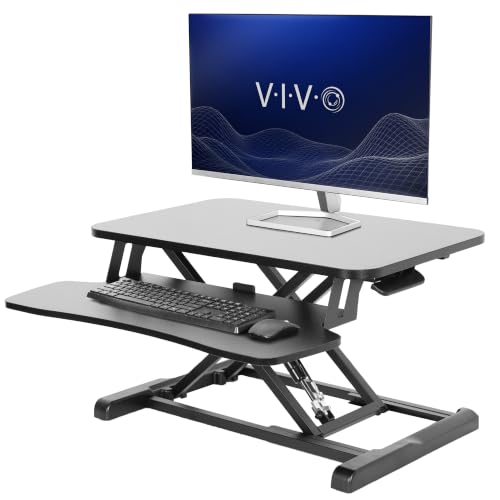
- 25.6-by-15.7-inch work surface
- 33-pound desktop capacity
- 4.5-to-16.9-inch manual adjustment
Best For: Compact dual-monitor or laptop workstations
Portable Laptop Riser
SAIJI Small Standing Desk Converter
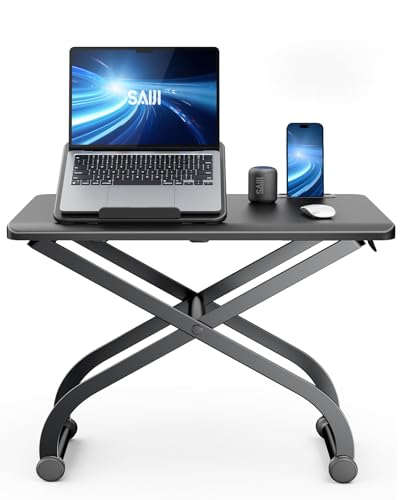
- Built-in laptop stand
- 4.7-to-16.5-inch height range
- Pre-assembled and portable
Best For: Single-laptop setups and small workspaces
Wide Pneumatic Riser

- 27.6-by-15.8-inch desktop
- Pneumatic 4.9-to-17.2-inch lift
- Supports up to 28.6 pounds
Best For: Dual-monitor and laptop-monitor setups
Best Slim Starter
VIVO 26-Inch Single-Top Converter

- 26.4-by-18.5-inch slim surface
- Five lockable height settings
- No assembly; 17.6-pound capacity
Best For: Small desks and basic single-monitor or laptop setups
Best Gas-Spring Range

- Adjusts from 4.9 to 19.2 inches
- Separate keyboard and mouse tray
- Lifetime warranty included
Best For: Compact workspaces needing broad height adjustment
Best Extra-Surface VIVO
VIVO 32-Inch Single-Top Converter

- 31.5-by-18.5-inch slim surface
- Five lockable height settings
- Pre-assembled with 17.6-pound capacity
Best For: Small desks needing extra width for a monitor or laptop
Best Value Compact Converter
Adjustable Height Standing Desk Converter

- 23.6-inch desktop for everyday essentials
- 2.3-to-16-inch manual height range
- No assembly and multipurpose design
Best For: Laptop users and flexible home-office setups
Best for Dual Monitors
VIVO 32-Inch Standing Desk Converter

- 31.5-inch surface for dual monitors
- Synchronized keyboard tray included
- Lift assist with up to 20-inch height
Best For: Multi-monitor desktop workstations
Best for Small Spaces

- Compact format for limited desk areas
- Spring-assisted height adjustment
- Supports up to 33 pounds on top
Best For: Apartments, dorms, and single-monitor setups
Balanced 26-Inch Riser – VIVO DESK-V026KB
The VIVO DESK-V026KB is a practical choice for shoppers comparing compact standing desk converters with a two-tier layout. Its 25.6-by-15.7-inch desktop and synchronized keyboard tray provide room for a laptop or monitor setup without requiring a separate standing desk.
Best For: Home and office users who want a compact manual riser with a keyboard tray and support for heavier equipment.
Pros:
- 33-pound desktop capacity supports a laptop or dual-monitor setup.
- Height adjusts from 4.5 to 16.9 inches with a simple-touch locking mechanism.
- Keyboard tray raises with the desktop for a more complete workstation.
- Requires only minimal assembly and includes a three-year warranty.
Cons:
- At 22.5 pounds, it is less convenient to move than lighter portable risers.
- The keyboard tray holds up to 4.4 pounds, limiting heavier accessories.
Choose this model when stability, a broad height range, and a coordinated keyboard tray matter more than the lightest possible design.
Portable Laptop Riser – SAIJI Small Standing Desk Converter
The SAIJI TR6 stands out among compact standing desk converters for its built-in laptop stand and lightweight, portable format. Its 22.4-by-11-inch surface is sized for a single laptop and mouse, making it suited to smaller work areas.
Best For: Laptop users who need a portable sit-stand setup and built-in screen elevation.
Pros:
- Built-in laptop stand helps raise the screen toward eye level.
- Adjusts from 4.7 to 16.5 inches with a simple-touch mechanism.
- Supports up to 88 pounds according to the supplied product notes.
- Arrives pre-assembled with no tools required.
Cons:
- The 22.4-by-11-inch surface is intended for a single laptop and mouse rather than a large multi-device setup.
- It does not provide the wider keyboard-tray layout found on larger risers.
This is a sensible pick for compact desks, shared workspaces, or users who regularly move their laptop station between locations.
Wide Pneumatic Riser – VIVO DESK-V028S
The VIVO DESK-V028S is one of the more spacious compact standing desk converters, offering a 27.6-by-15.8-inch surface while keeping a tabletop footprint. Its pneumatic lift and synchronized keyboard tray make switching positions straightforward.
Best For: Users who need room for dual monitors or a laptop-and-monitor arrangement on a compact riser.
Pros:
- 28-inch surface provides useful room for screen setups.
- Pneumatic spring lift adjusts from 4.9 to 17.2 inches.
- Steel construction supports up to 28.6 pounds on the desktop.
- Keyboard tray raises in sync with the main surface.
Cons:
- Its 23.5-inch depth requires more desk space than the smallest risers.
- The desktop capacity is lower than the 33-pound rating of the VIVO 26-inch model.
Consider this model if a wider surface and smooth pneumatic adjustment are priorities, especially for a dual-monitor or laptop-monitor workstation.
Natural Wood Worktop – Yoopin Standing Desk Converter
The Yoopin standing desk converter offers a natural-wood alternative for shoppers seeking compact standing desk converters with a ready-to-use design. Its 25.16-by-15.75-inch platform is sized for a laptop, monitor, keyboard, mouse, and everyday desk items.
Best For: Home offices and apartments where a natural-wood appearance, broad work surface, and no assembly are useful.
Pros:
- 25.16-by-15.75-inch desktop accommodates common laptop or monitor setups.
- Manual height adjustment requires no motor or power.
- Arrives fully assembled and ready to place on an existing desk.
- Coated surface is designed to resist scratches and wear.
Cons:
- The supplied notes do not specify a maximum weight capacity.
- Its 15.7-inch maximum height is lower than some competing risers.
- The wood-based construction may not suit users seeking a steel-framed industrial look.
This converter makes the most sense for buyers who value a warm natural finish and simple manual operation over detailed capacity specifications or maximum lift height.
Best Slim Starter – VIVO 26-Inch Single-Top Converter
If you need compact standing desk converters for a smaller workstation, the VIVO 26-inch riser keeps the footprint modest while accommodating a single monitor or laptop and a full-size keyboard. It arrives assembled and offers five lockable height settings.
Best For: Small desks, compact home offices, and users who want a straightforward sit-stand setup without assembly.
Pros:
- Ultra-slim 26.4-by-18.5-inch work surface fits smaller areas.
- Five lockable height settings, from 1.8-inch resting height to 15.9 inches.
- Steel frame supports up to 17.6 pounds.
- Pre-assembled and ready to use out of the box.
Cons:
- The single top is sized for a single-monitor or laptop setup rather than a broad multi-monitor arrangement.
- Height adjustment is limited to five preset positions.
This is a practical choice when space efficiency and simple setup matter most. Its compact surface and preset adjustment range suit basic workstation layouts, while the 17.6-pound capacity helps cover common monitor and laptop configurations.
Best Gas-Spring Range – Mount-It! 30-Inch Converter
Among compact standing desk converters, the Mount-It! 30-inch model stands out for its smooth gas-spring adjustment and separate keyboard tray. Its 30-inch tabletop is designed for a monitor or laptop while keeping the overall setup suitable for office nooks, dorm rooms, and other limited spaces.
Best For: Users who want a wider compact surface, a dedicated keyboard tray, and a broad sit-to-stand adjustment range.
Pros:
- Gas-spring handle adjusts the height from 4.9 to 19.2 inches.
- 30-inch tabletop supports a monitor or laptop setup.
- Separate ergonomic keyboard and mouse tray helps organize the workstation.
- Includes a lifetime warranty and US-based customer support.
Cons:
- Assembly is required for the keyboard tray.
- At 33 pounds, it is heavier than the two VIVO converters in this roundup.
- The tabletop is intended for a monitor or laptop rather than a large multi-device arrangement.
The Mount-It! is the most flexible option here for users who prioritize adjustment range and a dedicated keyboard position. Its 19.2-inch maximum height and gas-spring mechanism add versatility, though the heavier build and tray setup make it less immediately simple than a pre-assembled riser.
Best Extra-Surface VIVO – VIVO 32-Inch Single-Top Converter
For shoppers comparing compact standing desk converters, this 32-inch VIVO provides more usable width than the brand’s 26-inch model while retaining a slim profile. Its surface accommodates a single monitor or laptop with a full-size keyboard, and five preset positions make quick height changes simple.
Best For: Smaller work areas where a little more desktop width is useful without moving to a larger converter design.
Pros:
- 31.5-by-18.5-inch surface offers added width while remaining space-efficient.
- Five lockable height settings reach up to 15.9 inches.
- Steel support frame holds up to 17.6 pounds.
- Arrives fully assembled for immediate use.
Cons:
- The single-top layout is aimed at a single-monitor or laptop setup.
- It uses five preset heights rather than continuous adjustment.
This model is a sensible middle ground between a compact footprint and a more generous work surface. Choose it over the 26-inch version when the extra width is helpful, while keeping in mind that both share the same five-position adjustment approach and 17.6-pound capacity.
Best Value Compact Converter – Adjustable Height Standing Desk Converter
If you want compact standing desk converters with flexible placement options, this 23.6-inch riser is a practical choice. Its manual height adjustment spans 2.3 to 16 inches, allowing it to work on an existing desk, table, or even a bed.
Best For: Laptop users, home offices, and shoppers seeking a no-assembly converter that can also function as a study table or TV tray.
Pros:
- 23.6-by-13.3-inch work surface accommodates a monitor, laptop, keyboard, and accessories.
- Adjusts from 2.3 to 16 inches for sitting or standing use.
- No assembly required; place it on an existing surface and adjust the height.
- Metal-and-wood construction includes a stable base.
Cons:
- Manual adjustment does not provide powered or pneumatic lifting.
- The compact surface may be limiting for dual-monitor setups.
- No dedicated keyboard tray is listed.
Its broad height range and multipurpose design make it especially versatile for smaller work areas. Choose it when easy setup and flexible use matter more than advanced lifting features.
Best for Dual Monitors – VIVO 32-Inch Standing Desk Converter
Among compact standing desk converters, the VIVO DESK-V000K offers a relatively spacious 31.5-by-15.7-inch surface while retaining a desktop-riser format. Its synchronized keyboard tray and lift-assist mechanism are designed for quick sit-stand transitions.
Best For: Users who need room for dual monitors and want a sturdy manual converter with an integrated keyboard tray.
Pros:
- 31.5-inch surface is designed to accommodate dual monitors.
- Keyboard tray raises with the main platform for a more complete workstation.
- Lift-assist mechanism supports height adjustment from approximately 4.5 to 20 inches.
- High-grade steel design supports up to 33 pounds and includes a three-year manufacturer warranty.
Cons:
- At 31.5 inches deep, it may require more desk space than smaller risers.
- It weighs 26 pounds, which makes repositioning less convenient.
- Some assembly is required to attach the keyboard tray.
This is the strongest fit for a multi-monitor workstation where surface area and a synchronized keyboard tray take priority. It is less suitable for very shallow desks or highly portable setups.
Best for Small Spaces – FLEXISPOT 28-Inch Desk Riser
The FLEXISPOT 28-inch riser is one of the more space-conscious compact standing desk converters for apartments, dorms, and minimalist work areas. Its spring-assisted lift system provides smooth manual adjustment, while the layout is aimed at a laptop or single-monitor setup.
Best For: Small-space users who want a stable sit-stand riser with a keyboard tray and enough capacity for a laptop or single monitor.
Pros:
- Compact 28-inch format is designed for apartments, dorms, and limited desk areas.
- Mechanical spring lift system avoids the gas-spring issues described by the manufacturer.
- Reinforced steel frame supports up to 33 pounds on the top surface.
- Nearly assembled and includes a keyboard tray supporting up to 4.4 pounds.
Cons:
- Its layout is intended for a laptop or single monitor rather than dual monitors.
- The 31-pound weight may make frequent moving difficult.
- Attaching the keyboard tray is still required before use.
With a stable frame, compact footprint, and smooth spring-assisted adjustment, this converter balances ergonomics with space efficiency. It is a sensible pick when a full-size dual-monitor riser would overwhelm the available desk area.
How We Picked These Compact Standing Desk Converters
We focused on converters designed for smaller desks and practical everyday use. Our comparison considers footprint, usable work surface, height adjustability, lifting mechanism, stability, keyboard support, weight capacity, and setup requirements. Models with different layouts are included because a laptop-only workstation has very different needs from a dual-monitor setup.
We also considered whether each converter can sit comfortably on a typical home-office desk without making the surface feel crowded. A compact design is useful only if it remains stable and provides enough room for the equipment you actually use.
Quick Comparison
| Best For | What to Prioritize |
|---|---|
| Laptop users | Small footprint, light weight, and a dedicated keyboard area if needed |
| Single-monitor setups | Stable platform with enough depth for a monitor and keyboard |
| Dual-monitor setups | Wider top, higher weight capacity, and minimal wobble |
| Small desks | Compact dimensions and clearance for desk accessories |
| Frequent position changes | Smooth height adjustment and a dependable locking mechanism |
Key Buying Factors for Compact Standing Desk Converters
Width and Depth
Measure the usable portion of your desk before choosing a converter. Leave room for a mouse, speakers, notebooks, or other accessories. Width determines how many displays fit, while depth affects monitor placement and keyboard comfort.
Height Range and Ergonomics
At standing height, your elbows should remain near a relaxed 90-degree angle and your screen should be close to eye level. Check the converter’s maximum and minimum heights against your own height, chair, and desk dimensions rather than relying on the range alone.
Weight Capacity and Stability
Add the weight of your monitor, laptop, stand, keyboard, and accessories before buying. A converter operating near its limit may feel less stable. Broad platforms and sturdy bases generally help reduce movement, but a heavier design may be harder to reposition.
Adjustment Style
Gas-spring and assisted-lift models are convenient for frequent changes, while simpler risers can suit users who adjust less often. Look for smooth movement, secure height positions, and a mechanism that does not require excessive force.
Keyboard Support
A separate keyboard tray can improve comfort by keeping the keyboard and mouse at a consistent level. If you work directly from a laptop, a single top may be more compact; if you use a desktop monitor, a keyboard platform can make the arrangement more natural.
Who Should Buy Which Compact Standing Desk Converters?
Choose a narrow laptop riser if your priority is portability or maximum desk space. A mid-width converter is a practical match for one monitor, keyboard, and mouse. Users with larger displays or multiple monitors should consider a wider, sturdier platform and confirm its capacity before purchase.
For frequent sit-stand transitions, prioritize smooth assisted adjustment. If you mainly want occasional standing breaks, a simpler fixed-platform design may provide better value and fewer moving parts. Whichever model you choose, measure first, check the load rating, and pair the converter with an external keyboard and mouse when raising a laptop screen to eye level.