A thoughtful gaming gift can make everyday play more comfortable, organized, or responsive. These ideas range from small controller add-ons to major upgrades for a dedicated gaming space.
Gaming Gifts to Consider
1. COMHOMA Big and Tall Ergonomic Gaming Chair
A Roomier Seat for Long Sessions
COMHOMA Big and Tall Ergonomic Gaming Chair

- Wide seat and backrest with thick padding and built-in lumbar pocket springs.
- Adjustable armrests and a reclining function help tailor the seating position.
- Integrated footrest adds a place to stretch out between matches.
Best For: Gamers who spend long sessions at a desk and prefer a roomy chair
2. ErGear 48 × 24-Inch Electric Standing Desk
A Flexible Gaming Workstation
ErGear 48 × 24-Inch Electric Standing Desk

- Electric height adjustment supports switching between sitting and standing.
- Four memory presets make saved desk heights easy to select.
- Steel frame and 48-by-24-inch top suit a dedicated gaming workspace.
Best For: Gamers setting up a desk for both play and everyday work
3. Benicci Blue Light Blocking Computer Glasses
A Screen-Time Accessory to Carry Along
Benicci Blue Light Blocking Computer Glasses

- Blue light blocking lenses are designed for computer, phone, and TV screens.
- Classic black rectangular frame suits gaming, reading, or work.
- Protective case, cleaning cloth, and small carry bag are included.
Best For: Screen users who want non-prescription glasses for gaming or reading
4. Redragon K668 108-Key Hot-Swap RGB Keyboard
A Customizable Keyboard Upgrade
Redragon K668 108-Key Hot-Swap RGB Keyboard

- Wired full-size keyboard includes hot-swappable sockets for compatible 3-pin or 5-pin switches.
- RGB lighting offers preset modes, adjustable brightness, and flow speed.
- Two mixed-color keycap sets and four programmable shortcut keys add customization.
Best For: PC gamers who enjoy customizing their keyboard and lighting
5. EasySMX X15 Wireless PC and Steam Controller
A Multi-Device Controller Pick
EasySMX X15 Wireless PC and Steam Controller

- Supports PC, Steam, Switch, Android, and iOS; check the intended device before gifting.
- Connects by 2.4G wireless, Bluetooth, or wired USB-C.
- Hall effect joysticks and triggers, textured grips, and two programmable back buttons are included.
Best For: Players who prefer a gamepad for action, racing, or platform games
6. NEWDERY Dual PS5 Controller Charging Station
A Neater Place to Charge Controllers
NEWDERY Dual PS5 Controller Charging Station
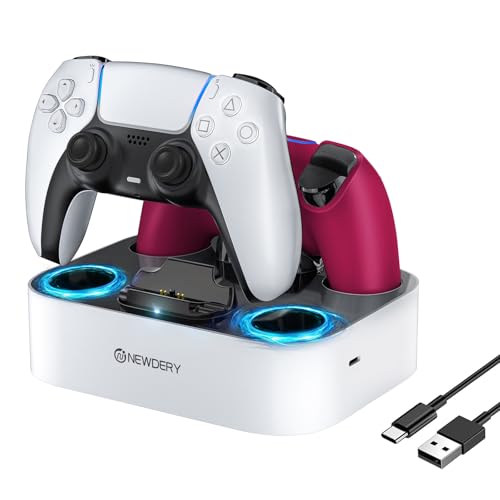
- Compatible with PS5 DualSense and DualSense Edge controllers.
- Four slots hold controllers, and LED indicators show charging or standby status.
- Includes a 3.3-foot USB Type-C cable; remove controller skins or cases before charging.
Best For: PS5 households that want a dedicated charging spot for controllers
7. Naukay Large Extended Gaming Mouse Pad
A Unified Surface for Mouse and Keyboard
Naukay Large Extended Gaming Mouse Pad
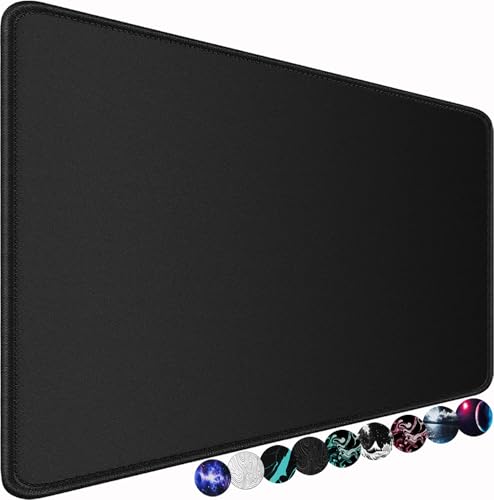
- 31.5-by-15.7-inch surface has room for a keyboard, mouse, and other desk items.
- Non-slip rubber base helps keep the mat in place.
- Water-resistant coating and stitched edges are designed for easier care and durability.
Best For: PC gamers who want a larger, coordinated desk surface
8. Faysazoy 16-in-1 Controller Thumb Grips
A Small Gift for Personalizing Controller Feel
Faysazoy 16-in-1 Controller Thumb Grips

- Set includes three pairs of performance grips in different heights and five pairs of anti-slip grips.
- Designed for PS5, PS4, Xbox Series X/S, and Xbox One controllers.
- Silicone caps snap over existing thumbsticks and come in a clear storage case.
Best For: Console players who like changing thumbstick grip and height
9. AOC 27-Inch QHD Gaming Monitor
A Display Upgrade for a Gaming Setup
AOC 27-Inch QHD Gaming Monitor

- 27-inch IPS display has QHD 2560 × 1440 resolution.
- Supports up to 240Hz refresh rate via DisplayPort and includes Adaptive-Sync.
- Connections include one DisplayPort 1.4, two HDMI 2.0 ports, and audio out.
Best For: PC or console gamers looking to upgrade their display
10. Razer DeathAdder V3 HyperSpeed Wireless Mouse
A Lightweight Mouse for Quick Play
Razer DeathAdder V3 HyperSpeed Wireless Mouse

- Wireless mouse weighs 55 grams and has a right-handed ergonomic shape.
- Focus X optical sensor supports up to 26,000 DPI sensitivity.
- USB-C rechargeable battery is listed for up to 100 hours of use.
Best For: Right-handed PC gamers who want a lightweight wireless mouse
11. MSI Radix AXE6600 WiFi 6E Gaming Router
A Network Upgrade for a Busy Home
MSI Radix AXE6600 WiFi 6E Gaming Router

- Tri-band Wi-Fi 6E covers 2.4GHz, 5GHz, and 6GHz bands.
- AI QoS is designed to prioritize data packets across network activity.
- Includes RGB lighting and a 1.8GHz quad-core processor.
Best For: Gamers sharing a home network with multiple connected devices
How to Choose a Gaming Gift for This Recipient
Start with the part of the setup the recipient talks about most. If they mention discomfort during long sessions, consider the chair or standing desk. If they already have a comfortable workspace, a keyboard, mouse, controller, or desk mat can add a more personal touch. A monitor or router is a larger change to their setup, so those make sense when you know they want that kind of upgrade.
Think about how and where they play. The controller is designed for several platforms, but its notes advise checking device compatibility before purchase. The charging station is for PS5 DualSense and DualSense Edge controllers. The keyboard is wired and listed for PC and laptop use. The mouse is a right-handed PC model. Matching a gift to the recipient’s actual platform and habits will matter more than choosing the most feature-rich item.
Match the Gift to Your Budget
Smaller accessories can still feel considered. Thumb grips add options for controller feel and color; the extended mat gives a mouse and keyboard a shared surface; glasses come with a case and cleaning accessories. These are useful choices when you want a practical, compact gift or know the recipient’s main equipment is already settled.
A keyboard, mouse, controller, or charging dock is a middle-sized setup addition. Look for the feature they would notice in daily use: switch swapping and lighting customization, wireless play and back buttons, or a dedicated place to charge two controllers. For a larger gift, the chair, desk, monitor, and router each serve a distinct purpose. A chair changes the seating experience, a desk changes the work surface, a monitor changes the display, and a router changes network equipment.
Check Compatibility and Personalization
Before choosing a device, confirm the platform and available connections. The monitor provides DisplayPort and HDMI inputs, but the recipient’s computer or console still needs a matching connection and should support the display mode they want to use. Its highest listed refresh rate is specified via DisplayPort. The keyboard uses USB-C connectivity, and the mouse includes a wireless dongle and USB cable. Check what ports and wireless options are available on the recipient’s device.
Personalization can make an accessory feel especially apt. The keyboard includes extra keycaps and RGB modes, while the controller grips offer multiple heights and colors. A desk mat can change the look and feel of a desk without replacing its main equipment. For larger furniture gifts, consider room dimensions, the existing desk layout, and whether the recipient has space for assembly. The chair and desk require assembly according to their supplied product details.
Plan Timing and Last-Minute Decisions
For a gift that needs to fit into a specific setup, verify the model and connection details before ordering. This is particularly useful for a PS5 charging dock, a multi-platform controller, or a monitor. For a desk or chair, measure the intended space and allow time for assembly. A smaller accessory may be simpler to wrap and place, while network or display equipment can involve setup and configuration after opening.
When time is short, choose based on what you already know: their platform, whether they use a controller or mouse and keyboard, and the part of their setup they want to improve. Avoid guessing at a major compatibility detail. A well-matched gaming accessory is a useful Christmas gift because it fits naturally into the recipient’s usual play, whether that means improving comfort, adding customization, or refreshing a central part of the gaming space.