Adding cameras, access points, VoIP phones, or other powered devices to a compact workspace does not require a full-size rack. The best PoE network switches for small desks deliver power and data in a desktop-friendly footprint, often with quiet fanless operation and simple setup.
This roundup compares 10 compact options across port counts, PoE budgets, uplink layouts, management features, and mounting flexibility so you can choose a switch that fits both your devices and your available space.
Best 10 PoE Network Switches for Small Desks Picks for 2026
Best Compact Gigabit Value

- 4 PoE+ ports with a 65W total budget
- Five Gigabit ports in a compact metal case
- Fanless, plug-and-play desktop or wall mounting
Best For: Small offices and home workspaces powering several PoE devices
Best Simple Silent Setup

- Four PoE+ ports share a 63W power budget
- Five Gigabit ports with automatic speed negotiation
- Fanless metal design mounts on a desk or wall
Best For: Quiet, low-maintenance PoE connectivity
Best Smart-Managed Option

- Four PoE+ ports with a 52W total budget
- VLAN, QoS, monitoring, and security controls
- Can operate in managed or unmanaged mode
Best For: Small networks needing VLANs and traffic management
Best for More Wired Devices

- Eight Gigabit PoE+ ports with a 65W budget
- Extend Mode reaches up to 820 feet
- PoE Auto Recovery reboots unresponsive devices
Best For: Growing small networks and surveillance setups
Best for Multiple Devices

- Eight PoE+ Gigabit ports plus two uplinks
- Extend mode reaches up to 820 feet
- PoE auto recovery restarts select devices
Best For: Compact surveillance networks with many powered devices
High-Capacity Pick
YuanLey 16-Port Gigabit PoE+ Switch

- 16 PoE+ ports plus two Gigabit uplinks
- 250W total PoE budget
- Desktop/rackmount metal enclosure
Best For: Small networks with many PoE devices
Quiet Desk Pick
Sinotchous 4-Port Fanless PoE+ Switch
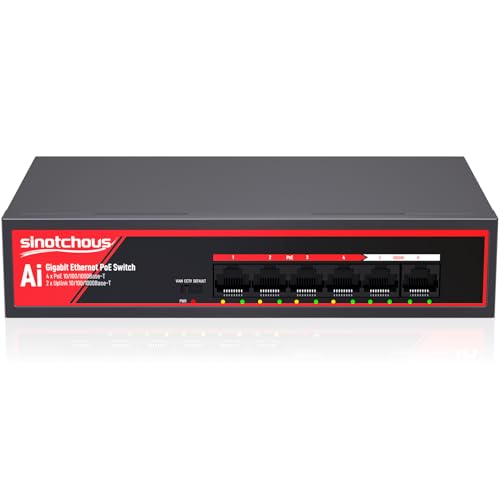
- Four PoE+ ports with 65W total power
- Two Gigabit uplinks
- Fanless metal design for silent operation
Best For: Quiet small-desk camera and office networks
Best Compact Gigabit Value – TP-Link TL-SG1005P
For small desks that need dependable wired connectivity, the TP-Link TL-SG1005P is a practical choice among PoE network switches for small desks. It provides four Gigabit PoE+ ports, one additional non-PoE Gigabit port, and plug-and-play setup in a compact fanless metal enclosure.
Best For: Small offices, home workspaces, and users powering up to four compatible PoE devices without configuring a network switch.
Pros:
- Four 802.3af/at PoE+ ports with up to 30W per port and a 65W total budget
- All five ports support Gigabit speeds, including the non-PoE uplink port
- Fanless metal design supports quiet desktop or wall-mounted installation
- Includes QoS and IGMP Snooping for prioritizing voice or video traffic
Cons:
- Unmanaged design does not provide VLAN or remote-management controls
- Only four ports supply PoE power
The TL-SG1005P balances useful PoE capacity, Gigabit performance, and silent operation without adding setup complexity. It is a strong fit when you want a sturdy, compact switch for a few powered devices.
Best Simple Silent Setup – NETGEAR GS305P
The NETGEAR GS305P keeps PoE networking straightforward for compact work areas. Its five Gigabit ports include four PoE+ ports, while dynamic power allocation, fanless operation, and flexible mounting make it a convenient option among PoE network switches for small desks.
Best For: Users who want a quiet, unmanaged switch for powering multiple PoE devices with minimal installation effort.
Pros:
- Five 1Gbps ports, including four PoE+ ports
- 63W total PoE budget with dynamic allocation of unused power
- Plug-and-play operation requires no software or configuration
- Compact metal housing supports desktop or wall mounting
Cons:
- Unmanaged design lacks configurable VLAN and traffic-management features
- One port is non-PoE
With its quiet fanless design and automatic power distribution, the GS305P is easy to deploy in a home office or small business. Choose it when simple Gigabit PoE connectivity matters more than advanced controls.
Best Smart-Managed Option – STEAMEMO 5-Port PoE+ Switch
The STEAMEMO 5-port switch adds management flexibility that many compact models omit. It combines four PoE+ ports and a Gigabit uplink with VLAN, QoS, monitoring, and dual managed or unmanaged modes, making it a feature-rich choice among PoE network switches for small desks.
Best For: Home offices and small businesses that need traffic controls, VLAN support, and remote network visibility in a compact switch.
Pros:
- Four PoE+ ports provide up to 30W per port within a 52W budget
- Supports web, desktop, and mobile management with VLAN and QoS controls
- Offers port mirroring, DHCP Snooping, storm control, and static MAC features
- Fanless metal design supports desktop or wall installation
Cons:
- Two PoE ports operate at 100Mbps rather than Gigabit speeds
- Lower total PoE budget than the other four-port PoE models listed here
- Warranty coverage is listed as one year
This switch is the better match for users who have outgrown purely plug-and-play hardware. Its mixed port speeds and modest power budget require planning, but its management tools provide considerably more control for a small network.
Best for More Wired Devices – TP-Link LS108GP
When a small desk setup needs more ports than a typical five-port switch, the TP-Link LS108GP provides eight PoE+ Gigabit ports and up to 16Gbps switching capacity. Its plug-and-play design, silent operation, and optional extended PoE mode make it a versatile choice among PoE network switches for small desks.
Best For: Small surveillance, office, or home networks that need up to eight PoE-connected devices and longer cable runs.
Pros:
- Eight PoE+ Gigabit ports with up to 30W per port
- 65W total PoE budget and up to 16Gbps switching capacity
- Extend Mode supports PoE transmission distances up to 820 feet
- PoE Auto Recovery can reboot dropped or unresponsive powered devices
Cons:
- Unmanaged design does not offer VLAN or remote-management settings
- Eight-port hardware takes more desk or wall space than five-port alternatives
- Total PoE power is shared across the ports
The LS108GP is the most expandable option in this group, especially for camera deployments or growing desk networks. Its extra ports and recovery features add practical flexibility, while the shared 65W budget should be checked against the devices you plan to power.
Best Compact Managed Pick – Goalake 5-Port PoE+ Smart Switch
For small desks that need to power cameras or access points, this Goalake model is a compact option among PoE network switches for small desks. It provides four PoE ports, one Gigabit uplink, smart management, and a fanless metal design for quiet desktop or wall-mounted installation.
Best For: Small offices, home networks, and compact IP-camera or wireless-access-point setups that need managed PoE features.
Pros:
- Four PoE ports support IEEE 802.3af/at and up to 30W per port.
- Offers VLAN, QoS, bandwidth control, port mirroring, and storm control.
- Fanless metal housing supports quiet desktop or wall-mounted use.
- Cloud management and web/software controls support remote monitoring.
Cons:
- Total PoE power is limited to 52W across all PoE ports.
- Non-PoE or passive-PoE devices require separate power or an active splitter.
- Only two of the four PoE ports are listed as Gigabit; the other two are 100 Mbps.
This is a strong fit when a small workspace needs both PoE power and network-management controls without fan noise. Check connected-device power requirements and port-speed needs before buying.
Best for Multiple Devices – UGREEN 10-Port PoE+ Switch
The UGREEN 10-port model is a practical choice among PoE network switches for small desks when several powered devices need to share one compact switch. It combines eight Gigabit PoE+ ports with two Gigabit uplinks, plus Standard, Port Isolation, and Extend modes.
Best For: Small security-camera systems, access points, and IP phones that need eight PoE connections and flexible deployment modes.
Pros:
- Eight PoE+ Gigabit ports support up to 30W per port.
- Two additional Gigabit uplinks help connect the switch to the wider network.
- Extend mode supports PoE distances up to 820 feet for long cable runs.
- PoE auto recovery can restart offline or frozen devices on ports 1–6.
Cons:
- The total PoE power budget is limited to 60W.
- When power demand exceeds the budget, ports are cut off in priority order.
- Its unmanaged design offers mode switching rather than the detailed configuration controls of a fully managed switch.
Choose this UGREEN switch if port count and automated device recovery matter more than advanced management. Its port-isolation and extend modes are especially useful for compact surveillance installations with longer cable runs.
Best Flexible Power Option – STEAMEMO 5-Port Smart Switch
For a small desk that needs VLAN and QoS features but not built-in PoE output, the STEAMEMO 5-port switch is a flexible option among PoE network switches for small desks. It supports five Gigabit ports, managed or unmanaged operation, and PoE-in power from an upstream PoE switch.
Best For: Small offices, temporary workspaces, and outdoor or remote setups where the switch may need to receive power over Ethernet.
Pros:
- Five 10/100/1000BASE-T ports provide Gigabit connectivity.
- Supports 802.1Q VLAN, MTU VLAN, port VLAN, QoS, rate control, and storm prevention.
- PoE-in operation can eliminate the need for a local 12V adapter when powered by an upstream PoE switch.
- Compact metal housing supports desktop or wall mounting.
Cons:
- It uses PoE in; the supplied notes do not indicate PoE output for connected devices.
- PoE-in requires an upstream PoE switch or another compatible power source.
- Its listed warranty is one year.
This model makes sense when the goal is to add managed Gigabit connectivity in a location where local power is inconvenient. It is not the right choice if you need the switch itself to power cameras or access points.
High-Capacity Pick – YuanLey 16-Port Gigabit PoE+ Switch
For small desks that support several cameras, access points, or other wired devices, this YuanLey model provides 16 Gigabit PoE+ ports plus two Gigabit uplinks. Its 250W power budget makes it a practical choice when you need more PoE capacity than a compact five- or six-port switch can offer.
Best For: Small offices or workstations managing multiple PoE devices and needing substantial power headroom.
Pros:
- 16 PoE/PoE+ ports and two Gigabit uplinks provide generous connectivity.
- 250W total power budget supports up to 30W per PoE port.
- VLAN isolation can separate traffic on PoE ports while retaining uplink communication.
- Metal desktop/rackmount design includes a built-in power supply.
Cons:
- Its 18-port layout and 2.01 kg weight take up more desk or rack space.
- The built-in industrial fan may be less quiet than a fanless switch.
- It is unmanaged, so advanced configuration options are limited.
The YuanLey is a capacity-focused option among PoE network switches for small desks. Choose it when port count and PoE power matter more than minimizing the physical footprint.
Compact Security Pick – NICGIGA 4-Port Gigabit PoE+ Switch
This NICGIGA switch keeps a small desk network straightforward with four Gigabit PoE+ ports and one Gigabit uplink. Its 78W power budget, one-key VLAN mode, and desktop or wall-mount design make it a useful fit for compact camera or access-point installations.
Best For: Small desks needing PoE for up to four devices with simple isolation and flexible placement.
Pros:
- Four PoE+ ports offer up to 30W per port with a 78W total budget.
- One-key VLAN mode isolates ports 1-4 while preserving uplink communication.
- Gigabit connectivity supports non-blocking data forwarding.
- Metal housing supports desktop or wall installation and includes 4KV lightning protection design.
Cons:
- Only four PoE ports are available, limiting expansion.
- The single uplink provides less connectivity flexibility than models with two uplinks.
- As an unmanaged switch, it does not provide software-based network management.
Among PoE network switches for small desks, the NICGIGA is a sensible compact option when four powered endpoints are enough. Its VLAN button adds useful separation without requiring configuration software.
Quiet Desk Pick – Sinotchous 4-Port Fanless PoE+ Switch
The Sinotchous switch is designed for quieter small-desk deployments, combining four Gigabit PoE+ ports with two Gigabit uplinks in a fanless metal enclosure. Its 65W power budget and plug-and-play operation suit a modest camera, router, NVR, or office setup.
Best For: Quiet desktop installations with a few standard PoE devices and separate uplink connections.
Pros:
- Fanless design provides silent operation and reduces power consumption.
- Four PoE ports support up to 30W each, with a 65W total budget.
- Two Gigabit uplinks provide dedicated connections for devices such as an NVR, router, or PC.
- VLAN, CCTV, and default modes offer added flexibility for supported installations.
Cons:
- The 65W budget is lower than the other listed switches, limiting simultaneous high-power loads.
- It supports standard 48V wireless access points, while 24V models are not workable without appropriate additional equipment.
- Its four PoE ports leave limited room for expansion.
For a quiet workspace, this is one of the more desk-friendly PoE network switches for small desks. The fanless enclosure and two uplinks are appealing, but check device voltage and total PoE requirements before buying.
How We Picked These PoE Network Switches for Small Desks
We focused on switches that suit home offices, small businesses, workshops, security installations, and compact networking cabinets. Key criteria included Gigabit throughput, IEEE 802.3af/at compatibility, total PoE budget, port layout, noise, enclosure quality, and ease of installation.
We also considered whether each model is unmanaged or smart managed. Unmanaged switches are generally the fastest to deploy, while smart managed models add useful controls such as VLANs, QoS, and traffic isolation. Port count and uplink design were weighed against the limited space typical of a small desk.
Quick Comparison
- Best for basic plug-and-play use: A compact five-port unmanaged switch with four PoE ports.
- Best for more connected devices: An eight- or 10-port model with multiple PoE+ ports and dedicated uplinks.
- Best for VLAN and traffic control: A smart managed switch with VLAN and QoS support.
- Best for larger installations: A 16-port switch with a higher PoE budget, provided you have room for its larger enclosure.
Key Buying Factors
Port Count and Uplinks
Count both powered devices and ordinary wired connections. A five-port switch can work well for a desk with several cameras or access points, but an eight-, 10-, or 16-port model leaves more room for expansion. Dedicated uplink ports can preserve bandwidth for the connection back to your router or core switch.
PoE Standard and Power Budget
Check whether your devices require 802.3af PoE or 802.3at PoE+. The total power budget must cover all connected devices at the same time, not merely the maximum output of one port. Cameras with heaters, wireless access points, and motorized devices may need more power than basic phones or compact cameras.
Managed or Unmanaged Operation
Unmanaged switches are ideal when you want automatic operation with minimal configuration. Smart managed models are better when you need VLANs for guest Wi-Fi or cameras, QoS for voice and video, or tools for troubleshooting. Management features add flexibility but require more setup and networking knowledge.
Size, Noise, and Installation
For a desk, fanless metal designs are attractive because they are quiet and usually more durable than lightweight plastic enclosures. Confirm the switch’s dimensions, ventilation requirements, power-adapter placement, and whether it supports desktop or wall mounting.
Who Should Buy Which PoE Network Switches for Small Desks?
Choose a five-port model if you need to power a small number of devices and want the simplest installation. Move to an eight- or 10-port switch if you are wiring several cameras, access points, or phones and expect the network to grow. Select a smart managed option when segmentation or traffic prioritization matters. For multi-camera systems or small commercial deployments, a higher-port-count switch with a generous PoE budget is the safer long-term choice.
Before buying, total the wattage of every powered device, reserve some capacity for future additions, and verify that the switch’s uplink speed and PoE standard match your existing network.