The best network video recorders for content creators do more than store security footage. They can centralize camera feeds, simplify long-form recording, and support a more reliable studio or production workflow.
Our 2026 shortlist includes dedicated NVRs, PoE systems, wireless options, and a camera monitor-recorder for creators with different storage, connectivity, and control needs.
Best 10 Network Video Recorders for Content Creators Picks for 2026
High-Capacity Pick
Ubiquiti UniFi Protect NVR Pro

- 8TB local HDD storage
- Supports up to 60 added cameras
- Remote UniFi Protect access without cloud storage
Best For: Large UniFi camera systems and locally stored footage
Production Recorder
Atomos Ninja RAW Monitor-Recorder

- Records ProRes and ProRes RAW
- 1500-nit 5-inch HDR touchscreen
- Includes professional monitoring and camera-control tools
Best For: On-camera recording and monitoring during video production
Compact UniFi Option

- Supports four listed camera channels
- Uses Ethernet and USB connectivity
- Designed for UniFi Protect IP cameras
Best For: Small UniFi Protect camera installations
Plug-and-Play Choice
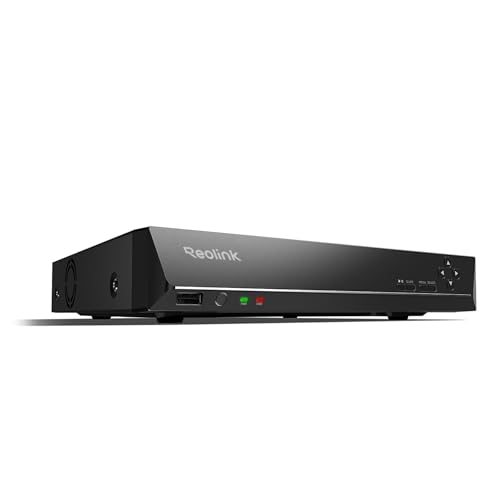
- Supports up to 16 Reolink cameras
- Includes a 4TB HDD for 24/7 recording
- PoE carries camera power and data over one cable
Best For: Reolink PoE camera systems needing easy local recording
Expandable Pro Storage

- Four-drive HDD/SSD support
- RAID data protection
- 10G SFP+ and Gigabit Ethernet
Best For: Creators planning an expandable UniFi Protect setup
Plug-and-Play 8-Channel Pick
Reolink RLN8-410 8-Channel NVR
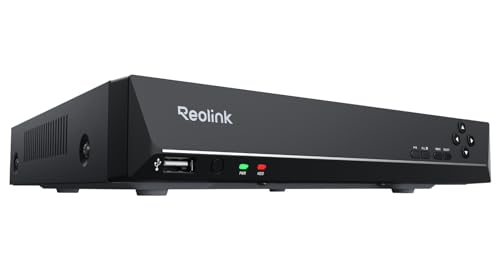
- Eight-channel 24/7 recording
- PoE setup with one Ethernet cable
- Internal and external storage expansion
Best For: Creators building a compatible Reolink camera system
Complete Starter Bundle

- Four cameras included
- 1TB hard drive included
- Four-channel UniFi Protect setup
Best For: Creators wanting a ready-made four-camera system
Best Local AI Pick
Reolink RLN4E 4-Channel PoE NVR

- Up to 8TB local HDD storage
- PoE plug-and-play camera setup
- Local AI search and remote access
Best For: Reolink camera users seeking subscription-free local recording
Best for Large Camera Systems
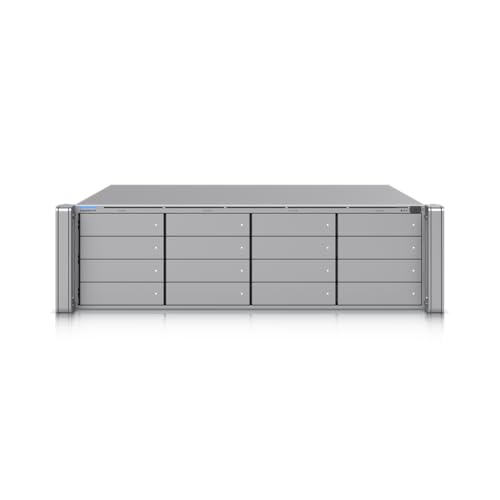
- Supports up to 16 HDDs or SSDs
- 10GbE and dual 10G SFP+ connectivity
- Redundant hot-swap power supplies
Best For: Large studios and teams managing extensive IP-camera deployments
Best Budget Wireless Option
OOSSXX 10-Channel Wireless NVR

- Supports up to 10 camera channels
- Motion alerts and remote app viewing
- Up to 6TB storage; drive not included
Best For: Small setups needing affordable wireless monitoring and remote access
High-Capacity Pick – Ubiquiti UniFi Protect NVR Pro
For content creators managing a multi-camera studio, venue, or production space, the Ubiquiti UniFi Network Video Recorder Pro offers local video storage and UniFi Protect access. Its 8TB capacity and support for adding up to 60 cameras make it a strong option when you need a scalable network video recorder for content creators.
Best For: Creators building a large UniFi Protect camera system with local recording.
Pros:
- Supports adding up to 60 cameras to cover extensive areas.
- Stores footage locally rather than on a cloud server.
- Allows free remote access to camera streams and recordings through UniFi Protect.
- Provides 8TB of HDD storage.
Cons:
- Its benefits depend on using compatible UniFi Protect cameras.
- The supplied specifications list 15 channels, which may require clarification for larger deployments.
- At 160 watts, it may use more power than a smaller recorder.
The UNVR-Pro is most compelling for creators who want a substantial, locally stored surveillance archive and room to expand. Verify channel and camera compatibility before purchase, especially for a complex setup.
Production Recorder – Atomos Ninja RAW Monitor-Recorder
The Atomos Ninja RAW is a camera-mounted monitor-recorder rather than a conventional security NVR, making it a specialized choice for content creators recording directly from HDMI or mirrorless cameras. It combines a bright HDR display, camera control, and ProRes recording in a compact field-production design.
Best For: Video creators who need an on-camera recorder and professional monitoring tools.
Pros:
- Records Apple ProRes and ProRes RAW from compatible cameras.
- Offers a bright 1500-nit, 5-inch HDR touchscreen.
- Includes waveform, focus peaking, EL Zone false color, and Onion Skin tools.
- Supports CFexpress Type B media or external USB-C storage.
Cons:
- It is not intended to manage IP security cameras or continuous surveillance recording.
- External storage and network-adapter options are sold separately.
- Its 1080p display may be less suitable for creators wanting a higher-resolution monitor.
For camera-based production, the Ninja RAW can simplify capture and monitoring while keeping files compatible with major editing platforms. Choose it for recording from a camera—not as a replacement for a security-focused network video recorder.
Compact UniFi Option – Ubiquiti UniFi Protect NVR
The Ubiquiti UniFi Protect Network Video Recorder is a compact option for creators who want centralized recording for a smaller compatible camera installation. With Ethernet and USB connectivity and four listed channels, it fits focused studio, office, or property-monitoring setups using UniFi Protect equipment.
Best For: Creators with a smaller UniFi Protect camera deployment.
Pros:
- Designed to work with compatible UniFi Protect cameras.
- Supports four listed camera channels for a focused setup.
- Offers Ethernet and USB connectivity.
Cons:
- The supplied notes do not specify included storage capacity.
- Four channels provide less expansion room than larger NVRs.
- It is limited to IP video input, so analog cameras are not supported by the listed specification.
This model makes sense when your production space needs a straightforward UniFi-based recording hub without the capacity of a larger system. Confirm storage details and camera compatibility before committing to a continuous-recording workflow.
Plug-and-Play Choice – REOLINK RLN16-410 16CH NVR
The REOLINK RLN16-410 is a practical choice for creators who want a dedicated recorder for a Reolink PoE camera system. It supports up to 16 cameras, includes a 4TB hard drive for 24/7 recording, and uses one Ethernet cable per compatible PoE camera for power and data.
Best For: Creators using Reolink PoE cameras who want easy setup and local recording.
Pros:
- Manages up to 16 Reolink cameras simultaneously.
- Includes a pre-installed 4TB HDD for 24/7 recording.
- PoE simplifies installation by carrying power and data over one Ethernet cable.
- Supports free Reolink apps and remote viewing without monthly fees.
Cons:
- Works only with Reolink IP cameras according to the supplied notes.
- Additional storage is limited to the stated option of adding an extra 8TB HDD.
- Its larger 9-pound chassis may be less convenient for highly mobile setups.
The RLN16-410 is a good fit for a fixed creator workspace, property, or small production facility already using Reolink cameras. Its main limitation is ecosystem lock-in, so confirm that your existing or planned cameras are compatible.
Expandable Pro Storage – UniFi Network Video Recorder
For content creators building a multi-camera studio or production space, the Ubiquiti UniFi Network Video Recorder offers an expandable foundation for network video recorders for content creators. It supports four 3.5-inch HDD or SSD drives, RAID-based data protection, and both 10G SFP+ and Gigabit Ethernet connectivity.
Best For: Creators who want expandable storage and a UniFi Protect-based recording setup.
Pros:
- Supports up to four 3.5-inch HDD or SSD drives.
- RAID storage technology helps protect recorded data.
- Includes a 10G SFP+ uplink and Gigabit Ethernet port.
- Designed for up to eight camera channels.
Cons:
- Storage drives are not specified as included in the supplied notes.
- Its 11.3-pound chassis may be more than smaller setups need.
- It is a recorder rather than a complete camera kit.
The UNVR is the strongest fit here for creators who expect their camera count or storage needs to grow. Its multi-drive design and faster uplink make it more suitable for a dedicated, expandable installation than a basic starter system.
Plug-and-Play 8-Channel Pick – Reolink RLN8-410 8-Channel NVR
The Reolink RLN8-410 is a practical choice for content creators who want straightforward camera recording without monthly fees. This eight-channel PoE NVR supports 24/7 recording, one internal HDD up to 8TB plus an external eSATA drive up to 8TB, and local or remote access through Reolink apps.
Best For: Creators using compatible Reolink PoE cameras who prioritize simple installation and continuous recording.
Pros:
- Supports up to eight cameras recording simultaneously.
- PoE carries power and data over one Ethernet cable, up to 330 feet.
- Supports an internal HDD up to 8TB and an external eSATA HDD up to 8TB.
- Offers free apps and clients for remote viewing without monthly fees.
Cons:
- Storage hard drive is not included.
- Works with Reolink cameras and excludes 4G LTE cameras.
- Firmware and camera compatibility should be checked before use.
This model makes sense for creators who want an accessible PoE system and already use, or plan to use, Reolink cameras. Its storage expansion and app support provide useful flexibility, but the ecosystem limitation is important to confirm before buying.
Complete Starter Bundle – UniFi Protect Instant NVR Kit
The Instant Network Video Recorder Kit is a convenient starting point for content creators who want cameras and recording hardware together. It combines a UniFi Protect NVR Instant, four G5 Turret Ultra cameras, and a 1TB hard drive, making it a ready-made option among network video recorders for content creators.
Best For: Creators who want a compact four-camera UniFi Protect bundle with included storage.
Pros:
- Includes the recorder, four G5 Turret Ultra cameras, and a 1TB hard drive.
- Provides four camera channels in one package.
- All-in-one bundle can simplify initial equipment selection.
- Uses UniFi Protect for the recording platform.
Cons:
- Requires linking to a Gateway or Layer 3 switch for installation.
- Four channels offer less expansion than an eight-channel recorder.
- The included 1TB drive provides less stated capacity than larger expandable options.
Unlike standalone recorders, this kit reduces the guesswork of matching cameras and storage. It is best for a defined four-camera installation, provided your network includes the required Gateway or Layer 3 switch.
Best Local AI Pick – Reolink RLN4E 4-Channel PoE NVR
For content creators building a dependable camera setup, the REOLINK RLN4E is one of the more practical network video recorders for content creators who value local storage and straightforward wired connections. Its PoE design carries power and data over one Ethernet cable, while local AI search can help find people, vehicles, or events without manually scrubbing through recordings.
Best For: Creators and small teams using compatible Reolink IP cameras who want continuous local recording without a subscription.
Pros:
- Supports 24/7 recording with a compatible surveillance-grade HDD, with up to 8TB of local storage.
- PoE plug-and-play setup uses one Ethernet cable per compatible camera.
- Local AI search, remote access, and multi-user viewing add practical management tools.
- Recording can continue without an internet connection.
Cons:
- HDD and microSD card are not included.
- Works only with Reolink IP cameras.
- Provides four PoE channels, plus support for two Wi-Fi or battery Wi-Fi cameras.
The RLN4E is a focused option for a compatible Reolink ecosystem. It is especially appealing when privacy, subscription-free storage, and stable wired performance matter more than broad third-party camera compatibility.
Best for Large Camera Systems – Ubiquiti Enterprise NVR
The Ubiquiti Enterprise Network Video Recorder is designed for larger, more infrastructure-heavy setups. Among network video recorders for content creators, it stands out for its support for up to 16 internal 3.5-inch HDDs or SSDs, high-speed 10GbE networking, and redundant hot-swap power supplies.
Best For: Studios, production facilities, or larger teams managing extensive compatible IP-camera systems.
Pros:
- Supports up to 16 3.5-inch HDDs or SSDs for substantial storage expansion.
- Includes two 10G SFP+ uplinks and one 10GbE RJ45 port.
- Two included hot-swap power supplies provide power redundancy.
- Listed with support for up to 70 channels.
Cons:
- Storage drives are not identified as included in the supplied notes.
- Its enterprise-focused design may be more capacity than a small creator setup requires.
- The listed manufacturer warranty is six months.
This NVR makes the most sense when a creator needs room to scale across many cameras and wants fast network links and redundant power. It is less compelling for simple, single-room recording systems.
Best Budget Wireless Option – OOSSXX 10-Channel Wireless NVR
The OOSSXX 5MP 10-Channel Wireless NVR is a straightforward choice for creators who want remote viewing and basic event monitoring without a monthly app fee. It supports up to 10 channels, wireless and Ethernet connectivity, motion alerts, and HDMI, VGA, and CVBS outputs for flexible viewing.
Best For: Home creators and small offices needing an affordable multi-camera recorder with phone, computer, or tablet access.
Pros:
- Provides 10 channels and supports up to 6TB of storage.
- Offers motion detection recording and email alerts for motion or video loss.
- Supports remote viewing through the Honestview app on iOS and Android, plus PCs and tablets.
- Includes features such as two-way intercom, PTZ control, intelligent search, playback, and backup.
Cons:
- Maximum resolution is listed as 5MP.
- Hard drive is not included.
- Camera compatibility is centered on OOSSXX devices, with only limited support for third-party ONVIF cameras.
This model is a practical entry point for basic surveillance and remote monitoring. Choose it when wireless flexibility and no monthly app fee are priorities, but verify camera compatibility before expanding the system.
How We Picked the Best Network Video Recorders for Content Creators
We focused on recording reliability, camera compatibility, storage flexibility, network connectivity, and ease of managing multiple feeds. The selection includes traditional PoE NVRs, ecosystem-based recorders, wireless NVR hardware, and the Atomos Ninja RAW, which serves a different role as an on-camera monitor-recorder.
We also considered channel capacity, expansion potential, recording resolution, included or optional storage, remote access, and how well each option may fit a home studio, live-production setup, or growing creator workspace.
Quick Comparison
- Best for larger UniFi camera systems: Ubiquiti UniFi Network Video Recorder Pro or Enterprise Network Video Recorder.
- Best for straightforward PoE surveillance: REOLINK RLN16-410, RLN8-410, or RLN4E.
- Best for HDMI camera recording: Atomos Ninja RAW.
- Best for compact UniFi setups: UniFi Protect Network Video Recorder or standard UNVR.
- Best for a bundled starter system: Instant Network Video Recorder Kit by Ubiquiti.
- Best for wireless installations: 5MP 10 Channel Wireless NVR.
Key Buying Factors for Network Video Recorders for Content Creators
Camera and Signal Compatibility
Check whether the recorder supports your cameras, connection type, and desired resolution. PoE NVRs suit Ethernet-connected IP cameras, while HDMI monitor-recorders are designed for compatible cameras and direct video capture. Ecosystem-specific products may work best when all cameras use the same platform.
Channel Capacity and Expansion
Choose more channels than you need today if you expect to add cameras, overhead angles, studio monitoring feeds, or remote locations. Four- and eight-channel models fit smaller setups; 16-channel and enterprise options provide more room for expansion.
Storage and Recording Workflows
Confirm whether hard drives are included, the maximum supported capacity, and whether storage can be replaced or expanded. Higher resolutions, continuous recording, and multiple cameras consume storage quickly. Motion-based recording can reduce usage, but scheduled or continuous capture may be preferable for production documentation.
Network, Remote Access, and Reliability
Wired Ethernet generally offers more stable performance than wireless connections. Look for dependable remote viewing, user permissions, alerts, and simple playback. For important footage, consider drive redundancy, backups, and an uninterruptible power supply.
Who Should Buy Which Network Video Recorders for Content Creators?
Choose a UniFi recorder if you already use UniFi Protect or want a polished, centralized ecosystem with room to scale. The Pro and Enterprise models are better suited to larger deployments, while the standard and compact options suit smaller systems.
Choose a REOLINK NVR if you want practical PoE recording with familiar channel choices and a security-focused setup. Match the RLN4E, RLN8-410, or RLN16-410 to your current camera count and expansion plans.
Choose the Atomos Ninja RAW if your priority is recording a camera’s HDMI output for filmmaking, livestream production, or high-quality creator capture rather than managing a multi-camera IP surveillance network.
Choose a wireless NVR when cabling is difficult, but verify wireless range, interference, power requirements, and compatibility before buying. For any option, prioritize the recorder that matches your cameras and workflow first; extra channels and features matter only when you can use them reliably.