The best compact ergonomic computer mice make travel and everyday work more comfortable without taking up much desk or laptop-bag space. This roundup compares small ambidextrous, vertical, folding, Bluetooth, and multi-device designs.
Whether you want quieter clicks, rechargeable power, adjustable DPI, or stronger wrist support, these options cover different comfort and portability priorities.
Best 10 Compact Ergonomic Computer Mice Picks for 2026
Best Compact Bluetooth Pick
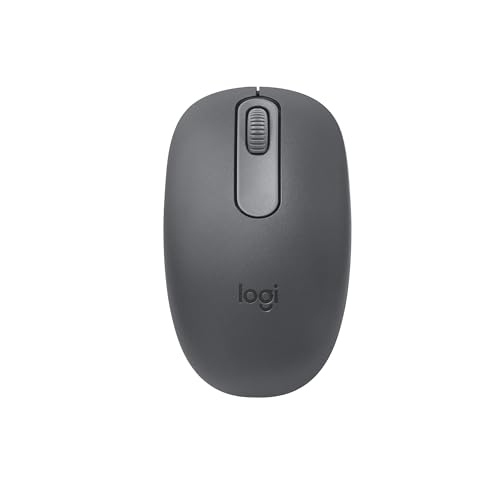
- Lightweight ambidextrous shape
- Bluetooth connection without a dongle
- 12-month AA battery life
Best For: Portable laptop and tablet productivity
Best Small Vertical Design

- Compact right-handed vertical design
- Six buttons with DPI switching
- Wired USB connection and silent clicks
Best For: Extended right-handed desktop work
Best Folding Travel Mouse
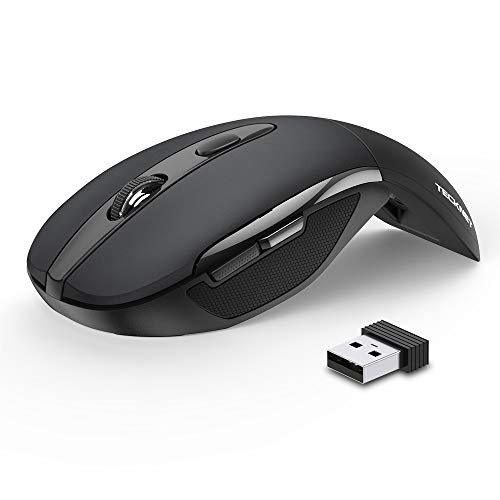
- Folds flat for travel
- Three adjustable DPI settings
- Up to 24 months from two AAA batteries
Best For: Portable laptop use and frequent travel
Best Rechargeable Multi-Device Option

- Dual-device Bluetooth pairing
- Rechargeable battery lasts 2–3 months
- Six programmable controls and up to 4000 DPI
Best For: Windows multitasking and customizable comfort
Small-Hand Comfort
TECKNET Vertical Wireless Mouse

- Compact shape for small and medium hands
- 4800 DPI with five adjustable settings
- Quiet clicks and 32-foot wireless range
Best For: Right-handed office users with smaller hands
Multi-Device Flexibility
UGREEN Ergonomic Wireless Mouse

- Bluetooth and 2.4G connections
- Switches among up to three devices
- Quiet five-button design for productivity
Best For: Medium- to large-handed multi-device users
Mini Vertical Fit

- Made for hands under 7.5 inches
- Quiet main buttons and rubberized grip
- 800/1200/1600 DPI settings
Best For: Small- to medium-handed right-handed users
Quiet Bluetooth Comfort

- Silent clicks for shared or quiet spaces
- Bluetooth 5.0 needs no USB receiver
- Three adjustable DPI settings
Best For: Portable everyday use in quiet workspaces
Long-Battery Travel Pick
TECKNET Ergonomic Wireless Mouse

- Compact design fits easily in a travel bag
- Five DPI settings up to 2600
- Up to 24 months of battery life
Best For: USB-A users seeking comfortable, low-maintenance travel use
Fold-Flat Multi-Device Design

- Rotating body snaps flat for travel
- Supports two Bluetooth and one 2.4GHz device
- Rechargeable battery lasts about 30 days
Best For: Travelers switching among several computers or tablets
Best Compact Bluetooth Pick – Logitech M196
The Logitech M196 is a straightforward choice for shoppers seeking compact ergonomic computer mice for laptops, tablets, and everyday travel. Its lightweight ambidextrous shape, Bluetooth connectivity, and 12-month AA battery life make it especially convenient when you want to avoid a USB receiver.
Best For: Portable productivity on Bluetooth-equipped laptops, tablets, and computers.
Pros:
- Ambidextrous contoured design suits left- and right-handed users.
- Bluetooth pairing requires no dongle or occupied USB port.
- Optical tracking works across nearly any surface.
- Includes an AA battery and offers up to 12 months of battery life.
Cons:
- Two-button layout is less versatile than models with side buttons.
- Its 1000 DPI sensitivity is aimed at general productivity rather than specialized precision work.
The M196 emphasizes portability and simplicity over extensive customization. It is a sensible compact option for travel, study, and everyday laptop use.
Best Small Vertical Design – Perixx PERIMICE-519
The Perixx PERIMICE-519 brings a compact vertical form to the compact ergonomic computer mice category. Its right-handed design is intended to encourage a more comfortable wrist and forearm position, while the wired USB connection provides stable plug-and-play performance.
Best For: Right-handed users who want a small vertical mouse for extended desktop work.
Pros:
- Vertical shape promotes a more neutral wrist and forearm position.
- Compact dimensions are practical for travel and limited desk space.
- Six-button layout includes forward and backward navigation shortcuts.
- 800/1600 DPI switching and optical tracking support adjustable, smooth control.
Cons:
- Wired USB operation limits cable-free portability.
- Designed for right-handed use only.
- Its vertical shape may require an adjustment period for users accustomed to standard mice.
This model is a useful fit when ergonomic positioning matters more than wireless freedom. The silent-click design also suits offices, shared spaces, and distraction-sensitive work environments.
Best Folding Travel Mouse – TECKNET Folding Pro
The TECKNET Folding Pro stands out among compact ergonomic computer mice for travelers who need a mouse that packs flat. Its rubberized ergonomic grip, adjustable DPI, 2.4GHz wireless connection, and auto-sleep mode combine portability with practical everyday control.
Best For: Travelers who want a fold-flat wireless mouse for laptops and mobile workstations.
Pros:
- Folds flat for easier storage in a laptop bag or travel case.
- Three DPI settings—1000, 1500, and 2000—allow cursor-speed adjustments.
- Wireless range extends up to 33 feet with the included nano receiver.
- Auto-sleep mode helps extend battery life to as much as 24 months.
Cons:
- Requires two AAA batteries, which are not included.
- Side buttons are not supported on macOS.
- Folding mechanism requires care to avoid pinching fingers.
The folding design is the main reason to choose this TECKNET model. It offers more travel convenience than a conventional mouse while retaining adjustable sensitivity and a comfortable rubberized grip.
Best Rechargeable Multi-Device Option – Lenovo Yoga Pro
The Lenovo Yoga Pro is a full-sized, right-handed option for shoppers who want compact ergonomic computer mice with more advanced controls. It combines a soft-sided grip and thumb rest with rechargeable power, dual-device Bluetooth pairing, programmable buttons, and adjustable sensitivity up to 4000 DPI through software.
Best For: Windows users who need a comfortable mouse with rechargeable power and multi-device switching.
Pros:
- Soft side material and a thumb rest support a comfortable right-handed grip.
- Pairs with two Bluetooth devices for convenient switching.
- Rechargeable battery provides roughly two to three months of use per charge.
- Six buttons, silent main clicks, and a configurable scroll wheel support customization.
Cons:
- Its full-sized 5-inch body is less travel-friendly than smaller compact models.
- Advanced software-adjustable features require Windows 10 or later.
- Designed for right-handed users.
The Yoga Pro is the feature-rich choice in this group, particularly for Windows workflows spanning two devices. Choose it when comfort, customization, and rechargeable convenience matter more than the smallest possible footprint.
Small-Hand Comfort – TECKNET Vertical Wireless Mouse
The TECKNET vertical mouse is a practical pick for shoppers seeking compact ergonomic computer mice for extended office work. Its 52-degree angle encourages a natural handshake position, while the rounded shape is designed for small to medium hands.
Best For: Right-handed users with small or medium hands who want quiet clicking, adjustable sensitivity, and simple 2.4GHz wireless connectivity.
Pros:
- Compact 4.13-by-2.55-inch shape suits small and medium hands.
- Five DPI settings range from 800 to 4800 for adaptable cursor control.
- Silent main clicks, six buttons, and a wireless range of up to 32 feet.
- Works with Windows, macOS, Linux, PCs, laptops, and tablets.
Cons:
- Forward and back buttons are not supported on macOS.
- The vertical design is right-handed only.
- Requires a battery and a USB receiver.
Among compact ergonomic computer mice, this model stands out for combining a small-hand-friendly profile with high DPI flexibility and very quiet primary clicks. It is a sensible office choice, especially when noise reduction matters.
Multi-Device Flexibility – UGREEN Ergonomic Wireless Mouse
The UGREEN vertical mouse is a versatile option among compact ergonomic computer mice, offering both Bluetooth and 2.4G wireless connections. Its upright handshake design helps reduce wrist rotation, though the larger fit is intended for medium to large hands.
Best For: Right-handed users with medium or large hands who switch between multiple computers, tablets, or operating systems.
Pros:
- Bluetooth and 2.4G wireless connectivity support up to three devices.
- Quiet clicks and a five-button layout suit everyday productivity.
- Four DPI levels from 1000 to 4000 cover precise and faster cursor movement.
- PTFE glide feet support smooth, quieter movement.
Cons:
- Not recommended for small hands; the product advises checking the hand-size guide.
- Uses one AA battery rather than a rechargeable battery.
- The wireless range is listed as up to 10 meters, shorter than some 2.4GHz models.
This UGREEN model is a strong fit when connection flexibility matters more than the smallest possible footprint. Its multi-device support and broad compatibility make it especially useful in mixed-device workspaces.
Mini Vertical Fit – Perixx PERIMICE-719
The Perixx PERIMICE-719 focuses on a smaller right-handed fit, making it a noteworthy choice among compact ergonomic computer mice. Its vertical shape keeps the wrist more upright, while the soft rubber coating and quiet main buttons support longer work sessions.
Best For: Right-handed users with hand lengths under 7.5 inches who want a compact vertical mouse with straightforward wireless operation.
Pros:
- Designed specifically for small to medium hands.
- Vertical shape and soft rubber coating support a comfortable grip.
- Three DPI settings—800, 1200, and 1600—provide basic sensitivity adjustment.
- Includes quiet left and right buttons, plus back and forward controls.
Cons:
- Scroll wheel and back/forward buttons are not silent.
- Back and forward buttons are not supported on macOS.
- Requires two AAA batteries, which are not included.
The PERIMICE-719 is a good option for shoppers prioritizing fit over advanced sensitivity or connectivity features. Allow for a short adjustment period, as the manufacturer notes that new vertical-mouse users may take one to two weeks to adapt.
Quiet Bluetooth Comfort – Lenovo WL310 Silent Mouse
The Lenovo WL310 is a practical choice among compact ergonomic computer mice for laptop users who want quiet clicks and Bluetooth connectivity without carrying a USB receiver. Its right-handed shape, lightweight build, and adjustable sensitivity suit everyday work, study, and portable setups.
Best For: Quiet offices, shared spaces, students, and Windows, Mac, or Chromebook users who prefer Bluetooth.
Pros:
- Ergonomic shape is designed to reduce wrist strain during extended use.
- Silent clicks are suitable for quiet workspaces and late-night use.
- Bluetooth 5.0 works with compatible Windows PCs, MacBooks, Chromebooks, and Lenovo laptops without a USB receiver.
- Three DPI settings—1000, 1200, and 1600—provide flexible cursor control.
Cons:
- Right-hand orientation may not suit left-handed users.
- Maximum sensitivity is 1600 DPI, which may be limiting for users seeking higher settings.
- Requires a battery for operation.
Choose the WL310 if quiet operation and receiver-free portability matter more than advanced gaming features or a rechargeable design. Its compact 2.4-ounce build makes it particularly convenient for travel.
Long-Battery Travel Pick – TECKNET Ergonomic Wireless Mouse
The TECKNET M003 is one of the more travel-friendly compact ergonomic computer mice, combining a contoured grip with rubber side supports and a 2.4GHz USB-A connection. It is designed for users who want a familiar plug-and-play setup and long battery life.
Best For: Right-handed Windows, Mac, Chrome OS, or Linux users with a USB-A port who prioritize comfort and battery longevity.
Pros:
- Compact 4.09-by-2.68-by-1.49-inch design is easy to pack.
- Contoured shape and rubber side grips provide thumb support and a comfortable hold.
- Five DPI levels from 800 to 2600 support different cursor-control preferences.
- Power-saving features are rated for up to 24 months of battery life.
Cons:
- Only compatible with devices that have a USB-A port.
- AAA batteries are not included.
- The side button is not compatible with Mac systems.
The M003 is a strong practical option when you want ergonomic support and minimal battery maintenance. Consider another model if your computer lacks USB-A or you need Bluetooth or a rechargeable battery.
Fold-Flat Multi-Device Design – Bluetooth Arc Travel Mouse
The Bluetooth Arc Travel Mouse stands out among compact ergonomic computer mice with a rotating, foldable design that snaps flat for storage. Its quiet clicks, rechargeable battery, and tri-mode connectivity make it suited to people who move between multiple computers and tablets.
Best For: Frequent travelers and multi-device users who want a slim, rechargeable mouse with Bluetooth and 2.4GHz options.
Pros:
- Rotating foldable body slips into a pocket or laptop bag.
- Silent, soft clicks help keep travel and shared workspaces quieter.
- Can connect with two Bluetooth devices and one 2.4GHz USB-dongle device.
- Built-in rechargeable battery lasts about 30 days per charge according to the supplied notes.
Cons:
- Three-button layout offers fewer controls than many ergonomic mice.
- Right-hand orientation may not fit left-handed users.
- Its slim travel shape may provide less palm support than a traditional contoured mouse.
This model is compelling for portability and device switching rather than maximum ergonomic support or extensive button customization. Its fold-flat construction and rechargeable design help reduce packing bulk and battery replacements.
How We Picked These Compact Ergonomic Computer Mice
We focused on mice that balance a compact footprint with features that can improve comfort during regular computer use. The selection includes conventional ambidextrous shapes, right-handed ergonomic contours, vertical designs, folding travel models, and rechargeable options.
We also considered connection type, portability, button and DPI controls, click noise, operating-system compatibility, and whether each mouse suits short travel sessions or extended desk work. Because hand size and grip style vary, no single shape is ideal for everyone.
Quick Comparison
| Mouse type | Best suited to | Features to look for |
|---|---|---|
| Compact standard | General travel and office use | Ambidextrous shape, Bluetooth, low weight |
| Vertical ergonomic | Users seeking a more neutral wrist position | Thumb rest, right-handed contour, adjustable DPI |
| Folding or arc design | Minimalist laptop bags | Fold-flat construction, rechargeable battery, Bluetooth |
| Multi-mode wireless | Users switching between devices | Bluetooth and 2.4GHz support, device switching |
Key Buying Factors for Compact Ergonomic Computer Mice
Shape and Hand Position
A compact mouse should still let your fingers rest naturally. Standard designs are usually easier to share between hands, while vertical mice can reduce forearm rotation but often require a right-handed grip. Check the listed dimensions against your hand, especially if you prefer a palm grip.
Connection and Compatibility
Bluetooth is convenient for laptops and tablets because it avoids a USB receiver. A 2.4GHz receiver can offer simple plug-and-play use, while dual- or tri-mode models are more versatile. Confirm compatibility with your computer and check whether an available USB-A or USB-C port is required.
Power, Noise, and Controls
Rechargeable models reduce disposable battery use, but battery life and charging convenience matter. Battery-powered mice may be better for long trips if you carry spares. Silent clicks are useful in offices, libraries, and shared spaces. Higher DPI and adjustable settings help users who want faster pointer movement, although maximum DPI is not automatically better.
Who Should Buy Which Compact Ergonomic Computer Mice?
Choose a compact ambidextrous mouse if you want the easiest general-purpose travel option or share a workstation. Pick a small vertical model if wrist posture is your primary concern and you are comfortable using a right-handed design. A folding or arc mouse is best for maximum portability, especially with a thin laptop.
For switching among a laptop, desktop, and tablet, prioritize Bluetooth or multi-mode connectivity. If quiet operation matters, look for silent-click specifications. Finally, users who work for several hours at a time should prioritize a comfortable fit and stable tracking over the smallest possible dimensions.