The right ceiling mount can turn a projector into a reliable part of a content studio, home theater, classroom, or presentation setup. For creators, stability, alignment, cable access, and repeatable positioning matter just as much as basic compatibility.
We’ve selected 10 projector ceiling mounts for content creators with different priorities, including low-profile designs, heavy-duty brackets, adjustable arms, wall-or-ceiling installation, shelves, and no-hole mounting options.
Best 10 Projector Ceiling Mounts for Content Creators Picks for 2026
Flexible Creator Setup
2-Be-Best Extendable Projector Mount

- 14–24-inch adjustable extension
- 360° rotation and 90° tilt
- Ceiling, wall, desk, or floor use
Best For: Creators needing flexible placement for compatible mini or medium projectors
Low-Profile Studio Mount
XINLEI PR14W Universal Ceiling Bracket

- Fits 2.83–11.42-inch hole spacing
- Supports up to 30 pounds
- Sits about 5 inches from ceiling
Best For: Permanent creator studios using compatible four-hole projectors
Compact Adjustable Choice
Aurzen Telescoping Projector Mount

- 9–15-inch telescoping pole
- 360° rotation and 90° tilt
- Supports up to 5.5 pounds
Best For: Creators using lightweight projectors with centered 1/4-inch threads
Commercial-Grade Stability
Mount-It! PRO Heavy-Duty Mount

- Supports projectors up to 77 pounds
- Quick-release head preserves alignment
- Built-in cable management
Best For: Permanent professional studios using full-size projectors
Flexible Long-Reach Pick
DYNAVISTA Full Motion Ceiling Mount
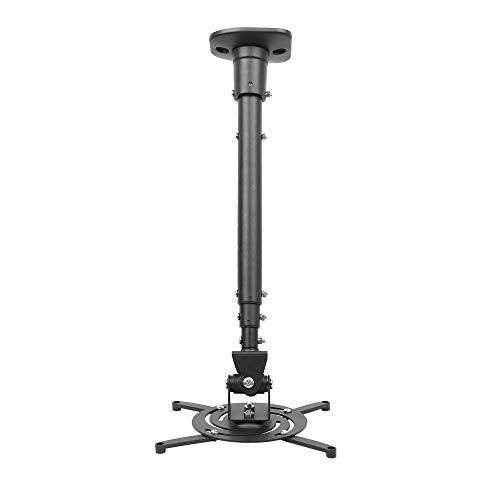
- 43.6-inch maximum extension
- Supports up to 30 pounds
- Full tilt, swivel, and rotation adjustment
Best For: Creators needing extended reach and flexible positioning
Most Versatile Installation
JOY worker Universal Projector Mount

- Supports wall and ceiling mounting
- Adjusts from 5.5 to 25.2 inches
- Handles projectors up to 33 pounds
Best For: Flexible studios with changing mounting needs
Heavy-Duty Mounting Option
Tonalee 3-in-1 Projector Mount

- Supports up to 40 pounds on ceilings
- Works with wall or ceiling installation
- Offers adjustable tilt and swivel
Best For: Heavier projectors installed on solid surfaces
Flexible Alignment Pick
HOIN 3-in-1 Projector Ceiling Mount

- Flush, telescoping, or wall installation
- ±30° tilt and swivel adjustment
- Supports up to 40 pounds on ceilings
Best For: Creators needing flexible placement for standard projectors
Tray Versatility Pick
Salange 3-in-1 Projector Mount

- 360° rotating tray with 0–90° tilt
- 11.8–21.1-inch height adjustment
- Concealed cable management
Best For: Creators mounting projectors or other compact AV devices
Simple Shelf-Style Pick
PUTORSEN Adjustable Projector Mount

- Wall- or ceiling-mount installation
- 14.17–21.65-inch adjustable arm
- 22-pound metal tray with cable hiding
Best For: Creators wanting a simple tray for projectors or small electronics
Flexible Creator Setup – 2-Be-Best Extendable Projector Mount
For content creators comparing projector ceiling mounts for content creators, this 2-Be-Best model offers a flexible setup with a 14–24-inch extension range and broad mounting versatility. Its adjustable head can help position a compatible projector for filming, presentations, movies, or studio viewing.
Best For: Creators using a mini or medium projector with a centered 1/4-inch mounting hole who need adjustable ceiling, wall, or desk placement.
Pros:
- 14–24-inch extendable length supports flexible positioning.
- 360° horizontal rotation and 90° vertical adjustment make angle changes straightforward.
- Supports ceiling, wall, desk, and floor mounting options.
- Reinforced aluminum-alloy construction supports up to 8 pounds.
Cons:
- Maximum listed capacity is lower than heavy-duty commercial mounts.
- Compatibility depends on a suitable 1/4-inch screw hole or included adapter size.
Its one-hand adjustment handle and anti-shake design make it a practical choice for creators who frequently fine-tune projector placement, provided their equipment fits the mounting requirements.
Low-Profile Studio Mount – XINLEI PR14W Universal Ceiling Bracket
This XINLEI PR14W is a strong option among projector ceiling mounts for content creators who want a tidy, close-to-ceiling installation. Its retractable arms fit many full-size projectors, while multiple adjustment points help align the image in flat- or sloped-ceiling spaces.
Best For: Creators building a permanent home studio, office, or presentation setup with a four-hole projector mounting pattern.
Pros:
- Universal arms accommodate mounting-hole distances from 2.83 to 11.42 inches.
- Supports projectors weighing up to 30 pounds.
- Low-profile design holds the projector about 5 inches from the ceiling.
- Offers ±15° tilt, ±20° swivel, and 360° rotation.
Cons:
- Requires four projector mounting holes; measurements should be checked before purchase.
- May be less suitable for projectors without the specified multi-hole pattern.
For creators prioritizing a clean installation and broad projector compatibility, this steel mount combines useful positioning control with a relatively compact ceiling profile.
Compact Adjustable Choice – Aurzen Telescoping Projector Mount
The Aurzen ceiling mount suits content creators seeking a lightweight, adjustable solution for compatible projectors. Its 9–15-inch telescoping pole, 360° rotation, and 90° tilt provide useful control when setting up a home theater, office, or creator workspace.
Best For: Creators with a projector featuring a centered 1/4-inch thread and weighing no more than 5.5 pounds.
Pros:
- Telescoping length adjusts from 9 to 15 inches.
- 360° rotation and 90° vertical tilt support flexible image alignment.
- Includes the ceiling base, pole, mounting screws, anchors, and manual.
- Works with many listed brands, including Aurzen, TMY, HAPPRUN, Yaber, and Epson.
Cons:
- Ceiling capacity is limited to 5.5 pounds, and wall capacity is 1 kilogram.
- Not compatible with the Aurzen D1 MAX or projectors using off-center, M6, M8, or non-threaded holes.
This mount is a sensible compact pick when the projector meets its centered-thread requirement, but creators with heavier equipment should choose a higher-capacity bracket.
Commercial-Grade Stability – Mount-It! PRO Heavy-Duty Mount
For creators working with full-size projectors or permanent production spaces, the Mount-It! PRO is the heavy-duty option among these projector ceiling mounts for content creators. Its steel construction, articulating arm, cable management, and quick-release head are designed for demanding home theater, boardroom, classroom, and studio installations.
Best For: Professional creator studios and permanent installations using standard-mount projectors weighing up to 77 pounds.
Pros:
- Supports up to 77 pounds and standard universal projector mounting patterns.
- Provides ±20° tilt, ±8° swivel, and ±180° joint rotation.
- Quick-release head allows projector removal and reinstallation without losing alignment.
- Integrated cable management keeps power and signal wiring routed through the arm.
Cons:
- Not designed for mini projectors.
- Its commercial-grade capacity may be excessive for lightweight creator setups.
- Provides less swivel adjustment than some mounts, at ±8°.
This is the most installation-focused choice in the group, especially valuable when equipment weight, repeatable alignment, service access, and organized cabling matter more than a compact footprint.
Flexible Long-Reach Pick – DYNAVISTA Full Motion Ceiling Mount
For content creators comparing projector ceiling mounts for content creators, the DYNAVISTA is a strong choice when you need substantial reach and broad positioning control. Its extendable arm, full-motion adjustment, and 30-pound capacity suit many home and office projection setups.
Best For: Creators who need a long, adjustable ceiling-mounted projection position.
Pros:
- Extends up to 43.6 inches and collapses to 23 inches with the arm.
- Supports projectors weighing up to 30 pounds.
- Offers 25-degree tilt, 90-degree swivel, and 360-degree rotation.
- Pre-assembled design includes hardware and instructions.
Cons:
- Compatibility is limited to projectors with mounting holes spaced 12.1 inches or less.
- The notes specify use on flat ceilings.
- Long-arm positioning may require careful tightening to reduce shaking.
The combination of reach and motion makes this a practical option for flexible creator studios, provided your projector and ceiling meet the stated requirements.
Most Versatile Installation – JOY worker Universal Projector Mount
Among projector ceiling mounts for content creators, the JOY worker stands out for installation flexibility. It can be configured for flush-ceiling, telescoping-arm ceiling, or wall mounting, while its adjustable length and full-motion design help accommodate changing studio layouts.
Best For: Creators who want one mount that can work on a wall, flat ceiling, or sloped ceiling.
Pros:
- Supports flush ceiling, telescoping ceiling, and wall installation.
- Adjusts from 5.5 to 25.2 inches in length.
- Supports projectors weighing up to 33 pounds.
- Provides 30-degree tilt, 30-degree swivel, and 360-degree rotation.
Cons:
- Projector mounting holes must be spaced 12.5 inches or less apart.
- Its multi-installation design may be more than needed for a fixed setup.
- The supplied details do not specify compatibility with vaulted ceilings.
This is the most adaptable option of the three, especially for creators who may rearrange equipment or switch between wall and ceiling placement.
Heavy-Duty Mounting Option – Tonalee 3-in-1 Projector Mount
For creators prioritizing a sturdy mounting system, the Tonalee is one of the more heavy-duty projector ceiling mounts for content creators. It supports up to 40 pounds on the ceiling, offers wall or ceiling installation, and provides adjustable positioning for home and office projection.
Best For: Creators with a heavier projector and a solid wall or suitable ceiling installation surface.
Pros:
- Supports ceiling-mounted projectors up to 40 pounds and wall-mounted projectors up to 20 pounds.
- Offers flush-ceiling, telescoping-ceiling, and wall installation.
- Provides plus-or-minus 30-degree tilt and swivel adjustment.
- Includes quick-release hooks, hardware, and instructions.
Cons:
- Not compatible with mini projectors.
- Requires a hard, solid wall and does not support regular drywall or vaulted ceilings.
- Projectors need three or four mounting holes with 3 mm or 4 mm diameters.
Its higher stated ceiling capacity is useful for heavier equipment, but the installation-surface and mounting-hole requirements should be checked carefully before purchase.
Flexible Alignment Pick – HOIN 3-in-1 Projector Ceiling Mount
For content creators building a home studio, theater, or presentation space, the HOIN is one of the more flexible projector ceiling mounts for content creators. It supports flush-ceiling, telescoping, and wall installation, with adjustable height and viewing angles for easier image alignment.
Best For: Creators who need flexible placement, cable organization, and support for standard full-size projectors.
Pros:
- Three installation options: flush ceiling, telescoping ceiling, and wall mounting.
- Offers adjustable height plus ±30° tilt and swivel adjustment.
- Steel construction supports up to 40 pounds for ceiling installation.
- Built-in cable routing helps conceal HDMI, audio, and power cables.
Cons:
- Not suitable for mini projectors, drywall, hollow walls, or vaulted ceilings.
- Its 20-pound wall-mount capacity is lower than its ceiling capacity.
- The listed warranty description is only 10 days.
Choose this mount when precise positioning and installation flexibility matter more than compatibility with lightweight mini projectors. Verify the projector’s mounting pattern and mounting surface before installation.
Tray Versatility Pick – Salange 3-in-1 Projector Mount
The Salange is a practical option among projector ceiling mounts for content creators who use more than a projector. Its large rotating tray, broad tilt range, adjustable height, and concealed cable management make it useful for compact AV and creator setups.
Best For: Content creators who want a tray-style mount for a projector, DVD player, Xbox console, or similar AV device.
Pros:
- 360° rotating tray and 0–90° tilt support flexible positioning.
- Height adjusts from 11.8 to 21.1 inches.
- Large steel tray includes side guards and supports up to 30 pounds according to the product notes.
- Supports recessed, telescopic-arm, and wall installation with concealed cable management.
Cons:
- The supplied details list a 22-pound maximum capacity, conflicting with the 30-pound bullet claim.
- The tray-style design may be less streamlined than a direct projector-specific bracket.
- Installation is intended for wooden studs, concrete, and flat ceilings rather than every ceiling type.
This mount stands out for creators who need a stable platform for varied equipment and frequent angle adjustments. Confirm the actual supported load before placing heavier gear on the tray.
Simple Shelf-Style Pick – PUTORSEN Adjustable Projector Mount
PUTORSEN offers a straightforward shelf-style option for projector ceiling mounts for content creators. Its tray can be installed on a wall or ceiling, the arm adjusts for placement, and the integrated cord hider helps maintain a cleaner studio or home-office setup.
Best For: Creators seeking a simple tray mount for a projector, camera, laptop, or other electronic device.
Pros:
- Works with wall or ceiling installation.
- Adjustable arm extends from 14.17 to 21.65 inches.
- Metal 13.77-by-8.66-inch tray supports up to 22 pounds.
- Integrated cable hiding and included mounting hardware simplify setup.
Cons:
- The 22-pound capacity is lower than heavy-duty mounts designed for larger projectors.
- Tray dimensions may limit oversized equipment.
- It is not water resistant.
This is a sensible choice when you prefer a platform-style mount and need placement flexibility without a specialized projector arm. Check the device footprint and weight before ordering.
How We Picked the Best Projector Ceiling Mounts for Content Creators
We focused on mounts that offer practical flexibility for creators who regularly record, stream, present, or use a projector in a multipurpose room. Key considerations included supported projector weight, adjustment range, mounting versatility, installation style, cable management, and the ability to fine-tune image alignment after installation.
Because projector mounting holes and room layouts vary, compatibility should be verified against your projector’s dimensions, mounting pattern, weight, and manufacturer instructions before purchase. A mount that works well for a compact projector may not be suitable for a large, high-brightness model.
Quick Comparison
| Mount type | Best for | What to check |
|---|---|---|
| Low-profile universal mount | Clean installations and limited ceiling space | Arm reach and projector clearance |
| Adjustable ceiling mount | Creators who frequently fine-tune framing | Tilt, swivel, rotation, and height range |
| Heavy-duty mount | Large projectors and permanent studios | Weight rating and ceiling structure |
| Wall-or-ceiling mount | Flexible room layouts | Surface strength and installation hardware |
| Shelf or tray mount | Projectors without standard mounting holes | Tray dimensions, edge support, and safety retention |
Key Buying Factors for Projector Ceiling Mounts for Content Creators
Compatibility and Weight Capacity
Confirm the projector’s mounting pattern and total weight, including any attached accessories. Choose a mount with a suitable safety margin rather than matching the maximum rating exactly. Heavy-duty models are preferable for full-size projectors, while compact universal mounts may be better for portable units.
Adjustment and Repeatability
Tilt and swivel controls help correct keystone-free alignment, while height adjustment can improve screen placement. If you move equipment or change shooting angles often, prioritize a mount that locks firmly and can be repositioned without excessive play.
Installation and Cable Access
Check whether your ceiling is wood, concrete, or another material, and use appropriate anchors or structural attachment points. Look for enough clearance around HDMI, power, USB, and network connections. Cable management features can reduce visible wiring and prevent strain on ports.
Profile, Clearance, and Room Layout
A low-profile mount keeps the setup discreet, but longer extension options may be useful with high ceilings or rear-projection layouts. Measure the projector, ceiling height, screen position, and nearby lighting before selecting the mounting length.
Who Should Buy Which Projector Ceiling Mounts for Content Creators?
Choose a low-profile universal mount if you want a tidy permanent installation with minimal visual bulk. An adjustable full-motion model is a better fit for creators who share a projector between presentations, filming, and entertainment. For heavier equipment, select a reinforced mount with a clearly stated high weight capacity and attach it directly to suitable structure.
If your projector lacks standard mounting holes, a shelf or tray-style option can be more practical, particularly when you need easy removal. Wall-or-ceiling designs suit renters, studios, and rooms where ceiling placement is inconvenient, but no-hole installation should still be checked for stability and the projector’s safety. In every case, prioritize secure attachment, accurate alignment, and accessible cables over the lowest price.