A well-positioned projector can make remote presentations, training sessions, and collaborative work more comfortable—but only if the mount keeps the image stable and properly aligned.
These 10 projector ceiling mounts for remote work cover common home-office and professional setups, from compact universal brackets to remote-controlled lifts and drop-ceiling systems.
Best 10 Projector Ceiling Mounts for Remote Work Picks for 2026
Best for Long-Drop Installations

- Extends 33.5–58 inches
- Supports up to 29.7 pounds
- Tilt, swivel, and 360° rotation
Best For: High or pitched ceilings in offices and home theaters
Best Low-Profile Pick

- Sits about 5 inches from ceiling
- Supports up to 30 pounds
- Includes tilt, swivel, and rotation adjustment
Best For: Compact office and conference-room installations
Best for Lightweight Projectors

- 360° rotation and 90° tilt
- 9–15-inch telescoping length
- Supports up to 5.5 pounds
Best For: Small projectors with a centered 1/4-inch thread
Best Motorized Concealment
BOZHENYULEI Electric Projector Lift
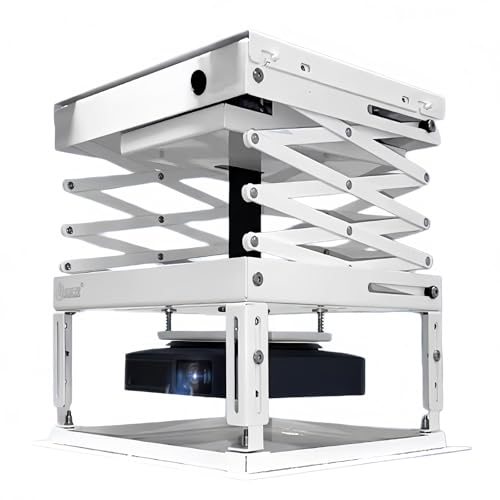
- 39-inch powered travel distance
- Remote-controlled retractable design
- Supports up to 22 pounds
Best For: Automated offices, conference rooms, and home theaters
Best Adjustable Pick
suptek Height-Adjustable Projector Mount

- Flat, sloped-ceiling, or wall installation
- 30.7–49.21-inch height range
- Supports projectors up to 30 pounds
Best For: Flexible home-office projector placement
Best Motorized Option
CGOLDENWALL Electric Projector Lift

- Remote-controlled height adjustment
- Memory function for preset positioning
- Concealed installation options
Best For: Professional offices needing retractable projector storage
Best Multi-Install Mount
Tonalee Wall or Ceiling Projector Mount

- Three installation configurations
- ±30-degree tilt and swivel adjustment
- 16.9–25.6-inch ceiling extension
Best For: Flexible projector placement in a solid-wall office
Most Versatile
Mount-It! Universal Projector Mount

- Three installation configurations
- 40-pound capacity
- Built-in cable management
Best For: Flexible home-office projector installations
Best for Drop Ceilings

- Fits 2-by-2-foot drop ceilings
- Reinforced steel plate
- Multiple alignment holes
Best For: Suspended-ceiling office installations
Best Long-Throw Adjustment
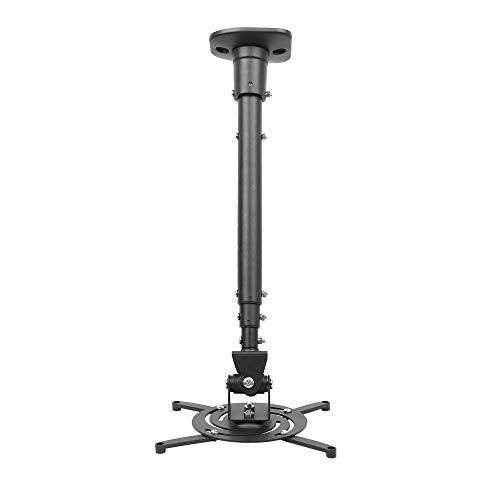
- Extends up to 43.6 inches
- 30-pound load capacity
- Wide motion adjustment range
Best For: Flat-ceiling setups needing extra projector reach
Best for Long-Drop Installations – VIVO MOUNT-VP03W
For remote work setups that need flexible placement, the VIVO MOUNT-VP03W is a projector ceiling mount with an unusually long telescoping extension. Its steel construction, broad projector compatibility, and full angle adjustment make it suitable when your ceiling height or viewing position requires extra reach.
Best For: Offices, conference rooms, classrooms, and home theaters needing a long drop from a flat or pitched ceiling.
Pros:
- Telescopes from 33.5 to 58 inches below the ceiling.
- Supports projectors up to 29.7 pounds.
- Offers ±15° tilt, ±15° swivel, and 360° rotation.
- Quick-release hooks simplify attachment and removal.
Cons:
- Not compatible with several listed Epson, Mitsubishi, and LG models.
- Requires projector mounting-hole spacing from 5.25 to 12.5 inches when using the arms.
- The extended design is less discreet than a low-profile mount.
Choose this model when positioning flexibility matters more than a compact ceiling footprint. Verify your projector model and mounting-hole measurements before ordering.
Best Low-Profile Pick – XINLEI PR14W
The XINLEI PR14W keeps a projector close to the ceiling, making it a practical choice for remote work rooms where a clean, unobtrusive installation is important. Its retractable arms and multiple adjustment options support a wide range of projectors under 30 pounds.
Best For: Home offices, conference rooms, and other spaces that need a compact projector ceiling mount with flexible positioning.
Pros:
- Low-profile design holds the projector about 5 inches from the ceiling.
- Supports projectors weighing up to 30 pounds.
- Provides ±15° tilt, ±20° swivel, and 360° rotation.
- Works with flat or sloped ceilings and includes hardware and instructions.
Cons:
- Requires four projector mounting holes.
- Mounting-hole spacing must be between 2.83 and 11.42 inches.
- Its close-to-ceiling design offers less height flexibility than an extending mount.
This is a sensible fit for a tidy remote-work installation where the projector can remain near the ceiling. Measure the projector’s mounting pattern carefully before purchase.
Best for Lightweight Projectors – Aurzen Adjustable Mount
For lightweight projectors in a remote work or home office setup, the Aurzen ceiling mount offers a compact telescoping design with broad angle adjustment. Its centered 1/4-inch thread requirement makes compatibility more specific, so check the projector connection before choosing it.
Best For: Small projectors weighing up to 5.5 pounds on solid wood, brick, or concrete ceilings.
Pros:
- Provides 360° rotation and up to 90° vertical tilt.
- Telescopes from 9 to 15 inches for flexible positioning.
- Includes the ceiling base, telescoping pole, screw kit, anchors, and manual.
- Lightweight design suits smaller projector installations.
Cons:
- Supports only up to 5.5 pounds for ceiling installations.
- Works only with projectors featuring a centered 1/4-inch thread.
- Not compatible with the Aurzen D1 MAX or projectors using off-center, M6, or M8 holes.
This mount is best when your projector meets the centered-thread requirement and falls within the lower weight limit. It offers strong adjustment range, but compatibility checks are essential.
Best Motorized Concealment – BOZHENYULEI Electric Projector Lift
The BOZHENYULEI electric projector lift is designed for remote workspaces that double as presentation or entertainment areas. Its retractable platform hides the projector when not in use, while the remote-controlled motor provides up to 39 inches of travel for flexible viewing height.
Best For: Offices, conference rooms, classrooms, and home theaters where concealed, remote-controlled projector storage is a priority.
Pros:
- Retracts the projector out of sight when not in use.
- Offers 39 inches of travel and supports up to 22 pounds.
- Uses a low-noise synchronous motor with wireless remote control.
- Supports synchronized operation with a projector or screen setup.
Cons:
- Requires a 110V electrical connection and ceiling installation.
- Its 19.69-by-19.69-inch baseplate needs sufficient ceiling space.
- More complex and potentially less discreet than a fixed mount.
This lift is the strongest choice here for a polished, automated installation. It makes the most sense when concealment and motorized operation justify the added hardware and electrical planning.
Best Adjustable Pick – suptek Height-Adjustable Projector Mount
For remote work setups that need flexible placement, this suptek mount is a practical option among projector ceiling mounts for remote work. Its extendable pole, broad adjustment range, and support for flat, sloped, or wall installation help accommodate different home-office layouts.
Best For: Home offices needing flexible projector placement and extended ceiling height adjustment.
Pros:
- Supports ceiling, sloped-ceiling, and wall installation.
- Adjusts from 30.7 to 49.21 inches in height.
- Offers 90-degree tilt and 360-degree swivel adjustment.
- Supports projectors weighing up to 30 pounds with three- or four-hole patterns.
Cons:
- Not suitable for single-hole projector installations.
- Compatibility requires mounting holes under 12 inches.
- Its long extension may be more than compact workspaces need.
The suptek is a strong choice when adjustability matters, particularly for a remote-work room where the projector position may need to change. Confirm the projector’s mounting pattern and weight before ordering.
Best Motorized Option – CGOLDENWALL Electric Projector Lift
For a polished remote-work room or shared office, the CGOLDENWALL lift adds remote-controlled projector deployment. As projector ceiling mounts for remote work go, its memory function, hidden installation options, and motorized operation are designed for setups where the projector should retract when not in use.
Best For: Offices, conference rooms, classrooms, and home theaters that want concealed motorized projector storage.
Pros:
- Remote control and memory function support repeatable positioning.
- Three mounting methods can enable a hidden or embedded installation.
- Metal construction and a tubular motor are designed for smooth operation.
- Supports projectors under 18.1 inches long, 15.3 inches wide, and 7.8 inches thick.
Cons:
- Mechanical screw adjustments are required when changing upper and lower limits.
- The 12V projector linkage is not included and requires customization.
- Installation requires at least 9.8 inches of reserved ceiling height plus projector thickness.
This lift is more complex than a fixed bracket, but it suits professional-looking workspaces where automatic lowering and retraction are valuable. Verify the projector dimensions, ceiling clearance, and customized base-plate requirements before purchase.
Best Multi-Install Mount – Tonalee Wall or Ceiling Projector Mount
This Tonalee bracket is a versatile choice for projector ceiling mounts for remote work, especially when the installation location is not yet settled. It supports flush-ceiling, telescoping-arm ceiling, and wall installation, while adjustable tilt and swivel help fine-tune the image for meetings or presentations.
Best For: Home or office users who need ceiling and wall installation flexibility for a standard-size projector.
Pros:
- Offers flush-ceiling, telescoping-ceiling, and wall installation options.
- Provides plus-or-minus 30-degree tilt and swivel adjustment.
- Ceiling height adjusts from 16.9 to 25.6 inches.
- Includes quick-release hooks and installation hardware.
Cons:
- Requires a hard, solid wall and does not support regular drywall or vaulted ceilings.
- Not compatible with mini projectors.
- The projector must have three or four screw holes with 3 mm or 4 mm diameters.
The Tonalee stands out for installation versatility, but its mounting-surface and screw-hole requirements are important. Check both the projector’s mounting pattern and the wall or ceiling structure before choosing it.
Most Versatile – Mount-It! Universal Projector Mount
For remote work setups that need flexible placement, the Mount-It! is one of the more adaptable projector ceiling mounts for remote work. It supports flush ceiling, telescoping ceiling, and wall-mounted configurations, with adjustment options for alignment and cable organization.
Best For: Home offices or shared workspaces needing multiple installation options and broad projector compatibility.
Pros:
- Supports flush ceiling, telescoping ceiling, and wall-mount configurations.
- Fits projectors with mounting-hole patterns from 8.85 to 12.44 inches and supports up to 40 pounds.
- Offers tilt, swivel, and 360-degree rotation adjustments.
- Includes built-in cable management and a lifetime warranty.
Cons:
- Requires a solid ceiling or wall and is not intended for drywall or vaulted ceilings.
- Projector compatibility should be verified against the specified hole pattern before purchase.
Its combination of installation choices, motion adjustment, and cable management makes it a strong fit for a professional remote-work presentation area, provided the mounting surface and projector pattern meet the requirements.
Best for Drop Ceilings – Amer Mounts AMRDCP100KIT
The Amer Mounts AMRDCP100KIT is designed specifically for suspended drop-ceiling installations, making it a practical choice among projector ceiling mounts for remote work in offices with modular ceiling tiles. Its reinforced 2-by-2-foot steel plate provides a dedicated mounting surface for projector alignment.
Best For: Office-based remote-work setups with standard 2-by-2-foot suspended drop ceilings.
Pros:
- Designed for 2-by-2-foot drop-ceiling applications.
- Uses a reinforced steel plate for a stable projector mounting surface.
- Multiple mounting holes help with projector alignment.
- Lightweight construction helps simplify installation.
Cons:
- Its drop-in design is specialized and may not suit solid or non-suspended ceilings.
- The listed maximum load is approximately 30 pounds, lower than some heavy-duty alternatives.
This kit is best considered when your workspace already has a compatible suspended ceiling. Its focused design can simplify placement, but it offers less installation flexibility than universal wall-and-ceiling mounts.
Best Long-Throw Adjustment – DYNAVISTA Full-Motion Mount
The DYNAVISTA full-motion mount suits remote workers who need substantial height adjustment or a projector positioned well away from the ceiling. Among projector ceiling mounts for remote work, it combines a long extendable arm with broad tilt, swivel, and rotation ranges.
Best For: Flat-ceiling home offices or conference rooms requiring extended projector placement and flexible viewing angles.
Pros:
- Extends up to 43.6 inches and collapses to 23 inches with the arm.
- Supports up to 30 pounds and fits projectors with mounting-hole spacing up to 12.1 inches.
- Provides 25-degree tilt, 90-degree swivel, and 360-degree rotation.
- Arrives pre-assembled with quick-release hooks and installation hardware.
Cons:
- Designed for flat ceilings, limiting use in other ceiling configurations.
- The long arm may require careful tightening to prevent shaking.
Its extended reach and wide range of movement are useful when a remote-work projector must clear furniture or align with a distant screen. Confirm the projector’s mounting-hole spacing and allow time to tighten the hardware securely.
How We Picked the Best Projector Ceiling Mounts for Remote Work
We focused on mounts that support practical work-from-home needs: dependable positioning, broad projector compatibility, useful adjustment range, and installation flexibility. The selection includes fixed and low-profile brackets, extendable models, wall-or-ceiling designs, electric lifts, and a drop-ceiling kit.
We also considered the specifications that matter most during video calls and presentations, including load capacity, tilt and swivel adjustment, ceiling type, extension length, and whether the mount can be installed without placing the projector directly over a desk.
Quick Comparison
- Best for a straightforward setup: A universal adjustable bracket with clear tilt, swivel, and height controls.
- Best for limited ceiling height: A low-profile or flush-mount design.
- Best for concealed storage: An electric projector lift that retracts the projector when it is not in use.
- Best for high or angled ceilings: An extendable mount with a generous length range and sloped-ceiling compatibility.
- Best for suspended ceilings: A dedicated drop-ceiling mounting kit designed for grid installation.
Key Buying Factors for Projector Ceiling Mounts for Remote Work
Compatibility and Weight Capacity
Check the projector’s mounting-hole pattern, dimensions, and weight before buying. Universal arms are useful, but they are not automatically compatible with every chassis. Choose a mount rated above the projector’s actual weight, especially for electric models that move the equipment repeatedly.
Adjustment Range and Image Alignment
Tilt, swivel, rotation, and height adjustment help compensate for imperfect placement and make it easier to center the image on a screen. A longer extension is valuable for tall ceilings, while a low-profile mount is often better for a standard room.
Ceiling Type and Installation
Confirm whether the mount supports flat, sloped, concrete, wood, or suspended ceilings. Fasteners are just as important as the bracket; use hardware appropriate for the ceiling structure and verify that the mounting point can support the combined projector and mount weight.
Noise, Clearance, and Cable Routing
For remote work, avoid placing the projector where its fan noise or heat affects your seating position. Check clearance around vents, plan HDMI or power-cable routing, and make sure the mount does not obstruct lighting, sprinklers, or ceiling fans.
Who Should Buy Which Projector Ceiling Mounts for Remote Work?
Choose a low-profile model if your office has a standard-height ceiling and you want a discreet installation. An extendable, full-motion bracket is better when you need precise alignment or have a sloped or unusually high ceiling. Electric lifts suit multipurpose rooms where the projector should disappear between meetings, while a drop-ceiling kit is the logical choice for grid-based office ceilings. If you move between wall and ceiling placements, select a versatile mount that explicitly supports both installation methods.