Routers, modems, DVRs, and streaming boxes can run warm in enclosed cabinets or during long periods of use. A USB cooling fan is a simple, low-cost way to improve airflow without replacing your equipment.
These 10 budget router cooling fans range from compact 80mm models to larger dual-fan setups, with options for adjustable speed, quiet operation, and flexible placement.
Best 10 Budget Router Cooling Fans Picks for 2026
Compact Quiet Pick
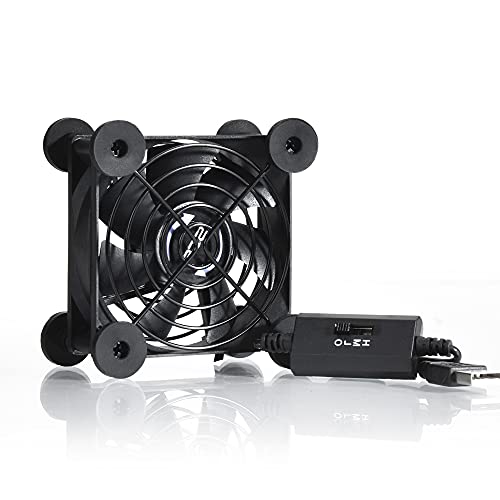
- Three adjustable speed settings
- 21dB low-speed rating
- Flat or upright placement
Best For: Small routers and compact AV cabinets
Wide-Coverage Pick

- Dual 120mm fan layout
- Up to 102 CFM listed airflow
- Three speeds with USB power
Best For: AV shelves and multiple-device cooling
Simple Single-Fan Value

- 56.7 CFM listed airflow
- 23dBA listed noise level
- Includes mounting accessories
Best For: Single routers and tight electronics spaces
High-Airflow DIY Pick
Four-Fan Variable-Speed Cooler

- Four 120mm fans
- Adjustable 3V–12V control
- 65,000-hour dual ball bearings
Best For: Large cabinets and DIY multi-device cooling
Best Dual-Fan Pick
Adjustable 240mm Router Cooling Fan
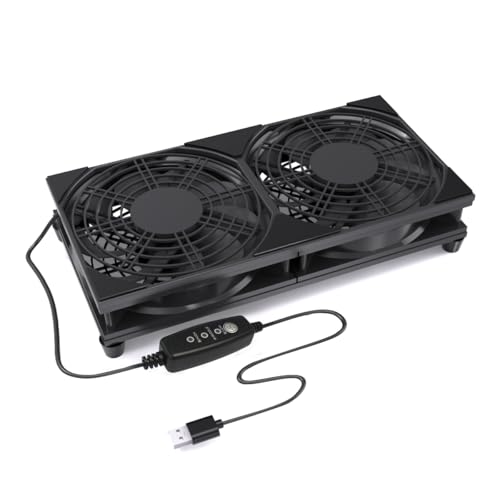
- Dual 120mm design for wider airflow
- Three speeds with USB plug-and-play power
- Raised base and protective grills
Best For: Larger routers, TV boxes, cabinets, and compact electronics
Best Variable-Speed Value
Quiet USB Router and Modem Fan

- High, medium, low, and off settings
- USB Type-A 5V power
- Dust filter and one-year warranty
Best For: Mixed home electronics needing adjustable cooling
Best Raised-Stand Design

- Tool-free stainless steel feet add clearance
- Three-speed USB-powered operation
- Double ball bearings rated over 50,000 hours
Best For: Elevated tabletop cooling for routers, mini PCs, and TV boxes
Best Adjustable-Speed Pick
Quie 120mm Router Cooling Fan Stand

- Three adjustable speed modes
- USB-A plug-and-play power
- 55 CFM airflow with rubber feet
Best For: Flexible cooling across routers, media boxes, and consoles
Best Compact Single-Fan Value

- High, medium, low, and off settings
- Silicone feet reduce vibration
- 50,000-hour dual ball bearings
Best For: Simple cooling for routers and small media devices
Best Simple Pick
Quiet Dual 120mm Router Fan Cooler

- Dual 120mm fan layout
- 74.8-inch cable for flexible placement
- Three speeds plus non-slip feet
Best For: Larger routers, cabinets, and multi-device cooling setups
Compact Quiet Pick – 80mm USB Router Fan
For shoppers comparing budget router cooling fans, this compact 80mm USB model is an easy fit for small shelves, cabinets, and entertainment setups. It offers three speed levels, USB power, and flexible flat or upright placement.
Best For: Small routers, consoles, DVRs, and AV equipment that need targeted airflow without much added noise.
Pros:
- Three-speed controller lets you balance airflow and noise.
- Low-speed operation is rated at 21dB.
- USB power works with compatible electronics, chargers, and consoles.
- Protective grilles and shockproof feet support flexible placement.
Cons:
- The single 80mm fan covers a smaller area than dual-fan models.
- Its 33 CFM airflow may be less suitable for larger cabinets or multiple devices.
This is a practical low-cost choice when you want quiet, adjustable cooling in a compact footprint. Choose a larger model if broader cabinet airflow is the priority.
Wide-Coverage Pick – 240mm Dual Router Fan
This 240mm dual-fan unit is a strong option among budget router cooling fans when one small fan is not enough. Its two 120mm fans provide broad airflow, while the USB connection and inline controller keep setup simple.
Best For: Routers, modems, receivers, DVRs, and crowded AV cabinets needing wider cooling coverage.
Pros:
- Dual 120mm fans provide up to 102 CFM of listed airflow.
- Three speed settings support quieter or higher-airflow operation.
- USB power requires no separate adapter and supports plug-and-play use.
- Includes a USB extension cable with inline speed control.
Cons:
- The 9.45-inch width requires more shelf space than a single-fan design.
- Its listed noise level is 29.6dB, higher than the smaller 80mm model’s low-speed rating.
With broad coverage and simple USB operation, this model makes sense for equipment shelves where heat builds across more than one device. Measure the available space before buying.
Simple Single-Fan Value – 120mm USB Cooling Fan
If you want budget router cooling fans with a straightforward setup, this 120mm USB fan provides a larger cooling surface than compact 80mm units without requiring an AC outlet. It includes protective hardware and mounting accessories for flexible installation.
Best For: Routers, modems, TV boxes, DVRs, mini PCs, and other electronics in tight spaces.
Pros:
- 120mm fan delivers a listed 56.7 CFM airflow.
- USB connection enables quick installation with compatible power sources.
- Listed noise level is 23dBA at 1500 RPM.
- Includes a protective net, feet, mounting screws, and nuts.
Cons:
- The product notes identify a sleeve bearing rather than a ball bearing.
- Only one fan is included, so it provides less coverage than dual-fan units.
This is a useful middle-ground option for cooling one router or electronic enclosure. Its included mounting parts add flexibility, while the USB connection keeps the installation uncomplicated.
High-Airflow DIY Pick – Four-Fan Variable-Speed Cooler
For larger setups, this four-fan cooler stands out among budget router cooling fans with variable speed control and an AC-powered design. The controller adjusts output from 3V to 12V, allowing you to tune airflow for routers, cabinets, streaming boxes, and other electronics.
Best For: DIY cooling projects, equipment cabinets, and multiple heat-generating electronics that need adjustable airflow.
Pros:
- Four 120mm fans provide broad coverage for larger setups.
- Variable controller adjusts from off to full output within the listed 3V–12V range.
- Dual ball bearings are rated for a 65,000-hour service life.
- Metal grilles are positioned between the fan units.
Cons:
- The AC plug and controller make it less convenient than USB-only models.
- Its larger four-fan layout may be excessive for cooling a single small router.
- The supplied details list laptop compatibility but do not provide a specific noise rating.
This is the most adaptable choice here for broad, high-volume cooling and DIY placement. It is best suited to users who have room for four fans and want fine control over airflow rather than a compact plug-in solution.
Best Dual-Fan Pick – Adjustable 240mm Router Cooling Fan
For shoppers comparing budget router cooling fans, this 240mm USB model offers broad airflow from two 120mm fans. Its three-speed controller and raised base make it a flexible choice for routers, TV boxes, consoles, and other compact electronics.
Best For: Cooling wider devices or electronics in entertainment centers, cabinets, and desk setups.
Pros:
- Dual 120mm fans cover a wider surface area.
- Three adjustable speeds accommodate different cooling and noise preferences.
- USB plug-and-play power works with wall adapters, power banks, computers, TVs, and monitors.
- Protective grills and raised feet support safer, steadier placement.
Cons:
- The larger 240mm design may not suit very small shelves or tight spaces.
- Only one fan body is included.
With a listed noise level of 13.6 dB and a maximum speed of 1800 rpm, this is a practical budget option when you want broad coverage, adjustable airflow, and simple USB operation.
Best Variable-Speed Value – Quiet USB Router and Modem Fan
This model is a strong contender among budget router cooling fans for users who want adjustable airflow and broad device compatibility. Its 5V USB power, speed controller, and added dust filter support straightforward cooling for routers, modems, DVRs, receivers, and streaming equipment.
Best For: Users who want to balance airflow and operating noise across several home electronics.
Pros:
- Variable controller cycles through high, medium, low, and off modes.
- USB Type-A power can connect to an AC outlet with a suitable adapter.
- Designed for routers, cabinets, consoles, SSDs, DVRs, receivers, and streaming boxes.
- Includes a dust filter and a one-year manufacturer warranty.
Cons:
- Its listed noise level is 23 dB, higher than some quieter alternatives.
- The 4.9-by-4.9-by-2.2-inch body may require more shelf space than compact fans.
The combination of speed control, a 1500 rpm maximum speed, and a stated one-year warranty makes this a versatile choice for DIY cooling setups where device compatibility matters.
Best Raised-Stand Design – 120mm USB Router Cooling Fan
Among budget router cooling fans, this 120mm USB model stands out for its elevated tabletop design and simple three-speed control. The included stainless steel feet create clearance for intake and exhaust, while the compact footprint suits routers, mini PCs, TV boxes, and game consoles.
Best For: Small home-office or living-room setups that need an elevated, plug-and-play cooling platform.
Pros:
- Four tool-free stainless steel feet provide approximately 28mm of clearance.
- Three-speed switch allows airflow adjustment for different environments.
- USB 5V power and a 39-inch cable support convenient placement.
- Double ball bearings are rated for a service life of more than 50,000 hours.
Cons:
- The feet require user installation, although no tools are needed.
- The single 120mm fan offers less coverage than a dual-fan design.
With a listed 1350 rpm speed, 0.14A maximum current, and protective nets included, this fan is a sensible choice for straightforward tabletop cooling with useful device clearance.
Best Adjustable-Speed Pick – Quie 120mm Router Cooling Fan Stand
For shoppers comparing budget router cooling fans, the Quie 120mm model offers flexible cooling for routers, modems, TV boxes, consoles, and other compact electronics. Its USB power, three speed settings, and 55 CFM airflow make it easy to adapt cooling to everyday browsing or heavier gaming and playback.
Best For: Multi-device home entertainment setups that need adjustable airflow and a stable cooling platform.
Pros:
- Three speed modes support quiet everyday use or stronger airflow.
- USB-A power works with power banks, computers, smart TVs, and wall chargers.
- Eight rubber foot pads help reduce vibration and slipping.
- Rated at 23 dB with 55 CFM airflow.
Cons:
- Its 4.7-inch square footprint may not suit larger equipment.
- It requires a separate USB power source rather than including a dedicated adapter.
This is a practical budget option when you want one compact fan to serve several electronics. The three-speed control and protective grille add useful flexibility for media shelves, desks, and cabinets.
Best Compact Single-Fan Value – Quiet 120mm Router Fan Cooler
This single-fan model is a straightforward choice among budget router cooling fans, combining USB power with low, medium, and high speed control. It is designed for routers, modems, receivers, DVRs, TV boxes, and other devices that need added ventilation.
Best For: Buyers who want a simple, compact cooler with adjustable speed and a long-running bearing design.
Pros:
- Three-degree speed controller cycles through high, medium, low, and off.
- Four silicone feet help absorb vibration and noise.
- Dual ball bearings are rated for a 50,000-hour lifespan.
- USB power supports convenient plug-in use.
Cons:
- The listed noise level is 26 dB, slightly higher than some compact alternatives.
- Its 53.35 CFM airflow is suited to small devices rather than broad cabinet ventilation.
Choose this fan if you prefer a conventional single 120mm unit with uncomplicated controls. Its silicone feet and dual ball bearings make it a sensible fit for routine router or media-device cooling.
Best Simple Pick – Quiet Dual 120mm Router Fan Cooler
If you need broader coverage than a single fan provides, this dual 120mm unit is a strong budget router cooling fans option. Its two-fan layout, three speed levels, and 74.8-inch cable are useful for routers, consoles, receivers, cabinets, and other equipment requiring added ventilation.
Best For: Larger devices or setups where dual-fan coverage and extra cable reach are more useful than the smallest footprint.
Pros:
- Dual 120mm fans provide a wider cooling layout.
- High, medium, low, and off settings let you adjust airflow and noise.
- Eight non-slip feet help stabilize equipment and absorb vibration.
- Long 74.8-inch cable offers flexible placement.
Cons:
- The 9.45-inch length takes more space than a single-fan design.
- Its listed noise level is 26 dB.
- The product details specify a 4-pin connector, so verify compatibility with your intended USB power setup.
This model makes the most sense when one 120mm fan does not provide enough coverage. Its larger dual-row format and long cable improve placement flexibility, though buyers should plan for the added size.
How We Picked These Budget Router Cooling Fans
We focused on practical cooling solutions that use common USB or 5V power, making them easy to connect to routers, USB adapters, power banks, computers, and media equipment. The selection covers several useful sizes, including compact 80mm fans, standard 120mm models, and wide 240mm configurations.
We also considered adjustable speed controls, stated noise-conscious designs, portability, cable convenience, and compatibility with equipment such as modems, DVRs, game consoles, TV boxes, and AV cabinets. Because airflow needs vary by setup, the list includes both single- and dual-fan designs.
Quick Comparison
| Fan type | Best for | Main advantage |
|---|---|---|
| 80mm single fan | Small spaces | Compact footprint |
| 120mm single fan | Routers and receivers | Balanced airflow and size |
| Dual 120mm fan | Wide equipment | Broader cabinet coverage |
| 240mm fan | AV cabinets and large surfaces | Long, even airflow coverage |
| Four-fan cooling pad | DIY or high-airflow setups | Multiple fan placement options |
Key Buying Factors for Budget Router Cooling Fans
Size and Airflow Coverage
Match the fan dimensions to the equipment and available shelf space. An 80mm unit suits a small modem or tight cabinet, while a 120mm fan is a versatile choice for most routers and receivers. Wide 240mm or dual-fan designs work better when the entire front or underside of a device needs ventilation.
Speed Control and Noise
Adjustable low, medium, and high settings let you balance cooling with sound. Use a lower setting in a quiet office or bedroom, then increase airflow when equipment is under heavy load or placed inside a cabinet. “Quiet” labeling is useful, but actual noise can vary with speed, dust, and mounting surface.
Power and Placement
Check whether the fan uses USB, a 5V connection, or an AC plug. USB models are convenient when your equipment has an available port, but a separate USB adapter may be needed if the router’s port cannot supply enough power. Look for a cable length and orientation that suit the intended placement.
Build and Protection
Choose a stable design that will not block the router’s vents. Keep the fan’s intake and exhaust clear, and clean the blades and grille periodically. A cooling fan improves airflow, but it cannot compensate for a severely obstructed cabinet or failing hardware.
Who Should Buy Which Budget Router Cooling Fans?
Choose a compact 80mm fan for a small desk or crowded shelf. A 120mm single fan is the best general-purpose option for one router, modem, receiver, or TV box. Select a dual 120mm model when the equipment is wide or needs airflow across multiple vent zones.
For long AV components, game consoles, or cabinet shelves, a 240mm fan can provide broader coverage with fewer separate units. A four-fan cooling pad makes the most sense for DIY installations or setups where airflow must be distributed across several pieces of equipment. If quiet operation matters most, prioritize a model with adjustable speed and run it at the lowest setting that keeps temperatures under control.