Shopping for a Dolby Vision PC monitor takes more than checking the OLED or HDR label. The display must support the format, and your PC, software, and content must deliver a compatible signal.
These three 32-inch 4K picks cover different priorities: versatile entertainment, fast OLED gaming, and professional HDR production. We’ll flag where Dolby Vision support is listed—and where you should verify it before buying.
Best 3 Dolby Vision Monitors for PC Picks for 2026
Best for Entertainment
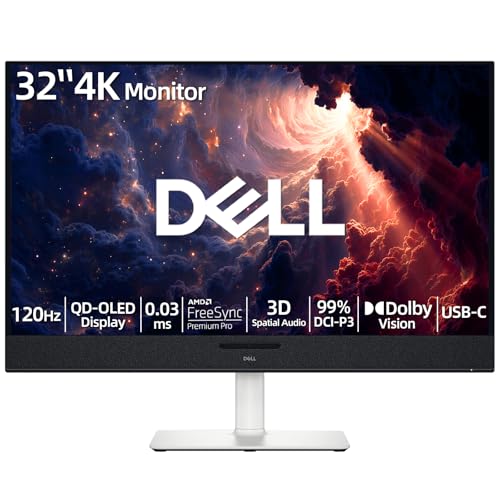
- 4K QD-OLED with Dolby Vision
- 120Hz and FreeSync Premium Pro
- Spatial audio and 90W USB-C
Best For: Movies, gaming, and everyday PC use
Best for High-Refresh Gaming
ASUS ROG PG32UCDM 32-inch 4K QD-OLED

- 4K QD-OLED at 240Hz
- Dolby Vision and G-SYNC Compatible
- 90W USB-C; burn-in warranty
Best For: High-refresh 4K PC gaming
Best for HDR Creation
ASUS ProArt PA32UCXR 32-inch 4K Mini-LED

- 2,304 dimming zones; Dolby Vision
- Built-in motorized colorimeter
- Dual Thunderbolt 4; 90W power
Best For: HDR editing and color-critical work
Best for Entertainment – Dell Plus 32-inch 4K QD-OLED
Among dolby vision monitors for pc, the Dell Plus stands out for pairing a 32-inch 4K QD-OLED display with built-in spatial audio. Its 120Hz refresh rate also makes it a practical choice for gaming alongside movies and everyday work.
Best For: PC users who want Dolby Vision entertainment, smooth gaming, and integrated sound in one display.
Pros:
- 4K QD-OLED panel with 99% DCI-P3 coverage and VESA DisplayHDR True Black 400.
- 120Hz refresh rate, 0.03ms claimed GtG response, and FreeSync Premium Pro.
- Built-in spatial audio and USB-C with up to 90W power delivery.
Cons:
- 120Hz ceiling is lower than the 240Hz ASUS gaming model in this roundup.
- Listed typical brightness is 250 cd/m².
This is the well-rounded entertainment pick if you value OLED contrast and monitor-based audio more than the highest available refresh rate.
Best for High-Refresh Gaming – ASUS ROG PG32UCDM 32-inch 4K QD-OLED
For gamers comparing dolby vision monitors for pc, the ASUS ROG PG32UCDM combines a 32-inch 4K QD-OLED panel with a 240Hz refresh rate. Its listed Dolby Vision support, G-SYNC Compatible technology, and 0.03ms GtG response make speed its clearest advantage.
Best For: PC gamers seeking 4K OLED image quality without giving up a 240Hz refresh rate.
Pros:
- 4K QD-OLED display with 240Hz refresh and a claimed 0.03ms GtG response.
- Dolby Vision support, VESA DisplayHDR 400 True Black, and 99% DCI-P3 coverage.
- 90W USB-C power delivery and a three-year warranty that includes burn-in coverage.
Cons:
- As an OLED display, it includes heat-management and OLED Care features intended to reduce burn-in risk, not eliminate it.
- Built-in speakers are not listed in the supplied specifications.
Choose this model when high-refresh gaming is the priority; its USB-C connection and stated color coverage also give it flexibility beyond games.
Best for HDR Creation – ASUS ProArt PA32UCXR 32-inch 4K Mini-LED
Among dolby vision monitors for pc, the ASUS ProArt PA32UCXR is the specialist choice for HDR and color work. Its 32-inch 4K Mini-LED panel has 2,304 local-dimming zones, while a built-in motorized colorimeter supports self and automatic calibration.
Best For: Editors and color-focused creators working with Dolby Vision and other HDR formats.
Pros:
- Dolby Vision, HDR10, and HLG support, with 1,600-nit peak and 1,000-nit sustained full-screen brightness claims.
- Built-in colorimeter, true 10-bit color, 99% Adobe RGB, and 97% DCI-P3 coverage.
- Dual Thunderbolt 4 ports, including USB-C connectivity with 90W power delivery.
Cons:
- 60Hz refresh rate makes it less suited to high-refresh gaming.
- At 30.4 pounds, it is the heaviest of the three listed monitors.
This is the strongest fit when calibration tools and sustained HDR brightness matter more than gaming speed. The listed five-year warranty requires online registration for its two-year extension.
How We Picked the Best Dolby Vision Monitors for PC
We focused on three 32-inch 4K displays with distinct reasons to buy: the Dell Plus for Dolby Vision entertainment and 120Hz use, the ASUS ROG PG32UCDM for 240Hz OLED gaming, and the ASUS ProArt PA32UCXR for professional HDR workflows. We weighed panel type, refresh rate, color-focused features, and stated Dolby Vision support. A monitor’s HDR capabilities alone do not establish Dolby Vision compatibility, so confirm current manufacturer specifications before ordering.
Quick Comparison
Dell Plus 32-inch 4K: A QD-OLED option with listed Dolby Vision support and a 120Hz refresh rate. It is the most straightforward pick here for someone balancing HDR viewing with everyday PC use.
ASUS ROG PG32UCDM: A 4K QD-OLED gaming display with a 240Hz refresh rate. Choose it for speed and OLED contrast, but verify Dolby Vision support for your intended source and input; do not assume it from the panel technology.
ASUS ProArt PA32UCXR: A 4K mini-LED professional display with listed Dolby Vision support and a built-in motorized colorimeter. Its features are better aligned with HDR creation than competitive gaming.
Key Buying Factors for Dolby Vision Monitors for PC
Confirm the Entire Playback Chain
Dolby Vision requires compatible content, an app or player that can output it, a suitable PC graphics and operating-system setup, and a display that accepts the signal over the connection you plan to use. Support can differ between PC apps, streaming devices, and inputs. Check the monitor manual and your playback software rather than relying on a logo in a listing.
Choose the Panel for Your Priorities
QD-OLED offers pixel-level contrast and fast response, making the Dell and ROG models compelling for movies or games in controlled lighting. OLED buyers should also consider static-interface use and the manufacturer’s burn-in warranty terms. Mini-LED LCD, as used by the ProArt, is worth considering for sustained desktop work and HDR grading; compare its local-dimming behavior and brightness specifications for your workflow.
Match Refresh Rate and Color Tools to the Job
The difference between 120Hz and 240Hz matters most to gamers whose systems can produce very high frame rates. For editing, calibration options and workflow support may matter more than refresh rate. The ProArt’s built-in colorimeter is relevant to that work, but you should still check compatibility with your preferred calibration software.
Who Should Buy Which Dolby Vision Monitors for PC?
Start with the Dell Plus if you want a listed Dolby Vision display for mixed entertainment and PC use. Pick the ROG PG32UCDM if 4K, 240Hz gaming comes first—and confirm its Dolby Vision compatibility separately if that format is essential. Choose the ProArt PA32UCXR for color-managed HDR production where its mini-LED design, calibration hardware, and listed Dolby Vision support address professional needs.