When you’re looking to enhance your PC’s storage capabilities, Asustor NAS devices offer impressive options. With powerful processing and flexible storage configurations, these devices can meet various needs, from gaming to content creation. Each model has unique features worth considering. As you explore the top ten Asustor NAS devices, you’ll find insights into which one might be the best fit for your requirements and how they can elevate your storage game.
Asustor AS5402T 2 Bay NAS for Gaming and Live Streaming

The Asustor AS5402T 2 Bay NAS is an ideal choice for gamers and live streamers who need a reliable, high-performance storage solution. With its Quad-Core Intel Celeron N5105 CPU and 4GB DDR4 RAM (expandable), you’ll experience smooth performance. The NAS features four M.2 NVMe SSD slots, ensuring rapid data access. Two 2.5GbE ports provide impressive connectivity, making streaming and gaming lag-free. Users appreciate its easy setup and solid construction, backed by a 4.3-star average rating. While the software may not be as polished as competitors, the AS5402T stands out for its hardware capabilities and user-friendly experience.
Best For: Gamers and live streamers seeking a reliable and high-performance NAS solution for seamless data access and storage.
Pros:
- High-performance hardware with a Quad-Core Intel Celeron N5105 CPU and expandable RAM for smooth operations.
- Multiple connectivity options including 2.5GbE ports for lag-free gaming and streaming experiences.
- User-friendly setup and solid construction, leading to positive user feedback and a high average rating.
Cons:
- Software polish may not match that of competitors like Synology, potentially affecting user experience.
- Flimsy plastic drive holders which require careful handling during installation and management.
- Occasional disconnection issues reported by some users, which may impact reliability.
Asustor Lockerstor 4 Gen3 AS6804T NAS for Video & Content Creators

For video and content creators seeking robust performance, the Asustor Lockerstor 4 Gen3 AS6804T NAS stands out with its powerful Quad-Core AMD Ryzen processor and 16GB of ECC DDR5 memory. This 4-bay, diskless NAS features four M.2 NVMe slots for speedy storage expansion and dual 10GbE ports for lightning-fast connectivity. You’ll appreciate its user-friendly interface, making RAID setups and user accounts a breeze. Plus, with a solid 4.5-star rating from users, it’s proven reliable. While some may face a learning curve, the performance and flexibility it offers truly make it a top choice for your creative needs.
Best For: Creative professionals and content creators who require high-performance storage solutions for video editing and content management.
Pros:
- Powerful Performance: Equipped with a Quad-Core AMD Ryzen processor and 16GB of ECC DDR5 memory for efficient multitasking.
- Fast Connectivity: Features dual 10GbE and 5GbE ports, ensuring rapid data transfer for large files.
- User-Friendly Interface: Easy setup for RAID configurations and user accounts, making it accessible for users of all skill levels.
Cons:
- Learning Curve: Some users may need additional tutorials to navigate network settings and security configurations effectively.
- Diskless Design: Requires separate purchase of HDDs or SSDs, which may increase overall cost.
- Weight: At 7.04 pounds, it may be less portable compared to lighter NAS options on the market.
Asustor Lockerstor 6 Gen3 NAS (AS6806T)

Designed for tech-savvy professionals and small businesses, the Asustor Lockerstor 6 Gen3 NAS (AS6806T) stands out with its powerful AMD Ryzen Quad-Core processor and generous 16GB ECC DDR5 RAM. With six bays and four M.2 NVMe slots for SSDs, it offers impressive storage capabilities. You’ll find high-speed connectivity options, including dual 10GbE and 5GbE ports, ensuring seamless data transfer. Users praise its straightforward setup and user-friendly interface, making it an excellent choice for backup and private cloud access. While some mention a higher price point, the reliability and performance make it a worthy investment for your storage needs.
Best For: Tech-savvy professionals and small businesses seeking reliable and high-performance storage solutions.
Pros:
- Exceptional processing power with an AMD Ryzen Quad-Core processor and 16GB ECC DDR5 RAM.
- High-speed connectivity options including dual 10GbE and 5GbE ports for efficient data transfer.
- User-friendly setup and interface, making it accessible for various users, even those less experienced with technology.
Cons:
- Higher price point compared to some alternative storage solutions, which may deter budget-conscious buyers.
- Some users report slow transfer rates due to home network limitations, impacting overall performance.
- Configuration issues with external notifications may require technical assistance for novice users.
Asustor Lockerstor 4 Gen2 NAS (AS6704T)
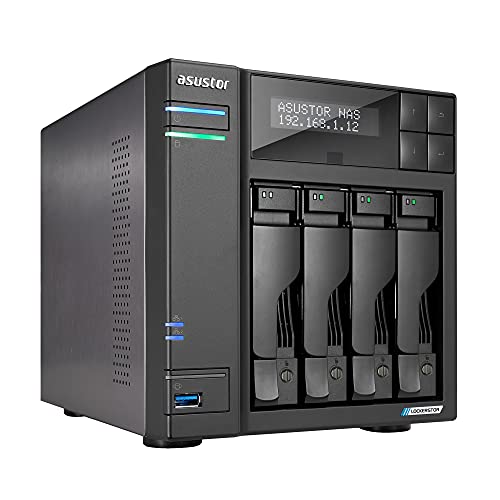
Looking for a versatile NAS that meets both home and small business needs? The Asustor Lockerstor 4 Gen2 (AS6704T) delivers impressive performance with its Intel Celeron N5105 Quad-Core processor and expandable 4GB RAM. With four M.2 slots and dual 2.5 GbE ports, it handles file transfers up to 280 MB/s effortlessly. Ideal for media serving, virtualization, and backup solutions, it’s best to upgrade RAM for peak performance. While its build quality is solid, enhancing sound insulation could improve user experience. Make sure you configure network settings properly to boost security and reliability for your data storage needs.
Best For: Home users and small businesses looking for a reliable and versatile NAS solution for media serving, virtualization, and backup needs.
Pros:
- Excellent performance with up to 280 MB/s file transfer speeds.
- Expandable RAM and M.2 slots for enhanced storage and performance.
- Dual 2.5 GbE ports provide flexibility for network configurations.
Cons:
- Limited app library compared to competitors like Synology and QNAP.
- Build quality could be improved with better sound insulation.
- Setup and configuration may require time and technical knowledge.
Asustor Flashstor 6 FS6706T – 6 Bay All-SSD NAS Storage

The Asustor Flashstor 6 FS6706T stands out as an exceptional choice for users who need high-speed, all-SSD storage solutions. With its Intel Celeron N5105 quad-core CPU and 4GB of expandable RAM, you’ll experience impressive performance, particularly when streaming with Plex or Jellyfin. Setting it up is quick and straightforward, allowing you to configure RAID options easily. Plus, you’ll appreciate the low power consumption and efficient cooling, keeping SSD temperatures around 42°C. While it offers a solid build and quiet operation, be sure to check SSD compatibility for peak performance. The three-year warranty adds peace of mind for your investment.
Best For: Users seeking a high-speed, all-SSD NAS storage solution for efficient streaming and data management.
Pros:
- Quiet operation and solid build quality enhance user experience.
- Easy setup and configuration with expandable RAM for improved performance.
- Low power consumption with efficient cooling, maintaining SSD temperatures around 42°C.
Cons:
- Some users report issues with Plex app performance.
- ADM OS interface may not be as seamless as competitors’.
- Certain SSD brands may face compatibility issues, requiring careful selection.
Asustor AS5404T 4 Bay NAS

For those seeking a robust and versatile storage solution, the Asustor AS5404T 4 Bay NAS stands out with its powerful Quad-Core Intel Celeron N5105 CPU, delivering impressive performance at a clock speed of 2.0 GHz. With 4 GB of DDR4 RAM and four M.2 NVMe SSD slots, it offers plenty of storage flexibility. You’ll also appreciate the dual 2.5 GbE ports, enhancing your network speeds. Plus, it includes three USB 3.2 Gen 2 ports for quick access to external devices. The aesthetically pleasing thermal vents guarantee peak heat dissipation, making it an excellent choice for your storage needs.
Best For: The Asustor AS5404T 4 Bay NAS is best for users seeking a high-performance, expandable storage solution for home or small office use.
Pros:
- Powerful Quad-Core Intel Celeron N5105 CPU ensures smooth operation and quick processing speeds.
- Four M.2 NVMe SSD slots provide ample opportunities for high-speed storage expansion.
- Dual 2.5 GbE ports enhance network performance, allowing for faster data transfers and improved connectivity.
Cons:
- Diskless configuration means users need to purchase hard drives separately, which can increase initial costs.
- Limited RAM at 4 GB may not be sufficient for very demanding applications or heavy multitasking.
- No built-in redundant power supply could lead to downtime in case of power supply failure.
Asustor Drivestor 4 Pro Gen2 AS3304T v2 – 4 Bay NAS

With its powerful Realtek RTD1619B 1.7GHz Quad-Core processor and support for smooth 4K video transcoding, the Asustor Drivestor 4 Pro Gen2 AS3304T v2 is ideal for home media enthusiasts who want a reliable, high-performance NAS solution. This 4-bay diskless NAS features a 2.5GbE port, 2GB DDR4 RAM, and various RAID configurations for maximum data management. Users appreciate the easy setup, intuitive interface, and quick Plex installation. Plus, with Btrfs/iSCSI snapshots and hot-swappable disks, you can guarantee data protection and flexibility. Overall, this NAS ranks highly among users, delivering fast transfer speeds and an enjoyable experience.
Best For: Home media enthusiasts looking for a reliable and high-performance NAS solution for 4K video transcoding and data management.
Pros:
- Easy setup process with tool-free installation and intuitive interface.
- Supports smooth transcoding of 4K videos and offers various RAID configurations.
- Fast transfer speeds and user-friendly documentation enhance user experience.
Cons:
- Some users report bugs with the AiFoto3 app and the need for manual updates for Plex.
- Limited memory (2GB DDR4 RAM) may not be sufficient for heavy multitasking.
- Diskless design requires additional purchase of hard drives, increasing overall cost.
Asustor Drivestor 2 Lite NAS Enclosure (AS1102TL)

Seeking a reliable and user-friendly NAS solution? The Asustor Drivestor 2 Lite (AS1102TL) might be exactly what you need. With its 2-bay design, 1.7GHz quad-core processor, and 1GB DDR4 RAM, it delivers impressive performance, including 4K transcoding. Setup is a breeze, often completed in under a day, and it integrates smoothly with apps like Plex. Users appreciate its cloud sync capabilities and customizable features, enhancing data management. At just 4.11 pounds, it’s compact and easy to place. With a solid average rating of 4.4 stars, you can trust this NAS to meet your storage needs effectively.
Best For: Users looking for a reliable and user-friendly NAS solution for media streaming and data management.
Pros:
- Easy setup and installation process, often completed in under a day.
- Impressive performance with 4K transcoding capabilities and seamless integration with apps like Plex.
- Customizable features and cloud sync capabilities enhance data management.
Cons:
- Some users reported minor issues with specific apps, requiring workarounds.
- Limited RAM (1GB) may hinder performance with multiple heavy applications running simultaneously.
- Warranty information is not explicitly detailed, requiring users to request it for clarity.
UGREEN NASync DH4300 Plus 4-Bay Desktop NAS

The UGREEN NASync DH4300 Plus 4-Bay Desktop NAS stands out as an ideal choice for home users and small businesses who demand substantial storage and efficient performance without breaking the bank. With a capacity of up to 120TB, you can store millions of photos, songs, and movies. The quad-core Intel N5105 CPU and 8GB RAM guarantee fast file transfers, while the user-friendly app simplifies setup and remote access. At just $629.99, it offers significant savings compared to cloud storage. Plus, advanced encryption keeps your data secure, making it a smart investment for your storage needs.
Best For: Home users and small businesses seeking substantial storage and efficient performance at an affordable price.
Pros:
- User-friendly app for quick setup and easy remote access.
- Massive storage capacity of up to 120TB, allowing for extensive file storage.
- Cost-effective, offering significant savings compared to long-term cloud storage.
Cons:
- Some software limitations and initial configuration security issues reported by users.
- Optimal performance may require NAS-grade drives.
- Not suitable for users needing advanced entertainment features without additional setup.
Asustor Flashstor 6 FS6706T – 6 Bay NAS Storage

For those who demand high-speed data access and seamless 4K streaming, the Asustor Flashstor 6 FS6706T stands out as an exceptional choice. This 6-bay NAS uses a powerful quad-core Intel Celeron processor and offers six M.2 NVMe slots for impressive storage capacity. With dual 2.5GbE ports and a 10GBaseT port, you’ll enjoy fast network connectivity. The simple setup process lets you configure it without a monitor or keyboard. While it’s great for streaming, some users recommend alternatives to Plex for transcoding. Plus, you can expand RAM up to 32GB, ensuring it meets your growing storage needs.
Best For: Users seeking high-speed data access and seamless 4K streaming capabilities in a compact NAS solution.
Pros:
- Easy setup: Quick and straightforward installation process, allowing configuration without a monitor or keyboard.
- Quiet operation: Minimal fan noise ensures a peaceful environment while in use.
- Expandable RAM: Ability to upgrade RAM up to 32GB for enhanced performance during high-demand scenarios.
Cons:
- Compatibility issues: Some users have reported problems with non-compatible SSDs.
- Plex transcoding concerns: Users have experienced issues with Plex, leading to recommendations for alternative software like Jellyfin.
- ADM OS interface: Some feedback highlights concerns with the user interface and app update processes in the Asustor ADM operating system.
Factors to Consider When Choosing Asustor NAS for PC
When choosing an Asustor NAS for your PC, you’ll want to take into account several key factors. Think about storage capacity options, processing power, and how much RAM you might want to upgrade in the future. Also, check the connectivity features and RAID configuration choices to make sure it fits your needs.
Storage Capacity Options
Choosing the right Asustor NAS for your PC involves careful consideration of storage capacity options, especially the number of drive bays. With choices ranging from 2 to 6 bays, each configuration directly impacts your total storage capacity. Many models also feature M.2 NVMe SSD slots, which enhance data access speeds and allow for further capacity expansion. When selecting a NAS, look for those supporting various RAID configurations like RAID 0, RAID 1, or RAID 5, as they improve data redundancy and performance tailored to your needs. Some Asustor NAS can reach a maximum storage capacity of 120TB, perfect for extensive media libraries or backups. Finally, verify your NAS can expand memory and storage options for future growth.
Processing Power Requirements
After settling on the right storage capacity for your Asustor NAS, it’s time to think about processing power. The CPU directly impacts how quickly and efficiently your NAS handles data. For better multitasking and support for multiple connections, look for NAS units with quad-core processors, ideally clocked at 2.0 GHz or higher. If you plan on using demanding applications, consider models with advanced processors like AMD Ryzen or Intel Celeron featuring Turbo Boost for enhanced performance in tasks like 4K video transcoding. Additionally, opting for NAS with 16GB or more RAM boosts overall performance, especially in data-intensive environments. Finally, if reliability is key, choose a model with ECC memory for added stability during critical operations.
RAM Expandability Potential
Considering the RAM expandability potential is essential for maximizing the performance of your Asustor NAS. Many models allow upgrades from 4GB to 16GB or even 64GB, greatly enhancing multitasking capabilities and performance for heavy applications. Higher RAM capacity boosts system responsiveness, making it easier to run virtual machines or applications like media servers and database management systems. Some Asustor NAS units feature ECC memory, providing additional data integrity and reliability, which is crucial for business environments. Be sure to check the specific RAM expansion limits of your chosen model, as not all units offer the same upgrade potential. A model’s RAM capability can also influence its performance in RAID configurations, especially during simultaneous read/write operations.
Connectivity Features Available
When evaluating an Asustor NAS for your PC, the range of connectivity features can greatly impact your overall experience. Many models come equipped with dual 2.5GbE ports, offering higher throughput and efficient data transfer compared to standard 1GbE connections. You’ll also benefit from USB 3.2 Gen 2 ports, allowing for data transfer speeds up to 10 Gbps for your external devices. If speed is essential, consider models with M.2 NVMe slots, which leverage faster SSD technology. Additionally, advanced features like Wake on LAN and Wake on WAN enhance remote access capabilities. For multimedia enthusiasts, HDMI and S/PDIF outputs let you stream and playback content directly to compatible displays and audio systems, enriching your entertainment experience.
RAID Configuration Choices
The right RAID configuration can greatly enhance your Asustor NAS experience, impacting both data security and performance. You’ll want to reflect on your needs carefully. If speed is your priority, RAID 0 offers excellent performance but lacks redundancy. For a balance of security and efficiency, RAID 5 is popular, utilizing at least three disks for data protection through distributed parity. If you need both speed and redundancy, RAID 10 combines mirroring and striping but requires a minimum of four disks. Remember, each RAID setup has unique advantages and disadvantages. Think about the number of drives you have available and choose a configuration that aligns with your specific requirements for speed, storage capacity, and fault tolerance.
Cooling and Noise Levels
Effective cooling and manageable noise levels play an essential role in your Asustor NAS experience. When running multiple drives or tackling intensive tasks like 4K transcoding, effective cooling mechanisms are critical to prevent overheating. Many Asustor models include built-in temperature sensors that adjust fan speeds in real-time, ensuring peak performance. Noise levels can differ considerably between devices, so it’s wise to check the fan noise rating measured in decibels, especially for home or office use. If you’re in a noise-sensitive environment, consider SSD-based NAS options; they typically operate more quietly than traditional HDDs, providing a more serene user experience. Balancing cooling efficiency and noise levels will enhance your overall satisfaction with your NAS.
Software Compatibility Needs
Choosing the right Asustor NAS for your PC hinges on software compatibility, as it can greatly influence both performance and usability. Start by evaluating the NAS’s operating system and its support for third-party applications. This is essential for running important software like Plex or Jellyfin for effective media streaming and transcoding. Look for features like RAID configurations and snapshot capabilities, which enhance data protection and recovery. A user-friendly interface can reduce the learning curve, making configuration easier. Additionally, check for regular firmware updates and support resources, as these can improve software stability and add new functionalities over time. Ensuring compatibility with your preferred software will maximize your NAS experience and efficiency.
Budget and Pricing Considerations
When you’re considering an Asustor NAS for your PC, budget and pricing are essential factors to weigh. Initial costs can vary widely, with entry-level models starting around $200, while higher-end options can exceed $1,000. Don’t forget to factor in the need for additional storage drives, as most units are diskless, requiring extra purchases. You should also evaluate potential RAM upgrades, which can add $30 to $200 depending on specs. While upfront costs may seem high, investing in a NAS can save you significant money over time—potentially over $6,500 in ten years compared to cloud storage fees. Finally, consider accessory costs like UPS systems for backup power to enhance data protection while increasing your overall budget.