If you’re looking to enhance your system’s storage capabilities, M.2 NVMe expansion cards are essential. These cards provide impressive speed and support for multiple SSDs, making them ideal for power users. With various options available, from versatile adapters to high-performance cards, choosing the right one can be challenging. Let’s explore the top contenders for 2025 and see which ones can truly maximize your storage potential.
StarTech.com Dual M.2 PCIe SSD Adapter Card

If you’re looking to boost your workstation or server’s storage capabilities, the StarTech.com Dual M.2 PCIe SSD Adapter Card is an excellent choice. This card lets you install two PCIe 3.0 M.2 SSDs, supporting both NVMe and AHCI formats. You’ll enjoy impressive read/write speeds of up to 3GB/s with a single drive, or 2.4GB/s in dual-drive mode. It’s compatible with various M.2 sizes and works seamlessly with Windows, Linux, and macOS. Plus, with built-in RAID support, you can configure your drives for peak performance or redundancy. The design enhances cooling, ensuring reliable operation for your data needs.
Best For: Users looking to enhance their workstation or server’s storage capacity with high-speed, versatile M.2 SSD support.
Pros:
- High Performance: Achieves impressive read/write speeds of up to 3GB/s and 2.4GB/s in dual-drive mode.
- Versatile Compatibility: Supports a range of M.2 SSD sizes and works with major operating systems including Windows, Linux, and macOS.
- RAID Functionality: Offers various RAID configurations for performance optimization or data redundancy.
Cons:
- Installation Complexity: May require advanced knowledge for installation and RAID setup, which could be challenging for novice users.
- Limited Slot Compatibility: Requires an available PCIe x8/x16 slot, which might not be available in all systems.
- Heat Management: Although designed for cooling, high-performance SSDs can still generate significant heat, necessitating additional cooling solutions in some cases.
ASUS Hyper M.2 PCIe Expansion Card V2

The ASUS Hyper M.2 PCIe Expansion Card V2 is the ideal choice for enthusiasts and professionals who demand exceptional storage performance and flexibility. This card supports up to four NVMe M.2 drives, delivering transfer speeds of up to 128 Gbps. Its compatibility with Intel VROC and AMD Ryzen Threadripper allows for impressive NVMe RAID setups. You’ll benefit from its innovative two-phase power solution, providing up to 14W output for enhanced performance. Plus, the sleek heatsink and integrated blower-style fan effectively manage temperatures, preventing throttling. Overall, this expansion card considerably boosts your system’s data transfer speeds and performance.
Best For: Enthusiasts and professionals seeking exceptional storage performance and flexibility with multiple NVMe M.2 drives.
Pros:
- High Transfer Speeds: Delivers transfer speeds of up to 128 Gbps for rapid data access and transfer.
- Versatile Compatibility: Works with both Intel VROC and AMD Ryzen Threadripper for advanced NVMe RAID configurations.
- Effective Cooling: Features a stylish heatsink and integrated blower-style fan to prevent M.2 throttling and maintain optimal temperatures.
Cons:
- Requires PCIe x16 Slot: Needs a specific PCIe x16 interface which may not be available on all motherboards.
- Limited to NVMe Drives: Only supports NVMe M.2 drives, excluding SATA M.2 options.
- Potential Power Draw: The two-phase power solution may require additional power management considerations for some systems.
ASUS Hyper M.2 X16 PCIe 4.0 X4 Expansion Card for NVMe M.2

For enthusiasts and professionals seeking to maximize their storage capabilities, the ASUS Hyper M.2 X16 PCIe 4.0 X4 Expansion Card stands out as an exceptional choice. It supports up to four NVMe M.2 drives, achieving speeds up to 256 Gbps through its PCIe 4.0 bandwidth. You’ll find it compatible with various platforms, including AMD’s Ryzen and Intel’s VROC NVMe RAID. With a stylish heatsink and integrated blower-style fan, it effectively manages thermal performance, preventing throttling during intense tasks. Built from server-grade PCB material, this expansion card guarantees durability and efficient data transfer, making it a top-tier option for your storage needs.
Best For: Enthusiasts and professionals looking to enhance their storage capabilities with high-speed NVMe M.2 drives.
Pros:
- Supports up to four NVMe M.2 drives, maximizing storage potential and speed.
- Utilizes PCIe 4.0 bandwidth, achieving impressive speeds up to 256 Gbps.
- Effective thermal management with a stylish heatsink and integrated blower-style fan, ensuring reliability during high-performance tasks.
Cons:
- Requires a compatible PCI Express x8 or x16 slot, limiting its use in some systems.
- Power consumption of 14W per SSD, which may be a consideration for power supply limits.
- Potentially overkill for casual users, as the high performance may not be necessary for everyday tasks.
NGFF M.2 M-Key to PCIe X4 Expansion Card Adapter
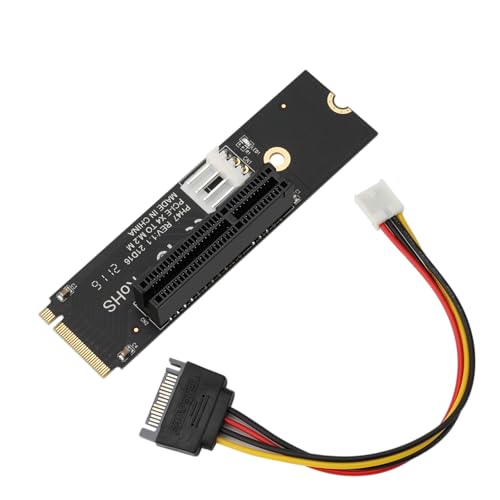
Looking to upgrade your system’s storage capabilities? The NGFF M.2 M-Key to PCIe X4 Expansion Card Adapter might be just what you need. It effortlessly converts your M.2 interface to a PCIe X4 slot, supporting various configurations. With a lateral 4-pin power connector and SATA 15-pin power supply, it guarantees stable operation without interference. Its 4-layer PCB design offers excellent signal integrity, while four high-capacity filter capacitors improve transmission stability. Plus, the plug-and-play installation means you won’t need any drivers. It’s compatible with X8 and X16 devices, making it a versatile choice for maximizing your storage potential.
Best For: Users looking to enhance their system’s storage capabilities with a reliable and easy-to-install M.2 to PCIe expansion solution.
Pros:
- Plug-and-play design eliminates the need for driver installation, making setup quick and easy.
- Supports a wide range of PCIe configurations (X1, X4, X8, and X16) for versatile compatibility.
- Features a robust 4-layer PCB and high-capacity filter capacitors for enhanced signal integrity and stability.
Cons:
- Limited to M.2 M-Key interface, which may restrict compatibility with other types of M.2 keys.
- Requires an available PCIe slot, which may be a limitation for systems with limited expansion options.
- Performance may vary based on the M.2 interface speed, potentially affecting data transfer rates.
StarTech.com 3-port M.2 SSD Adapter Card

Designed for tech enthusiasts and professionals who demand high performance, the StarTech.com 3-port M.2 SSD Adapter Card offers an efficient solution for expanding storage capabilities. You can connect up to three M.2 SSDs—one NVMe and two SATA III—maximizing your storage potential. With PCIe 3.0 x4 support, it delivers impressive speeds up to 40Gbps. This adapter card includes standard and low-profile brackets, along with LED indicators for power and activity. Plus, it facilitates data recovery from failed laptops via a pass-through SATA port, enhancing your overall productivity by improving data access speed and storage capacity in compatible systems.
Best For: Tech enthusiasts and professionals seeking to expand storage capabilities with high-performance M.2 SSDs.
Pros:
- Supports multiple SSD types: Connects one NVMe and two SATA III M.2 SSDs for versatile storage options.
- High-speed performance: PCIe 3.0 x4 support delivers impressive data transfer speeds up to 40Gbps.
- Data recovery capability: Facilitates data recovery from failed laptops via a pass-through SATA port.
Cons:
- Requires PCIe x4 slot: May not be compatible with systems lacking the necessary PCIe slot.
- Limited to M.2 drives: Does not support other types of SSDs or storage devices.
- Potential heat generation: Running multiple SSDs simultaneously may increase heat output, requiring adequate cooling solutions.
M.2 to USB Adapters PCIe to USB 3.0 Expansion Card
The M.2 to USB Adapters PCIe to USB 3.0 Expansion Card stands out for content creators and IT professionals who demand lightning-fast data transfers. With 10Gbps speeds, it efficiently handles large files, making it perfect for 4K video transfers and database backups. The advanced thermal management features, including aluminum housing, prevent overheating during intensive tasks. This adapter is universally compatible with NVMe HDDs and supports multiple device connections without needing additional drivers. Plus, its plug-and-play installation means you can set it up effortlessly, streamlining file migration between NVMe HDDs and USB 3.0 systems in no time.
Best For: Content creators, IT professionals, and mobile workers needing rapid data transfers between NVMe HDDs and USB 3.0 systems.
Pros:
- Delivers 10Gbps speeds, ideal for handling large files like 4K videos and backups efficiently.
- Advanced thermal management with aluminum housing prevents overheating during intensive tasks.
- Plug-and-play installation allows for easy setup and immediate use without the need for additional drivers.
Cons:
- Limited to NVMe HDDs, which may not accommodate users with other types of storage.
- Dependent on USB 3.0 compatibility, which could limit speed if connected to older USB ports.
- Potential for thermal issues if not used in well-ventilated areas despite the thermal management features.
Transcend 1TB NVMe Gen4 SSD with Heatsink

Transcend’s 1TB NVMe Gen4 SSD with Heatsink stands out for gamers and content creators seeking high-speed storage solutions. With a lightning-fast sequential read speed of up to 7,400 MB/s and a write speed of 6,500 MB/s, your data transfers will be seamless. The graphene heat sink effectively dissipates heat, ensuring reliability during intense tasks. This SSD is compatible with PS5, desktops, and laptops, making it versatile for various setups. Plus, with the free SSD Scope software, monitoring performance and firmware updates is a breeze. Rated 4.6 out of 5 stars, it’s a solid choice for maximizing your storage potential.
Best For: Gamers and content creators seeking high-speed storage solutions for their PS5, desktops, or laptops.
Pros:
- Lightning-fast sequential read speeds of up to 7,400 MB/s and write speeds of 6,500 MB/s for seamless data transfers.
- Efficient cooling system with a graphene heat sink that ensures reliability during intensive tasks.
- Versatile compatibility with PS5, desktops, and laptops, making it suitable for various setups.
Cons:
- Limited storage capacity options, with a maximum of 2TB available for expansion.
- Weight and size may not be suitable for all portable applications compared to smaller SSDs.
- Warranty details need to be requested, which can be inconvenient for potential buyers.
Transcend 500GB M.2 2280 SSD (PCIe NVMe Gen3x4)

For those looking to elevate their computing experience, the Transcend 500GB M.2 2280 SSD (PCIe NVMe Gen3x4) stands out with its impressive read speeds of up to 3,200 MB/s. This SSD offers write speeds reaching 2,000 MB/s, making it perfect for high-performance tasks. Its slim M.2 2280 form factor guarantees compatibility with desktops, laptops, and ultrabooks. The advanced 3D TLC NAND Flash technology enhances data integrity through LDPC coding, while dynamic thermal throttling boosts stability during demanding applications. Plus, Transcend SSD Scope software helps you monitor health and optimize performance, confirming your drive runs efficiently and error-free.
Best For: Those seeking to upgrade their computing performance with a high-speed, reliable storage solution for desktops, laptops, and ultrabooks.
Pros:
- High-Speed Performance: Achieves read speeds up to 3,200 MB/s and write speeds of 2,000 MB/s for efficient data handling.
- Enhanced Data Integrity: Utilizes LDPC coding and ECC algorithms to ensure reliable data storage and protection.
- User-Friendly Software: Comes with Transcend SSD Scope for easy monitoring and optimization of SSD health and performance.
Cons:
- Limited Storage Capacity: At 500GB, it may not be sufficient for users with extensive storage needs or large media files.
- M.2 Compatibility Required: Requires a compatible M.2 2280 slot, which may not be available on all older devices.
- Potential Thermal Throttling: Although dynamic thermal throttling is beneficial, it can impact performance under sustained heavy loads.
Factors to Consider When Choosing M2 NVMe Expansion Cards 8x.
When you’re choosing an M.2 NVMe expansion card 8x, you need to take into account several key factors. Performance specifications, compatibility with your existing hardware, and cooling solutions all play vital roles in ensuring peak functionality. Additionally, think about power consumption and whether you want RAID support for enhanced data management.
Performance Specifications Comparison
Choosing the right M.2 NVMe expansion card involves several critical performance specifications that can dramatically impact your system’s efficiency. First, consider the read and write speeds; single drives can hit up to 3GB/s, while dual drives generally reach around 2.4GB/s. The interface type is essential too—PCIe 4.0 offers a significant advantage with a bandwidth of up to 256 Gbps compared to PCIe 3.0’s 128 Gbps. Also, check how many M.2 drives the card supports; some can host up to four drives, boosting both storage capacity and data transfer rates. Finally, evaluate the cooling mechanisms in place to prevent throttling and enhance reliability during heavy tasks, ensuring your drives perform at their best.
Compatibility With Existing Hardware
Ensuring your M.2 NVMe expansion card works seamlessly with your existing hardware is essential for maximizing performance. First, check that the card fits your motherboard’s PCIe slot type—some require x4, x8, or x16 configurations for peak performance. Next, verify the supported M.2 SSD sizes, like 2242, 2260, 2280, or 22110, ensuring your drives will fit. Don’t forget to confirm compatibility with your operating system; some cards may have specific driver requirements. Additionally, consider the power needs of the expansion card. Your power supply unit must deliver enough wattage, especially for high-performance options. Finally, if you plan to use multiple M.2 SSDs, look for cards with RAID support to enhance your storage capabilities.
Cooling Solutions and Design
Effective cooling solutions are essential for M.2 NVMe expansion cards, as they help prevent overheating and maintain peak performance during demanding tasks. Many cards come equipped with heatsinks and integrated fans, which dissipate heat effectively, keeping operating temperatures stable for connected SSDs. A well-designed cooling mechanism enhances the reliability and longevity of your M.2 SSDs by reducing thermal stress during intense workloads. When choosing an expansion card, consider its thermal management design; some models feature vented designs that boost airflow and cooling efficiency. With proper cooling, you can achieve impressive read/write speeds of up to 3GB/s for individual drives, and even higher speeds in dual configurations, ensuring you get the most out of your storage potential.
Power Consumption Considerations
While cooling solutions play a significant role in maintaining performance, power consumption is another key factor to take into account when selecting M.2 NVMe expansion cards. The power consumption ratings can vary widely, often reaching up to 14W per drive for high-performance models. This total power draw can impact your system’s stability and performance, especially if your power supply can’t handle the extra load from multiple drives. Look for expansion cards with efficient power management features, like two-phase power solutions, which guarantee adequate power delivery without overheating. Monitoring the combined power usage is vital, as higher consumption can generate excess heat, affecting longevity and reliability. Selecting cards with built-in thermal management will help maintain ideal operating temperatures during intensive tasks.
RAID Functionality and Support
When you’re choosing M.2 NVMe expansion cards, considering RAID functionality is vital for maximizing performance and data security. RAID lets you configure multiple SSDs in setups like RAID 0 for speed or RAID 1 for redundancy. With advanced RAID features, some cards enable storage pooling and tiered solutions that enhance both reliability and performance. For instance, RAID 0 can combine read/write speeds that surpass individual drives, making your system faster. However, compatibility with RAID software is important, so verify the card supports your preferred configurations, such as RAID 0, 1, SPAN, or JBOD. Implementing RAID also improves your data recovery options in case of drive failure, depending on the configuration you choose.