A good 140mm case fan can move air at a lower speed than a smaller fan, helping balance cooling and noise. The right choice depends on your case, motherboard connections, and whether you value quiet operation, maximum airflow, or lighting.
These 10 picks cover straightforward PWM fans, high-speed options, ARGB models, and multipacks. Use the guide below to narrow down what fits your build before comparing individual fans.
Best 10 140mm PC Case Fans Picks for 2026
Quiet All-Rounder
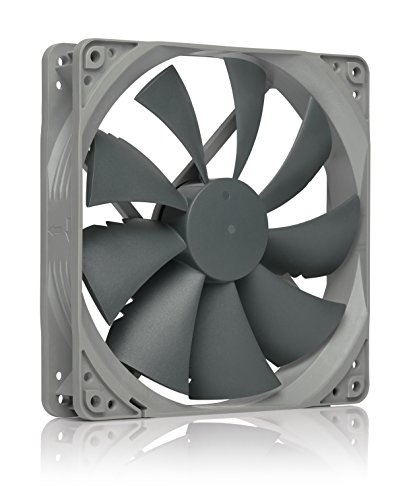
- 1500 RPM maximum with 4-pin PWM
- Up to 133.7 m³/h airflow
- Six-year manufacturer warranty
Best For: Understated case or radiator cooling
Daisy-Chain Dual Pack

- Two 140mm fans included
- Daisy-chain 4-pin PWM wiring
- Up to 95.5 CFM airflow
Best For: Two-fan builds with simplified wiring
ARGB Showpiece

- Infinity-mirror lighting with 24 LEDs
- Up to 89.77 CFM airflow
- Wired PWM and ARGB daisy-chaining
Best For: Motherboard-synced RGB desktop builds
Low-Noise Pick
be quiet! Pure Wings 3 140mm PWM

- Listed 21.9 dB noise level
- Low minimum RPM with PWM
- 80,000-hour rated bearing life
Best For: Quiet, low-speed desktop cooling
High-Pressure Pick
be quiet! Silent Wings Pro 4 140mm PWM

- Three selectable maximum PWM speed settings
- Pressure-focused blades and frame
- Fluid-dynamic bearing and six-pole motor
Best For: Adjustable radiator or heat-sink cooling
Triple-Pack Pick
be quiet! Pure Wings 3 140mm PWM High-Speed

- Three matching PWM fans
- Closed-loop target-speed regulation
- Up to 2.44 mm H2O listed pressure
Best For: Filling multiple case or radiator positions
Balanced Case-Airflow Pick

- Up to 74.3 CFM listed airflow
- Four-pin PWM control
- Listed noise at or below 26.6 dBA
Best For: A single balanced desktop case-fan replacement
Single-Fan Pick
Thermalright TL-C14CW-S White ARGB

- One 140 mm white ARGB fan
- Up to 1,500 RPM and 75.8 CFM
- 4-pin PWM; S-FDB bearing
Best For: A single white ARGB case or cooler fan
Black Three-Pack
Thermalright TL-C14C-S X3 ARGB

- Three black 140 mm fans
- 4-pin PWM and 5V 3-pin ARGB
- 55 cm cables; up to 75.8 CFM each
Best For: Multiple mounts in a black ARGB build
White Three-Pack
Thermalright TL-C14CW-S X3 ARGB

- Three white 140 mm ARGB fans
- Up to 1,500 RPM and 75.8 CFM each
- PWM control; silicone corner feet
Best For: Multiple mounts in a white ARGB build
Quiet All-Rounder – Noctua NF-P14s redux-1500 PWM
Among 140mm pc case fans, the Noctua NF-P14s redux-1500 PWM is a practical pick for chassis airflow or radiator use. Its square frame, 4-pin PWM control, and 1500 RPM maximum give you a way to balance cooling and noise.
Best For: Builders who want a single, understated PWM fan for case ventilation or a radiator.
Pros:
- 4-pin PWM supports automatic motherboard speed control.
- Rated at up to 133.7 m³/h airflow and 25.8 dB(A).
- Includes mounting screws and a six-year manufacturer warranty.
Cons:
- Anti-vibration mounts and other accessories are optional rather than included.
- Sold as a single fan, so multiple mounting positions require additional units.
This redux model keeps the focus on cooling and speed control rather than extras. Check your available 140mm mounts and motherboard headers before ordering.
If you need two 140mm pc case fans, the CORSAIR RS140 dual pack simplifies wiring: its fans can be daisy-chained and controlled through a single 4-pin PWM connector. CORSAIR also rates them for up to 1700 RPM and 95.5 CFM airflow.
Best For: Builds needing two PWM fans with fewer motherboard-header connections, including radiator installations.
Pros:
- Two fans are included in the pack.
- Daisy-chain connection lets you control multiple fans through one PWM connector.
- Rated 3.46 mmH₂O static pressure and AirGuide vanes suit use against obstructions.
Cons:
- Listed noise level is 36 dB, so check whether that meets your noise priorities.
- Daisy-chained fans share the same PWM control connection rather than separate header controls.
The RS140 pack makes the most sense when convenient two-fan installation matters as much as airflow. Its pressure rating also makes it worth considering for a radiator or heatsink.
For 140mm pc case fans that add visible lighting, the AsiaHorse Amici pairs an infinity-mirror effect with 24 LEDs. Its fan speed is PWM-adjustable, while separate 5V 3-pin ARGB connectors handle motherboard lighting sync.
Best For: Desktop builds that need a lit 140mm fan with wired daisy-chain connections.
Pros:
- Rated up to 89.77 CFM airflow and 3.24 mmH₂O pressure.
- ARGB supports Asus Aura Sync, Gigabyte RGB Fusion, and MSI Mystic Light Sync.
- Male and female PWM and ARGB connectors support wired daisy-chaining.
Cons:
- Lighting needs a separate 5V 3-pin ARGB connection.
- The supplied notes recommend no more than three fans per daisy-chain.
Choose this fan when its lighting design is part of the build plan, not just an afterthought. Check your motherboard’s PWM and 5V ARGB connections before buying.
The be quiet! Pure Wings 3 is aimed at shoppers comparing 140mm pc case fans for quieter everyday operation. Its 4-pin PWM control allows a low minimum speed, and the listed noise level is 21.9 dB.
Best For: Builders prioritizing low-speed operation in a desktop case.
Pros:
- Low minimum RPM supports quieter operation when full cooling is unnecessary.
- Seven airflow-optimized blades and a frame outlet designed for radiator performance.
- Rifle bearing is rated for an 80,000-hour operating lifetime.
Cons:
- Rated airflow is 57.4 CFM; compare specifications if maximum airflow is your priority.
- Two-year manufacturer warranty is shorter than the listed bearing lifetime.
This is a straightforward choice when adjustable, low-speed cooling matters most. Its 1500 RPM maximum leaves room to increase airflow when your system needs it.
High-Pressure Pick – be quiet! Silent Wings Pro 4 140mm PWM
Among 140mm pc case fans, the Silent Wings Pro 4 is the option to consider when airflow has to push through a radiator or heat sink. Its close blade-tip clearance and funnel-shaped frame outlet are designed for high air pressure, while a switch lets you choose among three maximum PWM speed settings.
Best For: Builds that need adjustable, high-pressure cooling for a radiator or heat sink.
Pros:
- Three maximum-speed settings provide flexibility when tuning cooling.
- Blades and frame are optimized for air pressure on radiators and heat sinks.
- Six-pole motor and fluid-dynamic bearing are designed for smooth, low-vibration operation.
Cons:
- The listed 36.8 dB noise level makes it worth considering how aggressively you plan to run it.
- Sold as a single fan, so a multi-fan build requires multiple units.
This is a strong fit when pressure and speed control matter more than simply filling several case-fan slots at once. The supplied details list a 2400 rpm maximum, while the speed-switch description mentions up to 3000 rpm, so check the specific speed setting before planning around a maximum.
Triple-Pack Pick – be quiet! Pure Wings 3 140mm PWM High-Speed
If you need three 140mm pc case fans for one build, this Pure Wings 3 pack covers multiple mounting positions in a single purchase. Its closed-loop motor is designed to maintain the target speed when a grille or radiator adds resistance, and the redesigned outlet and blades focus on air pressure.
Best For: Buyers outfitting several case positions or a radiator with matching PWM fans.
Pros:
- Includes three fans for a multi-position setup.
- Closed-loop speed regulation compensates for airflow resistance.
- Listed air pressure reaches 2.44 mm H2O, with an optimized frame outlet for radiator use.
Cons:
- Its 1800 rpm listed maximum is lower than the Silent Wings Pro 4’s listed 2400 rpm maximum.
- A triple pack is more fans than a single-position replacement requires.
The appeal here is consistent, pressure-focused cooling across three matching fans rather than the highest listed speed in the roundup. The stated 80,000-hour average rifle-bearing lifespan is another useful specification for a build intended to stay in service.
Balanced Case-Airflow Pick – Thermalright TL-C14 140mm PWM
For buyers comparing 140mm pc case fans for straightforward desktop ventilation, the Thermalright TL-C14 pairs 4-pin PWM control with a listed maximum of 1500 rpm. Its specifications include up to 74.3 CFM airflow and 2.0 mm H2O air pressure, making it a practical candidate when you want both airflow and some resistance-handling capability.
Best For: A single desktop case-fan replacement focused on balanced airflow and PWM control.
Pros:
- Listed airflow reaches 74.3 CFM at maximum.
- Four-pin PWM connector supports speed control.
- Listed noise level is 26.6 dBA or less.
Cons:
- Sold as one fan rather than a pack for several mounting positions.
- Its 1500 rpm maximum leaves less top-end speed than the other two fans listed here.
The TL-C14 makes the most sense when you need one conventional case fan, not a triple pack or a fan with selectable maximum-speed modes. Check that your mounting position accommodates its listed 140 × 140 × 26 mm dimensions.
Single-Fan Pick – Thermalright TL-C14CW-S White ARGB
If you need one of the 140mm pc case fans for a white-themed build, the Thermalright TL-C14CW-S combines PWM speed control with ARGB lighting. Its listed maximums are 1,500 RPM and 75.8 CFM, with a stated noise level of 26.4 dBA.
Best For: Adding one white ARGB fan to a case or compatible cooler.
Pros:
- 4-pin PWM connection supports adjustable fan speed.
- S-FDB bearing and silicone corner feet are designed to limit vibration.
- Listed 1.93 mm H2O static pressure broadens its use beyond open case mounts.
Cons:
- Only one fan is included.
- Motherboard-synchronized lighting requires a compatible ARGB connection.
This is the focused choice when you need a single matching fan rather than a three-pack. Check your available 140 mm mounting space and lighting header before ordering.
Black Three-Pack – Thermalright TL-C14C-S X3 ARGB
For builds needing several 140mm pc case fans at once, the black Thermalright TL-C14C-S X3 supplies three ARGB fans. Each has a 4-pin PWM power connection and a separate 5V 3-pin ARGB lighting interface, with listed maximum airflow of 75.8 CFM.
Best For: Filling multiple 140 mm case mounts in a black ARGB build.
Pros:
- Three-fan pack covers multiple mounting positions.
- PWM control adjusts speed through the motherboard, up to a listed 1,500 RPM.
- 55 cm cables provide routing flexibility.
Cons:
- ARGB synchronization requires a compatible 5V 3-pin connection.
- A three-pack may be more than you need for a single open mount.
Choose this pack if you want matching black fans across several positions. Its listed 1.93 mm H2O static pressure also makes it worth considering for compatible cooler or radiator mounts.
White Three-Pack – Thermalright TL-C14CW-S X3 ARGB
The Thermalright TL-C14CW-S X3 is a three-pack of white 140mm pc case fans for builds that need a consistent look across several mounts. The listed specifications include up to 1,500 RPM, 75.8 CFM airflow and 1.93 mm H2O static pressure per fan.
Best For: Outfitting multiple 140 mm positions in a white ARGB setup.
Pros:
- Three matching fans are included.
- 4-pin PWM power and 5V 3-pin ARGB lighting connections support motherboard control.
- Seven-blade design and silicone corner feet are intended to reduce noise and vibration.
Cons:
- Requires compatible connections for PWM control and ARGB lighting.
- Three fans are unnecessary if you only need one replacement.
This pack is the straightforward white-build counterpart to the black three-pack. Confirm that your case or cooler accepts 140 × 140 × 25 mm fans before buying.
How We Picked the Best 140mm PC Case Fans
We focused on the practical choices shoppers face with 140mm PC Case Fans: fan speed and PWM control, quiet-running options, lighting, and the value of single fans versus multipacks. This selection includes models suited to simple replacements, coordinated multi-fan builds, and systems that need more airflow headroom. Manufacturer specifications are useful for narrowing the field, but published noise and airflow figures do not tell the whole story; case panels, filters, mounting position, and fan curves all affect real-world results.
Quick Comparison
For an unlit build, start with the Noctua NF-P14s redux-1500 PWM, be quiet! Pure Wings 3, or Thermalright TL-C14. If you want higher speed on tap, compare the be quiet! Silent Wings Pro 4 with the high-speed Pure Wings 3 triple pack. The CORSAIR RS140 dual pack suits a two-fan purchase. For lighting, AsiaHorse Amici and the Thermalright TL-C14CW-S offer single-fan choices, while the Thermalright TL-C14C-S X3 and TL-C14CW-S X3 cover three-fan ARGB setups. Treat those as shopping shortcuts, not a substitute for checking connectors and dimensions.
Key Buying Factors for 140mm PC Case Fans
Fit and Placement
Confirm that your case supports 140mm fans at the intended front, top, or rear position. Check thickness and clearance around radiators, drive cages, motherboard heatsinks, and cables. A 140mm mounting location does not guarantee that every fan will clear nearby parts.
Airflow, Speed, and Noise
Higher maximum RPM gives you more cooling headroom, but it can also mean more noise at full speed. For everyday use, a well-set PWM fan curve often matters more than the headline RPM. Filtered front intakes and restrictive panels can change how a fan behaves, so leave room to adjust speeds after installation.
Power, Lighting, and Pack Size
Check how many fan-power headers or hub ports you have. PWM speed control and ARGB lighting use separate connections; verify your motherboard or controller supports the lighting connector a fan requires before buying. A multipack can simplify a full-case refresh, but count your available mounts first so you do not pay for unused fans.
Who Should Buy Which 140mm PC Case Fans?
Choose a single, unlit PWM model for a straightforward replacement or a build where lighting is unnecessary. Consider a high-speed model if your case is restrictive or you want extra cooling headroom, then tune its fan curve for acceptable noise. Pick an ARGB option only if you want the effect and can connect it properly. For two or three matching positions, compare the dual and triple packs against buying individual fans; the best value is the pack that matches your actual mounting plan.