If you want strong CPU cooling without the constant fan noise, a quiet AIO can make a desktop feel faster and calmer at the same time.
Below, we focus on models that balance thermal performance, pump design, fan acoustics, and platform support for modern AMD and Intel builds.
Best 10 Quiet Aio Liquid Coolers for Desktop Picks for 2026
Quiet Performance Pick
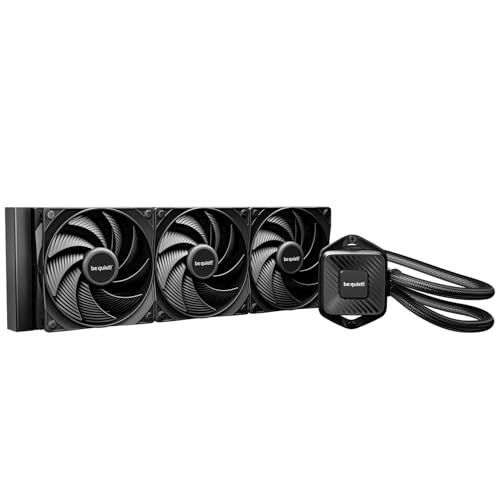
- Whisper-quiet PWM pump
- 3 quiet Pure Wings 3 fans
- 360mm radiator for high cooling power
Best For: Quiet, high-capacity cooling for demanding desktop CPUs
High-Airflow Cooling Pick
ARCTIC Liquid Freezer III Pro 360

- P12 Pro fans for strong, quiet operation
- Integrated VRM fan adds motherboard cooling
- Offset mounting improves CPU hotspot contact
Best For: Builders wanting efficient 360mm cooling with VRM assistance
Ultra-Quiet Premium Pick

- Pump noise absorber reduces vibration and sound
- NF-A12x25 G2 fans are tuned for low noise
- Includes paste and mounting extras
Best For: Near-silent premium desktops and workstation builds
RGB Quiet Cooling Pick
ARCTIC Liquid Freezer III Pro 360 A-RGB

- ARGB version of ARCTIC's 360mm cooler
- P12 Pro fans emphasize quiet efficiency
- Integrated VRM fan and offset mounting
Best For: ARGB builds that still need strong, efficient cooling
Quiet-Cooled Value Pick
Cooler Master Elite Liquid 240

- 240mm AIO with dual-chamber pump
- 2x low-noise ARGB PWM fans
- EPDM seal materials for leak prevention
Best For: Desktop builders wanting a balanced ARGB 240mm cooler
Low-Noise 360mm Pick

- 360mm radiator with 3 RS120 fans
- Pump rated at a whisper-quiet 20 dBA
- Daisy-chained wiring simplifies installation
Best For: Larger desktop builds needing quiet cooling and more radiator headroom
Quiet Budget-Friendly 360mm AIO
Thermalright Frozen Infinity 360 Black

- 360mm radiator with triple PWM fans
- Listed noise level up to 28.2 dB(A)
- ARGB infinity mirror pump and wide socket support
Best For: Builders wanting a value-oriented 360mm AIO with modest noise and flashy lighting
Premium LCD Showcase Cooler

- 2.1-inch IPS LCD for stats or custom images
- iCUE LINK hub simplifies wiring
- Low-noise FlowDrive pump with RX RGB radiator fans
Best For: Users who want a premium AIO with an LCD display and simplified cable management
Quiet Everyday 360mm AIO

- 27.2 dB listed noise level
- Gen S dual-chamber pump with improved copper base
- Includes CryoFuze paste and broad Intel/AMD support
Best For: Buyers seeking a quieter 360mm AIO with practical features and simple styling
Quiet Performance Pick – be quiet! Pure Loop 3 360mm
If you want quiet aio liquid coolers for desktop use without giving up cooling headroom, the be quiet! Pure Loop 3 360mm is built for demanding CPUs. Its whisper-quiet PWM pump, high-static-pressure Pure Wings 3 fans, and 360mm radiator are aimed at keeping temperatures in check during heavy workloads.
Best For: Users who want strong 360mm cooling with very quiet fan and pump operation.
Pros:
- Whisper-quiet PWM pump with a smooth 3-phase motor
- Three Pure Wings 3 120mm PWM fans are rated for quiet operation even at full speed
- High static pressure and funnel-shaped airflow outlet help radiator cooling
- Daisy-chain fan connection can simplify cabling
Cons:
- 360mm size requires case support for a large radiator
- No RGB lighting is mentioned in the supplied details
This is a practical choice if your priority is sustained cooling with restrained noise. The maintenance-friendly refill port and flexible tubing add convenience, while the overall design stays focused on performance-first quiet operation.
High-Airflow Cooling Pick – ARCTIC Liquid Freezer III Pro 360
For buyers comparing quiet aio liquid coolers for desktop builds, the ARCTIC Liquid Freezer III Pro 360 leans hard into airflow and thermal efficiency. It combines P12 Pro fans, native offset mounting, and an integrated VRM fan to help manage CPU and surrounding components under load.
Best For: Builders who want strong cooling performance and extra motherboard-area airflow in a 360mm AIO.
Pros:
- P12 Pro fans are designed to be more powerful and quieter than the P12, especially at low speeds
- Native offset mounting targets the CPU hotspot for better heat transfer
- Integrated VRM fan helps cool voltage converters
- Integrated cable management leaves only one visible motherboard connection
Cons:
- Noise-focused claims are balanced by a 3000 rpm maximum fan speed
- Requires room for a full 360mm radiator
This cooler is a strong fit if you want a feature-rich 360mm AIO that emphasizes practical cooling improvements. It is especially appealing for systems that benefit from better CPU hotspot contact and some extra VRM airflow.
Ultra-Quiet Premium Pick – Noctua NL-LC1-36 360mm
If your priority is one of the quietest aio liquid coolers for desktop use, the Noctua NL-LC1-36 is clearly tuned for low-noise performance. It pairs an Asetek Emma V2 platform with a pump noise absorber and Noctua NF-A12x25 G2 PWM fans to keep acoustic output restrained while still handling modern high-end CPUs.
Best For: Enthusiasts building a near-silent gaming PC or workstation with premium cooling parts.
Pros:
- Noise-optimized pump design with layered acoustic soundproofing
- Three NF-A12x25 G2 PWM fans are chosen for low-noise efficiency
- Large 360mm radiator supports strong thermal performance
- Includes SecuFirm2 mounting, NT-H2 paste, and AM5 paste guard
Cons:
- Premium positioning may be more than casual builds need
- Color scheme is distinctive and may not suit every setup
This model stands out if you want a polished, premium AIO that puts acoustics first. The included mounting accessories and thermal paste also make it a well-rounded choice for a clean, high-end desktop build.
RGB Quiet Cooling Pick – ARCTIC Liquid Freezer III Pro 360 A-RGB
The ARCTIC Liquid Freezer III Pro 360 A-RGB is a good fit if you want quiet aio liquid coolers for desktop systems and also want lighting in the build. It keeps the same cooling-focused platform as the non-RGB version, with P12 Pro fans, offset mounting, and an integrated VRM fan, while adding A-RGB styling.
Best For: Builders who want ARGB lighting alongside efficient 360mm cooling features.
Pros:
- P12 Pro fans are designed for stronger and quieter performance than the standard P12
- Native offset mounting improves contact with the CPU hotspot
- Integrated VRM fan helps manage motherboard component temperatures
- A-RGB version adds visual flair to the same cooling platform
Cons:
- ARGB lighting adds visual emphasis that some quiet-build users may not want
- Requires a case with support for a 360mm radiator
This version makes sense if you want the ARCTIC feature set but prefer a more styled build. It keeps the practical cooling layout intact, so you are mostly choosing between aesthetic preference and a plain finish.
Quiet-Cooled Value Pick – Cooler Master Elite Liquid 240
If you want quiet aio liquid coolers for desktop use without stepping up to a larger 360mm radiator, the Cooler Master Elite Liquid 240 is a practical 240mm option. It pairs a dual-chamber pump with low-noise ARGB PWM fans, and its widened radiator water channels are built to improve heat transfer while keeping the install straightforward.
Best For: Desktop builders who want a balanced 240mm cooler with ARGB and easy installation.
Pros:
- 2x low-noise ARGB PWM fans for controlled cooling.
- Dual-chamber pump design for steady liquid circulation.
- Widened radiator water channels increase cooling surface area.
- Industrial-grade EPDM seal materials help improve longevity and anti-leak prevention.
Cons:
- Noise level is listed at 39.5 dB, so it is not the quietest option here.
- 240mm size offers less cooling headroom than a 360mm radiator.
Overall, this is a solid mid-size pick if you want a feature-rich AIO with RGB appeal and a focus on dependable, everyday cooling rather than maximum thermal overhead.
Performance Quiet Pick – ARCTIC Liquid Freezer III Pro 240
For quiet aio liquid coolers for desktop systems that still need strong thermal handling, the ARCTIC Liquid Freezer III Pro 240 stands out with a focus on efficient cooling hardware. It uses P12 Pro fans, native offset mounting for Intel and AMD, and an integrated VRM fan to help manage nearby component temperatures.
Best For: Users who want a quieter 240mm cooler with advanced mounting and extra VRM cooling.
Pros:
- P12 Pro fans are described as more powerful and quieter than the P12, especially at low speeds.
- Native offset mounting helps align cooling more directly with the CPU hotspot.
- Integrated VRM fan helps lower voltage converter temperatures.
- Integrated cable management reduces visible wiring to a single motherboard connection.
Cons:
- The integrated VRM fan and dense feature set may be more than some basic builds need.
- Maximum rotational speed is listed at 3000 rpm, which suggests it can prioritize performance over absolute silence when pushed hard.
This is a strong choice if you want a 240mm AIO with thoughtful thermal engineering and better low-speed acoustics, especially for builds where CPU and surrounding component temperatures both matter.
Low-Noise 360mm Pick – CORSAIR Nautilus 360 RS
If you are comparing quiet aio liquid coolers for desktop rigs and want more radiator headroom, the CORSAIR Nautilus 360 RS is the largest option in this group. It combines a 360mm radiator with an efficient low-noise pump, RS120 fans, and daisy-chained connections that reduce cable clutter during installation.
Best For: Builders who want a larger 360mm cooler with low-noise operation and simpler wiring.
Pros:
- Whisper-quiet pump is rated at 20 dBA.
- Three RS120 fans provide strong airflow and high static pressure for the radiator.
- AirGuide technology and magnetic dome bearings are designed for cooling performance with low noise.
- Daisy-chained fan connections reduce wiring to a single PWM header.
Cons:
- 360mm size requires more case space than 240mm alternatives.
- At 36 dB, it is low-noise but not silent under all conditions.
For larger desktop builds, this is the most spacious cooling option here and a smart fit when you want quieter operation plus the extra radiator surface area of a 360mm AIO.
Quiet Budget-Friendly 360mm AIO – Thermalright Frozen Infinity 360 Black
If you want quiet aio liquid coolers for desktop with a 360mm radiator and strong visual flair, the Thermalright Frozen Infinity 360 Black is built around a practical balance of cooling and noise. It uses a triple-fan setup rated at up to 2000RPM with a listed noise level of up to 28.2 dB(A), plus an infinity mirror pump and ARGB sync for a more polished build.
Best For: Builders who want a reasonably quiet 360mm AIO with ARGB styling and broad platform support.
Pros:
- Triple PWM fans and a 360mm radiator for strong CPU cooling
- Listed noise level is 28.2 dB(A), which helps keep the system relatively restrained
- Infinity mirror pump design and synchronized 5V ARGB lighting
- Supports AMD AM4/AM5 and Intel LGA 1150 through 1851
Cons:
- Fans can reach 2000RPM, so it is not the quietest option under load
- Lighting-forward design may not suit minimal builds
Overall, this is a straightforward pick if you want a capable 360mm AIO with a lower-noise profile and a distinctive look. It makes the most sense for users who value cooling performance, compatibility, and price-conscious feature sets.
Premium LCD Showcase Cooler – CORSAIR Titan 360 RX LCD
Among quiet aio liquid coolers for desktop, the CORSAIR Titan 360 RX LCD focuses on premium cooling hardware and a standout display rather than being the absolute quietest model on paper. It combines a low-noise FlowDrive cooling engine, pre-mounted RX RGB fans, and an IPS LCD screen for system stats or custom graphics.
Best For: Builders who want a premium 360mm AIO with an LCD screen, simplified cable management, and strong feature depth.
Pros:
- 2.1-inch IPS LCD with 480×480 resolution and 600 cd/m² brightness
- iCUE LINK ecosystem and included System Hub reduce cable clutter
- FlowDrive cooling engine uses a three-phase motor and precision cold plate surface
- RX RGB fans are designed for high airflow and static pressure on radiators
Cons:
- Listed noise level is 36 dB, so it is not the quietest in this group
- Premium feature set may be more than some buyers need
This cooler stands out most for its LCD customization and clean iCUE LINK setup. If you want your desktop build to look high-end while still getting serious 360mm cooling, it is a compelling option.
Quiet Everyday 360mm AIO – Cooler Master 360L Core
If you’re shopping for quiet aio liquid coolers for desktop and want a balanced, easy-to-live-with 360mm option, the Cooler Master 360L Core is aimed at that middle ground. It pairs a Gen S dual-chamber pump with optimized PWM fan blades, and its listed noise level of 27.2 dB makes it one of the quieter picks in this group.
Best For: Users who want a quiet, practical 360mm AIO with straightforward styling and included thermal paste.
Pros:
- Listed noise level of 27.2 dB for a quieter operating profile
- Gen S dual-chamber pump helps target heat spots and improve flow
- Optimized PWM fan blades and enhanced frame aim to reduce turbulent noise
- Includes CryoFuze thermal paste and supports AMD AM5/AM4 and Intel LGA 1851/1700
Cons:
- No LCD or high-end ecosystem features
- Maximum fan speed tops out at 1800RPM, which may limit peak cooling headroom versus faster models
For buyers prioritizing quieter everyday use over flashy extras, this cooler is the most straightforward fit. It offers a sensible feature set, solid compatibility, and a noise rating that stands out for a 360mm AIO.
How We Picked the Best Quiet Aio Liquid Coolers for Desktop
For this roundup of Quiet Aio Liquid Coolers for Desktop, we prioritized noise control, radiator size, pump behavior, included fan quality, and compatibility with current sockets. We also looked for practical features that matter in real builds, such as easy mounting, cable management, and support for both mainstream and higher-wattage CPUs.
Quick Comparison
In general, 360mm coolers offer the best temperature headroom and often run quieter at the same load because their fans do not need to spin as fast. 240mm models are a better fit for smaller cases or more modest CPUs, while premium units may add LCDs, ARGB, or software control without changing the core cooling job.
Key Buying Factors for Quiet Aio Liquid Coolers for Desktop
Radiator Size and Case Clearance
Match the radiator to your case first. A 360mm model is ideal if your case supports it and you want lower fan speeds under load. If space is tight, a 240mm AIO can still be an excellent quiet option for midrange systems.
Pump and Fan Noise
Look for pumps designed to minimize vibration and fans tuned for low-noise operation at typical gaming and productivity loads. PWM control is important because it lets the system stay quiet at idle and only ramp up when needed.
CPU Heat Output
Heavier all-core workloads, overclocked processors, and high-end chips benefit from more cooling capacity. If your CPU runs hot, choose the larger radiator and stronger fan package rather than relying on appearance features alone.
Socket and Mounting Support
Check that the cooler supports your exact AMD or Intel socket. Good bracket hardware and clear instructions matter because a secure install can affect both temperatures and noise.
Who Should Buy Which Quiet Aio Liquid Coolers for Desktop?
If you want the quietest balance for a powerful desktop, start with a 360mm AIO. If your build is smaller or your CPU is less demanding, a 240mm model is usually easier to fit and still quieter than many air coolers under sustained load. Buyers who value aesthetics or monitoring can look for RGB or LCD-equipped models, but those extras should come after core acoustic and thermal performance.
For most shoppers, the best choice is the cooler that fits the case, supports the CPU, and can keep fan speeds low during your normal workload. That is the real path to a quieter desktop.