If you want near-flagship cooling without jumping to a larger radiator, 280mm AIO liquid coolers are a smart sweet spot. They pair two 140mm fans with enough surface area to handle strong CPUs while often staying quieter than smaller 240mm units.
In this roundup, we focus on models that balance thermal performance, noise levels, mounting support, and useful extras like RGB, LCDs, and easy cable management.
Best 10 280mm Aio Liquid Coolers Picks for 2026
Display-first premium pick
NZXT Kraken Elite 280 RGB White

- 2.72-inch IPS LCD adds major customization
- Turbine pump targets strong cooling with less noise
- Tool-free mounting and pre-applied paste ease setup
Best For: Showcase PCs that want LCD visuals and RGB
Premium LCD Showcase
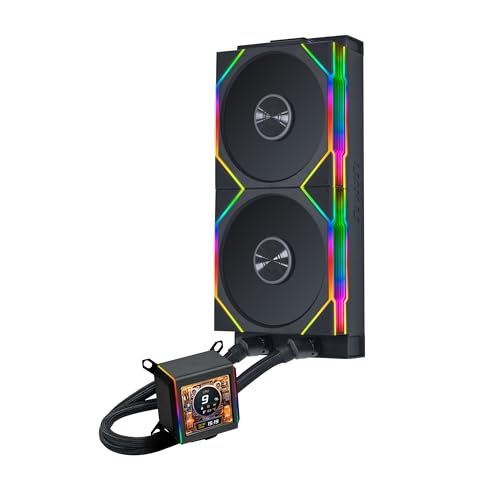
- 2.88-inch IPS LCD with 480x480 resolution
- Asetek 8th Gen pump up to 3600 RPM
- Pre-installed 140mm wireless RGB fans
Best For: premium display builds with wireless fan control
LCD Feature Pick
Thermaltake TH360 V3 Ultra ARGB

- 3.95-inch TFT LCD for graphics and system data
- Rotatable pump head helps with screen alignment
- 360mm single-frame fan design supports high airflow
Best For: buyers comparing large-screen AIOs who can fit 360mm
Value RGB Performer

- Rotatable blockhead up to 270 degrees
- Radiator-integrated pump for lower noise
- Dual 140mm aRGB PWM fans
Best For: Users who want an RGB 280mm AIO with a flexible block orientation
Cable-Minimal Ecosystem Pick

- Single-hub iCUE LINK connectivity cuts cable clutter
- Hidden radiator-side connections for a cleaner look
- QX140 RGB fans with 34 LEDs per fan
Best For: Builders who want a 280mm AIO that emphasizes cable reduction and RGB
Quiet iCUE Link pick – CORSAIR Titan 280 RX RGB
If you want one of the more streamlined 280mm aio liquid coolers with strong cooling and less cable clutter, the CORSAIR iCUE Link Titan 280 RX RGB is built around convenience as much as performance. Its FlowDrive cooling engine, pre-mounted RX RGB fans, and included iCUE LINK System Hub make it a practical fit for modern Intel and AMD builds.
Best For: Builders who want a tidy, low-noise 280mm AIO with iCUE LINK integration and broad socket support.
Pros:
- iCUE LINK ecosystem reduces cable clutter with universal connectors and a single hub connection
- FlowDrive cooling engine uses a three-phase pump motor and precision cold plate for efficient contact
- RX RGB fans are designed for radiator use with high airflow, static pressure, and low noise
- Supports PWM control and Zero RPM mode for quieter idle operation
Cons:
- Requires iCUE LINK ecosystem planning for the cleanest setup
- Maximum fan speed is capped at 1,700 RPM, which may matter for buyers prioritizing raw fan speed
Overall, this is a polished AIO for users who value easy cable management and a quiet, integrated build. It balances modern connectivity with enough cooling hardware to handle mainstream high-performance CPUs.
Whisper-quiet value pick – be quiet! Pure Loop 3 280mm
The be quiet! Pure Loop 3 280mm is aimed at users who want dependable cooling from one of the more understated 280mm aio liquid coolers. It combines a high-performance PWM pump, 2 Pure Wings 3 140mm fans, and a design that emphasizes quiet operation and easier installation.
Best For: Users who want a quiet 280mm AIO for overclocked AMD or Intel systems without extra complexity.
Pros:
- Whisper-quiet PWM pump with a 6-pole, 3-phase motor
- Pure Wings 3 fans provide high static pressure for radiator cooling
- Daisy chain function helps reduce cable clutter
- Accessible refill port and flexible tubes make maintenance easier
Cons:
- RGB lighting is not a focus here
- Rated airflow is lower than some more aggressive 280mm options
This model makes sense if you care more about acoustics and practicality than flashy extras. It is a strong fit for a quiet performance build that still needs serious thermal headroom.
Display-first premium pick – NZXT Kraken Elite 280 RGB White
The NZXT Kraken Elite 280 RGB is one of the most feature-rich 280mm aio liquid coolers here, pairing a custom Turbine pump with a large LCD display and integrated RGB styling. It is designed for builders who want cooling hardware that also acts as a visual centerpiece.
Best For: PC builders who want a premium 280mm AIO with a customizable LCD and synchronized RGB.
Pros:
- Large 2.72-inch IPS LCD with high resolution, 60 Hz refresh rate, and strong brightness
- Can display GIFs, images, real-time system stats, and media integrations
- Custom Turbine pump is tuned for strong cooling with less noise
- Tool-free mounting and pre-applied thermal paste simplify installation
Cons:
- Best suited to buyers who will actually use the LCD and RGB features
- Single-frame fan design may not appeal to everyone’s airflow or styling preferences
If you want your cooler to do more than manage temperatures, this NZXT stands out. It is a premium choice for a showcase system where customization and appearance matter as much as thermal performance.
Cooling-max performance pick – ARCTIC Liquid Freezer III Pro 280
The ARCTIC Liquid Freezer III Pro 280 is built for buyers who want serious thermal performance from one of the more aggressive 280mm aio liquid coolers. It combines high-speed P14 PRO fans, an integrated VRM fan, and offset mounting designed to improve contact with the CPU hotspot.
Best For: Performance-focused builders who want strong cooling, low noise, and extra attention to CPU and VRM temperatures.
Pros:
- P14 PRO fans are tuned for more power at any speed and stronger cooling under load
- Integrated VRM fan helps cool voltage converters for more reliable performance
- Native offset mounting improves heat transfer to the CPU hotspot
- Integrated cable management leaves only a single visible motherboard cable
Cons:
- Performance-focused design may be more than casual users need
- High maximum fan speed may not be the top priority for silence-first buyers
This is the pick for users who care most about cooling efficiency and practical engineering. It packs a lot of function into a clean setup, making it a strong choice for demanding CPUs and heavier workloads.
Premium LCD Showcase – Lian Li Galahad II LCD 280mm
If you want one of the more display-focused 280mm aio liquid coolers, the Lian Li Galahad II LCD 280mm stands out with a large 2.88-inch IPS screen and wireless fan control. It pairs an Asetek 8th Gen pump with pre-installed 140mm TL RGB fans, making it a strong pick for builders who want both cooling hardware and a visual centerpiece without a lot of setup hassle.
Best For: Builders who want a premium 280mm AIO with an LCD screen, wireless fan management, and a clean-looking install.
Pros:
- 2.88-inch 480×480 IPS LCD screen adds highly customizable visual flair
- Asetek 8th Gen pump is rated up to 3600 RPM for strong cooling support
- Pre-installed 2x 140mm TL wireless fans simplify radiator setup
- 45-degree rotating tube connectors help with flexible mounting
Cons:
- Wireless fan and ARGB control depends on the included USB controller and L-Connect 3
- More focused on premium features than minimalist value pricing
- Large LCD screen may be overkill if you only want basic cooling
This is a feature-rich 280mm AIO built for users who care about display customization and cable-light management as much as thermals. If your build is meant to be shown off, the Galahad II LCD delivers the most visual appeal of the three.
High-Performance Workhorse – ARCTIC Liquid Freezer III Pro 280 A-RGB
The ARCTIC Liquid Freezer III Pro 280 A-RGB is one of the most practical 280mm aio liquid coolers here, built around airflow, contact pressure, and heat transfer rather than flashy extras. It uses ARCTIC’s P14 Pro fans, native offset mounting, and an integrated VRM fan, so it is aimed at builders who want efficient cooling and thoughtful platform support.
Best For: Users who want a no-nonsense 280mm AIO with strong cooling design and long warranty coverage.
Pros:
- P14 Pro fans are designed to be more powerful and quieter at low speeds
- Native offset mounting helps align the cold plate with the CPU hotspot
- Integrated VRM fan can help lower voltage converter temperatures
- 6-year warranty adds confidence for long-term use
Cons:
- No LCD screen or other showpiece features
- Integrated cable management keeps things tidy but is still more functional than flashy
- Best suited to users who value performance over visual customization
This model is a strong fit if your priority is effective CPU cooling with extras that make real-world use easier. It focuses on thermal efficiency and clean installation, which is exactly what many 280mm AIO buyers want.
LCD Feature Pick – Thermaltake TH360 V3 Ultra ARGB
Thermaltake’s TH360 V3 Ultra ARGB is not a 280mm unit, but it is still worth noting if you are comparing display-heavy aio liquid coolers and want a larger screen-driven design. It combines a 3.95-inch TFT LCD, a rotatable pump head, and a single-frame 360mm fan setup, so it is built for builders who want customization and easy visual alignment.
Best For: Builders who want a large LCD display and rotatable pump head in a 360mm cooler.
Pros:
- 3.95-inch TFT LCD can show custom graphics and system data
- Rotatable pump head makes screen orientation easier to match the build
- Single-frame fan design simplifies maintenance and installation
- High airflow and up to 2500 RPM fan speed support strong cooling potential
Cons:
- It is a 360mm cooler, so it does not fit the 280mm size target
- Screen-focused design may be more than some buyers need
- Requires Thermaltake’s LCD screen software for display control
This cooler makes sense if you are cross-shopping display-centric AIOs and can accommodate a 360mm radiator. For buyers locked into 280mm aio liquid coolers, it serves more as a benchmark than a direct fit.
Premium Display Cooling – NZXT Kraken 280 LCD
If you want 280mm aio liquid coolers with more personality than a standard black block, the NZXT Kraken 280 stands out for its customizable 1.54-inch square LCD. It still focuses on core cooling basics, with an Asetek pump, static pressure fans, and a simple single-cable setup for cleaner installation.
Best For: Builders who want an LCD-equipped 280mm AIO with easy customization and a tidy install.
Pros:
- 1.54-inch square LCD can show GIFs, images, performance stats, music, and web content through CAM
- Asetek pump runs up to 2,800 RPM for efficient coolant circulation
- Static pressure fans use fluid dynamic bearings for strong cooling with minimal noise
- Single breakout cable from pump to motherboard simplifies setup
Cons:
- LCD features depend on NZXT CAM software
- Noise level is listed at 32.1 dB, so it is not the quietest option on paper
This is a good pick if you value display customization and straightforward installation as much as raw cooling. It combines premium styling with the practical hardware needed for a modern 280mm AIO build.
Value RGB Performer – MSI MAG CoreLiquid 280R
Among 280mm aio liquid coolers, the MSI MAG CORELIQUID 280R focuses on practical cooling and RGB flexibility. Its rotatable blockhead helps with orientation, while the radiator-integrated pump is designed to reduce noise and keep the pump farther from heat.
Best For: Users who want an RGB 280mm AIO with a flexible block orientation and a reliability-first design.
Pros:
- Rotatable cap can turn up to 270 degrees to keep the block upright
- Pump integrated into the radiator for noise reduction and longer life expectancy
- Dual 140mm aRGB PWM fans support software-controlled speed and lighting
- Listed at a low 16.7 dB and 4,200 RPM pump speed
Cons:
- RGB and fan tuning rely on software control
- Heavier focus on function than premium display features
Overall, this is a solid utility-first choice if you want a 280mm AIO with RGB lighting, flexible mounting orientation, and a design that aims to keep pump wear and noise down.
Cable-Minimal Ecosystem Pick – Corsair iCUE LINK H115i RGB
If you are comparing 280mm aio liquid coolers and want the cleanest wiring experience, the CORSAIR iCUE LINK H115i RGB is built around simplified hidden connections. The included iCUE LINK System Hub, pre-installed QX140 RGB fans, and hidden radiator-side connections make it geared toward neat, modern builds.
Best For: Builders who want a 280mm AIO that emphasizes cable reduction, RGB, and an ecosystem-style setup.
Pros:
- iCUE LINK ecosystem connects components through universal connectors on a single hub
- Hidden connection design keeps cables out of sight for a cleaner build
- Pre-installed QX140 RGB fans deliver strong airflow with 34 RGB LEDs per fan
- Supports PWM control up to 2,000 RPM and 0 RPM mode at low temperatures
Cons:
- Relies on the iCUE LINK ecosystem, which adds platform-specific dependence
- Noise level is listed at 37 dB, so quiet operation may vary with fan settings
This model is best if your priority is an orderly build with modern RGB hardware and less cable clutter. It is a strong fit for users who want the 280mm AIO experience to feel as polished as the rest of the system.
How We Picked the Best 280mm Aio Liquid Coolers
We focused on 280mm Aio Liquid Coolers that make sense for real buyers, not just spec sheets. Priority went to cooling capacity, acoustic behavior, mounting compatibility, build quality, and the value of included software or display features. We also considered radiator thickness, fan quality, and whether the design is practical for modern Intel and AMD builds.
Quick Comparison
Most 280mm units are aimed at users who want a step up from 240mm cooling without the case-fit challenges of a 360mm radiator. The main differences usually come down to noise tuning, pump design, fan pressure, RGB or LCD features, and how easy the cooler is to install and control. If you care most about a clean build, look at cable-reduction systems. If you care most about visuals, display models stand out. If you care most about thermals per dollar, simpler non-LCD options usually win.
Key Buying Factors for 280mm Aio Liquid Coolers
Case Clearance and Radiator Support
Before buying, confirm your case supports a 280mm radiator in the top or front position. Some cases accept 280mm only in specific locations, and thicker radiators can interfere with motherboard heatsinks or RAM clearance.
CPU Heat Output
These coolers are a good fit for mid-to-high power CPUs, including performance-focused gaming chips and many productivity builds. For heavily overclocked processors, look for strong fan static pressure, a reliable pump, and a radiator design known for sustained loads.
Noise Versus Performance
Two 140mm fans can move a lot of air at lower RPM, which often helps reduce noise. Pay attention to fan curve tuning and pump acoustics if you want a quieter system, especially during gaming or long rendering sessions.
Features That Matter
RGB, LCD screens, and software control are nice extras, but they should not outweigh core cooling quality. If you prefer simplicity, choose a straightforward unit with strong stock performance. If you want a centerpiece build, an LCD or premium lighting system can be worth the tradeoff.
Who Should Buy Which 280mm Aio Liquid Coolers?
Choose a 280mm AIO if you want a strong balance of cooling and noise in a mid-tower or larger case. Gamers with high-end CPUs, creators who run sustained workloads, and builders who want premium thermals without a massive radiator are the best fit. If your case is compact or your CPU is modest, a smaller cooler may be more practical. If you have lots of clearance and want maximum cooling headroom, a larger 360mm option can still be the better choice.