Choosing the right cooler can make a big difference in gaming performance, noise levels, and long-term reliability. The best aio liquid coolers for gaming pc builds combine strong thermal headroom with easy installation and the right fit for your case.
In this roundup, we focus on practical options for high-end CPUs, quiet setups, and showcase builds, so you can match cooling power and features to your budget and hardware.
Best 10 Aio Liquid Coolers for Gaming PC Picks for 2026
Best Cooling Headroom
ARCTIC Liquid Freezer III Pro 360 A-RGB

- Native offset mounting targets the CPU hotspot.
- Integrated VRM fan helps cool voltage converters.
- P12 Pro fans and cable management focus on performance and cleanup.
Best For: Gamers wanting performance-first 360mm cooling with added VRM support
Display-First Gaming Build
ASUS TUF Gaming LC III 360 ARGB LCD
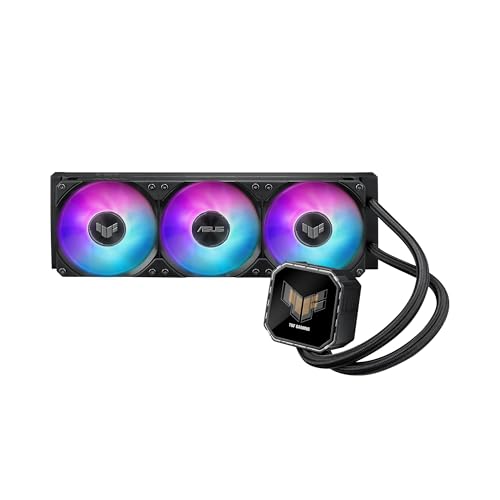
- 2.8-inch IPS LCD shows GIFs or hardware stats.
- Integrated fans make installation easier.
- 360mm design pairs airflow, static pressure, and TUF styling.
Best For: Gamers who want an LCD-equipped 360mm cooler with TUF branding
Showcase Lighting and LCD
NZXT Kraken Plus 360 RGB White

- 1.54-inch LCD supports temps, GIFs, and web integrations.
- Turbine pump is tuned for high flow and low noise.
- Single-frame fan and breakout cable simplify the build.
Best For: Gamers wanting a white 360mm AIO with LCD customization and easy installation
Quiet Value AIO Pick
CORSAIR Nautilus 360 RS 360mm AIO Cooler

- 20 dBA low-noise pump
- Daisy-chained RS120 fan setup
- Pre-applied thermal paste included
Best For: Quiet, no-fuss gaming PC cooling
Display Showcase Choice
NZXT Kraken Elite 360 RGB White

- 2.72-inch IPS LCD display
- Custom media and system stats support
- Turbine pump for high-flow cooling
Best For: Showcase gaming PCs with premium visual flair
Premium ROG LCD Option
ASUS ROG Strix LC III 360 ARGB LCD

- 2.1-inch rotatable IPS LCD
- Asetek Gen7 V2 pump
- Reinforced sleeved tubing and ARGB fans
Best For: ROG-style gaming builds with LCD flair
Quiet Value Pick
CORSAIR Nautilus 360 RS ARGB White

- 360mm AIO with low-noise 20 dBA pump
- Pre-applied paste and convex cold plate
- Daisy-chained ARGB fans cut cable clutter
Best For: Quiet, straightforward gaming PC builds
Premium LCD Pick
ASUS ROG RYUJIN III 360 ARGB Extreme

- Asetek Gen8 V2 pump for high-flow cooling
- 3.5-inch 640x480 LCD for custom content
- Magnetic fans and VRM-focused embedded fan
Best For: Enthusiasts who want display features and cooling performance
Connected Premium Pick
CORSAIR Titan 360 RX LCD Black

- iCUE LINK setup reduces cable clutter
- 2.1-inch IPS LCD with 480x480 resolution
- FlowDrive pump and RX RGB radiator fans
Best For: Corsair ecosystem builders wanting an LCD AIO
Best Cooling Headroom – ARCTIC Liquid Freezer III Pro 360 A-RGB
If you want an aio liquid cooler for gaming pc use that prioritizes raw cooling efficiency, the ARCTIC Liquid Freezer III Pro 360 A-RGB brings a strong set of performance-focused features. Its native offset mounting, integrated VRM fan, and high-speed P12 Pro fans are all aimed at improving heat transfer and keeping surrounding components stable under load.
Best For: Gamers who want a high-performance 360mm cooler with extra attention to CPU and VRM cooling.
Pros:
- Native offset mounting targets the CPU hotspot for better heat transfer.
- Integrated VRM fan helps cool voltage converters for steadier performance.
- P12 Pro fans are designed to be stronger and quieter at lower speeds.
- Integrated cable management reduces visible motherboard cabling.
Cons:
- Large 360mm size may limit case compatibility.
- No LCD display or software-driven visual customization.
Overall, this is a very practical pick if your priority is efficient thermal handling rather than extra display features. The 6-year warranty and Intel/AMD socket support add to its appeal for a long-term gaming build.
Display-First Gaming Build – ASUS TUF Gaming LC III 360 ARGB LCD
The ASUS TUF Gaming LC III 360 ARGB LCD is built for aio liquid coolers for gaming pc setups that want a strong visual centerpiece alongside capable cooling. Its 2.8-inch IPS LCD can show custom GIFs or live hardware stats, while the pre-installed integrated fans are designed to streamline installation and maintain airflow and static pressure.
Best For: Builders who want a 360mm cooler with an LCD screen and a TUF-themed look.
Pros:
- 2.8-inch IPS LCD supports custom GIFs and live hardware monitoring.
- Pre-installed integrated fans simplify the build process.
- High airflow and static pressure suit radiator use.
- 6-year warranty and wide Intel/AMD socket support improve flexibility.
Cons:
- Large 360mm radiator requires compatible case space.
- Noise rating reaches 37.4 dB(A) at higher speeds.
This cooler makes the most sense if you want your AIO to be both functional and visually prominent. The LCD and TUF software customization add personality, while the 360mm design gives it the cooling capacity expected in a modern gaming build.
Clean Cable Setup – CORSAIR iCUE Link Titan 240 RX RGB
For a compact aio liquid cooler for gaming pc builds, the CORSAIR iCUE Link Titan 240 RX RGB focuses on simplified wiring and quiet performance. The included iCUE LINK System Hub, sequential component connections, and pre-mounted RX RGB fans are all meant to reduce cable clutter while still delivering radiator-ready airflow and static pressure.
Best For: Builders who want a tidy 240mm AIO with easy cable management and low-noise operation.
Pros:
- iCUE LINK ecosystem connects components through one hub for cleaner wiring.
- FlowDrive cooling engine is designed for efficient CPU contact and pumping.
- Pre-mounted RX RGB fans are built for radiator airflow and static pressure.
- Zero RPM mode can eliminate fan noise at low temperatures.
Cons:
- 240mm size offers less cooling surface than 360mm alternatives.
- Requires iCUE LINK ecosystem integration for full simplicity benefits.
This is a smart choice if you value a neat build and quieter operation over maximum radiator size. Its 6-year warranty and support for current Intel and AMD sockets make it a solid long-term option for many gaming systems.
Showcase Lighting and LCD – NZXT Kraken Plus 360 RGB White
The NZXT Kraken Plus 360 RGB is aimed at aio liquid coolers for gaming pc builds that want a clean white finish, a customizable LCD, and easy setup. Its Turbine pump is designed for high flow and head pressure, while the RGB Core fan and single breakout cable help keep the install simple and visually tidy.
Best For: Builders who want a white 360mm AIO with LCD customization and straightforward cable management.
Pros:
- 1.54-inch square LCD can show temps, GIFs, images, and web integrations.
- Turbine pump is built for efficient, low-noise cooling.
- RGB Core single-frame fan uses one cable for a cleaner install.
- Pre-applied thermal paste and tool-free brackets speed up setup.
Cons:
- Power connector is 3-pin rather than the more common 4-pin fan lead.
- 360mm format needs adequate case clearance.
Overall, this cooler is a strong match if you want your AIO to look as polished as the rest of your build. It combines customization, simplified installation, and broad socket support into one gaming-friendly package.
Quiet Value AIO Pick – CORSAIR Nautilus 360 RS 360mm AIO Cooler
If you want aio liquid coolers for gaming pc builds that emphasize strong cooling without a lot of noise, the CORSAIR Nautilus 360 RS is an easy, practical option. Its 360mm radiator, low-noise pump, and RS120 fans are aimed at keeping modern CPUs cool while simplifying the install with daisy-chained fan connections and pre-applied thermal paste.
Best For: Builders who want a straightforward 360mm AIO with quiet operation and clean cable management.
Pros:
- Low-noise pump is rated at a whisper-quiet 20 dBA.
- RS120 fans are built for strong radiator airflow and high static pressure.
- Daisy-chained fan connections reduce wiring clutter.
- Pre-applied thermal paste helps speed up installation.
Cons:
- No LCD or RGB display features.
- Uses a simple black design rather than a premium showpiece style.
This cooler makes sense if your priority is dependable cooling and easier cable routing over flashy extras. It covers the essentials well for a gaming PC focused on performance and quieter operation.
Display Showcase Choice – NZXT Kraken Elite 360 RGB White
For aio liquid coolers for gaming pc builds where looks matter as much as performance, the NZXT Kraken Elite 360 RGB stands out with a large LCD, synced RGB, and a high-flow pump. It is built for users who want to monitor system stats or show custom media while still getting strong 360mm liquid cooling.
Best For: Gamers who want a premium showcase cooler with an LCD and polished RGB integration.
Pros:
- Large 2.72-inch IPS LCD with 640 x 640 resolution.
- Can display GIFs, images, system performance, and media integrations.
- Custom-designed Turbine pump is tuned for high flow and head pressure.
- Single-frame RGB Core fan keeps the radiator setup tidy.
Cons:
- Premium feature set is likely overkill if you only want basic cooling.
- Requires CAM software for full display and RGB control.
This is the pick for builders who want their cooler to be part of the system’s visual identity. If your gaming PC lives in a windowed case, the LCD and RGB features make a strong case.
Premium ROG LCD Option – ASUS ROG Strix LC III 360 ARGB LCD
If you are comparing aio liquid coolers for gaming pc upgrades and want a mix of styling, durability, and strong cooling hardware, the ASUS ROG Strix LC III 360 ARGB LCD is built to stand out. It adds a 2.1-inch IPS LCD, Asetek Gen7 V2 pump, and premium ARGB fans while keeping compatibility broad across current Intel and AMD sockets.
Best For: ROG-themed builds that want a durable 360mm cooler with an LCD and premium fan setup.
Pros:
- 2.1-inch IPS LCD with 360-degree rotatable graphics.
- Asetek Gen7 V2 pump is designed for strong cooling performance.
- Premium ROG ARGB fans include optimized acoustics and 0dB technology.
- Reinforced sleeved tubing adds durability.
Cons:
- RGB and LCD features add complexity compared with simpler AIOs.
- Its styling is most appealing in ROG-centered builds.
This cooler is a strong fit if you want a feature-rich AIO that looks at home in an RGB-heavy gaming rig. The long warranty and durable tubing add extra appeal for builders thinking about the long term.
Quiet Value Pick – CORSAIR Nautilus 360 RS ARGB White
If you want aio liquid coolers for gaming pc builds that prioritize simple installation and strong everyday cooling, the CORSAIR Nautilus 360 RS ARGB is a practical pick. It pairs a low-noise pump with 360mm radiator capacity, pre-applied thermal paste, and daisy-chained fan connections to keep setup straightforward while still delivering solid thermal support.
Best For: Builders who want a clean, quiet 360mm AIO with easy wiring and ARGB fans.
Pros:
- Low-noise pump is rated at a whisper-quiet 20 dBA.
- Pre-applied thermal paste and convex cold plate help simplify installation.
- Daisy-chained RS ARGB fans reduce cable clutter.
- Compatible with Intel LGA 1851/1700 and AMD AM5/AM4.
Cons:
- ARGB control depends on a compatible motherboard.
- Uses direct motherboard connections rather than a more integrated controller ecosystem.
- Focuses on practical cooling features rather than premium display extras.
Overall, this cooler is a good fit if your priority is dependable 360mm cooling without a complicated build process. It leans more toward efficiency and noise control than flashy extras, which makes it appealing for sensible gaming PC upgrades.
Premium LCD Pick – ASUS ROG RYUJIN III 360 ARGB Extreme
For aio liquid coolers for gaming pc setups that need premium cooling features and a standout visual centerpiece, the ASUS ROG RYUJIN III 360 ARGB Extreme brings a lot to the table. It combines an Asetek Gen8 V2 pump, thickened high-airflow ARGB fans, and a 3.5-inch 640×480 LCD for custom animations or live monitoring.
Best For: Enthusiasts who want top-tier cooling features plus a customizable LCD screen.
Pros:
- Asetek Gen8 V2 pump is designed for high flow and lower impedance.
- 3.5-inch LCD supports GIFs and live system monitoring.
- Magnetic fans snap together to streamline installation.
- Embedded pump fan helps cool motherboard VRMs.
Cons:
- Feature-rich design is likely more than a basic build needs.
- Software control adds another layer to setup and tuning.
- LCD and premium hardware focus may place it in a higher-end category.
This cooler stands out if you want your AIO to do more than just manage temperatures. It is best viewed as a premium, feature-packed option for builders who value both performance hardware and a high-impact aesthetic.
Connected Premium Pick – CORSAIR Titan 360 RX LCD Black
If you’re comparing aio liquid coolers for gaming pc builds and want a streamlined, modern setup, the CORSAIR Titan 360 RX LCD is built around easy system integration. Its iCUE LINK connection approach, FlowDrive cooling engine, and 2.1-inch IPS LCD make it a strong fit for builders who want both tidy cabling and a polished visual display.
Best For: Builders who want iCUE LINK convenience, an LCD screen, and high-end 360mm cooling.
Pros:
- iCUE LINK ecosystem simplifies cable routing with universal connectors.
- 2.1-inch IPS LCD offers GIFs, temperature readouts, and custom images.
- FlowDrive engine uses a three-phase motor and precision cold plate profile.
- Pre-mounted RX RGB fans are tuned for radiator airflow and low noise.
Cons:
- Best experience depends on using the iCUE LINK ecosystem.
- Included system hub adds another component to plan around.
- LCD and ecosystem features may be unnecessary for simple builds.
As a whole, this cooler is aimed at users who want a cleaner build experience without giving up premium visual and thermal features. It is especially appealing if you prefer a connected, coordinated Corsair setup with less cable clutter.
How We Picked the Best Aio Liquid Coolers for Gaming PC
We prioritized cooling capacity, pump and fan design, noise control, radiator size, software or motherboard integration, and compatibility with modern Intel and AMD platforms. For Aio Liquid Coolers for Gaming PC builds, we also weighed the value of extras like LCDs, RGB, and daisy-chain cabling against real-world usability.
Quick Comparison
As a rule, 360mm models offer the most thermal headroom for high-power gaming CPUs, while 240mm units are better for compact cases or midrange systems. LCD-equipped coolers add display customization, but they usually cost more and are most worthwhile for showcase PCs. Simpler designs often deliver the best value if your priority is cooling performance over aesthetics.
Key Buying Factors for Aio Liquid Coolers for Gaming PC
Radiator Size and Case Clearance
Match the radiator to your case first. A 360mm cooler typically handles hotter chips better, but only if your case supports the length, thickness, and fan clearance. Check top, front, and RAM clearance before buying.
CPU Heat Output
Higher-end gaming CPUs can benefit from larger radiators and stronger pumps. If you run a flagship chip, look for models designed for sustained boost clocks and heavier loads.
Noise Levels
Low-noise fans and efficient pump profiles matter if your PC sits near your desk. Quiet operation is especially important for streamers, creators, and late-night gamers.
Features and Ecosystem
LCD screens, RGB, and app control are nice quality-of-life upgrades, but they should not come at the expense of cooling performance. Consider whether you want a direct motherboard connection, brand software, or simpler plug-and-play wiring.
Platform Compatibility
Confirm support for your current socket and any upgrade path. Most modern Aio Liquid Coolers for Gaming PC systems support Intel LGA 1700/1851 and AMD AM5, but it is still worth checking mounting hardware.
Who Should Buy Which Aio Liquid Coolers for Gaming PC?
Choose a 360mm cooler if you want the strongest balance of temperature control and quiet operation for a high-end gaming build. Pick a 240mm model if your case is smaller or your CPU is more modest. If visual customization matters, an LCD cooler is the best fit for showcase rigs. If value and simplicity matter most, a no-frills design with strong fans and a reliable pump is usually the smartest buy.