Overclocking pushes more heat through your CPU, so the right cooler can make the difference between stable performance and thermal throttling. This roundup focuses on strong, practical options for builders who want real thermal headroom.
From premium dual-tower air coolers to high-performance 360mm AIOs, these picks cover a range of budgets, case sizes, and noise targets without wasting space on hype.
Best 10 Cpu Coolers for Overclocking Picks for 2026
Quiet High-End Air Cooling
be quiet! Dark Rock Pro 5 for Overclocking PCs

- 7 copper heat pipes and dual Silent Wings fans
- Quiet and Performance speed modes
- 280W rated air cooler for heavy loads
Best For: Overclocked PCs that need strong cooling with low noise
Top-Tier Quiet Air Cooler
Noctua NH-D15 chromax.Black Overclocking Pick

- Dual-tower heatsink with 6 heatpipes
- Two NF-A15 140mm PWM fans
- Quiet cooling performance for high-end builds
Best For: Users who want proven, quiet cooling for overclocking
High-Performance AIO Cooling
ARCTIC Liquid Freezer III Pro 360 for OC

- 360mm AIO with P12 PRO fans
- Contact frame and offset mounting
- Integrated VRM fan and cleaner cable routing
Best For: Intel and AMD overclocking builds that want efficient liquid cooling
High-Compatibility Quiet Cooler
Noctua NH-D15S Black for Overclocking
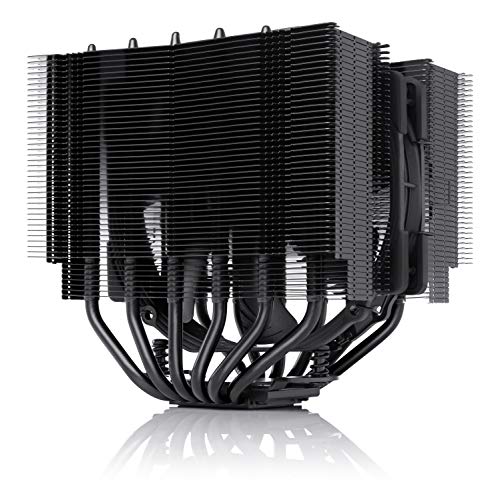
- Dual-tower design with one NF-A15 fan
- Better RAM and PCIe clearance than many large coolers
- Includes NT-H1 paste and SecuFirm2 mount
Best For: Overclockers who need strong cooling with better hardware clearance
Flagship high-contact air cooling
Noctua NH-D15 G2 HBC for Intel LGA1700

- HBC base targets concave LGA1700 CPUs
- 8 heatpipes and larger dual-tower surface
- Dual G2 fans balance cooling and noise
Best For: Intel LGA1700 overclocking with hot flagship CPUs
Budget-friendly performance tower

- 4 heat pipes with a copper base
- PWM fan from 690 to 2,500 RPM
- Easy install for AM5 and LGA 1700/1851
Best For: Mainstream builds needing a simple cooling upgrade
High-value dual tower upgrade
Thermalright Peerless Assassin 120 SE V2

- Dual-tower design with 6 heat pipes
- Dual 120mm PWM fans up to 1850 RPM
- Wide support for AM4, AM5, and LGA1700
Best For: Builders wanting strong value and dual-fan cooling
Quiet Double-Tower Value
be quiet! Pure Rock Pro 3 Black

- 6 heat pipes and nickel-plated base for strong thermal transfer
- Double-tower layout with compact offset improves compatibility
- 120mm PWM fan uses optimized blades and funnel-shaped airflow
Best For: Overclocked systems and quiet-leaning air-cooling builds
Budget Dual-Fan Performer
Thermalright Peerless Assassin 120 SE Black

- Dual-tower design with six heat pipes for better cooling
- Two PWM fans deliver up to 66.17 CFM airflow
- Memory cut corner layout helps avoid RAM interference
Best For: Value-minded builders needing strong air cooling for overclocking
High-RPM Cooling Pick
Thermalright Peerless Assassin 120 Black V3
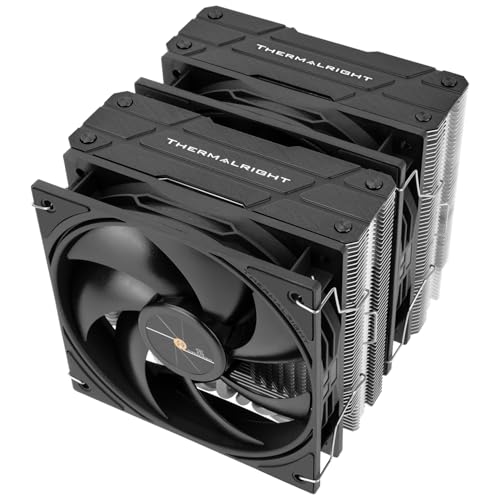
- 2000 RPM PWM fans for stronger cooling potential
- Dual-tower design with six plated heat pipes and copper base
- AGHP heat pipe tech helps in vertical or horizontal installs
Best For: Performance-focused builds needing higher airflow for overclocking
Quiet High-End Air Cooling – be quiet! Dark Rock Pro 5 for Overclocking PCs
If you want cpu coolers for overclocking that lean toward quiet operation without giving up serious thermal headroom, the Dark Rock Pro 5 is built for exactly that kind of build. Its 7 heat pipes, dual Silent Wings PWM fans, and 280W cooling rating make it a strong fit for high-performance systems pushing sustained loads.
Best For: Overclocked builds that need strong air cooling with low noise and a clean black design.
Pros:
- 7 copper heat pipes and a high-end dual-fan layout for strong heat handling
- Speed Switch lets you choose Quiet or Performance Mode
- Decoupled fan mounting helps reduce vibration and turbulence noise
- Simple top-down installation with a black mounting kit
Cons:
- Large dual-tower design may be challenging in tighter cases
- Best performance depends on using Performance Mode
The Dark Rock Pro 5 stands out if you want premium air cooling with a focus on acoustics and overclocking support. It is a polished choice for builders who want a powerful cooler that still keeps the system restrained and refined.
Top-Tier Quiet Air Cooler – Noctua NH-D15 chromax.Black Overclocking Pick
Among cpu coolers for overclocking, the NH-D15 chromax.Black is a classic pick for builders who want maximum quiet cooling efficiency in an all-black finish. Its extra-wide dual-tower design, 6 heatpipes, and dual NF-A15 fans are designed to deliver performance that rivals many all-in-one water coolers.
Best For: High-end overclockers and silent-PC builders who want proven air cooling performance.
Pros:
- Dual-tower heatsink with 6 heatpipes for strong cooling capacity
- Dual NF-A15 fans with PWM control and Low-Noise Adaptors
- Includes NT-H1 thermal paste and SecuFirm2 mounting hardware
- Compatible with Intel LGA1851/1700 and AMD AM5/AM4
Cons:
- Large footprint may limit case and RAM clearance in some builds
- Single color theme may not suit every aesthetic
This is the kind of cooler you choose when reliability and proven results matter more than flashy extras. For overclocking systems that still need quiet operation, it remains one of the safest high-end air-cooling bets.
High-Performance AIO Cooling – ARCTIC Liquid Freezer III Pro 360 for OC
If your priority is liquid cooling for cpu coolers for overclocking, the Liquid Freezer III Pro 360 brings several design features aimed at better heat transfer and stable load performance. It combines a 360mm radiator setup with a contact frame, native offset mounting, an integrated VRM fan, and ARCTIC’s upgraded P12 PRO fans.
Best For: Overclocked Intel and AMD systems that want efficient AIO cooling with built-in extras.
Pros:
- 360mm AIO layout for high cooling capacity
- Contact frame and native offset mounting improve heat transfer
- Integrated VRM fan helps cool voltage converters
- PWM cable management keeps wiring cleaner
Cons:
- Requires radiator space for a 360mm installation
- More complex than a basic air cooler
This cooler is a practical choice if you want liquid cooling with thoughtful engineering around hotspot coverage and motherboard thermals. It is especially appealing for builders who want an all-in-one solution tuned for demanding CPU loads.
High-Compatibility Quiet Cooler – Noctua NH-D15S Black for Overclocking
For builders comparing cpu coolers for overclocking, the NH-D15S chromax.Black is the more compatibility-friendly version of Noctua’s large dual-tower design. It keeps the same premium cooling approach with a single NF-A15 fan, while adding better clearance for RAM and PCIe slot access in many ATX and Micro-ATX builds.
Best For: Overclockers who need strong air cooling but also want easier fitment around memory and expansion slots.
Pros:
- Dual-tower heatsink design with 6 heatpipes for premium air cooling
- Single-fan layout improves compatibility and clearance
- 65mm RAM clearance and no PCIe slot block on most boards
- Includes NT-H1 thermal paste and SecuFirm2 mounting system
Cons:
- Single fan may offer less raw airflow than dual-fan versions
- Still a large cooler at 160mm height
This model makes sense when a full-size cooler would interfere with your hardware layout. It offers a smart compromise for overclocked systems that need premium cooling without sacrificing as much build flexibility.
Flagship high-contact air cooling – Noctua NH-D15 G2 HBC for Intel LGA1700
If you want one of the most refined cpu coolers for overclocking, the Noctua NH-D15 G2 HBC is built for demanding Intel LGA1700 systems. This special HBC version is tuned for strongly concave CPUs and uses the full ILM pressure without washers or a contact frame, making it a smart fit for high-end chips that run hot under sustained load.
Best For: Intel LGA1700 overclocked builds, especially 14900K, 14700K, and 14600K systems with full ILM pressure.
Pros:
- Specialized High Base Convexity design for stronger CPU contact on LGA1700
- Second-gen dual-tower layout with 8 heatpipes and 20% more surface area
- Two NF-A14x25r G2 fans with speed-offset for acoustic fine-tuning
- Offset fins improve PCIe clearance and single-fan RAM clearance
Cons:
- HBC version is specifically optimized for LGA1700 and full ILM pressure
- On AM5, the regular or LBC version can perform slightly better
This is a premium air cooler focused on contact quality, thermal capacity, and quiet operation. If your priority is squeezing the most out of a hot Intel chip while keeping noise under control, it is one of the strongest air-cooled choices here.
Budget-friendly performance tower – Cooler Master Hyper 212 Black
The Cooler Master Hyper 212 Black is a practical choice if you want a straightforward cpu cooler for overclocking without jumping to a massive dual-tower design. Its four heat pipes, copper base, and PWM-controlled 120mm fan are aimed at solid everyday thermal performance for mainstream AMD and Intel builds.
Best For: Mainstream gaming and moderate overclocking on AMD AM5 or Intel LGA 1700/1851 systems.
Pros:
- Four heat pipes and copper base for dependable cooling
- PWM fan runs from 690 to 2,500 RPM for adjustable output
- Redesigned brackets simplify installation on AM5 and LGA 1700/1851
- 152mm height keeps it compatible with many cases
Cons:
- Single-tower design is less capable than larger dual-tower coolers
- Noise can rise to 26 dB at higher fan speeds
This cooler is best viewed as a value-focused upgrade over stock cooling rather than an extreme overclocking solution. For users who want easier installation and decent thermal headroom, it offers a strong middle ground.
High-value dual tower upgrade – Thermalright Peerless Assassin 120 SE V2
For buyers comparing cpu coolers for overclocking, the Thermalright Peerless Assassin 120 SE V2 stands out as a strong value dual-tower option. It combines six heat pipes with dual 120mm PWM fans and broad AM4, AM5, and Intel LGA1851/1700 support, making it a practical choice for current mainstream desktop builds that need more thermal headroom.
Best For: Value-conscious builders who want dual-tower cooling for gaming, multitasking, and moderate overclocking.
Pros:
- Dual-tower heatsink improves heat transfer and thermal stability
- Six heat pipes and dual 120mm PWM fans for stronger airflow
- Supports AMD AM4/AM5 and Intel LGA1851/1700 platforms
- Up to 88.89 CFM airflow with fan-curve control
Cons:
- Rated noise level of 29.5 dBA is higher than quieter premium models
- Bulkier dual-tower design may be less convenient in tighter cases
This cooler is aimed at users who want more than a basic tower without paying flagship prices. If your goal is a capable all-rounder with dual-fan performance, it is an easy model to consider.
Quiet Double-Tower Value – be quiet! Pure Rock Pro 3 Black
If you want cpu coolers for overclocking that stay focused on performance without getting flashy, the Pure Rock Pro 3 Black is a strong air-cooling option. Its 6 heat pipes, nickel-plated base, and double-tower layout are built to keep demanding CPUs under control, while the included 120mm PWM fan is tuned for high airflow and pressure.
Best For: Overclocked systems, quiet-focused builds, and users who want strong air cooling with easier RAM/VRM compatibility.
Pros:
- 6 copper heat pipes and a nickel-plated base are designed for peak CPU performance, even in overclocked systems
- Double-tower design with compact offset layout improves RAM and VRM cooler compatibility
- Pure Wings 3 120mm PWM fan uses optimized blades and a funnel-shaped outlet for better airflow
- Offset mounting support for AMD AM5 helps center the base over CPU hot spots
Cons:
- At 34.8 dB, it is not the quietest option on paper under load
- Large dual-tower design may still require checking case clearance carefully
This is a practical pick if you want a high-end air cooler that prioritizes stable thermals over overclocking headroom and compatibility. It blends performance, manageable acoustics, and a refined installation experience in a single package.
Budget Dual-Fan Performer – Thermalright Peerless Assassin 120 SE Black
Among cpu coolers for overclocking, the Peerless Assassin 120 SE Black stands out as a straightforward dual-tower air cooler with a performance-first design. It combines six heat pipes, dual PWM fans, and a copper bottom to push more air through the fins and help keep temperatures in check during heavier CPU loads.
Best For: Builders who want strong dual-fan air cooling with broad platform support and a focus on value.
Pros:
- Dual-tower, dual-fan layout improves heat dissipation compared with single-tower coolers
- Six heat pipes and a fine micro-carved copper bottom increase effective heat dissipation area
- Dual 120mm PWM fans reach up to 1550 RPM with 66.17 CFM airflow
- Memory cut corner design helps with RAM clearance during installation
Cons:
- Maximum fan speed is lower than the V3 model, so it is less aggressive on paper
- AM4 installation requires using the motherboard’s original backplate
This cooler is a solid fit if you want proven dual-fan air cooling without moving to a more complex setup. It focuses on stable output, decent acoustics, and easy compatibility across modern Intel and AMD platforms.
High-RPM Cooling Pick – Thermalright Peerless Assassin 120 Black V3
If your goal is cpu coolers for overclocking with a little more fan speed on tap, the Peerless Assassin 120 Black V3 is built for that job. It uses a dual-tower, dual-fan layout with six plated heat pipes, a copper base, and 2000 RPM PWM fans to move heat away quickly during demanding workloads.
Best For: Users who want a high-RPM dual-tower air cooler for modern Intel or AMD gaming and performance builds.
Pros:
- 2000 RPM PWM fans provide stronger cooling potential than lower-speed alternatives
- Dual-tower body with six fully plated heat pipes and a micro-engraved copper base boosts heat dissipation
- Memory avoidance cut corners help with RAM clearance and fan placement
- AGHP heat pipe technology is designed to maintain performance across upright or horizontal mounting orientations
Cons:
- Noise level is listed at 29.8 dB, so it is not the quietest option when pushed hard
- AM4 installation still relies on the motherboard’s original backplate
This version leans harder into raw airflow than the SE model, making it the better fit if you want more headroom for hotter CPUs. It remains a conventional air cooler, but one tuned for stronger thermal response under load.
How We Picked These Cpu Coolers for Overclocking
We focused on cooling capacity, mounting compatibility, acoustic performance, fan quality, and overall value. For Cpu Coolers for Overclocking, sustained heat dissipation matters more than short burst scores, so we prioritized designs with proven tower mass, efficient heat pipe layouts, or strong radiator coverage.
We also considered real-world usability: clearance around RAM and heatsinks, installation complexity, and whether the cooler makes sense for mainstream gaming CPUs versus hotter flagship chips.
Quick Comparison
High-end dual-tower air coolers are usually the simplest path for a quiet, low-maintenance overclocking build. A 360mm liquid cooler can offer extra thermal headroom for sustained all-core workloads. Midrange dual-tower models often deliver the best value, while budget single-tower options are better suited to mild tuning rather than aggressive voltage increases.
Key Buying Factors for Cpu Coolers for Overclocking
Cooling Capacity
Match the cooler to your CPU’s power draw, not just its socket. A cooler that handles stock loads well may still struggle once voltage and power limits rise.
Noise Under Load
Strong cooling is only part of the equation. Look for balanced fan curves, quality bearings, and enough thermal mass to avoid constantly ramping fans to maximum speed.
Case and RAM Clearance
Large dual-tower coolers can interfere with tall memory modules or side panels. Verify height limits and check whether the front fan can be raised if needed.
Platform Support and Mounting
Some coolers ship with better hardware for newer Intel or AMD sockets, while others are broader in compatibility. Make sure the mounting kit fits your board before buying.
Air Vs. Liquid
Air coolers are generally simpler, cheaper to maintain, and excellent for long-term reliability. AIOs can be a smart choice when you want maximum heat transfer and better case-to-socket airflow around the CPU area.
Who Should Buy Which Cpu Coolers for Overclocking?
If you want the easiest, lowest-maintenance overclocking setup, choose a premium dual-tower air cooler. If you’re building a hotter high-end system or pushing sustained all-core workloads, a 360mm AIO is often the better fit.
Budget builders should look for value-focused dual-fan towers that can support moderate tuning without overspending. For smaller cases or quieter builds, a compact air cooler may be the more practical choice, especially if your overclock is light rather than extreme.