When it comes to competitive gaming, having the right monitor can make all the difference. A 360Hz monitor offers unmatched refresh rates, ensuring smooth gameplay and minimal motion blur. From the sleek designs of Alienware to the vibrant visuals of Samsung, each option caters to different preferences and setups. But what should you consider before making your choice? Let’s explore the top contenders and find the perfect fit for your gaming rig.
Alienware 25 Gaming Monitor AW2523HF (24.5 IPS LED, 360Hz)
The Alienware 25 Gaming Monitor AW2523HF is perfect for serious gamers who demand speed and precision in their gameplay. With a 24.5-inch Full HD display and an impressive 360Hz refresh rate, you’ll enjoy ultra-smooth visuals and rapid response times of just 0.5ms. The fast IPS panel guarantees vibrant colors and excellent clarity, making it ideal for competitive gaming. Its ergonomic design allows for easy adjustments, while the integrated headset hanger keeps your setup tidy. Although it has some limitations in HDR performance, its overall features make it a top choice for those seeking high performance in fast-paced gaming environments.
Best For: Serious gamers who demand high-speed performance and precision in competitive gaming environments.
Pros:
- High refresh rate of 360Hz and ultra-fast response time of 0.5ms for smooth gameplay.
- Exceptional color accuracy and clarity thanks to the fast IPS panel.
- Ergonomic design with adjustable height, tilt, swivel, and an integrated headset hanger.
Cons:
- Mediocre HDR performance with noticeable backlight bleed in dark scenes.
- Lacks built-in speakers and has a limited user interface compared to competitors.
- No HDMI 2.1 support, which may limit compatibility with the latest gaming consoles.
Alienware AW2725DF OLED Gaming Monitor (26.7-inch WQHD, 360Hz)

For competitive gamers who demand the ultimate in performance, the Alienware AW2725DF OLED Gaming Monitor stands out with its stunning 360Hz refresh rate. Its 26.7-inch QHD display delivers vibrant colors, thanks to QD-OLED technology with 99.3% DCI-P3 coverage. With a lightning-fast 0.03 ms response time, you’ll enjoy smooth, tear-free gameplay, supported by AMD FreeSync Premium Pro and NVIDIA G-SYNC. The fully adjustable stand and sleek design enhance your gaming setup. While some users report potential burn-in issues, the three-year warranty offers peace of mind. Invest in this premium monitor for an elite gaming experience that won’t disappoint.
Best For: Competitive gamers seeking high performance and stunning visuals in their gaming experience.
Pros:
- Exceptional 360Hz refresh rate for ultra-smooth gameplay.
- Impressive color accuracy with QD-OLED technology and 99.3% DCI-P3 coverage.
- Fully adjustable stand for ergonomic comfort and sleek design.
Cons:
- Potential risk of burn-in typical of OLED technology.
- Premium price point, generally over $850.
- Some users reported issues with initial units.
Samsung 27” Odyssey OLED G6 Gaming Monitor (G60SD)

Looking for an exceptional gaming experience? The Samsung 27” Odyssey OLED G6 (G60SD) delivers with its stunning QHD resolution and 360Hz refresh rate. Enjoy near-instant response times at just 0.03ms, ensuring smooth gameplay. With QD-OLED technology, you’ll appreciate vibrant colors and deep blacks, while AMD FreeSync Premium Pro eliminates choppiness. Plus, its Dynamic Cooling System prevents burn-in, enhancing longevity. The sleek metal design and ergonomic stand make long sessions comfortable. Users rate it highly for its visual performance, though some note minor issues with color fringing. Overall, it’s a top-tier monitor for serious gamers seeking an immersive experience.
Best For: Serious gamers looking for a high-performance monitor with vibrant visuals and rapid response times.
Pros:
- Exceptional QHD resolution with a 360Hz refresh rate for smooth gameplay.
- QD-OLED technology provides vibrant colors and deep blacks, enhancing visual depth.
- Dynamic Cooling System effectively prevents burn-in and prolongs monitor lifespan.
Cons:
- Some users report minor color fringing in high-contrast text scenarios.
- HDMI 2.1 functionality may experience issues with display compression at 360Hz.
- Matte coating effectiveness varies among users, affecting reflection reduction.
MSI MAG 271QPX QD-OLED Gaming Monitor

Experience unparalleled gaming performance with the MSI MAG 271QPX QD-OLED Gaming Monitor, designed specifically for competitive players seeking a cutting-edge edge. With a stunning 27-inch QHD display, this monitor delivers a blazing-fast 360Hz refresh rate and an impressive 0.03ms response time, ensuring smooth gameplay without motion blur. You’ll enjoy exceptional color accuracy and deep blacks thanks to its HDR True Black technology. While the stand may be bulky, the sleek design and built-in MSI QOLED Care features help prevent burn-in. With a 3-year warranty and vibrant visuals, it’s perfect for elevating your gaming experience.
Best For: Competitive gamers looking for a high-performance monitor with exceptional visuals and fast response times.
Pros:
- Outstanding image quality with vibrant colors.
- High refresh rate (360Hz) and quick response time (0.03ms).
- Built-in features to prevent burn-in, including MSI QOLED Care.
Cons:
- Some users report issues with artifacting and firmware updates.
- Stand design is bulky, may require VESA mount for space-saving.
- Limited resolution support for streaming services (e.g., 1080p max on platforms).
GAMEPOWER Rapid 27 inch Gaming Monitor 360Hz

The GAMEPOWER Rapid 27 inch Gaming Monitor 360Hz is an excellent choice for competitive gamers who demand ultra-smooth visuals and rapid response times. With a stunning refresh rate of 360Hz and a lightning-fast 1ms response time, you’ll experience gameplay like never before. The monitor’s 1920 x 1080 resolution and HDR10 support enhance brightness and color contrast, making every detail pop. Its ergonomic design lets you adjust height, tilt, and swivel for ideal comfort. Plus, G-Sync and FreeSync technology eliminate tearing for a seamless experience. With multiple connectivity options and an anti-glare display, this monitor is perfect for any gaming setup.
Best For: Competitive gamers seeking ultra-smooth visuals and rapid response times for an enhanced gaming experience.
Pros:
- High Refresh Rate: The 360Hz refresh rate provides ultra-smooth gameplay, ideal for fast-paced gaming.
- Fast Response Time: A 1ms response time minimizes input lag, ensuring quick reactions during gameplay.
- Ergonomic Adjustability: Features height, tilt, swivel, and pivot adjustments for personalized comfort during long gaming sessions.
Cons:
- Limited Resolution: The 1920 x 1080 resolution may not meet the expectations of users looking for higher pixel density.
- Weight: At 12.5 pounds, it may be heavier than some users prefer for easy portability.
- Best Sellers Rank: The monitor’s rank indicates it may not be as popular compared to other leading models in the market.
CRUA 27 Inch Gaming Monitor (360Hz, QHD 1440P)

For competitive gamers seeking peak performance, the CRUA 27-Inch Gaming Monitor stands out with its native 360Hz refresh rate and QHD resolution. With a 1ms response time and FreeSync technology, you’ll experience minimal motion blur and ghosting, enhancing your gameplay. Its IPS panel guarantees vibrant colors and wide viewing angles, while the 120% sRGB color gamut brings your games to life. The monitor’s versatile connections and adjustable design make setup a breeze. Although some users mention pixel display issues, many rave about the immersive gaming experience. With a 4.1-star rating, it’s a solid choice for serious gamers.
Best For: Competitive gamers looking for high refresh rates and immersive visuals in their gaming experience.
Pros:
- Exceptional 360Hz refresh rate and 1ms response time for smooth gameplay.
- IPS panel offers vibrant colors and wide viewing angles for an enhanced visual experience.
- Versatile connectivity options including HDMI 2.1 and DP 1.4, and adjustable design for easy setup.
Cons:
- Some users report issues with pixel display and menu navigation.
- Color calibration may be necessary for optimal performance as stock settings might not meet expectations.
- Customer ratings indicate a mix of experiences, with a significant number of users mentioning setup challenges.
GIGABYTE AORUS FO27Q3 Gaming Monitor
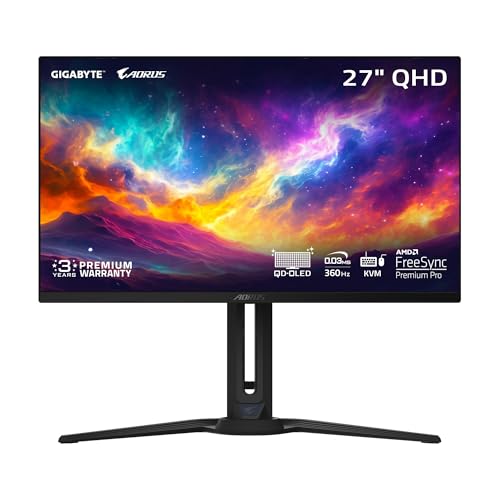
With a stunning 360Hz refresh rate and an ultra-fast 0.03ms response time, the GIGABYTE AORUS FO27Q3 Gaming Monitor is perfect for competitive gamers seeking an edge in fast-paced titles. Its 27-inch QD-OLED panel delivers vibrant visuals with a DCI-P3 99% color gamut, ensuring you’ll see every detail. Featuring AMD FreeSync Premium Pro, you’ll enjoy tear-free and stutter-free gameplay. The monitor also includes useful tools like Black Equalizer 2.0 and Game Assist. With multiple connectivity options, including HDMI and Type C, you can easily set it up for any gaming rig while maintaining ergonomic comfort through adjustable stand features.
Best For: Competitive gamers seeking a high-performance monitor with exceptional speed and vibrant visuals.
Pros:
- Ultra-fast 360Hz refresh rate and 0.03ms response time for smooth gameplay.
- Stunning color accuracy with DCI-P3 99% color gamut for vibrant graphics.
- Multiple connectivity options including HDMI, DisplayPort, and Type C for versatile setups.
Cons:
- Higher price point compared to standard gaming monitors.
- Limited native resolutions may not suit all gaming preferences.
- Potential burn-in risk associated with OLED technology over prolonged use.
Alienware AW2725DF 27 QHD Gaming PC Monitor (Renewed)

Get ready to elevate your gaming experience with the Alienware AW2725DF, a 27-inch QHD monitor that’s perfect for competitive gamers. With a stunning resolution of 2560×1440 and QD OLED technology, you’ll enjoy vibrant colors and deep blacks. The ultra-fast 360Hz refresh rate and an impressive response time of just 0.03ms guarantee smooth gameplay without lag. Plus, AMD FreeSync Premium Pro ensures a tear-free experience. With versatile connectivity options, including USB-C and multiple ports, this renewed monitor is ideal for gaming and content creation. Enjoy peace of mind with a 3-year warranty and a stellar customer rating of 5.0 stars!
Best For: Competitive gamers and content creators looking for a high-performance monitor with stunning visuals and minimal latency.
Pros:
- Ultra-fast 360Hz refresh rate for an incredibly smooth gaming experience.
- QD OLED technology provides enhanced clarity, vibrant colors, and deep blacks.
- Versatile connectivity options including USB-C and multiple ports for easy integration with various devices.
Cons:
- Higher price point compared to standard monitors may not suit all budgets.
- Limited availability as it is a renewed product, potentially affecting stock.
- Weight may require a sturdy desk or mount for optimal setup.
Alienware AW2724HF 27″ FHD Gaming Monitor

The Alienware AW2724HF 27″ FHD Gaming Monitor is an exceptional choice for competitive gamers seeking lightning-fast responsiveness and stunning visuals. With a remarkable 360Hz refresh rate and a 0.5ms response time, you’ll experience ultra-smooth gameplay. Its Full HD resolution of 1920 x 1080 pixels, combined with IPS technology, delivers vibrant colors and wide viewing angles. Plus, AMD FreeSync Premium technology guarantees you enjoy tear-free gaming. Weighing just 9.2 pounds and featuring five USB ports, it’s also user-friendly. With a solid 4.3 out of 5 stars from customers, this monitor is truly a top contender for your gaming setup.
Best For: Competitive gamers seeking ultra-fast responsiveness and vibrant visuals for an immersive gaming experience.
Pros:
- Exceptional Refresh Rate: With a 360Hz refresh rate, gameplay is incredibly smooth and responsive.
- Vibrant Colors and Viewing Angles: IPS technology ensures rich color reproduction and wide viewing angles.
- Tear-Free Gaming Experience: AMD FreeSync Premium technology eliminates screen tearing for a seamless experience.
Cons:
- Limited Resolution: Full HD (1920 x 1080) may not satisfy users looking for higher resolutions like 1440p or 4K.
- Weight: At 9.2 pounds, it may be heavier compared to other monitors in its category.
- Price Point: The advanced features may come with a higher price tag, which might not fit all budgets.
Alienware Gaming Monitor AW2523HF 24.5 inch FHD 360Hz Display
For competitive gamers seeking an edge in fast-paced titles, the Alienware Gaming Monitor AW2523HF stands out with its stunning 360Hz refresh rate. This 24.5-inch IPS LED display offers a Full HD resolution of 1920 x 1080, ensuring crystal-clear visuals. With a lightning-fast 0.5ms response time and 99% sRGB color coverage, you’ll experience vibrant colors and smooth gameplay. The monitor features AMD FreeSync Premium for tear-free performance and an ergonomic design that allows height, tilt, swivel, and pivot adjustments. Plus, connectivity options include multiple HDMI and USB ports, making it a versatile addition to your gaming setup.
Best For: Competitive gamers looking for a high-performance monitor that delivers exceptional refresh rates and vibrant visuals.
Pros:
- 360Hz refresh rate for ultra-smooth gameplay, ideal for fast-paced gaming.
- 0.5ms response time ensures minimal input lag and quick reactions.
- Versatile connectivity options with multiple HDMI and USB ports for easy integration into any gaming setup.
Cons:
- Limited to Full HD (1920 x 1080) resolution, which may not satisfy users seeking higher resolutions like 1440p or 4K.
- The monitor’s weight of 7.6 pounds may not be ideal for those looking for lightweight options.
- Best Sellers Rank indicates it may not be as widely recognized compared to other gaming monitors in the market.
Factors to Consider When Choosing 360Hz Monitors for Gaming PCs
When selecting a 360Hz monitor for your gaming rig, you need to take into account several key factors. Refresh rate and response time are essential for smooth gameplay, while panel technology can affect color accuracy and viewing angles. Don’t forget to look at resolution and connectivity options to guarantee the monitor fits your gaming setup.
Refresh Rate Importance
Choosing a 360Hz monitor can dramatically enhance your gaming experience, especially in fast-paced titles. A refresh rate this high greatly improves motion smoothness, making gameplay fluid and responsive. You’ll notice reduced motion blur and ghosting, which enhances visual clarity during rapid movements. This clarity provides you a competitive edge, vital in intense gaming scenarios. With the capability to display up to 360 frames per second, you can fully harness the power of high-performance graphics cards for an ideal experience. Plus, these monitors often have response times as low as 0.03ms, minimizing input lag and ensuring your actions appear on-screen almost instantly. In competitive gaming, every millisecond counts, and a 360Hz refresh rate can make all the difference.
Response Time Comparison
While high refresh rates like 360Hz are impressive, the response time of a monitor plays a significant role in your overall gaming experience. Measured in milliseconds (ms), response time indicates how quickly a pixel can change colors, directly affecting the clarity of fast-moving images. Monitors with a response time of 0.03ms, like some premium 360Hz models, offer near-instantaneous pixel changes, minimizing motion blur and ghosting during intense gameplay. A response time of 1ms is generally acceptable, but values around 0.5ms or 0.03ms deliver a more responsive and sharper experience, essential in fast-paced environments. Considering monitors with faster response times can give you a competitive edge, as even a slight delay can hinder quick reactions in gaming.
Panel Technology Types
Understanding the different panel technologies is essential for selecting the right 360Hz monitor for your gaming setup. IPS panels offer vibrant colors and wide viewing angles, making them great for competitive gaming due to their 99% sRGB color accuracy. If you prefer superior contrast and deeper blacks, consider OLED panels, which excel in dark scenes. VA panels provide high contrast ratios and immersive experiences but may have slower response times. For the best of both worlds, look into QD-OLED technology, which combines OLED benefits with enhanced brightness and color accuracy. Regardless of the type, make certain your monitor has low response times and high refresh rates to minimize motion blur and enhance your gaming experience.
Resolution Considerations
When it comes to selecting a 360Hz monitor, resolution plays a significant role in maximizing your gaming experience. Higher resolutions, like QHD (2560×1440), offer more detail and clarity than Full HD (1920×1080), enhancing immersion. On larger screens, 2560×1440 provides a sharper image, making your gameplay more visually engaging. While 360Hz monitors boost frame rates, you’ll see the real benefits when they’re paired with higher resolutions that utilize those refresh rates. However, remember your graphics card’s capabilities; higher resolutions demand more processing power to maintain those high frame rates. For competitive gaming, 1920×1080 can still be effective, allowing for higher frame rates and lower input lag, which is essential in fast-paced situations.
Connectivity Options Available
Selecting a 360Hz monitor involves more than just the impressive refresh rate; connectivity options are vital for a seamless gaming experience. Look for monitors with multiple HDMI and DisplayPort connections, making sure you can connect various gaming consoles and PCs. HDMI 2.1 support is essential for achieving high refresh rates and resolutions, especially at 360Hz, resulting in smoother gameplay. Don’t overlook USB ports, particularly USB-C, as they simplify connecting and charging peripherals like headsets and controllers. Additionally, verify your monitor supports adaptive sync technologies like AMD FreeSync or NVIDIA G-SYNC, which rely on specific connections. Finally, check for built-in KVM switches in monitors with USB-C, allowing control over multiple devices from one setup, enhancing efficiency.
Ergonomic Design Features
Ergonomic design features are essential for ensuring comfort during long gaming sessions, and there are several key aspects to take into account when choosing a 360Hz monitor. Look for adjustable height, tilt, swivel, and pivot capabilities to find the best viewing angles and reduce eye strain. A hexagonal base design can optimize the monitor’s footprint, allowing for better placement of your peripherals. Integrated headset hangers help keep your gaming area organized and clutter-free. Choose monitors with anti-glare surfaces to minimize reflections, enhancing visibility and comfort while you play. Additionally, some models include cable management systems to keep your setup neat and tidy, further contributing to an ergonomic gaming experience.
Color Accuracy Metrics
Comfort isn’t the only factor to take into account for an ideal gaming experience; color accuracy plays a significant role as well. Look for monitors with a Delta E value under 2 for exceptional color fidelity that closely mirrors real life. Pay attention to color gamut coverage like sRGB, Adobe RGB, or DCI-P3—higher percentages mean more vibrant colors. HDR certification can enhance your visuals by delivering deeper blacks and brighter highlights, making games more immersive. Consider using calibration tools to fine-tune your monitor’s settings, which is essential for competitive gaming and content creation. Finally, a 10-bit panel is preferable since it displays over a billion colors, ensuring smoother gradients and reducing banding in your gameplay.
Price Versus Performance
When you’re weighing price versus performance in 360Hz monitors, it’s important to balance your budget with the features that matter most for your gaming style. Higher-end models often exceed $800, providing advanced features like QD-OLED technology and adaptive sync, which enhance gameplay with smoother visuals and reduced motion blur. If you’re on a tighter budget, entry-level options range from $200 to $300, but they may lack in resolution and color accuracy. Investing in a premium monitor can improve HDR performance and color coverage, ensuring a more immersive experience. Ultimately, consider your gaming needs—some monitors excel in competitive scenarios, while others are better for casual use or multimedia enjoyment. Choose wisely to maximize your investment.