When it comes to enhancing your gaming setup, choosing the right 4K monitor with G-Sync can make all the difference. In 2025, several models stand out for their stunning visuals and performance. Whether you prioritize fast refresh rates or superior color accuracy, there’s a perfect option for you. Discover the top contenders that can elevate your gaming experience to new heights. Which monitor will take your gameplay to the next level?
Dell G3223Q Gaming Monitor – 32-Inch 4K Ultra UHD

If you’re a serious gamer looking for an immersive experience, the Dell G3223Q Gaming Monitor is a standout choice with its stunning 32-inch 4K Ultra UHD display. Offering a crisp 3840×2160 resolution and a smooth 144Hz refresh rate, it delivers exceptional performance, whether you’re gaming or working. With support for AMD FreeSync and NVIDIA G-SYNC, you’ll enjoy tear-free visuals. Its HDR capabilities enhance color accuracy, while the adjustable stand guarantees comfort during long sessions. Weighing just 13.25 pounds, it’s easy to set up. Overall, this monitor combines versatility and quality, making it a top pick for any dedicated gamer.
Best For: Serious gamers seeking an immersive 32-inch 4K Ultra UHD display with high refresh rates and advanced gaming features.
Pros:
- Excellent clarity and vibrant colors enhance the gaming and professional experience.
- Supports both AMD FreeSync and NVIDIA G-SYNC for tear-free visuals.
- Adjustable stand allows for comfortable viewing during long sessions.
Cons:
- Initial setup may be confusing due to unclear power button location and inadequate instructions.
- Mixed experiences reported with Dell’s customer support regarding cable mismatches.
- Delays and complications noted in the replacement process for defective units.
KTC 27 Inch 4K Gaming Monitor (H27P22S)

The KTC 27 Inch 4K Gaming Monitor (H27P22S) stands out with its impressive 160Hz refresh rate, making it an ideal choice for gamers seeking smooth and responsive gameplay. With UHD 4K resolution and a 1ms response time, you’ll experience vibrant visuals and minimal ghosting. This monitor supports both FreeSync and G-Sync, ensuring tear-free gaming sessions. Its ergonomic design allows for tilt, height, pivot, and swivel adjustments, offering personalized comfort. User reviews praise its color accuracy and brightness, while the three-year warranty provides peace of mind. At 18.26 pounds, it’s easy to handle and mount for your gaming setup.
Best For: Gamers looking for a high-performance monitor with vibrant visuals and fast response times for an enhanced gaming experience.
Pros:
- Impressive Refresh Rate: Offers a 160Hz refresh rate for smooth and responsive gameplay.
- Excellent Color Accuracy: Features low blue light technology and HDR400 for vibrant colors and reduced eye strain.
- Ergonomic Adjustability: Allows for tilt, height, pivot, and swivel adjustments for personalized comfort.
Cons:
- Backlight Bleed Issues: Some users report experiencing backlight bleed in certain scenarios.
- Limited Ergonomic Adjustments: While adjustable, the options may not meet all users’ preferences.
- Weight: At 18.26 pounds, it may be less convenient for frequent relocation compared to lighter models.
ASUS ROG Swift 32” 4K OLED Gaming Monitor (PG32UCDM)

Designed for serious gamers, the ASUS ROG Swift 32” 4K OLED Gaming Monitor (PG32UCDM) stands out with its stunning 240Hz refresh rate and ultra-fast 0.03 ms response time. Its QD-OLED panel delivers vibrant colors and deep blacks, while the 99% DCI-P3 color gamut guarantees exceptional visual fidelity. With G-SYNC compatibility, you’ll experience smooth gameplay without tearing. The innovative design includes a custom heatsink and graphene film, enhancing heat management and reducing burn-in risk. Plus, the DisplayWidget Center provides easy access to settings, making it a top choice for gamers seeking an immersive and high-performance experience.
Best For: Serious gamers looking for a high-performance monitor with exceptional visual fidelity and fast response times.
Pros:
- Stunning 240Hz refresh rate and ultra-fast 0.03 ms response time for smooth gameplay.
- QD-OLED panel provides vibrant colors and deep blacks, enhancing the overall gaming experience.
- G-SYNC compatibility eliminates screen tearing, ensuring a fluid gaming performance.
Cons:
- Higher price point compared to standard monitors, which may not fit all budgets.
- Potential for burn-in, despite enhancements like graphene film, requires careful use.
- Limited brightness adjustment options, as peak brightness varies based on color pre-calibration.
ASUS ROG Strix 27” 4K HDR Gaming Monitor (XG27UCS)

For professional gamers seeking top-tier performance, the ASUS ROG Strix 27” 4K HDR Gaming Monitor (XG27UCS) stands out with its impressive 160Hz refresh rate and ultra-fast 1ms response time. You’ll enjoy stunning visuals with a 3840 x 2160 4K resolution and 95% DCI-P3 color gamut. The Extreme Low Motion Blur Sync technology guarantees smooth gameplay, eliminating ghosting and tearing, while G-Sync compatibility enhances your experience further. With ASUS Fast IPS technology, colors appear sharp and vivid. Plus, the DisplayWidget Center makes adjustments easy, and a 3-year warranty adds peace of mind for your investment.
Best For: Professional gamers seeking high-performance and visually stunning gaming experiences.
Pros:
- Impressive 160Hz refresh rate for smooth and fluid gameplay.
- Extreme Low Motion Blur Sync technology eliminates ghosting and tearing.
- G-Sync compatibility ensures seamless synchronization with compatible graphics cards.
Cons:
- Higher price point compared to standard monitors.
- Large size may not fit well in smaller gaming setups.
- Requires a powerful graphics card to fully utilize 4K resolution and high refresh rate.
Alienware 27 4K QD-OLED Gaming Monitor (AW2725Q)
Experience gaming like never before with the Alienware 27 4K QD-OLED Gaming Monitor (AW2725Q), a powerhouse designed for serious gamers who demand top-tier performance. With a stunning 3840×2160 resolution and a blazing 240Hz refresh rate, your gameplay will be smooth and visually enchanting. QD-OLED technology delivers vibrant colors and deep blacks, enhancing every detail. Plus, G-SYNC compatibility guarantees tear-free gaming. The sleek design, customizable RGB lighting, and fully adjustable stand offer both style and comfort. Weighing just under 15 pounds, it’s easy to set up. As an investment over $850, this monitor promises an unmatched experience for dedicated gamers.
Best For: Serious gamers seeking a high-quality display for an immersive gaming experience.
Pros:
- Exceptional visual performance with 4K resolution and QD-OLED technology for vibrant colors and deep blacks.
- High refresh rate of 240Hz and ultra-fast response time of 0.03ms ensure smooth gameplay.
- Fully adjustable stand and customizable RGB lighting enhance both ergonomics and aesthetics.
Cons:
- Price point over $850 may be considered a significant investment for some users.
- Potential concerns about OLED burn-in, despite built-in mitigation features.
- Some initial units reported issues, although customer service was noted to be satisfactory.
LG Ultragear 27-inch 4K UHD Gaming Monitor (27G850A-B)
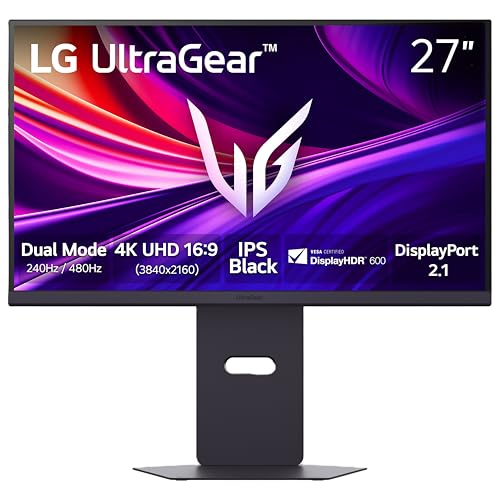
The LG Ultragear 27-inch 4K UHD Gaming Monitor (27G850A-B) is an excellent choice for gamers seeking stunning visuals and rapid response times. With a 3840 x 2160 resolution and a lightning-fast 1ms response time, you’ll enjoy smooth gameplay without ghosting. Its Nano IPS Black technology guarantees vibrant colors and deep blacks, while HDR support enhances your gaming experience. Connectivity options include DisplayPort 2.1 and HDMI 2.1, making it compatible with G-SYNC for tear-free performance. Plus, the ergonomic design lets you adjust height, tilt, and swivel for ultimate comfort. Get ready to elevate your gaming setup!
Best For: Gamers looking for a high-performance monitor that delivers stunning visuals and rapid response times for an immersive gaming experience.
Pros:
- Stunning 4K resolution provides exceptional clarity and detail in games.
- Fast 1ms response time minimizes ghosting, ensuring smooth gameplay.
- Ergonomic design allows for height, tilt, and swivel adjustments for comfortable extended use.
Cons:
- Weight of 20.7 pounds may make it less portable compared to lighter monitors.
- Requires software installation for optimal performance, which may be inconvenient for some users.
- Price point could be higher compared to other monitors in the same category.
Samsung 27” Odyssey G7 4K UHD Gaming Monitor

With its impressive 4K UHD resolution and rapid 144Hz refresh rate, the Samsung 27” Odyssey G7 is a game-changer for serious gamers seeking exceptional visual performance. The 1ms response time guarantees real-time movement capture, while G-Sync compatibility and AMD FreeSync Premium eliminate screen tearing and stuttering. Its IPS panel delivers vibrant colors and wide viewing angles, enhanced by DisplayHDR 400 for stunning contrast. Plus, the Gaming Hub offers easy access to streaming services. Weighing 15.65 pounds and measuring 27 inches, this versatile monitor fits perfectly in any setup, making it an excellent choice for both casual and enthusiast gamers.
Best For: Serious gamers seeking exceptional visual performance and immersive gameplay experiences.
Pros:
- High 4K UHD resolution provides crystal-clear visuals and vibrant colors for an enhanced gaming experience.
- Fast 144Hz refresh rate and 1ms response time ensure ultra-smooth gameplay with minimal lag.
- G-Sync and AMD FreeSync Premium compatibility significantly reduce screen tearing and stuttering.
Cons:
- Setup process may be cumbersome due to the requirement of a Samsung account for full functionality.
- Internet connectivity is necessary for accessing certain features, which may be a drawback for some users.
- Limited specialization may not cater specifically to niche audiences, appealing to a broader range of users instead.
Samsung Odyssey Neo G7 43″ 4K UHD Gaming Monitor

Looking for a gaming monitor that delivers stunning visuals and rapid responsiveness? The Samsung Odyssey Neo G7 43″ 4K UHD Gaming Monitor boasts a 3840×2160 resolution and a lightning-fast 144Hz refresh rate, ensuring smooth gameplay. With Quantum Matrix Technology and VESA Display HDR600, you’ll enjoy vibrant colors and deep blacks. Plus, its 1ms response time minimizes input lag. The monitor features smart capabilities, including a built-in gaming hub and streaming apps. While users praise its performance, some have noted software issues. Overall, it’s a solid choice for gamers seeking an immersive experience without breaking the bank.
Best For: Gamers seeking a high-performance monitor that offers exceptional visuals and fast response times for an immersive gaming experience.
Pros:
- 144Hz refresh rate ensures smooth gameplay with minimal motion blur.
- Quantum Matrix Technology provides enhanced brightness and contrast for vibrant visuals.
- Smart TV functionality allows easy access to streaming services and cloud gaming.
Cons:
- Some users report software reliability issues and input detection problems.
- Ghosting can occur in certain scenarios, affecting the viewing experience.
- More suited for gaming rather than productivity tasks, limiting versatility.
Samsung 27-inch Odyssey QD-OLED G8 Gaming Monitor (G81SF)
For gamers seeking an ultra-smooth experience, the Samsung 27-inch Odyssey QD-OLED G8 Gaming Monitor (G81SF) stands out with its impressive 240Hz refresh rate and lightning-fast 0.03ms response time. The 4K QD-OLED display delivers stunning visuals with true blacks and vibrant colors, thanks to VESA DisplayHDR True Black 400. Plus, G-Sync and AMD FreeSync Premium Pro guarantee choppiness and tearing are eliminated. With the Safeguard+ Dynamic Cooling System, you won’t have to worry about overheating. The ergonomic stand and premium design enhance your gaming setup, making it an essential choice for serious gamers looking for quality and performance.
Best For: Serious gamers looking for high-performance, ultra-smooth visuals and advanced cooling technology in their gaming monitor.
Pros:
- Exceptional Performance: With a 240Hz refresh rate and 0.03ms response time, gameplay is ultra-smooth and responsive.
- High-Quality Display: The QD-OLED screen with 4K resolution and VESA DisplayHDR True Black 400 ensures stunning visuals with true blacks and vibrant colors.
- Effective Cooling System: The Safeguard+ Dynamic Cooling System prevents overheating, allowing for extended gaming sessions without burn-ins.
Cons:
- Weight: At 15.21 pounds, it may be heavier than some other monitors, which could affect mounting options.
- Price Point: High-end features may come with a premium price, making it less accessible for budget-conscious gamers.
- Limited Native Refresh Rate Support: While it supports high refresh rates, not all games may fully utilize the 240Hz capability.
ASUS TUF Gaming 32” 4K HDR Gaming Monitor (VG32UQA1A)

The ASUS TUF Gaming 32” 4K HDR Gaming Monitor (VG32UQA1A) is an excellent choice for gamers seeking an immersive experience, thanks to its stunning 4K UHD resolution and lightning-fast 160Hz refresh rate. With a 1ms response time and 120% sRGB color coverage, every game looks vibrant and fluid. Featuring ELMB Sync and FreeSync Premium, it effectively eliminates ghosting and tearing, ensuring smooth gameplay. Plus, HDMI 2.1 support offers native 4K 120Hz gaming. While many users praise its image quality, some report issues like flickering and HDR problems. Overall, it’s a solid pick for serious gamers looking to elevate their setup.
Best For: Gamers seeking an immersive experience with high-resolution visuals and fast refresh rates.
Pros:
- Exceptional 4K UHD resolution and vibrant color accuracy with 120% sRGB coverage.
- Lightning-fast 160Hz refresh rate and 1ms response time for smooth gameplay.
- Advanced features like ELMB Sync and FreeSync Premium eliminate ghosting and tearing.
Cons:
- Some users have reported issues with flickering and HDR functionality.
- Occasional intermittent power outages may affect user experience.
- Concerns over quality control and reliability based on customer feedback.
Factors to Consider When Choosing 4K PC Monitors with G-Sync
When choosing a 4K PC monitor with G-Sync, it’s essential to take into account several key factors. Refresh rate, response time, and panel technology can greatly impact your gaming experience. Additionally, pay attention to color accuracy and available connectivity options to make sure your setup meets your needs.
Refresh Rate Importance
While choosing a 4K PC monitor with G-Sync, you can’t overlook the importance of refresh rate. This metric, measured in hertz (Hz), tells you how often the display updates the image per second. For gaming, a refresh rate of 144Hz or higher is often recommended. It reduces motion blur and enhances fluidity in fast-paced content, giving you a competitive edge. G-Sync technology synchronizes your monitor’s refresh rate with your GPU, eliminating screen tearing and stuttering. This combination is essential for maintaining high frame rates without sacrificing visual quality. In competitive gaming, even a millisecond can make a difference, so opting for monitors above 120Hz can considerably improve your responsiveness and overall gaming experience.
Response Time Considerations
Choosing a 4K PC monitor with G-Sync means paying close attention to response time, as it directly impacts your gaming experience. Ideally, look for monitors with a response time of 1ms or less to minimize motion blur during fast-paced action. Monitors boasting response times around 0.03ms (GTG) can greatly reduce ghosting effects, essential for competitive gaming where quick reflexes matter. When paired with high refresh rates of 144Hz or higher, these fast response times enhance visual fluidity, making gameplay feel more responsive. Keep in mind that response time can vary between display technologies—OLED typically offers faster response times compared to traditional LCD panels. G-Sync technology thrives on low response times, eliminating screen tearing and stuttering for smoother gameplay.
Panel Technology Types
Understanding the different panel technologies is key to selecting a 4K PC monitor with G-Sync that suits your gaming needs. IPS panels excel in color accuracy and wide viewing angles, perfect for both gaming and creative tasks, though they can lag in response times. VA panels deliver superior contrast with deep blacks but may struggle with ghosting during fast-paced games. TN panels offer quick response times and high refresh rates, making them popular among competitive gamers, but they often compromise on color reproduction and viewing angles. OLED technology provides stunning color depth and true blacks, albeit with potential burn-in issues. Finally, QD-OLED combines OLED with quantum dots for enhanced brightness, offering a premium experience at a higher cost.
Color Accuracy Factors
When it comes to selecting a 4K PC monitor with G-Sync, color accuracy plays an essential role in your gaming experience. Look for monitors with high color gamut coverage, particularly in DCI-P3 or sRGB, which indicates better color reproduction. A lower response time of 1ms or less is vital for reducing motion blur and maintaining consistent colors during fast-paced action. Additionally, HDR support enhances your visuals with a wider contrast ratio and vivid colors, revealing details in both bright and dark areas. Consider calibration tools, like factory settings or customizable options, to guarantee true-to-life colors. Finally, stay updated on display technologies like Quantum Dot and OLED for improved color depth and reduced color issues.
Connectivity Options Available
Having the right connectivity options is essential for maximizing your gaming experience with a 4K PC monitor featuring G-Sync. Look for monitors that offer HDMI 2.1, as it supports 4K resolution at high refresh rates—up to 144Hz for PC gaming and 120Hz for consoles. Additionally, consider DisplayPort 1.4 compatibility for high bandwidth connectivity, allowing for refresh rates exceeding 60Hz. Verify the monitor includes multiple HDMI and DisplayPort inputs, so you can connect various devices like gaming consoles, PCs, and streaming devices. USB ports are also helpful for connecting peripherals like gaming mice and keyboards, enhancing usability. Finally, check if the monitor supports Display Stream Compression (DSC) for smooth visuals and high frame rates while maintaining 4K resolution.
Ergonomic Design Features
Choosing a 4K PC monitor with G-Sync isn’t just about performance; ergonomic design features play an essential role in your overall gaming experience. Look for adjustable stands that let you modify height, tilt, swivel, and pivot, promoting comfort during those long gaming sessions. A well-designed monitor can greatly reduce neck and eye strain by allowing you to position the screen at the ideal angle and distance. Many models offer VESA mount compatibility, giving you the flexibility to customize your setup with wall or arm mounts. Additionally, anti-glare coatings and flicker-free technology help minimize reflections and reduce eye fatigue. These ergonomic elements not only enhance your comfort but also boost productivity, ensuring you maintain a healthy posture while gaming.
Price vs. Performance
While balancing price and performance may seem challenging, understanding the key factors can help you make an informed decision when selecting a 4K PC monitor with G-Sync. Prices for these monitors can range considerably, from around $300 for budget options to over $800 for high-end models. Higher-priced monitors typically offer better performance, like refresh rates up to 240Hz and response times as low as 0.03ms, vital for competitive gaming. Advanced technologies, such as OLED or Quantum Dot, improve visual quality but often come with a higher price tag. While budget models may suffice, they often lack essential features like HDR support and extensive color gamuts, so consider your gaming needs before making a choice.