As you explore the evolving world of 3D printing, you’ll find that 2025 brings an impressive lineup of machines designed specifically for PC users. From user-friendly models to those catering to seasoned pros, each printer offers unique features that can elevate your projects. You’ll want to contemplate factors like print quality and material versatility. Which models rise to the top? Let’s take a closer look at the best contenders.
FLASHFORGE Adventurer 5M 3D Printer

The FLASHFORGE Adventurer 5M 3D Printer stands out as an excellent choice for PC users thanks to its fully automatic features, including one-click printing and bed leveling. With a maximum speed of 600mm/s and a direct extruder capable of reaching 280°C, you’ll enjoy ultra-fast printing without sacrificing quality. Its dual-fan nozzles and multiple sizes guarantee precise results. Setting up is a breeze with the FlashMaker app, and the touchscreen makes navigation easy. Just remember, for peak performance, keep the nozzle and platform clean. This printer’s reliability and user-friendly design make it a top pick for your 3D printing needs.
Best For: The FLASHFORGE Adventurer 5M 3D Printer is best for users seeking a high-speed, user-friendly 3D printing experience with reliable performance and quality results.
Pros:
- Easy setup with one-click automatic printing and bed leveling.
- High-speed printing at 600mm/s with excellent precision due to dual-fan nozzles.
- User-friendly touchscreen interface and compatibility with FlashMaker app for seamless navigation.
Cons:
- Software compatibility issues noted, especially with MacOS.
- Regular maintenance required for optimal performance, including cleaning the nozzle and platform.
- May require conversion of file formats (.STL to .GX) before printing, adding an extra step for users.
ELEGOO Centauri Carbon 3D Printer

Looking for a high-performance 3D printer that combines speed and ease of use? The ELEGOO Centauri Carbon 3D Printer has you covered with its impressive CoreXY technology, achieving print speeds up to 500 mm/s. Fully assembled and pre-calibrated, it features auto bed leveling and an intuitive touchscreen, making it perfect for both beginners and pros. Plus, the built-in camera allows real-time monitoring of your projects. With a 256x256x256 mm printing size and compatibility with advanced filaments, you’ll create detailed parts for various applications effortlessly. Enjoy smooth, frustration-free printing from day one with this reliable machine!
Best For: The ELEGOO Centauri Carbon 3D Printer is best for both beginners and experienced users looking for a high-speed, reliable 3D printing solution.
Pros:
- Fully assembled and pre-calibrated for immediate use, saving setup time.
- High-speed printing capabilities up to 500 mm/s, ideal for producing large, detailed parts quickly.
- Built-in camera for real-time monitoring, enhancing user experience and project oversight.
Cons:
- Limited to a maximum printing size of 256x256x256 mm, which may not suffice for larger projects.
- Advanced filament compatibility may require additional knowledge or experience for optimal results.
- Initial investment may be higher compared to entry-level 3D printers.
Creality K1 SE 3D Printer
For PC users enthusiastic to plunge into 3D printing, the Creality K1 SE 3D Printer stands out with its impressive maximum speed of 600mm/s and rapid heating capabilities. With a generous print size of 250x220x220mm, it’s perfect for various projects. The flagship extruder guarantees precise filament feeding, while the quick-swap tri-metal nozzle heats up to 300℃ in just 75 seconds. Enjoy hassle-free setup with one-click auto calibration and a plug-and-play design. Users appreciate the advanced Creality OS for customization, and the active input shaping minimizes print imperfections. It’s a solid choice for beginners and seasoned makers alike.
Best For: The Creality K1 SE 3D Printer is best for beginners and enthusiasts looking for a user-friendly, high-performance 3D printing experience.
Pros:
- Quick Setup: Pre-assembled design and one-click auto calibration allow users to start printing almost immediately.
- High Speed and Efficiency: Capable of printing at a maximum speed of 600mm/s, significantly reducing print times.
- Advanced Features: Equipped with a flagship extruder, tri-metal nozzle, and active input shaping for superior print quality.
Cons:
- Customer Support: Some users have reported issues with responsiveness from customer service.
- Power Supply Issues: A few users experienced problems related to the power supply, which may require attention.
- Learning Curve for Customization: While the Creality OS offers advanced functions, it may be overwhelming for complete beginners to navigate customization options.
ELEGOO Neptune 3 Pro 3D Printer
Experience seamless 3D printing with the ELEGOO Neptune 3 Pro, designed specifically for PC users who value precision and ease of use. With a generous printing size of 225x225x280mm, this printer features a dual-gear direct extruder, allowing for smooth filament feeding and compatibility with various materials like PLA and ABS. Its advanced auto bed leveling scans 36 points for high accuracy, while the dual lead screws enhance stability. Plus, you’ll appreciate the efficient heat dissipation system that minimizes clogging. With smart features like auto-pause for filament issues, you can print with confidence and convenience.
Best For: This printer is best for PC users seeking a reliable and precise 3D printing experience with versatile material compatibility.
Pros:
- High Precision: Auto bed leveling with 36-point scanning ensures accurate prints.
- Stable Operation: Dual lead screws enhance print head stability, reducing deviations.
- Smart Features: Auto-pause functionality allows for recovery from filament issues or power outages.
Cons:
- Noise Level: Operating at 47-48dB may be noticeable in quiet environments.
- Pre-assembly Requirement: Although pre-assembled, some users may still find assembly or setup time-consuming.
- Limited Build Size: The printing size of 225x225x280mm may not accommodate larger projects.
Bambu Lab A1 Combo 3D Printer

The Bambu Lab A1 Combo 3D Printer stands out for PC users who value both speed and precision in their projects. With impressive acceleration of 10,000 mm/s², it delivers rapid prints without sacrificing detail. The A1 Combo, which includes the AMS lite, supports vibrant multi-color printing, enhancing your creative possibilities. You’ll appreciate the full-auto calibration and active flow rate compensation for consistent results. Plus, its user-friendly touchscreen and 1-Clip quick swap nozzle make maintenance a breeze. Operating quietly at ≤48 dB, it creates a peaceful workspace, allowing you to focus on your next masterpiece without distractions.
Best For: The Bambu Lab A1 Combo 3D Printer is best for PC users seeking a high-speed, precision 3D printing solution that supports vibrant multi-color projects.
Pros:
- Exceptional acceleration of 10,000 mm/s² for fast printing without loss of detail.
- User-friendly touchscreen interface and 1-Clip quick swap nozzle for easy maintenance.
- Quiet operation at ≤48 dB, creating a peaceful workspace.
Cons:
- Requires AMS lite for full multi-color printing functionality, which may need to be purchased separately.
- Advanced features may have a learning curve for beginners.
- Limited to the specific compatibility offered by the A1 Combo setup.
FLASHFORGE Adventurer 5M 3D Printer

Crafted with precision and user-friendly features, the FLASHFORGE Adventurer 5M 3D Printer stands out as an ideal choice for both novice and experienced PC users. With a max travel speed of 600mm/s and rapid heating capabilities, you’ll enjoy efficient printing. Its Core XY all-metal structure guarantees durability while supporting various filament types like PLA and ABS. One-click automatic leveling simplifies setup, and the dual-sided PEI platform makes model removal a breeze. Plus, with the Flash Maker app, you can remotely monitor prints and adjust settings. This printer truly elevates your 3D printing experience, making it a top contender for 2025.
Best For: The FLASHFORGE Adventurer 5M 3D Printer is best for both novice and experienced users seeking a reliable and efficient 3D printing solution at home.
Pros:
- High-speed printing with a max travel speed of 600mm/s, significantly reducing print times.
- User-friendly features including one-click automatic leveling and a dual-sided PEI platform for easy model removal.
- Versatile filament compatibility, supporting a wide range of materials such as PLA, ABS, and PETG.
Cons:
- Weight of 22 pounds may make it less portable compared to lighter models.
- Requires additional camera kit for full remote monitoring capabilities via the Flash Maker app.
- Limited to specific nozzle sizes which may restrict customization for certain printing needs.
Bambu Lab A1 Mini 3D Printer

For those new to 3D printing, the Bambu Lab A1 Mini 3D Printer stands out as an excellent choice thanks to its user-friendly design and quick assembly process. Weighing just 17.82 pounds, it fits easily into your workspace and operates quietly at ≤48 dB, making it ideal for home use. With high-speed precision and full-auto calibration, you’ll achieve exceptional print quality with minimal effort. Plus, it supports vibrant multi-color printing when paired with the AMS lite. Overall, the Bambu Lab A1 is perfect for beginners, providing a straightforward setup and reliable performance for your creative projects.
Best For: The Bambu Lab A1 Mini 3D Printer is best for beginners and casual users looking for a reliable and easy-to-use 3D printing solution.
Pros:
- User-friendly design with quick assembly and auto-leveling feature.
- Quiet operation, making it suitable for home environments.
- High-quality prints with minimal tuning required.
Cons:
- Some users reported adhesion problems that needed adjustment.
- Multi-color printing requires the AMS lite, which is sold separately.
- Limited compatibility with materials other than PLA without careful handling.
HEPHI3D Tina2S 3D Printer (Fully Assembled, WiFi Cloud Printing)
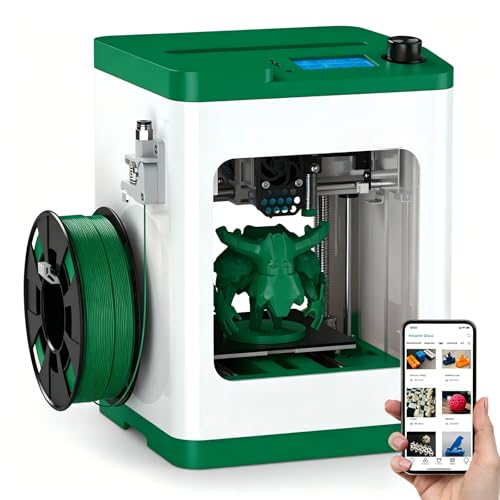
Designed specifically for beginners, the HEPHI3D Tina2S 3D Printer stands out with its user-friendly features like WiFi cloud printing and auto bed leveling. You’ll appreciate the quiet operation at just 40-50dB and impressive print speeds of up to 200mm/s. With the Poloprint Cloud app, you can easily access a vast library of models and slice them with a single click from your smartphone or tablet. Its open-source compatibility lets you customize designs effortlessly. Whether for school projects, DIY crafts, or business samples, the Tina2S is a versatile choice that makes 3D printing accessible for everyone in your family.
Best For: The HEPHI3D Tina2S 3D Printer is best for beginners, families, and educators looking for an easy-to-use, versatile 3D printing solution.
Pros:
- User-friendly features like WiFi cloud printing and auto bed leveling simplify the printing experience.
- Quiet operation at 40-50dB makes it suitable for home and school environments.
- Open-source compatibility allows for customization and easy access to various slicing software.
Cons:
- Limited advanced features may not satisfy experienced users looking for more control.
- Smaller build volume compared to larger 3D printers could restrict project sizes.
- Dependency on WiFi for cloud printing may be challenging in areas with unstable internet connections.
Official Creality Ender 3 3D Printer

The Official Creality Ender 3 3D Printer stands out as an excellent choice for students and beginners enthusiastic to plunge into the world of 3D printing. With a build volume of 8.66 x 8.66 x 9.84 inches, it’s compact yet capable. The printer features advanced extruder technology, ensuring smooth operation and reducing the risk of clogging. You’ll appreciate the resume printing function, which allows you to continue after power interruptions. Assembly takes about two hours, making it user-friendly. Plus, it’s backed by positive reviews and solid support, ensuring you’ll have a reliable companion on your 3D printing journey.
Best For: The Official Creality Ender 3 3D Printer is best for students and beginners looking to learn 3D printing and enhance their hands-on skills.
Pros:
- Advanced extruder technology minimizes clogging and ensures smooth printing.
- Resume printing function allows continuation after power outages, enhancing reliability.
- User-friendly assembly process takes approximately two hours, making it accessible for newcomers.
Cons:
- Requires external power supply, limiting portability compared to some models.
- Does not support direct phone connections, which may limit convenience for some users.
- Build volume may be small for larger projects, potentially restricting creativity.
FLASHFORGE AD5X Multi-Color 3D Printer

Elevate your 3D printing experience with the FLASHFORGE AD5X Multi-Color 3D Printer, especially if you’re a PC user looking for vibrant, multi-color prints. This printer supports up to four colors simultaneously, delivering exceptional print quality thanks to its advanced cooling fan and direct-drive extruder. You’ll love its ultra-fast 12X printing speed, perfect for rapid prototyping. With user-friendly features like 1-click auto leveling and a built-in resume function, you’ll enjoy hassle-free operation. Plus, interchangeable nozzles let you switch between ultra-fine details or large prints effortlessly. Monitor your projects remotely via the Flash Maker app for added convenience.
Best For: Enthusiasts and professionals seeking high-quality, vibrant multi-color 3D prints with rapid prototyping capabilities.
Pros:
- Exceptional print quality with advanced cooling and a direct-drive extruder for detailed outputs.
- Ultra-fast printing speed of up to 600mm/s, ideal for quick turnaround times in projects.
- User-friendly features such as 1-click auto leveling and built-in resume function enhance the printing experience.
Cons:
- Higher initial investment compared to single-color printers may be a barrier for some users.
- Complexity of multi-color printing can require more setup and calibration time.
- Limited to specific nozzle sizes, which may not cater to all printing needs or preferences.
Factors to Consider When Choosing 3D Printers for PC Users
When you’re choosing a 3D printer, you’ll want to contemplate several key factors. Think about software compatibility, print quality, and how easy the setup process is. Also, take into account the materials you’ll use and the printer’s speed and performance.
Software Compatibility Considerations
Choosing the right 3D printer involves more than just looking at the hardware; software compatibility plays a crucial role. First, verify your printer’s software matches your operating system, as some models can have issues with specific MacOS or Windows versions. Look for printers that support common file formats like .STL and .GX to make model preparation and slicing easier. If you want more flexibility, consider options with open-source software compatibility, which provides greater customization. It’s also important to check if the manufacturer offers regular software updates and support, keeping your printer in sync with evolving systems. Finally, user-friendly features, like touchscreen interfaces and mobile app integration, can enhance your overall experience, making printing smoother and more enjoyable.
Print Quality Standards
Software compatibility sets the stage, but print quality standards are what truly determine your 3D printing experience. When choosing a printer, consider layer resolution; high-end models can achieve resolutions as fine as 50 microns, allowing for intricate details. The nozzle size also plays an important role—smaller nozzles (like 0.25mm) yield finer details, while larger nozzles (such as 0.8mm) are faster. Look for dual-fan cooling systems to reduce warping and enhance layer adhesion, resulting in smoother finishes. Additionally, vibration compensation technology helps maintain quality at high speeds, minimizing artifacts. Finally, the filament you select—PLA, PETG, or ABS—affects adhesion, strength, and finish, making it essential to match the material to your project needs.
Setup and Assembly Ease
While many enthusiasts plunge into the world of 3D printing, the ease of setup and assembly can make or break your experience. Look for printers that come fully assembled or require minimal assembly, as this can save you valuable time. User-friendly interfaces with features like auto bed leveling and plug-and-play functionality streamline the initial setup. Detailed guides and touchscreen controls help guarantee an intuitive process, whether you’re a beginner or a pro. Additionally, consider models with wireless connectivity and mobile app integration, making monitoring and control simpler. Finally, printers that arrive pre-calibrated can greatly reduce frustration during setup, allowing you to immerse yourself in your projects sooner. Choose wisely, and enjoy a smoother start to your 3D printing journey!
Material Versatility and Support
When you immerse yourself in 3D printing, material versatility and support can greatly influence your creative projects. Choosing a printer that supports a wide range of filaments—like PLA, ABS, PETG, and even specialty materials such as carbon fiber—ensures you can tackle various designs. Look for printers with high-temperature capabilities, reaching nozzle temperatures of 300°C or more, to experiment with advanced materials. Compatibility with different nozzle sizes enhances your ability to produce fine details or larger prints. A well-designed cooling system is essential, affecting print quality and material adhesion, especially with high-performance filaments. Finally, features like auto bed leveling help maintain ideal conditions, minimizing issues like warping or under-extrusion, so you can focus on your creations.
Speed and Performance Metrics
As you explore the world of 3D printing, understanding speed and performance metrics is essential for maximizing your efficiency and output quality. Look for printers that can achieve impressive speeds, with some models hitting 600mm/s, making them 12 times faster than standard printers. Acceleration metrics, like a maximum of 20,000mm/s², are important; they impact how quickly your printer reaches top speed, enhancing productivity. High flow nozzles that handle up to 32mm³/s enable faster extrusion rates, necessary for large volume prints without sacrificing quality. Additionally, advanced features such as dual-fan nozzles and vibration compensation systems help maintain print quality at high speeds. Finally, effective cooling mechanisms solidify materials quickly, preventing issues like warping or stringing during fast prints.
Maintenance and Troubleshooting Needs
Maintaining a 3D printer is just as important as understanding its speed and performance. Regular upkeep, like cleaning the nozzle and print bed, guarantees ideal functionality and prevents frustrating clogs or print failures. You’ll often need to troubleshoot software compatibility issues, especially if you use different operating systems, which can influence your printing process. Familiarize yourself with your printer’s FAQ sections or online communities to quickly resolve common issues like bed leveling and filament feeding. Automatic features such as one-click bed leveling and auto-pause for filament run-out can greatly ease your maintenance load. Also, keep your firmware updated, as manufacturers frequently release updates that fix bugs and enhance performance, providing a smoother printing experience.
Connectivity Options Available
Choosing the right connectivity options for your 3D printer can greatly enhance your printing experience. Many modern printers offer WiFi connectivity, letting you send print jobs and monitor progress remotely through smartphone apps. If you prefer a direct approach, USB connectivity allows you to transfer files from your PC straight to the printer, guaranteeing you can print without a network. Some models even support cloud printing, enabling you to print from anywhere with internet access, while also providing a library of models. Additionally, SD card support is common, offering a reliable way to transfer large files. Finally, verify your printer is compatible with various slicing software, as this affects how you manage your 3D models for printing.
Size and Build Volume
When selecting a 3D printer, size and build volume are critical factors that can greatly impact your projects. Larger printers can handle more substantial designs, with build volumes typically ranging from 220x220x220mm to 256x256x256mm. Consider the printer’s dimensions too; some models measure around 15.83 x 14.29 x 17.64 inches. If you have limited space, a compact design is ideal, while a larger frame offers enhanced stability during high-speed printing. Make sure the size fits your intended use—larger projects demand bigger build volumes for efficiency. Finally, take note of the printer’s weight, which varies considerably (e.g., 17.82 pounds to over 23 pounds), affecting portability and placement in your workspace.