As you explore the best photo printers for PC in 2025, you’ll find a range of options that cater to both enthusiasts and professionals. These printers are designed to enhance your printing experience with cutting-edge technology, impressive print quality, and user-friendly features. Whether you’re printing family photos or professional projects, there’s a model that fits your needs. Curious about which printers made the list? Let’s plunge into the top contenders.
Liene M100 Portable Instant Photo Printer for iPhone and Android

The Liene M100 Portable Instant Photo Printer is perfect for anyone who wants to print vibrant 4×6 photos directly from their smartphone or PC without the hassle of cables or complicated setups. This compact printer utilizes thermal-dye sublimation technology, ensuring your prints are sharp and resistant to water, scratches, and fading. With a built-in hotspot, you can connect up to five devices simultaneously, making it easy to share and print memories with family and friends. Plus, the Liene app lets you customize images with filters and borders, so you can add a personal touch to every print.
Best For: Individuals looking for a convenient and high-quality solution for printing photos directly from their smartphones or PCs.
Pros:
- Compact and minimalist design for easy portability and storage.
- Utilizes thermal-dye sublimation technology for vibrant, high-quality prints that are resistant to damage.
- Built-in hotspot allows for up to five simultaneous device connections, making it easy to share printing among users.
Cons:
- Limited to 4×6 photo sizes, which may not meet all printing needs.
- Requires regular cleaning of the print head to maintain print quality.
- Customization options are dependent on the Liene app, which might not cater to all user preferences.
Canon PIXMA TR8620a All-in-One Printer

For those who need a reliable all-in-one solution for both home and office use, the Canon PIXMA TR8620a stands out with its impressive photo printing capabilities. With a maximum print resolution of 4800 x 1200 dpi and speeds of 15 ipm for black and 10 ipm for color, your photos will look stunning. It’s equipped with a flatbed scanner, auto duplex printing, and wireless connectivity, making it a versatile choice. Plus, it easily connects to PCs and smartphones, allowing you to print from anywhere. Weighing just 17.4 pounds, it’s compact enough for most spaces.
Best For: Individuals and small businesses looking for a versatile all-in-one printer that excels in photo printing and offers wireless connectivity.
Pros:
- High Print Quality: Maximum print resolution of 4800 x 1200 dpi ensures stunning photo and document quality.
- Versatile Functionality: Offers printing, scanning, copying, and faxing capabilities in one compact device.
- Wireless Connectivity: Easily connects to PCs and smartphones for convenient printing from anywhere.
Cons:
- Weight: At 17.4 pounds, it may be less portable compared to lighter printers.
- Print Speed: While decent, the print speeds of 15 ipm for black and 10 ipm for color may not meet the needs of high-volume users.
- Limited Output Capacity: The output sheet capacity of 20 sheets may require frequent emptying during larger print jobs.
HP OfficeJet Pro 8125e Wireless All-in-One Color Inkjet Printer

Ideal for home offices, the HP OfficeJet Pro 8125e Wireless All-in-One Color Inkjet Printer delivers fast color printing at speeds of up to 10 pages per minute. You’ll appreciate its ability to print quality documents like business reports and flyers. With a 225-sheet input tray and auto document feeder, multitasking becomes effortless. The 2.7-inch touchscreen makes navigation simple, while reliable dual-band Wi-Fi guarantees hassle-free wireless printing. Plus, enjoy three months of Instant Ink, with optional delivery before you run out. Enhanced security features protect your data, giving you peace of mind while you print like a pro.
Best For: Home office users seeking a reliable, efficient printer for color documents and multitasking needs.
Pros:
- Fast printing speeds of up to 20 ppm for black and 10 ppm for color, enhancing productivity.
- Auto document feeder and 225-sheet input tray, allowing for efficient handling of multiple documents.
- Enhanced security features with HP Wolf Essential Security to protect sensitive data.
Cons:
- Monthly fee for ink subscription after the initial 6 months can add to long-term costs.
- Limited to inkjet printing, which may not be ideal for users needing high-volume or specialized printing options.
- Connectivity issues may arise despite automatic detection and resolution features.
Canon Pixma MG3620 Wireless All-in-One Color Inkjet Printer

Looking for a versatile and compact printer that fits well in small spaces? The Canon Pixma MG3620 Wireless All-in-One Color Inkjet Printer is a fantastic choice. It prints, copies, and scans, with a decent print speed of 9.9 ipm for color and 5.7 ipm for black and white. You can easily connect via Wi-Fi, supporting Airprint and Google Cloud Print. With a maximum print resolution of 4800 x 1200 DPI, your photos look great. However, be prepared for some setup challenges and potential connectivity issues. It’s perfect for everyday printing needs, but heavy users might find ink cartridges lacking.
Best For: Those seeking a compact and versatile printer for everyday printing, copying, and scanning needs in small spaces.
Pros:
- Wireless printing capabilities with Airprint and Google Cloud Print support.
- Decent print quality and speed for everyday documents and photos.
- Space-saving design with a 100-sheet capacity.
Cons:
- Initial setup can be frustrating with potential WiFi connectivity issues.
- Ink cartridges may not last long for heavy printing users.
- Mixed customer feedback on performance and support responsiveness.
Epson Expression Premium XP-6100 Wireless Color Photo Printer

The Epson Expression Premium XP-6100 Wireless Color Photo Printer stands out for its superior photo quality, making it a top choice for photography enthusiasts and casual users alike. With 5-color Claria Premium inks, it delivers stunning prints at a maximum resolution of 5760 x 1440 dpi. You’ll appreciate the fast printing speeds, producing 4 x 6 photos in just 15 seconds. Enjoy convenient features like hands-free printing and compatibility with mobile devices. Plus, it supports various media sizes up to 8.5 x 11 inches. With a compact design and solid customer ratings, this printer is a reliable addition to your setup.
Best For: Photography enthusiasts and casual users looking for high-quality color photo printing in a compact, versatile device.
Pros:
- Superior photo quality with 5-color Claria Premium inks and a maximum resolution of 5760 x 1440 dpi.
- Fast printing speeds, producing 4 x 6 photos in just 15 seconds.
- Convenient features such as hands-free printing and mobile device compatibility.
Cons:
- Limited to genuine Epson cartridges, which may increase ongoing costs.
- Requires internet connection for most features when printing from mobile devices.
- Relatively heavy at 14.6 pounds, making it less portable than some other models.
KODAK Dock Plus 4PASS Instant Photo Printer, 4×6 inches, 90 Sheets Bundle
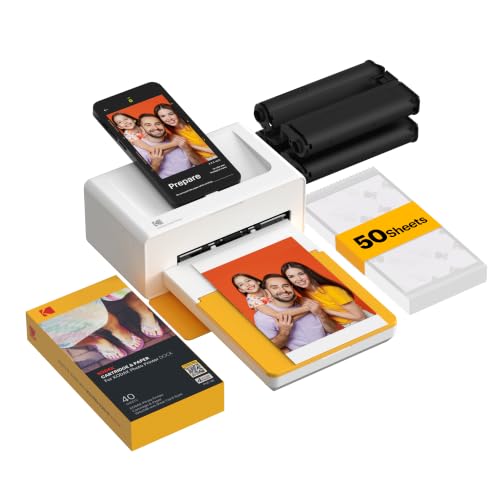
For those who want to print high-quality photos directly from their mobile devices, the KODAK Dock Plus 4PASS Instant Photo Printer is an excellent choice. This compact printer produces stunning 4×6 inch prints using advanced 4PASS technology, ensuring your photos are fingerprint-proof and water-resistant. With a simple dock-and-charge feature, you can easily connect your iPhone, iPad, or Android device via Bluetooth. The bundle includes 90 sheets, perfect for memory preservation and scrapbooking. Users rave about its ease of setup and impressive print quality, making it a must-have for anyone looking to create lasting memories effortlessly.
Best For: Those who want a user-friendly, portable printer for high-quality photo printing directly from their mobile devices.
Pros:
- Easy to use with a simple dock-and-charge feature for quick printing.
- Produces high-quality, durable prints that are fingerprint-proof and water-resistant.
- Compact design makes it portable and suitable for home use, scrapbooking, and memory preservation.
Cons:
- Some users report issues with ink cartridge recognition and paper feeding.
- Lacks portability features like a built-in battery for on-the-go use.
- Limited to printing 4×6 inch photos, which may not meet all users’ needs.
Canon SELPHY CP1500 Compact Photo Printer White
With its compact design and optional battery pack, the Canon SELPHY CP1500 Compact Photo Printer is perfect for anyone who loves to print photos on-the-go. Its sleek, modern look enhances usability, allowing you to print high-quality images effortlessly. You’ll appreciate the instant-dry, water-resistant photos that last up to 100 years, preserving your precious memories. Plus, with various connectivity options like Wi-Fi, USB, and memory cards, you can easily print from your smartphone, computer, or camera. The large 3.5” built-in display lets you view and edit your photos, applying fun filters before printing to make each memory truly special.
Best For: Those who enjoy printing high-quality photos on-the-go and want a portable solution for preserving memories.
Pros:
- Compact and portable design with an optional battery pack for easy travel.
- Instant-dry and water-resistant photos that last up to 100 years.
- Versatile connectivity options including Wi-Fi, USB, and memory card support.
Cons:
- Limited print size compared to larger printers.
- Potentially higher cost per print compared to traditional printing methods.
- Battery pack sold separately, which adds to the overall cost.
Epson PictureMate PM-400 Wireless Compact Color Photo Printer, white

Compact and lightweight, the Epson PictureMate PM-400 is the ideal choice for on-the-go photographers seeking high-quality prints. You can easily create stunning borderless photos in 4×6 and 5×7 sizes, with a speedy print time of just 36 seconds for a 4×6 print on premium glossy paper. Its ultra-compact design allows for effortless portability, fitting seamlessly into your space. Plus, with total wireless connectivity, you can print directly from your iPad, iPhone, tablet, or smartphone. Just keep in mind that it’s designed for use with Epson cartridges only, as third-party options may not perform well.
Best For: On-the-go photographers looking for a portable printer that delivers high-quality borderless photo prints.
Pros:
- High-speed printing with 4×6 borderless photos in just 36 seconds.
- Ultra-compact and lightweight design for easy portability and space-saving.
- Wireless connectivity allows printing directly from mobile devices like iPads and smartphones.
Cons:
- Only compatible with Epson cartridges; third-party options may not work.
- Limited to specific photo sizes (4×6 and 5×7).
- May require premium photo paper for optimal print quality.
Liene Mini Instant Portable Photo Printer Bundle

The Liene Mini Instant Portable Photo Printer Bundle is perfect for anyone who loves capturing and sharing memories on the go. With its compact size and lightweight design, you can easily take it anywhere. This mini printer connects via Bluetooth 5.0, allowing seamless printing from your iOS or Android device. It produces vibrant 2×3-inch photos using Zink inkless technology, ensuring durability for over ten years. Plus, you get 50 sheets of sticky-backed paper, making it easy to stick your prints on any surface. Enjoy simple app functionality that enhances your printing experience while you create lasting memories effortlessly.
Best For: Anyone who enjoys capturing and sharing memories on the go with a compact and portable photo printer.
Pros:
- Easy Bluetooth connectivity with no Wi-Fi required for printing.
- Long-lasting prints that resist fading for over 10 years.
- Compact design and lightweight build make it ideal for travel and outdoor activities.
Cons:
- Photos can only be printed through the Liene app, limiting flexibility.
- Print speed of 1 photo per minute may be slow for high-volume needs.
- Limited to 2×3-inch photo size, which may not suit everyone’s preferences.
Canon PIXMA G620 Wireless All-in-One Printer
![Canon PIXMA G620 Wireless MegaTank Photo All-in-One Printer [Print, Copy, Scan], Black,Works with Alexa](https://m.media-amazon.com/images/I/31W+8GDKNLL._SL500_.jpg)
Perfect for photography enthusiasts and small business owners, the Canon PIXMA G620 Wireless All-in-One Printer offers an impressive MegaTank system that allows you to print up to 3,800 vibrant 4” x 6” color photos on a single set of ink. With a low cost of about 2.5 cents per print, this printer features a 6-color dye-based ink system that includes Red and Gray inks for a wider color gamut. Its compact design makes it easy to fit into any space, while wireless printing from your devices guarantees convenience. Plus, the automatic duplex feature saves you time and paper.
Best For: Photography enthusiasts and small business owners looking for an efficient and cost-effective printing solution.
Pros:
- High page yield: Print up to 3,800 4” x 6” color photos on a single set of ink.
- Cost-efficient: Low cost of approximately 2.5 cents per color photo.
- Compact and convenient: Easy setup and wireless printing from various devices, along with automatic duplex printing.
Cons:
- Weight: At 19.61 pounds, it may be heavier than some other compact printers.
- Limited maximum media size: Maximum supported media size is 8.5 x 14 inches, which may not accommodate larger prints.
- Customer rating: While it has a decent rating, some users might seek higher-rated options.
Factors to Consider When Choosing Photo Printers for PC
When choosing a photo printer for your PC, think about the print quality you need and the types of ink that work best for you. Consider connectivity options that suit your setup, as well as the size and portability of the printer. Finally, keep an eye on printing speed and volume to guarantee it meets your workflow demands.
Print Quality Considerations
Choosing a photo printer for your PC involves careful consideration of print quality, as it directly impacts how your images will look. Start by checking the print resolution; a high dpi, like 4800 x 1200, guarantees finer details and sharper images. The type of ink technology also matters—dye-based inks deliver vibrant colors, while pigment-based inks provide better longevity and fade resistance. For the best photo quality, consider printers using thermal-dye sublimation, which infuse colors into the paper for smudge-proof results. Longevity is key, too; some prints can last up to 100 years without fading. Finally, if you want stunning displays, look for printers that can produce borderless photos, enhancing your overall presentation.
Connectivity Options Available
Print quality is just one piece of the puzzle; connectivity options also play a significant role in your overall printing experience. When choosing a photo printer, consider wireless connectivity like Wi-Fi, Bluetooth, and USB. These options let you print easily from smartphones and computers. Look for printers that support mobile printing technologies such as AirPrint or Google Cloud Print, allowing direct printing from mobile devices without a computer. Evaluate how many devices can connect simultaneously—this is handy in group settings. Check if the printer has a built-in hotspot feature for direct printing from smartphones, bypassing external networks. Finally, verify compatibility with various operating systems to maximize your printing flexibility across different platforms.
Size and Portability
Size and portability are essential factors to take into account in photo printers for PC, especially if you’re planning to take your printer on the go. Look for compact models, typically around 5.39D x 7.8W x 2.2H inches, which make travel and storage easier. Weight also matters; lightweight printers, around 4.4 pounds, enhance convenience for outdoor activities. Many portable options include battery capabilities, allowing you to print without needing a power source. Some designs feature a dock for charging, streamlining the printing process while keeping a compact form factor. Additionally, wireless connectivity allows you to print directly from your smartphone or tablet, eliminating the hassle of cables and making your printing experience even more user-friendly.
Ink Type Efficiency
When considering a photo printer for your PC, ink type efficiency plays an essential role in determining both the quality and cost of your prints. Dye-based inks offer vibrant colors, while pigment-based inks provide longevity and water resistance. The cost per print can vary widely; some systems let you print up to 3,800 4” x 6” photos from a single ink set, costing about 2.5 cents each. Ink choice also affects printing speed, with some systems drying faster for quicker, high-quality prints. Different printers support various ink technologies, such as thermal-dye sublimation for color and Zink inkless printing for durability. Using genuine cartridges enhances performance, preventing clogging and ensuring consistent results.
Printing Speed and Volume
Choosing the right photo printer also involves considering printing speed and volume, which can greatly impact your overall experience. Most home photo printers average around 10-15 images per minute (ipm) for color prints. If you’re frequently printing large batches, look for a printer with a high duty cycle, as it indicates the maximum number of pages it can handle monthly. Remember, specialized modes for photo printing may slow down the process, so balance quality with speed. Fast printers can produce 4×6 photos in under a minute, enhancing productivity, especially during events. Ultimately, assess your printing needs to find a model that matches your desired speed and volume capabilities for best results.
Cost of Supplies
Understanding the cost of supplies is essential for anyone considering a photo printer for their PC. The type of ink you choose plays a big role; dye-based inks typically cost less per page than pigment-based inks. If you print frequently, look into high-yield ink tanks, like MegaTank systems, which can lower your cost to about 2.5 cents for a 4” x 6” color photo. Don’t forget about photo paper—specialty options for high quality can be pricier than standard paper. Regular maintenance supplies, like print head cleaning kits, can add to your long-term costs, especially if you encounter issues. Finally, subscription services for ink delivery might save you money, but weigh those monthly fees against your actual printing needs.