A Threadripper CPU can support demanding AI workflows, but the GPU configuration usually determines which models you can run and how quickly they respond. These eight workstations range from entry points that need a GPU upgrade to multi-GPU systems built for larger local workloads.
Use the comparisons below to match GPU memory, system RAM, storage, and expansion capacity to your actual projects—not just the highest core count.
Best 8 Amd Threadripper AI Workstations Picks for 2026
Best Dual-GPU Configuration
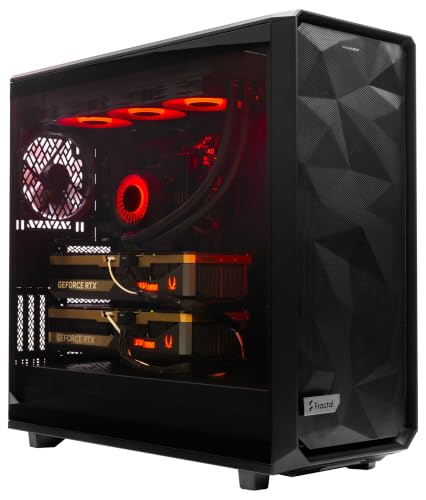
- 96-core Threadripper PRO processor
- Dual RTX PRO 6000 Blackwell GPUs
- 384GB ECC RAM and 8TB NVMe
Best For: Professional dual-GPU compute with ample system memory
Best Upgrade Starting Point

- 12-core Threadripper PRO 7945WX
- 32GB ECC-capable RAM; 1TB NVMe SSD
- Three-year Lenovo Premier Support
Best For: Supported workstation deployments with planned upgrades
Best Triple-GPU Build
Empowered PC Threadripper PRO 9995WX

- Three 96GB RTX PRO 6000 GPUs
- 768GB ECC RAM; four 4TB NVMe SSDs
- 240V/20A needed for maximum capability
Best For: Multi-GPU AI and rendering with appropriate power infrastructure
Best Creator-Oriented Option

- 24-core Threadripper 7960X
- RTX 5080 with 16GB GDDR7
- 1TB SSD plus 4TB hard drive
Best For: Creative workflows and smaller local GPU workloads
Dual-GPU Creator Pick
Sentinel Wood Threadripper PRO 9975WX

- 32-core Threadripper PRO 9975WX
- Two 96GB RTX PRO 6000 GPUs
- 384GB ECC RAM; 10TB listed SSD storage
Best For: Dual-GPU local AI and creative workloads
CPU-Heavy Workstation Pick
APC ES620 Threadripper PRO 9995WX

- 96-core Threadripper PRO 9995WX
- Single 96GB RTX PRO 6000 Blackwell
- 256GB ECC RAM; expandable to 2TB
Best For: CPU-intensive work with one high-memory GPU
Triple-GPU AI Pick
Threadripper PRO 9975WX 3-GPU Workstation
- Three listed 96GB RTX 6000 GPUs
- 384GB ECC RAM; 10TB Gen5 NVMe storage
- 240V/20A specified for maximum utilization
Best For: Multi-GPU local AI and rendering setups
Renewed Entry Pick

- Renewed 12-core Threadripper PRO system
- 32GB DDR4 RAM and 1TB SSD
- Quadro P2000 with 5GB graphics memory
Best For: General workstation use with modest GPU needs
Best Dual-GPU Configuration – MES2X Threadripper PRO 9995WX
Among amd threadripper ai workstations, the MES2X stands out for pairing a 96-core Threadripper PRO 9995WX with two RTX PRO 6000 Blackwell GPUs. Its 384GB of ECC memory and 8TB NVMe configuration suit buyers building a substantial local compute setup.
Best For: Teams that need two professional GPUs, high memory capacity, and fast wired networking in a prebuilt workstation.
Pros:
- Two RTX PRO 6000 Blackwell GPUs provide 192GB of combined GDDR7 memory.
- 384GB of eight-channel ECC RAM is expandable to 2TB.
- Includes dual 10Gb Ethernet, a dedicated management LAN, and an 8TB NVMe configuration.
Cons:
- Requires a 220–240V outlet and uses a 2000W power supply.
- No onboard Wi-Fi; parts-and-labor warranty lasts one year.
This is a strong fit when dual-GPU capacity matters more than a standard wall-outlet setup. Confirm the electrical requirements and your software’s multi-GPU support before ordering.
Best Upgrade Starting Point – Lenovo ThinkStation P8
The Lenovo ThinkStation P8 is a more modest entry among amd threadripper ai workstations: its Threadripper PRO 7945WX has 12 cores, while the listed NVIDIA graphics card has 4GB of dedicated memory. It makes more sense as a professional tower to expand than as a ready-to-run machine for large local models.
Best For: Businesses seeking a supported Threadripper PRO workstation for professional tasks or a planned hardware upgrade.
Pros:
- 12-core, 24-thread Threadripper PRO processor and ECC-capable DDR5 memory.
- 1TB PCIe 4.0 NVMe SSD plus Gigabit and 10Gb Ethernet connectivity.
- Three-year limited manufacturer warranty with Lenovo Premier Support.
Cons:
- 32GB of installed RAM and 4GB of GPU memory limit its appeal for demanding local AI workloads.
- Supplied specifications conflict on maximum RAM capacity; verify expansion limits before purchasing upgrades.
Choose this P8 for its workstation platform and support, not for the strongest out-of-box AI hardware in this group. Budget for memory and graphics changes if your applications require more.
Best Triple-GPU Build – Empowered PC Threadripper PRO 9995WX
For buyers comparing amd threadripper ai workstations by GPU capacity, this Empowered PC tower combines a 96-core Threadripper PRO 9995WX with three RTX PRO 6000 Blackwell cards. The listed 768GB of ECC RAM and four 4TB Gen5 NVMe SSDs also give large datasets substantial room in system memory and local storage.
Best For: Teams planning multi-GPU AI, simulation, or rendering workloads that can use the listed hardware and accommodate its power needs.
Pros:
- Three 96GB GPUs provide 288GB of combined graphics memory.
- 768GB of DDR5 ECC RAM and 16TB of listed NVMe storage.
- Three-year limited hardware warranty and lifetime technical and diagnostic support.
Cons:
- Maximum capabilities require a 240V/20A circuit; operation on 120V/15A comes with reduced compute power.
- At a listed 75 pounds, the tower needs a suitable location for installation.
This is the most GPU-heavy configuration here, but that hardware is useful only when your software can take advantage of multiple cards. Check circuit availability before committing to the build.
Best Creator-Oriented Option – CLX Horus Creator
The CLX Horus Creator takes a different approach to amd threadripper ai workstations, combining a 24-core Threadripper 7960X with a GeForce RTX 5080 and 16GB of GDDR7 memory. Its 1TB NVMe SSD and 4TB hard drive split active-project storage from bulk archiving.
Best For: Creators who want Threadripper CPU cores and a current GeForce GPU for visual work and smaller GPU-memory workloads.
Pros:
- 24-core CPU with 360mm liquid cooling and an RTX 5080 GPU.
- Includes both a 1TB SSD and a 4TB hard drive.
- Offers 10Gb wired networking, Wi-Fi, and Bluetooth.
Cons:
- 32GB of installed RAM and 16GB of GPU memory are modest for larger local AI models.
- Ships with Windows 11 Home rather than a Pro edition.
This is better matched to mixed creative work than memory-intensive AI projects. Check your application’s RAM, VRAM, and operating-system requirements before choosing it over a Threadripper PRO configuration.
Dual-GPU Creator Pick – Sentinel Wood Threadripper PRO 9975WX
Among amd threadripper ai workstations, this Sentinel Wood build pairs a 32-core Threadripper PRO 9975WX with two RTX PRO 6000 GPUs for demanding local AI and creative workflows. Its 384GB of ECC memory and four Gen5 SSDs provide room for large projects and working datasets.
Best For: Buyers who want dual professional GPUs for local AI work, 3D rendering, and content creation.
Pros:
- Two RTX PRO 6000 GPUs, each listed with 96GB of GDDR7 memory.
- 384GB ECC DDR5 RDIMM memory and 10TB of listed Gen5 SSD capacity.
- Three-year limited hardware warranty and lifetime technical and diagnostic support.
Cons:
- The listing guarantees only one HDMI and one DisplayPort output; additional ports may vary.
- Listed maximum RAM is 384GB, the same as the installed amount.
This is a practical fit when two high-memory GPUs and substantial fast storage matter more than maximizing CPU core count. Confirm the display connections you need before ordering.
CPU-Heavy Workstation Pick – APC ES620 Threadripper PRO 9995WX
For shoppers comparing amd threadripper ai workstations, the APC ES620 emphasizes CPU capacity: its Threadripper PRO 9995WX has 96 cores, paired with one RTX PRO 6000 Blackwell GPU with 96GB of GDDR7 memory. It ships with 256GB of eight-channel ECC memory and a 4TB NVMe SSD.
Best For: CPU-intensive workstation tasks alongside GPU-accelerated AI work.
Pros:
- 96-core processor and 256GB ECC registered DDR5 memory, listed as expandable to 2TB.
- RTX PRO 6000 Blackwell with 96GB GDDR7 memory.
- Dual 10Gb Ethernet, dedicated management LAN, and 14 USB ports.
Cons:
- No onboard Wi-Fi.
- One-year parts-and-labor warranty.
Choose this configuration if CPU parallelism, memory expansion, and wired connectivity are priorities. Its single-GPU setup is worth weighing against the multi-GPU systems here.
Triple-GPU AI Pick – Threadripper PRO 9975WX 3-GPU Workstation
At the multi-GPU end of amd threadripper ai workstations, this Empowered PC build combines a 32-core Threadripper PRO 9975WX with three RTX 6000 GPUs listed at 96GB each. The configuration also includes 384GB ECC RDIMM memory and 10TB of Gen5 NVMe SSD storage.
Best For: Teams planning multi-GPU local AI, deep learning, or demanding rendering workflows.
Pros:
- Three 96GB GPUs provide 288GB of aggregate listed graphics memory across the cards.
- 384GB ECC memory and four Gen5 NVMe SSDs totaling 10TB.
- Three-year limited hardware warranty and lifetime technical and diagnostic support.
Cons:
- The listing says 120V/15A operation reduces compute power; maximum utilization calls for 240V/20A power.
- Installed memory matches the listed 384GB maximum.
The third GPU is the key distinction, but aggregate GPU memory should not be mistaken for a single shared 288GB pool. Check your power setup and software’s multi-GPU support before committing.
Renewed Entry Pick – Lenovo ThinkStation P620
For buyers browsing amd threadripper ai workstations on a more modest hardware tier, this renewed ThinkStation P620 offers a 12-core Threadripper PRO 3945WX, 32GB DDR4 memory, and a Quadro P2000 with 5GB of graphics memory. It is better viewed as a general workstation starting point than a ready-made system for large local AI models.
Best For: Buyers seeking a renewed Threadripper PRO desktop for general workstation tasks rather than demanding local AI training.
Pros:
- 12-core Threadripper PRO processor with Windows 11 Pro installed.
- 1TB SSD and dedicated Quadro P2000 graphics.
- Listed support for up to 1TB of RAM, versus 32GB installed.
Cons:
- The Quadro P2000 has only 5GB of graphics memory, limiting its suitability for larger local AI workloads.
- Renewed unit carries a 90-day limited warranty; keyboard and mouse are not included.
This P620 makes sense if its existing workstation specifications meet your needs or you plan upgrades. Do not confuse its Threadripper branding with the substantially higher GPU capacity of the newer builds above.
How We Picked These Amd Threadripper AI Workstations
We compared the listed CPU, GPU, memory, and storage configurations, then considered how each might fit local inference, development, and data preparation. The selection includes both ready-equipped RTX PRO systems and lower-spec towers that may make sense as upgrade platforms. Listed specifications do not establish benchmark performance, cooling quality, support terms, or compatibility with every AI framework; verify those details with the seller before ordering.
Quick Comparison: Which Configuration Fits?
For large models or several GPU jobs at once, start with the triple-RTX PRO 6000 listings and compare their exact GPU specifications, power needs, and software plans. The MES2X and Sentinel Wood offer dual RTX PRO 6000 configurations; the MES2X pairs them with a 96-core PRO 9995WX, while the Sentinel Wood lists a 32-core PRO 9975WX and more system RAM. The APC ES620 provides a single RTX PRO 6000 alongside a 96-core CPU.
The CLX Horus pairs a Threadripper 7960X with a GeForce RTX 5080, making it a different proposition from the professional-GPU builds. The Lenovo ThinkStation P8 lists 32 GB of RAM but no GPU in the supplied configuration; confirm its graphics hardware before treating it as AI-ready. The older ThinkStation P620 includes a Quadro P2000 with 5 GB of VRAM, which is restrictive for many current local-model workloads.
Key Buying Factors for Amd Threadripper AI Workstations
GPU Memory Comes First
Check the exact GPU model and VRAM per card against your model, context length, batch size, and precision requirements. Multiple GPUs do not automatically pool their memory: distributing a model across cards depends on your software. Also confirm whether a listing specifies RTX PRO 6000 Blackwell or uses less precise GPU naming.
CPU, RAM, and Platform Fit
More CPU cores can help with preprocessing, compilation, simulation, and concurrent services, but they will not substitute for insufficient GPU memory. Leave room in system RAM for datasets, model loading, and CPU-side work. Threadripper and Threadripper PRO platforms differ in expansion and memory capabilities, so check the motherboard, available PCIe slots, and installed memory layout rather than relying on the processor name alone.
Power, Cooling, and Storage
For dual- or triple-GPU builds, verify the installed power supply, GPU spacing, sustained cooling, electrical requirements, and physical dimensions. Compare usable SSD capacity, not just the number of drives: the MES2X lists two 4 TB drives in RAID, but the RAID level is not stated here. Keep a separate backup plan; RAID is not a backup.
Who Should Buy Which Amd Threadripper AI Workstations?
Choose a triple-GPU configuration if your workload genuinely benefits from several high-memory cards and you have confirmed software and power compatibility. Consider the MES2X or Sentinel Wood for substantial dual-GPU work, selecting between CPU cores, RAM, and storage needs. The single-GPU APC ES620 may fit buyers who need a high-core-count CPU now and have confirmed its future expansion options. The CLX Horus suits buyers whose applications support its consumer GPU and whose memory needs fit that card. Treat the P8 as a configurable starting point after checking its GPU; consider the P620 primarily for lighter tasks or a carefully budgeted upgrade.