If you’re looking to enhance your workspace with a triple monitor setup, finding the right mini PC is essential. These compact machines pack a punch with powerful processors and ample RAM, ensuring you can multitask effortlessly. From gaming to creative work, there’s a mini PC that meets your needs. Curious about which models top the list for performance and efficiency? Let’s explore the best options available.
ACEMAGIC M1 Mini PC (Intel Core i9-11900H, 32GB DDR4, 1TB SSD)

If you’re a creative professional or power user needing robust performance, the ACEMAGIC M1 Mini PC is an excellent choice for a triple monitor setup. It boasts an Intel Core i9-11900H processor, offering impressive speed up to 4.9GHz. With 32GB DDR4 RAM and a 1TB SSD, this mini PC handles demanding tasks like photo editing and 3D modeling effortlessly. You can expand your storage up to 4TB, ensuring you never run out of space. Plus, its multiple connectivity options and support for ultra-realistic 4K visuals at 60Hz enhance your productivity, making it a top contender for any workspace.
Best For: Creative professionals and power users seeking high-performance computing for demanding tasks such as photo/video editing, 3D modeling, and data analysis.
Pros:
- Exceptional processing power with Intel Core i9-11900H, ideal for multitasking and intensive applications.
- Ample memory and storage options, expandable up to 64GB RAM and 4TB SSD, accommodating large files and software.
- Versatile connectivity including multiple USB ports and support for triple display output, enhancing productivity and workflow.
Cons:
- Higher price point compared to entry-level mini PCs may not suit budget-conscious users.
- Requires adequate cooling and ventilation due to powerful hardware, which might limit placement options.
- May be overkill for casual users or simple tasks, potentially leading to underutilization of capabilities.
BOSGAME P3 Mini Gaming PC with AMD Ryzen 7 7840HS

The BOSGAME P3 Mini Gaming PC, powered by the impressive AMD Ryzen 7 7840HS, is perfect for gamers and content creators seeking high performance in a compact form. With 32GB of fast DDR5 RAM and a 1TB NVMe SSD, you’ll enjoy seamless multitasking and rapid data access. Its integrated AMD Radeon 780M GPU offers performance comparable to a GTX 1060, making it ideal for AAA gaming and 4K video editing. Plus, with triple display support for up to 3x4K, you can maximize your workspace. Enjoy reliable connectivity with Wi-Fi 6E, dual Gigabit Ethernet, and 24/7 technical support.
Best For: Gamers and content creators looking for high performance in a compact mini PC.
Pros:
- Powerful Performance: Equipped with AMD Ryzen 7 7840HS and integrated Radeon 780M GPU, suitable for AAA gaming and 4K video editing.
- Expandable Memory and Storage: Comes with 32GB DDR5 RAM and a 1TB NVMe SSD, expandable up to 64GB with additional storage options.
- Versatile Connectivity: Supports triple display up to 3x4K, Wi-Fi 6E, and dual Gigabit Ethernet for fast and reliable connections.
Cons:
- Limited Graphics Upgrade Options: Integrated GPU may not meet the needs of users requiring dedicated graphics cards for extreme gaming.
- Compact Design May Limit Cooling: Smaller form factor could lead to thermal constraints under heavy loads.
- Warranty Duration: Limited to a 1-year warranty, which may be shorter than some competing products.
Lenovo ThinkCentre M70q Tiny Desktop (Renewed)

For professionals seeking a compact yet powerful solution for a triple monitor setup, the Lenovo ThinkCentre M70q Tiny Desktop (Renewed) stands out with its impressive Intel Core i5 performance and 16GB of RAM. You’ll enjoy fast boot times and smooth multitasking, thanks to its 256GB NVMe SSD. This mini PC is designed for efficiency, making it perfect for home or office use. With built-in WiFi and support for connecting up to three monitors, you can enhance your productivity effortlessly. Plus, it comes with a wired keyboard and mouse, so you’re ready to go right out of the box.
Best For: Professionals seeking a compact and powerful desktop solution for multitasking and productivity with a triple monitor setup.
Pros:
- Compact design ideal for both home and office environments.
- Strong performance with Intel Core i5 and 16GB DDR4 RAM for efficient workflow.
- Ready to use right out of the box with included wired keyboard and mouse.
Cons:
- Limited storage capacity with only 256GB NVMe SSD.
- As a renewed product, there may be minor cosmetic imperfections.
- May require additional adapters for certain monitor connections.
GMKtec Mini PC Nucbox G2 Plus

Designed for multitaskers and home entertainment enthusiasts, the GMKtec Mini PC Nucbox G2 Plus stands out with its impressive ability to connect up to three 4K displays. Powered by the Intel Twin Lake N150 processor, it delivers a performance boost of 6%-10% over previous models. With 12GB of DDR5 RAM and a 512GB SSD, it guarantees swift multitasking and fast file transfers. Equipped with multiple USB 3.2 ports, dual Gigabit Ethernet, and WiFi 6, connectivity is seamless. Plus, its robust graphics capabilities make it perfect for home theater setups, making your entertainment experience truly immersive.
Best For: The GMKtec Mini PC Nucbox G2 Plus is best for multitaskers and home entertainment enthusiasts seeking a powerful, compact solution for their computing needs.
Pros:
- Impressive performance with Intel Twin Lake N150 processor, offering a 6%-10% boost over previous models.
- Generous memory and storage with 12GB DDR5 RAM and 512GB SSD for seamless multitasking and fast file transfers.
- Multiple connectivity options including USB 3.2, dual Gigabit Ethernet, and support for three 4K displays for an enhanced entertainment experience.
Cons:
- Limited upgrade options due to its compact design, which may restrict future enhancements.
- May not support high-end gaming due to integrated graphics limitations.
- The 1-year warranty may be considered short compared to competitors offering longer coverage.
GMKtec M3 Ultra Mini PC with Intel Core i7 12700H

Looking to elevate your multitasking capabilities? The GMKtec M3 Ultra Mini PC with Intel Core i7-12700H is your perfect companion. With its powerful 14 cores and 20 threads, it maxes out at 4.7 GHz, ensuring smooth performance whether you’re programming or creating content. You’ll love its ability to support three 4K displays through dual HDMI and one Type-C port, making multitasking seamless. Plus, with 32GB of expandable RAM and a 1TB SSD, storage won’t be an issue. Enjoy faster networking with 2.5G Ethernet and WiFi 6, ensuring you stay connected while you work or play.
Best For: Professionals and content creators seeking a high-performance mini PC for multitasking, programming, and graphics-intensive tasks.
Pros:
- Powerful Performance: Equipped with an Intel Core i7-12700H, delivering superior processing capabilities and multitasking efficiency.
- Triple 4K Display Support: Ideal for users needing extensive screen real estate for productivity and content creation.
- Fast Networking Options: Features 2.5G Ethernet and WiFi 6, providing accelerated internet speeds and stable connections.
Cons:
- Limited Warranty: Comes with a 1-year limited warranty, which may not be sufficient for some users.
- Potential Overheating: High-performance components may generate heat, requiring adequate cooling solutions.
- Size Constraints: While compact, the mini PC may lack the expandability options of larger desktop systems.
KAMRUI Mini PC E3B (32GB RAM, 512GB SSD)

If you’re a multitasker who demands high performance from your setup, the KAMRUI Mini PC E3B with 32GB of RAM and a 512GB SSD is an excellent fit. Powered by the Ryzen 5 7430U, it handles productivity, multitasking, and light gaming with ease. You’ll appreciate the support for three displays, including 4K@60Hz visuals, perfect for your triple monitor setup. With upgradable RAM and storage, plus WiFi 6 and Bluetooth 5.2 for seamless connectivity, it guarantees stable performance. The built-in cooling fan keeps noise to a minimum, letting you focus on what matters most.
Best For: The KAMRUI Mini PC E3B is best for multitaskers and content creators who require high performance and multitasking capabilities in a compact form factor.
Pros:
- Excellent performance for productivity, multitasking, and light gaming due to the powerful Ryzen 5 7430U processor.
- Supports multiple displays with 4K@60Hz visuals, ideal for a triple monitor setup.
- Upgradable RAM and storage, allowing for customization and expansion to meet future needs.
Cons:
- Limited gaming performance for more demanding titles due to integrated graphics.
- Cooling fan may generate some noise, which could be distracting in quiet environments.
- No dedicated GPU option, limiting graphics performance for intensive applications.
BOSGAME E2 Mini PC with AMD Ryzen 5 3550H

For professionals who need robust multitasking capabilities, the BOSGAME E2 Mini PC with AMD Ryzen 5 3550H stands out as an excellent choice. With its 4 cores and 8 threads, this mini PC delivers up to 3.7GHz Turbo speed, offering 50% faster multi-core performance than basic models. You’ll enjoy seamless multitasking across three displays with 4K Ultra HD clarity, thanks to its support for dual HDMI and USB-C connections. Plus, the 16GB RAM (expandable to 32GB) and 512GB SSD guarantee smooth application switching. With dual-band WiFi 5 and Bluetooth 5.0, your connectivity remains stable and efficient.
Best For: Professionals and content creators who require powerful multitasking capabilities and seamless performance across multiple displays.
Pros:
- 50% faster multi-core performance compared to basic mini PCs, enhancing productivity.
- Supports triple-screen multitasking with 4K Ultra HD clarity for improved workflow.
- Compact design with advanced cooling and low noise operation, making it suitable for any workspace.
Cons:
- Limited standard storage of 512GB may require upgrades for extensive data needs.
- Dual-Band WiFi 5 may not offer the fastest connectivity compared to newer standards like WiFi 6.
- Potentially higher initial cost compared to entry-level mini PCs.
KAMRUI E3B Mini PC with AMD Ryzen 7 5825U

The KAMRUI E3B Mini PC with the AMD Ryzen 7 5825U is an excellent choice for professionals who demand high performance in multitasking environments. With its 8 cores and 16 threads, you’ll experience impressive single-thread performance, enhancing tasks like web browsing and document editing. It comes with 16GB of RAM, expandable up to 64GB, plus dual M.2 slots for substantial storage. The AMD Radeon RX Vega 8 GPU lets you support triple 4K displays effortlessly. With WiFi 6 and Bluetooth 5.2, you’ll enjoy fast connectivity, making this mini PC a powerhouse for your triple monitor setup.
Best For: Professionals and multitaskers who require high performance and efficient multitasking capabilities in a compact form factor.
Pros:
- High Performance: Powered by AMD Ryzen 7 5825U with 8 cores and 16 threads, providing excellent single-thread performance for demanding tasks.
- Expandable Memory and Storage: Comes with 16GB RAM, expandable to 64GB, and dual M.2 slots for significant storage options.
- Triple 4K Display Support: Equipped with AMD Radeon RX Vega 8 GPU, allowing seamless multitasking across three 4K displays.
Cons:
- Limited Graphics for Gaming: While capable for everyday tasks, the integrated GPU may not perform well for high-end gaming.
- No pre-installed OS: Users need to install their preferred operating system, which may be inconvenient for some.
- Potentially Noisy: The mini PC’s cooling system might generate noise under heavy load, which could be distracting in quiet environments.
Getorli Mini PC (AMD 3550H, 32GB RAM, 1TB SSD)
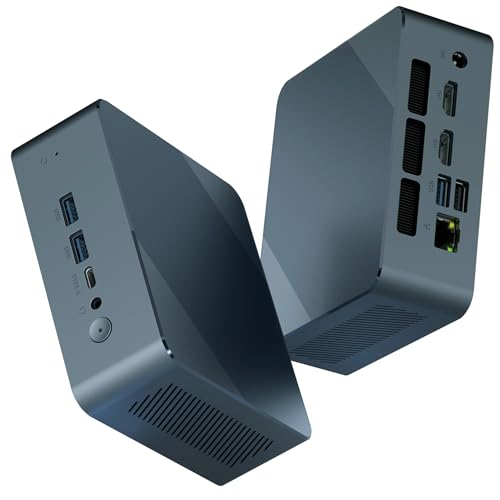
Looking to enhance your productivity with a powerful mini PC? The Getorli Mini PC is an excellent choice, featuring an AMD Ryzen 5 3550H processor that boosts up to 3.7GHz. With 32GB of RAM, multitasking becomes a breeze, and the 1TB SSD guarantees quick file transfers. You’ll appreciate the variety of connectivity options, including dual HDMI ports for 4K @ 60Hz triple-screen output. Its compact design makes it easily portable, while honeycomb vents optimize airflow for efficient cooling. Plus, enjoy peace of mind with a 1-year warranty and 24-hour technical support for any questions.
Best For: Professionals and multitaskers seeking a compact and powerful mini PC for productivity and entertainment.
Pros:
- High performance with AMD Ryzen 5 3550H processor and 32GB RAM for seamless multitasking.
- Versatile connectivity options, including multiple USB ports and dual HDMI for 4K triple-screen output.
- Compact and portable design with effective heat dissipation for on-the-go use.
Cons:
- Limited upgrade options as the M.2 SSD can only be expanded to 2TB.
- Potential noise from cooling fans during intensive tasks.
- Price point may be higher compared to other mini PCs with similar specs.
HP Pro 400 G9 Mini PC Desktop Computer

If you need a powerful yet compact solution for a triple monitor setup, the HP Pro 400 G9 Mini PC Desktop Computer stands out with its impressive support for triple 4K displays. Featuring an Intel Celeron G6900T processor and 16GB DDR5 RAM, it handles multitasking effortlessly. The compact design, measuring just 17.7 x 17.5 x 3.4 cm and weighing under 3 pounds, makes it easy to fit into any workspace. With a 256GB PCIe SSD (expandable up to 4TB) and multiple advanced connectivity options, you’ll enjoy smooth performance whether for business or personal use. Plus, it runs on Windows 11 Pro for enhanced productivity.
Best For: Professionals and home users seeking a compact, efficient PC for multitasking and triple monitor configurations.
Pros:
- Supports triple 4K displays for enhanced productivity and visual clarity.
- Compact and lightweight design allows easy integration into any workspace.
- Configurable storage options with up to 4TB PCIe M.2 SSD for ample data storage.
Cons:
- Limited upgrade options for RAM as it only supports up to 32GB.
- Intel Celeron processor may not be suitable for heavy gaming or resource-intensive applications.
- Ultra-quiet design might not provide sufficient cooling for prolonged heavy use.
Factors to Consider When Choosing Mini PCs for a Triple Monitor Setup
When you’re picking a mini PC for a triple monitor setup, you’ll want to focus on several key factors. Consider the graphics card performance, connectivity options, and processing power to guarantee smooth operation. Don’t forget about memory, storage capacity, and cooling to keep everything running efficiently and quietly.
Graphics Card Performance
Graphics card performance is an essential element to take into account for anyone setting up a mini PC with a triple monitor configuration. It determines how well your system can drive multiple displays without lag or distortion. Integrated graphics, like Intel UHD Graphics, may struggle with high-resolution setups, so opting for dedicated GPUs such as AMD Radeon or Nvidia GeForce is a smart choice. Make sure your mini PC supports a minimum of 4K resolution at 60Hz for each display, assuring crisp visuals and smooth multitasking. Pay attention to the number and type of output ports, as they affect your connectivity options. Finally, higher memory bandwidth and VRAM can greatly enhance performance for demanding tasks like gaming and video editing across multiple screens.
Connectivity Options Available
Choosing the right connectivity options is essential for setting up a mini PC with a triple monitor configuration. First, look for multiple display outputs like HDMI, DisplayPort, or USB-C to connect three separate screens simultaneously. Make certain that these ports support high resolutions, ideally 4K at 60Hz, to deliver sharp visuals on each monitor. Check the total number of ports available, including USB Type-A and Type-C, to enable peripheral connections and maintain adequate data transfer bandwidth. It’s also important to take into account mini PCs with integrated graphics that can handle triple monitor setups efficiently, enhancing your multitasking or gaming experience. Finally, make sure compatibility with multi-monitor arrangements, as some systems may need specific configurations or adapters for full functionality.
Processing Power Requirements
To guarantee a smooth experience with a triple monitor setup, you’ll need a mini PC equipped with robust processing power. Look for a powerful processor, like an Intel Core i7 or AMD Ryzen 7, to efficiently handle multiple applications and high-resolution displays. Aim for at least 8 cores and 16 threads in the CPU, which supports multitasking and assures smoother performance across screens. A processor with a maximum boost frequency above 4.5 GHz can greatly enhance responsiveness when juggling several tasks. Make certain the integrated graphics can support multiple 4K displays, providing smooth rendering and playback of high-definition content. Finally, opt for mini PCs utilizing advanced architectures like Zen 3 or Intel’s Alder Lake for peak performance and energy efficiency.
Memory and Storage Capacity
While processing power sets the foundation for a smooth triple monitor experience, memory and storage capacity play an essential role in maintaining that performance. For best results, aim for at least 16GB of RAM, but 32GB or more is ideal for multitasking across several applications. Storage is equally important; a minimum of 512GB SSD guarantees quick access to files and efficient application switching, especially with large datasets or multimedia content. Expandability is fundamental, so look for mini PCs that support additional RAM and storage upgrades. Opt for dual-channel memory configurations to boost performance, and choose NVMe SSDs over SATA SSDs for faster read and write speeds, which are critical in a multi-display setup.
Cooling and Noise Levels
When you set up a triple monitor configuration, effective cooling and low noise levels become critical for maintaining ideal performance. Compact mini PCs often struggle with heat management during intensive tasks, so look for models with upgraded silent fans and optimized air ducts. These features can guarantee efficient cooling, minimizing noise even under heavy workloads. Additionally, heat dissipation mechanisms like cooling copper tubes are essential to reduce thermal buildup, preventing performance issues during multitasking across multiple displays. Prioritize options that advertise low noise operation and high cooling efficiency; these factors greatly enhance your productivity and comfort in a multi-monitor environment. A well-cooled, quiet setup will help you focus on your tasks without distraction.
Compatibility With Operating Systems
Choosing the right mini PC for your triple monitor setup hinges on compatibility with your desired operating systems, ensuring you can run your preferred software without issues. Make sure the mini PC supports operating systems like Windows, Linux, or Ubuntu. This compatibility is essential for smooth performance. Check that its graphics capabilities can handle multiple displays, especially for tasks like gaming or video editing, which may need specific drivers. Look for multiple display outputs such as HDMI, DisplayPort, or USB-C to connect three monitors simultaneously. Additionally, consider networking features like Wi-Fi and Ethernet for seamless online tasks, and evaluate expandability options like extra RAM or storage to enhance performance as your needs evolve.