When it comes to efficient data management, choosing the right cloning docking station can make all the difference. With advanced features and impressive speeds, these devices simplify your data transfer tasks. But how do you know which one is perfect for your needs? This guide will help you navigate through the top options available in 2025, ensuring you make an informed choice that enhances your workflow. Let’s explore what each docking station has to offer.
SABRENT USB 3.0 to SATA Dual Bay External Hard Drive Docking Station

The SABRENT USB 3.0 to SATA Dual Bay External Hard Drive Docking Station is perfect for users who need quick and efficient access to multiple hard drives or SSDs, thanks to its plug-and-play functionality and support for both 2.5 and 3.5-inch drives up to 10TB. You’ll enjoy transfer speeds of up to 5Gbps, making data management a breeze. Plus, with offline cloning, you can duplicate drives at speeds of 30 MB/sec. While the cloning function may lead to confusion with disk letters and potential data scares, most users appreciate its overall value and performance, especially for hot-swapping drives effortlessly.
Best For: Users needing an efficient solution for accessing and managing multiple hard drives or SSDs quickly and conveniently.
Pros:
- Plug-and-play functionality allows for easy setup without the need for drivers.
- High transfer speeds of up to 5Gbps facilitate quick data transfers.
- Versatile compatibility with various operating systems and potential use as a boot drive.
Cons:
- Cloning function may cause confusion with disk letters and data management.
- Data duplication issues reported during cloning could lead to user concerns.
- Design limitations may require additional support for slim profile drives.
ORICO Dual Bay Hard Drive Docking Station with Duplicator Function

For tech enthusiasts and professionals who need efficient data management, the ORICO Dual Bay Hard Drive Docking Station stands out with its impressive offline cloning function. You can easily clone hard drives without a computer by simply pressing the CLONE button. This docking station supports up to 44TB of storage, handles 2.5/3.5 SATA drives, and offers high-speed data transfer up to 5Gbps. Its tool-less design allows for quick hot-swapping, while the independent power supply guarantees stable performance. Users appreciate its solid build quality, ease of use, and effective cloning capabilities, making it a top choice for data management.
Best For: Tech enthusiasts and professionals seeking efficient data management and reliable hard drive cloning capabilities.
Pros:
- High-speed data transfer rates up to 5Gbps with USB 3.0 and UASP support.
- Convenient offline cloning function allows for quick hard drive duplication without a computer.
- Tool-less design enables easy hot-swapping of drives, enhancing usability.
Cons:
- Some users report loud beeping during connections or disconnections, which may be distracting.
- Limited support for drives larger than the source disk when using the cloning function.
- The weight and dimensions may be less portable for users needing a more compact solution.
ICY BOX M.2 NVMe & SATA SSD/HDD Hard Drive Docking Station

If you’re looking for a reliable solution to clone and manage multiple drives simultaneously, the ICY BOX M.2 NVMe & SATA SSD/HDD Hard Drive Docking Station stands out with its one-touch offline cloning feature. This triple-bay cloner supports a variety of drive types, including M.2 PCIe NVMe SSDs and 2.5/3.5 SATA SSDs and HDDs. With data transfer speeds up to 10 Gbps, you’ll enjoy quick backups. Plus, its tool-free design makes swapping drives effortless. While it generally gets high praise for ease of use, some users mention minor setup challenges. Overall, it’s an excellent choice for seamless data transfer.
Best For: Users needing a versatile docking station for efficient cloning and management of multiple types of SSDs and HDDs.
Pros:
- One-Touch Offline Cloning: Simple and quick cloning process without the need for software installation.
- High-Speed Data Transfer: Achieves data transfer rates up to 10 Gbps, ensuring fast backups.
- Tool-Free Design: Easy to swap and manage drives without any additional tools.
Cons:
- Initial Setup Challenges: Some users may experience difficulties during the initial setup process.
- Lack of Clear Instructions: Instructions provided may not be sufficient for all users, leading to confusion.
- Compatibility Limitations: While compatible with many systems, some users may face issues with specific configurations.
SABRENT USB C Docking Station for M.2 PCIe/NVMe and SATA SSD & HDD

Need a reliable solution for cloning and managing your drives? The SABRENT USB C Docking Station is your go-to option for M.2 PCIe/NVMe and SATA SSDs and HDDs. Weighing just 7 ounces and measuring 6.1 x 2.4 x 2.6 inches, this dock supports offline cloning, so you can duplicate drives without a computer. With USB 3.2 Gen 2 speeds and compatibility with various drive sizes, you’ll experience quick and efficient transfers. Though some users report fan noise and hot-swapping issues, its tool-less installation and stylish design make it a strong contender for your data management needs.
Best For: Users looking for a versatile and efficient solution for cloning and managing M.2 PCIe/NVMe and SATA SSDs and HDDs without the need for a computer.
Pros:
- Supports offline cloning, allowing duplication of drives without a computer.
- Tool-less installation makes it easy to swap out drives quickly and efficiently.
- Stylish design with a built-in heatsink and fan for effective cooling.
Cons:
- Fan noise reported by some users can be bothersome during operation.
- Hot-swapping issues where disconnecting one drive can affect others.
- Limited customer support options, making it difficult for some users to get assistance.
MAIWO Dual Bay Hard Drive Docking Station with Offline Clone for SATA HDD SSD

The MAIWO Dual Bay Hard Drive Docking Station shines as the ideal choice for tech-savvy users who require efficient offline cloning capabilities without the need for a computer. With support for both 2.5 and 3.5-inch SATA HDDs and SSDs, it offers a total capacity of 48TB and features a USB 3.0 interface for rapid 5Gbps data transfers. The tool-free installation and LED indicators simplify the cloning process, allowing you to monitor progress easily. Compatible with various devices and equipped with robust power supply options, this docking station guarantees reliable performance, making it a top choice for seamless data management.
Best For: Tech-savvy users seeking efficient offline cloning capabilities and high-speed data transfer for SATA HDDs and SSDs.
Pros:
- Supports offline cloning without a computer, simplifying data backup and recovery.
- High-speed USB 3.0 interface allows for rapid 5Gbps data transfers.
- Tool-free installation and LED indicators provide easy monitoring and usability.
Cons:
- Some users report minor issues with drive partitioning.
- Mixed reviews on build quality, with mentions of flimsy design components.
- Compatibility issues may arise with certain older devices or operating systems.
SABRENT USB Type C Dual Bay Hard Drive Docking Station (EC-CH2B)

For those who frequently need to clone hard drives, the SABRENT USB Type C Dual Bay Hard Drive Docking Station (EC-CH2B) stands out with its impressive offline cloning capability of up to 60MBps. You can read and write to two hard drives at once, making data transfer efficient. Its tool-free installation means you can set it up without any hassle. Plus, the hot-swappable feature allows for easy swapping of drives. With USB 3.0, you’ll enjoy transfer speeds of up to 5Gbps. Compatible with both Windows and Mac, it supports 2.5” and 3.5” SATA HDDs for versatile use.
Best For: Users who need a reliable and efficient solution for cloning and transferring data between multiple hard drives.
Pros:
- Supports offline cloning at speeds of up to 60MBps, making it ideal for quick backups.
- Tool-free installation and hot-swappable design for effortless drive management.
- High transfer speeds of up to 5Gbps with USB 3.0, ensuring fast data access.
Cons:
- Limited to SATA HDDs only, which may not accommodate other types of drives.
- May require additional power supply for larger 3.5” drives, which is not included.
- Compatibility issues may arise with certain older operating systems or specific drive models.
SABRENT USB-C Lay Flat Docking Station for M.2 & SATA SSD/HDD

Designed for tech enthusiasts and professionals alike, the SABRENT USB-C Lay Flat Docking Station offers a seamless solution for cloning and accessing M.2 and SATA SSDs/HDDs. With compatibility for various drive sizes and a speedy 10Gbps transfer rate, you can quickly back up your data or access media. Its tool-free installation makes swapping drives effortless, while the smart cloning feature allows offline duplication without needing a PC. Though it requires an external power source and some users report overheating, its solid performance and high ratings make it a top choice for efficient data management.
Best For: Tech enthusiasts and professionals seeking a reliable and high-speed solution for cloning and accessing M.2 and SATA SSDs/HDDs.
Pros:
- Versatile compatibility with different drive sizes.
- High-speed data transfer capabilities of up to 10Gbps.
- Tool-free installation allows for effortless drive swapping.
Cons:
- Requires an external power source, which may be cumbersome.
- Some users experienced overheating issues during prolonged use.
- Size and weight may be greater than other docking solutions.
FIDECO External Hard Drive Docking Station for 2.5 and 3.5 inch SATA HDD SSD

If you’re looking for a versatile solution to manage both 2.5 and 3.5 inch SATA HDDs and SSDs, the FIDECO External Hard Drive Docking Station stands out with its impressive offline cloning feature. This docking station supports a maximum storage capacity of 24 TB and boasts USB 3.0 speeds up to 5 Gbps, ensuring quick data transfers. You can easily connect two drives simultaneously with a plug-and-play design. While the cloning process is simple, be aware that you may need to power off the device to swap drives. Overall, it’s a reliable choice for efficient data management and cloning.
Best For: Users needing an efficient solution for cloning and managing large SATA HDDs and SSDs, particularly those who value fast data transfer rates.
Pros:
- Fast Data Transfer: Supports USB 3.0 speeds up to 5 Gbps for quick file transfers.
- Offline Cloning Feature: Allows cloning of drives without needing a computer, simplifying the process.
- Versatile Compatibility: Works with both 2.5 and 3.5 inch SATA HDDs and SSDs, supporting up to 24 TB of storage.
Cons:
- Hot Swap Limitations: Requires powering off the docking station to add or remove drives, which can be inconvenient.
- Drive Recognition Issues: Some users report difficulties with drive recognition when connecting a second drive.
- Initialization Requirement: New drives must be initialized to be recognized, which may pose a challenge for some users.
Inateck RGB SATA to USB 3.0 Hard Drive Docking Station (SA02003)
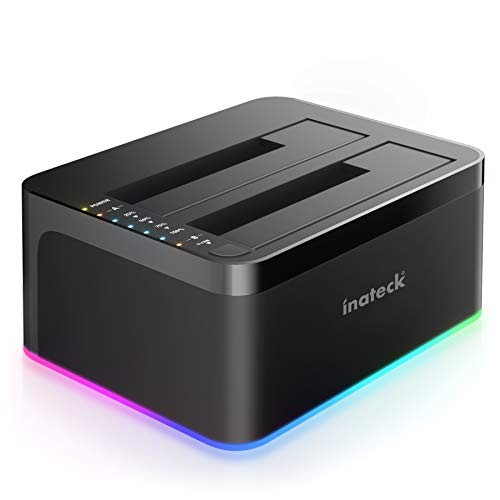
The Inateck RGB SATA to USB 3.0 Hard Drive Docking Station (SA02003) is an excellent choice for tech enthusiasts and professionals who need efficient data management and cloning capabilities. Weighing just 0.57 pounds, it supports both 2.5” and 3.5” HDDs and SSDs, accommodating up to 20 TB of storage. With a speedy 5 Gbps data transfer rate and offline cloning feature, you can duplicate drives without a computer. The RGB lighting adds a stylish touch, while user reviews highlight its ease of use. Just make sure your target drive is equal to or larger than the source for successful cloning.
Best For: Tech enthusiasts and professionals looking for efficient data management and cloning solutions.
Pros:
- Fast data transfer rate of 5 Gbps with UASP support for improved performance.
- Offline cloning capability allows for sector-by-sector duplication without a computer.
- Wide compatibility with various HDDs and SSDs, accommodating both 2.5” and 3.5” drives.
Cons:
- Cloning smaller drives onto larger ones may lead to issues if target drive capacity is not equal to or greater.
- RGB lighting may be considered unnecessary by some users, despite its aesthetic appeal.
- Caution is advised when using both drive slots simultaneously to prevent potential issues.
Inateck RGB USB 3.0 USB-C Hard Drive Docking Station (SA02003C)

For anyone seeking a versatile and efficient way to manage their data, the Inateck RGB USB 3.0 USB-C Hard Drive Docking Station (SA02003C) stands out as an excellent choice. This dual-bay dock supports both 2.5 and 3.5-inch SATA HDDs and SSDs, accommodating up to 2 x 20TB drives. With its vibrant RGB effects, you’ll easily monitor drive activity. Plus, the offline cloning feature allows you to clone drives without needing a computer. Enjoy fast transfer speeds thanks to USB 3.0 and UASP support, along with hot-swapping capability for seamless operation. It’s a must-have for any data management setup.
Best For: Users looking for a reliable and feature-rich docking station to manage and clone multiple hard drives efficiently.
Pros:
- Dual Bay Support: Accommodates both 2.5 and 3.5-inch SATA HDDs and SSDs with a maximum capacity of 2 x 20TB.
- Offline Cloning Capability: Allows you to clone drives without needing to connect to a computer, enhancing convenience.
- Fast Data Transfer: Utilizes USB 3.0 and UASP technology for improved transfer speeds and supports hot-swapping.
Cons:
- Limited to SATA Drives: Only compatible with SATA HDDs and SSDs, excluding other drive types.
- Power Adapter Required: Requires an external power adapter, which may add to cable management concerns.
- RGB Features May Not Appeal to Everyone: The RGB lighting may not be suitable for users who prefer a more understated design.
Factors to Consider When Choosing a Cloning Docking Station for PC
When choosing a cloning docking station for your PC, you need to contemplate several key factors. Cloning speed efficiency and compatibility with different drive types can greatly impact your experience. Additionally, look at supported storage capacity, design, build quality, and the variety of connectivity options available.
Cloning Speed Efficiency
Choosing the right cloning docking station for your PC hinges on understanding cloning speed efficiency, as it can greatly affect your workflow. Cloning speeds generally range from 30 MB/s to over 250 MB/s, directly impacting how quickly you can transfer data. The type of connection you use matters too; USB 3.0 offers speeds up to 5 Gbps, while USB 3.2 Gen 2 doubles that to 10 Gbps. Some stations allow offline cloning, simplifying the process and enhancing speed. Keep in mind that larger drives with heavy data loads will take longer to clone, so consider your drive sizes carefully. Verify your target drive matches or exceeds the source drive’s size to avoid data loss or errors.
Compatibility With Drive Types
Understanding cloning speed efficiency leads naturally to the next important factor: compatibility with various drive types. When you’re selecting a cloning docking station, confirm it supports the specific drive types you need, such as 2.5-inch and 3.5-inch SATA HDDs and SSDs, since compatibility varies widely between models. If you plan to clone faster M.2 PCIe NVMe drives, check if the docking station has this feature. Look for tool-free installation for quick drive swapping, enhancing your efficiency. Also, verify the docking station can handle both offline cloning and simultaneous access to multiple drive types, as this flexibility will greatly improve your data transfer and backup processes.
Supported Storage Capacity
Selecting a cloning docking station with the right supported storage capacity can greatly impact your data management experience. Pay attention to the maximum storage capacity; some models accommodate up to 48TB, while others might only support 20TB or less. It’s essential that the docking station handles both 2.5-inch and 3.5-inch SATA HDDs and SSDs to maximize compatibility. Look for options that allow offline cloning with a larger target drive than the source to guarantee successful data duplication. Additionally, consider models supporting multiple drives simultaneously, as some offer dual bays for enhanced storage. Just remember that certain models may limit individual drive sizes, so verify specifications, especially if you plan to use dual bay configurations.
Design and Build Quality
When it comes to cloning docking stations, design and build quality play an important role in your overall experience. Look for models made from high-quality ABS plastic or aluminum, as these materials guarantee durability and effective heat dissipation. A tool-free installation process is vital; it allows you to swap drives quickly and effortlessly, enhancing convenience. LED indicators are another feature to take into account, providing clear feedback on power and activity status to monitor your drives easily. Opt for a compact design that’s lightweight for better portability and storage. Finally, evaluate cooling features like built-in fans or heatsinks to prevent overheating during extended use, ensuring peak performance and longevity of your docking station.
Connectivity and Ports
To guarantee you get the most out of your cloning docking station, pay close attention to its connectivity options and ports. Look for models featuring multiple ports like USB 3.0 and USB-C to accommodate various devices and speeds. Compatibility with both 2.5 and 3.5-inch SATA HDDs and SSDs is essential for maximizing versatility. High data transfer rates, such as USB 3.0 or USB 3.2, can provide speeds up to 10 Gbps, making cloning and data transfer efficient. Additionally, consider docking stations with hot-swappable capabilities, which let you add or remove drives without shutting down your system. Finally, offline cloning functionality enhances convenience by allowing data duplication without needing a computer.
Ease of Use
While connectivity options and ports are important, ease of use can greatly enhance your experience with a cloning docking station. Look for a model with plug-and-play functionality, allowing immediate use without extra drivers or software. Tool-free installation features are also essential, letting you swap drives quickly without needing tools. Hot-swapping capabilities enable you to connect and disconnect drives without shutting down your system, making data transfers more convenient. Additionally, clear LED indicators provide visual feedback on power status and data transfer activity, helping you monitor operations easily. Finally, opt for a docking station that supports offline cloning with a simple button press, ensuring a straightforward and efficient cloning process without a connected computer.
Power Supply Options
Choosing the right power supply options for your cloning docking station is essential, especially if you want reliable performance during data transfers. Look for a docking station with an independent power supply; this guarantees a stable source for larger drives and enhances overall performance. Aim for a power adapter rated at least 12V and 3A to support high-capacity drives and avoid power-related issues. Energy-saving modes can also be beneficial, reducing consumption when the station’s idle. Additionally, check if it supports hot-swapping while powered, allowing you to add or remove drives without disconnecting the power. Be cautious, as some docking stations may depend on USB bus power, limiting performance during intensive operations.
Offline Cloning Functionality
When you’re considering a cloning docking station for your PC, offline cloning functionality can greatly enhance your experience. This feature lets you duplicate data from one hard drive to another without needing a connected computer, making it incredibly convenient. Look for models offering a one-button offline cloning process, which simplifies duplication and often comes with LED indicators to track progress. Keep in mind that cloning speeds can vary, with some devices reaching up to 60 MB/s, so choose wisely for efficiency. Always verify the target drive is larger than the source drive, as many docking stations require this for successful cloning. Finally, be cautious of potential data duplication issues and manage your drives properly after cloning to avoid confusion.