The best compact stream control decks put frequent commands, scenes, apps, and audio controls within easy reach without taking over your desk. The right model can simplify live production while also speeding up editing, gaming, and daily computer tasks.
This roundup compares 10 options across key count, display features, dials, touch controls, software flexibility, and overall desk footprint. Use the buying guide below to narrow the list based on how you work and what you need to control.
Best 10 Compact Stream Control Decks Picks for 2026
Best Budget Pick

- Six customizable LCD macro keys
- Drag-and-drop setup with multi-action support
- Works with Mac and PC apps
Best For: Beginners and small desk setups
Best for Information-Rich Workflows

- 15 customizable LCD keys
- Three real-time status display panels
- Supports profiles, action flows, and 100+ plugins
Best For: Streamers and creators managing multiple workflows
Best Mainstream Choice

- Eight customizable shortcut keys
- Two touch points and drag-and-drop setup
- Supports apps and compatible smart-home controls
Best For: Productivity users and connected workspaces
Best for Hands-On Audio Control
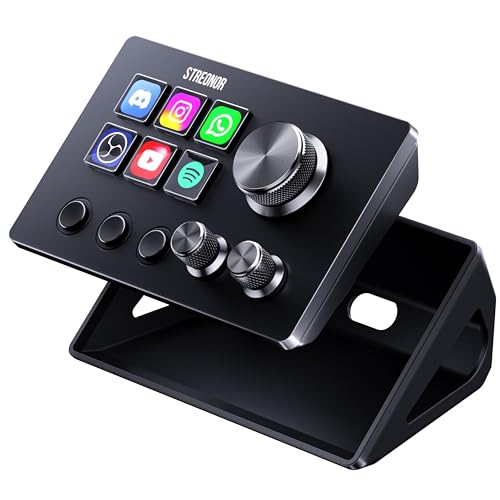
- Six LCD keys plus three rotary knobs
- Three dedicated scene-switching keys
- 100+ plugins and multi-action macros
Best For: Streamers and editors needing tactile audio controls
Best Overall

- 15 customizable LCD keys
- One-touch and multi-action controls
- Broad Mac and PC plugin support
Best For: Streamers and creators wanting a versatile compact control deck
Best Value Features

- 18 programmable controls
- Supports animated LCD key icons
- RGB ring and multi-step macros
Best For: Gamers and creators seeking extensive macro customization
Best for Audio Control

- LCD keys, touch strip, and dials
- Useful as an audio mixer
- Supports smart profiles and plugins
Best For: Streamers needing tactile audio and studio controls
Versatile Macro Hub
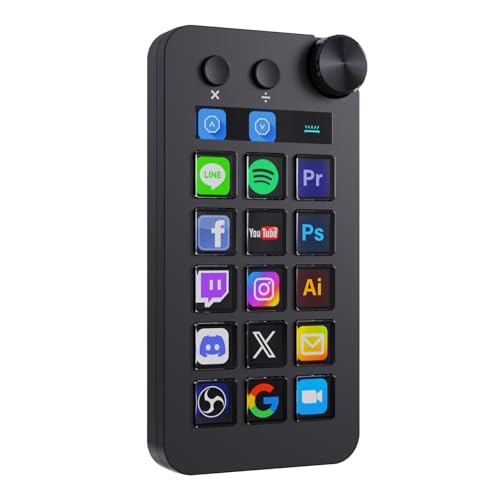
- 18 customizable controls with LCD keys, buttons, and a dial
- Shortcut, calculator, and numeric-keypad modes
- Supports OBS, Streamlabs, Windows, and macOS
Best For: Creators needing streaming controls and expanded desktop shortcuts
Balanced Studio Deck

- 15 customizable LCD buttons
- Supports OBS, Twitch, YouTube, Spotify, and Philips Hue
- Includes a removable stand and rubber feet
Best For: Streamers and creators wanting a simple 15-button workflow deck
Dial-Focused Compact Pick

- Six LCD keys plus three page buttons and three dials
- Physical controls for volume, brightness, and other settings
- Compact design with stand and adhesive mounting option
Best For: Small desks and users who prefer tactile dial adjustments
Best Budget Pick – Elgato Stream Deck Mini
The Elgato Stream Deck Mini is a compact stream control deck for users who want quick access to six frequently used shortcuts without reaching for keyboard combinations. Its drag-and-drop setup, customizable LCD keys, and multi-action support make it practical for streaming, meetings, office apps, and creative software.
Best For: Beginners, small desks, and users who need a simple six-key macro controller for everyday workflows.
Pros:
- Six customizable LCD keys clearly display assigned commands.
- Works with apps including Zoom, Teams, Office, Adobe software, and Spotify.
- Supports multi-action sequences with easy drag-and-drop setup.
Cons:
- Six keys provide less room for commands than larger control decks.
- Uses a Micro USB connection.
The Stream Deck Mini is a straightforward choice when compact size and ease of use matter more than extensive controls. It is especially well suited to first-time buyers and streamlined desktop setups.
Best for Information-Rich Workflows – Streonor S15 Control Deck
The Streonor S15 is a compact stream control deck with 15 customizable LCD keys and three dedicated status display panels. It gives streamers, editors, gamers, and office users room for multiple profiles while also showing information such as time, weather, system performance, or hardware status.
Best For: Users who want many programmable controls plus at-a-glance system and productivity information.
Pros:
- Provides 15 customizable LCD keys for shortcuts, OBS controls, and app actions.
- Three non-touch status panels can display supported real-time information.
- Supports preset pages, action flows, plugins, icons, and GIF customization.
Cons:
- Does not support Linux.
- Requires the STREONOR software and direct USB connection for setup and stable use.
- Some third-party integrations may require an account, subscription, or membership.
The S15 stands out among compact stream control decks for its combination of a larger key count and status displays. It is a strong fit for users managing several workflows, provided Windows or macOS compatibility meets their needs.
Best Mainstream Choice – Elgato Stream Deck Neo
The Elgato Stream Deck Neo is a compact stream control deck with eight customizable keys and two touch points. It combines quick macro access with drag-and-drop configuration, app integration, and the ability to control compatible smart-home devices, making it useful beyond streaming.
Best For: Users who want a polished eight-key controller for productivity, meetings, creative apps, media, and smart-home control.
Pros:
- Eight programmable keys provide more room than a six-key mini deck.
- Integrates with Zoom, Teams, Office apps, Adobe software, Spotify, and more.
- Can control supported smart lights, plugs, audio, and other Neo products.
Cons:
- Offers fewer programmable keys than 15-key control decks.
- Uses a Micro USB connection.
The Stream Deck Neo is a versatile middle ground for buyers who want more than a basic macro pad without moving to a larger professional deck. Its smart-control support also adds value for connected workspaces.
Best for Hands-On Audio Control – Streonor S6 Mini Control Deck
The Streonor S6 Mini is a compact stream control deck that combines six LCD keys with three rotary knobs and three dedicated scene-switching keys. This layout is useful when you need both programmable shortcuts and quick physical adjustments for volume, microphone levels, scrolling, zooming, or editing timelines.
Best For: Streamers, editors, and small-desk users who prefer tactile knobs alongside programmable keys and scene controls.
Pros:
- Combines six LCD keys, three rotary knobs, and three scene-switching keys.
- Supports multi-action macros, profiles, and layouts for streaming, editing, gaming, and office work.
- Offers access to 100+ plugins, icon packs, GIF icons, and tutorials.
Cons:
- Does not support Linux.
- Requires direct connection to a computer rather than a USB hub for stable operation.
- Some third-party integrations may require an active account or subscription.
The S6 Mini is one of the more flexible compact stream control decks for users who want physical adjustment knobs without sacrificing programmable buttons. It is particularly appealing for audio-heavy streaming and editing workflows.
Best Overall – Elgato Stream Deck MK.2
The Elgato Stream Deck MK.2 is a straightforward choice for shoppers seeking compact stream control decks with dependable one-touch access. Its 15 customizable LCD keys can launch apps, adjust audio, mute a microphone, control lighting, and trigger actions in supported platforms such as OBS, Twitch, YouTube, Discord, and Spotify.
Best For: Streamers and creators who want a compact, established control deck with broad plugin support.
Pros:
- 15 customizable LCD keys provide visual feedback for assigned commands.
- Supports single actions and multi-action workflows.
- Works with Mac and PC through USB-C and supports numerous plugins.
Cons:
- Offers fewer controls than the 18-key VSD M18.
- Does not include dedicated touch controls or dials for hands-on mixing.
The MK.2 balances a small footprint with flexible controls, making it a strong all-purpose option for streaming, editing, music production, and other repetitive desktop workflows.
Best Value Features – VSD M18 Macro Pad
The VSD M18 stands out among compact stream control decks by combining 15 LCD keys with three physical buttons. It supports programmable shortcuts, multi-step macros, media control, and OBS scene switching, while its RGB light ring adds adjustable visual accent lighting for gaming or nighttime work.
Best For: Users who want a higher key count, animated key icons, and built-in macro features for streaming, gaming, or office tasks.
Pros:
- Provides 18 programmable controls, including 15 LCD keys and three physical buttons.
- LCD keys support JPG, PNG, and GIF images or animations.
- Includes multi-step macros, built-in utility plugins, and an adjustable RGB light ring.
Cons:
- Native Linux plug-and-play support is not available.
- Listed system compatibility requires Windows 11 or newer and macOS 11.0 or newer.
- Its broader feature set may require more setup than a simpler macro pad.
The M18 is appealing when flexibility and key quantity matter, particularly for buyers comfortable with newer operating-system requirements and macro customization.
Best for Audio Control – Elgato Stream Deck+
The Elgato Stream Deck+ expands the compact stream control decks concept with LCD keys, a touch strip, and tactile dials. It can serve as an audio mixer or studio controller for tasks involving audio, video, lighting, and supported tools such as Wave Link, Camera Hub, OBS, Twitch, YouTube, Discord, and Spotify.
Best For: Streamers and studio users who prioritize tactile audio adjustment alongside programmable controls.
Pros:
- Combines LCD keys, a touch strip, and dials for hands-on control.
- Supports multi-actions and smart profiles for different applications.
- Works with Mac and PC and integrates with Wave Link and many other plugins.
Cons:
- Its 470 g weight and larger listed dimensions make it less minimal than the MK.2.
- It has fewer listed programmable key controls than the VSD M18.
- It is powered through a USB-C connection and does not list standalone battery operation.
The Stream Deck+ is the specialized pick of this group: choose it when physical dials and a touch strip are more useful than maximizing the number of keys.
Versatile Macro Hub – TreasLin N1 Stream Controller
The TreasLin N1 is a strong choice for shoppers comparing compact stream control decks with more than basic shortcut functionality. Its 18 customizable controls combine LCD keys, clickable buttons, and a rotary knob, while multiple operating modes extend its usefulness beyond streaming.
Best For: Streamers, creators, editors, and users who want customizable controls plus calculator and numeric-keypad modes.
Pros:
- Provides 18 customizable controls, including 15 visual LCD buttons, two clickable buttons, and one rotary knob.
- Supports shortcut, calculator, and numeric keypad modes for broader desktop use.
- Works with Windows and macOS alongside OBS Studio and Streamlabs.
- Offers scenario-based profiles, workflows, and access to a plugins marketplace.
Cons:
- Spotify integration requires an active Spotify Premium account.
- Its broad feature set may require time to configure through the VSD Craft software.
The N1 stands out when you want a compact deck that can handle streaming, productivity, and creative applications. Choose it over a simpler controller if numeric input, automation, and extensive customization are priorities.
Balanced Studio Deck – SOOMFON 15-Key Control Deck
The SOOMFON Studio Control Deck is a practical option among compact stream control decks for users who prefer a straightforward 15-key layout. Its customizable LCD buttons can trigger software actions, media controls, social posts, and other workflow shortcuts without changing windows.
Best For: Streamers and creative professionals who want a larger LCD-button layout for one-touch workflow control.
Pros:
- Includes 15 customizable LCD keys with individually selectable image files.
- Supports OBS Studio, Twitch, YouTube, Twitter, Spotify, Philips Hue, and other platforms.
- Removable stand and rubber feet provide flexible placement and added stability.
- Useful for streaming, video editing, music production, and photography workflows.
Cons:
- Spotify integration requires an active Spotify Premium account.
- The manufacturer recommends using the original cable and connecting directly to a computer USB port rather than a hub.
- Firmware updates may be needed through the official software download link.
This model offers a focused balance of customization and ease of use. It is a sensible pick for buyers who want many LCD shortcuts but do not need the extra keypad and rotary-control features found on larger multifunction decks.
Dial-Focused Compact Pick – SOOMFON 6-Key Stream Deck
The SOOMFON 6-key model is one of the most compact stream control decks in this group, combining six LCD buttons with three page-switch buttons and three multifunction dials. That layout favors quick navigation and hands-on adjustment of settings such as volume and brightness.
Best For: Users with limited desk space who want physical dials alongside a small set of customizable LCD shortcuts.
Pros:
- Combines six customizable LCD keys, three page buttons, and three multifunction dials.
- Dials can be assigned to settings such as volume and brightness.
- Supports OBS Studio, Twitch, YouTube, Discord, Spotify, and Voicemod.
- Includes a removable 40-degree stand and adhesive for more stable placement.
Cons:
- Offers fewer LCD shortcut keys than the 15- and 18-control alternatives.
- Supports Windows 10 64-bit or later and macOS Big Sur 11.0 or later; Linux is not supported.
- Spotify integration requires an active Spotify Premium account.
This deck makes the most sense when tactile dial control matters more than a large number of programmable buttons. Its small footprint and page-navigation controls suit streamlined streaming, audio, and desktop setups.
How We Picked These Compact Stream Control Decks
We focused on the features that matter most in a small control surface: programmable keys, readable displays, profile and macro support, software compatibility, physical controls, and ease of setup. The selection includes six-key models for minimal desks, 15- and 18-key decks for larger shortcut libraries, and hybrid designs with dials, touch points, or dedicated audio functions.
We also considered how well each format suits common use cases, including OBS scene switching, Twitch and YouTube controls, podcasting, music playback, video editing, app launching, and productivity shortcuts. Since feature sets vary by brand and model, verify current software support and operating-system compatibility before buying.
Quick Comparison
| Control style | Best suited to | What to consider |
|---|---|---|
| 6 programmable keys | Small desks and essential commands | Limited space for large macro libraries |
| 8 keys with touch points | Flexible everyday control | Fewer physical keys than larger decks |
| 15–18 LCD keys | Multi-scene streaming and complex workflows | Larger footprint and higher potential cost |
| Keys with dials or audio controls | Streaming, podcasting, and sound adjustment | May require more setup and desk space |
Key Buying Factors for Compact Stream Control Decks
Key Count and Layout
Choose based on how many commands you need visible at once. Six keys work well for core actions such as starting a stream, changing scenes, muting a microphone, and launching an app. A 15- or 18-key layout is better when you use multiple profiles, layered macros, or separate controls for streaming, editing, and productivity.
Displays and Customization
LCD-labeled keys make profiles easier to scan and can reduce mistakes during a live session. Look for flexible icon, text, folder, and multi-action support if you frequently change workflows. A simpler keypad may be enough if you already know your shortcuts or prefer a low-maintenance setup.
Dials, Touch Controls, and Audio Features
Physical dials are useful for volume, microphone gain, brightness, timeline scrubbing, and other continuously adjustable settings. If audio mixing is central to your setup, prioritize a deck with dedicated mixer functions rather than choosing solely by key count.
Software and Compatibility
Confirm support for your operating system and preferred applications, including OBS, Streamlabs, Discord, Spotify, editing software, and conferencing tools. Check whether profiles, plugins, multi-actions, and integrations are included or require additional downloads.
Size, Connection, and Desk Placement
Measure the available space beside your keyboard and microphone. A compact deck should remain easy to reach without forcing awkward wrist movement. Also check the USB connection, cable arrangement, stand or tilt options, and whether the deck can sit securely during frequent use.
Who Should Buy Which Compact Stream Control Decks?
Choose a six-key deck if you want a small, affordable command center for essential streaming or productivity shortcuts. Choose an eight-key model with touch controls if you want a middle ground between compactness and added flexibility.
Choose a 15- or 18-key deck if you manage many scenes, applications, or multi-step actions and want more commands available without switching profiles. Choose a model with dials or audio controls if live sound, podcasting, or frequent volume adjustments are central to your workflow.
For most buyers, the best option is the one that matches the number of commands used regularly—not simply the deck with the most keys. Prioritize reliable software support, a comfortable layout, and controls you can reach quickly while staying focused on your content.