The best budget USB foot pedals can turn a frequently used keyboard shortcut, mouse action, or game command into a quick hands-free control. They are useful for gaming, transcription, office tasks, media playback, and accessibility-focused setups.
This roundup compares 10 affordable models, including single-, double-, and triple-pedal designs, plus optical and mechanical options. Focus on software compatibility, programmability, pedal feel, and the number of controls you actually need.
Best 10 Budget USB Foot Pedals Picks for 2026
Best Budget Single-Pedal Pick
iKKEGOL Programmable USB Foot Pedal
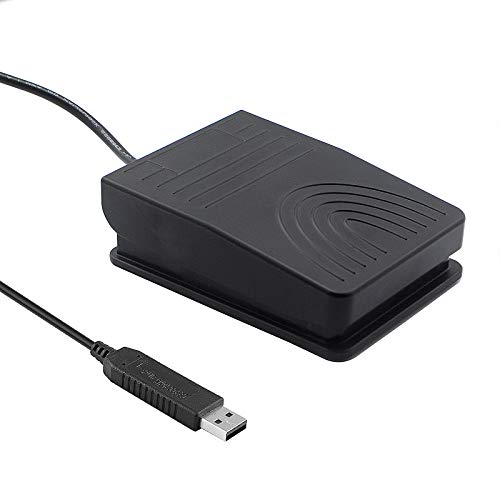
- Single programmable HID pedal
- Wide, low-resistance design
- Four TPU anti-slip feet
Best For: One customizable PC shortcut
Best Three-Shortcut Value
3-Key USB Programmable Foot Pedal

- Three independently mapped pedals
- Supports PC and Mac shortcuts
- Firm press helps prevent mis-triggers
Best For: Gaming, streaming, and voice-chat control
Best Quiet Triple-Pedal Option
iKKEGOL USB Optical Footswitch

- Three programmable foot controls
- Quiet optical switch design
- Wide layout with anti-slip feet
Best For: Quiet multi-command computer workflows
Best Silent Quick-Tap Pick

- Quiet optical single-pedal design
- Maps keyboard and mouse actions
- 1.9-meter USB cable
Best For: Quiet streaming, calls, and transcription
Best Dual-Pedal Value
iKKEGOL USB Double Foot Switch

- Two programmable pedals
- Aluminum-alloy base
- Supports keyboard, mouse, multimedia, and game functions
Best For: Two-action computer control and repetitive tasks
Best for Versatile Setup
iKKEGOL Upgraded Single Foot Switch

- Highly configurable software mapping
- Long 1.9 m USB cable
- Rubber feet and mechanical construction
Best For: Streaming, transcription, gaming, and hands-free shortcuts
Best Simple Single-Switch Pick

- One customizable foot control
- Supports shortcuts and key combinations
- Free configuration software
Best For: Single-action shortcut control and repetitive workloads
Best with Extra Features
iKKEGOL Optical USB Foot Pedal

- Programmable keyboard, mouse, and multimedia input
- Quiet optical design with rubber feet
- Works with Windows and Mac setup software
Best For: One customizable hands-free command
Best Budget Three-Key Option

- Three independently programmable foot keys
- Supports keyboard, mouse, hotkey, and media functions
- Compatible with Windows, Mac, Linux, iOS, and Android after setup
Best For: Multiple hands-free commands
Best Budget Mechanical Pick
iKKEGOL Programmable USB Foot Switch
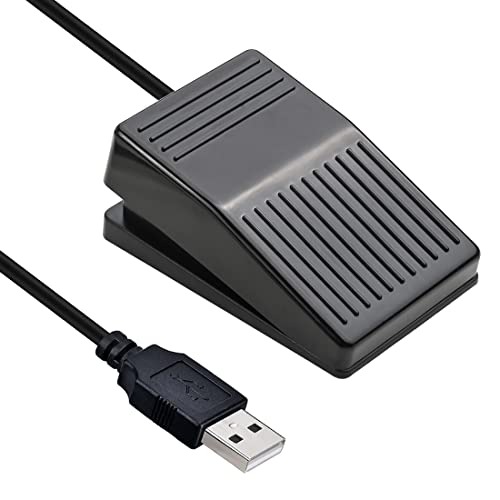
- Single programmable mechanical pedal
- Suitable for push-to-talk, transcription, and streaming
- Rubber feet and 6.2-foot USB cable included
Best For: One frequently repeated hands-free action
Best Budget Single-Pedal Pick – iKKEGOL Programmable USB Foot Pedal
For shoppers comparing budget USB foot pedals, this single-pedal iKKEGOL model offers straightforward hands-free control for a PC. Its programmable HID design can trigger keyboard or mouse actions through included software, making it useful for gaming, push-to-talk, transcription, media control, and other repetitive commands.
Best For: Buyers who need one customizable foot-controlled shortcut at a budget-friendly price.
Pros:
- Programmable keyboard and mouse functions through free software
- Wide ergonomic pedal with a low-resistance touch response
- Four TPU rubber feet help limit movement on hard floors
- 2-meter USB cable and support for more than 100 kg of weight
Cons:
- Single pedal limits simultaneous shortcut control
- Compatible device listing is focused on PCs
- IP00 rating indicates no stated ingress protection
This is a practical entry point for a hands-free PC setup when one mapped action is enough. Choose it over a multi-pedal design if simplicity, a broad pedal surface, and low resistance matter more than multiple controls.
Best Three-Shortcut Value – 3-Key USB Programmable Foot Pedal
This three-key model stands out among budget USB foot pedals for users who want separate foot controls without constantly remapping one switch. Its setup guide supports custom assignments for keyboard shortcuts, key combinations, mouse actions, and media controls on PC or Mac.
Best For: Gamers, streamers, voice-chat users, and transcription workflows needing three distinct commands.
Pros:
- Three foot-operated shortcuts for tasks such as push-to-talk and mic mute
- Supports keyboard, mouse, and media-control mappings
- Firm spring resistance helps reduce accidental presses
- Three anti-slip bottom pads help keep it steadier under a desk
Cons:
- USB-C-only computers require a compatible adapter
- Firm resistance may not suit users seeking feather-light activation
- The supplied compatibility details emphasize PC and Mac setup rather than mobile use
With three separately assignable pedals and a deliberate press feel, this is a strong value for hands-busy computer tasks. It is particularly practical when a single pedal would require too much reconfiguration during calls, gaming, or streaming.
Best Quiet Triple-Pedal Option – iKKEGOL USB Optical Footswitch
For shoppers seeking budget USB foot pedals with multiple controls, this iKKEGOL triple-pedal switch combines three programmable keys with a quiet optical switch design. It can handle keyboard and mouse commands for gaming, push-to-talk, transcription, media playback, Zoom, and other hands-free computer tasks.
Best For: Users who want three mapped controls and quieter operation in a broad, ergonomic pedal layout.
Pros:
- Three programmable foot controls in one unit
- Optical switches are designed for quiet operation
- Wide pedal design offers an easy-touch response
- Four TPU rubber feet help hold the unit on hard floors
Cons:
- Supplied operating-system details are centered on Windows and Linux
- Triple-pedal construction takes more desk or floor space than a single switch
- Programming is required to customize the controls
This model makes sense when separate controls are more useful than minimal size. Its quiet optical switching and wide layout are helpful for shared spaces, while the three-key format supports more varied workflows than a basic single pedal.
Best Silent Quick-Tap Pick – iKKEGOL Optical USB Footpedal
This single-pedal iKKEGOL is a compelling choice among budget USB foot pedals when quiet, quick foot activation is the priority. Its optical design is described as full quiet with no tactile feel or sound, while downloadable software lets users assign keyboard, mouse, string, multimedia, or game actions.
Best For: Streamers, musicians, transcription users, and callers who need a quiet programmable pedal.
Pros:
- Quiet optical operation with no tactile feel or sound
- Programmable for keyboard, mouse, multimedia, and game inputs
- 1.9-meter USB cable provides flexible placement
- Windows and Mac programming software with support for configured use on other systems
Cons:
- Single pedal provides only one physical control
- No tactile feedback may take adjustment for some users
- Customization requires downloading and configuring software
This is a focused option for environments where pedal noise could be distracting. Its single-control format keeps the setup simple, while the broad input-mapping support makes it useful for push-to-talk, muting, scene changes, transcription, and similar repetitive actions.
Best Dual-Pedal Value – iKKEGOL USB Double Foot Switch
If you need budget USB foot pedals with two programmable controls, this iKKEGOL model offers a practical way to trigger separate shortcuts without reaching for the keyboard. Its HID USB design supports customized keys, combinations, multimedia actions, mouse functions, and game controls.
Best For: Users who want two configurable foot controls for office tasks, gaming, multimedia, equipment control, or repetitive computer actions.
Pros:
- Two pedals can control two functions on one PC.
- Supports custom keys, hotkeys, key combinations, and multimedia functions.
- Sturdy aluminum-alloy base is rated to bear more than 100 kg.
- Compatible with Windows, Mac, Linux, and DOS after configuration on Windows.
Cons:
- Configuration must be completed on a Windows machine before use with Mac or Linux.
- The larger double-pedal design may take more floor space than a single switch.
This is a strong budget choice when two programmable inputs matter more than compact size. The aluminum construction and broad function support make it especially flexible, though cross-platform users should plan on initial Windows setup.
Best for Versatile Setup – iKKEGOL Upgraded Single Foot Switch
This upgraded iKKEGOL is one of the more adaptable budget USB foot pedals for hands-free computer control. Its downloadable software lets you assign keyboard, mouse, string, multimedia, or game actions, making it useful across transcription, streaming, gaming, calls, and other workflows.
Best For: Users who want a single responsive pedal with extensive programmable options and support for multiple operating systems.
Pros:
- Can assign many different keyboard, mouse, multimedia, and game actions.
- Mechanical pedal is described as responsive, quiet, and sturdy.
- Includes a 1.9 m/6.2 ft USB cable and rubber feet to help prevent sliding.
- Multiple switches can be connected and programmed individually.
Cons:
- Programming software is required for setup and is offered for Windows and Mac.
- The mechanical action may still produce a plastic-on-plastic click when pressed firmly.
Choose this model if flexible software mapping is the priority. It is particularly well suited to users who may expand to multiple pedals, while its long cable and anti-slip feet support practical desktop use.
Best Simple Single-Switch Pick – iKKEGOL USB Foot Switch
iKKEGOL USB Single Foot Switch Control One Key Customized Computer Keyboard Action Pedal HID
Check Price On AmazonFor shoppers seeking budget USB foot pedals with one straightforward control, this iKKEGOL model provides a compact programmable switch for computer shortcuts. The included software allows custom keys, combinations, and hotkeys, along with mouse, string, multimedia, and game-control functions.
Best For: Users who need one customizable pedal to reduce repeated keyboard work in office, medical, sewing, equipment-control, or computer applications.
Pros:
- Single-pedal design keeps operation simple.
- Can be programmed for individual keys, key combinations, hotkeys, and shortcuts.
- Supports keyboard, mouse, string, multimedia, and game-controller functions.
- CE and FCC specifications are listed, and the software is available as a free download.
Cons:
- Offers only one foot-controlled input.
- Software installation is needed to customize the pedal.
- The supplied notes list PC compatibility, so broader platform support is not specified.
This is a sensible entry-level option when one programmable action is enough. It avoids the extra complexity of a dual pedal while retaining the shortcut flexibility needed for repetitive computer tasks.
Best with Extra Features – iKKEGOL Optical USB Foot Pedal
If you want budget USB foot pedals for hands-free control, this single-pedal iKKEGOL model offers programmable input for gaming, push-to-talk, transcription, streaming, and other repetitive tasks. Its optical design is intended to provide quiet, responsive operation without requiring a permanent software setup after configuration.
Best For: Gamers, streamers, transcription users, and anyone who needs one customizable hands-free command.
Pros:
- Programmable for keyboard, mouse, multimedia, game, and other input types.
- Optical operation is designed to be quiet and responsive.
- Includes rubber feet, a 6.2-foot USB cable, and Windows/Mac programming software.
- Can be used alongside additional individually programmed switches.
Cons:
- Only one pedal is included.
- Programming software must be downloaded from the manufacturer.
This is a practical choice when one programmable action is enough and you value a compact optical pedal. It also offers broad post-configuration compatibility, including Windows, Linux, Mac, and DOS systems.
Best Budget Three-Key Option – PCsensor 3-Key USB Foot Pedal
For shoppers comparing budget USB foot pedals, this PCsensor model stands out by providing three independently programmable keys. It can emulate keyboard and mouse functions for gaming, office work, sheet-music page turning, media control, and equipment operation.
Best For: Users who need multiple programmable actions from one foot-controlled unit.
Pros:
- Three keys can be configured individually for keys, hotkeys, shortcuts, mouse actions, and media controls.
- After setup on Windows or Mac, it can operate with Windows, Linux, Mac, iOS, and Android devices.
- Solid plastic construction is rated to bear up to 220 pounds.
- Photoelectric operation, water resistance, and a built-in control chip support quieter, more reliable use.
Cons:
- The larger 14.45-by-5.63-by-1.77-inch footprint may require more floor space.
- Configuration requires Windows or Mac before using it with other supported systems.
Choose this model if three separate foot commands are more useful than a compact single switch. Its flexible programming and lifetime technical support make it a particularly versatile option for mixed work and gaming setups.
Best Budget Mechanical Pick – iKKEGOL Programmable USB Foot Switch
This mechanical iKKEGOL foot switch is a straightforward option among budget USB foot pedals, giving you one programmable control for push-to-talk, transcription, streaming, gaming, music, and repetitive computer tasks. Its USB connection and configurable input make it easy to add hands-free control without changing your keyboard or mouse.
Best For: Users who prefer a sturdy mechanical single pedal for one frequently repeated action.
Pros:
- Can be mapped to keyboard, mouse, multimedia, string, or game functions.
- Mechanical pedal construction is described as sturdy, responsive, and quiet.
- Rubber feet help reduce sliding, and the included USB cable measures 6.2 feet.
- Once configured, it works as plug and play across Windows, Linux, Mac, DOS, and more.
Cons:
- It provides only one programmable pedal.
- Initial configuration software is available for Windows and Mac rather than every listed operating system.
This model makes sense when you want a simple mechanical foot switch and do not need multiple controls. It is especially well suited to one repeated command, such as microphone muting or push-to-talk.
How We Picked These Budget USB Foot Pedals
We focused on USB foot pedals designed for direct computer control, with programmable inputs suitable for Windows or Mac workflows where supported. The selection includes single-pedal models for simple commands, two- and three-pedal units for multi-action setups, and quieter optical designs for shared workspaces.
We also considered practical factors such as HID compatibility, shortcut and key-combination support, cable length, construction style, and likely use cases. Product listings can vary by revision, so verify the included software, operating-system support, and programmable functions before ordering.
Quick Comparison
| Type | Best for | Main advantage | Trade-off |
|---|---|---|---|
| Single pedal | One shortcut or command | Simple setup and lower cost | Limited control range |
| Double pedal | Two recurring actions | More flexibility without much added bulk | More floor space than a single |
| Triple pedal | Gaming, transcription, and complex workflows | Three programmable inputs | Higher price and a larger footprint |
| Optical pedal | Quiet offices and shared rooms | Fast, low-noise activation | Feel may differ from mechanical switches |
Key Buying Factors for Budget USB Foot Pedals
Pedal Count and Layout
Choose a single pedal if you only need push-to-talk, play/pause, a macro, or one game command. A two-pedal model adds a second shortcut, while a three-pedal design is better for transcription, editing, or workflows that use several repeated actions.
Programmability and Compatibility
Confirm that the pedal can map the keys, mouse actions, or combinations you need. Basic HID models may work as keyboard devices but offer fewer customization options. Check whether configuration software is required and whether it supports your operating system.
Switch Feel and Noise
Mechanical pedals typically provide a more pronounced click or tactile response. Optical designs can feel smoother and quieter, which is helpful in offices, streaming spaces, libraries, and shared rooms. Consider activation force too, especially if the pedal will be used for hours.
Build, Stability, and Cable Reach
A stable base helps prevent sliding during rapid use. Look for a durable housing, a comfortable pedal angle, and enough USB cable length to reach your computer without tension. A compact model is easier to transport, but a wider base may be more comfortable.
Who Should Buy Which Budget USB Foot Pedals?
Choose a single-pedal model for one repeatable command and the simplest, least expensive setup. Choose a double pedal when you regularly alternate between two shortcuts, such as play and pause or forward and back. Choose a triple pedal for transcription, gaming, editing, or office workflows that benefit from three distinct inputs. Choose an optical model when quiet operation and quick activation matter more than a traditional mechanical feel.
Before buying, identify the exact command you want to trigger, confirm software compatibility, and check how the pedal connects to your computer. The right Budget USB Foot Pedals should reduce hand movement without adding complicated setup or unwanted noise.