The best compact USB foot pedals give you quick, hands-free control without taking valuable desk space. They can trigger keyboard shortcuts, mouse actions, macros, page turns, or custom commands while your hands stay focused elsewhere.
This roundup compares single-, triple-, mechanical, optical, and wireless options for PC workflows, gaming, streaming, transcription, music, and tablet use.
Best 10 Compact USB Foot Pedals Picks for 2026
Best Programmable Pick
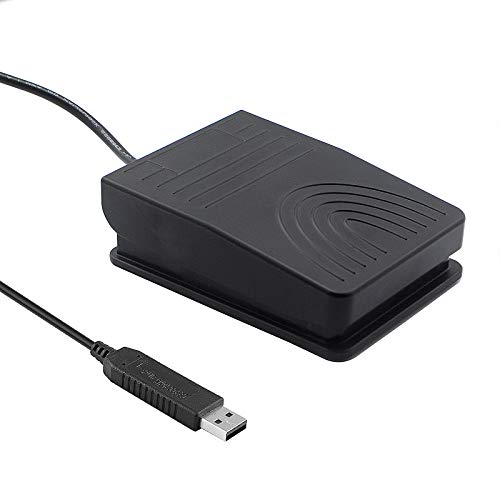
- Programmable keyboard and mouse commands
- Wide, pressure-sensitive single pedal
- 2-meter USB cable and non-slip feet
Best For: Hands-free PC shortcuts, push-to-talk, and transcription
Best for Streaming

- Three customizable hands-free pedals
- Interchangeable springs for pedal pressure
- Plugins for OBS, Twitch, Discord, and more
Best For: Streaming and multi-action Mac or PC control
Best Low-Profile Design
Infinity USB Digital Foot Control

- Low-profile foot-control design
- Three-button layout
- Broad non-slip surface area
Best For: Simple wired multi-button foot control
Best for Musicians

- Five page-turn and command modes
- Up to 60 hours per charge
- Quiet, non-slip pedals for music use
Best For: Hands-free digital sheet-music control
Wide Triple-Pedal Control
Upgraded iKKEGOL USB Triple Foot Pedal

- Three programmable HID pedals
- Quiet optical switches
- Wide, stable ergonomic design
Best For: Hands-free gaming, transcription, media control, and push-to-talk
Heavy-Duty Three-Way Control

- Dedicated three-function layout
- Heavy-duty micro switches
- Wide ergonomic central pedal
Best For: Durable hands-free media navigation
Customizable Single-Pedal Control
iKKEGOL USB Mechanical Footswitch

- Programmable single-pedal input
- Supports keyboard, mouse, and media actions
- Rubber feet and 1.9 m USB cable
Best For: Streaming, gaming, transcription, and one-touch shortcuts
Single-Key Customizer
iKKEGOL USB Single Foot Switch

- Programmable single-pedal USB control
- Supports keyboard, mouse, multimedia, and game functions
- Useful for hands-free computer and equipment tasks
Best For: Single-action shortcuts and repetitive hands-free controls
Triple-Pedal Powerhouse
iKKEGOL Digital Optical USB Foot Pedal
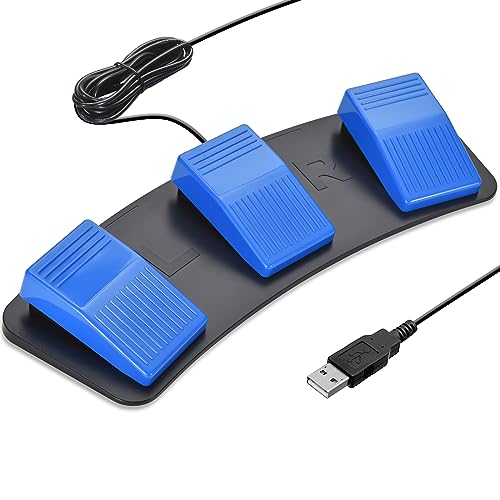
- Three programmable optical pedals
- Quiet, responsive operation with rubber feet
- Supports gaming, streaming, transcription, and music workflows
Best For: Multi-action hands-free control
Compact Optical Trigger
iKKEGOL USB Single Foot Switch

- Small optical single-pedal design
- Programmable for keyboard, mouse, multimedia, and game inputs
- Includes USB cable and anti-slip rubber feet
Best For: Compact push-to-talk, streaming, gaming, and transcription control
Best Programmable Pick – iKKEGOL USB Foot Pedal
For shoppers comparing compact USB foot pedals, the upgraded iKKEGOL model is a practical single-switch option for hands-free computer control. Its programmable HID design can trigger keyboard or mouse commands through the included software, while the 2-meter cable gives it useful placement flexibility.
Best For: Push-to-talk, media controls, transcription, streaming, gaming, and other single-command PC tasks.
Pros:
- Programmable keyboard and mouse functions with free setup software.
- Wide pedal, sensitive switch, and ergonomic design support repeated use.
- TPU rubber feet help limit movement on hard floors.
- USB plug-and-play connectivity with a 2-meter cable.
Cons:
- Single-pedal design limits it to one primary control at a time.
- Designed for PC compatibility rather than broad device support.
- IP00 rating provides no stated protection from dust or water.
This is a strong value-oriented choice when you want a compact USB foot pedal that can be customized for everyday computer shortcuts. Choose it over a dedicated music pedal if programmable PC control is your priority.
Best for Streaming – Elgato Stream Deck Pedal
The Elgato Stream Deck Pedal is a premium compact USB foot-control option for users who need several hands-free actions. Three customizable pedals can launch single or multiple commands, and support for plugins connects it with platforms such as OBS, Twitch, YouTube, Discord, and Spotify.
Best For: Streamers, content creators, and Mac or PC users managing multiple app controls without reaching for the keyboard.
Pros:
- Three customizable pedals provide more control options than a single-switch model.
- Interchangeable springs let you adjust pedal pressure.
- Heavy-duty chassis is designed for confident tapping.
- Works with Mac and PC and supports numerous plugins.
Cons:
- Heavier and larger than many basic compact foot pedals.
- More specialized than necessary for a simple one-command shortcut.
- Its feature set may require additional setup through plugins and software.
For multi-action workflows, this is one of the more capable compact USB foot pedals in the group. Its adjustable mechanics and broad plugin support make it especially well suited to streaming setups.
Best Low-Profile Design – Infinity USB Digital Foot Control
The Infinity IN-USB3 focuses on straightforward foot control with a low-profile shape and a larger non-slip surface area. Its three-button layout makes it a useful candidate for shoppers seeking compact USB foot pedals for wired computer or gaming-console control.
Best For: Users who prefer a low-profile three-button foot controller with a broad non-slip surface.
Pros:
- Low-profile design keeps the controller close to the floor.
- Three buttons offer multiple foot-control inputs.
- Greater non-slip surface area can improve placement stability.
- Wired corded-electric operation avoids recharging.
Cons:
- Supplied notes do not specify programmable functions or included configuration software.
- Compatibility details are limited, with PlayStation 4 listed as the compatible device.
- The listed 90-day warranty is shorter than some competing options.
This model is worth considering when physical layout matters more than advanced customization. Verify compatibility with your intended computer or console before buying, since the supplied specifications provide limited platform information.
Best for Musicians – AITONE Bluetooth Page Turner
The AITONE A-SP1 is a compact wireless alternative to conventional compact USB foot pedals, built specifically for turning digital music pages. Bluetooth connectivity, five command modes, quiet switches, and a rechargeable battery make it convenient for musicians using compatible tablets, phones, computers, and music apps.
Best For: Musicians who need hands-free page turning, repeat scrolling, or configurable score commands during practice and performance.
Pros:
- Five modes support page, arrow, mouse-click, and Space/Enter commands.
- Up to 60 hours of stated use per charge.
- Quiet pedals and a non-slip base suit acoustic practice and performance.
- Compact 260-gram design fits in a gig bag or backpack.
Cons:
- Bluetooth and app support are required; command behavior varies by device and app.
- It is designed for page turning rather than general programmable PC shortcuts.
- Users may need to configure supported commands inside their music app.
If your main goal is digital sheet-music control, the A-SP1 is more purpose-built than a general USB switch. Test the pedal modes with your chosen app before performing to confirm that pages or scrolling respond correctly.
Wide Triple-Pedal Control – Upgraded iKKEGOL USB Triple Foot Pedal
For hands-free computing, this compact USB foot pedal provides three programmable controls in a wide, ergonomic design. Its standard HID compatibility and quiet optical switches make it suitable for tasks ranging from push-to-talk and media control to transcription and gaming.
Best For: Users who need three customizable foot controls for hands-free work, gaming, transcription, or media operation.
Pros:
- Three programmable pedals can trigger keyboard and mouse actions.
- Quiet optical switches offer low-resistance foot activation.
- Wide, durable design supports extended use and can bear more than 100 kg.
- TPU rubber feet help keep the pedal stable on hard floors.
Cons:
- The wide three-pedal design takes up more space than a single-pedal model.
- Programming is necessary to customize the controls for specific tasks.
This is a practical choice when you want multiple programmable inputs and a stable, comfortable platform. Choose it over a smaller single pedal when three foot-operated commands are more valuable than minimal desk or floor space.
Heavy-Duty Three-Way Control – Infinity 3 USB Foot Pedal
Executive Communication Systems Infinity 3 USB Foot Pedal Control with Computer Plug In, one unit
Check Price On AmazonThe Infinity 3 is a compact USB foot pedal built around three physical controls for play, fast-forward, and rewind functions. Its sturdy construction and heavy-duty micro switches make it a suitable option for repeated hands-free operation.
Best For: Users seeking a durable three-function pedal for media navigation and other straightforward foot-switch tasks.
Pros:
- Three-way layout provides play, fast-forward, and rewind controls.
- Heavy-duty micro switches are designed for extended use.
- Wide central play pedal and sloping ergonomic design make foot movement easier.
- USB connectivity works with compatible devices such as tablets.
Cons:
- The product is larger and heavier than many single-pedal alternatives.
- The supplied notes describe a three-function layout rather than broad programmable keyboard and mouse customization.
With its dedicated three-way arrangement, the Infinity 3 favors dependable, familiar operation over highly configurable controls. It is a sensible pick for buyers who prioritize a sturdy pedal and easy movement between media functions.
Customizable Single-Pedal Control – iKKEGOL USB Mechanical Footswitch
This compact USB foot pedal is designed for users who want one customizable control without adding a larger multi-pedal unit. The mechanical switch can be programmed through available Windows and Mac software to emulate keyboard, mouse, multimedia, or game inputs.
Best For: Streamers, gamers, musicians, transcription users, and anyone needing one programmable hands-free shortcut.
Pros:
- Single-pedal design is compact and focused on one primary action.
- Programming supports keyboard, mouse, multimedia, and game commands.
- Mechanical pedal is sturdy, responsive, and supplied with a 1.9 m USB cable.
- Rubber feet help reduce sliding on hardwood floors.
Cons:
- Only one pedal is included, so multiple simultaneous controls require additional units.
- The mechanical switch may produce a plastic-on-plastic click when pressed firmly.
- Customization software is offered for Windows and Mac, not every operating system listed for configured use.
This model is a strong fit when a single shortcut—such as mute, push-to-talk, page turning, or scene changing—is all you need. Its configurable input options make it more versatile than a pedal limited to fixed media functions.
Single-Key Customizer – iKKEGOL USB Single Foot Switch
iKKEGOL USB Single Foot Switch Control One Key Customized Computer Keyboard Action Pedal HID
Check Price On AmazonThe iKKEGOL USB Single Foot Switch is a practical choice among compact USB foot pedals when you need one hands-free trigger for a computer task. Its customization software can assign a key, key combination, hotkey, shortcut, mouse action, multimedia command, or other supported function.
Best For: Users who want a single programmable pedal for office shortcuts, sewing or equipment control, transcription, and other repetitive computer tasks.
Pros:
- Single-pedal design keeps the control setup straightforward.
- Supports customized keys, key combinations, hotkeys, and shortcuts.
- Can emulate keyboard, mouse, string, multimedia, and game-controller functions.
- USB connectivity and included customization software support a flexible setup.
Cons:
- Only one physical pedal is included.
- Customization requires downloading and configuring the software.
- Its IP00 rating provides no stated protection from dust or water.
This model makes the most sense if you prefer a compact, single-action control rather than a multi-pedal layout. The broad function support gives it more flexibility than a basic on/off foot switch.
Triple-Pedal Powerhouse – iKKEGOL Digital Optical USB Foot Pedal
For shoppers comparing compact USB foot pedals, the iKKEGOL Triple Pedal offers three programmable controls in one unit. Its optical switches are described as responsive and quiet, while the software lets each pedal emulate keyboard, mouse, string, multimedia, or game inputs.
Best For: Gamers, streamers, musicians, transcription users, and anyone who needs several configurable hands-free actions.
Pros:
- Three pedals provide multiple programmable actions without adding separate devices.
- Optical operation is described as responsive and quiet.
- Supports uses such as push-to-talk, muting, scene changes, clips, and transcription.
- Includes a 2 m/6.6 ft USB cable and rubber feet to help limit sliding.
Cons:
- The three-pedal layout is larger than a single-switch design.
- Initial programming requires the downloadable software.
- The listed dimensions and three-control layout may take more desk or floor space.
This is the strongest fit when three distinct foot commands are more valuable than maximum compactness. Windows and Mac programming support adds setup flexibility, and the configured pedals can then work with several other systems.
Compact Optical Trigger – iKKEGOL USB Single Foot Switch
The iKKEGOL Single Foot Switch is a compact USB foot pedal for users who need one programmable hands-free command. Its optical design is intended to be quiet and responsive, and the included software can map the pedal to keyboard, mouse, multimedia, game, string, or other supported inputs.
Best For: Users seeking a small single-pedal control for push-to-talk, streaming, gaming, transcription, Zoom, or repetitive computer tasks.
Pros:
- Small single-pedal footprint measures 3.9 x 2.5 x 1.5 inches.
- Optical switching is described as quiet and responsive.
- Supports programmable keyboard, mouse, multimedia, string, and game functions.
- USB setup includes a 1.9 m/6.2 ft cable and rubber feet.
Cons:
- One pedal limits the number of simultaneous physical controls.
- Software setup is needed to customize its action.
- The supplied notes do not specify console compatibility beyond listing a gaming-console-compatible device category.
Choose this version when floor or desk space matters and one dependable programmable action is enough. It offers much of the flexibility of the triple model in a simpler, smaller format.
How We Picked the Best Compact USB Foot Pedals
We focused on practical differences that affect daily use: pedal count, programmable controls, connection type, compatibility, actuation style, cable length, software support, and likely comfort during repeated presses. The selection includes USB HID-style pedals that can emulate keyboard or mouse inputs, as well as Bluetooth models designed for tablets and page turning.
Because foot pedals vary widely in purpose, we did not treat a three-pedal model as automatically better than a compact single-switch design. The right choice depends on how many commands you need, how much floor space is available, and whether you need advanced remapping or simple plug-and-play operation.
Quick Comparison
- Best for multiple shortcuts: Triple-pedal models provide three separately programmable controls.
- Best for streaming and macros: The Elgato Stream Deck Pedal is designed for hands-free macro workflows.
- Best for transcription: Infinity USB foot controls are purpose-built for repeated playback and dictation commands.
- Best for tablets: The AITONE Bluetooth pedal avoids a wired USB connection and supports page-turning use.
- Best for simple control: Single-pedal iKKEGOL models suit one frequently used shortcut or action.
Key Buying Factors for Compact USB Foot Pedals
Number of Pedals and Programming
Choose a single pedal for one essential command, such as push-to-talk or play/pause. Triple-pedal units make more sense when you need separate controls for forward, back, mute, playback, or gaming actions. Check whether each switch can be remapped independently and whether the software saves profiles.
USB, Bluetooth, and Compatibility
USB models generally offer reliable low-latency operation and are convenient for desktop computers. Confirm that the pedal works with your operating system and target application. Bluetooth models are more flexible for iPads and other mobile devices, but they require charging and may involve pairing or app-specific limitations.
Switch Feel, Noise, and Durability
Mechanical pedals can provide a distinct click and tactile response, while optical designs may offer quieter or contact-free actuation. Consider noise if you share an office or record audio. For frequent use, look for a stable base, durable housing, and a cable or battery arrangement that will not interfere with foot placement.
Size and Placement
Compact dimensions are useful under a desk, but a pedal should still be large enough to locate accurately without looking down. Place it where your heel can remain stable and make sure the cable has enough reach. A three-pedal unit may be faster for complex workflows but needs more floor space.
Who Should Buy Which Compact USB Foot Pedals?
Choose a programmable single pedal if you need one dependable shortcut for gaming, meetings, accessibility, or streaming. Pick a triple-pedal model for workflows that use several commands repeatedly. Transcription users should prioritize dedicated playback controls and comfortable, consistent actuation. Streamers and creators may prefer macro-oriented software, while tablet users should choose a compatible Bluetooth page-turning pedal. If you are unsure, start with the simplest model that supports your most important command; extra pedals are useful only when you will actually use them.