The best USB foot pedals turn foot presses into keyboard shortcuts, macros, or mouse commands, helping you work, stream, game, or control software without reaching for your hands.
This roundup compares single-, dual-, and triple-pedal models, including programmable options for transcription, office workflows, multimedia control, and custom PC commands.
Best 10 USB Foot Pedals Picks for 2026
Low-Profile Control
Infinity USB Digital Foot Control

- Three-button wired foot controller
- Low-profile construction
- Expanded non-slip surface
Best For: PlayStation 4 and gaming-console foot control
Macro Control

- Three customizable macro pedals
- Interchangeable springs
- Plugins for streaming and productivity
Best For: Streamers and creators using Mac or PC
Heavy-Duty Switching

- Three-function Play, Fast Forward, and Rewind layout
- Heavy-duty micro switches
- Wide ergonomic pedal arrangement
Best For: Durable three-way computer or tablet control
Programmable Dual Control
iKKEGOL USB Double Foot Switch

- Two configurable USB pedals
- Supports hotkeys and multimedia functions
- Durable aluminum-alloy base
Best For: Custom shortcut control on Windows PCs
Best Budget Gaming Pedal

- Assigns a key or shortcut with included software
- Compact design fits under a desk
- Useful for gaming and basic foot-control tasks
Best For: Older Windows systems and simple programmable control
Best Multi-Function Control

- Maps keys, hotkeys, mouse, and multimedia functions
- Useful for reducing repetitive computer tasks
- Suitable for office, equipment, and production workflows
Best For: Custom computer control across work and equipment applications
Best Advanced Programmability

- Maps keyboard, mouse, multimedia, and game actions
- Supports Windows, Mac, Linux, and DOS after setup
- Allows multiple individually programmed pedals
Best For: Streaming, gaming, transcription, music, and complex hands-free workflows
Best Programmable 3-Key Pick

- Three individually programmable pedals
- Supports hotkeys, mouse, media, and game controls
- Works across multiple operating systems after setup
Best For: Multi-action workflows and customizable hands-free control
Best Simple Single-Pedal Pick
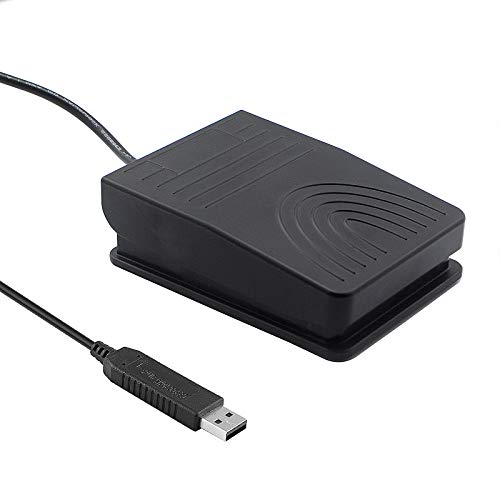
- One programmable keyboard or mouse action
- Wide pedal with low-resistance touch response
- TPU feet help maintain stability on hard floors
Best For: Push-to-talk, transcription, media, and other single-action tasks
Best Quiet Triple-Pedal Pick

- Three customizable foot controls
- Quiet optical switches
- Wide ergonomic pedals with stabilizing TPU feet
Best For: Quiet multi-action control for gaming, transcription, media, and work
Low-Profile Control – Infinity USB Digital Foot Control
The Infinity USB Digital Foot Control is a straightforward three-button option for shoppers comparing USB foot pedals for gaming-console control. Its wired, corded design and low-profile shape keep the setup simple, while the broad non-slip surface is designed for steady foot placement.
Best For: Gamers who want a wired three-button foot controller with a low-profile, non-slip design.
Pros:
- Three-button layout for foot-based control.
- Low-profile design.
- Greater non-slip surface area.
- Compatible with PlayStation 4 according to the supplied details.
Cons:
- Wired and corded rather than battery-powered.
- The listed warranty is 90 days.
- Product details identify it primarily for PlayStation 4 and gaming-console use.
This model suits buyers prioritizing a stable, uncomplicated pedal layout over advanced customization or extensive software features.
Macro Control – Elgato Stream Deck Pedal
The Elgato Stream Deck Pedal is a polished choice among USB foot pedals for hands-free computer control. Its three customizable pedals can trigger single or multiple actions, while plugins support platforms and tools such as OBS, Twitch, YouTube, Discord, Spotify, and Philips Hue.
Best For: Streamers, creators, and computer users who need customizable hands-free macros on Mac or PC.
Pros:
- Three customizable pedals for app and platform controls.
- Can trigger actions such as going live, muting a microphone, or toggling cameras.
- Interchangeable springs allow pedal-pressure adjustment.
- Heavy-duty chassis and two-year manufacturer warranty.
Cons:
- Its feature set may be more than needed for basic pedal input.
- Customization depends on software, plugins, and configuration.
- It is listed as compatible with Mac and PC rather than consoles.
Choose this model when programmable workflows matter more than simple keyboard-style switching. The plugin ecosystem makes it especially compelling for streaming and content-creation setups.
Heavy-Duty Switching – Infinity 3 USB Foot Pedal
Executive Communication Systems Infinity 3 USB Foot Pedal Control with Computer Plug In, one unit
Check Price On AmazonThe Infinity 3 USB Foot Pedal is a sturdy three-function option for buyers seeking USB foot pedals with a traditional control layout. It uses heavy-duty micro switches and a sloped central Play pedal, with enough width to move between Play, Fast Forward, and Rewind controls.
Best For: Users who need durable three-way foot control for computer or tablet-connected workflows.
Pros:
- Three-way foot-pedal circuit with Play, Fast Forward, and Rewind positioning.
- Heavy-duty micro switches designed for repeated use.
- Wide, ergonomic layout supports movement between pedals.
- USB connectivity and a substantial 2.1-pound build.
Cons:
- The listed IP00 rating does not indicate protection from dust or water.
- Plastic-and-metal construction may be less premium than an all-metal design.
- The supplied details do not list programmable software features.
This is a practical pick for buyers who prefer a conventional, durable pedal arrangement. Its strengths are physical robustness and clearly defined three-function control rather than customization.
Programmable Dual Control – iKKEGOL USB Double Foot Switch
The iKKEGOL USB Double Foot Switch is a flexible choice among USB foot pedals, with two switches that can be assigned to keys, key combinations, hotkeys, mouse functions, strings, multimedia controls, or game-controller functions. Its aluminum-alloy base is designed to support more than 100 kg and connects as a USB HID keyboard.
Best For: Windows users who want two configurable foot controls for shortcuts, multimedia tasks, gaming, or equipment operation.
Pros:
- Two pedals can provide two functions on one PC at the same time.
- Supports customizable keys, combinations, hotkeys, and multimedia functions.
- Aluminum-alloy base plate is designed for heavy weight support.
- Listed compatibility includes Windows, Mac, Linux, and various equipment applications.
Cons:
- Linux, Mac, and other-system use requires configuration on a Windows machine first.
- Only two pedals are included.
- Configuration may require more setup than a basic plug-and-play switch.
Consider this model if assigning custom shortcuts is more important than having three pedals. The dual-switch format and HID keyboard behavior make it adaptable, but initial Windows configuration may be necessary for some systems.
Best Budget Gaming Pedal – Compact USB Foot Switch
iKKEGOL USB Foot Switch Singal Pedal Footswitch Game Control Action HID for Keyboard Mouse PC Laptop
Check Price On AmazonThis compact USB foot pedal gives you hands-free control over a PC, letting the included software assign a keyboard shortcut or single key to the switch. It is a straightforward option for gaming and other basic foot-control tasks, though compatibility is limited on newer systems.
Best For: Windows users seeking an affordable pedal for gaming, shortcuts, factory tasks, instrument control, or accessibility applications.
Pros:
- Software can reproduce a single key or keyboard shortcut.
- Compact 3.9 x 2.4 x 1.5-inch design fits under most desks.
- Suitable for gaming, industrial, medical, testing, and accessibility uses.
- Can trigger an action quickly with a foot press.
Cons:
- Notes state that it does not work with Windows 10.
- Mac Snow Leopard is not supported, and newer Mac compatibility is limited.
- Provides only one foot switch.
This USB foot pedal is best when you want simple programmable control at a low profile and primarily use an older supported operating system. Check compatibility carefully before buying, especially for Windows 10 or Mac setups.
Best Multi-Function Control – Programmable Single Pedal
iKKEGOL USB Single Foot Switch Control One Key Customized Computer Keyboard Action Pedal HID
Check Price On AmazonThis programmable USB foot pedal is designed for users who need more than a basic on-off action. Its software supports customized keys, key combinations, hotkeys, shortcuts, mouse functions, strings, multimedia controls, and game commands.
Best For: Office, production, sewing, medical, instrumentation, and computer users who want to reduce repetitive keyboard or mouse work with one pedal.
Pros:
- Supports single keys, combinations, hotkeys, and shortcuts.
- Can emulate keyboard, mouse, string, multimedia, and game-controller functions.
- Software is available as a free download and is intended to simplify customization.
- Works with a broad range of applications, including sewing machines, equipment, and computers.
Cons:
- Only one foot switch is included.
- Requires software setup before customization.
- IP00 rating provides no stated protection against dust or water.
This USB foot pedal offers useful flexibility for repetitive workflows, but it is more configuration-focused than plug-and-play. It makes the most sense when you will take advantage of its programmable functions rather than use it as a simple switch.
Best Advanced Programmability – Upgraded Mechanical USB Pedal
This upgraded USB foot pedal is the most versatile option in this group, with software that can assign keyboard, mouse, string, multimedia, and game actions. Its mechanical construction, 6.2-foot cable, rubber feet, and support for multiple individually programmed pedals make it suitable for demanding hands-free setups.
Best For: Streamers, musicians, gamers, transcription users, accessibility setups, and anyone needing configurable hands-free controls on Windows or Mac.
Pros:
- Supports varied assignments, including hotkeys, mouse actions, multimedia, and game controls.
- Programming software supports Windows and Mac, while configured pedals can operate on Windows, Linux, Mac, and DOS.
- Mechanical pedal is described as responsive, sturdy, and quiet with a light press.
- Rubber feet help prevent sliding, and multiple pedals can be connected and programmed individually.
Cons:
- Setup requires downloading and configuring the software.
- The pedal may make a plastic-on-plastic click when pressed firmly.
- The supplied notes do not specify wireless operation; it uses a corded USB connection.
This USB foot pedal is the strongest choice for complex workflows because it combines broad input emulation with cross-platform use after configuration. It is especially practical when you need several hands-free actions or want to expand the setup with additional pedals.
Best Programmable 3-Key Pick – PCsensor FS2020U1
For shoppers comparing USB foot pedals, the PCsensor FS2020U1 stands out as a flexible three-key option. Its software supports individual key assignments, combinations, shortcuts, mouse commands, media controls, and game actions, making it useful when one pedal is not enough.
Best For: Users who need three independently programmable controls for gaming, office work, sheet music, or equipment control.
Pros:
- Three pedals can be configured individually.
- Supports key combinations, hotkeys, shortcuts, mouse functions, and media controls.
- After setup on Windows or Mac, it can be used with Windows, Mac, Linux, iOS, and Android devices.
- Solid plastic construction, water resistance, and a quiet photoelectric design.
Cons:
- Configuration software is required initially on Windows or Mac.
- The three-key design may be more than needed for simple single-action tasks.
- Its larger footprint may require more desk or floor space.
The FS2020U1 is a strong all-purpose choice when customization and multiple foot commands matter. Its broad post-configuration compatibility adds versatility, while the durable housing and quiet operation suit repeated office, gaming, and control tasks.
Best Simple Single-Pedal Pick – iKKEGOL 10731
This iKKEGOL USB foot pedal is a straightforward one-key solution for hands-free computer control. Free software lets you assign the pedal as a keyboard or mouse input, while the wide surface and rubber feet are designed for comfortable, stable use.
Best For: Buyers who want one programmable pedal for push-to-talk, transcription, media control, video calls, scanning, or gaming.
Pros:
- Single-pedal design keeps operation simple.
- Programmable through free software as a keyboard or mouse control.
- Wide ergonomic pedal supports extended use and can bear more than 100 kg.
- Four TPU rubber feet help keep it in place on hard floors.
Cons:
- Only one control is available.
- Notes list PC compatibility rather than broad multi-platform compatibility.
- Its IP00 rating does not indicate protection from dust or water.
Choose this model when a single reliable action is all your workflow needs. It offers an accessible entry point into programmable USB foot pedals without the complexity of a multi-key layout.
Best Quiet Triple-Pedal Pick – iKKEGOL 10717
The iKKEGOL 10717 is a practical choice for shoppers seeking USB foot pedals with three programmable controls and quieter operation. Its optical switches, wide ergonomic pedals, and stable TPU feet suit hands-free gaming, transcription, medical workflows, media control, and instrument or factory tasks.
Best For: Users who need three customizable foot commands with quiet optical switching.
Pros:
- Three-key layout supports customized keyboard and mouse actions.
- Optical switches are designed for quiet operation.
- Wide ergonomic pedals provide a low-resistance touch response.
- TPU rubber feet help prevent movement on hard floors.
Cons:
- Listed operating-system compatibility is limited to Linux and Windows.
- Requires configuration for customized commands.
- A triple-pedal layout may be unnecessary for one-action workflows.
This model makes the most sense when you want several foot-controlled commands but need to minimize switch noise. Its optical design and ergonomic construction are especially useful in shared spaces or long hands-free sessions.
How We Picked the Best USB Foot Pedals
We focused on the features that matter most in everyday hands-free control: pedal count, programmable inputs, USB compatibility, setup requirements, construction, and the types of shortcuts each design can handle. The selection includes dedicated transcription-style controllers, multi-function macro pedals, and simpler HID foot switches for gaming, accessibility, and routine computer tasks.
Because software support can vary, we also considered whether a pedal is likely to work as a standard keyboard or mouse input, whether it requires custom mapping, and how easily it can fit into an existing workflow. Always confirm operating-system and application compatibility before buying, particularly if you need advanced macros or specialized transcription software.
Quick Comparison
| Type | Best for | Main advantage | Potential limitation |
|---|---|---|---|
| Single pedal | One shortcut or simple control | Compact and straightforward | Limited command capacity |
| Dual pedal | Two recurring actions | More flexibility without much extra space | Fewer controls than a triple pedal |
| Triple pedal | Transcription and complex workflows | Several hands-free commands | Larger footprint and more setup |
| Macro pedal | Streaming and custom productivity | Multiple mapped actions and profiles | May depend on companion software |
Key Buying Factors for USB Foot Pedals
Pedal Count and Layout
Choose a single pedal if one command solves your main problem, such as push-to-talk or play/pause. Dual and triple models are better when you need separate controls for actions such as rewind, forward, select, or repeat. Check the spacing and angle if you expect long sessions.
Programming and Compatibility
Some USB Foot Pedals behave like standard HID keyboard or mouse devices, while others offer deeper remapping through software. Confirm that your target application accepts the desired shortcuts and that the product supports your operating system. Macro features may require a utility running in the background.
Build Quality and Stability
A pedal should stay in place when pressed and tolerate repeated use. Look for a sturdy enclosure, responsive switches, a cable long enough for your desk setup, and a base that will not slide easily on your floor. Mechanical switches can provide a more distinct response, but may be louder.
Setup and Workflow
USB connection is generally convenient, but “plug and play” does not always mean every function is preconfigured. Consider how much time you are willing to spend assigning keys, creating profiles, or troubleshooting software. For shared computers, simpler standard-input models can be easier to deploy.
Who Should Buy Which USB Foot Pedals?
Transcriptionists and editors: A three-pedal controller is usually the most practical choice when you need several playback and navigation commands while typing.
Streamers and creators: Choose a programmable macro pedal when you want hands-free scene changes, microphone control, media commands, or custom actions.
Gamers: Single- or dual-pedal HID models can add an extra key or mouse command without taking your hands off the main controls.
Office and accessibility users: Start with a dependable single pedal for one repeated action, or move to a dual model when two commands would noticeably reduce keyboard and mouse use.