The best compact USB video adapters make it easier to connect modern laptops and desktops to HDMI, VGA, or capture equipment without carrying a bulky dock. The right model can add a monitor, mirror a presentation, or simplify a streaming setup while taking up very little space.
This roundup covers simple USB-C display adapters, USB-A video converters, multiport hubs, and HDMI capture hardware. Pay close attention to connector type, resolution, operating-system support, refresh rate, and whether the adapter requires drivers.
Best 10 Compact USB Video Adapters Picks for 2026
Best Single-Display Pick

- 4K video at 60Hz
- Plug-and-play setup
- Lightweight aluminum housing
Best For: USB-C laptops needing one HDMI display
Best for Mobile Video Rigs

- Up to 100W PD charging
- 10Gbps USB-C 3.1 data
- Cold shoe mount for mobile rigs
Best For: Mobile creators recording ProRes video
Best Windows Expansion Option
StarTech USB-A to HDMI Converter

- 1080p at 60Hz output
- USB bus-powered design
- Supports Windows X86, X64, and ARM
Best For: Windows workstations adding an HDMI monitor
Best Apple Multiport Choice
Apple USB-C Digital AV Adapter

- HDMI video and audio output
- USB port for peripherals
- USB-C charging passthrough
Best For: Mac and compatible iPad users needing HDMI and charging
Legacy Display Support
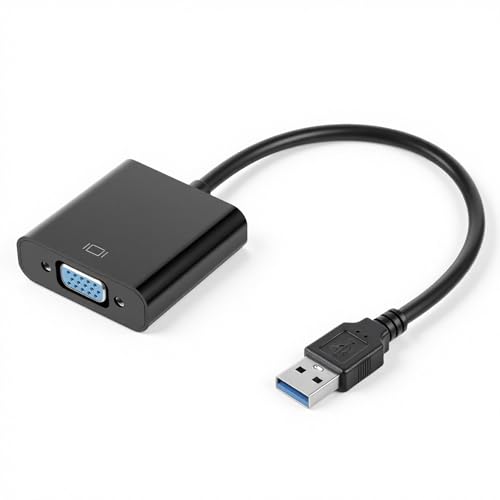
- VGA output up to 1920 x 1080
- Mirror or extend desktop layouts
- Designed for Windows 7, 8, and Vista
Best For: Connecting a USB computer to an older VGA monitor or projector
All-in-One USB-C Setup

- 4K HDMI at 60Hz
- Up to 100W PD input and 90W output
- USB-C and USB-A ports at 5Gbps
Best For: USB-C laptops needing display, charging, and accessory expansion
Best Plug-and-Play Capture Pick
VIXLW 4K HDMI Video Capture Card

- Captures HDMI video and audio together
- Supports 4K input and up to 1080p output
- Compact, driver-free design with broad OS support
Best For: Portable streaming, teaching, gaming, and video capture
Best All-in-One Hub
Acer 8-in-1 USB-C Hub with 4K HDMI

- 4K HDMI output at 60Hz
- Adds USB, SD, and MicroSD connectivity
- Supports 100W PD input with up to 90W output
Best For: Portable workstations and laptop connectivity
Best Simple Display Adapter

- Adds HDMI display output over USB-A
- Supports up to 1080p at 60Hz
- Provides mirror and extended display modes
Best For: Adding an extra monitor to Windows or macOS computers
Best Single-Display Pick – Anker USB-C to HDMI Adapter
If you need compact USB video adapters for connecting a USB-C laptop to an HDMI television or monitor, the Anker 310 is a straightforward choice. It supports video up to 4K at 60Hz, requires no installation, and is compatible with USB-C DP Alt Mode, USB4, and Thunderbolt connections.
Best For: USB-C laptops that need a simple, single-display HDMI connection.
Pros:
- Supports up to 4K video at 60Hz.
- Plug-and-play operation with no installation required.
- Lightweight aluminum casing and reinforced braided-nylon cable.
- Compact 1.97 x 0.85 x 0.45-inch design.
Cons:
- Does not support charging or Power Delivery.
- Provides one HDMI connection rather than multiple ports.
The Anker is a strong fit when portability and dependable HDMI output matter more than expansion features. Its lack of charging support means you may need a separate power connection while using it.
Best for Mobile Video Rigs – SmallRig 4-in-1 USB-C Hub
Among compact USB video adapters, the SmallRig 4598 stands out as a mobile-shooting hub rather than a basic display dongle. It adds USB-C charging, data, audio, and video connectivity, while its cold shoe mount helps integrate the hub with compatible camera or phone equipment.
Best For: Mobile creators recording ProRes video who need charging, accessories, and data connectivity.
Pros:
- Includes a PD charging port with support for up to 100W.
- USB-C 3.1 supports data transfer up to 10Gbps.
- Supports shooting ProRes 4K video at 60fps on mobile phones.
- Compact 38.3-gram design with an integrated cold shoe mount.
Cons:
- Designed specifically around mobile video shooting rather than general HDMI output.
- Two USB-C interfaces are limited to USB 2.0 speeds.
With four USB-C ports and a mounting option, this SmallRig hub is especially useful in a phone-based production setup. It offers more flexibility than a single-purpose adapter, though its feature set is tailored to compatible mobile workflows.
Best Windows Expansion Option – StarTech USB-A to HDMI Converter
The StarTech USB32HDES is one of the more practical compact USB video adapters for adding an HDMI monitor to a Windows laptop or desktop. It connects through USB-A, supports up to 1920×1200 or 1080p at 60Hz, and uses USB bus power instead of a separate power supply.
Best For: Windows users expanding a workstation with an additional HDMI display.
Pros:
- Supports 1920×1200 or 1080p video at 60Hz.
- USB bus-powered, so no extra power supply is required.
- Includes HDMI audio support with two-channel output.
- Works with Windows X86, X64, and ARM platforms.
Cons:
- Windows-only; it does not support macOS, ChromeOS, or Linux.
- Driver installation requires administrator rights.
- It does not provide 4K output.
This converter makes sense for office or home-workstation setups that still use USB-A ports. Confirm your operating system and access to administrator privileges before buying, since driver support is essential for operation.
Best Apple Multiport Choice – Apple USB-C Digital AV Adapter
The Apple USB-C Digital AV Multiport Adapter is a practical option for Mac and select iPad users who need HDMI display output without giving up charging or a standard USB connection. It supports video and audio output, and it can mirror a Mac display to an HDMI-enabled TV or projector.
Best For: Mac and compatible iPad users who need HDMI, USB, and USB-C charging in one adapter.
Pros:
- Connects a USB-C Mac or select iPad to an HDMI display.
- Includes a standard USB port for peripherals, cameras, or syncing.
- Provides a USB-C port for charging the Mac, iPad, or iPhone.
- Supports both video and audio output.
Cons:
- Requires a separate HDMI cable.
- Compatibility is limited to supported Apple devices and listed operating systems.
- The supplied notes do not specify a maximum video resolution or refresh rate.
This adapter is a well-rounded choice when you want display connectivity plus charging and USB access in one Apple-focused accessory. It is less suitable if you need confirmed high-refresh-rate or 4K specifications.
Flexible HDMI Expansion – USB to HDMI Adapter
This USB to HDMI adapter is a practical choice among compact USB video adapters when you need to add an HDMI display to a Windows or Mac computer. It supports up to 1080p at 60Hz through USB 3.0 and offers mirrored or extended display modes for monitors, TVs, and projectors.
Best For: Laptop users who need an affordable HDMI connection for multitasking, presentations, home theater, or video conferencing.
Pros:
- Supports up to 1080p at 60Hz through USB 3.0.
- Offers both mirror and extend display modes.
- Works with Windows 11, 10, 8.1, 8, 7, XP, and Mac OS.
- Lightweight design is convenient for travel.
Cons:
- USB 2.0 connections are recommended only at up to 720p for better stability.
- Linux, Vista, Chrome, and Firestick are not supported.
- Requires driver installation and a computer restart.
Choose this model if you want straightforward HDMI expansion and broad Windows compatibility. Its USB 3.0 connection is the better fit for full-resolution output, while the included driver setup adds an extra installation step.
Legacy Display Support – USB to VGA Adapter
This USB to VGA adapter is one of the more specialized compact USB video adapters, connecting a USB-enabled laptop or desktop to a VGA monitor, projector, or TV. It is designed for dual-monitor, mirrored, and extended-desktop setups, with output up to 1920 x 1080 when used with USB 3.0.
Best For: Windows 7, Windows 8, or Vista users connecting newer USB-equipped computers to an existing VGA display.
Pros:
- Connects USB devices to VGA displays.
- Supports extended and mirrored display configurations.
- Provides output up to 1920 x 1080 with USB 3.0.
- Useful for presentations, classrooms, and home entertainment.
Cons:
- Operating-system support is limited to Windows 7, Windows 8, and Vista according to the listing.
- USB 3.0 is recommended for optimal performance.
- Includes no warranty description.
This adapter makes the most sense when VGA compatibility is essential and the host computer runs one of the listed Windows versions. Confirm both the operating system and available USB performance before buying.
All-in-One USB-C Setup – Acer 5-in-1 USB-C Hub
The Acer 5-in-1 hub is a versatile pick among compact USB video adapters for USB-C laptops and tablets with DisplayPort Alt Mode. Along with 4K HDMI output at 60Hz, it adds USB-C and USB-A data ports plus up to 100W power delivery passthrough in a slim aluminum body.
Best For: USB-C laptop users who want one travel-friendly hub for an external 4K display, accessories, data transfer, and charging.
Pros:
- Supports 4K HDMI output at 60Hz.
- Includes USB-C and USB-A 3.0 data ports with 5Gbps transfer speeds.
- Offers up to 100W input and stable 90W laptop output with suitable equipment.
- Compact aluminum design supports travel, office, and remote-work setups.
Cons:
- Requires a full-featured USB-C port with DisplayPort Alt Mode, Power Delivery, and data support.
- A 100W power adapter and cable are recommended for optimal charging but are not included.
- It provides HDMI rather than VGA output.
This is the strongest choice here for modern USB-C workstations because it combines display expansion, charging, and peripheral connectivity. Verify that your device supports the required USB-C video features before purchasing.
Best Plug-and-Play Capture Pick – VIXLW 4K HDMI Video Capture Card
For shoppers seeking compact USB video adapters for streaming or recording, the VIXLW is a small HDMI capture device designed for straightforward setup. It captures HDMI video and audio to a computer or smartphone, supports 4K input at 60Hz, and outputs up to 1080p at 30Hz.
Best For: Streamers, online instructors, video conference users, and gamers who need a portable HDMI capture solution.
Pros:
- Compact aluminum-alloy housing weighs about 0.06 kg.
- Plug-and-play design requires no external power supply or complicated software installation.
- Works with OBS and supports Windows, macOS, Linux, and Android.
- Captures video and audio simultaneously through HDMI.
Cons:
- Maximum listed capture output is 1080p at 30Hz, despite supporting 4K input at 60Hz.
- Its primary function is HDMI capture rather than general-purpose display expansion.
The VIXLW is a practical choice when portability and simple HDMI recording matter most. Its broad operating-system support and included USB cable add convenience for mobile setups, broadcasts, and remote teaching.
Best All-in-One Hub – Acer 8-in-1 USB-C Hub with 4K HDMI
The Acer 8-in-1 is a compact USB-C hub for laptops and mobile devices that combines HDMI display output with high-speed data, card readers, and charging. It is a strong fit for buyers who want one adapter to organize a portable workstation, provided the host USB-C port supports DisplayPort Alternate Mode.
Best For: Laptop users, photographers, and professionals who need display connectivity, storage expansion, and charging from one hub.
Pros:
- Provides 4K HDMI output at 60Hz for mirroring or extending a display.
- Includes two USB-C 10Gbps ports, two USB-A 5Gbps ports, and SD/Micro SD readers.
- 100W power-delivery input provides up to 90W output with a suitable charger.
- Compact 5.4-inch design supports Windows, macOS, ChromeOS, and Linux.
Cons:
- Video output requires USB-C DisplayPort Alternate Mode.
- The USB-C and USB-A data ports do not support charging, video, or audio.
- A charger and charging cable are not included, and SSD use may require hub power.
This Acer hub offers the broadest connectivity of the three options, making it useful for a desk or travel kit. Check your device’s USB-C specifications before buying, especially if HDMI output is essential.
Best Simple Display Adapter – Reborn USB to HDMI Adapter
The Reborn USB to HDMI adapter is a compact USB-A display adapter for adding an HDMI monitor to a Windows or macOS computer. It supports up to 1080p at 60Hz, but it requires a one-time driver installation and is not suitable for BIOS mode.
Best For: Users who need an additional HDMI display connection from a compatible laptop or desktop.
Pros:
- Supports 1920×1080 output at 60Hz under supported conditions.
- Offers mirror and extended display modes for work or entertainment.
- Compact metallic design weighs about 0.07 kg.
- Includes a two-year warranty and stated 24/7 after-sales support.
Cons:
- Requires driver installation before first use.
- Cannot be used in BIOS mode, and conflicting display drivers may need removal.
- USB 2.0 or unsupported receiving devices may limit output to 800×600.
The Reborn is a focused option for adding one HDMI display without the extra ports of a hub. Its performance depends on the computer, USB connection, and driver setup, so it is best for users comfortable with a brief installation process.
How We Picked These Compact USB Video Adapters
We selected models across the most common use cases: direct USB-C-to-HDMI connections, USB-A-to-video conversion, VGA display support, multiport expansion, and HDMI capture. Priority went to adapters with clearly stated output resolutions, useful portability, broad device compatibility, and practical features such as 4K at 60Hz, additional ports, or support for multiple monitors.
Because USB video adapters do not all work the same way, we also considered connection technology. A USB-C adapter that uses DisplayPort Alt Mode generally offers a simpler, lower-latency connection than a USB-A converter that relies on DisplayLink-style software. Capture cards serve a different purpose entirely: they receive HDMI video and send it to a computer for recording or streaming.
Quick Comparison
- Best for a simple USB-C monitor connection: Anker USB-C to HDMI Adapter.
- Best for creators using a camera or rig: SmallRig 4-in-1 USB-C Hub with Cold Shoe Mount.
- Best for USB-A display expansion: StarTech USB-A 3.0 to HDMI Converter.
- Best for Apple laptops and tablets: Apple USB-C Digital AV Multiport Adapter.
- Best for extra connectivity: Acer USB-C hubs with HDMI, USB, and other expansion ports.
- Best for HDMI capture: VIXLW 4K HDMI Video Capture Card.
Key Buying Factors for Compact USB Video Adapters
Connector and Host Compatibility
Check whether your computer has USB-C, USB-A, or both. USB-C alone does not guarantee video output; the host port must support DisplayPort Alt Mode or Thunderbolt for many direct HDMI adapters. USB-A video converters typically require a driver and may have stricter operating-system requirements.
Resolution and Refresh Rate
For office work and presentations, 1080p at 60Hz is usually sufficient. Choose a 4K-capable model for sharper text, detailed creative work, or a modern television. Confirm the supported refresh rate, since some adapters reach 4K only at 30Hz while others support 4K at 60Hz.
Drivers, Latency, and Multiple Displays
Driver-based adapters can be useful for adding screens to computers that lack native video outputs, but they may not be ideal for gaming, protected content, or low-latency work. If you need multiple monitors, verify your operating system, display limits, and whether each output is independently supported.
Portability and Power
Compact adapters are easiest to carry, while hubs add useful ports but take up more space. Consider pass-through charging if the adapter will remain connected to a laptop, and check whether high-resolution output or several peripherals require external power.
Who Should Buy Which Compact USB Video Adapters?
Choose a small USB-C-to-HDMI adapter for a straightforward laptop-to-monitor or projector connection. Pick a USB-C hub if you need HDMI alongside USB accessories, storage, or charging. USB-A-to-HDMI or USB-A-to-VGA models suit older computers, provided you are comfortable installing drivers. For presentations with legacy projectors, VGA support remains useful. Streamers, teachers, and gamers should choose an HDMI capture card instead of a display adapter, since it is designed to bring an external HDMI source into recording software.