A dual-GPU system can give local AI work more room to run, but two graphics cards do not automatically act like one larger card. GPU memory, software support, and cooling matter as much as the headline specs.
These three systems offer different starting points: two RTX 5090 workstations for desktop-based work and a rackmount Tesla V100 server for buyers with server infrastructure. Here is what to check before choosing.
Best 3 Dual GPU PC for AI Picks for 2026
High-Core-Count Tower
MES2X Dual RTX 5090 Workstation
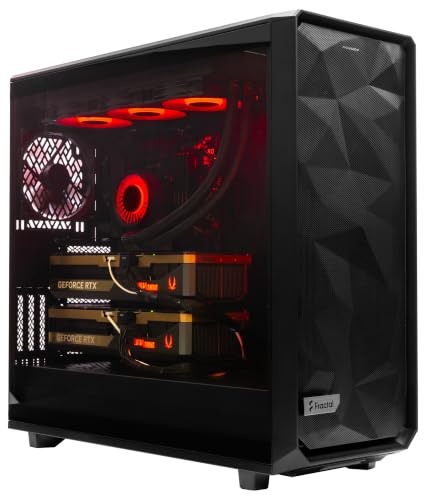
- Two RTX 5090 GPUs; 64GB combined graphics memory listed
- 16-core Ryzen 9 and 256GB DDR5
- 8TB NVMe storage; Windows 11 Pro preloaded
Best For: A prebuilt Windows dual-GPU tower with ample memory and storage
Rackmount Server Pick
Supermicro A+ Dual V100 Server

- Two Tesla V100 32GB accelerators
- Dual 64-core EPYC CPUs; 256GB DDR4
- 24 × 1.92TB SATA SSDs; rack rails included
Best For: Teams equipped for a 5U rackmount AI server
Connectivity-Focused Tower
ES620 Dual RTX 5090 Workstation

- Two RTX 5090 GPUs; 64GB combined GDDR7 listed
- 256GB DDR5 and 8TB NVMe storage
- 5Gb Ethernet, Wi-Fi 7, and Windows 11 Pro for Workstations
Best For: A ready-built dual-GPU tower with extensive connectivity
High-Core-Count Tower – MES2X Dual RTX 5090 Workstation
If you want a dual gpu pc for ai in a ready-to-use tower, the MES2X pairs two GeForce RTX 5090 cards with a 16-core Ryzen 9 processor, 256GB of DDR5 memory, and 8TB of NVMe storage listed as two 4TB drives in RAID.
Best For: Buyers who want a prebuilt, Windows-based dual-GPU workstation with substantial memory and local storage.
Pros:
- Two RTX 5090 GPUs with 64GB of combined graphics memory listed.
- 16-core CPU, 256GB DDR5, and 8TB NVMe storage.
- Windows 11 Pro and current drivers are preloaded; the build is listed as tested.
Cons:
- The 60-pound tower needs space and a standard North American power connection.
- The listing gives conflicting RAM figures: 256GB installed but 192GB maximum.
The 1600W power supply and 360mm liquid cooler suit the listed components, but confirm the memory specification and RAID setup with the seller before ordering.
For buyers considering a rack-mounted dual gpu pc for ai rather than a desktop tower, this renewed Supermicro 5U server combines two Tesla V100 32GB accelerators with two 64-core EPYC 7742 processors, 256GB of DDR4 memory, and 24 1.92TB SATA SSDs.
Best For: Teams with rack space that want a dual-accelerator server and extensive installed SSD capacity.
Pros:
- Two Tesla V100 accelerators, each listed with 32GB HBM2.
- Two 64-core EPYC processors and 256GB of installed memory.
- Twenty-four 1.92TB SSDs and four-post rack rails are included.
Cons:
- Renewed unit rather than a new workstation.
- Its 5U rackmount format is not suited to a typical desk setup.
- The supplied listing does not specify an installed operating system.
This is a server-focused option with substantial CPU and storage hardware. Check the operating system, software requirements, and rack fit before buying.
The ES620 is a dual gpu pc for ai aimed at buyers who want a configured Windows workstation: it pairs two GeForce RTX 5090 cards with a 12-core Ryzen 9 9900X, 256GB of DDR5, and 8TB of NVMe storage listed as two 4TB drives in RAID.
Best For: Buyers who want a prebuilt dual-GPU tower with modern networking and Windows 11 Pro for Workstations.
Pros:
- Two RTX 5090 GPUs with 64GB of combined GDDR7 memory listed.
- 5Gb Ethernet, Wi-Fi 7, Bluetooth 5.4, and 15 USB ports.
- Windows 11 Pro for Workstations is installed; a one-year parts-and-labor warranty is listed.
Cons:
- Its 60-pound full-tower chassis requires a suitable location.
- The listed 256GB of installed RAM also matches the stated maximum, leaving no advertised capacity headroom.
The 1600W power supply, 360mm CPU liquid cooler, and stated stress testing round out the build. Confirm how the two SSDs are configured in RAID if storage layout matters to your workflow.
How We Picked the Best Dual GPU PC for AI
We focused on the listed GPU pair, system memory, storage, and workstation-versus-server design. The selection spans two 256GB desktop workstations with dual GeForce RTX 5090 cards and one 5U server with dual Tesla V100 cards. Those specifications help identify likely use cases, but they are not benchmark results. Confirm the exact GPU memory configuration, power requirements, and current listing details with the seller before ordering.
Quick Comparison
The MES2X pairs two RTX 5090 GPUs with a 16-core Ryzen 9-9950X3D2, 256GB of RAM, and two 4TB NVMe drives listed in a RAID configuration. The APC ES620 lists the same GPU count, RAM, and storage arrangement, but uses a 12-core Ryzen 9-9900X. If pricing and other components are comparable, the MES2X is the one to examine for heavier CPU-side work; the ES620 may be the better value if its lower core count meets your needs.
The Supermicro AS-4124GS-TNR takes a different approach: a 5U chassis, two 64-core EPYC 7742 CPUs, 256GB of RAM, 24 listed 1.92TB SATA SSDs, and two Tesla V100 GPUs. It offers substantial listed CPU and drive capacity, but its GPUs are from an older generation. Do not assume it will match the RTX 5090 systems in GPU-focused workloads.
Key Buying Factors for a Dual GPU PC for AI
GPU Memory and Software Support
Check memory per GPU, not just a combined figure. Two cards do not usually give a single model one seamless pool of VRAM; splitting a model across GPUs requires compatible software and can add communication overhead. Verify that your framework supports the GPUs, drivers, and CUDA version you intend to use. This is especially important when comparing current GeForce cards with older Tesla accelerators.
Power, Cooling, and Placement
Ask for the complete power-supply specification, expected wall-power draw, airflow requirements, and noise profile. Two high-end GPUs place serious demands on cooling. A 5U rackmount server also needs suitable rack space, ventilation, and power; it is not a straightforward substitute for a desk-side workstation.
Storage and Upgradeability
NVMe storage can help with active datasets and checkpoints, while a larger SATA drive array may suit bulk storage. Confirm what the advertised RAID setup actually provides: two 4TB drives do not necessarily mean 8TB of usable space, and RAID is not a backup. Check available slots, networking, and service access if future expansion matters.
Who Should Buy Which Dual GPU PC for AI?
Start with the MES2X if you want dual RTX 5090 GPUs and expect significant CPU-side preprocessing or multitasking. Consider the APC ES620 if your work is primarily GPU-bound and its price makes the 12-core configuration attractive. Choose the Supermicro only if you specifically need its rackmount design, CPU resources, or drive capacity—and your AI software and performance expectations fit dual V100 GPUs. For any of the three, request workload-specific benchmarks and a written configuration before committing.