Finding a quiet rackmount workstation pc means balancing cooling, expansion, and noise control without sacrificing performance. The best options stay calm under load while still handling demanding professional workloads.
Below, we focus on prebuilt systems and rackmount chassis choices that make sense for creators, engineers, IT teams, and power users who want a cleaner, quieter rack-ready setup in 2026.
Best 10 Quiet Rackmount Workstation PC Picks for 2026
Best Quiet Rackmount Value
Quiet Rackmount Ryzen 7 5700G 2U PC

- 8-core Ryzen 7 5700G handles multitasking smoothly
- 32GB RAM and 1TB NVMe SSD boost everyday speed
- 2U rackmount case fits home or business setups
Best For: Home offices and small businesses that want a rackmount PC with strong all-around performance.
Best for Custom Water-Cooled Racks
SilverStone RM44 4U Rackmount Chassis

- 360mm radiator support for quieter cooling
- Fits SSI-EEB / Extended ATX workstation boards
- Eight PCIe slots plus long GPU clearance
Best For: Custom rackmount workstation builders who need strong cooling and expansion headroom.
Best for Quiet Productivity
Dell Pro Slim QCS1250 Business Desktop

- 14th Gen Intel i7-14700 delivers strong everyday multitasking
- 64GB DDR5 RAM and PCIe SSD keep apps and files responsive
- Dual 4K monitor support suits focused office setups
Best For: Business users and remote workers who want a compact, quiet desktop with dual-monitor support.
Best for Heavy-Duty Workstations
ThinkStation P920 Dual Xeon Refurbished
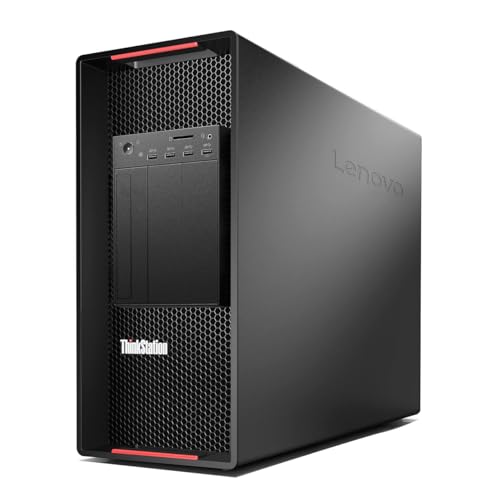
- 40-core / 80-thread dual Xeon performance
- 128GB RAM installed for demanding multitasking
- Custom storage and OS setup for flexible builds
Best For: Engineers and power users who want a customizable, server-grade workstation for heavy multitasking and virtualization.
Best for High-Airflow Builds
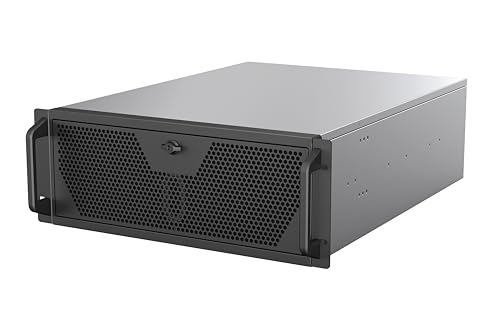
- E-ATX and SSI-EEB compatible
- 360mm AIO support with 3 PWM fans
- Front USB 3.2 Type-C and flexible storage
Best For: Creators and IT builders who need a roomy rackmount chassis with strong cooling and workstation-class compatibility.
Best for Heavy Multicore Workloads
PCSP Precision 7920 Dual Xeon Workstation

- 48-core, 96-thread dual Xeon platform
- Up to 1.5TB DDR4 RAM support
- 1TB NVMe SSD + 4TB HDD storage
Best For: Engineers and creators who need maximum CPU throughput, big memory capacity, and pro-grade connectivity.
Best for High-End Workloads
Quiet Rackmount Computer with RTX 5070 Ti

- Ultra 9 285K CPU for demanding productivity
- RTX 5070 Ti with 16GB GDDR7
- 2TB SSD + 32GB DDR5 for fast multitasking
Best For: Creators and power users who want rack-mounted performance for editing, streaming, and gaming.
Best for Quiet Office Work
HP ProDesk 600 G6 Ultra-Quiet i5 Desktop

- Ultra-quiet design keeps noise low in busy offices
- 64GB RAM and 1TB NVMe SSD handle multitasking smoothly
- Windows 11 Pro and included peripherals simplify setup
Best For: Office and home users who want a quiet, ready-to-run business desktop with plenty of memory.
High-Performance Rackmount Pick
Quiet Rackmount Computer with Ryzen 9 9950X
- Ryzen 9 9950X + RTX 5080 for demanding workloads
- 64GB DDR5 and 2TB Gen4 SSD for fast multitasking
- 4U rackmount case suits studios, offices, and AV racks
Best For: Creators and power users who want a rack-ready workstation with top-tier specs.
Best Quiet Rackmount Value – Quiet Rackmount Ryzen 7 5700G 2U PC
If you want a quiet rackmount workstation pc that still has enough muscle for everyday creative work, light gaming, or office multitasking, this 2U system is a practical pick. It pairs an AMD Ryzen 7 5700G, 32GB of RAM, and a 1TB NVMe SSD in a rack-friendly chassis, so you get fast responsiveness without moving up to a full tower.
Best For: Home offices, small businesses, and users who need a rackmount PC with solid all-around performance and Windows 11 Pro.
Pros:
- Ryzen 7 5700G offers 8 cores and 16 threads for strong multitasking
- 32GB DDR4 RAM and 1TB NVMe SSD make boot times and app launches feel fast
- 2U rackmount form factor works well in server racks or compact workspaces
- Includes Windows 11 Pro plus integrated Radeon graphics for basic display needs
Cons:
- Integrated graphics are fine for basics, but not ideal for heavy GPU work
- 2U rackmount designs can be noisier than true silent desktop PCs
- Not the most expandable option if you need high-end workstation upgrades later
This is a sensible middle-ground choice if you need a quiet rackmount workstation pc that balances speed, simplicity, and rack compatibility. It is especially appealing when you want dependable day-to-day performance rather than a flashy, oversized workstation build.
Best for Custom Water-Cooled Racks – SilverStone RM44 4U Rackmount Chassis
If you’re building a quiet rackmount workstation pc that still needs serious cooling headroom, the SilverStone RM44 is a strong chassis to consider. It gives you 4U rack space, support for up to a 360mm radiator, and room for large SSI-EEB or Extended ATX boards, making it a practical fit for high-end workstation hardware without feeling cramped.
Best For: Builders who want a rackmount chassis with liquid cooling support, long GPU clearance, and plenty of expansion room.
Pros:
- Supports up to a 360mm radiator for more effective, quieter cooling
- Fits SSI-EEB and Extended ATX motherboards for workstation-class builds
- Eight PCIe slots and 424mm GPU clearance help with high-end expansion
- Includes sliding rail mounting holes and a front USB-C port
Cons:
- 4U rackmount format is larger than compact desktop cases
- Liquid cooling and full-size components can raise total build cost
For a quiet rackmount workstation pc, the RM44 stands out because it combines rack-ready hardware support with cooling flexibility that many server chassis lack. It’s especially appealing if you want a workstation that can handle powerful CPUs and GPUs while staying organized and thermally efficient.
Best for Quiet Productivity – Dell Pro Slim QCS1250 Business Desktop
If you want a quiet rackmount workstation pc alternative for office work, multitasking, or a tidy home setup, the Dell Pro Slim QCS1250 is built around fast 14th Gen Intel performance in a compact, low-noise chassis. It’s a practical fit when you need strong everyday speed, dual-monitor support, and modern connectivity without a bulky tower.
Best For: Business users, remote workers, and anyone who wants a compact desktop with quiet operation and strong multitasking headroom.
Pros:
- 14th Gen Intel i7-14700 with plenty of cores for smooth multitasking
- 64GB DDR5 RAM and fast PCIe SSD storage for responsive performance
- Dual 4K display support via HDMI 2.1 and DisplayPort 1.4a
- Compact design with USB-C, Wi-Fi, and Windows 11 Pro
Cons:
- Not a true rackmount chassis if you need standard server-rack installation
- Integrated graphics limit heavy 3D or GPU-accelerated workloads
- Business-focused design is less ideal for DIY upgrade enthusiasts
This model makes sense if you want a quiet rackmount workstation pc feel in a smaller, office-friendly form factor: fast, unobtrusive, and well suited to dual-monitor productivity. If rack mounting isn’t required, it’s an easy recommendation for users who care more about silence and stability than expandability.
Best for Heavy-Duty Workstations – ThinkStation P920 Dual Xeon Refurbished
If you need a quiet rackmount workstation pc for virtualization, CAD, rendering, or lab-style server work, this refurbished ThinkStation P920-class tower is built around serious dual-socket performance rather than consumer gaming parts. It gives you 40 cores, 80 threads, and a huge memory ceiling, but you’ll need to add storage and an operating system yourself.
Best For: Engineers, creators, and power users who want a server-grade workstation they can customize for long runtimes and demanding multitasking.
Pros:
- Dual Xeon Gold 6148 CPUs deliver excellent multi-threaded performance
- 128GB of RAM is already installed for heavy workloads and virtualization
- Flexibility to add your own SSDs, HDDs, or NVMe storage
- Pro-grade Quadro graphics and strong connectivity for workstation setups
Cons:
- No drives or operating system included, so setup takes extra time
- Quadio K620 graphics are basic for modern 3D or GPU-heavy tasks
- Large tower form factor is not a true rackmount solution
For buyers prioritizing raw compute and customization, this is a capable workstation platform, though it is not the easiest choice if your main goal is a truly quiet rackmount workstation pc. It makes more sense when performance, expandability, and server-like durability matter more than compactness or silence.
Best for High-Airflow Builds – Rosewill 4U Rackmount Chassis
If you’re building a quiet rackmount workstation pc that still needs serious cooling and expandability, this Rosewill 4U chassis is a practical starting point. It supports E-ATX and SSI-EEB boards, a 360mm AIO, and enough storage for mixed SSD/HDD setups, making it a strong fit for demanding creator or lab machines.
Best For: Builders who want a 4U rack case with broad motherboard support, strong airflow, and front USB-C for workstation or server tasks.
Pros:
- Supports E-ATX and SSI-EEB motherboards for larger workstation builds
- Includes three 120mm PWM fans and 360mm AIO support for better thermals
- Front USB 3.2 Type-C adds convenient 10Gbps file transfers
- Flexible drive layout supports up to 2 x 3.5″ HDDs and 4 x 2.5″ SSDs
Cons:
- 4U rackmount size is not ideal for compact desks or mobile setups
- Preinstalled fans help airflow, but a truly quiet build still depends on component choice
- Less suited to users who need a polished tower-style PC case
This chassis makes sense if you want a quiet rackmount workstation pc platform with room for serious cooling, storage, and rack integration. It’s more about flexible, high-airflow workstation support than small-form-factor silence, but that balance will suit many heavy-duty builds.
Best for Heavy Multicore Workloads – PCSP Precision 7920 Dual Xeon Workstation
If you need a quiet rackmount workstation pc for demanding rendering, CAD, virtualization, or AI work, this dual Xeon tower is built around throughput rather than compact consumer styling. It pairs 48 cores, 96 threads, and very large RAM support with fast NVMe storage, making it a strong fit for sustained professional workloads.
Best For: Engineers, designers, and creators who need a high-core-count workstation with generous memory headroom and reliable pro graphics.
Pros:
- Dual Xeon Platinum 8160 CPUs deliver massive multicore performance for heavy workstation tasks
- Up to 1.5TB DDR4 RAM support is excellent for simulation, VMs, and large projects
- 1TB NVMe SSD plus 4TB HDD balances fast boot times with roomy storage
- Quadro P2000 with 4 DisplayPorts suits multi-monitor professional setups
Cons:
- Not a compact rackmount chassis, so it may be a poor fit for strict space-limited installs
- Quadro P2000 is capable, but not ideal for modern high-end GPU rendering
- Renewed hardware may be less appealing to buyers wanting a brand-new system
This is a strong pick if your priority is workstation muscle over size, and it can still be attractive for a quiet rackmount workstation pc setup when low-noise cooling and a stable enterprise platform matter more than gaming-grade graphics.
Best for High-End Workloads – Quiet Rackmount Computer with RTX 5070 Ti
If you want a quiet rackmount workstation pc that can handle demanding creative work and gaming in one chassis, this 4U system is built around strong modern hardware. The Intel Core Ultra 9 285K, RTX 5070 Ti, 32GB DDR5, and 2TB NVMe SSD give it the speed to move from editing and rendering to multitasking without feeling slow.
Best For: Creators, streamers, and power users who need rack-mounted performance for 4K editing, 3D work, or gaming.
Pros:
- Top-tier Intel Core Ultra 9 285K CPU with high boost clocks for heavy workloads
- RTX 5070 Ti graphics with 16GB GDDR7 for modern gaming and GPU-accelerated apps
- 2TB Gen4 NVMe SSD and 32GB DDR5 RAM for fast boot times and smooth multitasking
- 4U rackmount case with Windows 11 Pro, making it flexible for home or business setups
Cons:
- More machine than most casual users need
- 4U rack design is less compact than a standard tower
- Premium hardware likely puts it in a higher price bracket
For buyers comparing a quiet rackmount workstation pc, this model stands out when performance matters more than size or budget. It is a strong fit if you need a polished rack-ready system that can double as a creator rig and gaming desktop.
Best for Quiet Office Work – HP ProDesk 600 G6 Ultra-Quiet i5 Desktop
If you want a quiet rackmount workstation pc-style setup for office productivity, this HP ProDesk 600 G6 MT is a strong fit thanks to its ultra-quiet design, fast 10th Gen Core i5 performance, and generous memory and storage. It’s built for multitasking, dual-monitor work, and dependable day-to-day business use without adding much noise to the room.
Best For: Small offices, home workstations, and buyers who want a low-noise desktop with plenty of RAM and ready-to-use business features.
Pros:
- Ultra-quiet operation suits shared offices and focused workspaces
- 64GB RAM and 1TB NVMe SSD deliver fast multitasking and quick boot times
- Multiple video outputs plus WiFi adapter and 9+ USB ports improve flexibility
- Windows 11 Pro, keyboard, and mouse make setup straightforward
Cons:
- GeForce GT 610 is basic and not meant for heavy graphics work
- MicroTower design is compact, but it is not a true rackmount chassis
For buyers comparing a quiet rackmount workstation pc alternative, this HP stands out more for silent office productivity than for specialized mounting or high-end graphics. It’s a practical pick if your priority is low noise, strong multitasking, and business-ready convenience.
Best High-Performance 4U Pick – Quiet 4U RTX 5090 Workstation PC
If you want a quiet rackmount workstation pc that still delivers serious desktop-class performance, this 4U system is built for demanding creative work, heavy multitasking, and high-end gaming. The Ryzen 9 9950X, RTX 5090, 96GB of DDR5 memory, and 4TB NVMe storage make it a strong all-in-one choice for users who need speed and expansion-friendly rackmount hardware.
Best For: Content creators, power users, and home or business buyers who want workstation performance in a 4U rackmount design.
Pros:
- Ryzen 9 9950X and RTX 5090 deliver top-tier performance for editing, rendering, and gaming.
- 96GB RAM and 4TB Gen4 SSD provide plenty of headroom for large projects and fast load times.
- 4U rackmount case suits AV racks, studio setups, and space-conscious workspaces.
- Windows 11 Pro and included peripherals make it ready to deploy out of the box.
Cons:
- High-end specs likely put it well above budget-friendly options.
- 4U chassis is practical, but not as compact as smaller rackmount systems.
Overall, this is a compelling quiet rackmount workstation pc for buyers who care more about raw capability than minimal footprint. It stands out as a strong rack-ready option when you need workstation power, modern graphics, and fast storage in one package.
High-Performance Rackmount Pick – Quiet Rackmount Computer with Ryzen 9 9950X
If you want a quiet rackmount workstation pc that still feels genuinely high-end, this 4U system is built around serious parts: a Ryzen 9 9950X, RTX 5080, 64GB of DDR5, and a 2TB Gen4 SSD. It’s a strong fit for creators, power users, and gamers who need desktop-class speed in a rackmount-friendly chassis.
Best For: Content creators, streamers, and home or business users who want a powerful 4U rackmount system with top-tier CPU and GPU performance.
Pros:
- Ryzen 9 9950X and RTX 5080 deliver excellent performance for gaming, editing, and 3D workloads
- 64GB RAM and 2TB NVMe SSD make multitasking and large project work feel fast and responsive
- 4U rackmount case is practical for AV racks, offices, and studio setups
- Windows 11 Pro plus included keyboard and mouse help it feel ready to use out of the box
Cons:
- 4U rackmount designs are not as compact as smaller rack systems
- High-end hardware likely means higher power use and more heat than a typical office PC
- “Quiet” is relative here, since a powerful workstation can still generate fan noise under load
This is a strong option if you need a quiet rackmount workstation pc that prioritizes raw performance and flexibility over compact size. It looks especially compelling for users who want one machine for creative work, streaming, and gaming in a rack-ready format.
How We Picked These Quiet Rackmount Workstation PC Options
We prioritized systems and chassis that support dependable cooling, practical expansion, and strong performance for professional use. Noise reduction matters most when it is achieved through better airflow design, larger fans, efficient components, and sensible layout rather than restrictive cooling that hurts stability.
We also looked at CPU and GPU headroom, memory capacity, storage flexibility, rack compatibility, and whether the design fits real workstation tasks such as rendering, CAD, editing, virtualization, and office-heavy multitasking.
Quick Comparison
Prebuilt quiet systems are the easiest path if you want a ready-to-run machine with predictable setup time. Chassis-only picks are better if you already have parts or want to customize thermals, storage, and acoustics around your exact workload.
For the Quiet Rackmount Workstation PC buyer, the main tradeoff is simple: choose convenience and tested configuration, or choose flexibility and build control.
Key Buying Factors for a Quiet Rackmount Workstation PC
Cooling Design
Look for support for larger radiators, multiple intake and exhaust fans, and enough internal space to avoid heat buildup. A well-ventilated 4U chassis often gives you more acoustic headroom than a tighter enclosure.
Component Efficiency
Modern CPUs and GPUs can deliver more performance per watt, which usually means less fan noise at the same workload. If your tasks are not graphics-heavy, a lower-power GPU or integrated graphics can help keep acoustics down.
Storage and Memory
Fast NVMe storage improves responsiveness without adding much heat, while ample RAM helps reduce swapping and keeps heavy apps smooth. For demanding workflows, 32GB is a starting point, while 64GB or more is often smarter for long-term use.
Rack Fit and Expandability
Check rack height, chassis depth, motherboard support, drive bays, and power supply clearance before buying. A Quiet Rackmount Workstation PC should still leave room for future upgrades, not just current needs.
Who Should Buy Which Quiet Rackmount Workstation PC?
If you want the simplest path, choose a prebuilt Quiet Rackmount Workstation PC with balanced CPU, RAM, and SSD capacity. If you need a custom thermal design or specific drive support, choose a rackmount chassis and build to your own standards.
Professionals running creative apps, simulation tools, or virtual machines should favor higher-core CPUs and more memory. Buyers focused on office productivity, light media work, or mixed business use can usually save money with a quieter midrange configuration and still get excellent results.
In short, match the system to your workload, noise tolerance, and upgrade plans. The best choice is the one that stays cool, stays quiet, and has enough performance margin to remain useful well past 2026.