Building a rendering farm is about more than raw CPU specs. You need stable cooling, easy serviceability, and a chassis that can handle sustained workloads without throttling.
Below, you’ll find rackmount PC and rackmount chassis picks that fit different build styles, from compact 2U systems to high-airflow 4U options for serious rendering throughput.
Best 10 Rackmount PC for Rendering Farm Picks for 2026
Best Quiet Rackmount Pick
Quiet 2U Ryzen 7 5700G Rackmount PC

- Quiet 2U rackmount design
- Ryzen 7 5700G with 32GB RAM
- 1TB NVMe SSD and Windows 11 Pro
Best For: Small studios and home labs needing a quiet entry-level rack workstation.
Best 2U Storage-Chassis Pick
Rosewill 2U Server Chassis RSV-Z2900U

- 4 x 3.5" bays plus 2 x 2.5" mounts
- E-ATX support with 7 PCI expansion slots
- 3 pre-installed 80mm PWM fans for airflow
Best For: Builders who need a compact 2U rack case for a storage-friendly render node.
Best for Quiet 2U Servers
Quiet Rackmount Ultra 7 265 32GB/2TB
- 20-core Intel Core Ultra 7 265 CPU
- 2TB NVMe SSD for fast project storage
- 2U rackmount with expansion and drive bays
Best For: Quiet rack-friendly render nodes and workstation-style deployments.
Best High-Capacity 4U Tower
Rosewill 4U Server Chassis RSV-R4000U
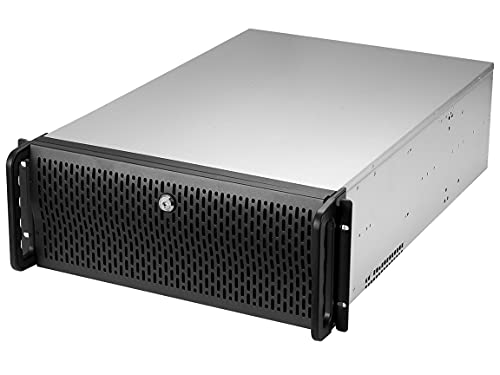
- 8 internal 3.5" bays for storage-heavy builds
- ATX/CEB support with 7 PCI expansion slots
- 4 pre-installed fans and front USB 3.0
Best For: Render nodes and server-style workstations that need lots of drive bays and expansion room.
Best Compact Rackmount Workstation

- 10-core Intel Core Ultra 5 with up to 4.9GHz boost
- 32GB DDR5 RAM and 1TB NVMe SSD
- 2U rackmount design with Windows 11 Pro
Best For: Small studios and home labs needing a quiet rack-mounted workstation for light rendering and production tasks.
Best for High-Bay Drive Arrays
Rosewill 4U Server Chassis RSV-R4100U
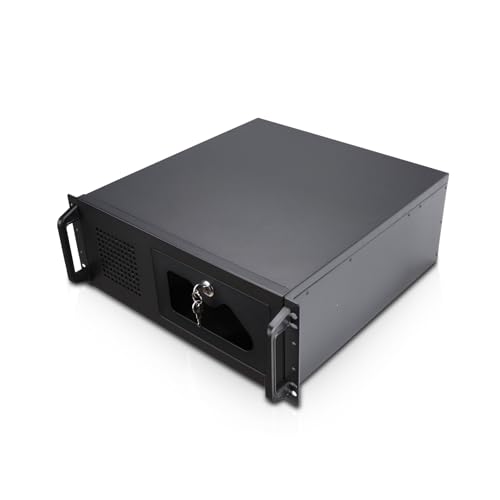
- 7 internal 3.5-inch bays for storage-heavy builds
- ATX/CEB support with 7 PCI expansion slots
- Pre-installed PWM fans and front USB 3.0
Best For: Builders who want a roomy 4U rack case for drive-heavy rendering or media workloads.
Best for Compact Multi-Node Builds
GeeekPi 4U 10-Inch Mini Server Rack
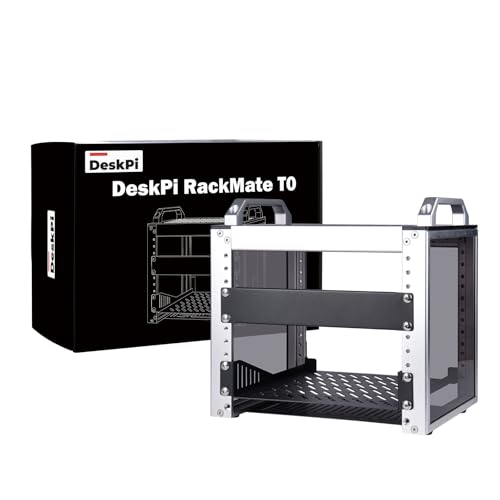
- Compact 4U design for small node clusters
- Open frame layout simplifies access and maintenance
- Perforated sides support better cooling airflow
Best For: Small rendering clusters, home labs, and compact server setups with limited space.
Best for Liquid-Cooled Builds
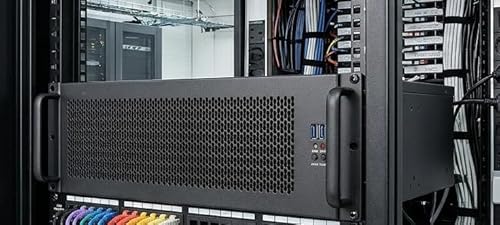
- 360mm AIO support for demanding render workloads
- PCIe 4.0 riser included for vertical GPU mounting
- Flexible 3U layout with useful front I/O
Best For: Render nodes and GPU-heavy rack builds that need compact cooling headroom.
Best for High-Cooling Builds
SilverStone RM44 4U Rackmount Server Chassis

- 360mm radiator support for stronger cooling
- Fits SSI-EEB / Extended ATX motherboards
- 8 PCIe slots and long-GPU clearance
Best For: Render-farm builders who need a 4U chassis with strong cooling and workstation-grade expansion.
Best for Liquid Cooling
RackChoice 3U Rackmount Server Chassis

- Up to elevated 360mm radiator support
- Fits ATX, MicroATX, Mini-ITX, and SFX/ATX PSU
- Good foundation for dense rendering nodes
Best For: Builders who want a flexible 3U chassis for a liquid-cooled rendering farm node.
Best Quiet Rackmount Pick – Quiet 2U Ryzen 7 5700G Rackmount PC
If you need a rackmount pc for rendering farm duties without overcomplicating the build, this 2U system is a practical fit. The Ryzen 7 5700G brings 8 cores and 16 threads, while 32GB of RAM and a 1TB NVMe SSD help keep projects, caches, and multitasking responsive.
Best For: Small studios, home labs, and budget-conscious buyers who want a quiet 2U rack workstation for light-to-moderate rendering workloads.
Pros:
- 8-core Ryzen 7 5700G offers solid everyday rendering and content-creation performance
- 32GB DDR4 RAM and 1TB NVMe SSD provide a balanced out-of-box setup
- 2U rackmount format with drive bays and expansion slots for practical workstation use
- Windows 11 Pro and lifetime support add convenience for business or home deployment
Cons:
- Integrated Radeon graphics are not ideal for GPU-heavy rendering pipelines
- Single-CPU design limits scalability versus more powerful multi-socket render nodes
- May need upgrades for larger scenes, heavier simulations, or bigger farms
This is a sensible rackmount pc for rendering farm setups that prioritize quiet operation, fast storage, and straightforward deployment over maximum throughput. For lighter render nodes or a starter workstation in a rack, it covers the essentials well.
Best 2U Storage-Chassis Pick – Rosewill 2U Server Chassis RSV-Z2900U
If you’re building a rackmount pc for rendering farm duties and need a straightforward chassis with room for drives and expansion, the Rosewill RSV-Z2900U is a practical 2U option. It focuses on the essentials: multiple storage bays, E-ATX support, and active airflow for dense workstation or server builds.
Best For: Builders who want a compact 2U rack case with solid drive capacity for a render node or shared storage-heavy render box.
Pros:
- Four 3.5″ bays plus two 2.5″ mounts give you useful storage flexibility.
- E-ATX compatibility and 7 PCI slots make it easier to plan a capable build.
- Three pre-installed 80mm PWM fans help move air through a tight 2U chassis.
Cons:
- 2U height can limit cooler and GPU clearance compared with larger rack cases.
- Drive and cable access is more cramped than in tower-style cases.
For a rackmount pc for rendering farm use, this chassis makes the most sense when storage density and rack compatibility matter more than spacious internal working room. It’s a sensible foundation for a render node if you already know your cooling and component sizes will fit the 2U form factor.
Best for Quiet 2U Servers – Quiet Rackmount Ultra 7 265 32GB/2TB
If you need a rackmount pc for rendering farm duties but want a quieter machine that can double as a workstation, this 2U build is worth a look. It pairs an Intel Core Ultra 7 265 CPU with 32GB of DDR5 memory and a 2TB NVMe SSD, giving you a solid mix of speed, fast storage, and practical expandability for smaller studio or business setups.
Best For: Users who want a quiet, rack-friendly render node or workstation with strong everyday performance and low-friction setup.
Pros:
- Intel Core Ultra 7 265 with 20 cores for multi-threaded workloads
- 2TB PCIe NVMe SSD for fast project loads and cache access
- 2U rackmount design with 2x 3.5" bays and 4 expansion slots
- Windows 11 Pro and lifetime technical support included
Cons:
- Integrated graphics only, so it is not ideal for GPU-heavy rendering
- 32GB RAM is workable, but larger render jobs may need an upgrade
- Not a turnkey high-core-count render server for large farms
As a rackmount pc for rendering farm use, this model makes the most sense as a compact, quiet node or hybrid workstation rather than a top-end production renderer. It offers good responsiveness and expansion potential, but buyers running large scenes or GPU-accelerated pipelines should compare it with more specialized hardware.
Best High-Capacity 4U Tower – Rosewill 4U Server Chassis RSV-R4000U
If you need a practical rackmount pc for rendering farm builds, this Rosewill 4U chassis gives you the drive space, expansion room, and airflow that multi-GPU or storage-heavy systems often demand. It is a straightforward server case for builders who want a roomy ATX/CEB platform without moving up to a full rack enclosure.
Best For: Builders who need lots of internal storage bays and a flexible 4U chassis for a render node or server-style workstation.
Pros:
- 8 internal 3.5" bays plus 3 x 5.25" device slots for storage expansion
- ATX and CEB compatibility with 7 PCI expansion slots for flexible builds
- Four pre-installed fans help maintain airflow for loaded rendering systems
- Front USB 3.0 ports and a lockable front panel add convenience and security
Cons:
- Not a compact case, so it needs more rack or desk space than smaller chassis
- Cooling is good for a case, but high-end rendering rigs may still want upgraded fans
For a rackmount pc for rendering farm use, this case stands out more for storage density and expandability than for sleek design. It is a solid pick when your priority is fitting drives, cards, and cooling into one dependable 4U platform.
Best Compact Rackmount Workstation – Quiet Rackmount Computer 2U
If you need a rackmount pc for rendering farm duties without jumping to a larger enterprise tower, this 2U system offers a practical balance of speed, storage, and low-noise operation. The Intel Core Ultra 5 225, 32GB of DDR5 memory, and 1TB NVMe SSD make it a capable starter node for content creation, light rendering, and general workstation use.
Best For: Small studios, home labs, and creators who want a rack-friendly workstation that can handle rendering jobs and everyday production work.
Pros:
- 10-core Intel Core Ultra 5 processor with boost speeds up to 4.9GHz
- 32GB DDR5 RAM and 1TB PCIe NVMe SSD for fast multitasking and project loading
- 2U rackmount format with expansion slots and dual 3.5" drive bays
- Windows 11 Pro and lifetime technical support included
Cons:
- Integrated graphics limit heavier GPU-rendered workflows
- 32GB RAM may be modest for larger rendering farm nodes
- Not the best fit if you need maximum expandability or ECC-focused workstation specs
As a rackmount pc for rendering farm use, this model makes the most sense as a compact, quiet node for modest workloads rather than a high-end render beast. It is a solid choice if you value easy rack integration, quick storage, and dependable day-to-day performance.
Best for High-Bay Drive Arrays – Rosewill 4U Server Chassis RSV-R4100U
If you need a rackmount pc for rendering farm builds that prioritize storage density and expansion over compact size, this Rosewill 4U chassis is a practical starting point. It offers seven internal 3.5-inch bays, dual 5.25-inch device slots, and ATX/CEB compatibility for a straightforward multi-drive workstation or server layout.
Best For: Builders who want a roomy 4U rack case for drive-heavy rendering or media workloads with standard ATX-style hardware.
Pros:
- Seven internal 3.5-inch bays support larger local storage arrays
- ATX and CEB compatibility plus 7 PCI slots improve expandability
- Pre-installed 120mm and dual 80mm PWM fans help with airflow
- Front USB 3.0 ports and a lockable front panel add convenience
Cons:
- Only works with hard drives that use three screw holes per side
- 4U size takes up more rack space than slimmer cases
For a rackmount pc for rendering farm use, this chassis makes more sense when your priority is bays, airflow, and general expandability rather than hot-swap convenience or a compact footprint. It is a solid case-first option for builders assembling a storage-rich render node.
Best for Compact Multi-Node Builds – GeeekPi 4U 10-Inch Mini Server Rack
If you need a tidy, space-saving rackmount pc for rendering farm workflows, this 4U mini server cabinet is a practical way to organize compact nodes, networking gear, and supporting equipment. Its open frame design makes it easy to install, access, and cool hardware without giving up desk space.
Best For: Small rendering clusters, home labs, and compact server setups that need simple access and better airflow.
Pros:
- 4U, 10-inch form factor fits compact multi-device builds
- Open design makes maintenance and cable changes easier
- Perforated side panels help improve airflow for active hardware
- Aluminum alloy and acrylic construction keeps it lightweight
Cons:
- Too small for full-size enterprise rack hardware
- Open chassis offers less dust and noise isolation
- May require careful planning for deeper components
For a rackmount pc for rendering farm use, this cabinet makes the most sense when you want a compact, accessible frame rather than a fully enclosed server rack. It’s a good fit for builders prioritizing airflow, modularity, and a small footprint over high-density expansion.
Best for Liquid-Cooled Builds – 3U Rackmount Industrial Case
If you’re building a rackmount pc for rendering farm workloads, this 3U chassis stands out for its 360mm AIO support, PCIe 4.0 riser cable, and flexible GPU mounting layout. It gives you a practical path to high-density compute without giving up cooling or expansion options.
Best For: Render nodes, GPU workstations, and server builds that need strong cooling in a compact 3U rackmount case.
Pros:
- Supports a 360mm liquid CPU cooler for heavier rendering loads
- PCIe 4.0 riser cable simplifies vertical GPU mounting
- Flexible slot layout for up to 2 vertical or 3 horizontal full-height expansions
- Front USB 3.0 ports and power/reset buttons are handy in rack setups
Cons:
- Designed around SFX power supplies, which narrows PSU choices
- 3U height can limit compatibility with very large air coolers and components
- Liquid cooling adds build complexity compared with simpler rack cases
For a rackmount pc for rendering farm use, this case makes sense when cooling and GPU flexibility matter more than simplicity. It is a strong fit if you want a compact rack chassis that still leaves room for performance-focused hardware.
Best for High-Cooling Builds – SilverStone RM44 4U Rackmount Server Chassis
If you’re building a rackmount pc for rendering farm workloads, the SilverStone RM44 stands out for one reason: it gives modern workstation parts room to breathe. With support for up to a 360mm radiator, SSI-EEB/Extended ATX boards, and long GPUs, it’s a strong foundation for dense, high-power render nodes that need serious cooling and expansion.
Best For: Builders who want a 4U chassis with liquid-cooling headroom, large motherboard support, and enough space for high-end graphics cards in a rendering farm.
Pros:
- Supports up to a 360mm radiator for stronger cooling in sustained workloads
- Fits SSI-EEB and Extended ATX motherboards for workstation-class builds
- Eight PCIe/PCI slots and long-GPU clearance suit render-focused hardware
- Extra drive mounting options improve storage flexibility
Cons:
- 4U rack size is bulkier than compact rackmount cases
- Chassis-only design means you still need to source all internal components
For a rackmount pc for rendering farm use, the RM44 is especially appealing if cooling and expansion matter more than minimal size. It’s not the cheapest route, but it’s a practical enclosure for high-wattage GPUs and heavy-duty workstation parts.
Best for Liquid Cooling – RackChoice 3U Rackmount Server Chassis
If you need a rackmount pc for rendering farm work and want a chassis that can handle serious cooling, this 3U RackChoice server case is built around flexibility. It supports liquid cooling with elevated radiator clearance and works with SFX, ATX, MicroATX, and Mini-ITX setups, making it a practical foundation for a dense multi-node or high-output rendering machine.
Best For: Builders who want a 3U rackmount chassis with radiator support and broad motherboard compatibility for a rendering-focused workstation or farm node.
Pros:
- Supports up to an elevated 360mm radiator for liquid cooling
- Fits multiple motherboard sizes, including ATX, MicroATX, and Mini-ITX
- 3U rack form factor helps balance space efficiency and component support
- SFX and ATX PSU compatibility adds build flexibility
Cons:
- Chassis-only purchase means you still need to source the rest of the build
- 3U height may limit cooler and component clearance compared with larger cases
- Not ideal if you want a turnkey prebuilt rendering system
For a rackmount pc for rendering farm setups, this case stands out when cooling headroom matters more than simplicity. It is a strong pick if you want to tailor the internal layout around a liquid-cooled, rack-friendly rendering node.
How We Picked These Rackmount PC for Rendering Farm Options
For a Rackmount PC for Rendering Farm use, we focused on long-load reliability, thermal headroom, platform flexibility, and upgrade potential. We also considered rack height, drive support, fan placement, and whether the case or system better suits a dedicated render node or a custom build.
Quick Comparison
2U systems are best when density matters and you want a smaller footprint. 3U and 4U cases usually make more sense for a Rackmount PC for Rendering Farm setups that need stronger cooling, larger GPUs, more storage, or easier maintenance. Prebuilt systems reduce setup time, while bare chassis options give you more control over components and acoustics.
Key Buying Factors for Rackmount PC for Rendering Farm
Cooling and Sustained Load Performance
Rendering keeps CPUs and GPUs busy for long periods, so prioritize airflow paths, front-to-back ventilation, and support for larger fans or liquid cooling. If you plan to use a high-core-count processor or add a discrete GPU, a 4U chassis often offers the safest thermal margin.
Expansion and Component Clearance
Check motherboard size support, PCIe slot access, drive bays, and clearance for tall coolers or radiators. A Rackmount PC for Rendering Farm should make future upgrades easier, not force you into a cramped layout.
Storage and Network Needs
Rendering projects can consume a lot of fast local storage. Look for room for NVMe drives, additional SSDs, or multiple HDDs for asset libraries and cache. If you move large files often, pair the system with fast networking and enough front I/O for quick maintenance.
Noise, Serviceability, and Power
In studio environments, quieter fan profiles and efficient hardware matter. In machine rooms, easy cable routing and tool-light access are more important. A balanced build should match your space, power budget, and how often you’ll swap parts.
Who Should Buy Which Rackmount PC for Rendering Farm?
If you want the simplest path, a prebuilt rackmount workstation is best for small teams or solo creators who need to start rendering right away. If you’re optimizing for density and reuse of existing components, choose a bare chassis and build the system around your preferred CPU, motherboard, and GPU. For high-output farms, favor 4U cases with better cooling and more expansion room; for tighter racks, compact 2U options can work well when thermals are controlled.
In short, the best Rackmount PC for Rendering Farm use is the one that balances performance with cooling, expandability, and long-term maintenance. Match the chassis size to your hardware today and the upgrades you expect tomorrow.