When it comes to building an extreme workstation, the choice of your E-ATX case can make all the difference. You need a case that not only supports your high-performance components but also provides ample storage and cooling solutions. In this guide, we’ll explore ten top picks that cater to power users like you, ensuring your setup is efficient and reliable. Let’s uncover the best options available for your next build.
DARKROCK Classico Max Storage Master E-ATX Computer Case

If you’re a power user needing ample storage for your demanding workloads, the DARKROCK Classico Max Storage Master E-ATX Computer Case is your ideal choice. It supports up to 13 hard drives, with space for 10x 3.5” HDDs and 3x 2.5” SSDs, so you’ll never run out of room for games and data. This case accommodates various motherboard sizes, including E-ATX, while its cooling solutions, like a max 360 mm radiator and mesh panels, guarantee peak heat dissipation. Plus, the vertical GPU mounting and included 4x120mm fans enhance airflow, keeping your high-power hardware running smoothly and efficiently.
Best For: Power users who require extensive storage capacity and efficient cooling solutions for demanding workloads.
Pros:
- Ample Storage: Supports up to 13 hard drives, accommodating both 3.5” HDDs and 2.5” SSDs.
- Versatile Compatibility: Compatible with multiple motherboard sizes including E-ATX, ATX, M-ATX, and ITX.
- Enhanced Cooling: Features a max 360 mm radiator and multiple fans for superior heat dissipation and airflow.
Cons:
- Size Constraints: The case may be too large for smaller setups or compact spaces.
- E-ATX Installation Complexity: Requires removal of hard drive cages for E-ATX motherboard installation, which may complicate setup.
- Limited Vertical GPU Space: While it supports vertical GPU mounting, the space may be restrictive for larger graphics cards.
Zalman T6 ATX Mid Tower Computer Case
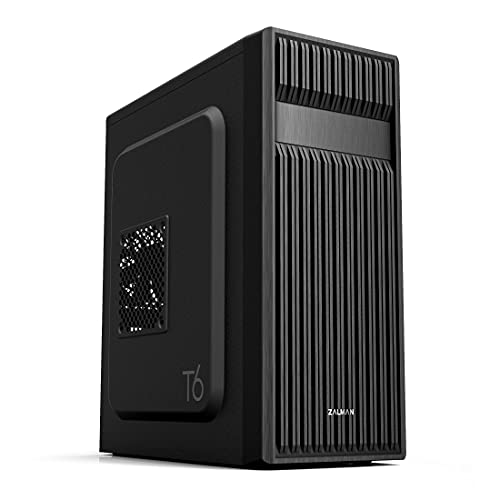
The Zalman T6 ATX Mid Tower Computer Case is an excellent choice for gamers and workstation enthusiasts seeking a balance of style and functionality. Its sleek patterned mesh design not only looks great but also enhances airflow, keeping your components cool. With room for up to four fans, you’ll enjoy optimized cooling performance. The durable high-strength steel construction guarantees it withstands heat and pressure, while the black powder coating adds corrosion resistance. It supports various motherboard sizes, and its ample drive bays, including USB 3.0 and audio ports, make it versatile for any setup. Get ready to build your ideal PC!
Best For: Gamers and workstation enthusiasts looking for a stylish and functional PC case with excellent cooling capabilities.
Pros:
- Optimized airflow with a patterned mesh design and support for up to four fans.
- Durable construction from high-strength steel with corrosion-resistant black powder coating.
- Versatile layout that accommodates ATX, mATX, and mini-ITX motherboards and includes ample drive bays.
Cons:
- Limited compatibility as it does not fit ATX motherboards with side-facing SATA ports.
- No front fan included, which may require additional purchases for optimal cooling.
- Basic aesthetic may not appeal to those seeking more unique or flashy designs.
Cooler Master N400 Mid Tower Computer Case
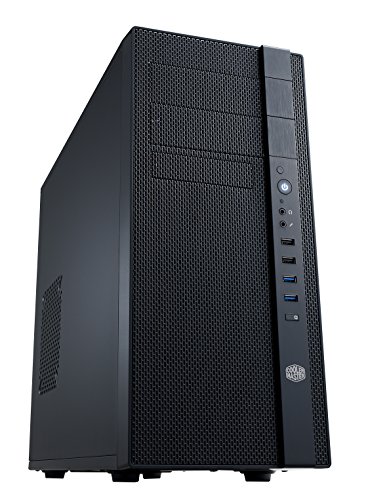
For enthusiasts seeking a reliable and spacious solution for their high-performance builds, the Cooler Master N400 Mid Tower Computer Case stands out with its impressive cooling capabilities. With a fully meshed front panel and support for up to eight fans, it guarantees optimal airflow. You can fit a 240 mm water cooling radiator or two 120 mm fans on the top or side, while two pre-installed Cooler Master XtraFlo 120 mm fans enhance cooling right out of the box. Plus, it accommodates three SSDs and includes three dust filters for easy maintenance. Overall, it’s a solid choice for power users.
Best For: The Cooler Master N400 Mid Tower Computer Case is best for enthusiasts seeking a reliable and spacious solution for high-performance builds with optimal cooling capabilities.
Pros:
- Superior airflow with a fully meshed front panel and support for up to eight fans.
- Flexible cooling options allowing for a 240 mm water cooling radiator or multiple fan configurations.
- Easy maintenance with three dust filters and tool-less SSD installation.
Cons:
- Limited color options as it only comes in one color (N400).
- Weight may be a consideration for those needing a more portable case.
- Non-LED fans may not appeal to users looking for RGB lighting features.
Thermaltake View 270 Plus TG ARGB Mid Tower E-ATX Case

Designed for enthusiasts who prioritize aesthetics and performance, the Thermaltake View 270 Plus TG ARGB Mid Tower E-ATX Case stands out with its striking full view tempered glass design. You’ll love the dual tempered glass panels that elevate its visual appeal. This case includes three 120mm ARGB fans for superb cooling, and it supports radiator installations up to 360mm on the top, ensuring excellent airflow. With a maximum VGA length of 420mm, compatibility isn’t an issue. Plus, the I/O ports feature USB 3.2 Type-C and USB 3.0 for modern connectivity. Enjoy a 3-year warranty for peace of mind!
Best For: The Thermaltake View 270 Plus TG ARGB Mid Tower E-ATX Case is best for PC enthusiasts seeking a visually striking case with excellent cooling capabilities.
Pros:
- Aesthetics: The dual tempered glass panels offer a sleek and modern look that enhances any setup.
- Cooling Efficiency: Comes with three 120mm ARGB fans and supports large radiators for optimal cooling performance.
- Modern Connectivity: Equipped with USB 3.2 Type-C and USB 3.0 ports for fast data transfer and connectivity.
Cons:
- Size Limitations: The maximum VGA length of 420mm may restrict compatibility with certain high-end graphics cards.
- Weight: The tempered glass design may make the case heavier compared to other materials.
- Price Point: It may be considered on the pricier side for budget-conscious builders.
be quiet! Pure Base 501 Black ATX Case
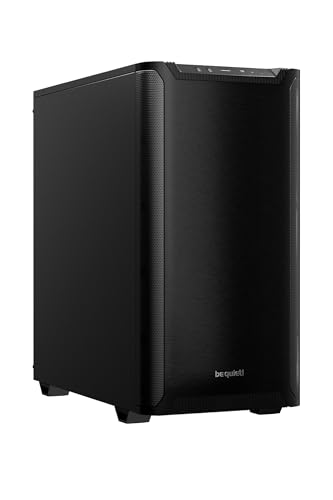
If you value a clean, minimalist aesthetic in your workstation, the be quiet! Pure Base 501 Black ATX Case is a perfect choice. Its compact design optimizes space while maintaining functionality, creating a distraction-free environment. You’ll appreciate the two preinstalled Pure Wings 3 fans, designed for quiet operation and efficient cooling, with options for adding more. The case allows for vertical GPU installation, accommodating wide graphics cards and preventing sag. Cable management is a breeze with integrated routing options, keeping everything tidy. Plus, the front I/O offers USB 3.2 Gen. 2 Type C and Type A ports for fast connectivity.
Best For: Users seeking a minimalist and functional case that supports high-performance components while maintaining a clean aesthetic.
Pros:
- Two preinstalled Pure Wings 3 fans provide efficient cooling with low noise levels.
- Vertical GPU installation option prevents sag and accommodates wide graphics cards.
- Integrated cable management options keep the interior tidy and organized.
Cons:
- Limited space for additional cooling solutions compared to larger cases.
- Minimalist design may not appeal to users looking for more customizable aesthetics.
- Potentially higher price point compared to budget cases with similar specifications.
Thermaltake Versa H21 ATX Mid Tower Computer Chassis
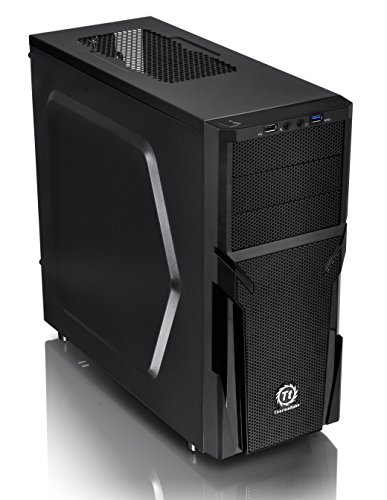
The Thermaltake Versa H21 ATX Mid Tower Computer Chassis is an excellent choice for gamers and power users who demand ideal cooling and easy installation. Its SPCC design features a perforated metal mesh front and top panel, allowing for maximum heat dissipation and airflow. You’ll appreciate the tool-free installation, which supports standard ATX motherboards and long graphic cards, making setup a breeze. With a robust ventilation system, it guarantees efficient cooling during intense gaming sessions. Plus, the included USB 3.0 and USB 2.0 ports, along with HD audio jacks, provide convenient connectivity options for all your devices.
Best For: Gamers and power users seeking efficient cooling and easy installation in their computer builds.
Pros:
- Tool-free installation simplifies setup, making it accessible for users of all skill levels.
- Optimized ventilation system ensures maximum airflow, keeping components cool during intense gaming sessions.
- Multiple connectivity options including USB 3.0, USB 2.0, and HD audio jacks enhance user convenience.
Cons:
- Limited to standard ATX motherboards, which may restrict options for advanced users looking for larger configurations.
- The design may lack aesthetic appeal for users who prefer more modern or flashy cases.
- May require additional fans for optimal cooling performance, depending on component configurations.
Rosewill 4U Rackmount Server Chassis (RSV-L4620)
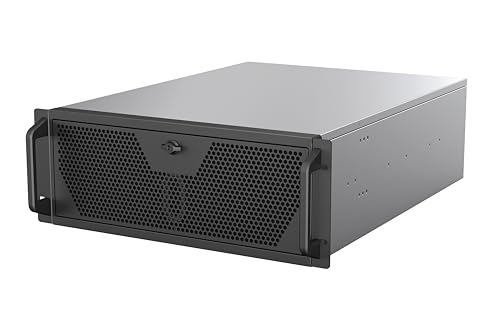
For those seeking a robust solution for high-performance computing, the Rosewill 4U Rackmount Server Chassis (RSV-L4620) stands out with its impressive support for E-ATX motherboards and multi-GPU setups. It accommodates two 3.5″ HDDs and four 2.5″ SSDs, ensuring ample storage for your demanding applications. With the capability for a 360mm AIO liquid cooler and three pre-installed 120mm PWM fans, it excels in maintaining ideal temperatures. The front-panel USB 3.2 Gen Type-C port delivers up to 10 Gbps, making file transfers efficient. This chassis is perfect for rendering, AI training, and virtualization, offering reliability under heavy loads.
Best For: Those in need of a high-performance server chassis for rendering, AI training, and virtualization with support for advanced cooling solutions and multiple GPUs.
Pros:
- Ample Storage: Supports multiple HDDs and SSDs for extensive data needs.
- Enhanced Cooling: Designed for optimal airflow with pre-installed PWM fans and compatibility with a 360mm radiator.
- Fast Connectivity: Front-panel USB 3.2 Gen Type-C port offers quick file transfers up to 10 Gbps.
Cons:
- Size Constraints: Its rackmount design may not be suitable for smaller spaces or traditional desktop setups.
- Weight: The robust construction could make it heavier, complicating transport or installation.
- Limited Compatibility: Specific to E-ATX motherboards, which may restrict options for some users.
NZXT H5 Flow Compact ATX Mid-Tower Gaming Case

Designed with gamers and content creators in mind, the NZXT H5 Flow Compact ATX Mid-Tower Gaming Case excels in cooling performance and airflow management. You’ll benefit from exceptional GPU cooling thanks to the perforated PSU shroud that maximizes air intake. It supports up to a 360mm radiator in front and a 240mm radiator on top, ensuring powerful liquid cooling. With two included 120mm Quiet Airflow fans and options for additional fans, cooling remains solid. The seamless cable management system keeps your setup tidy, while the sleek black design and tempered glass panels showcase your components beautifully.
Best For: Gamers and content creators seeking a compact yet high-performance case with excellent cooling and airflow management.
Pros:
- Exceptional cooling performance with support for large radiators and multiple fan installations.
- Seamless cable management system for a clean and organized build.
- Sleek design featuring tempered glass panels that showcase internal components beautifully.
Cons:
- Limited space for larger components due to its compact design.
- Only available in black, which may not suit all aesthetic preferences.
- Additional fans sold separately, which could increase overall build costs.
DARKROCK Classico Storage Master ATX NAS Computer Case

Ideal for power users and gamers alike, the DARKROCK Classico Storage Master ATX NAS Computer Case stands out with its exceptional storage capacity. You can easily install up to thirteen hard drives, including ten 3.5” HDDs and three 2.5” SSDs, ensuring you’ll never run out of space for games and data. Its mesh front and side panels enhance airflow for maximum cooling, while the ability to support a 360 mm radiator keeps your system quiet and efficient. Plus, the vertical GPU mount showcases your graphics card beautifully, preventing sagging and maintaining peak temperatures. With four 120mm fans, cooling performance is excellent.
Best For: Power users and gamers seeking an efficient and spacious NAS computer case for high-performance builds.
Pros:
- Ample Storage: Supports up to thirteen hard drives, ensuring plenty of space for data and games.
- Optimal Cooling: Mesh front and side panels, along with four 120mm fans, enhance airflow for effective cooling.
- Aesthetic GPU Display: Vertical GPU mount showcases graphics cards while preventing sagging and maintaining temperatures.
Cons:
- Mid Tower Size: May not fit in smaller setups or spaces due to its mid-tower design.
- Limited RGB Features: Lacks built-in RGB lighting options for users looking for a more visually dynamic case.
- Advanced Installation Required: Installing multiple drives and cooling components may require technical expertise.
Thermaltake Core W200 Super Tower Computer Case
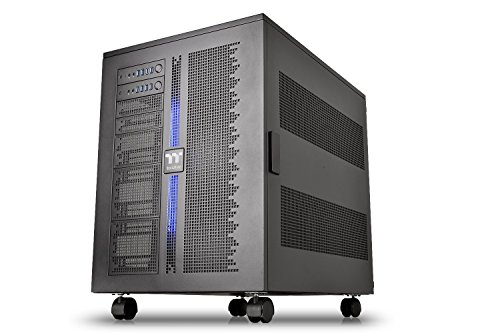
The Thermaltake Core W200 Super Tower Computer Case stands out with its dual system capability, making it a top choice for power users who need to run separate systems simultaneously. You can accommodate two motherboards and power supplies in a unique back-to-back configuration, supporting everything from Mini ITX to XL-ATX. Its fully modular design allows you to customize your setup easily, while the impressive cooling options include space for dual 600mm radiators. With hidden SSD/HDD panels and a stunning acrylic window, this case combines functionality and aesthetics, backed by a three-year warranty for peace of mind.
Best For: Power users and PC enthusiasts who require a dual system setup with extensive customization and cooling options.
Pros:
- Dual system capability allows for separate setups, accommodating a wide range of motherboard sizes.
- Fully modular design enables easy customization and configuration to suit individual preferences.
- Impressive cooling support with the ability to fit dual 600mm radiators for optimal thermal management.
Cons:
- The large size may not fit well in smaller spaces or setups.
- Assembly and configuration can be complex, especially for beginners.
- Higher price point compared to standard cases without dual system features.
Factors to Consider When Choosing E ATX Cases for Extreme Workstations
When choosing an E-ATX case for your extreme workstation, you’ll want to contemplate several key factors. Think about your storage capacity needs, cooling efficiency options, and how well it pairs with your components. Also, don’t overlook the importance of build quality and effective cable management solutions for a tidy setup.
Storage Capacity Requirements
Choosing the right E-ATX case for your extreme workstation hinges on understanding your storage capacity needs. You’ll want to look for cases that support multiple drives, ideally accommodating up to 13 hard drives, including configurations for both 3.5” HDDs and 2.5” SSDs. Cases with at least 10x 3.5” and 3x 2.5” drive bays are essential for your demanding applications. It’s also wise to evaluate tool-less installation options for easy upgrades and maintenance. Make certain the internal layout fits high-capacity drives and allows space for future expansions. Finally, while cooling isn’t our focus here, consider cases that promote airflow to manage temperatures effectively when housing multiple high-performance drives. This will guarantee your workstation performs at its best.
Cooling Efficiency Options
After addressing storage capacity, it’s time to turn attention to cooling efficiency options that are vital for your extreme workstation. First, choose a case that supports large radiators, ideally up to 360mm, to maximize heat dissipation. Look for optimized airflow designs, including mesh panels and multiple fan mounting spots, to keep internal temperatures low. Pre-installed high-performance fans are a must, along with the option to add more if needed. Don’t overlook vertical GPU mounting; it enhances airflow around high-end graphics cards. Finally, effective dust filtration systems are essential, as they help maintain clean airflow paths and prevent dust accumulation from hindering cooling performance over time. Prioritize these features for a truly efficient cooling setup.
Compatibility With Components
To build an extreme workstation, you need to verify your E-ATX case is compatible with various components. Make certain it supports different motherboard sizes like E-ATX, ATX, M-ATX, and ITX, as this flexibility lets you customize your hardware setup. Adequate space for high-end graphics cards is vital; look for cases that accommodate GPU lengths of up to 420mm. Storage capacity matters too—opt for cases that hold 10 or more drives to meet your extensive data requirements. Additionally, check for compatibility with large cooling solutions, like 360mm radiators and multiple fans. Don’t forget to ascertain there’s enough clearance for tall CPU coolers and cabling, which helps maintain airflow and simplifies installation.
Build Quality and Durability
When it comes to building an extreme workstation, the build quality and durability of your E-ATX case are vital for long-term performance. Look for high-strength materials like steel sheets that can withstand pressure and heat. A powder coating finish is important for enhancing corrosion resistance, guaranteeing your chassis remains intact over time. Evaluate the structural design; modular cases offer flexibility for customization and upgrades as your needs evolve. Confirm the case supports effective thermal management features, such as mesh panels or pre-installed fans, to keep high-end components cool. Finally, opt for cases with dust filters and easy maintenance features, as these can greatly prolong the lifespan of your internal components by preventing dust buildup and overheating.
Cable Management Solutions
Effective cable management is essential for any E-ATX case designed for extreme workstations. Look for features like integrated routing channels, hooks, and straps that simplify cable organization, leading to a cleaner build and better airflow. Many cases also include removable or adjustable panels, making it easier to access internal components while keeping everything tidy. Ample space behind the motherboard tray is another key factor, allowing you to conceal excess cables and reduce clutter. Additionally, grommets and cutouts for cable pass-through help you route cables neatly to various components. A well-thought-out cable management system not only looks good but also enhances cooling efficiency by preventing cables from obstructing airflow, which is critical for maintaining ideal temperatures.
Aesthetic Appeal and Design
While organizing cables is important for functionality, the aesthetic appeal of your E-ATX case can elevate your workstation’s overall look. Consider options like tempered glass panels and customizable RGB lighting, which let you showcase your internal components beautifully. A well-designed case with a minimalist or modern style can seamlessly fit into any office or gaming environment, reflecting your personal taste. Many E-ATX cases offer modular layouts, allowing you to personalize your setup and express your individuality with unique configurations and color schemes. Additionally, strong airflow and cooling features not only enhance performance but also create a visually appealing internal arrangement. Finally, materials like high-strength steel or aluminum finishes add both durability and style to your extreme workstation.
Price and Value Comparison
How do you determine the best value for your E-ATX case when considering the myriad of options available? Start by comparing prices across different models, as they can vary widely based on features. Assess storage capacity; cases that support more hard drives, sometimes up to 13, often offer better value for extensive data needs. Don’t overlook cooling performance; advanced cooling solutions can raise costs but are vital for high-performance systems. Material quality matters too—cases made from high-strength steel or tempered glass may cost more but provide durability. Finally, features like vertical GPU mounting and efficient cable management can justify a higher price, enhancing both aesthetics and functionality in your workstation setup.