When building your PC, choosing the right case can greatly impact both cooling efficiency and overall convenience. A case with built-in fans and a hub not only enhances airflow but also simplifies cable management. With so many options available, it’s essential to identify the best features that suit your needs. Let’s explore ten standout cases that combine functionality with aesthetics, ensuring your setup runs smoothly and looks good doing it.
CORSAIR 3500X ARGB Mid-Tower ATX PC Case

If you’re looking for a versatile case that combines aesthetics with high-performance cooling, the CORSAIR 3500X ARGB Mid-Tower ATX PC Case is an excellent choice for gamers and PC builders alike. Its panoramic tempered glass design not only enhances your setup but also allows for easy access via removable panels. You’ll appreciate the high cooling capacity, accommodating up to 10x 120mm fans, including three pre-installed CORSAIR RS120 ARGB fans for ideal airflow. Plus, with compatibility for various motherboard sizes and simple ARGB lighting control, you’ll enjoy both convenience and visual appeal in your build.
Best For: Gamers and PC builders looking for a stylish case with excellent cooling capabilities and easy assembly.
Pros:
- Stylish Design: Panoramic tempered glass panels enhance the aesthetic appeal of any setup.
- High Cooling Capacity: Supports up to 10x 120mm fans, ensuring optimal airflow during intense gaming sessions.
- Easy Access: Removable glass panels allow for straightforward system building and maintenance.
Cons:
- Limited Space for Large Components: May not accommodate larger graphics cards or cooling solutions in builds.
- Potential for Dust Accumulation: Glass design may require more frequent cleaning to maintain appearance.
- Price Point: Higher cost compared to basic cases without advanced features or aesthetics.
KEDIERS PC Case ATX with Dual Tempered Glass (K4)

The KEDIERS PC Case ATX with Dual Tempered Glass (K4) is an excellent choice for gamers and PC enthusiasts seeking a sleek design paired with optimal cooling performance. With four pre-installed fans, including three 120mm intake fans, it guarantees ideal airflow. Its stunning 270° panoramic view showcases your hardware, while diamond cut angles add a touch of elegance. The upgraded I/O panel provides versatile connectivity options, including Type-C, USB 3.0, and HD audio ports. Designed for compatibility with various motherboards, it supports ample cooling solutions, making it perfect for high-performance gaming setups without compromising aesthetics.
Best For: Gamers and PC enthusiasts looking for a stylish and high-performance case with excellent cooling capabilities.
Pros:
- Stunning Design: Features a 270° panoramic view with diamond cut angles for an elegant appearance.
- Optimal Cooling: Pre-installed with four fans and supports additional cooling solutions, ensuring efficient airflow.
- Versatile Connectivity: Upgraded I/O panel with Type-C, USB 3.0, and HD audio ports caters to various connectivity needs.
Cons:
- Size Limitations: May not fit in smaller spaces due to its mid tower design.
- Limited Color Options: Available in fewer color choices, which may not suit everyone’s aesthetic preferences.
- Potential Noise Levels: Additional fans for enhanced cooling could increase noise levels during operation.
NZXT H9 Flow RGB+ Mid-Tower PC Case

For gamers and PC enthusiasts seeking ideal cooling and cable management, the NZXT H9 Flow RGB+ Mid-Tower PC Case stands out. Its dual-chamber design keeps your components separate from the PSU, enhancing airflow and organization. With panoramic tempered glass panels, your build shines brightly, especially with the RGB features and included fans. You can support up to nine 140mm fans and even fit a 420mm radiator for exceptional cooling. Plus, easy cable management with wide channels and Velcro straps makes setup a breeze. This case not only performs well but also looks stunning in any gaming setup.
Best For: Gamers and PC enthusiasts looking for optimal cooling and cable management in a stylish mid-tower case.
Pros:
- Excellent thermal performance with a dual-chamber design and support for multiple fans and radiators.
- Stunning aesthetics with panoramic tempered glass panels and vibrant RGB lighting.
- User-friendly cable management features, including wide channels and Velcro straps for easy routing.
Cons:
- The case may be too large for users with limited space.
- Some users might find the RGB setup complex if unfamiliar with RGB systems.
- Higher price point compared to basic PC cases without advanced features.
NZXT H9 Flow RGB+ Large Dual-Chamber ATX Mid-Tower PC Case

Designed for gamers and PC builders who prioritize both aesthetics and performance, the NZXT H9 Flow RGB+ Large Dual-Chamber ATX Mid-Tower Case stands out with its stunning panoramic tempered glass paneling and efficient airflow system. This case features a dual-chamber design, improving thermal performance while simplifying cable management. You can support up to ten fans, including seven RGB fans, ensuring your system stays cool and visually striking. With ample clearance for high-end GPUs and large radiators up to 420mm, it’s perfect for your build. Plus, the extra-wide cable channels make routing a breeze, keeping everything tidy.
Best For: Gamers and PC builders seeking a stylish and high-performance case with excellent airflow and cable management.
Pros:
- Dual-chamber design enhances thermal performance and simplifies cable management.
- Supports up to ten fans including seven RGB fans for optimal cooling and aesthetics.
- Ample clearance for high-end GPUs and large radiators, accommodating advanced builds.
Cons:
- Size may be cumbersome for smaller setups or limited space.
- Tempered glass panels may be prone to fingerprints and require regular cleaning.
- Premium price point compared to standard cases, which might not fit all budgets.
CORSAIR 4000D RS Frame Mid-Tower PC Case

Customization enthusiasts will find the CORSAIR 4000D RS Frame Mid-Tower PC Case an ideal choice for their builds. Its FRAME Modular Case System allows for extensive upgrades, letting you tailor the motherboard tray and front I/O panel to your preferences. Equipped with three high-performance CORSAIR RS PWM Fans, this case guarantees silent operation during low loads with its Zero RPM mode. The InfiniRail Fan Mounting System provides remarkable flexibility, accommodating fans up to 200mm. With a 3D Y-Pattern Airflow Panel and perforated steel front, you’ll enjoy maximum cooling and airflow efficiency for your setup.
Best For: Customization enthusiasts and gamers looking for a versatile and high-performance mid-tower PC case.
Pros:
- Extensive customization options with the FRAME Modular Case System for tailored builds.
- High-performance cooling provided by three CORSAIR RS PWM Fans with Zero RPM mode for silent operation.
- Flexible fan mounting with the InfiniRail system, allowing for optimal airflow configuration.
Cons:
- Limited space for cable management if additional components are added, which might affect aesthetics.
- No built-in RGB lighting, which may be a drawback for those seeking a visually striking setup.
- Potentially higher price point compared to basic PC cases, reflecting its advanced features and capabilities.
CORSAIR 3500X ARGB Mid-Tower ATX PC Case
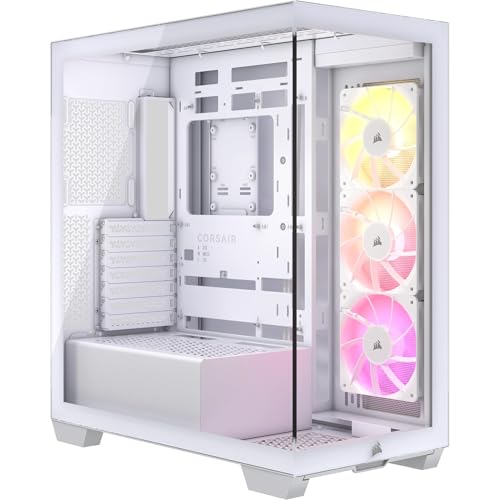
The CORSAIR 3500X ARGB Mid-Tower ATX PC Case is an excellent choice for gamers and PC builders who prioritize both cooling performance and aesthetics. Its panoramic tempered glass design not only showcases your components but also enhances airflow. You can install up to 10x 120mm fans, guaranteeing efficient cooling without sacrificing style. With three pre-installed CORSAIR RS120 ARGB fans, you’ll enjoy vibrant lighting and easy control via the +5V ARGB header. The removable glass panels make accessing your hardware a breeze, while compatibility with various motherboard sizes ensures a snug fit for your build.
Best For: Gamers and PC builders seeking a balance of high cooling performance and aesthetic appeal in their setups.
Pros:
- Panoramic tempered glass design enhances the visual presentation of components.
- Supports up to 10x 120mm fans for optimal cooling efficiency.
- Includes three pre-installed CORSAIR RS120 ARGB fans for vibrant lighting and easy control.
Cons:
- Limited to ATX form factor, which may not suit all builders.
- Removable panels may require extra care to avoid damage during access.
- Cable management options might be limited in compact builds compared to larger cases.
MONTECH King 95 PRO ATX Mid-Tower PC Gaming Case

If you’re a gamer seeking a case that combines high performance with stunning aesthetics, the MONTECH King 95 PRO ATX Mid-Tower PC Gaming Case is an excellent choice. Its dual-chamber design not only enhances hardware compatibility but also streamlines cable management for a cleaner look. With six pre-installed ARGB PWM fans, including two 140mm and four 120mm, you’ll enjoy peak cooling and fan management via the included hub. The curved tempered glass front offers an immersive visual experience, while built-in dust filters keep your components clean. This case guarantees your gaming rig stays cool and performs at its best.
Best For: Gamers looking for a high-performance case that combines efficient cooling with visually striking design.
Pros:
- Excellent airflow with six pre-installed ARGB PWM fans for optimal cooling.
- Dual-chamber design improves hardware compatibility and cable management.
- Curved tempered glass front panel provides an aesthetically pleasing view of components.
Cons:
- Larger size may not fit in smaller spaces or setups.
- The reliance on ARGB fans may not appeal to users who prefer simpler designs.
- Tool-less panels can sometimes feel less secure compared to traditional screws.
MUSETEX ATX Mid Tower Computer Case with Dual Tempered Glass

For gamers seeking both style and performance, the MUSETEX ATX Mid Tower Computer Case with Dual Tempered Glass stands out with its six pre-installed PWM ARGB fans. These fans, featuring anti-vortex blades, optimize airflow while the innovative duct design enhances heat dissipation, extending your hardware’s lifespan. You’ll appreciate the ample compatibility for GPUs up to 420mm and CPU coolers up to 178mm. The upgraded I/O panel includes two USB 3.0 ports and a Type-C interface, perfect for modern devices. With durable tempered glass and magnetic dust filters, this case combines elegance with functionality for your gaming setup.
Best For: Gamers looking for a stylish and high-performance case with excellent cooling capabilities and ample hardware compatibility.
Pros:
- Six pre-installed PWM ARGB fans enhance cooling and visual appeal.
- Ample compatibility for high-end components, supporting GPUs up to 420mm and CPU coolers up to 178mm.
- Durable tempered glass panels and magnetic dust filters provide elegance and ease of maintenance.
Cons:
- Limited space for cable management might challenge some users during installation.
- Potentially high price point compared to more basic cases.
- Weight may be heavier due to the dual tempered glass panels, affecting portability.
Zalman ZQBE ATX Mid Tower PC Case with ARGB Fans

Designed for gamers and PC enthusiasts who prioritize aesthetics and performance, the Zalman ZQBE ATX Mid Tower PC Case stands out with its panoramic tempered glass panels. You’ll enjoy full visibility of your components, beautifully enhanced by three preinstalled PWM Prism ARGB fans. This case optimizes cooling while providing dynamic lighting effects. With a 12-port PWM ARGB hub, you can easily manage fan speeds and lighting. It supports ATX, mATX, and Mini-ITX motherboards, along with GPUs up to 330mm. Plus, the modern front I/O includes USB Type-C 3.2, ensuring fast, future-proof connectivity for your setup.
Best For: Gamers and PC enthusiasts who value both aesthetics and performance in their builds.
Pros:
- Stunning panoramic tempered glass design for full component visibility.
- Comes with three vibrant ARGB fans and a 12-port hub for customizable lighting and cooling.
- Compatible with various motherboard sizes and accommodates large GPUs and radiators.
Cons:
- Limited to specific PSU sizes (up to 160mm), which may restrict options.
- The glass panels may require regular cleaning to maintain clarity.
- Potentially less airflow compared to cases with more open designs.
CORSAIR 3500X LX-R RGB Mid-Tower PC Case

The CORSAIR 3500X LX-R RGB Mid-Tower PC Case stands out for gamers and PC builders who crave a stunning aesthetic combined with exceptional cooling performance. Its sleek black design features wraparound tempered glass panels for easy access during builds and maintenance. With support for motherboards ranging from Mini-ITX to EATX, you’ll enjoy versatility. The case boasts impressive cooling capabilities, accommodating up to 10x 120mm fans, and comes with three pre-installed LX120-R RGB fans. Plus, the iCUE LINK System Hub simplifies connections, minimizing cable clutter. A GPU anti-sag arm guarantees your graphics card stays perfectly positioned, enhancing both looks and functionality.
Best For: Gamers and PC builders looking for a visually appealing case with excellent cooling performance and easy access for maintenance.
Pros:
- Sleek black design with wraparound tempered glass panels enhances aesthetics.
- High cooling capacity with support for up to 10x 120mm fans and three pre-installed RGB fans.
- GPU anti-sag arm maintains optimal positioning of graphics cards for improved performance.
Cons:
- Limited to specific motherboard form factors (Mini-ITX to EATX), which may not suit all builds.
- The focus on RGB lighting may not appeal to users preferring a more minimalist look.
- The size of the case may be a concern for those with limited space in their setup.
Factors to Consider When Choosing PC Cases with Built-in Fans and Hub
When you’re picking a PC case with built-in fans and a hub, there are several key factors to keep in mind. You’ll want to take into account the fan size options, cooling performance metrics, and I/O panel features to guarantee ideal airflow and connectivity. Plus, don’t forget about the aesthetic appeal and compatibility with your components to create a cohesive build.
Fan Size Options
Choosing the right fan size is essential for optimizing your PC’s cooling performance and noise levels. Common options include 120mm, 140mm, and even larger 200mm fans, so you can select based on your cooling needs and available space. Larger fans typically run at lower RPMs while moving a significant volume of air, resulting in quieter operation compared to smaller models. Additionally, consider the number of fan mounts in your case; many mid-tower cases support up to 10 x 120mm fans or equivalent configurations. Make sure your chosen case is compatible with the fan sizes you want to install, especially if you’re incorporating radiators or extra cooling solutions. Fan hubs can also simplify managing multiple fans and enhance synchronization.
Cooling Performance Metrics
Optimizing cooling performance in your PC case involves several key factors that can greatly influence your system’s efficiency. First, consider the number of fans the case can accommodate; many support up to ten 120mm fans for enhanced airflow. Look for cases with ARGB fans, which offer improved cooling and aesthetic appeal through synchronized lighting and adjustable speeds. Efficient airflow design is essential, so choose cases with perforated panels and well-placed fan mounts to minimize thermal buildup. Dual-chamber configurations can also help separate heat-generating components from cool air intakes, promoting better thermal management. Finally, built-in fans with features like anti-vortex blades optimize air circulation while keeping noise levels low, ensuring effective cooling without distractions.
I/O Panel Features
A well-designed I/O panel can greatly enhance your PC experience, especially when paired with built-in fans and hubs. Look for upgraded panels that include modern connectivity options like USB Type-C, USB 3.0, and USB 2.0 ports, ensuring fast data transfer and compatibility with various devices. Many I/O panels also come with audio interfaces for headphones and microphones, which is perfect for gaming and multimedia tasks. Additional controls like power buttons, reset buttons, and LED switches provide quick access to essential functions. Consider the layout and design as well; strategically placed ports can improve cable management, reducing clutter and enhancing accessibility. A high-quality I/O panel can support the high-speed data transfer vital for today’s demanding applications.
Aesthetic Appeal Factors
When it comes to aesthetic appeal in PC cases, various factors can elevate your build’s visual impact. Panoramic tempered glass designs allow full visibility of your components and lighting effects, creating a striking look. Incorporating RGB fans adds dynamic lighting that can be synchronized across multiple components, enhancing the overall vibe. Consider cases with curved or uniquely shaped glass panels; they not only look great but also draw attention to your hardware. Customizable fan hubs and ARGB controllers let you adjust lighting patterns, making your setup even more visually appealing. Finally, pay attention to design details like diamond-cut angles and premium mesh panels, as they can elevate your case’s aesthetic, suitable for both gaming and office environments.
Compatibility With Components
Choosing a PC case with built-in fans and a hub requires careful consideration of compatibility to guarantee your components fit and function well together. First, make certain the case supports the motherboard form factors you plan to use, like Mini-ITX, Micro-ATX, or ATX. Next, check the maximum GPU length and CPU cooler height specifications to make sure they won’t be obstructed. Look for adequate mounting points for fans and radiators, as this impacts cooling performance. Confirm that the case can accommodate your power supply regarding size and type. Finally, review the I/O panel options, ensuring the number and types of USB ports meet your connectivity needs for peripherals and devices.
Cable Management Solutions
Effective cable management can make a significant difference in the performance and aesthetics of your PC build. When choosing a case, look for features like extra-wide channels and built-in Velcro straps that help streamline cable routing and minimize clutter. Modular designs with repositionable cable cover panels offer flexibility for your setup. Integrated systems with tie-down points and designated pathways guarantee your power supply and peripheral cables stay organized, promoting better airflow. Dual-chamber designs can separate components from the power supply, reducing visible clutter and enhancing organization. Finally, an intelligently placed I/O panel allows for easy access to ports without tangling cables, making your build not only cleaner but also more efficient.
Expandability and Modularity
A well-organized PC build not only looks good but also allows for future upgrades. When choosing a case, consider the number of expansion slots available; more slots mean you can add extra fans, storage devices, or other components later. Opt for modular designs that let you easily replace or upgrade parts like fan mounts or I/O panels. Additionally, verify there’s enough space for various cooling solutions, such as radiators and fans, to enhance airflow based on your needs. Check for compatibility with different motherboard form factors, so you won’t have to buy a new case for future upgrades. A built-in fan hub simplifies cable management and lets you control fan speeds and lighting, improving both aesthetics and functionality.