When it comes to building a high-performance PC, choosing the right case for dual radiator water cooling is essential. You want a case that supports ideal airflow and efficient heat dissipation while showcasing your components. The right choice can greatly enhance your gaming or workstation experience. In this guide, we’ll explore the top ten cases that excel in these areas, ensuring your setup performs at its best. Let’s plunge into the options available.
darkFlash ATX Mid-Tower PC Case (DS900)

If you’re a gamer or PC enthusiast looking for a case that combines stunning aesthetics with superior cooling performance, the darkFlash ATX Mid-Tower PC Case (DS900) is an excellent choice. Its 270° panoramic tempered glass panel showcases your hardware and RGB lighting beautifully, while high-strength glass guarantees durability. With four PWM ARGB fans and support for up to 10 fans, you’ll enjoy maximum airflow and heat dissipation, perfect for intense gaming sessions. Plus, the high-speed IO panel with USB 3.0 and Type-C ports ensures quick data transfer. Easy installation and maintenance make it a top pick for any setup.
Best For: Gamers and PC enthusiasts seeking a visually stunning case with excellent cooling capabilities.
Pros:
- 270° panoramic tempered glass panel provides a stunning view of hardware and RGB lighting.
- Excellent cooling options with four PWM ARGB fans and support for up to 10 fans and a 360mm radiator.
- User-friendly design allows for easy installation and hassle-free cable management.
Cons:
- RGB hub controller not included, which may require additional purchases for full lighting functionality.
- Limited dust filters only at the top and panel, potentially requiring extra maintenance.
- Mid-tower size may not accommodate very large components or advanced cooling setups.
NZXT H9 Flow Large Dual-Chamber ATX Mid-Tower PC Case

The NZXT H9 Flow Large Dual-Chamber ATX Mid-Tower PC Case is an exceptional choice for enthusiasts who prioritize high-performance cooling and cable management. Its dual-chamber design effectively separates components, enhancing thermal performance while simplifying cable routing. You’ll appreciate the panoramic view offered by the seamless tempered glass paneling, showcasing your build. With up to ten fans and support for a 420mm radiator, airflow is optimized for demanding setups. It even accommodates rear-connected motherboards for a clean look. Plus, the wide channels and Velcro straps make cable management a breeze, ensuring your rig stays organized and efficient.
Best For: Enthusiasts seeking a high-performance PC case with exceptional cooling and cable management features.
Pros:
- Excellent thermal performance due to dual-chamber design and optimized airflow.
- Ample cooling support with the capacity for up to ten fans and a 420mm radiator.
- User-friendly cable management with extra-wide channels and built-in Velcro straps.
Cons:
- Limited color options, as it only comes in black.
- Size may be cumbersome for smaller spaces or setups.
- Potentially higher cost compared to standard mid-tower cases.
Thermaltake View 270 Plus TG ARGB Mid Tower E-ATX Case

For those seeking a stylish yet functional case for dual radiator water cooling, the Thermaltake View 270 Plus TG ARGB Mid Tower E-ATX Case stands out with its full view tempered glass design. Its dual tempered glass panels enhance aesthetics while showcasing your components. You’ll appreciate the included three 120mm ARGB fans, providing efficient cooling, and the capability to install radiators up to 360mm at the top. With ample I/O ports, including USB 3.2 Type-C and USB 3.0, connectivity is a breeze. Plus, it accommodates a maximum VGA length of 420mm, ensuring compatibility with high-end graphics cards.
Best For: Users looking for a stylish and functional case that supports high-end cooling solutions and showcases their components effectively.
Pros:
- Dual tempered glass panels enhance aesthetics and allow for a clear view of internal components.
- Comes with three 120mm ARGB fans for excellent cooling performance.
- Supports radiator installation up to 360mm, making it ideal for dual radiator water cooling setups.
Cons:
- The full glass design may not provide as much airflow as cases with mesh panels.
- Limited space for cable management due to the design, which could affect build aesthetics.
- The case may be heavier than traditional cases due to the glass panels.
darkFlash Full-Tower ATX Gaming PC Case (DY470)

Designed with gamers and content creators in mind, the darkFlash Full-Tower ATX Gaming PC Case (DY470) stands out for its impressive dual-chamber layout. This case supports vertical GPU mounting and can accommodate up to two 360mm radiators, perfect for maximizing cooling efficiency. The unique angled glass offers a stunning view of your components, while the spacious interior fits large GPUs up to 410mm. With velcro straps and a back cover for tidy cable management, it keeps your setup organized. Plus, the dust filter minimizes buildup, ensuring your system stays clean and functional. Enjoy a premium experience with this stylish case.
Best For: Gamers and content creators seeking a stylish, spacious case with excellent cooling capabilities and cable management features.
Pros:
- Dual-Chamber Layout: Optimizes airflow and provides ample space for components, including vertical GPU mounting.
- Premium Construction: Crafted with high-quality materials for durability and elegance, appealing to both gamers and creators.
- User-Friendly Design: Features like a dust filter and organized cable management ensure a clean and functional build.
Cons:
- Full-Tower Size: May be too large for users with limited desk space or those building compact systems.
- Potential Installation Complexity: The dual-chamber design might require more effort for setup compared to simpler cases.
- Price Point: As a premium case, it may be more expensive than entry-level options on the market.
NZXT H9 Flow RGB Large Dual-Chamber ATX Mid-Tower PC Case
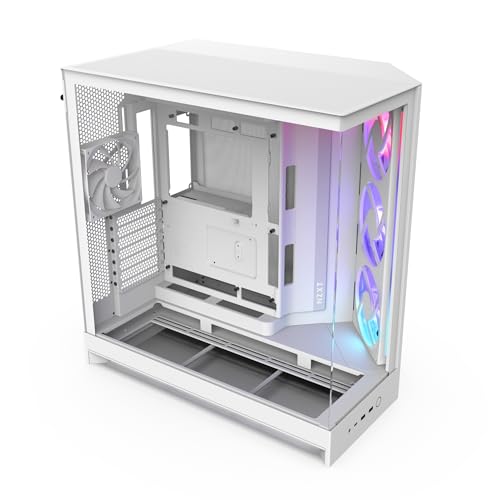
When seeking an ideal solution for high-performance cooling, the NZXT H9 Flow RGB stands out thanks to its innovative dual-chamber design. This mid-tower case separates your main components from the PSU and drives, enhancing thermal performance and simplifying cable management. With optimized airflow from perforated steel panels and pre-installed RGB fans, you’ll keep your system cool and stylish. It supports a 420mm radiator, making it perfect for dual radiator setups. Plus, the panoramic tempered glass panels let you showcase your build beautifully. Weighing 27.8 pounds, it’s robust yet manageable for your gaming rig.
Best For: Gamers and PC builders looking for a high-performance, customizable case that offers excellent cooling and cable management.
Pros:
- Innovative Dual-Chamber Design: Enhances thermal performance and simplifies cable management by separating main components from the PSU and drives.
- Optimized Airflow: Features perforated steel panels and pre-installed RGB fans for efficient cooling, supporting a dual radiator setup.
- Stylish Showcase: Panoramic tempered glass panels provide a beautiful view of your build while maintaining a clean aesthetic.
Cons:
- Weight: At 27.8 pounds, it may be cumbersome for some users to move or transport.
- Limited Compatibility: Back-connect ready feature may not be compatible with all motherboards.
- Cost: High-performance features may come at a premium price point compared to standard cases.
Thermaltake Core W200 Super Tower Computer Case
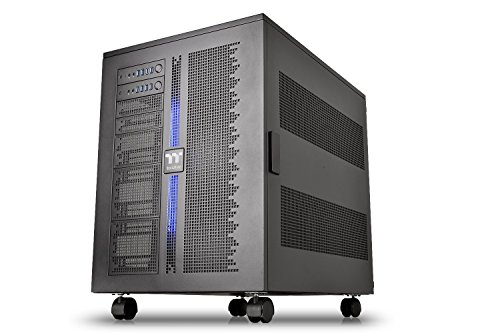
The Thermaltake Core W200 Super Tower Computer Case is an ideal choice for PC enthusiasts who seek to build a powerful dual-system setup featuring extreme water cooling capabilities. This case accommodates two separate systems, supporting a range of motherboards from Mini ITX to XL-ATX in a back-to-back configuration. Its fully modular design allows you to customize and configure your build easily. You’ll appreciate the ability to install up to two 600mm radiators for optimum cooling. Plus, the large acrylic window showcases your build, while the interchangeable LED lighting adds a personal touch, all backed by a three-year warranty.
Best For: PC enthusiasts looking to build a powerful dual-system setup with advanced water cooling capabilities.
Pros:
- Dual system capability allows for back-to-back configurations, accommodating multiple motherboards and components.
- Fully modular design provides flexibility for customization and easy breakdown of the system.
- Supports extensive cooling options with the ability to install up to two 600mm radiators, enhancing performance.
Cons:
- Large size may not fit in smaller spaces or standard setups.
- Complexity in setup could be challenging for beginners or those unfamiliar with dual-system configurations.
- Weight may be considerable due to its robust construction, potentially requiring a sturdy surface for placement.
darkFlash Full-Tower ATX Gaming PC Case (DY470)
If you’re a gamer or content creator seeking a robust case for high-performance builds, the darkFlash Full-Tower ATX Gaming PC Case (DY470) stands out with its unique top-angled glass design. Its dual-chamber layout allows for vertical GPU mounting and fits large 410mm GPUs alongside dual 360mm radiators. Excellent airflow guarantees peak performance, while the snap-on design simplifies installation and cable management. Velcro straps keep your cables organized, and the bottom dust filter minimizes dust buildup. Compatible with RTX 40 hardware, this case offers versatility and is backed by a 1-year guarantee for your peace of mind.
Best For: Gamers and content creators looking for a stylish and spacious case to accommodate high-performance hardware.
Pros:
- Excellent airflow design ensures optimal performance and cooling.
- Spacious interior fits large components, including 410mm GPUs and dual 360mm radiators.
- User-friendly snap-on design makes installation and cable management hassle-free.
Cons:
- The full-tower size may take up more space than mid-tower options.
- Higher price point compared to basic cases in the market.
- Limited color options may not appeal to all aesthetic preferences.
CORSAIR 4000D RS Frame Mid-Tower PC Case

For builders seeking a versatile and customizable case, the CORSAIR 4000D RS Frame Mid-Tower PC Case stands out as an excellent choice. Its FRAME Modular Case System allows you to upgrade components like the motherboard tray and front I/O panel, offering limitless personalization. Equipped with three high-performance CORSAIR RS PWM fans, it guarantees peak cooling with a flexible fan mounting system. The 3D Y-Pattern Airflow Panel enhances airflow efficiency, while the steel front panel promotes unobstructed cool air intake. Plus, it accommodates multiple 360mm radiators, making it perfect for any dual radiator water cooling setup you envision.
Best For: PC builders who prioritize customization, efficient cooling, and compatibility with various components.
Pros:
- Extensive customization options with the FRAME Modular Case System for personalized builds.
- High-performance cooling with 3x CORSAIR RS PWM fans and flexible fan mounting capabilities.
- Optimized airflow design featuring a 3D Y-Pattern Airflow Panel for efficient cooling.
Cons:
- Potentially complex assembly for those unfamiliar with modular case systems.
- Limited cable management options might require additional planning for clean builds.
- Size constraints may not accommodate larger or unconventional components in all configurations.
AsiaHorse ATX PC Case with Tempered Glass and Type-C Port
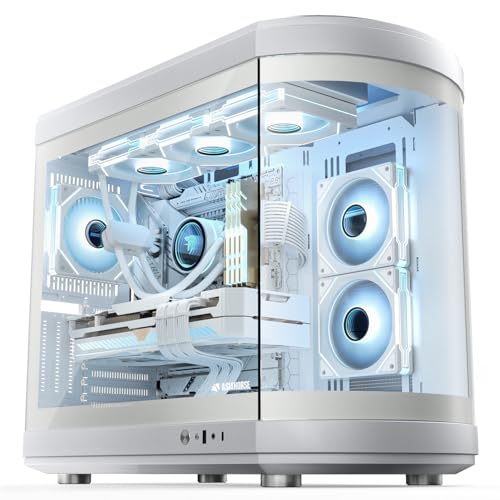
Engineered for enthusiasts and DIY builders, the AsiaHorse ATX PC Case with Tempered Glass and Type-C Port stands out with its innovative dual chamber design. Its 180° panoramic glass window showcases your components beautifully while supporting up to 9 fans for ideal airflow. With space for ATX, Micro ATX, and ITX motherboards, you can customize your setup effortlessly. The case accommodates dual radiators, ensuring efficient cooling for high-performance builds. Plus, the Type-C port offers fast connectivity. Constructed from durable SPCC steel and thick tempered glass, this case combines style and reliability, making it perfect for your next ambitious project.
Best For: PC enthusiasts and DIY builders looking for a stylish and customizable case that supports high-performance cooling solutions.
Pros:
- Spacious interior allows for ambitious builds and customization potential.
- 180° panoramic glass window showcases components with aesthetic appeal.
- Supports up to 9 fans for optimal airflow and cooling efficiency.
Cons:
- Limited GPU height and power supply length may restrict some high-end components.
- Weight of the case can make it cumbersome to move.
- Potential difficulty in cable management due to dual chamber design.
Thermaltake Tower 600 Mid-Tower ATX Case (CA-1Z1-00MFWN-00)

The Thermaltake Tower 600 Mid-Tower ATX Case (CA-1Z1-00MFWN-00) stands out as an exceptional choice for enthusiasts seeking a robust cooling solution. Its distinctive octagonal shape and three tempered glass panels allow for easy access and stunning aesthetics, especially with the optional horizontal display stand. You’ll appreciate the hidden-connector design that promotes clean cable management, compatible with ASUS, MSI, and GIGABYTE motherboards. With support for up to nine fans and 420mm radiators, your cooling needs are well covered. Plus, the three-way VGA installations and floating VGA bracket offer flexibility for your GPU positioning. Enjoy peace of mind with a 3-year warranty!
Best For: The Thermaltake Tower 600 Mid-Tower ATX Case is best for PC enthusiasts seeking a stylish case with excellent cooling capabilities and flexible GPU installation options.
Pros:
- Distinctive octagonal design enhances the aesthetic appeal of any build.
- Ample cooling support with the capacity for up to nine fans and 420mm radiators.
- Flexible GPU positioning through three-way VGA installations and a floating VGA bracket.
Cons:
- Size may be limiting for those with compact spaces due to its mid-tower dimensions.
- Tempered glass panels may require frequent cleaning to maintain a pristine look.
- Optional horizontal display stand is an additional purchase, which may not be included in the base price.
Factors to Consider When Choosing PC Cases for Dual Radiator Water Cooling
When you’re choosing a PC case for dual radiator water cooling, there are several key factors to keep in mind. You’ll want to take into account radiator compatibility, airflow efficiency, and cable management solutions to guarantee peak performance. Plus, don’t forget about size requirements and the case’s aesthetic appeal to suit your style.
Radiator Compatibility Options
Choosing the right PC case for dual radiator water cooling requires careful consideration of several key factors to guarantee ideal performance. First, check the maximum radiator size supported by the case, as many can accommodate 360mm or larger configurations. You’ll want to make sure there’s enough clearance for both radiators and other components, especially high-end graphics cards and CPU coolers. Look for cases with multiple radiator mounting options—top, front, or side—to optimize airflow based on your build. Additionally, consider fan support; more fans alongside dual radiators can greatly enhance cooling capabilities. Finally, verify that the case offers effective cable management features to keep your build clean and prevent airflow obstruction.
Airflow and Cooling Efficiency
Maximizing airflow and cooling efficiency is key to enhancing the performance of your dual radiator water cooling system. Effective airflow helps maintain ideal temperatures for your CPU and GPU, especially during intense workloads. Choose a case that supports multiple fan configurations—ideally nine or more—to boost cooling performance and improve air circulation. The placement of your radiators, along with strategically positioned intake and exhaust fans, greatly impacts thermal management. Look for cases with perforated panels and improved airflow designs to minimize air resistance and guarantee a steady flow of cool air to critical components. Finally, adequate space for radiators and fans, along with dust filters, will help maintain long-term cooling efficiency by preventing dust buildup and guaranteeing consistent airflow.
Cable Management Solutions
Effective cable management is vital for maintaining a clean and efficient setup in your PC case, especially when integrating a dual radiator water cooling system. Look for cases with wide channels and built-in Velcro straps that help route cables neatly. Dedicated cable management compartments are a must, as they separate power supply cables from other components, improving airflow and aesthetics. Some models offer removable side panels that assist in cable organization while allowing easy access. Modular designs can also enhance your setup, giving you customizable options to meet your specific needs. Prioritizing integrated cable management features will prevent tangles and interference, essential for maintaining ideal cooling performance in your high-performance build.
Size and Dimension Requirements
When you’re considering a PC case for dual radiator water cooling, it’s crucial to guarantee it has enough internal space to fit larger radiators, typically up to 360mm each. You should verify the case dimensions allow for both radiators to be installed without obstructing airflow or other components like the GPU and motherboard. Look for cases with dual-chamber designs, as they help separate the radiators from the main system, enhancing thermal management. Also, keep an eye on maximum GPU length and CPU cooler height specs, since these can impact available space for radiator installation. Finally, make sure the case offers adequate mounting options and support for multiple fan placements to optimize cooling efficiency alongside your dual radiator setup.
Aesthetic and Design Features
Finding the right PC case for dual radiator water cooling isn’t just about functionality; aesthetics play a significant role too. Look for designs with panoramic tempered glass panels that showcase your cooling setup and components beautifully. A dual-chamber layout enhances the appearance by separating critical components from power supplies and drives, creating a cleaner look while boosting thermal performance. Innovative shapes or unique glass designs can add flair, allowing for ideal visibility of your RGB lighting. Additionally, cases with tool-free removable panels make maintenance easy and visually appealing. Finally, a spacious interior accommodates large radiators and GPUs, promoting effective cooling while contributing to an organized and attractive setup. Your case should reflect both style and performance.