If you’re looking to elevate your gaming experience, choosing the right external GPU enclosure with RTX 5090 support is essential. These enclosures not only enhance performance but also offer advanced connectivity options for seamless gameplay. With various models available, each boasting unique features, you’ll want to know which one suits your needs best. Let’s explore the top contenders that promise to take your gaming to the next level.
GIGABYTE AORUS RTX 5090 AI Box Graphics Card (GV-N5090IXEB-32GD 1.0)

If you’re a serious gamer or a creative professional looking to elevate your performance, the GIGABYTE AORUS RTX 5090 AI Box Graphics Card (GV-N5090IXEB-32GD 1.0) is a powerhouse choice. Featuring NVIDIA’s Blackwell architecture and a staggering 32GB of GDDR7 memory, it delivers lightning-fast speeds with a core clock of 2407 MHz. Enjoy stunning visuals up to 3840 x 2160 resolution, powered by DLSS 4 technology. Plus, with a WATERFORCE cooling system, stability is assured during intense sessions. Its robust connectivity options, including Thunderbolt 5 and multiple USB ports, guarantee you’re always ready for the next level of gaming or creative work.
Best For: Serious gamers and creative professionals seeking top-tier performance and stunning visuals in their applications.
Pros:
- High performance with NVIDIA Blackwell architecture and 32GB GDDR7 memory for demanding tasks.
- Advanced cooling system ensures stability during intense gaming or creative sessions.
- Versatile connectivity options including Thunderbolt 5 and multiple USB ports for enhanced compatibility.
Cons:
- High weight at 5400 grams may be cumbersome for some setups.
- Premium price point may not be accessible for all users.
- Large size may require ample space in your computer case.
Razer Core X V2 External Graphics Enclosure (eGPU)

The Razer Core X V2 External Graphics Enclosure (eGPU) is an excellent choice for gamers looking to elevate their gaming experience with powerful graphics capabilities. Compatible with Windows 11 Thunderbolt 4/5 and USB 4 devices, it supports PCIe desktop graphics cards up to four slots wide. With a Thunderbolt 5 connection offering up to 80 Gbps bandwidth, you’ll enjoy smooth gameplay and impressive performance. The modular design allows easy GPU swaps, and the adjustable cooling fan keeps your system running efficiently. Plus, its sturdy alloy steel construction guarantees durability, making it a reliable addition to your gaming setup.
Best For: Gamers and creative professionals seeking to enhance their devices with powerful external graphics capabilities.
Pros:
- High Performance: Thunderbolt 5 connection provides ultra-fast bandwidth of up to 80 Gbps for demanding applications and AAA games.
- Modular Design: Easy to swap out GPUs and power supplies with tool-free installation for future upgrades.
- Efficient Cooling: Equipped with an adjustable 120 mm fan that optimizes cooling based on load, ensuring consistent performance.
Cons:
- Weight: At 5.06 kg, it may be cumbersome for portable setups or frequent travel.
- Limited Port Availability: Only one USB port may restrict additional device connections.
- Compatibility Limitations: Primarily designed for Thunderbolt 4/5 and USB 4 devices, limiting use with older laptops.
MINISFORUM DEG1 External GPU Dock Station for RTX 4090 and AMD RX 7900 XTX
For gamers seeking top-tier performance, the MINISFORUM DEG1 External GPU Dock Station stands out with its compatibility for high-end graphics cards like the RTX 4090 and AMD RX 7900 XTX. This mini eGPU enclosure boasts a powerful 240W power supply and features an Oculink interface for seamless connectivity. With dimensions of 10.64L x 6.87W x 1.6H cm and a weight of just 1.15 kg, it’s compact yet robust. Note that the Oculink connector requires the machine to be off for connection. With a solid 2-year warranty and positive customer reviews, it’s a reliable choice for boosting your gaming experience.
Best For: Gamers and PC enthusiasts looking for a compact and powerful external GPU solution to enhance their gaming performance with high-end graphics cards.
Pros:
- High Compatibility: Supports top-tier graphics cards like RTX 4090 and AMD RX 7900 XTX.
- Compact Design: Small dimensions (10.64L x 6.87W x 1.6H cm) make it easy to fit into any setup.
- Solid Warranty: Comes with a 2-year warranty for peace of mind regarding product reliability.
Cons:
- No Hot Plugging: The Oculink interface requires the machine to be off for connection, which can be inconvenient.
- Weight: At 1.15 kg, it may be slightly heavier than some portable solutions.
- Limited Port Availability: Only one PCIEx16 port may restrict multi-GPU setups.
MINISFORUM DEG1 eGPU Dock for RTX 4090 and AMD RX 7900 XTX

Designed specifically for gamers seeking top-tier performance, the MINISFORUM DEG1 eGPU Dock seamlessly accommodates high-end graphics cards like the RTX 4090 and AMD RX 7900 XTX. It supports ATX and SFX standard power supplies, giving you flexibility in power options. For connectivity, it features an Oculink 4i interface, but remember, you can’t hot plug—your machine must be powered off during connection. While it’s tailored for MINISFORUM Mini PCs, make sure you use the original wires for the follow-start function. Just keep in mind that it doesn’t support Thunderbolt connections, so plan accordingly for your setup.
Best For: Gamers seeking high-performance graphics solutions with compatibility for RTX 4090 and AMD RX 7900 XTX.
Pros:
- Flexible power options with support for ATX and SFX standard power supplies.
- High-speed connectivity through the Oculink 4i interface for optimal performance.
- Designed specifically for MINISFORUM Mini PCs, ensuring tailored functionality.
Cons:
- Does not support hot plugging; the machine must be powered off for connection.
- Compatibility for follow-start function is limited to MINISFORUM Mini PCs with original wires.
- Lacks Thunderbolt connection support, potentially limiting options for some users.
RIITOP eGPU Enclosure USB4.0 for Thunderbolt 4 Graphics Card

Offering a robust 40Gbps eGPU enclosure, the RIITOP USB4.0 is perfect for gamers and creative professionals seeking to enhance their laptop’s graphics performance. This external GPU dock supports PCIe 4.0 x16 graphics cards, including NVIDIA RTX 50 Series and AMD RX 7000 Series. It compensates for performance limitations in thin laptops and older gaming rigs, making it ideal for AI computing, video editing, and immersive gaming. Installation is straightforward, requiring only a Thunderbolt 4 or USB4 port. With its open design, you won’t face restrictions on graphics card size, ensuring compatibility across various systems.
Best For: Gamers and creative professionals looking to enhance their laptop’s graphics performance with an external GPU solution.
Pros:
- High-speed performance with 40Gbps bandwidth, ideal for demanding applications.
- Wide compatibility with NVIDIA RTX 50 Series and AMD RX 7000 Series graphics cards.
- Easy installation process with an open design, accommodating various graphics card sizes.
Cons:
- Requires Thunderbolt 4 or USB4 port, which may not be available on all laptops.
- Limited support for Mac OS, only compatible with AMD GPUs.
- Power supply installation may require additional effort and hardware matching.
PCIE 3.0 x16 eGPU Dock for Windows Laptops and Consoles
The PCIE 3.0 x16 eGPU Dock stands out as an ideal solution for gamers and professionals seeking to boost their laptop or console’s graphical performance. With support for NVIDIA and AMD GPUs, including the powerhouse RTX 5090, this dock connects seamlessly via Thunderbolt 4. You’ll enjoy impressive transfer speeds up to 22Gbps and stunning 4K resolution at 3840 x 2160. It’s compatible with most Windows and Linux devices, although some consoles may need a BIOS update for USB4 functionality. Plus, you’ll find four power input options, ensuring you can customize your setup to meet your needs.
Best For: Gamers and professionals looking to enhance their laptop or console’s graphical capabilities with an external GPU solution.
Pros:
- Supports a wide range of NVIDIA and AMD GPUs, including high-performance models like the RTX 5090.
- Offers impressive transfer speeds up to 22Gbps and supports 4K display resolution at 3840 x 2160.
- Flexible power input options allow for customizable setups tailored to specific needs.
Cons:
- Some consoles may require a BIOS update to utilize USB4 functionality.
- Compatibility is limited to devices with Thunderbolt ports, excluding some laptops and desktops.
- Customer reviews indicate mixed experiences with an average rating of 3.8 out of 5 stars.
Alphacool Core Geforce RTX 5090 Gaming GPU Water Block

If you’re looking to elevate your gaming experience with the latest Nvidia GeForce RTX 5090, the Alphacool Core GPU Water Block is an excellent choice. Designed specifically for Gigabyte Master, Gaming, and Windforce graphics cards, it features a copper block with a durable chrome finish. The high-quality materials, including an acrylic top and brass connectors, guarantee peak performance. With dimensions of 237.50 x 157.07 x 34.20mm, it supports up to 60°C and includes four G1/4 connections. Plus, the digital RGB LEDs add a stylish touch. This water block is a fantastic addition for serious gamers seeking efficiency and aesthetics.
Best For: Gamers using Gigabyte Master, Gaming, or Windforce graphics cards who want to enhance cooling performance and aesthetics.
Pros:
- High-quality construction with a chrome-plated copper base for durability and performance.
- Digital RGB LEDs for customizable lighting options to match your gaming setup.
- Designed specifically for compatibility with the latest Nvidia GeForce RTX 5090 graphics cards.
Cons:
- Limited to specific Gigabyte graphics card models, reducing versatility.
- Requires a proper water cooling setup, which may not be suitable for all users.
- May have a higher price point compared to standard air cooling solutions.
External GPU Enclosure Dock (eGPU) for Thunderbolt 3/4 and USB 4 Devices

Designed for gamers and creative professionals seeking enhanced graphics performance, the GOLDSOUN External GPU Enclosure Dock (eGPU) delivers a powerful solution for laptops and devices equipped with Thunderbolt 3/4 or USB 4 ports. It supports 3-slot wide NVIDIA and AMD graphics cards, guaranteeing compatibility with the latest RTX 50 and RX 7000 series GPUs. With 80W Power Delivery via USB-C, you can power your devices while gaming. The eGPU features high-performance connectivity, including a Thunderbolt 4 port and a 10Gbps USB-A port, making it an excellent hub for your external devices. Just verify your device has the right ports for functionality!
Best For: Gamers and creative professionals looking to enhance their graphics performance on laptops and devices with Thunderbolt 3/4 or USB 4 ports.
Pros:
- Supports the latest NVIDIA RTX 50 and AMD RX 7000 series graphics cards for cutting-edge performance.
- Provides 80W Power Delivery via USB-C, allowing for simultaneous device charging while gaming.
- Features multiple connectivity options including Thunderbolt 4 and a 10Gbps USB-A port, serving as a versatile hub for external devices.
Cons:
- Does not include an ATX power supply or graphics card, requiring additional purchases.
- Requires devices to have Thunderbolt 3/4 or USB 4 ports for compatibility, limiting usability with older devices.
- Average customer reviews of 3.5 out of 5 stars may indicate mixed satisfaction among users.
Alphacool Core Geforce RTX 5090 Epic-X GPU Water Block with Backplate

For gamers seeking superior cooling performance, the Alphacool Core Geforce RTX 5090 Epic-X GPU Water Block with Backplate stands out as an essential upgrade. Crafted from chromed copper and featuring a sleek acrylic design, it guarantees efficient heat transfer and durability. This water block is compatible with various PNY RTX 5090 models and includes a striking aRGB lighting system for added visual flair. With its overhauled cooling design and precision-milled copper block, you’ll experience peak performance during intense gaming sessions. Plus, the included backplate enhances aesthetics while protecting your investment. Enjoy a one-year warranty and 5-star customer satisfaction.
Best For: Gamers looking for advanced cooling solutions and enhanced aesthetics for their PNY GeForce RTX 5090 graphics cards.
Pros:
- Efficient Cooling: The precision-milled copper block ensures optimal heat transfer, enhancing performance during intense gaming.
- Aesthetic Appeal: The chromed finish and aRGB lighting add a stylish look to your gaming setup.
- Compatibility: Designed to fit multiple PNY GeForce RTX 5090 models, making it a versatile choice for users.
Cons:
- Limited Compatibility: Only compatible with specific PNY RTX 5090 models, which may restrict options for some users.
- Installation Complexity: Water cooling setups can be more complex to install compared to air cooling solutions.
- Price Point: Higher initial investment compared to traditional cooling methods may not suit all budgets.
EZDIY-FAB GPU Holder Brace for Graphics Cards
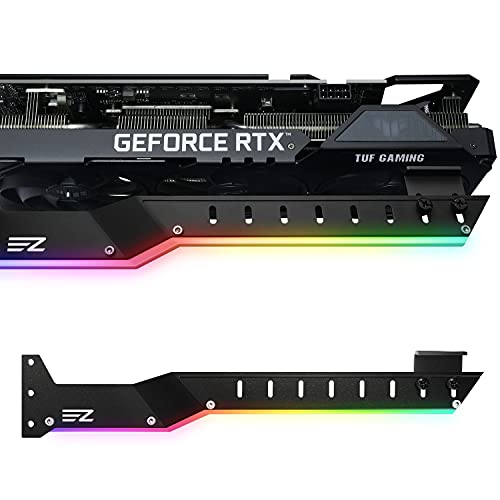
The EZDIY-FAB GPU Holder Brace is an essential accessory for gamers looking to enhance their graphics card’s longevity and performance. With its bending shape design, it supports large GPUs, including Nvidia RTX 3000 and AMD RX5000/6000 series. Made from sturdy aluminum alloy, it’s lightweight yet robust, preventing GPU sagging over time. The universal support arm allows for easy adjustments to fit various graphics cards and PC cases with 7 or more PCI slots. Plus, it features 5V ARGB LED lights for that extra flair. With a 4.4-star rating from 717 reviews, it’s clearly a popular choice among gamers.
Best For: The EZDIY-FAB GPU Holder Brace is best for gamers and PC builders looking to support large graphics cards and prevent sagging over time.
Pros:
- Supports a wide range of graphics cards, including Nvidia RTX 3000 and AMD RX5000/6000 series.
- Made from lightweight yet sturdy aluminum alloy, ensuring durability.
- Features customizable 5V ARGB LED lights for enhanced aesthetics.
Cons:
- Requires compatibility with PC cases that have 7 or more PCI slots, limiting some users.
- May not fit all GPU cooling fan spacings despite included rubber pads.
- Some users may find the installation process a bit complex.
Factors to Consider When Choosing External GPU Enclosures with RTX 5090 Support
When you’re choosing an external GPU enclosure for your RTX 5090, several factors come into play. You’ll want to guarantee compatibility, assess power delivery requirements, and check the cooling system’s efficiency. Plus, consider how easy the installation process is and what connectivity options are available to get the most out of your setup.
Compatibility With RTX 5090
Choosing an external GPU enclosure that supports the RTX 5090 requires careful consideration of several key factors to guarantee peak performance. First, verify the enclosure supports PCIe 5.0, as this matches the RTX 5090’s interface requirements for ideal performance. You’ll also want to confirm that the enclosure can accommodate the size of large GPUs; the RTX 5090 is a high-end card that demands extra space. Compatibility with Thunderbolt 4 or USB 4 connections is essential, as these interfaces provide the necessary bandwidth. Additionally, look for an enclosure that can handle the RTX 5090’s power requirements and includes adequate cooling solutions to prevent overheating during demanding applications. These factors will enhance your gaming experience greatly.
Power Delivery Requirements
Selecting an external GPU enclosure for the RTX 5090 means paying close attention to power delivery requirements. You’ll want an enclosure that provides at least 140W via USB-C to power the graphics card effectively. Many options utilize ATX or SFX standard power supplies, so choose one that meets the RTX 5090’s specific power needs. Look for enclosures with Power Delivery (PD) 3.0 support, allowing for fast charging while powering the GPU. Since the RTX 5090 may demand up to 240W, make sure the power supply can handle this wattage. Finally, check that the enclosure’s power input options align with the RTX 5090’s specifications, including both traditional power connectors and USB-C PD options for versatility.
Cooling System Efficiency
Efficient cooling systems play an essential role in maximizing the performance of the RTX 5090, as high temperatures can lead to thermal throttling. When choosing an external GPU enclosure, consider water cooling solutions, as they provide superior thermal management compared to traditional air cooling. This enables your RTX 5090 to maintain higher performance levels during demanding tasks. Look for designs that guarantee adequate airflow and heat dissipation, especially in compact enclosures where space is tight. Active cooling systems with adjustable fan speeds adapt to varying load conditions, enhancing efficiency during intense gaming or rendering sessions. Finally, materials like copper in heat sinks notably improve heat transfer efficiency, ultimately impacting your GPU’s performance and longevity.
Installation Process Ease
When it comes to setting up your RTX 5090 with an external GPU enclosure, the ease of installation can make all the difference in your gaming experience. First, verify the enclosure supports PCIe 4.0 x16 graphics cards for full compatibility. Look for tool-free installation features that let you swap graphics cards and power supplies without additional tools. Clear installation instructions are vital, so you can easily connect power supplies and secure your GPU. A user-friendly interface, like Thunderbolt 4 or USB 4, simplifies the connection to your laptop or desktop. Finally, consider models that come with a thorough installation package, including necessary cables and brackets, to streamline the setup process and get you gaming quickly.
Connectivity Options Available
Choosing the right connectivity options is crucial for maximizing your RTX 5090’s performance with an external GPU enclosure. Look for enclosures that support Thunderbolt 4 or USB 4, as these provide the high bandwidth necessary for peak performance. Verify the enclosure has enough PCIe interface support, ideally PCIe 4.0 x16, to fully utilize the RTX 5090’s capabilities. Multiple ports, like USB-A and Thunderbolt, can enhance device connectivity and allow for daisy chaining. Additionally, check for power delivery options that reach at least 140W, guaranteeing your RTX 5090 and other connected devices receive adequate power. Finally, don’t overlook the cooling system; effective cooling is essential for maintaining performance during intense gaming or rendering sessions.
Size and Weight Considerations
After confirming you have the right connectivity options for your RTX 5090, it’s time to think about size and weight considerations. First, check the dimensions of the enclosure to make certain it fits comfortably in your workspace. Enclosures can vary greatly in size, and you’ll want it to accommodate the RTX 5090’s larger footprint to prevent thermal issues. Weight is another vital factor; heavier enclosures might need extra support on your desk or shelf. Verify the enclosure’s weight capacity can handle the RTX 5090, which typically weighs over 2 kg. If you plan to move the enclosure often, lighter models are more portable, while heavier ones might offer better stability and cooling performance. Choose wisely!
Warranty and Return Policy
While selecting an external GPU enclosure for your RTX 5090, it’s vital to pay attention to the warranty and return policy. Look for warranties ranging from 1 to 3 years, as this indicates the manufacturer’s confidence in their product. Review the return policy carefully; many enclosures allow full refunds within about 30 days for defective items. Check for any restocking fees, especially if you misrepresent the product’s condition during the return. It’s important that the warranty covers performance and compatibility issues, as these can vary greatly. Additionally, seek out customer feedback on warranty claims and return experiences to verify the manufacturer is reliable and offers good customer service. This can save you headaches down the line.