If you’re looking to boost your laptop’s performance, USB4 eGPU enclosures might be the answer. These innovative devices can transform your gaming and productivity experience by allowing you to connect powerful graphics cards. With options like the ANQ-L336 and RIITOP, you’ll find designs that cater to various needs. But what should you consider when choosing the right enclosure? Let’s explore the top contenders and key factors to help you make an informed decision.
ANQ-L336 Mini eGPU Enclosure for Laptops

The ANQ-L336 Mini eGPU Enclosure is perfect for gamers and creative professionals who need a powerful boost in performance without the bulk. With its 40Gbps Thunderbolt 3/4 and USB4 interfaces, you’ll enjoy seamless data transfer and compatibility across Windows, Linux, and macOS. This PCIe external GPU dock supports NVIDIA and AMD GPUs, making it ideal for gaming, 3D modeling, and AI training. Plus, it provides 85W fast charging for devices like the ROG Ally X. Weighing just 365 grams, it’s compact enough to take anywhere, while also acting as a hub for your external devices.
Best For: Gamers and creative professionals seeking a compact, high-performance external GPU solution.
Pros:
- Supports a wide range of NVIDIA and AMD GPUs, enhancing gaming and creative tasks.
- Compact design and lightweight build make it easy to transport.
- Provides 85W fast charging, allowing for quick power delivery to compatible devices.
Cons:
- PSU not included may require additional purchase.
- Limited support for the latest NVIDIA RTX 50-series GPUs.
- Customer rating of 3.6 out of 5 stars indicates mixed user satisfaction.
PCIE 3.0 x16 eGPU Dock with Thunderbolt 4 Cable
For gamers and creative professionals seeking to boost their laptop’s graphics performance, the PCIE 3.0 x16 eGPU Dock with Thunderbolt 4 Cable is an excellent choice. It’s compatible with a range of NVIDIA and AMD GPUs, ensuring you can tap into powerful graphics capabilities. With a blazing transfer speed of up to 22Gbps and support for resolutions up to 3840 x 2160, your visual experience will be exceptional. The dock offers flexible power input options and works seamlessly with most Windows and Linux devices. Plus, it comes with a one-year warranty for peace of mind. Upgrade your setup today!
Best For: Gamers and creative professionals looking to enhance their laptop’s graphics performance with external GPU support.
Pros:
- High compatibility: Works with a wide range of NVIDIA and AMD graphics cards.
- Fast transfer speeds: Achieves up to 22Gbps for quick data transfer and smooth performance.
- Flexible power options: Offers multiple power input choices to suit different setups.
Cons:
- Limited compatibility with Intel cards: Only supports NVIDIA and AMD GPUs, excluding Intel graphics.
- Potential BIOS updates needed: USB4 functionality may require BIOS updates for some consoles.
- Mixed customer reviews: Holds a 3.8 out of 5-star rating, indicating some users may have experienced issues.
Thunderbolt 3/4 eGPU Enclosure (VK-Y900)

Designed specifically for those seeking to elevate their laptop’s performance, the Thunderbolt 3/4 eGPU Enclosure (VK-Y900) excels in enhancing graphics capabilities. Compatible with a range of NVIDIA and AMD GPUs, this enclosure is perfect for laptops and handhelds equipped with Thunderbolt or USB4. Its Intel JHL7440/7450 controller guarantees stable data transfer, while dual Thunderbolt ports allow for efficient charging and connectivity. With an optimized design for ROG Ally X and support for AI deep learning applications, you’ll find this enclosure a valuable addition to your setup. Enjoy fast customer support and a solid return policy for peace of mind.
Best For: Professionals and developers focused on AI deep learning who need enhanced graphics performance for laptops and handheld devices.
Pros:
- Supports a wide range of NVIDIA and AMD GPUs, increasing versatility for various applications.
- Dual Thunderbolt ports facilitate efficient connectivity and charging simultaneously.
- Optimized for AI deep learning development, making it ideal for specialized tasks.
Cons:
- Not suitable for gaming or 3D rendering, limiting its use case.
- Higher restocking fees for damaged or tampered products may deter some buyers.
- Testing of returns may incur a 15% fee if the product is misrepresented.
RIITOP eGPU Enclosure for PCIe 4.0 Graphics Card

Offering a remarkable 40Gbps data transfer rate, the RIITOP eGPU Enclosure is an exceptional choice for gamers and creative professionals looking to enhance their laptop’s graphics performance. It supports PCIe 4.0 x16 graphics cards, including NVIDIA’s RTX 50 Series and AMD’s RX 7000 Series, making it perfect for demanding tasks like gaming, video editing, and large-scale rendering. Installation is straightforward with provided instructions, ensuring compatibility with Windows, Linux, and Mac OS. Just make sure your laptop has a Thunderbolt 4 or USB4 port. Upgrade your setup with the RIITOP, and experience the true power of your graphics card.
Best For: Gamers and creative professionals seeking to enhance their laptop’s graphics performance with high-end PCIe 4.0 graphics cards.
Pros:
- Supports the latest NVIDIA RTX 50 Series and AMD RX 7000 Series GPUs for top-tier performance.
- Easy installation process with included instructions and all necessary components.
- Compatible with multiple operating systems, including Windows, Linux, and Mac OS.
Cons:
- Requires a laptop with a Thunderbolt 4 or USB4 port, limiting compatibility with older devices.
- Additional power supply is needed, which may increase setup complexity.
- Limited support for AMD GPUs on Mac OS, restricting options for Mac users.
Mini eGPU Enclosure Compatible with Thunderbolt 3/4

If you’re a gamer or creative professional seeking to enhance your laptop’s graphics performance, the Mini eGPU Enclosure compatible with Thunderbolt 3/4 is an ideal solution. This compact dock supports NVIDIA and AMD PCIe graphics cards while providing 85W power delivery for charging. To guarantee compatibility, check that your laptop supports USB4 or Thunderbolt 3/4. The enclosure includes USB A and a second TB3 port, functioning as a hub for additional devices. With support for various power supplies, setup requires some DIY knowledge. Enjoy a one-year warranty and customer service for any questions during your eGPU experience.
Best For: Gamers and creative professionals looking to boost their laptop’s graphics performance with an external GPU solution.
Pros:
- Supports a wide range of NVIDIA and AMD PCIe graphics cards for enhanced performance.
- Includes multiple ports, allowing for additional Thunderbolt device connectivity.
- Provides 85W power delivery for charging while using the eGPU.
Cons:
- Requires some DIY knowledge for setup, which may not be suitable for all users.
- Graphics card, power supply, and laptop not included, necessitating additional purchases.
- Compatibility checks are essential, which can be confusing for some users.
External GPU Dock Station Compatible with Thunderbolt 3/4

For gamers and content creators seeking enhanced performance, the external GPU dock station compatible with Thunderbolt 3/4 is a game-changer. It leverages the JHL7440 controller for superior speed, breaking the 22Gbps barrier and supporting daisy chaining for up to 32Gbps data transfer. Confirm your device has a Thunderbolt 3/4 or USB4 port, as it won’t work with older Thunderbolt versions. You’ll need to supply your power source, compatible with various specifications, and remember not to connect the CPU cable to the PCIE-8PIN port. With USB A and Thunderbolt 4 ports, it becomes a versatile hub for all your external devices.
Best For: Gamers and content creators seeking to enhance their system’s graphical performance with an external GPU solution.
Pros:
- High Performance: Utilizes the JHL7440 controller for speeds exceeding 22Gbps, supporting daisy chaining for efficient data transfer.
- Versatile Connectivity: Features multiple ports including a Thunderbolt 4 port and a 10Gbps USB A port for connecting various external devices.
- Power Delivery Support: Provides up to 85W charging capabilities, allowing for efficient power management of connected devices.
Cons:
- Compatibility Limitations: Only works with Thunderbolt 3/4 and USB4, not compatible with older Thunderbolt versions or standard USB-C.
- Power Supply Not Included: Users must source their own power supply, which may require additional investment and compatibility checks.
- Connection Guidelines: Requires careful connection to avoid power-off protection issues, potentially complicating setup for some users.
GODLIY eGPU Enclosure Dock for Gaming Handhelds and Laptops

The GODLIY eGPU Enclosure Dock is an exceptional choice for gamers who need enhanced graphics performance on their laptops or handheld devices. Compatible with NVIDIA’s RTX 50 Series and AMD’s RX 7000 Series, it offers a powerful boost via Thunderbolt 3/4 and USB4 interfaces. With a data rate of 40Gbps and 85W power delivery, you’ll experience seamless gameplay. Plus, it features additional ports for USB connectivity and daisy chaining. Just make sure your device has the right port, and follow the usage guidelines to avoid any power issues. With a solid 4.5-star rating, it’s a reliable gaming companion.
Best For: Gamers seeking enhanced graphics performance for their laptops or handheld devices that support Thunderbolt 3/4 or USB4.
Pros:
- High Compatibility: Supports both NVIDIA RTX 50 Series and AMD RX 7000 Series graphics cards.
- Fast Data Transfer: Offers a data rate of 40Gbps for seamless gameplay and quick data access.
- Multiple Connectivity Options: Includes additional USB ports and daisy chain capabilities for versatile usage.
Cons:
- Device Requirement: Requires a Thunderbolt 3/4 or USB4 port for compatibility, limiting usage with older devices.
- Power Connection Caution: Incorrect power connection can trigger automatic power-off protection, which may confuse users.
- Moderate Sales Ranking: Currently ranked #177,698 in Electronics, indicating it may not be a widely recognized choice among consumers.
PUSOKEI eGPU Dock for Thunderbolt 4/3 & USB4
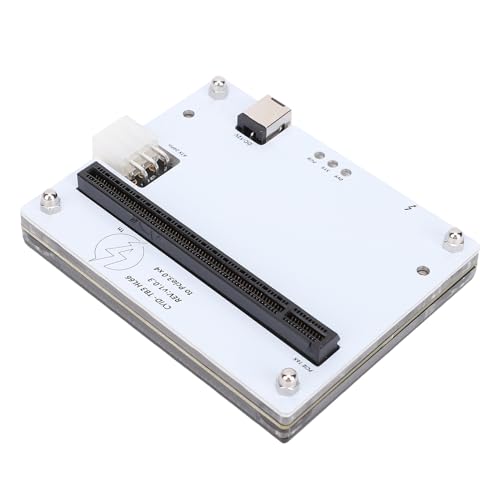
Transform your laptop into a powerhouse with the PUSOKEI eGPU Dock, designed for Thunderbolt 4/3 and USB4 compatibility. This eGPU enclosure features a PCIe 16X slot, letting you connect a desktop graphics card to supercharge your graphics performance. With versatile connectivity options, it seamlessly connects to laptops, small PCs, and portable gaming consoles. Plus, it supports hot-swappable SSDs and 10G NICs, making it easy to upgrade your setup. You can power the dock using a 12V DC adapter or PD spoofing cable. Built with high-quality materials, it guarantees durability and stable connectivity, enhancing both gaming and productivity.
Best For: Gamers and professionals looking to enhance the graphics performance of their laptops or small PCs with an eGPU solution.
Pros:
- Significantly boosts graphics processing capabilities by connecting a desktop graphics card via PCIe 16X slot.
- Versatile connectivity options allow for seamless integration with a variety of devices, including laptops and portable gaming consoles.
- Durable construction ensures longevity and stable connectivity for improved performance.
Cons:
- Requires external power source (12V DC adapter or PD spoofing cable) which may not be convenient for all users.
- Limited to devices with Thunderbolt 4/3 or USB4 compatibility, potentially excluding some older systems.
- Potentially high cost associated with purchasing a compatible desktop graphics card separately.
eGPU Enclosure Thunderbolt 3/4 External GPU Dock

Designed for gamers and professionals seeking enhanced graphics performance, the Maskedfish eGPU Enclosure MK-L18 stands out with its robust Thunderbolt 3/4 connectivity. Weighing only 369 grams, it boasts a premium anodized aluminum design for better airflow. Compatible with NVIDIA and AMD graphics cards, it supports next-gen RTX 50 Series and RX 7000 series. With a bandwidth of 32Gbps, you’ll enjoy high-speed performance and stability. Plus, it features dual Thunderbolt ports for 85W PD fast charging. Backed by a 1-year warranty and a solid customer rating, this enclosure is an excellent choice for boosting your laptop’s graphics capabilities.
Best For: Gamers and professionals looking to enhance their graphics performance with a lightweight and high-speed external GPU solution.
Pros:
- High-speed performance with 32Gbps bandwidth and PCIe 4.0 x16 mode for optimal graphics capabilities.
- Universal connectivity with Thunderbolt 3/4 and USB4 compatibility for versatile use with various devices.
- Premium design featuring a rust-proof anodized aluminum structure for improved airflow and durability.
Cons:
- Limited expansion with only one expansion slot available for additional hardware.
- Cooling method may not be sufficient for all high-performance graphics cards under heavy load.
- Compatibility restrictions with certain applications, primarily optimized for AI deployment rather than gaming or 3D rendering.
External GPU Enclosure Dock (eGPU) for Thunderbolt 3/4 and USB 4 Laptops

If you’re a gamer or a creative professional seeking to enhance your laptop’s graphical performance, the GOLDSOUN External GPU Enclosure Dock offers a powerful solution. Compatible with Thunderbolt 3/4 and USB 4 laptops, it supports 3-slot wide NVIDIA and AMD graphics cards via PCIe 4.0. With 80W Power Delivery through USB-C, it guarantees your devices stay charged. The dock features a JHL7440 controller for high performance in gaming and 3D modeling. Plus, it includes multiple ports for connectivity. Just remember, it doesn’t come with a power supply or graphics card, so plan accordingly.
Best For: Gamers and creative professionals looking to significantly boost their laptop’s graphical performance with an external GPU solution.
Pros:
- High compatibility with both NVIDIA and AMD graphics cards, including the latest RTX 50 and RX 7000 series.
- Fast connectivity with Thunderbolt 4 and USB 4 ports, enabling rapid data transfer and device connectivity.
- 80W Power Delivery through USB-C ensures that your laptop remains charged while in use.
Cons:
- No power supply or graphics card included, requiring additional purchases for full functionality.
- Limited customer reviews with an average rating of 3.5 out of 5 stars, indicating mixed user experiences.
- Requires Thunderbolt 4/3 or USB 4 port for operation, which may not be available on all laptops.
Factors to Consider When Choosing USB4 eGPU Enclosures for Laptops
When choosing a USB4 eGPU enclosure for your laptop, you should consider several key factors. Compatibility with your graphics card, power delivery options, and data transfer speeds can greatly impact performance. Additionally, think about the size, portability, and cooling solutions to guarantee the enclosure meets your needs.
Compatibility With Graphics Cards
Choosing the right USB4 eGPU enclosure for your laptop hinges on compatibility with your graphics card. First, ascertain the enclosure explicitly supports the specific NVIDIA or AMD models you plan to use, as compatibility can vary. Look for support for the latest GPU generations, like the RTX 50 Series for NVIDIA and the RX 7000 Series for AMD, to maximize your performance. Additionally, verify that drivers for your chosen card are compatible with your laptop’s operating system, whether it’s Windows, Linux, or macOS. Opt for enclosures utilizing advanced controller technology, such as the JHL7440 or JHL6340, for stable data transfer. Finally, confirm the enclosure supports the necessary PCIe lane configuration, like PCIe 4.0 x16, to fully leverage your GPU’s potential.
Power Delivery Options
Power delivery options play a significant role in selecting a USB4 eGPU enclosure for your laptop. Many enclosures support Power Delivery (PD) charging, typically ranging from 60W to 85W, enabling fast charging of your devices while using the GPU. The power delivery capabilities depend on the interface; Thunderbolt 3/4 and USB4 ports deliver higher wattage compared to standard USB-C connections. It’s important to check the maximum power output to verify it meets both the enclosure’s and the graphics card’s requirements. Some enclosures provide multiple power input options, including ATX, SFX, FLEX, and DC power supplies, offering flexibility based on your needs. Properly matching the power supply is essential to prevent damage and guarantee peak performance.
Data Transfer Speeds
As you’re considering a USB4 eGPU enclosure for your laptop, data transfer speeds become a critical factor in guaranteeing peak performance. USB4 interfaces can deliver speeds up to 40Gbps, which means rapid communication between your external GPU and laptop. Look for enclosures that utilize PCIe 4.0 technology, as they provide seamless data transfer capabilities of 32Gbps in a PCIe x4 configuration. Some models might feature advanced controllers like JHL7440 or JHL7540, boosting performance for demanding applications. While some older enclosures might offer speeds of up to 22Gbps with PCIe 3.0 x16 configurations, opting for modern standards is key to maximizing your gaming and productivity experience. High data transfer rates guarantee you get the best graphics performance possible.
Size and Portability
When it comes to USB4 eGPU enclosures for laptops, size and portability are essential considerations that can greatly impact your experience. Many models measure around 6.38L x 4.65W x 6.97H inches, making them compact enough to carry with you easily. Weighing between 339 to 369 grams, these lightweight enclosures won’t add much bulk to your setup. Their open-frame design not only enhances airflow but also contributes to a smaller footprint. Plus, features like daisy chaining allow you to connect multiple devices without clutter. Portability is boosted further by compatibility with various power supply types, such as ATX, SFX, and FLEX, ensuring you can find the right power solution while on the go.
Cooling Solutions
Choosing the right USB4 eGPU enclosure goes beyond just considering size and portability; effective cooling solutions play an essential role in maximizing your setup’s performance. High-performance GPUs generate significant heat, so you’ll want an enclosure that employs efficient cooling methods. Look for designs featuring strategically placed fans or open-frame structures that promote airflow to dissipate heat effectively. Additionally, some enclosures utilize high-grade PCB materials to enhance thermal conductivity and prevent overheating. Prioritizing proper cooling not only reduces the risk of thermal throttling but also guarantees the longevity and stability of your graphics card, especially during demanding tasks like gaming or AI processing. Invest in an enclosure with robust cooling solutions for peak performance.
Installation Process
Before diving into the installation process, it’s essential to guarantee your laptop’s compatibility with the eGPU enclosure. Check that your device has a compatible Thunderbolt 3, Thunderbolt 4, or USB4 port. Once confirmed, securely install the graphics card into the PCIe slot of the eGPU enclosure, using copper pillars or brackets for added stability. Next, connect the required power supply, ensuring it meets the voltage and wattage needs of your graphics card. After that, attach the necessary cables, including the Thunderbolt or USB4 cable for data transfer and any video output cables. Finally, follow the manufacturer’s instructions to install the required drivers and software on your laptop for ideal functionality of your eGPU setup.
Price and Warranty
Understanding the price and warranty options of USB4 eGPU enclosures is essential since they can greatly impact your investment. Prices can vary considerably based on features and capabilities, so it’s wise to compare models. Look for enclosures that offer a one-year warranty, as this provides peace of mind regarding reliability and potential defects. Some manufacturers even provide a 30-day return policy, allowing you to evaluate the product and guarantee satisfaction before committing. Keep in mind that a higher price often reflects compatibility with high-performance graphics cards and additional features like power delivery and fast data transfer rates. Investing in higher-rated enclosures can also mean better customer support and warranty terms, which are valuable for troubleshooting and long-term use.