If you’re serious about gaming, investing in a Thunderbolt 5 external GPU enclosure can greatly enhance your setup. With options like the Razer Core X V2 and the Sonnet Breakaway Box 850 T5, you’ll find powerful solutions that support high-performance graphics cards. These enclosures not only boost performance but also offer features like efficient cooling and versatile connectivity. Curious about which models stand out and what factors to evaluate? Let’s explore the top choices for ultimate gaming performance.
Razer Core X V2 External Graphics Enclosure (eGPU)

If you’re a gamer or creative professional looking to supercharge your laptop’s graphics performance, the Razer Core X V2 External Graphics Enclosure (eGPU) is your ideal companion. Compatible with Windows 11 Thunderbolt 4/5 and USB 4 devices, it supports PCIe graphics cards up to four slots wide, whether NVIDIA or AMD. With a Thunderbolt 5 connection offering up to 80 Gbps bandwidth, you’ll enjoy seamless gameplay and creative workflows. The built-in 120 mm cooling fan adjusts speed based on load, ensuring peak performance. Plus, setup is a breeze—just plug it in and get started without any restarts!
Best For: Gamers and creative professionals seeking to enhance their laptop’s graphics performance with an external solution.
Pros:
- High Compatibility: Works seamlessly with Windows 11 Thunderbolt 4/5 and USB 4 devices, accommodating a wide range of graphics cards.
- Easy Setup: Tool-free installation allows for quick GPU and power supply swaps without the need for restarting the system.
- Powerful Cooling: Features an adjustable 120 mm fan that optimizes cooling based on load, maintaining performance during intensive tasks.
Cons:
- Weight: At 5.06 kg, it may be less portable compared to other eGPU options.
- Limited USB Ports: Only one USB port may be a drawback for users needing multiple connections.
- Price Point: As a premium product, it may be on the higher end of the price spectrum for some users.
Sonnet Breakaway Box 850 T5 eGPU Enclosure

The Sonnet Breakaway Box 850 T5 eGPU Enclosure is the ideal choice for gamers and creative professionals seeking to supercharge their Windows 11 laptops. With its 80 Gbps Thunderbolt 5 connectivity, it supports triple-wide graphics cards, delivering near-desktop GPU power. You can easily install NVIDIA GeForce or AMD Radeon cards, backed by an 850W power supply for demanding tasks. Its effective cooling system features a variable-speed fan, ensuring peak performance during intense gaming or editing sessions. Plus, the built-in dock offers additional Thunderbolt 5 and USB ports, enhancing your connectivity options for a seamless workflow.
Best For: Gamers and creative professionals looking to enhance the performance of their Windows 11 laptops with powerful graphics capabilities.
Pros:
- Supports high-performance graphics cards with compatibility for NVIDIA GeForce and AMD Radeon series.
- Effective cooling system with a variable-speed fan to maintain optimal performance during intensive tasks.
- Enhanced connectivity options with a built-in dock featuring Thunderbolt 5 and USB ports for seamless workflow integration.
Cons:
- Limited to Windows 11 laptops, which may exclude users on other operating systems.
- Requires additional investment in a compatible graphics card, which may increase overall cost.
- Size and weight may be cumbersome for portable use compared to integrated solutions.
TREBLEET eGPU Enclosure, Compatible with Thunderbolt 5 & USB4
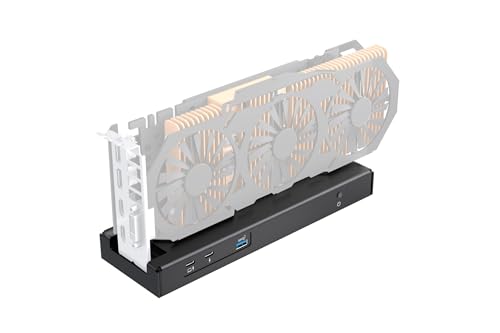
For gamers and creative professionals seeking top-tier performance, the TREBLEET 80Gbps eGPU Enclosure stands out with its exceptional 80Gbps bandwidth, making it perfect for gaming, 3D rendering, and video editing. This enclosure supports Thunderbolt 5 and USB4, ensuring compatibility with a wide range of devices, including laptops and handheld consoles. It delivers up to 140W PD charging, allowing you to fast-charge your laptop while using the eGPU. You can use NVIDIA and AMD PCIe cards effortlessly, and installation is straightforward with the right drivers. With a one-year warranty, it’s a reliable choice for boosting your gaming experience.
Best For: Gamers and creative professionals looking for high-performance graphics solutions to enhance their gaming, 3D rendering, and video editing experiences.
Pros:
- Exceptional 80Gbps bandwidth, providing 2x faster performance than previous generations.
- Supports fast charging with up to 140W PD, allowing simultaneous laptop usage and charging.
- Compatible with both NVIDIA and AMD PCIe graphics cards, offering versatility for users.
Cons:
- Requires a power supply of at least 180W when using PD charging, which may add to setup costs.
- Installation may require specific driver configurations based on CPU type (Intel or AMD).
- Limited to devices that support external PCIe expansion, which may exclude some older models.
Plugable Thunderbolt 5 AI eGPU Enclosure & Dock (TBT5-AI)

Designed specifically for gamers and AI enthusiasts, the Plugable Thunderbolt 5 AI eGPU Enclosure & Dock (TBT5-AI) delivers unmatched performance with its 80Gbps Thunderbolt 5 speeds and robust 850W power supply. You can install your custom GPU securely, supporting models up to 346mm, while enjoying seamless compatibility with Windows 11 and USB4 systems. With 600W dedicated to your GPU, you’ll experience enhanced performance for AI workloads. Plus, the modular design includes multiple connectivity options like 2.5Gbps Ethernet and 10Gbps USB ports. Enjoy peace of mind with a 2-year warranty and lifetime support, ensuring reliability for your setup.
Best For: Gamers and AI enthusiasts seeking high-performance graphics capabilities and modular connectivity options.
Pros:
- 80Gbps Thunderbolt 5 speeds for enhanced data transfer and performance.
- Supports custom GPUs with a robust power supply, allowing for tailored setups.
- Lifetime support and a 2-year warranty provide peace of mind and reliability.
Cons:
- Not compatible with macOS, Linux, or ChromeOS, limiting usability for some users.
- GPU not included, requiring additional investment for complete functionality.
- Large dimensions may not fit in all setups, especially compact spaces.
TREBLEET eGPU Enclosure Compatible with Thunderbolt 5 & USB4

Gamers and content creators seeking top-tier performance will find the TREBLEET eGPU Enclosure an exceptional choice with its next-gen 80Gbps speed, powered by the JH9480 controller. Compatible with Thunderbolt 5 and USB4, it offers double the performance of Thunderbolt 4, ensuring minimal latency for gaming and 3D rendering. The built-in 600W SFX PSU delivers up to 450W to your GPU, while the compact aluminum chassis efficiently dissipates heat. With dual high-speed ports for daisy chaining and full compatibility with Windows and Intel-based Macs, this enclosure serves as a powerful docking station, streamlining your workspace for ultimate efficiency.
Best For: Gamers and content creators looking for high-performance graphics and minimal latency in their workstations.
Pros:
- Next-gen 80Gbps speed for enhanced performance, ideal for gaming and video editing.
- Built-in 600W PSU provides ample power for high-end graphics cards and fast laptop charging.
- Compact and durable design allows for efficient heat dissipation and easy integration into any workspace.
Cons:
- Limited compatibility with NVIDIA GPUs, which may restrict options for some users.
- Not compatible with Bootcamp on macOS, potentially limiting use for Mac users wanting to run Windows.
- Requires adequate space for larger graphics cards, which may not fit in all setups.
PCIE 3.0 x16 eGPU Dock with Thunderbolt 4 Cable (Compatible with NVIDIA AMD Graphics Card)
If you’re looking to elevate your gaming experience with an external GPU, the PCIE 3.0 x16 eGPU Dock with Thunderbolt 4 cable is an excellent choice, especially if you own an NVIDIA or AMD graphics card. It supports Windows 10/11 and Linux-based systems, ensuring broad compatibility. With transfer speeds up to 22Gbps and maximum resolution of 3840 x 2160, your gaming visuals will be stunning. Plus, it features flexible power input options to suit your setup. The dock includes a Thunderbolt 4 cable and offers a one-year warranty, making it a reliable addition to your gaming arsenal.
Best For: Gamers and creative professionals seeking to enhance their graphics performance using NVIDIA or AMD external GPUs with a compatible laptop or desktop.
Pros:
- Supports a wide range of NVIDIA and AMD graphics cards for versatility.
- Offers impressive transfer speeds up to 22Gbps and a maximum resolution of 3840 x 2160 for high-quality visuals.
- Includes a Thunderbolt 4 cable and a one-year warranty for added value and peace of mind.
Cons:
- USB4 functionality may require a BIOS update for some console users, which could be a hassle.
- Limited to Windows 10/11 and Linux, excluding macOS compatibility.
- Customer reviews indicate mixed feedback, reflected in a 3.8 out of 5-star rating.
OWC Mercury Helios 5S Thunderbolt™ 5 External PCIe Expansion Solution

The OWC Mercury Helios 5S Thunderbolt™ 5 External PCIe Expansion Solution is an ideal choice for creative professionals and tech enthusiasts who need to elevate their performance without the hassle of upgrading their entire system. With over 6000MB/s bandwidth for simultaneous read/write, you can utilize pro-level PCIe 4.0 cards for enhanced graphics and connectivity. It features three Thunderbolt 5 ports, providing expanded connectivity options and power delivery. This sleek black aluminum enclosure is compatible with various devices, including MacBooks and desktops, ensuring you can easily integrate it into your setup. Plus, it comes with a 3-year warranty for peace of mind.
Best For: Creative professionals and tech enthusiasts looking to enhance their system’s performance without full upgrades.
Pros:
- High Speed: Offers over 6000MB/s bandwidth for simultaneous read/write, ideal for demanding applications.
- Versatile Connectivity: Equipped with three Thunderbolt 5 ports for extensive connectivity options and power delivery.
- Solid Warranty: Comes with a 3-year OWC Limited Warranty for added peace of mind.
Cons:
- Weight: At 1.7 kilograms, it may be less portable compared to lighter alternatives.
- Compatibility Limitations: Primarily designed for macOS, which may limit usage for Windows users.
- Mixed Reviews: Has a moderate customer rating of 3.5 out of 5 stars, indicating some concerns from users.
RIITOP eGPU Enclosure USB4.0 for Thunderbolt 4

For those seeking a powerful boost to their gaming or creative computing experience, the RIITOP eGPU Enclosure USB4.0 for Thunderbolt 4 stands out with its impressive 40Gbps performance. This external GPU dock supports PCIe 4.0 x16 graphics cards, making it perfect for NVIDIA RTX 50 Series and AMD RX 7000 Series GPUs. It compensates for limitations of older systems, enhancing gaming, AI computing, and video editing. Installation is straightforward, requiring just an available Thunderbolt 4 port and a compatible power supply. With compatibility across multiple operating systems, the RIITOP eGPU enclosure is a versatile choice for any gamer or creative professional.
Best For: Gamers and creative professionals seeking enhanced graphics performance and capabilities on older or lightweight laptops.
Pros:
- High-speed performance with 40Gbps data transfer, ideal for demanding applications like gaming and video editing.
- Wide compatibility with NVIDIA RTX 50 Series and AMD RX 7000 Series GPUs, accommodating various user needs.
- Easy installation process that includes clear steps and necessary components in the package.
Cons:
- Requires a Thunderbolt 4 or USB4 port, which may not be available on all laptops or older systems.
- Limited support for Mac OS, as it only accommodates AMD GPUs, excluding NVIDIA options for Mac users.
- Additional power supply needed, which may add to the overall cost and complexity of setup.
External GPU Dock Station Compatible with Thunderbolt 3/4 and USB4

Gamers seeking to elevate their performance will find the Thunderbolt 5 External GPU Dock Station a powerful ally, especially those using Thunderbolt 3, 4, or USB4 interfaces. This dock features the advanced JHL7440 controller, breaking the 22Gbps limitations of earlier models for superior data transfer. It supports daisy chaining, allowing up to 32Gbps via PCIE3.0X4. Remember, it requires Windows 11 and a compatible power supply, as the package doesn’t include one. With multiple ports, including a Thunderbolt 4 and a 10Gbps USB A port, it serves as a hub for all your external devices, enhancing your gaming experience.
Best For: Gamers and professionals using Thunderbolt 3, 4, or USB4 interfaces looking to enhance their performance with external graphics solutions.
Pros:
- Enhanced Performance: Utilizes the JHL7440 controller for superior data transfer speeds, breaking previous limitations.
- Daisy Chaining Support: Allows for multiple devices to be connected with up to 32Gbps data transfer via PCIE3.0X4.
- Multiple Ports: Features a Thunderbolt 4 port and a 10Gbps USB A port, functioning as a versatile hub for external devices.
Cons:
- Limited Compatibility: Only works with Thunderbolt 3/4 and USB4 interfaces; not compatible with older Thunderbolt or USB-C ports.
- Power Supply Not Included: Requires users to provide a compatible power supply, which can add to the overall cost.
- Windows 11 Requirement: Only detected on Windows 11, limiting usability for those on earlier operating systems.
OWC 4TB Envoy Ultra Thunderbolt 5 Portable SSD Enclosure

Designed for those seeking lightning-fast performance, the OWC 4TB Envoy Ultra Thunderbolt 5 Portable SSD Enclosure stands out with ultra-fast transfer rates exceeding 6000MB/s. This makes it up to 2x faster than Thunderbolt 4 and USB4, ensuring your gaming experience is seamless. It’s compatible with various devices, including Mac, PC, iPad Pro, Chromebooks, and Surface devices. The rugged, shock-resistant design is weatherproof, protecting your data from dust and moisture. With a bus-powered setup, built-in Thunderbolt cable, and fanless operation, it offers convenience without sacrificing performance. Plus, it’s backed by a 5-year OWC limited warranty for peace of mind.
Best For: Those who require ultra-fast data transfer speeds and rugged durability for high-performance tasks like gaming or professional content creation.
Pros:
- Ultra-fast transfer rates exceeding 6000MB/s, ideal for demanding applications.
- Rugged and weatherproof design protects data from dust, drops, and moisture.
- Convenient bus-powered setup with a built-in Thunderbolt cable and silent operation.
Cons:
- Higher price point compared to standard SSD enclosures.
- Limited compatibility with devices that do not support Thunderbolt 3, 4, or USB4.
- No internal cooling fan, which may lead to heat buildup during extended use.
Factors to Consider When Choosing Thunderbolt 5 External GPU Enclosures
When you’re choosing a Thunderbolt 5 external GPU enclosure, it’s essential to take into account several key factors. Think about compatibility with your devices, performance specs, and power supply needs. You’ll also want to evaluate the cooling system and the size and weight to guarantee it fits your setup.
Compatibility With Devices
How can you confirm your Thunderbolt 5 external GPU enclosure integrates seamlessly with your device? Start by verifying that your laptop or device has Thunderbolt 4 or USB4 ports, as these guarantee peak performance. Next, check that the enclosure supports your specific graphics card, since different models have varying size and power needs. Don’t forget to see if your device’s operating system is compatible; some enclosures may only work with Windows 11 or certain macOS versions. It’s also essential to look into power delivery specifications to verify the enclosure can power both the GPU and your device effectively. Finally, check for any installation or driver requirements that might be necessary for proper functionality, especially with Intel or AMD processors.
Performance Specifications
Choosing the right Thunderbolt 5 external GPU enclosure hinges on understanding performance specifications that directly impact your gaming and creative experiences. Look for enclosures that offer bi-directional bandwidth of up to 80 Gbps, which greatly boosts performance for demanding applications and AAA gaming. Guarantee compatibility with a variety of graphics cards, particularly high-performance models from NVIDIA and AMD, as many enclosures can accommodate GPUs up to 4 slots wide. Efficient cooling systems with variable-speed fans are vital for maintaining peak performance during intensive tasks like rendering and AI processing. Finally, compatibility with advanced interfaces like PCIe 4.0 enhances data transfer rates, improving overall system responsiveness in your workflows. These factors will guarantee you get the best performance out of your setup.
Power Supply Requirements
Performance specifications set the stage, but power supply requirements play a pivotal role in guaranteeing your Thunderbolt 5 external GPU enclosure functions efficiently. When choosing an enclosure, make certain the power supply supports your GPU’s needs, typically ranging from 600W to 850W for high-end models. Look for enclosures with built-in power supplies to streamline setup and enhance portability, eliminating the need for bulky external bricks. Also, consider compatibility with different power supply types like ATX, SFX, or FLEX to match your GPU’s requirements. Finally, verify that the enclosure provides the necessary power input options, such as 24-pin ATX or 4+4-pin CPU connections, to guarantee proper power delivery for peak performance.
Cooling System Efficiency
A well-designed cooling system is vital for maximizing the performance of your Thunderbolt 5 external GPU enclosure. High temperatures can cause thermal throttling, reducing your GPU’s efficiency during intensive tasks. Look for enclosures that feature variable-speed fans, which adjust their RPM based on the GPU’s load, keeping noise levels down during lighter operations. Additional cooling solutions like heat sinks and optimized airflow designs can greatly enhance thermal management, prolonging your hardware’s lifespan. Some models even incorporate advanced methods, such as liquid cooling or passive cooling systems, which further improve thermal efficiency and reduce noise. Prioritizing an efficient cooling system is essential to guarantee your gaming experience remains smooth and uninterrupted.
Size and Weight
When considering Thunderbolt 5 external GPU enclosures, size and weight play essential roles in your overall setup and portability. These enclosures typically range from 15 cm to 20 cm in depth and width, with heights up to 10 cm. Compact models are ideal for limited desk space or frequent travel, while larger ones might offer better cooling and power options. Weights can vary considerably, from 1.5 kg to over 5 kg, affecting how easy they are to transport. Keep in mind the size of your graphics card, as some enclosures accommodate larger, triple-wide cards, while others may restrict space for smaller GPUs. Consider these factors to choose the right enclosure for your gaming needs.
Installation Process
Installing a Thunderbolt 5 external GPU enclosure can be straightforward, especially if you keep a few key factors in mind. First, secure the graphics card with a copper pillar and fix the power supply using a bracket. Before powering on your system, connect the necessary cables: the 24-pin ATX power cable, USB 4 connection, and video cable. If you’re using Windows, don’t forget to install the graphics card driver and verify your Thunderbolt controller drivers are updated for peak performance. Some enclosures offer tool-free installation, which makes swapping GPUs or power supplies a breeze. Finally, check that your host device supports external PCIe expansion and meets the power supply requirements to avoid any hiccups during installation.
Connectivity Options
After setting up your Thunderbolt 5 external GPU enclosure, it’s important to contemplate the connectivity options that will enhance your gaming experience. Look for enclosures that support 80 Gbps bi-directional bandwidth, delivering faster data transfer rates essential for graphics-intensive applications. Many Thunderbolt 5 models are compatible with Thunderbolt 4 and USB4 devices, guaranteeing wide usability across your modern setup. Check for multiple Thunderbolt ports, USB Type A ports, and Ethernet connections to accommodate various peripherals and network needs. Enclosures with daisy chaining capabilities simplify cable management by allowing you to connect multiple devices through a single port. Finally, verify your enclosure supports adequate power delivery to charge your laptop while gaming, making it perfect for portable configurations.
Warranty and Support
Warranty and support are key factors to evaluate when choosing a Thunderbolt 5 external GPU enclosure. You’ll want to assess the warranty length, which typically ranges from one to three years, offering varying coverage for defects. A solid return policy is also important; many manufacturers allow full refunds within 30 days for defective items, giving you peace of mind. Additionally, check the availability of customer support—some brands offer lifetime assistance or dedicated service for troubleshooting and compatibility issues. Be sure to read the warranty conditions thoroughly, as specific requirements may affect your eligibility for service. Finally, don’t overlook customer reviews regarding warranty and support experiences; they can provide valuable insights into a manufacturer’s reliability.