A fanless switch can make an office network quieter, cleaner, and easier to place near workspaces without distracting background noise. If you’re powering phones, access points, or cameras, the right PoE model can simplify cabling too.
Below, we focus on the best fanless PoE switches for office use in 2026, balancing port count, PoE budget, management features, and installation style.
Best 10 Fanless Poe Switches for Office Picks for 2026
Compact Quiet Power

- 4 PoE+ ports with 65W total power
- Fanless metal case for quiet office use
- Plug-and-play with QoS and IGMP Snooping
Best For: Small offices needing a quiet, simple PoE switch
Silent Essentials Pick

- 4 PoE+ ports with 63W total budget
- Fanless, silent, and energy-efficient
- Desktop or wall mount with plug-and-play setup
Best For: Quiet office installs that need simple PoE connectivity
Quiet High-Capacity Pick
18-Port Gigabit PoE Switch with 250W Budget

- Fanless 18-port design for quiet office use
- 16 PoE+ ports plus 2 Gigabit uplinks
- 250W total budget, up to 30W per port
Best For: Offices needing a quiet, high-port-count unmanaged PoE switch
Compact Budget-Friendly Pick
5-Port Fanless PoE Switch with 67W Budget

- Fanless desktop switch for quiet small-office use
- 4 PoE+ ports plus 1 non-PoE port
- 67W total budget with extend and priority modes
Best For: Small offices needing quiet PoE for just a few devices
Rackmount Reliability Pick
16-Port Fanless Gigabit PoE+ Switch

- 16 Gigabit PoE+ ports for office devices
- Fanless metal housing for quiet installs
- Includes rackmount brackets and lifetime protection
Best For: Offices wanting a quiet rackmount Gigabit PoE+ switch
Quiet High-Power Office Pick
16-Port Fanless Gigabit PoE Switch
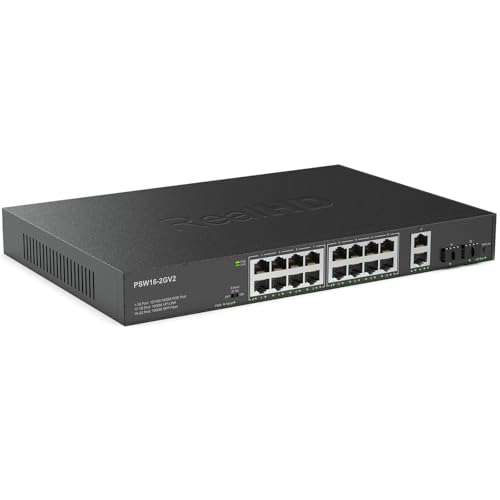
- Fanless metal design for quiet office use
- 300W budget with up to 30W per port
- 16 PoE ports plus RJ45 and SFP uplinks
Best For: Offices that need quiet, high-capacity PoE without managed setup
Managed Office Network Anchor
TP-Link 48-Port Fanless PoE Switch

- Fanless design for quiet office deployment
- 32 PoE+ ports with 230W budget
- Omada management plus VLAN and PoE recovery
Best For: Larger offices needing quiet, managed PoE with cloud control
Compact Desk-Friendly Option
TP-Link 8-Port Fanless PoE Switch

- Fanless metal design for quiet operation
- 4 PoE+ ports with 64W budget
- Easy smart features with VLAN and QoS
Best For: Small offices needing a quiet, compact PoE switch for a few devices
Compact Quiet Power – TP-Link 5-Port 65W PoE
If you need fanless poe switches for office use in a small workspace, the TP-Link TL-SG1005P is a straightforward fit. It delivers 4 PoE+ ports plus 1 Gigabit uplink, supports plug-and-play setup, and keeps operation quiet with a fanless metal design.
Best For: Small offices that want a quiet, unmanaged PoE switch with enough budget for a few cameras, phones, or access points.
Pros:
- 4 PoE+ ports with up to 30W per port and a 65W total budget
- Fanless design helps keep office noise down
- Plug-and-play setup with no configuration required
- Includes QoS and IGMP Snooping for traffic prioritization
Cons:
- Only 5 total ports, so expansion is limited
- Unmanaged design may not suit users who want advanced control
This is a practical pick when you want simple PoE delivery in a compact desktop or wall-mount form factor. The limited port count keeps it best suited to smaller office deployments rather than larger network builds.
Silent Essentials Pick – NETGEAR GS305P 63W
The NETGEAR GS305P is a solid option if you are comparing fanless poe switches for office deployment and want a compact, silent unit. It offers 5 gigabit ports, 4 PoE+ ports, and a 63W power budget in a plug-and-play unmanaged design.
Best For: Offices that want a quiet, easy-to-install PoE switch with flexible desktop or wall mounting.
Pros:
- 4 PoE+ ports with a 63W total power budget
- Fanless operation for silent performance
- Dynamic PoE allocation helps redistribute unused power
- Compact metal design supports desktop or wall mounting
Cons:
- Unmanaged switch offers no advanced setup options
- Regional compatibility is limited to the U.S. and Canada
For offices that just need reliable PoE without extra complexity, this model covers the essentials well. Its silent, energy-efficient design makes it easy to place in shared work areas or conference rooms.
High-Power Office Value – YuanLey 78W PoE
If you want fanless poe switches for office use with a little more power headroom, the YuanLey 5-port model is worth a look. It combines 4 PoE+ ports, a Gigabit uplink, and a 78W built-in power supply in a compact metal, fanless design.
Best For: Offices that need a higher PoE budget for multiple powered devices in a small unmanaged switch.
Pros:
- 78W total PoE power with up to 30W per port
- All gigabit ports, including a dedicated uplink
- Fanless metal build with bilateral heat dissipation
- One-key VLAN mode for traffic isolation
Cons:
- Unmanaged design limits network customization
- Less polished office-focused feature set than smart-managed models
This switch stands out when your office devices need more PoE budget than entry-level models provide. It remains simple to deploy, but the higher power output is its main advantage.
Managed Quiet Office Choice – D-Link 8-Port Smart PoE
For buyers comparing fanless poe switches for office networks that need more than basic plug-and-play support, the D-Link DGS-1100-08PV2 adds smart management to a quiet desktop design. It provides 8 gigabit PoE+ ports, a 64W budget, and tools like VLANs, QoS, and IGMP snooping.
Best For: Offices that want a fanless PoE switch with smart management features and more port capacity.
Pros:
- 8 PoE+ gigabit ports with a 64W power budget
- Fanless design for silent, energy-efficient operation
- Smart management features including VLANs, QoS, and IGMP Snooping
- PD Alive can automatically reset an unresponsive PoE device
Cons:
- Lower power budget than some 4-port alternatives with fewer ports
- Smart-managed setup is more involved than unmanaged switches
This model is the most feature-rich option in the group and makes sense when office traffic needs a bit more control. It is a strong fit for teams that want quiet operation plus management flexibility.
Quiet High-Capacity Pick – 18-Port Gigabit PoE Switch with 250W Budget
If you’re comparing fanless poe switches for office use, this 18-port model is a practical pick when you need plenty of PoE lines and quiet operation. It combines 16 Gigabit PoE+ ports with 2 uplink ports, making it suitable for office networks that also power APs, IP phones, or cameras without adding fan noise.
Best For: Offices that need a quiet, unmanaged PoE switch with a large port count and a 250W power budget.
Pros:
- Fanless design for quiet operation in shared workspaces.
- 16 Gigabit PoE+ ports plus 2 Gigabit uplink ports for flexible office connections.
- 250W total PoE power and up to 30W per port for powered devices.
- VLAN mode, QoS, and intelligent PD detection add useful control for an unmanaged switch.
Cons:
- Unmanaged design means no advanced configuration interface.
- Bulkier 19-inch rackmount format may be more than some small desks need.
For offices that want simple plug-and-play deployment with quiet operation and enough PoE capacity for multiple devices, this Reidubo switch covers the basics well. The built-in power supply and wall/desktop installation options also help keep setup straightforward.
Compact Budget-Friendly Pick – 5-Port Fanless PoE Switch with 67W Budget
For smaller deployments, this is one of the more compact fanless poe switches for office setups where quiet operation matters more than high port count. It offers 4 PoE+ ports plus 1 non-PoE port, giving you a simple way to power a few devices like phones or cameras without software setup.
Best For: Small offices that need a quiet plug-and-play PoE switch for a few powered devices.
Pros:
- Fanless design keeps operation quiet for office environments.
- 4 PoE+ ports with up to 30W per port and 67W total budget.
- Plug-and-play setup requires no software installation or configuration.
- Extend mode and priority mode add practical features for surveillance or voice traffic.
Cons:
- Fast Ethernet ports are limited to 10/100 Mbps, not Gigabit.
- Only 5 ports total, so it is not ideal for larger office rollouts.
This TP-Link model makes sense when you want a simple, sturdy, quiet PoE switch for a small office without paying for capacity you won’t use. Its low port count is also its main limitation, so it fits best as a compact powered-network hub.
Rackmount Reliability Pick – 16-Port Fanless Gigabit PoE+ Switch
Among fanless poe switches for office networks, this TRENDnet option is a strong fit when you want Gigabit performance, a clean rackmount form factor, and quiet operation. With 16 PoE+ ports and included 1U rackmount brackets, it suits offices that need a dependable powered switch for cameras, access points, or other PoE devices.
Best For: Offices that want a fanless Gigabit PoE+ switch with rackmount hardware and lifetime protection.
Pros:
- 16 Gigabit PoE+ ports provide a strong balance of speed and capacity.
- Fanless design helps eliminate disruptive operating noise.
- Sturdy metal housing and included rackmount brackets support wall or 1U rack installs.
- Lifetime manufacturer protection adds peace of mind.
Cons:
- 120W maximum power is lower than larger high-budget PoE switches.
- Designed as a simple switch, so it does not offer advanced managed features.
If your office wants quiet Gigabit PoE in a rack-ready package, this switch is easy to recommend. It focuses on reliable port capacity, solid construction, and long-term support rather than advanced configuration.
Quiet High-Power Office Pick – 16-Port Fanless Gigabit PoE Switch
If you’re comparing fanless poe switches for office use, this 16-port model stands out for its quiet operation and high PoE capacity. It supports 802.3af/at devices, offers a 300W total PoE budget, and includes both RJ45 and SFP uplinks for flexible office network layouts.
Best For: Offices needing a quiet, unmanaged PoE switch with strong power headroom for cameras, access points, and phones.
Pros:
- Fanless metal housing keeps noise down in shared workspaces.
- 16 Gigabit PoE ports plus 2 RJ45 uplinks and 2 SFP ports.
- 300W PoE budget and up to 30W per port for broader device support.
- Plug-and-play setup with automatic power detection.
Cons:
- Unmanaged design offers no advanced configuration tools.
- Extend mode lowers speed to 10 Mbps and is intended for one camera per port.
- Best suited to standard 48V PoE devices, not 24V equipment.
Overall, this is a strong choice when you want quiet PoE switching with enough capacity for an office rollout. It is especially practical if you need a simple, durable switch that can also handle IP cameras and wireless access points.
Managed Office Network Anchor – TP-Link 48-Port Fanless PoE Switch
For larger deployments of fanless poe switches for office networks, this TP-Link model adds serious management features without active cooling noise. It combines 32 PoE+ ports, 16 non-PoE ports, and 4 SFP ports with a 230W budget, making it a better fit when you need control and scaling in one quiet chassis.
Best For: Larger offices that want a quiet, fully managed PoE switch with VLANs, security features, and cloud-based administration.
Pros:
- Fanless passive cooling supports quiet operation in offices and conference rooms.
- Omada cloud management, web GUI, CLI, SNMP, and RMON options.
- 32 PoE+ ports, 4 SFP ports, and a 230W power budget.
- Security and networking tools include VLAN, LAG, PoE recovery, and more.
Cons:
- More complex than an unmanaged switch for basic plug-and-play needs.
- Overkill if you only need a handful of PoE ports.
- Requires planning to take advantage of its advanced features.
This is the most feature-rich option in the group, and it makes sense when your office network needs segmentation, remote management, and recovery tools. The fanless design is a plus if you want those capabilities without adding rack noise.
Compact Desk-Friendly Option – TP-Link 8-Port Fanless PoE Switch
If you want a smaller entry in fanless poe switches for office setups, this TP-Link 8-port switch is built for simple desktop or small-network use. It offers 4 PoE+ ports, a 64W budget, and easy smart features like VLAN and QoS, while staying quiet thanks to its fanless metal housing.
Best For: Small offices or deskside installs that need a quiet, easy-to-manage PoE switch for a few powered devices.
Pros:
- Fanless metal build keeps operation quiet.
- Easy smart management with web-based setup tools.
- 4 PoE+ ports with up to 64W total PoE budget.
- Useful office features like VLAN, QoS, and IGMP snooping.
Cons:
- Only 4 PoE ports, so capacity is limited.
- Lower total PoE budget than larger office switches.
- Not intended for big multi-zone deployments.
This is the best fit when your office only needs a few PoE-powered devices and you want a compact, quiet switch. It balances simple management with enough feature depth for small network segmentation and traffic prioritization.
How We Picked the Best Fanless Poe Switches for Office
For Fanless Poe Switches for Office setups, we prioritized quiet operation, enough PoE budget for real-world device loads, and a mix of compact desktop and rackmount options. We also looked for dependable gigabit performance, sensible build quality, and features that matter in business environments, such as VLAN support, QoS, IGMP snooping, and uplink flexibility.
Quick Comparison
Smaller 5-port models are best for a desk, small reception, or a few PoE devices. 8-port models offer a practical step up for growing offices. 16-port and 18-port switches fit larger teams or multi-device deployments, while 48-port units are for more structured networks that need higher density and more expansion room.
Key Buying Factors for Fanless Poe Switches for Office
PoE Budget and Per-Port Power
Check both total wattage and the power available per port. A switch may have enough ports, but not enough budget to run several phones, cameras, or access points at full load. For mixed office hardware, a higher total PoE budget usually provides more flexibility.
Managed Vs. Unmanaged
Unmanaged switches are simple and quick to deploy. Smart managed and fully managed models are better when you need VLAN segmentation, traffic prioritization, or tighter control over office networks. For Fanless Poe Switches for Office environments, management features can be especially useful if you share one switch across voice, data, and Wi-Fi.
Port Count and Expansion
Choose a little more capacity than you need today. Offices tend to grow, and extra ports reduce the need to replace hardware later. If you expect future APs, IP phones, or security devices, a larger switch can be the more cost-effective choice.
Placement and Form Factor
Desktop, wall-mount, and rackmount designs each solve different space problems. Compact fanless models work well in quiet rooms, while rackmount units are better for wiring closets and centralized IT setups.
Who Should Buy Which Fanless Poe Switches for Office?
If you need a simple, quiet solution for a few devices, a 5-port fanless PoE switch is usually enough. Small offices with growing wireless or phone needs should look at 8-port options for better headroom. Larger offices, shared workspaces, and network closets will benefit more from 16-port, 18-port, or 48-port switches, especially when multiple endpoints need stable PoE delivery and better traffic organization.
In short, the best choice depends on how many devices you power now, how much you may add later, and whether you need basic plug-and-play simplicity or more control over the network.