Choosing the right PoE switch for a network closet comes down to port count, power budget, mounting style, and how much management you actually need. The best option is not always the biggest one—it is the one that fits your cameras, access points, phones, and uplinks without wasting budget.
This roundup highlights practical picks for small business and home-network closets, with options that balance simplicity, power delivery, and installation flexibility.
Best 10 Poe Switches for Network Closets Picks for 2026
Quiet Rackmount Pick
NETGEAR 24-Port PoE+ Switch for Larger Closets

- 16 PoE+ ports, 190W total budget
- Fanless, silent desktop or rackmount build
- 24 gigabit ports with dynamic PoE allocation
Best For: Silent, plug-and-play closet deployments with room to grow
Managed Wall-Mount Option
Ubiquiti UniFi 16-Port PoE Switch

- Fully managed Layer 2 switch
- 8 PoE+ ports, up to 45W total
- Wall-mount kit and UniFi app control
Best For: Compact closets that need managed PoE and UniFi integration
High-Power Budget Choice
AUMOX PRO 18-Port 250W PoE Switch

- 16 PoE ports, 250W total budget
- One-key VLAN isolates ports 1-16
- Rack, wall, or desktop mounting
Best For: Power-hungry closet installs needing simple isolation and uplinks
Compact Smart Managed Pick
NETGEAR 10-Port PoE Smart Switch
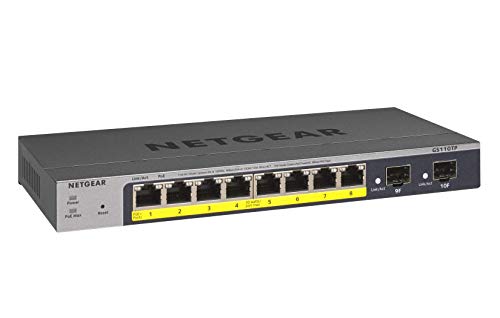
- 8 PoE+ ports with 55W budget
- 2 SFP ports for fiber uplinks
- Fanless smart-managed metal design
Best For: Small closets that need quiet managed PoE with fiber options
Compact Closet Pick
8-Port Gigabit PoE+ Switch with 2 Uplinks

- 8 PoE+ ports with 2 Gigabit uplinks
- 30W per port, 120W total budget
- Metal housing with rack mount ears
Best For: Small closets running cameras or VoIP phones
High-Capacity Silent Pick
NETGEAR 16-Port PoE+ Unmanaged Switch

- 16 PoE+ Gigabit ports with 183W budget
- Fanless design for silent operation
- Desktop or wall-mount installation
Best For: Quiet closets that need more powered ports
Camera-Focused Pick
REOLINK 8-Port PoE Switch with Uplinks

- 8 PoE ports plus 2 Gigabit uplinks
- 120W budget with 30W per port
- Intelligent power management and auto detection
Best For: REOLINK camera closets and NVR setups
Compact 8-Port Closet Pick
NETGEAR GS308PP 8-Port PoE+ 83W
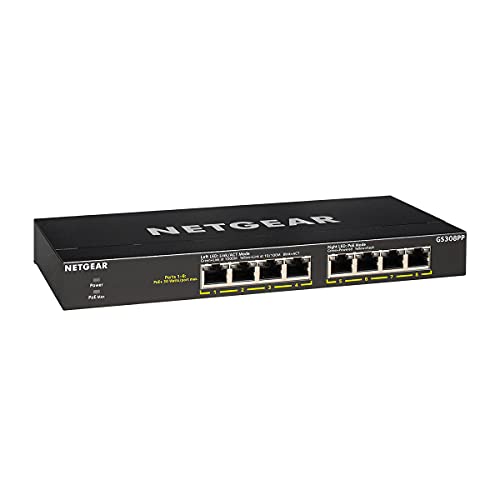
- 8 PoE+ Gigabit ports
- 83W total PoE budget
- Fanless metal, wall-mount ready
Best For: Small closets needing quiet, unmanaged PoE+ expansion
Quiet 8-Port Utility Switch
TP-Link LS108GP 8-Port PoE 62W

- 8 PoE+ Gigabit ports
- Extend Mode up to 820 ft
- PoE Auto Recovery, fanless
Best For: Closets running cameras or other quiet PoE endpoints
Compact 5-Port Closet Switch

- 5 Gigabit ports, 4 PoE+
- 63W total PoE budget
- Fanless metal, wall-mountable
Best For: Small closets with just a few PoE devices
Quiet Rackmount Pick – NETGEAR 24-Port PoE+ Switch for Larger Closets
If you need a straightforward choice among poe switches for network closets, this NETGEAR GS324P is built for simple expansion. It offers 24 gigabit ports, 16 PoE+ ports, and a 190W power budget, so it can handle a mix of cameras, access points, and other powered devices without requiring any software setup.
Best For: Network closets that need silent, plug-and-play PoE expansion with rackmount flexibility.
Pros:
- 16 PoE+ ports with a 190W total power budget
- Fanless design for silent operation
- Desktop or rack-mount metal housing
- Auto-negotiating gigabit ports work with Cat5e or Cat6
Cons:
- Unmanaged design offers no advanced configuration
- Made for use in U.S. and Canada only
Overall, this is a practical fit when you want reliable PoE capacity in a closet without adding management overhead. The dynamic PoE allocation is also helpful if some connected devices draw less power than others.
Managed Wall-Mount Option – Ubiquiti UniFi 16-Port PoE Switch
Ubiquiti - UniFi Switch (USW-Lite-16-PoE, 16 Gigabit Ethernet Ports, 8 PoE+ Ports, Wall Mounted)
Check Price On AmazonFor poe switches for network closets where centralized control matters, the UniFi USW-Lite-16-PoE stands out as a compact managed option. It includes 16 gigabit ports, 8 PoE+ ports, and up to 45W of PoE power, with UniFi controller and mobile app management for monitoring and configuration.
Best For: Small network closets that benefit from UniFi management and a wall-mounted footprint.
Pros:
- Fully managed Layer 2 switch
- 8 PoE+ ports with up to 45W total power
- Controller and mobile app support for remote monitoring
- Wall-mount kit included
Cons:
- Lower PoE power budget than larger closet switches
- Only eight ports provide PoE output
- Requires UniFi management ecosystem for full feature access
This is a smart pick when you want more visibility and control than an unmanaged switch can offer. Its compact metal build and wall-mount design make it especially useful where rack space is limited.
High-Power Budget Choice – AUMOX PRO 18-Port 250W PoE Switch
If your closet needs more PoE headroom, this AUMOX PRO model is a strong fit among poe switches for network closets. It provides 16 PoE ports, 2 uplink ports, and a 250W total power budget, making it suited to larger groups of IP cameras, access points, and mixed office devices. The one-key VLAN mode adds a simple way to isolate ports 1-16 from each other.
Best For: Larger network closets that need higher PoE power, uplinks, and basic VLAN isolation.
Pros:
- 16 PoE ports with up to 30W per port
- 250W total PoE budget
- One-key VLAN mode for port isolation
- Desktop, wall, or rack placement options
Cons:
- Unmanaged design aside from the one-key VLAN function
- Built-in fans may be less ideal than fanless models
- Heavier-duty power setup than small closet installs need
Overall, this switch is aimed at installations that need power and flexibility more than advanced software management. The metal case and multiple mounting options make it practical for standard network closet deployments.
Compact Smart Managed Pick – NETGEAR 10-Port PoE Smart Switch
For smaller poe switches for network closets, the NETGEAR GS110TP offers a compact managed option with a useful mix of features. It includes 8 PoE+ ports with a 55W budget, 2 SFP ports for fiber expansion, and smart management tools for secure setup and monitoring. The fanless metal design also keeps it quiet in tight spaces.
Best For: Small closets that need managed PoE plus SFP fiber uplinks in a compact form.
Pros:
- 8 PoE+ ports with 55W total power
- 2 x 1G SFP ports for fiber expansion
- Smart managed interface with SNMP support
- Fanless, silent metal design
Cons:
- Lower PoE budget than larger closet switches
- Only 8 ports deliver PoE power
- Best suited to smaller-scale deployments
This switch makes sense when you want a quieter, more controllable setup without moving to a large chassis. The included Insight cloud management year can also be helpful if you want remote oversight.
Compact Closet Pick – 8-Port Gigabit PoE+ Switch with 2 Uplinks
If you need a straightforward PoE switch for network closets, this 8-port Gigabit model is a practical fit for small camera or VoIP deployments. It gives you 8 PoE+ ports plus 2 Gigabit uplinks, with up to 30W per port and a 120W total budget, so it covers modest edge networks without adding setup complexity.
Best For: Small network closets that need a simple, plug-and-play PoE switch for IP cameras or phones.
Pros:
- 8 Gigabit PoE ports plus 2 Gigabit uplink ports
- Up to 30W per PoE port with 120W total budget
- Metal housing and rack mount ears for easier installation
- Plug-and-play operation with automatic PoE detection
Cons:
- Does not support passive 24V PoE devices
- Total budget is best suited to smaller installs
For compact closets, this switch focuses on essentials: Gigabit connectivity, simple mounting, and basic protection for non-PoE gear. It is a sensible choice when you want a clean, no-config PoE layer for a few endpoints.
High-Capacity Silent Pick – NETGEAR 16-Port PoE+ Unmanaged Switch
For network closets that need more PoE capacity, this NETGEAR switch is built around 16 PoE+ Gigabit ports and a 183W budget. It is an unmanaged, plug-and-play option, so it works well when you want to add powered devices without introducing configuration overhead, and the fanless design keeps noise down in shared spaces.
Best For: Medium-size network closets that need quiet operation and a larger PoE+ port count.
Pros:
- 16 Gigabit PoE+ ports with 183W total power budget
- Dynamic PoE allocation helps redistribute unused power
- Fanless design supports silent operation
- Includes desktop or wall-mount flexibility
Cons:
- Unmanaged design offers no advanced configuration options
- Made for use in U.S. & CA only
This is a strong fit when your closet needs a simple but higher-capacity PoE layer. The combination of silent operation, metal construction, and flexible mounting makes it especially appealing for offices and utility spaces.
Camera-Focused Pick – REOLINK 8-Port PoE Switch with Uplinks
If your closet is centered on REOLINK cameras and NVR gear, this PoE switch is designed to keep that setup simple. It provides 8 PoE ports and 2 Gigabit uplink ports, supports IEEE 802.3af/at, and includes intelligent power management to help prioritize connected devices within its 120W budget.
Best For: REOLINK-based camera closets that need an easy, power-managed PoE switch.
Pros:
- 8 PoE ports plus 2 Gigabit uplink ports
- IEEE 802.3af/at support with 30W per port
- Intelligent power management helps protect against overload
- Wall or desktop mounting with plug-and-play setup
Cons:
- Power budget is limited to 120W total
- Most compelling when paired with REOLINK cameras or NVRs
This model stands out for users who want a purpose-built camera switch with automatic device detection and overload protection. In a network closet, it is a practical choice when reliability and simple deployment matter more than advanced switching features.
Compact 8-Port Closet Pick – NETGEAR GS308PP 8-Port PoE+ 83W
If you’re comparing poe switches for network closets, the NETGEAR GS308PP is a straightforward fit for small installations that need multiple powered devices without extra setup. It gives you 8 Gigabit ports, full PoE+ on all ports, and a fanless metal build that stays quiet in a closet or on a wall.
Best For: Small network closets that need an unmanaged 8-port PoE+ switch with an 83W budget and silent operation.
Pros:
- 8 PoE+ Gigabit ports with a total 83W power budget
- Dynamic PoE allocation helps redirect unused power to devices that need it
- Fanless metal design supports silent desktop or wall-mount use
- Plug-and-play setup with no software or configuration required
Cons:
- Unmanaged, so it offers no advanced network controls
- Made for use in the U.S. and Canada only
For a compact closet deployment, this model is appealing because it combines simple installation with a solid port count and enough PoE budget for common powered gear. It is a practical choice when you want reliability and quiet operation rather than configuration options.
Quiet 8-Port Utility Switch – TP-Link LS108GP 8-Port PoE 62W
For poe switches for network closets, the TP-Link LS108GP stands out when you want an easy, silent 8-port option with a more modest power budget. It offers Gigabit PoE+ on every port, plug-and-play operation, and practical extras like Extend Mode and PoE Auto Recovery for camera or device installs.
Best For: Network closets that need a quiet unmanaged PoE switch for surveillance or small powered-device deployments.
Pros:
- 8 PoE+ Gigabit ports with up to 30W per port
- Extend Mode supports PoE transmission up to 820 ft
- PoE Auto Recovery can reboot unresponsive powered devices
- Fanless design keeps operation silent
Cons:
- 62W total PoE budget is lower than some higher-output alternatives
- Unmanaged design limits advanced setup options
This is a strong utility pick for closet-based systems where silence and simple deployment matter. The extra range and auto-recovery features make it especially useful when powered devices are spread out or need occasional self-healing.
Compact 5-Port Closet Switch – NETGEAR GS305P 5-Port PoE 63W
If you need poe switches for network closets but only have a few powered devices to connect, the NETGEAR GS305P is a compact and simple option. It provides 5 Gigabit ports, 4 PoE+ outputs, and a 63W budget in a fanless metal design that suits small closet installs.
Best For: Tight network closets that only need a few PoE+ connections and a quiet, no-fuss unmanaged switch.
Pros:
- 5 Gigabit ports with 4 PoE+ ports
- 63W total PoE budget for smaller device counts
- Fanless metal build supports silent operation
- Desktop or wall-mount placement for flexible setup
Cons:
- Only 4 ports provide PoE power
- Smaller port count may not suit growing closet needs
Compared with larger 8-port options, this switch is best when closet space is tight and the powered-device count is low. It keeps the installation simple while still delivering Gigabit speed and enough PoE for small deployments.
How We Picked the Best Poe Switches for Network Closets
For Poe Switches for Network Closets, the most important factors are real-world usefulness and installation fit. We prioritized port counts that make sense for closet-based deployments, PoE power headroom, uplink options, and chassis styles that work in racks, on shelves, or on walls. We also favored models with a clear purpose: simple unmanaged switches for easy installs, plus a few managed or smart options for networks that need VLANs, monitoring, or segmented traffic.
Quick Comparison
In practical terms, the lineup breaks down into three groups. Compact 5- to 8-port switches are best for small closets, cameras, and a few access points. Midrange 10- to 16-port models offer a better balance of capacity and budget for growing networks. Larger 18- to 24-port switches are a stronger fit when you need to power multiple endpoints from one closet and want room to expand.
Key Buying Factors for Poe Switches for Network Closets
PoE Budget
Check total wattage, not just the number of PoE ports. A switch with many PoE ports can still be a poor fit if the total budget is too low for your cameras or access points. Higher budgets matter most when several high-draw devices may power up at once.
Port Mix and Uplinks
Look for enough PoE ports for current devices, plus one or two spare ports for growth. Gigabit uplinks are important if the switch feeds an upstream router, core switch, or NVR. SFP uplinks can be useful in closets where fiber runs are likely.
Managed Vs. Unmanaged
Unmanaged switches are ideal when you want simple plug-and-play operation. Managed or smart models are better when you need VLANs, traffic control, monitoring, or remote troubleshooting. If your closet supports multiple user groups or camera networks, management features can save time later.
Physical Design
For closets, mounting flexibility matters. Rackmount units fit structured installations, while desktop or wall-mount switches work well in smaller utility spaces. Fanless designs are quieter, while fan-cooled models can be better for higher-power deployments.
Who Should Buy Which Poe Switches for Network Closets?
If you are building a small office or home closet with just a few powered devices, choose a compact 5- to 8-port switch with enough PoE budget for your actual load. If you are supporting a larger camera system, a 10- to 16-port model is usually the sweet spot. For larger closets with growth in mind, 18- to 24-port options give you more breathing room and simpler cable management.
For most buyers, the best choice is the switch that matches today’s devices while leaving power and port overhead for tomorrow. That approach avoids overbuying and keeps your closet easier to manage.