Building a home lab means balancing performance, power delivery, and tidy rack integration. The best rackmount PoE switches make it easier to run access points, cameras, VoIP phones, and other network gear from a single central switch.
In this roundup, we focus on practical choices for different budgets and setups, from simple unmanaged models to feature-rich managed switches with higher power budgets and fiber uplinks.
Best 10 Rackmount Poe Switches for Home Lab Picks for 2026
High-Power Rackmount Pick

- 16 PoE+ ports with 250W total power
- 2 gigabit uplinks plus 2 combo SFP slots
- Plug-and-play metal rack-mountable design
Best For: Home labs needing simple, high-capacity PoE power
Managed Ubiquiti Upgrade

- 24-port PoE Layer 3 switch
- Rack-friendly desktop or rackmount design
- Built for managed UniFi-style networking
Best For: Users who want managed PoE and Layer 3 control
Quiet Budget Workhorse
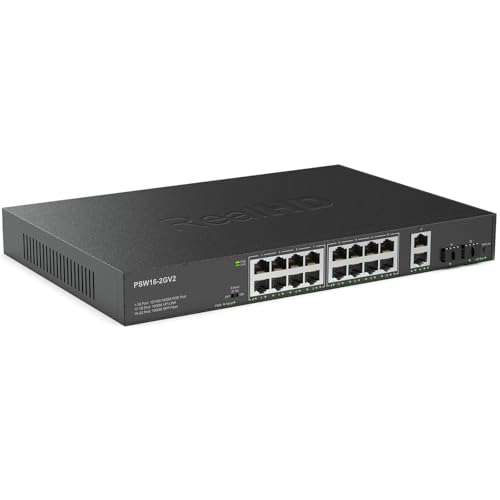
- 16 PoE ports with a 300W budget
- Fanless metal build for quiet operation
- 2 RJ45 uplinks, 2 SFP ports, and extend mode
Best For: Quiet home labs needing lots of PoE at a lower complexity
Smart Managed Value

- 24 PoE+ ports with 190W total budget
- Smart managed with optional Insight cloud support
- Fanless rack-mount or desktop design
Best For: Labs wanting managed PoE with quiet, flexible mounting
High-Capacity Managed Pick

- 24 Gigabit ports with PoE+ support
- Two SFP uplinks for expansion
- Up to 26 Gbps non-blocking throughput
Best For: Growing home labs that need a managed rackmount PoE+ switch
Simple Rackmount Value

- 24 Gigabit ports, 16 with PoE+
- 190W total PoE budget
- Unmanaged, fanless, rack-mountable design
Best For: Silent home labs that want a no-fuss rackmount PoE switch
Compact Smart Pick

- 8 PoE+ ports with 62W budget
- Easy Smart features for VLANs and QoS
- Fanless and compact for quiet installs
Best For: Small home labs needing a compact smart PoE switch
Compact 8-Port PoE Workhorse
TP-Link 8-Port Gigabit PoE+ Switch

- 8 PoE+ ports with Gigabit speeds
- 153W total budget with port priority
- Desktop or rackmount metal design
Best For: Small home labs needing simple PoE power
Quiet Expandable 16-Port Option
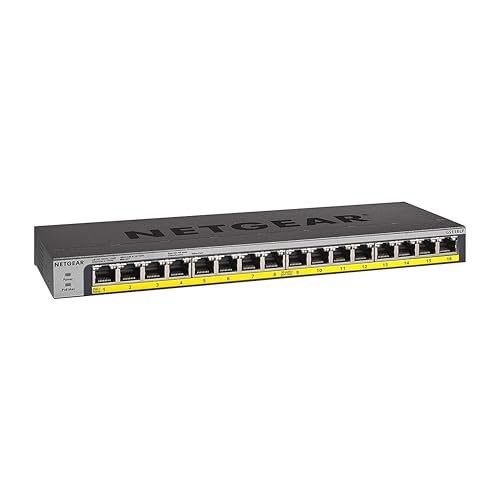
- 16 Gigabit PoE+ ports
- Fanless silent metal design
- Rack-mountable with upgradeable power
Best For: Quiet labs that need more PoE ports
High-Power 16-Port Build
YuanLey 16-Port Gigabit PoE Switch

- 16 PoE+ ports with 2 uplinks
- 250W power budget, up to 30W per port
- VLAN isolation on PoE ports 1-16
Best For: Labs needing higher power and port isolation
High-Power Rackmount Pick – TP-Link 16-Port Gigabit PoE+
If you want rackmount poe switches for home lab use that can power a lot of devices at once, the TP-Link TL-SG1218MP is built around capacity. It offers 16 PoE+ gigabit ports with a 250W total budget, plus 2 gigabit uplinks and 2 combo SFP slots for flexible expansion.
Best For: Home labs that need a simple, rack-mountable PoE switch with lots of power for cameras, access points, and other PoE gear.
Pros:
- 16 PoE+ ports with up to 30W per port and a 250W total budget
- 2 gigabit non-PoE uplinks plus 2 combo SFP slots
- Plug-and-play setup with no software installation needed
- Metal casing with professional heat dissipation design
Cons:
- Unmanaged, so it does not offer advanced configuration features
- Best fit when you want straightforward PoE rather than layer 3 controls
This is a practical pick if your priority is powering multiple PoE devices with minimal setup. The included QoS and IGMP snooping add some useful traffic-handling support, while the sturdy metal build helps it suit a rack or equipment closet.
Managed Ubiquiti Upgrade – UniFi USW-Pro-24-PoE
For rackmount poe switches for home lab setups that need more control, the Ubiquiti UniFi USW-Pro-24-PoE stands out as a Layer 3 switch. Its 24-port PoE design and UniFi ecosystem positioning make it better suited to users who want managed networking rather than a basic plug-and-play box.
Best For: Home lab builders who want a managed 24-port PoE switch with UniFi integration and rack-friendly sizing.
Pros:
- 24-port PoE switch with Layer 3 capability
- Rack-sized metal chassis for a clean install
- Supports PoE through a dedicated PoE interface
- Built for desktop or rack placement
Cons:
- Only the provided specs are limited here, so port-power details are not stated in the notes
- More advanced than unmanaged options if you only need simple PoE switching
This is the right direction if your home lab benefits from a managed platform and you expect to grow into more advanced network segmentation. It is less about affordability-first basics and more about a structured, controllable rack switch.
Quiet Budget Workhorse – 16-Port 300W Rack Mount PoE
If your rackmount poe switches for home lab search is really about value and capacity, this 16-port unmanaged model is easy to place and easy to run. It combines 16 gigabit PoE ports with 2 gigabit RJ45 uplinks and 2 SFP ports, while keeping setup simple with plug-and-play operation.
Best For: Home labs that need a quiet, high-power PoE switch for cameras, access points, and general network gear.
Pros:
- 16 gigabit PoE ports with a 300W total power budget
- 2 gigabit RJ45 uplinks and 2 SFP ports for expansion
- Fanless, quiet metal housing with good heat dissipation
- Extend mode supports longer PoE runs for surveillance use
Cons:
- Unmanaged design, so there are no advanced control features
- Extend mode reduces speed to 10 Mbps when enabled
For a home lab that values silent operation and lots of PoE headroom, this is a strong practical choice. The metal enclosure and rack-mount support make it feel at home in a closet or equipment rack, especially when you need straightforward power delivery more than software features.
Smart Managed Value – NETGEAR GS724TP 24-Port PoE+
Among rackmount poe switches for home lab use, the NETGEAR GS724TP is a strong middle ground between simple unmanaged models and heavier enterprise gear. It gives you 24 PoE+ ports, 2 SFP ports, and smart managed control, plus an optional Insight cloud management path if you want remote administration.
Best For: Home labs that want managed PoE, quiet operation, and flexible rack or desktop placement.
Pros:
- 24 PoE+ ports with a 190W power budget
- 2 SFP ports for fiber optic connections and expansion
- Smart managed interface with SNMP support and optional Insight cloud management
- Fanless design for silent, energy-efficient operation
Cons:
- Made for use in the U.S. and Canada only
- Plastic case material, unlike some all-metal alternatives
This switch makes sense if you want more control than a basic plug-and-play unit without jumping into a more complex deployment. Its rack-mount flexibility, quiet fanless operation, and 24-port PoE+ layout make it a versatile choice for a growing lab.
High-Capacity Managed Pick – UniFi Switch PoE 24
If you’re shopping for rackmount poe switches for home lab use, the UniFi Switch PoE 24 is built for a more expandable setup. It offers 24 Gigabit ports, PoE+ support, and two SFP uplinks, making it a strong fit for a lab that needs room for cameras, access points, or other powered gear while still keeping uplinks simple.
Best For: Home lab builders who want a managed 24-port PoE+ switch with UniFi ecosystem integration and rack-ready expansion.
Pros:
- 24 Gigabit Ethernet ports with auto-sensing IEEE 802.3af/at PoE support
- Two SFP ports for uplinks up to 1 Gbps
- Non-blocking throughput up to 26 Gbps for the 24-port model
- Designed for line-rate forwarding across all ports
Cons:
- Only two SFP uplinks, with no SFP+ on the 24-port model
- More switch than a basic plug-and-play home lab needs
This is the kind of switch that makes sense when your home lab is growing and you want managed PoE with a rackmount footprint. The feature set is strong for multi-device deployments, but it is best chosen by users who will actually use the extra ports, uplinks, and management options.
Simple Rackmount Value – NETGEAR GS324P
For rackmount poe switches for home lab setups that need simplicity, the NETGEAR GS324P is an easy fit. It combines 24 Gigabit ports, 16 PoE+ ports, and a 190W power budget in a plug-and-play design, so you can add powered devices without dealing with setup or software.
Best For: Home lab users who want an unmanaged 24-port rackmount PoE switch with silent operation and straightforward installation.
Pros:
- 24 Gigabit Ethernet ports with 16 PoE+ ports
- 190W total PoE power budget with dynamic allocation
- Unmanaged plug-and-play operation with no configuration required
- Fanless metal design supports desktop or rack-mount placement
Cons:
- No smart or managed features for VLANs or traffic control
- PoE is limited to 16 of the 24 ports
This model is a practical choice when you want a rack-friendly PoE switch that just works. It is especially appealing for home labs where silence, easy mounting, and enough PoE ports matter more than advanced switching features.
Compact Smart Pick – NETGEAR GS308EP
When your rackmount poe switches for home lab planning is centered on a smaller footprint, the NETGEAR GS308EP offers a compact managed option. It gives you 8 Gigabit PoE+ ports, a 62W budget, and Easy Smart Managed Essentials features like VLANs, QoS, port monitoring, and basic network security controls.
Best For: Smaller home labs that want a quiet, compact PoE switch with basic managed features.
Pros:
- 8 Gigabit ports with PoE+ on all ports
- 62W total PoE budget for smaller deployments
- Easy Smart Managed Essentials supports VLANs, QoS, and port monitoring
- Fanless design for silent operation
Cons:
- Not a rackmount model, with desktop or wall-mount placement only
- Lower port count and power budget than larger lab switches
This switch makes sense if you need smart features without moving up to a larger rack unit. It is a good fit for compact home lab builds where silence and basic management are more important than raw port count.
Compact 8-Port PoE Workhorse – TP-Link 8-Port Gigabit PoE+ Switch
If you’re shopping for rackmount poe switches for home lab, this TP-Link model is a straightforward way to power a few cameras, access points, or VoIP phones without extra setup. It offers 8 Gigabit PoE+ ports, a 153W power budget, and a metal desktop/rackmount design, so it fits well in a small rack or utility shelf.
Best For: Small home labs that need a simple, quiet PoE switch with enough power for a modest device mix.
Pros:
- 8 Gigabit PoE+ ports with up to 30W per port
- 153W total power budget with port priority protection
- Desktop or rackmount installation with sturdy metal housing
- Plug-and-play operation with no software setup required
Cons:
- Unmanaged design offers no advanced configuration controls
- Only 8 ports, so larger labs may outgrow it quickly
- Power budget is solid but lower than higher-capacity 16-port options
For a compact home-lab build, this switch focuses on reliability and ease of use instead of complexity. The rackmount kit, Gigabit speeds, and port-priority behavior make it a practical fit when you want PoE without extra management overhead.
Quiet Expandable 16-Port Option – NETGEAR GS116LP PoE Switch
For rackmount poe switches for home lab builds that need more port count without adding noise, the NETGEAR GS116LP is a practical unmanaged choice. It provides 16 Gigabit PoE+ ports, a 76W power budget, and a fanless metal chassis, with flexible desktop, wall-mount, or rack-mount placement.
Best For: Quiet home labs that want 16 PoE+ ports in a compact, easy-to-place switch.
Pros:
- 16 Gigabit PoE+ ports for larger device counts
- Fanless design for silent operation
- Flexible mounting: desktop, wall, or rack mount
- Upgradeable power budget from 76W to 183W with separate module
Cons:
- 76W included power budget is modest for heavy PoE loads
- Upgradeable power requires a separately purchased module
- Unmanaged switch means no advanced traffic controls
This is a good middle-ground pick when your lab needs more PoE ports but not a bulky managed switch. The silent fanless build and rack-mount kit make it especially appealing for a clean, low-noise setup.
High-Power 16-Port Build – YuanLey 16-Port Gigabit PoE Switch
If you want rackmount poe switches for home lab use with more headroom, the YuanLey 16-port model stands out for its 250W total power and 16 PoE+ ports. It also adds 2 Gigabit uplink ports, VLAN isolation on ports 1-16, and a metal desktop/rackmount form factor, making it well suited to a growing network.
Best For: Home labs that need higher PoE power and VLAN isolation across multiple devices.
Pros:
- 16 PoE+ ports plus 2 Gigabit uplink ports
- High 250W total power budget, up to 30W per port
- VLAN isolation support on PoE ports 1-16
- Metal desktop/rackmount design with built-in power supply
Cons:
- Industrial fan may be less appealing in a quiet room
- Unmanaged switch limits advanced network control
- Larger power capacity may be more than a simple small lab needs
This is the strongest pick here when power and port count matter more than refinement. The combination of 250W PoE capacity, uplinks, and VLAN isolation makes it a capable choice for cameras, APs, and other mixed devices.
How We Picked the Best Rackmount Poe Switches for Home Lab
We focused on Rackmount Poe Switches for Home Lab use that offer a useful mix of port count, PoE budget, mounting flexibility, and network features. Priority went to models that can handle common lab workloads such as APs, cameras, servers with IPMI, and small office devices without overcomplicating setup.
We also favored switches with reliable 1G switching, enough uplinks for growth, and clear PoE standards support such as 802.3af/at. For managed options, we looked for practical controls like VLANs, QoS, and monitoring rather than advanced enterprise features most home labs will never use.
Quick Comparison
If you want the simplest setup, unmanaged switches are usually the fastest path. If you need traffic segmentation, remote management, or better visibility into power use, a managed switch is the better long-term choice. Higher PoE budgets matter most when you plan to power multiple cameras, Wi‑Fi 6/6E access points, or other power-hungry devices at once.
Key Buying Factors for Rackmount Poe Switches for Home Lab
PoE Budget and Port Count
Check both the number of PoE ports and the total wattage budget. A 24-port switch with a modest budget may run out of power quickly if several devices need higher draw. Match the budget to your expected device count and wattage, not just the advertised port total.
Managed Vs. Unmanaged
Managed switches are best for VLANs, link monitoring, and cleaner network segmentation. Unmanaged models are easier to deploy and often cheaper, making them a strong fit for basic camera, AP, or lab-device networks.
Rackmount Fit and Uplinks
For a tidy rack, confirm the switch includes rack ears or a rackmount-ready chassis. Uplink ports matter too: dual SFP or extra gigabit uplinks are helpful if you connect to a router, NAS, or aggregation switch.
Fan Noise, Build, and Power Efficiency
In a home lab, noise can matter as much as features. Metal enclosures and efficient thermal design are useful, especially if the switch sits near a desk or in an open rack.
Who Should Buy Which Rackmount Poe Switches for Home Lab?
Choose an unmanaged model if you want quick setup and dependable PoE for a small lab. Choose a smart or fully managed switch if you plan to use VLANs, isolate devices, or grow into more advanced network layouts. If your setup includes many cameras or high-power access points, prioritize the largest PoE budget you can reasonably afford.
For most home labs, the sweet spot is a rackmount switch that combines enough PoE headroom, at least one or two uplinks, and management features you will actually use. That balance usually delivers the best long-term value.