As you explore the evolving world of FDM 3D printers in 2025, you’ll find impressive advancements tailored for prototyping. Whether you’re just starting or have years of experience, there’s a model that suits your needs. From enhanced print speeds to multi-color capabilities, the options are vast. Let’s take a closer look at the top contenders that promise to transform your prototyping experience and elevate your projects.
Bambu Lab A1 3D Printer

The Bambu Lab A1 3D Printer is the perfect choice for designers and engineers who need high-speed precision in their prototyping process. With an impressive acceleration of 10,000 mm/s², you’ll enjoy rapid printing without sacrificing detail. The multi-color printing capability, enhanced by the AMS lite system, opens up creative possibilities, making your designs pop. Automatic calibration takes the stress out of setup, ensuring each print’s Z-offset and bed leveling are spot on. Plus, the active flow rate compensation guarantees consistent extrusion. Its user-friendly interface and quiet operation at ≤48 dB make the A1 an ideal addition to any workspace.
Best For: Designers and engineers seeking high-speed precision for their prototyping needs.
Pros:
- Exceptional acceleration of 10,000 mm/s² for rapid printing without loss of detail.
- Automatic calibration for hassle-free setup and consistent print quality.
- User-friendly interface and quiet operation, enhancing the printing experience.
Cons:
- Multi-color printing requires the AMS lite system, which may be an additional cost.
- Some users may find the advanced features complex initially.
- Limited to specific materials compatible with the printer’s capabilities.
FLASHFORGE AD5X Multi-Color 3D Printer

Looking for a versatile 3D printer that caters to artists, designers, and hobbyists? The FLASHFORGE AD5X Multi-Color 3D Printer has you covered with its innovative multi-color printing, allowing you to use up to four colors at once. Its Intelligent Filament System (IFS) automatically detects and refills filament, minimizing downtime. With a maximum printing speed of 600mm/s and an all-metal Core XY structure, you’ll enjoy rapid, high-quality prints. Plus, the AD5X supports flexible TPU printing and boasts a generous build size of 220 x 220 x 220mm, making it an excellent addition to any creative workspace.
Best For: Artists, designers, and hobbyists seeking a versatile and high-performance 3D printer for creative projects.
Pros:
- Innovative multi-color printing allows for up to four colors simultaneously, enhancing creative possibilities.
- Intelligent Filament System (IFS) automatically detects and refills filament, minimizing downtime and interruptions.
- High-speed performance with a maximum printing speed of 600mm/s and a reliable Core XY structure ensures rapid and accurate prints.
Cons:
- The initial setup and calibration may require a learning curve for beginners.
- Limited printing size of 220 x 220 x 220mm may not accommodate larger projects.
- The all-metal structure, while durable, may contribute to a heavier printer, making it less portable.
HEPHI3D Tina2S 3D Printer
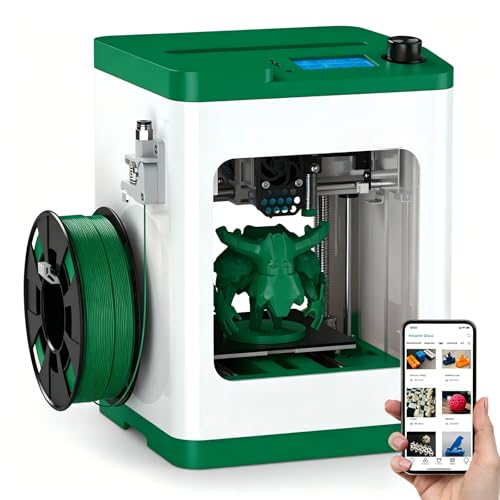
Designed with beginners in mind, the HEPHI3D Tina2S 3D Printer stands out for its user-friendly features, like WiFi cloud printing and auto bed leveling. This fully assembled mini printer makes it easy for you to immerse yourself in 3D printing, whether at home or school. Enjoy the smart Poloprint Cloud app for quick wireless printing and one-click slicing from your smartphone. With a fast print speed of up to 200 mm/s and ultra-quiet operation, you’ll create stunning models without disturbing your environment. Its robust build and versatile applications encourage creativity for users of all ages.
Best For: The HEPHI3D Tina2S 3D Printer is best for beginners, educators, and hobbyists looking for an easy-to-use, fully assembled 3D printing solution.
Pros:
- User-friendly features such as WiFi cloud printing and auto bed leveling make it ideal for novices.
- Fast print speed of up to 200 mm/s combined with ultra-quiet operation enhances the user experience.
- Versatile applications cater to various interests, including education, art, and DIY projects.
Cons:
- Limited to a mini size, which may not be suitable for larger prints.
- Dependence on WiFi for cloud printing may pose issues in areas with poor connectivity.
- The print speed may compromise print quality for more intricate designs.
TINA2 Plus V2 Mini 3D Printer

If you’re a beginner in 3D printing or someone seeking a compact solution for prototyping, the TINA2 Plus V2 Mini 3D Printer stands out with its fully assembled design and user-friendly features. Weighing just 6.6 pounds and measuring 8.3 x 8.3 x 11.4 inches, it’s perfect for tight spaces. With impressive printing speeds of 250mm/s, you’ll save time on projects. The auto-leveling function and dual Z-axis guarantee stability, while WiFi printing via Poloprint Cloud adds convenience. Plus, it’s compatible with multiple operating systems, making it ideal for DIY enthusiasts. Overall, it’s a solid choice for quality prints and ease of use.
Best For: Beginners in 3D printing and those seeking a compact solution for prototyping.
Pros:
- Fully assembled and ready to use out of the box, making it user-friendly for newcomers.
- High-speed printing capability of 250mm/s significantly reduces project completion time.
- WiFi printing with Poloprint Cloud integration offers added convenience for remote printing.
Cons:
- Limited printing size of 3.9 x 4.7 x 3.9 inches may not suit larger projects.
- Being a mini printer, it might have less stability compared to larger models during high-speed operations.
- Open-source nature may require more technical knowledge for advanced modifications.
Entina TINA2Plus V3 3D Printer

The Entina TINA2Plus V3 3D Printer stands out as an ideal choice for kids and beginners, thanks to its compact design and ease of use. With a printing size of 3.9×4.7×3.9 inches, this fully assembled mini printer is ready to go right out of the box. It offers high-speed printing at 250mm/s, greatly cutting down your wait time. You’ll appreciate the auto leveling and dual Z-axis design, enhancing stability and accuracy. Plus, it connects seamlessly with Poloprint Cloud for convenient WiFi printing. Complete with a starter kit, the TINA2Plus V3 makes 3D printing accessible and fun!
Best For: The Entina TINA2Plus V3 3D Printer is best for kids and beginners looking for an easy-to-use, compact 3D printing solution.
Pros:
- Easy setup and fully assembled, making it beginner-friendly.
- High-speed printing at 250mm/s reduces waiting time for projects.
- Compatible with Poloprint Cloud for convenient WiFi printing and cloud slicing.
Cons:
- Limited printing size of 3.9×4.7×3.9 inches may restrict larger projects.
- Fully open-source may require some technical knowledge for advanced customizations.
- As a mini printer, it may not meet the demands of experienced users needing higher capabilities.
FLASHFORGE Adventurer 5M 3D Printer

For those seeking a reliable and efficient solution for rapid prototyping, the FLASHFORGE Adventurer 5M 3D Printer stands out with its impressive 12X ultra-fast printing capability. Its CoreXY all-metal design guarantees stability, while the 600mm/s travel speed and 20000mm/s² acceleration deliver exceptional performance. You’ll appreciate the 280°C direct extruder with a quick-detach nozzle, facilitating easy maintenance. Automatic bed leveling and the Flash Maker app enable hassle-free, real-time monitoring. With superior print quality thanks to dual-fan nozzles, projects adapt quickly on the dual-sided PEI platform. Regular maintenance keeps your printer running efficiently, guaranteeing consistent results every time.
Best For: The FLASHFORGE Adventurer 5M 3D Printer is best for professionals and hobbyists looking for a fast and reliable 3D printing solution for rapid prototyping and small batch production.
Pros:
- Ultra-fast printing: Achieves 12X faster printing speeds, ideal for quick project turnaround.
- User-friendly features: Automatic bed leveling and remote monitoring via the Flash Maker app simplify the printing process.
- High-quality results: Dual-fan nozzles and vibration compensation provide superior print quality.
Cons:
- Limited print size: The 220x220x220mm build volume may not suit larger projects.
- Maintenance required: Regular cleaning of the nozzle and platform is necessary to maintain optimal performance.
- Dependence on app: Remote monitoring relies on the Flash Maker app, which may not appeal to users preferring standalone operation.
TINA2 Mini 3D Printer for Beginners

Looking for a user-friendly 3D printer that’s perfect for beginners? The TINA2 Mini 3D Printer by HEPHI3D is your ideal choice. Fully assembled and compact at just 8.27 x 8.27 x 11.42 inches, it weighs only 5.68 pounds, making it easy to fit in any space. With a 2.4 LCD display, auto bed leveling, and a sample PLA filament roll included, you’ll be printing in no time. Its dual Z-axis and Y-axis rails guarantee high precision, while the removable magnetic build plate simplifies model removal. Plus, it boasts a solid 4.3-star rating from users.
Best For: The TINA2 Mini 3D Printer is best for beginners and children looking for an easy-to-use and compact 3D printing solution.
Pros:
- Fully assembled out of the box, making it ready to use immediately.
- Features auto bed leveling for precise and hassle-free printing.
- Lightweight and compact design allows it to fit easily in small spaces.
Cons:
- Limited compatibility with materials compared to more advanced printers.
- Lacks WiFi connectivity for remote printing options.
- May have a lower printing speed than higher-end models.
FLASHFORGE AD5M 3D Printer with Auto Calibration

Designed with precision in mind, the FLASHFORGE AD5M 3D Printer’s fully automatic one-click leveling system makes it an ideal choice for both beginners and seasoned professionals. With a print size of 220x220x220mm and a maximum speed of 600mm/s, it delivers high-quality prints efficiently. The durable all-metal CoreXY structure guarantees stability and low noise, even during high-speed printing. Plus, you’ll appreciate the patent quick-release nozzle that swaps in seconds for easy maintenance. Remote management via the Flash Maker APP and power outage recovery features enhance reliability, making your printing experience seamless and stress-free.
Best For: The FLASHFORGE AD5M 3D Printer is best for both beginners looking for an easy setup and experienced users seeking high-speed, high-quality printing.
Pros:
- User-friendly automatic leveling system simplifies the setup process, ensuring precise prints.
- High-speed printing capabilities of up to 600mm/s without compromising print quality.
- Flexible maintenance options with a quick-release nozzle that allows for easy swaps and various diameters.
Cons:
- Limited print size of 220x220x220mm may not be suitable for larger projects.
- Reliance on software features like the Flash Maker APP may require a learning curve for new users.
- All-metal structure can make the printer heavier and less portable.
ELEGOO Neptune 3 Pro 3D Printer
The ELEGOO Neptune 3 Pro 3D Printer stands out for its impressive 36-point auto bed leveling feature, making it an ideal choice for both beginners and experienced users who want hassle-free setup and perfect first layers. With a build size of 225x225x280 mm, it accommodates various projects. The STM32 motherboard and silent stepper motors guarantee smooth and precise movement at noise levels as low as 47dB. You’ll appreciate the dual-gear direct drive extruder and upgraded nozzle system, which enhance reliability and reduce clogs. Plus, features like the filament runout sensor and power-loss resume function keep your prints running seamlessly.
Best For: The ELEGOO Neptune 3 Pro 3D Printer is best for both beginners and experienced users seeking a reliable and user-friendly 3D printing experience.
Pros:
- 36-point auto bed leveling ensures effortless setup and optimal first layers.
- Quiet operation with noise levels as low as 47dB, making it suitable for home or office environments.
- Versatile filament compatibility allows for printing with PLA, TPU, PETG, and ABS, catering to a range of project needs.
Cons:
- Limited build size of 225x225x280 mm may not accommodate larger projects.
- Initial setup may still require some technical knowledge for complete assembly.
- Potential for filament clogs despite the upgraded nozzle system, depending on filament quality.
Anycubic Kobra 3 V2 Combo 3D Printer

If you’re seeking a high-speed 3D printer that delivers exceptional multicolor capabilities, the Anycubic Kobra 3 V2 Combo is an excellent choice for prototyping. With a print volume of 10.0” x 10.0” x 10.2”, it can reach speeds up to 600 mm/s, making it 12 times faster than standard FDM printers. You’ll love the 4-color and 8-color printing options, thanks to its advanced ACE Pro technology. The built-in filament drying system guarantees peak performance, while the standard 720p camera allows you to monitor your prints in real-time. This printer combines speed, quality, and convenience flawlessly.
Best For: The Anycubic Kobra 3 V2 Combo is best for professionals and hobbyists who require high-speed, multicolor 3D printing for prototyping and creative projects.
Pros:
- High-speed printing: Capable of speeds up to 600 mm/s, significantly reducing print times.
- Multicolor capabilities: Supports both 4-color and 8-color printing, enhancing design versatility.
- Filament drying system: Active drying ensures optimal filament performance and prevents clogs.
Cons:
- Initial setup complexity: May require a learning curve for new users to fully utilize advanced features.
- Price point: Higher cost compared to standard FDM printers may not suit all budgets.
- Limited print volume: While spacious, the print volume may not accommodate larger projects.
Factors to Consider When Choosing FDM 3D Printers for Prototyping
When choosing an FDM 3D printer for prototyping, you need to think about several key factors. Print speed, multi-color capability, and auto calibration features can greatly impact your workflow and results. Plus, considering build size and user-friendly design will help guarantee you find the right match for your projects.
Print Speed Importance
Choosing an FDM 3D printer for prototyping means considering print speed as a critical factor, since it directly influences how quickly you can iterate on designs. High-speed printing capabilities, reaching up to 600 mm/s, are essential for time-sensitive projects, allowing you to produce prototypes rapidly. When paired with high acceleration rates, like 20,000 mm/s², you can tackle complex models more efficiently, enhancing overall productivity. Consistent print speed is crucial for maintaining quality across prototypes, ensuring each iteration accurately represents your design intentions without losing detail. Efficient speeds also streamline the prototyping phase, enabling more extensive testing and refinement of designs, which ultimately leads to better final products. Prioritizing print speed will help you achieve your prototyping goals.
Multi-Color Capability
While exploring FDM 3D printers for prototyping, you’ll want to contemplate multi-color capability as a key feature that can elevate your designs. This allows you to use multiple filament colors simultaneously, enhancing creativity and visual appeal. Some printers support up to four colors at once, enabling you to create intricate and detailed prototypes without post-processing painting. Advanced technologies like AMS systems guarantee smooth color changes, reducing material waste and maintaining consistent quality. You can achieve multi-color printing through dual-extruder setups or color mixing systems, broadening your project’s possibilities. Ultimately, utilizing this capability can greatly cut down the time and effort needed to produce visually complex prototypes, making your prototyping process more efficient and effective.
Auto Calibration Features
Auto calibration features can greatly enhance your prototyping experience by streamlining the setup process and ensuring consistent print quality. With advanced algorithms for automatic bed leveling, many modern FDM printers make precise nozzle-to-bed distance adjustments based on real-time measurements. This means you can skip manual tweaks, saving time and frustration. For beginners, full-auto calibration systems simplify the experience, allowing you to start printing right out of the box with minimal technical knowledge. Some printers even offer dual-axis auto leveling, boosting stability and reducing leveling errors. Additionally, automatic calibration systems often include power loss recovery features, so if there’s an interruption, your prints can resume from the last successful layer, cutting down on material waste and time.
Build Size Considerations
Build size plays a pivotal role in your prototyping projects, as it defines the maximum dimensions of the objects you can create. A larger build size enables you to print more complex prototypes in a single pass, cutting down on the need for assembly. When selecting a printer, assess the print volume, typically shown in millimeters for width, depth, and height, to guarantee it matches your design requirements. For small-scale projects, a compact printer might suffice, but larger models are essential for detailed prototypes or functional models that need more space. Additionally, consider your available workspace; the printer should fit comfortably while still allowing you to produce the prototype sizes you desire.
User-Friendly Design
How can you guarantee a smooth prototyping experience with FDM 3D printers? Look for models with a user-friendly design that caters to both beginners and experts. Fully assembled setups allow you to start printing right away, skipping the hassle of complex assembly. A touchscreen interface simplifies operation, enabling you to navigate settings effortlessly. Features like automatic bed leveling and calibration minimize setup time and enhance accuracy, making your projects more accessible. Additionally, quiet operation levels around 40-50 dB create a pleasant workspace, encouraging creativity without distractions. Compact and lightweight designs make it easy to place or transport your printer, fitting seamlessly into any environment, even if you have limited space. Choose wisely for a hassle-free prototyping journey!