If you’re looking to enhance your small office’s security with efficient ID card printers, you’ve come to the right place. The right printer can streamline your badge-making process, ensuring high-quality outputs without breaking the bank. From compact designs to user-friendly software, there are plenty of options to contemplate. Let’s explore the top models that can meet your needs and fit seamlessly into your workspace.
Badgy100 Plastic Card Printer with ID Design Software for Custom ID Badges
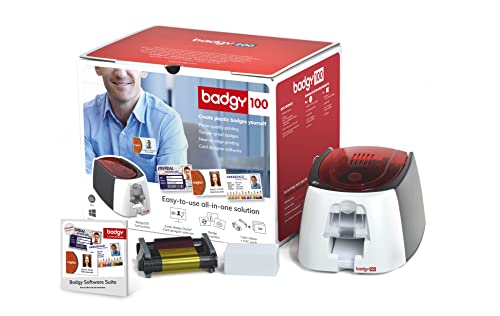
If you’re looking for an efficient solution to create custom ID badges in your small office, the Badgy100 Plastic Card Printer is your best choice. This printer, paired with Badge Studio ID Design Software, allows you to produce full-color, tamper-proof ID badges effortlessly. It’s perfect for single printing needs, enabling you to print on demand whenever required. You can quickly replace lost or stolen cards without hassle. With high-resolution printing on quality plastic and access to an online template library, you’ll achieve professional-looking designs every time, streamlining your badge creation and management process while eliminating subcontractor deadlines.
Best For: Small offices seeking an efficient, in-house solution for creating custom ID badges.
Pros:
- High-resolution printing ensures professional-quality ID badges every time.
- On-demand printing capabilities allow for quick replacement of lost or stolen cards.
- Access to an online template library simplifies the design process and enhances creativity.
Cons:
- Limited to single printing needs, which may not be suitable for larger organizations needing bulk printing.
- Software may have a learning curve for users unfamiliar with ID design applications.
- Initial investment may be higher compared to outsourcing badge printing services.
Bodno Seaory S25 ID Card Printer & Supplies Package

The Bodno Seaory S25 ID Card Printer & Supplies Package is an excellent choice for small offices that require efficient and straightforward ID card production. This compact printer, weighing just 12.42 pounds, features a manual feed system for low-volume printing, producing one card at a time at a speed of 5 ppm. With a print resolution of 300 x 300 dpi, you’ll achieve high-quality results. The package includes user-friendly Bodno Bronze Edition software, compatible with various operating systems. Plus, enjoy a 2-year warranty and lifetime software support, making it a reliable option for your ID card needs.
Best For: Small offices or organizations that require efficient and straightforward low-volume ID card production.
Pros:
- User-friendly Bodno Bronze Edition software with pre-made templates and drag-and-drop capabilities.
- Compact design and lightweight, making it easy to fit into small office spaces.
- Includes a 2-year hardware warranty and lifetime software support for added peace of mind.
Cons:
- Limited to manual feed system, which may not be ideal for high-volume printing needs.
- Print speed of 5 ppm may be slower compared to other ID card printers on the market.
- Dual-sided printing capability is not available, limiting design options for ID cards.
Easy Badges Solid 210 ID Badge Printer

For small organizations seeking a cost-effective solution for ID card printing, the Easy Badges Solid 210 ID Badge Printer stands out with its compact design and user-friendly software. This single-sided printer handles 300 full-color cards per hour, making it efficient for your needs. With a print quality of 300 dpi, it meets the standards for 95% of organizations. The included Cardholdir ID software allows you to create badges easily, using templates without needing graphic design skills. Plus, it’s compatible with both PC and Mac, ensuring a seamless experience. Ideal for employee IDs and visitor passes, it’s perfect for any workspace.
Best For: Small organizations looking for a cost-effective and efficient solution for ID card printing.
Pros:
- User-friendly software that requires no graphic design skills, making badge creation easy.
- High printing speed of 300 full-color cards per hour, suitable for various ID needs.
- Compact and lightweight design allows it to fit easily in any workspace.
Cons:
- Single-sided printing may not meet the needs of organizations requiring dual-sided badges.
- Manual feeding capability may slow down the printing process for larger batches.
- Limited to standard CR80 sized ID badges, which may not suit all requirements.
Bodno Seaory S26 Single Sided ID Card Printer & Complete Supplies Package

Bodno’s Seaory S26 Single Sided ID Card Printer is ideal for small offices that require efficient and high-quality ID card production. This all-inclusive package comes with the Seaory 17031 color ribbon, allowing you to print 300 vibrant cards right out of the box. With a resolution of up to 300 x 1200 dpi, you’ll enjoy impressive color depth and sharpness. It’s compatible with Windows, Mac, and Linux, and the Silver Edition enhances functionality by auto-creating cards from Excel or CSV files. Plus, you get a 2-year hardware warranty and lifetime software support for peace of mind.
Best For: Small offices or businesses that need efficient and high-quality ID card production.
Pros:
- High-resolution printing at up to 300 x 1200 dpi for vibrant and sharp ID cards.
- All-inclusive package with supplies for immediate use, including a color ribbon for 300 prints.
- Compatible with multiple operating systems (Windows, Mac, and Linux) and includes enhanced features for easy card creation.
Cons:
- Limited to single-sided printing, which may not meet all ID card needs.
- The initial cost may be higher for small businesses with tight budgets.
- Requires regular purchase of supplies (ribbons and cards) for ongoing use.
Bodno Magicard Pronto ID Card Printer & Supplies Package

Compact and portable, the Bodno Magicard Pronto ID Card Printer & Supplies Package is perfect for small offices or those who need mobile printing solutions. This all-inclusive package features the Magicard Pronto printer, supplies, and Bodno Bronze Edition software, ensuring you have everything you need. With a maximum color print resolution of 1200×1200 dpi, you’ll achieve vibrant results. The user-friendly software offers pre-made templates and drag-and-drop design capabilities, making it easy to create professional cards. Plus, you’ll benefit from a 2-year warranty and lifetime software support. Weighing just 11 pounds, it’s easy to transport wherever you need it.
Best For: Small offices and mobile printing solutions that require a compact and portable ID card printing option.
Pros:
- User-friendly software with pre-made templates and drag-and-drop design capabilities for easy card creation.
- High maximum color print resolution of 1200×1200 dpi for vibrant and professional results.
- 2-year warranty and lifetime software support provide peace of mind and assistance when needed.
Cons:
- Manual feed printer limits printing to one card at a time, which may not be efficient for larger batches.
- No dual-sided printing capability, which may be a drawback for those needing double-sided ID cards.
- Best Sellers Rank indicates it may not be as popular as some competing products in the market.
Zebra ZC100 LT ID Card Printer – Complete Supplies Package

The Zebra ZC100 LT ID Card Printer is an excellent choice for small offices looking to streamline their ID card production. With a compact and portable design, it fits perfectly in any workspace. You’ll appreciate the intuitive graphical user interface and the automatic card thickness adjustment, making printing effortless. Enjoy high-quality color prints at 600 x 600 dpi, ideal for various ID cards and labels. Plus, the efficient ribbon change system guarantees smooth operation without hassles. The complete supplies package includes CloudBadging software, blank cards, ribbon, and labels, so you can start printing right away.
Best For: Small offices and businesses looking for an efficient and user-friendly ID card printing solution.
Pros:
- Intuitive graphical user interface for easy operation.
- High-quality color printing at 600 x 600 dpi for professional results.
- Complete supplies package includes everything needed to start printing immediately.
Cons:
- Limited printing speed compared to higher-end models.
- Compact design may restrict card capacity and require more frequent refills.
- Dependence on proprietary software may limit integration with other systems.
Evolis Primacy 2 Dual-Sided ID Card Printer (PM2-0025-A)

If you’re looking for a reliable ID card printer that can keep up with your small office’s demands, the Evolis Primacy 2 Dual-Sided ID Card Printer (PM2-0025-A) stands out with its impressive speed. It prints 280 full-color cards per hour, making it 25% faster than its predecessor. This model utilizes dye sublimation technology for high-quality results and includes essential supplies like a color ribbon, 100 blank cards, and card design software. Plus, its LED panel and optional LCD touch screen simplify operation. Compatible with both Windows and Mac, it’s backed by a 3-year warranty, ensuring peace of mind.
Best For: Small to medium-sized offices that require efficient and high-quality ID card printing.
Pros:
- High-speed printing: Produces 280 full-color cards per hour, increasing productivity.
- User-friendly features: Equipped with an LED panel and optional LCD touch screen for easy operation.
- Comprehensive bundle: Includes essential supplies like a color ribbon, 100 blank cards, and design software.
Cons:
- Limited card feeder capacity: The standard feeder holds only 100 cards, requiring an upgrade for larger jobs.
- Compatibility issues: While it works with Windows and Mac, it may not support other operating systems.
- Price point: As a newer model, it may be on the higher end of the price spectrum compared to older versions.
Zebra ZC300 Dual Sided ID Card Printer

For small offices in need of efficient and versatile ID card printing, the Zebra ZC300 Dual Sided ID Card Printer stands out with its intuitive interface and advanced security features. You’ll appreciate the color and monochrome printing options, along with a highly graphical LED/LCD interface that simplifies operation. The redesigned hopper makes loading and unloading cards a breeze, while saloon-style output doors guarantee easy retrieval. With multiple encoding options and robust AES encryption, your sensitive data remains secure. This printer’s reliability and flexibility cater to diverse printing needs, making it a perfect addition to your small office setup.
Best For: Small offices seeking an efficient and versatile solution for ID card printing.
Pros:
- User-friendly interface with a highly graphical LED/LCD display simplifies operation.
- Multiple encoding options provide versatility for different card applications.
- Advanced security features like AES encryption ensure sensitive data protection.
Cons:
- Initial setup may require some technical knowledge for those unfamiliar with printers.
- Cost of consumables such as ink and cards can add up over time.
- Limited support for very high-volume printing compared to industrial-grade printers.
Fargo DTC4250e Dual-Side ID Card Printer Package

Small offices looking for a reliable and efficient ID card solution will find the Fargo DTC4250e Dual-Side ID Card Printer Package an excellent choice. This package includes a printer, color ribbon for 250 prints, 100 PVC cards, and card imaging software. With direct-to-card printing and the ability to print on both sides, you’ll produce high-quality cards quickly. The smart LCD screen makes maneuvering through print commands a breeze, whether they’re simple or complex. Plus, the 3-year warranty gives you peace of mind, ensuring your investment is protected. Upgrade your ID card printing with Fargo’s innovative technology today!
Best For: Small offices seeking a reliable and efficient ID card printing solution.
Pros:
- High-quality direct-to-card printing with dual-side capabilities.
- User-friendly smart LCD screen for easy navigation of print commands.
- Includes essential supplies and a 3-year warranty for added peace of mind.
Cons:
- Limited to 250 prints per color ribbon, which may require frequent replacements for high-volume use.
- May not support advanced security features for sensitive ID card applications.
- Initial setup and software installation may require technical expertise.
Badgy200 Plastic Card Printer with Badge Studio+ ID Design Software
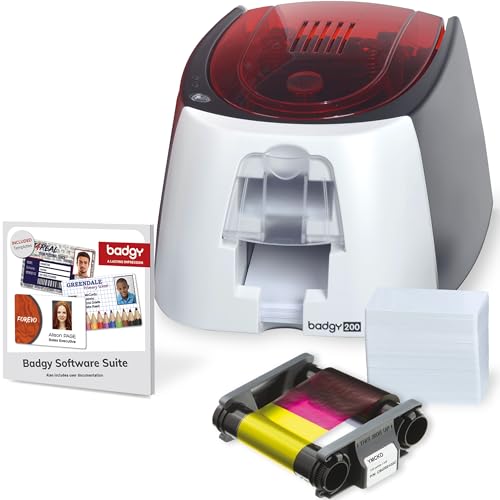
The Badgy200 Plastic Card Printer is perfect for businesses looking to streamline their ID badge creation process. This all-in-one printer offers full-color, tamper-proof ID badges, making it ideal for students, employees, and loyalty cards. With upgraded Badge Studio+ software, you can easily import databases and customize badges using free templates and a design wizard. The package includes the printer, 100 color ribbons, 100 blank cards, and all necessary cables. Plus, it enhances security in workplaces and fosters community among members. You also get a 1-year warranty and technical support for peace of mind.
Best For: Businesses, schools, and organizations looking to efficiently create professional-quality ID badges for students, employees, and loyalty programs.
Pros:
- Full-color printing capability ensures vibrant and professional-looking ID badges.
- Upgraded Badge Studio+ software simplifies badge design with easy database import and customizable templates.
- Includes all necessary components such as ribbons, blank cards, and cables for immediate use.
Cons:
- Limited to plastic card printing, which may not meet all organizations’ needs for different materials.
- The 1-year warranty may be shorter than some competitors’ offerings.
- Technical support is only available via email, which may lead to longer response times.
Factors to Consider When Choosing Id Card Printers for Small Offices
When you’re choosing an ID card printer for your small office, several key factors can make a big difference. You should consider printing speed, card quality, and software compatibility, along with how much you’re willing to spend. Additionally, look into warranty and support options to guarantee you’re covered after your purchase.
Printing Speed Matters
Choosing the right ID card printer for your office often hinges on printing speed, which can greatly affect your workflow. Faster printers can produce up to 300 full-color cards per hour, making them ideal for high-demand situations. If you’re in a larger organization, a printer that only prints 5 cards per minute may not meet your needs efficiently. Aligning the printing speed with your ID card volume is essential to minimize wait times. Keep in mind that some printers offer manual feed options, suitable for low-volume tasks but could slow you down. Finally, verify that the print resolution matches your speed choice; high-quality prints at faster speeds can enhance both efficiency and professionalism in your ID cards.
Card Quality Considerations
Quality matters just as much as speed when it comes to ID card printers for small offices. You should pay attention to print resolution; higher resolutions like 300 x 1200 dpi deliver sharper images than lower ones. The printing technology also plays a critical role—dye-sublimation produces more vibrant colors compared to direct-to-card methods. Don’t overlook the card material; PVC cards are more durable and provide a professional finish. Full-color printing enhances visual appeal, making your ID cards more engaging. Additionally, consider features like anti-counterfeiting measures, such as holographic overlays, which boost security and longevity. Each of these factors contributes to the overall quality, ensuring your ID cards represent your office well.
Software Compatibility Options
Selecting the right ID card printer hinges considerably on software compatibility, as it directly impacts your ability to create and manage ID cards efficiently. Make sure the printer’s software works with your operating system, whether it’s Windows, Mac, or Linux, to avoid any functionality issues. Look for user-friendly design software that offers templates and drag-and-drop features, making badge creation quick and easy. Consider options that provide lifetime support or updates, keeping you current with design capabilities and security features. It’s also beneficial to choose printers that allow database import functionality for efficient management of cardholder information. Finally, check for pre-made templates to simplify the design process, especially if you lack graphic design experience.
Price and Budget Constraints
Establishing a budget is essential when you’re looking for ID card printers for your small office, as prices can vary widely—from around $200 to over $1,500. Analyze the total cost of ownership, including ongoing expenses like ribbons, cards, and software licenses that can impact your long-term budget. Look for printers that offer bundled supplies or packages, which can provide better initial value and help manage upfront costs. Evaluate the printer’s print speed and volume capabilities to guarantee they align with your expected workload; a higher-capacity printer may justify a larger initial investment. These considerations will help you choose a printer that fits your financial constraints while meeting your office’s needs effectively.
Warranty and Support Services
When choosing an ID card printer for your small office, it’s crucial to take into account the warranty and support services that come with it. A warranty typically ranges from one to three years, covering hardware defects and giving you peace of mind. Extended warranty options can also provide ongoing protection. Look for printers that offer lifetime software support; this guarantees you get help with software issues and updates without extra costs. Additionally, check if technical support is available through various channels like email and phone, as this can greatly enhance your experience. Finally, pay attention to customer ratings and reviews to gauge the quality of warranty and support services before making your purchase.
Size and Portability Factors
Considering the limited space in small offices, size and portability play an essential role in choosing an ID card printer. You’ll want a compact model that fits seamlessly into your workspace, with dimensions as small as 9.6D x 6.29W x 8.18H inches. Lightweight designs, weighing around 11 to 12 pounds, make it easy to relocate the printer whenever necessary. Look for options with a manual feed system, allowing you to print one card at a time without needing much setup space. Many compact printers also feature a streamlined design that saves desk space while maintaining vital functionalities. If you need mobile printing, a portable ID card printer will let you create badges on-site at events or remote locations.