As you navigate the evolving landscape of home office technology in 2025, it’s vital to pinpoint the best high-end PCs that can truly enhance your productivity. With powerful processors and ample storage options, these systems are designed for seamless multitasking and impressive visual support. But what specific models stand out this year? Let’s explore the top contenders that could redefine your work experience.
HP Envy Desktop PC (TE01-5002)

The HP Envy Desktop PC (TE01-5002) is an ideal choice for professionals who need a powerful workstation for tasks like rendering, editing, and streaming. With its Intel Core i7-14700 processor and 32 GB of DDR4 RAM, you’ll experience seamless multitasking and performance. The 1 TB SSD guarantees plenty of fast storage for your projects, while the Intel UHD Graphics 770 allows you to stream 4K content effortlessly. Designed for Windows 11, this compact desktop brings a rejuvenated Start menu and enhanced connectivity features, making it a perfect fit for your high-end home office setup. Enjoy productivity like never before!
Best For: Professionals seeking a powerful workstation for rendering, editing, and streaming tasks.
Pros:
- High-performance: Equipped with an Intel Core i7-14700 processor and 32 GB of RAM for seamless multitasking.
- Ample storage: 1 TB SSD provides fast and generous storage capacity for projects.
- Enhanced connectivity: Features Windows 11 with a rejuvenated Start menu and new connectivity options.
Cons:
- Limited customization: Some users have noted concerns about limited options for customization and upgradeability.
- Windows 11 issues: A few users experienced difficulties during the transition to Windows 11.
- Support feedback: There are mixed reviews regarding HP’s customer support services.
Dell OptiPlex 7020 Plus Business Desktop Computer
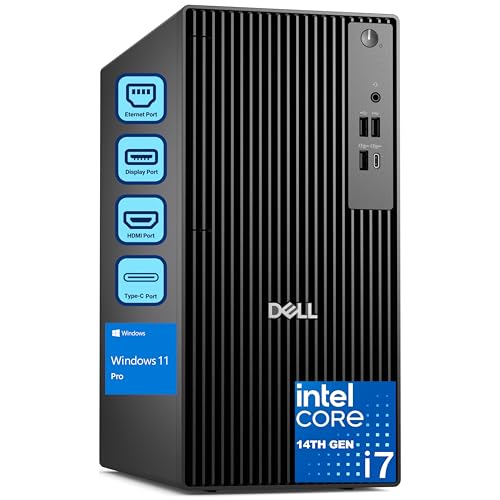
For professionals seeking a powerful and reliable workstation, the Dell OptiPlex 7020 Plus Business Desktop Computer stands out with its robust 14th Gen Intel Core i7 processor, boasting 20 cores and a max turbo speed of 5.4GHz. It comes with 64GB DDR5 RAM, ideal for multitasking and managing numerous browser tabs. The 2TB PCIe SSD guarantees quick boot times and speedy data transfers, while integrated Intel UHD 770 graphics deliver clear images via three DisplayPort outputs. Running on Windows 11 Professional, it enhances security and performance, making it a perfect fit for both business and home environments.
Best For: Professionals and businesses looking for a high-performance desktop computer that excels in multitasking and data processing.
Pros:
- Powerful 14th Gen Intel Core i7 processor with 20 cores, ensuring efficient performance for demanding tasks.
- Ample 64GB DDR5 RAM allows seamless multitasking and management of multiple applications and browser tabs.
- 2TB PCIe SSD provides fast boot times and quick data access, enhancing overall productivity.
Cons:
- No built-in Wi-Fi means users need to rely on the included wireless USB WiFi adapter for internet connectivity.
- Lacks HDMI ports, which may be inconvenient for users needing to connect to HDMI-compatible displays.
- Heavyweight desktop design may not be suitable for users looking for portable computing solutions.
Dell OptiPlex 7020 Plus Tower Desktop Computer
Looking for a powerful workstation that can handle demanding tasks with ease? The Dell OptiPlex 7020 Plus Tower Desktop is your solution. Featuring a 14th Gen Intel Core i7 processor with 20 cores, it delivers exceptional performance. With 64GB of DDR5 RAM and a lightning-fast 2TB PCIe NVMe SSD, multitasking and data transfer are seamless. The integrated Intel UHD 770 graphics support multiple displays, and you’ll appreciate the range of connectivity options, including USB-C and DisplayPort. Although it lacks built-in Wi-Fi, you can easily add a USB WiFi adapter. Experience productivity like never before with this reliable desktop.
Best For: Professionals and businesses seeking a high-performance desktop for multitasking and demanding applications.
Pros:
- High-performance 14th Gen Intel Core i7 processor with 20 cores for exceptional speed.
- Ample memory with 64GB DDR5 RAM, perfect for multitasking and running multiple applications simultaneously.
- Fast storage with a 2TB PCIe NVMe SSD, ensuring quick boot times and rapid data transfer.
Cons:
- No built-in Wi-Fi or Bluetooth, requiring an additional USB WiFi adapter for wireless connectivity.
- Limited power supply (260W), which may restrict future upgrades or high-performance components.
- Potential issues with preowned units, as noted by some customer feedback regarding reliability.
HP OmniDesk Desktop PC (M03-0060)
If you’re seeking a powerful workstation that effortlessly balances style and performance, the HP OmniDesk Desktop PC (M03-0060) stands out as a top contender. Its sleek wooden design enhances any workspace, while the Intel Core Ultra 7 265 Processor delivers impressive AI performance. With 32 GB DDR5 RAM and a 2 TB PCIe Gen4 NVMe SSD, you’ll experience lightning-fast speeds and seamless multitasking. The Intel Graphics provide vivid visuals for both creative tasks and gaming. Plus, with Windows 11 Home and Microsoft Copilot, your productivity and connectivity are elevated, ensuring you stay ahead in today’s fast-paced environment.
Best For: The HP OmniDesk Desktop PC (M03-0060) is best for professionals and creatives who require high performance, efficient multitasking, and stunning visuals in a stylish design.
Pros:
- Powerful Intel Core Ultra 7 265 Processor for efficient AI performance.
- Ample storage with a 2 TB PCIe Gen4 NVMe SSD and 32 GB DDR5 RAM for seamless multitasking.
- Elegant wooden design that enhances the aesthetic of any workspace.
Cons:
- Higher price point compared to basic desktop models.
- Limited upgrade options due to the integrated design.
- Potential overkill for casual users who do not require advanced performance features.
HP Elite 600 G9 SFF Desktop PC

The HP Elite 600 G9 SFF Desktop PC stands out as an ideal choice for professionals who require exceptional speed and multitasking capabilities in their home office setup. Powered by an Intel Core i9-12900K processor, it delivers impressive performance with 16 cores and speeds up to 5.2GHz. You can boost productivity with up to 64GB of DDR5 RAM and a 2TB PCIe M.2 SSD for extensive storage. Its compact design fits easily in any workspace, and it operates quietly. With multiple connectivity options, including USB Type-C and HDMI, you can effortlessly connect to peripherals and 4K monitors for an enhanced experience.
Best For: Professionals seeking exceptional speed and multitasking capabilities in a compact home office setup.
Pros:
- Exceptional performance with an Intel Core i9-12900K processor and up to 64GB DDR5 RAM for demanding workloads.
- Space-saving design fits easily in any workspace while operating quietly, ideal for office or home environments.
- Versatile connectivity options including USB Type-C and HDMI for easy connection to peripherals and 4K monitors.
Cons:
- Higher price point compared to entry-level desktops, which may not be budget-friendly for all users.
- Limited upgrade potential due to small form factor chassis, which may restrict future enhancements.
- Weight may be cumbersome for users needing to frequently move the desktop between locations.
HP Envy Desktop PC Tower (Intel i7-14700, 64GB RAM, 2TB SSD, Windows 11 Pro)

For creators and remote professionals demanding top-tier performance, the HP Envy Desktop PC Tower stands out with its powerful Intel i7-14700 processor and 64GB of RAM. You’ll appreciate the lightning-fast 2TB SSD, ensuring quick access to files and applications. With Windows 11 Pro, enjoy enhanced security and a lifetime Microsoft Office license for seamless productivity. Its Wi-Fi 6 and Bluetooth 5.3 connectivity keep you connected, while the immersive 5.1 surround sound elevates your audio experience. Whether you’re gaming, editing videos, or managing complex spreadsheets, this desktop delivers the raw power and expandability you need for any task.
Best For: Creators, remote professionals, and gamers seeking high-performance computing for multitasking and demanding applications.
Pros:
- Powerful Intel i7-14700 processor with 20 cores and 64GB RAM for exceptional performance.
- Fast 2TB SSD provides quick access to files and enhances overall system responsiveness.
- Comprehensive connectivity options with Wi-Fi 6 and Bluetooth 5.3 to support multiple devices seamlessly.
Cons:
- Limited gaming graphics capability with Intel UHD Graphics 770 may not meet the needs of high-end gamers.
- Potentially overkill for casual users who do not require such high specifications.
- Might be pricier than basic desktops that cater to standard office tasks and browsing.
Dell Inspiron 3030 Desktop – Intel Core i7-14700, 16GB RAM, 1TB SSD

Ideal for professionals seeking a powerful workstation, the Dell Inspiron 3030 Desktop boasts an Intel Core i7-14700 processor and 16GB of fast DDR5 RAM. With a 1TB SSD, you’ll enjoy ample storage and rapid data access. The Intel UHD 770 graphics support stunning visuals, while Windows 11 Pro enhances security and productivity. This compact desktop, weighing just 15.17 pounds, fits seamlessly in any home office. You can connect multiple monitors using USB 3.0 and HDMI ports, and WiFi 6 guarantees stable connectivity. Overall, its performance and efficiency make it an excellent choice for your high-end computing needs.
Best For: Professionals seeking a powerful workstation with high performance and multitasking capabilities.
Pros:
- High Performance: Equipped with an Intel Core i7-14700 processor and 16GB DDR5 RAM for demanding workloads.
- Ample Storage: The 1TB SSD provides fast data access and plenty of storage for files and applications.
- Multi-Monitor Support: Capable of connecting multiple monitors for enhanced productivity and multitasking.
Cons:
- Mixed Tech Support Experiences: Some users report challenges with Dell’s customer support and warranty services.
- Dell Migrate Issues: There are concerns about the effectiveness of the Dell Migrate service for transferring files.
- Weight and Size: At 15.17 pounds, it may be less portable compared to more lightweight desktop options.
HP Elite 600 G9 SFF Desktop Computer
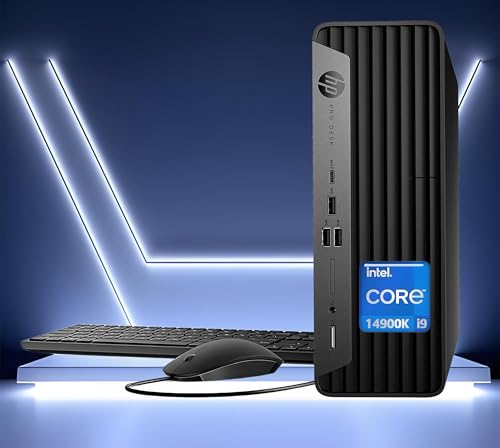
Packed with power, the HP Elite 600 G9 SFF Desktop Computer is perfect for professionals who demand top-tier performance in a compact design. Featuring an Intel Core i9-14900K processor with 24 cores and speeds up to 6.0GHz, it handles multitasking effortlessly. You can expand the 64GB DDR5 RAM to 128GB, ensuring smooth performance for demanding applications. The 1TB PCIe SSD offers ample storage, expandable up to 2TB. With multiple connectivity options, including USB Type-C and HDMI, you can easily set up dual monitors. This machine’s sleek design fits any workspace, making it an ideal choice for ultimate productivity.
Best For: Professionals seeking a high-performance desktop computer for demanding applications in a compact design.
Pros:
- Powerful Processor: Equipped with an Intel Core i9-14900K, providing exceptional speed and multitasking capabilities.
- Expandable Memory and Storage: Offers up to 128GB of RAM and expandable storage options for enhanced performance and capacity.
- Versatile Connectivity: Multiple ports including USB Type-C and HDMI allow for easy dual monitor setup and connectivity to various devices.
Cons:
- Weight: At 11 lbs, it may be less portable compared to lighter compact desktops.
- Integrated Graphics: Lacks dedicated graphics, which may not meet the needs of high-end gaming or graphic design applications.
- Price Point: Higher-end specifications may come with a steep price, potentially making it less accessible for budget-conscious buyers.
HP Pro Business Desktop Computer with Intel Core i9 Processor

Designed for professionals who demand top-tier performance, the HP Pro Business Desktop Computer with Intel Core i9 processor delivers exceptional power and speed. With its 16 cores and 24 threads, it can handle multitasking effortlessly, reaching speeds up to 5.2GHz. You can expand your RAM up to 64GB and enjoy lightning-fast storage with up to 4TB PCIe M.2 SSD. The ultra-quiet design guarantees a conducive work environment, while Wi-Fi 6 and Bluetooth connectivity keep you connected. Plus, it comes with a reliable wired keyboard and mouse, making it a solid choice for any high-end home office setup.
Best For: Professionals and businesses seeking high-performance computing for multitasking and resource-intensive applications.
Pros:
- Powerful Performance: Equipped with an Intel Core i9 processor, offering exceptional speed and multitasking capabilities.
- Expansive Storage: Supports up to 4TB PCIe M.2 SSD for fast data access and ample storage space.
- Quiet Operation: Ultra-quiet design enhances the work environment, making it ideal for office use.
Cons:
- Weight: At 15.7 – 16 LB, it may be less portable compared to smaller desktop options.
- Integrated Graphics: While it supports 4K, the integrated graphics may not meet the needs of gamers or graphic designers requiring high-end visual performance.
- Traditional Accessories: Comes with wired keyboard and mouse, which might not appeal to users preferring wireless options.
Lenovo ThinkCentre Neo 50T Gen 3 Tower Computer

For professionals seeking a powerful and efficient workstation, the Lenovo ThinkCentre Neo 50T Gen 3 Tower Computer stands out with its impressive Intel i7-12700K processor. This 12-core powerhouse operates at a clock speed of 3.6 to 5.2 GHz, ensuring seamless multitasking. With 64GB of RAM and a speedy 2TB NVMe SSD, you’ll handle demanding tasks effortlessly. The Intel UHD Graphics 770 supports stunning 4K visuals, perfect for detailed work. Connectivity options like USB-C and dual-band Wi-Fi keep you linked to everything you need. Designed for productivity, this desktop is a reliable choice for your home office needs.
Best For: Professionals seeking a powerful and efficient workstation for demanding tasks and multitasking.
Pros:
- Exceptional performance with a 12-core Intel i7-12700K processor and 64GB of RAM.
- Fast data access and storage with a 2TB NVMe SSD.
- Supports stunning 4K visuals and offers versatile connectivity options.
Cons:
- No DVD drive included, which may be a limitation for some users.
- Higher price point compared to entry-level desktops.
- Limited graphics capabilities for high-end gaming or specialized graphic design tasks.
Factors to Consider When Choosing High End Home Office PCs
When choosing a high-end home office PC, you’ll want to focus on several key factors. Performance specifications, storage capacity, and connectivity options are essential to guarantee your setup meets your work demands. Don’t forget to take into account graphics capabilities and your preferred operating system to create the perfect work environment.
Performance Specifications Importance
Choosing the right high-end home office PC hinges on understanding the importance of performance specifications. The processor type and speed are vital; multi-core processors excel at multitasking, letting you juggle demanding tasks effortlessly. Your RAM choice matters too—aim for 16GB to 64GB to run multiple applications smoothly without lag. Opt for SSD storage for quicker boot times and snappier data access, enhancing overall responsiveness. While integrated graphics might suffice for everyday use, dedicated graphics cards become essential for graphics-intensive tasks like video editing or gaming. Finally, consider the operating system; Windows 11 Pro offers advanced security and multitasking features, greatly impacting your productivity in a home office setting. Choose wisely, and you’ll maximize your efficiency.
Storage Capacity Requirements
Understanding performance specifications is just the start; storage capacity plays a pivotal role in ensuring your high-end home office PC meets your needs. Most high-end models offer 1TB to 2TB SSDs, providing ample space for large files and essential applications. SSDs are preferred over traditional hard drives due to their faster read/write speeds, enhancing boot times and application loading. If you manage extensive media files or complex databases, consider opting for at least 2TB of storage for smooth performance. Assess your specific requirements based on the applications you run—creative professionals may need more space for high-resolution images and videos. Additionally, look for systems that allow for expansion through multiple drive slots or hybrid storage solutions.
Connectivity Options Available
While evaluating high-end home office PCs, connectivity options should be a top priority. Look for multiple USB ports, including USB 3.0 and USB-C, which allow for fast data transfer and easy connection with various peripherals. Confirm your PC supports Wi-Fi 6 and Bluetooth 5.0 or higher for quicker wireless connections and better range. Check for multiple display outputs like HDMI and DisplayPort, so you can connect several high-resolution monitors to boost your productivity. An integrated Ethernet port is also essential for a reliable wired internet connection, especially during video calls or heavy data transfers. Advanced features such as USB Power Delivery and support for NVMe SSDs can further enhance your connectivity and efficiency.
Graphics Capabilities Needed
When it comes to selecting a high-end home office PC, graphics capabilities play an essential role in ensuring your system meets both everyday and demanding tasks. For basic graphic tasks, integrated graphics like Intel UHD 770 can suffice, supporting 4K video output for enhanced clarity. However, if you’re diving into video editing or 3D rendering, a dedicated graphics card is vital for superior performance and higher frame rates. Don’t overlook the importance of RAM, ideally between 16GB to 64GB, as it aids in processing graphics-intensive applications efficiently. Multi-display support through HDMI and DisplayPort helps you manage multiple applications simultaneously, boosting productivity. Finally, make sure your PC supports the latest graphics standards like DirectX 12 and OpenGL for ideal software compatibility.
Operating System Choice
Choosing the right operating system (OS) can greatly impact your productivity and software compatibility in a high-end home office PC. For instance, Windows 11 Pro offers enhanced security and productivity features specifically designed for professional environments. Its user-friendly interface and rejuvenated Start menu improve ease of use, while advanced multitasking capabilities help you run demanding workloads efficiently.
When selecting an OS, consider its support for hardware and software updates, ensuring you receive ongoing updates and security patches. Additionally, think about the level of technical support available; Windows systems typically have extensive community resources for troubleshooting. Ultimately, the right OS will streamline your workflow and enhance your overall productivity in your home office.
Design and Aesthetics
A well-designed high-end home office PC not only boosts performance but also enhances the overall aesthetic of your workspace. Look for sleek, modern lines and finishes that seamlessly blend with your office decor. Compact form factors, like small form factor (SFF) designs, save space while delivering powerful performance—perfect for your home office. Choose a visually appealing chassis with customizable lighting options to reflect your personal style or office theme. Ergonomics also matter; make sure the PC’s placement allows for comfortable interaction with peripherals, reducing strain during long hours. Finally, consider noise reduction features to maintain a peaceful environment, allowing you to focus on productivity without distractions. The right design can truly transform your workspace.