As you navigate the vibrant world of RGB workstation PCs in 2025, you’ll find a perfect balance between performance and aesthetics. These machines do more than just light up your workspace; they enhance your productivity and elevate your gaming experience. With options like the Skytech Legacy 4 and the iBUYPOWER Y40 PRO, you’ll discover how these top models can transform your workflow. Are you ready to find the ideal setup for your needs?
Skytech King 95 Gaming PC Desktop

The Skytech King 95 Gaming PC Desktop is ideal for gamers and content creators who crave high performance without compromising on aesthetics. With its AMD Ryzen 7 9700X processor and NVIDIA RTX 5070 graphics, you’re set for seamless gameplay at Ultra settings. It boasts 32GB of DDR5 RAM and a 1TB Gen4 NVMe SSD, ensuring quick load times and smooth multitasking. The 360mm ARGB AIO liquid cooler keeps your system running efficiently, while the black King 95 case adds a sleek touch. With Windows 11 and robust wireless support, you’ll enjoy an exceptional experience, whether gaming or creating content.
Best For: Gamers and content creators seeking high performance and stylish design in a powerful gaming PC.
Pros:
- Exceptional gaming performance with the ability to run popular titles at Ultra settings and high frame rates.
- Fast load times and efficient multitasking due to 32GB DDR5 RAM and a 1TB Gen4 NVMe SSD.
- Effective cooling system with a 360mm ARGB AIO liquid cooler, preventing thermal throttling during intense sessions.
Cons:
- Weighs 47.1 pounds, making it less portable for users who may want to move it frequently.
- Limited upgrade options for the graphics card in the future due to the case design and power supply constraints.
- Some users may need to invest in additional peripherals for an enhanced gaming experience.
iBUYPOWER Y40 PRO Gaming PC Desktop Computer

If you’re a gamer or content creator seeking a powerful and visually striking system, the iBUYPOWER Y40 PRO Gaming PC Desktop Computer stands out with its AMD Ryzen 9 7900X processor and NVIDIA GeForce RTX 5070Ti graphics. With 32GB of high-speed DDR5 RAM and a speedy 2TB NVMe SSD, you’ll enjoy quick load times and smooth multitasking. The RGB lighting and tempered glass case enhance its aesthetics, making it a centerpiece in any setup. While customer support has mixed reviews, the overall performance and gaming experience remain excellent, with the ability to run games at 1440p Ultra settings effortlessly.
Best For: Gamers and content creators looking for a high-performance desktop with striking aesthetics and multitasking capabilities.
Pros:
- High-performance AMD Ryzen 9 7900X processor and NVIDIA GeForce RTX 5070Ti graphics for smooth gaming at 1440p Ultra settings.
- Ample 32GB DDR5 RAM and 2TB NVMe SSD ensure fast load times and excellent multitasking capabilities.
- Visually appealing design with RGB lighting and a tempered glass case that enhances any gaming setup.
Cons:
- Mixed reviews regarding customer support, with some users experiencing long wait times and troubleshooting difficulties.
- Reported issues such as Windows activation problems and audio jack failures.
- Some minor cosmetic issues have been noted, including scratches on the tempered glass.
Thermaltake LCGS Quartz i1460 Gaming Desktop (S2QT-B760-560-LCS)

For creative professionals and gamers alike, the Thermaltake LCGS Quartz i1460 Gaming Desktop (S2QT-B760-560-LCS) stands out with its powerful Intel Core i5-14400F CPU and NVIDIA GeForce RTX 5060 graphics card. You’ll appreciate the 16GB ToughRam DDR4 3600Mhz RGB memory, ensuring smooth multitasking during intense sessions. With 1TB NVMe M.2 storage, loading times become a thing of the past. The stunning 3mm thick tempered glass side panel showcases the ARGB tower air cooler, adding flair to your setup. Plus, with built-in WiFi and Windows 11 Home, your connectivity and user experience are exceptional. Illuminate your workflow with style!
Best For: The Thermaltake LCGS Quartz i1460 Gaming Desktop is best for gamers and creative professionals seeking a powerful and stylish computing solution.
Pros:
- High-performance components with Intel Core i5-14400F CPU and NVIDIA GeForce RTX 5060 for smooth gaming and multitasking.
- Impressive storage capacity of 1TB NVMe M.2 for fast load times and ample space for games and applications.
- Aesthetic design featuring a 3mm thick tempered glass side panel and RGB memory for an eye-catching setup.
Cons:
- Limited upgradeability due to the compact design and specific motherboard limitations.
- Potentially high noise levels from the cooling system under heavy load.
- Price point may be higher compared to similar systems with lower specifications.
STGAubron RGB PC Computer Desktop with AMD Ryzen 7 5700G
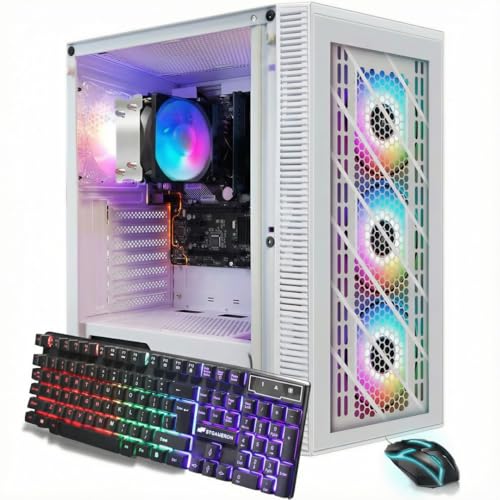
Ideal for users who need a powerful yet stylish workstation, the STGAubron RGB PC Desktop with the AMD Ryzen 7 5700G combines performance and aesthetics seamlessly. With a clock speed reaching up to 4.6GHz and 16GB of DDR4 RAM, it handles tasks like photo editing, gaming, and streaming with ease. The 1TB SSD guarantees quick load times, while integrated Radeon Vega 8 graphics deliver solid visuals. Plus, the RGB fans and accessories enhance your setup’s look. Connectivity options, including Wi-Fi 6 and Bluetooth 5.2, keep you connected. Enjoy peace of mind with a one-year warranty and free lifetime tech support.
Best For: Users seeking a stylish and powerful desktop for casual gaming, photo/video editing, and general productivity tasks.
Pros:
- High performance with AMD Ryzen 7 5700G and 16GB DDR4 RAM suitable for multitasking.
- Aesthetic appeal enhanced by RGB fans and accessories, making it a visually striking addition to any workspace.
- Robust connectivity options including Wi-Fi 6 and Bluetooth 5.2 for seamless online experiences.
Cons:
- Potential Wi-Fi issues reported by some users, affecting internet connectivity.
- Concerns about durability when performing heavy processing tasks, indicating the need for potential upgrades.
- Integrated graphics may not suffice for demanding gaming or high-end graphic applications.
Skytech Legacy 4 Gaming PC Desktop

The Skytech Legacy 4 Gaming PC Desktop is an exceptional choice for gamers and content creators seeking high-quality performance and stunning visuals. With the AMD Ryzen 9 9950X3D CPU and NVIDIA RTX 5090 graphics card, you’ll experience ultra-settings at 4K resolution with over 60 FPS. The 4TB Gen4 NVMe SSD and 64GB DDR5 RAM guarantee lightning-fast load times and seamless multitasking. Cooling is first-rate thanks to the 420mm AIO liquid cooler with ARGB fans, eliminating thermal throttling. Plus, its sleek white tempered glass case enhances your workspace’s aesthetics. Enjoy the peace of mind with Skytech’s all-encompassing warranty and support!
Best For: Gamers and content creators seeking top-tier performance with stunning graphics and smooth gameplay at 4K resolution.
Pros:
- Exceptional gaming performance with AMD Ryzen 9 9950X3D and NVIDIA RTX 5090 for ultra-settings and 60+ FPS.
- Large storage capacity with a 4TB Gen4 NVMe SSD for fast load times and ample space for games and content.
- High-quality cooling system with a 420mm AIO liquid cooler, preventing thermal throttling during intense sessions.
Cons:
- Higher price point may not be suitable for budget-conscious buyers.
- Large size (24 x 23.5 x 12.25 inches) may require ample desk space.
- Weight of 30 pounds may make it less portable for users needing a gaming setup on the go.
iBUYPOWER Slate MESH Gaming PC Desktop Computer

Designed for gamers and content creators who crave high performance, the iBUYPOWER Slate MESH Gaming PC delivers impressive capabilities with its Intel Core i7 14700F processor and NVIDIA GeForce RTX 5070 graphics card. With 32GB of DDR5 RGB RAM and a lightning-fast 1TB NVMe SSD, you’ll experience seamless multitasking and rapid load times. Its sleek design features a tempered glass RGB gaming case and customizable lighting, adding flair to your setup. Connectivity is a breeze with multiple USB ports and 802.11AC Wi-Fi. Plus, you’ll enjoy peace of mind with a solid warranty and excellent customer support.
Best For: Gamers and content creators seeking high-performance capabilities in a stylish and customizable desktop computer.
Pros:
- High-performance Intel Core i7 processor and NVIDIA GeForce RTX graphics card for seamless gaming and content creation.
- Ample 32GB DDR5 RAM and 1TB NVMe SSD ensure fast load times and efficient multitasking.
- Aesthetic design with customizable RGB lighting and included gaming peripherals enhances the overall gaming experience.
Cons:
- Weighs 36 pounds, making it less portable compared to lighter gaming PCs.
- Limited to Windows 11 Home, which may not suit all users’ preferences.
- Best Sellers Rank indicates it may not be the top choice among all gaming PCs available.
Skytech Gaming King 95 Desktop PC

For gamers and content creators seeking a powerful and visually stunning setup, the Skytech Gaming King 95 Desktop PC stands out with its impressive AMD Ryzen 7 9700X processor and NVIDIA GeForce RTX 5070 graphics card. With 32GB of DDR5 RAM and a 1TB Gen4 NVMe SSD, you’ll enjoy lightning-fast load times and seamless multitasking. Plus, its 360mm AIO liquid cooler guarantees peak thermal management during intense sessions. The sleek black case, enhanced with customizable ARGB lighting, adds flair to your workspace. With a one-year warranty and stellar customer support, the King 95 promises performance and peace of mind.
Best For: Gamers and content creators looking for a high-performance desktop PC that combines powerful hardware with stunning aesthetics.
Pros:
- Exceptional gaming performance at Ultra settings and 1440p resolution with smooth frame rates.
- Efficient cooling system with a 360mm AIO liquid cooler, preventing thermal throttling during demanding tasks.
- Customizable ARGB lighting adds a visually appealing element to your gaming setup.
Cons:
- The weight of 58.9 pounds may make it less portable compared to lighter gaming PCs.
- Limited return policy conditions may complicate returns for items with issues beyond initial damage.
- The high-end components may come at a premium price point, affecting budget-conscious buyers.
SEDETA Gaming Desk with LED Lights and Storage Shelves
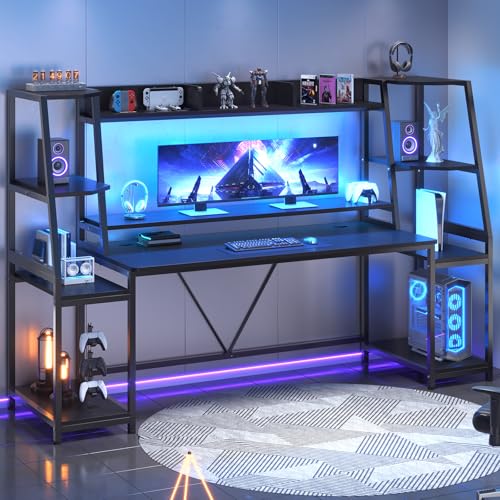
Looking for a multifunctional workstation that seamlessly blends gaming and productivity? The SEDETA Gaming Desk is your perfect match. With its spacious 55 x 21.6-inch surface, it supports dual computers while providing ample room for your gaming gear. The two large storage shelves keep everything organized, from your CPU to books. Plus, the RGB LED lights add flair, with over 60,000 colors and 29 flashing modes, all controllable via an app. Its ergonomic design promotes good posture, reducing neck fatigue. Easy assembly and responsive customer support guarantee a hassle-free setup, making it a popular choice for gamers and professionals alike.
Best For: Gamers and professionals seeking a multifunctional workstation that enhances both gaming and productivity.
Pros:
- Spacious desktop supports dual computers and provides ample room for gaming gear.
- RGB LED lights with extensive color options and app control enhance the gaming atmosphere.
- Ergonomic design promotes good posture, reducing neck fatigue during extended use.
Cons:
- Assembly may require time and effort due to multiple parts.
- Limited color options for the desk itself, primarily focusing on LED features.
- The size may be too large for smaller rooms or workspaces.
HP RGB Gaming Desktop Computer (Renewed)

The HP RGB Gaming Desktop Computer (Renewed) stands out as an excellent choice for budget-conscious gamers and casual users seeking a vibrant, visually appealing setup. With its Intel Quad Core i5 processor and NVIDIA GeForce GTX 750 Ti graphics, you can enjoy light gaming and retro titles effortlessly. The 16GB DDR4 memory and 512GB SSD guarantee smooth performance for work tasks and online activities. Plus, the RGB lighting adds flair to your workspace. While the included keyboard and mouse are basic, consider upgrading them for a better experience. Overall, it’s a solid entry-level option for gaming and productivity.
Best For: Budget-conscious gamers and casual users looking for an entry-level gaming and productivity desktop with appealing RGB aesthetics.
Pros:
- Compact size and quick boot time enhance the user experience.
- Capable of handling light gaming and older titles smoothly.
- Comes with RGB case lighting and includes a gaming mouse and keyboard.
Cons:
- The included keyboard and mouse are basic and may require upgrades for better performance.
- Some users report reliability issues, including random shutdowns and power problems.
- Potential longevity concerns due to low-quality components sourced from less reputable suppliers.
HP ProDesk Desktop RGB Gaming PC (Renewed)

With its vibrant front panel RGB lights and a powerful Intel Core i5-6500 processor, the HP ProDesk Desktop RGB Gaming PC (Renewed) stands out as an excellent choice for creative professionals and casual gamers alike. You’ll appreciate the quick boot-up time thanks to the 256GB SSD and 8GB DDR4 RAM. The adjustable RGB lights add flair, while the included gaming keyboard and mouse combo enhance your experience. Although the integrated Intel HD Graphics may limit gaming capabilities, you can easily upgrade with a low-profile graphics card. Plus, Windows 11 Pro guarantees you stay up to date with the latest features.
Best For: Creative professionals and casual gamers looking for an affordable, customizable PC with stylish RGB lighting.
Pros:
- Quick boot-up time with 256GB SSD and 8GB DDR4 RAM.
- Adjustable RGB lights add a personalized aesthetic.
- Includes a gaming keyboard and mouse combo for an enhanced experience.
Cons:
- Integrated Intel HD Graphics limits gaming performance without additional hardware.
- Some users reported issues with the remote control and connectivity.
- Lack of HDMI cords and Bluetooth connectivity may be a drawback.
Factors to Consider When Choosing Rgb Workstation PCs
When you’re choosing an RGB workstation PC, it’s essential to think about performance specifications that meet your needs. Don’t forget to take into account the aesthetic design elements and cooling solutions, as these can impact both functionality and style. Finally, keep your budget in mind while weighing upgrade potential, ensuring you get the best value for your investment.
Performance Specifications Required
Choosing the right RGB workstation PC hinges on understanding key performance specifications that can greatly impact your workflow. First, opt for processors with higher clock speeds, like the AMD Ryzen 9 or Intel Core i7/i9, as they enhance performance during intensive tasks. You should also look for at least 32GB of DDR5 RAM to guarantee smooth multitasking and efficient handling of demanding applications. For graphics, select cards with a minimum of 12GB of GDDR7 memory to excel in high-resolution gaming and rendering. NVMe SSDs with 1TB or more are essential for fast load times and improved data transfer speeds. Finally, make certain your cooling system, such as AIO liquid cooling, can maintain lower temperatures during prolonged workloads, preventing thermal throttling.
Aesthetic Design Elements
Beyond performance specifications, the aesthetic design elements of RGB workstation PCs play a significant role in your overall experience. Customizable RGB lighting lets you personalize your setup, matching colors and effects to your mood or style. Tempered glass side panels enhance visual appeal, showcasing internal components while adding a modern touch. Ergonomic design features, like monitor shelves and spacious desktops, promote comfort during long hours, reducing strain on your neck and back. Cohesive RGB components, such as RAM and cooling fans, create a visually striking environment that elevates your gaming or working experience. Finally, high-quality materials like aluminum and premium plastics not only guarantee durability but also enhance the overall aesthetic value of your workstation, making it a true centerpiece.
Cooling Solutions Importance
Cooling solutions are essential for maintaining ideal performance in RGB workstation PCs, especially during demanding tasks like gaming or video editing. Effective cooling prevents thermal throttling, which can harm performance when your system’s under pressure. High-performance options like AIO liquid coolers or ARGB fans help keep temperatures optimal, allowing processors and graphics cards to perform at their best without overheating. This proper cooling not only boosts performance but also extends the lifespan of your components by minimizing heat-related damage. Plus, advanced cooling solutions provide constant airflow and efficient heat dissipation, enhancing your multitasking capabilities. A well-cooled PC can elevate your experience by reducing noise levels, as quieter systems operate more efficiently under load than standard air coolers.
Upgrade Potential Considerations
When considering an RGB workstation PC, it’s essential to think about its upgrade potential to guarantee long-term usability and adaptability. Start by evaluating how easily you can upgrade components like RAM, storage, and graphics cards—look for models with accessible cases and modular designs. Check the motherboard specifications for compatibility with newer processors and RAM types, ensuring it can keep up with evolving tech. Assess the power supply unit (PSU) wattage and efficiency, as a higher-rated PSU can support additional hardware without needing replacement. Also, consider cooling solutions to maintain performance during upgrades. Finally, review customer feedback on upgrade experiences; insights from other users can highlight potential challenges or advantages in modifying specific workstation models.
Budget Constraints Awareness
Setting a budget for your RGB workstation PC is essential, especially since high-performance components can quickly push costs beyond $1,500 for mid to high-end systems. Don’t forget to factor in additional costs like RGB peripherals, which can add another $100 to $300 to your total. If you’re on a tighter budget, options in the $600 to $800 range exist, but they often compromise graphics capabilities and storage speed, potentially limiting performance for demanding applications. Always evaluate the total cost of ownership, considering future upgrades and maintenance. While RGB lighting enhances aesthetics, it shouldn’t overshadow performance specifications. Prioritize capability over cosmetic features to guarantee your workstation meets your workflow needs effectively.