The best deep-learning workstation depends on what you plan to run locally. Prototyping models, working with large datasets, and training on a dedicated GPU put very different demands on memory, compute, and storage.
These 10 picks span compact AI desktops, high-memory CPU workstations, and systems built around professional GPUs. Use the guide below to narrow the field before checking each system’s exact configuration.
Best 10 Workstation PCs for Deep Learning Picks for 2026
Best NVIDIA Software Integration

- GB10 Grace Blackwell Superchip
- 128GB unified memory; 4TB NVMe SSD
- DGX OS and NVIDIA AI software stack
Best For: Local NVIDIA AI development and large-model experiments
Best Expansion Options

- Ryzen AI Max+ 395 with 128GB unified memory
- Dual 10GbE and USB4 V2 connectivity
- PCIe x16 slot and dual M.2 slots
Best For: Expandable local AI work and compact clusters
Best for Bundled QSFP Connectivity

- Grace Blackwell GPU and 20-core Arm CPU
- 128GB unified memory; 4TB Gen5 NVMe SSD
- QSFP cable included
Best For: Grace Blackwell development with ample local storage
Best for Local RAG Workflows

- GB10 Grace Blackwell Superchip
- 128GB unified memory; 2TB NVMe SSD
- DGX OS, 10GbE, and Wi-Fi 7
Best For: Local LLM testing and RAG prototyping
Maximum GPU Memory
Sentinel Threadripper PRO 9995WX

- RTX PRO 6000 with 96GB GDDR7
- 96-core CPU and 384GB ECC RAM
- 4TB Gen5 SSD plus 12TB HDD
Best For: Large dedicated GPU memory and CPU-heavy workflows
Unified-Memory AI System
- Grace Blackwell with 20-core Arm CPU
- 128GB coherent unified memory
- Two 4TB Gen5 NVMe SSDs
Best For: Arm-based AI development with unified memory
High-RAM Windows Tower
Adamant Custom 64-Core Threadripper PRO
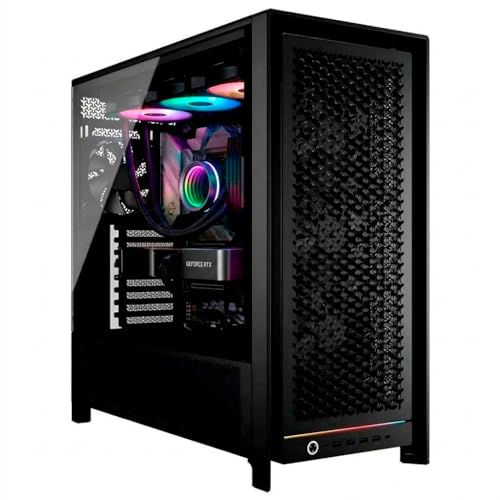
- 512GB ECC DDR5 system RAM
- 64-core Threadripper PRO CPU
- Confirm conflicting 48GB/32GB GPU memory listing
Best For: Memory-intensive Windows workflows and CPU-heavy preprocessing
GPU Memory Pick
Empowered PC 4U Rackmount RTX PRO 6000

- Listed RTX PRO 6000 with 96GB VRAM
- 24-core Intel CPU and 96GB DDR5
- 4TB SSD plus 6TB HDD
Best For: GPU-memory-focused work in a rack-compatible chassis
CPU and RAM Pick
Adamant Custom 64-Core RTX 4000 Workstation
- 64-core Threadripper PRO processor
- 512GB ECC DDR5 system memory
- 8TB NVMe SSD plus 8TB HDD
Best For: CPU-heavy preprocessing and large system-memory workloads
Balanced Memory Pick
Adamant Custom 64-Core RTX 4500 Workstation

- Listed RTX 4500 Blackwell with 32GB VRAM
- 64-core Threadripper PRO and 512GB ECC RAM
- 8TB NVMe SSD plus 8TB HDD
Best For: High-core-count workflows needing more listed GPU memory than RTX 4000
Best NVIDIA Software Integration – NVIDIA DGX Spark
NVIDIA DGX Spark™ - Personal AI Desktop Supercomputer – Desktop GB10 Grace Blackwell Chip
Check Price On AmazonAmong workstation pcs for deep learning, the NVIDIA DGX Spark is a compact choice for developers who want to build and test AI models locally within the NVIDIA software stack. Its GB10 Grace Blackwell Superchip pairs 128GB of unified memory with up to 1 petaFLOP of FP4 AI performance.
Best For: Developers prototyping, fine-tuning, and running large models locally with NVIDIA DGX OS.
Pros:
- 128GB unified memory supports experiments with models up to 200 billion parameters at FP4.
- 4TB self-encrypting NVMe storage provides room for models and project files.
- DGX OS and the NVIDIA AI software stack support a develop-locally, deploy-anywhere workflow.
Cons:
- 128GB is the listed maximum memory, limiting memory upgrades.
- ARM-based architecture may require checking compatibility with existing software.
Choose the DGX Spark when its integrated NVIDIA development environment matters more than conventional desktop expandability; the headline performance and model-size figures are specified for FP4 workloads.
Best Expansion Options – MINISFORUM MS-S1 MAX
The MINISFORUM MS-S1 MAX stands out among workstation pcs for deep learning if you need a compact machine with extensive connectivity. Its Ryzen AI Max+ 395 combines a 16-core CPU, RDNA 3.5 graphics, and a 50-TOPS NPU, while 128GB of unified memory supports local model work.
Best For: Users building a flexible local AI workstation with fast networking and room for storage or PCIe expansion.
Pros:
- 128GB LPDDR5x unified memory gives the CPU and GPU a shared memory pool.
- Dual 10GbE, USB4 V2, a PCIe x16 slot, and dual M.2 slots offer varied expansion paths.
- Slide-out chassis and 2U rack support suit both desktop and clustered setups.
Cons:
- The listed operating system is unspecified; confirm software setup before buying.
- Published large-model cluster results require multiple units, not one desktop.
This is the practical pick when ports, networking, and deployment flexibility are priorities. Treat the advertised 235B and 671B model examples as multi-unit configurations rather than single-system expectations.
Best for Bundled QSFP Connectivity – MSI EdgeXpert
The MSI EdgeXpert is one of the workstation pcs for deep learning built around NVIDIA Grace Blackwell architecture. It combines a Blackwell GPU, 20-core Arm CPU, and 128GB of coherent unified memory in a desktop AI system that includes a QSFP cable.
Best For: AI developers seeking a Grace Blackwell system with 4TB of storage and a supplied QSFP cable.
Pros:
- 128GB unified LPDDR5x memory supports shared CPU-GPU workloads.
- 4TB self-encrypting Gen5 NVMe storage offers substantial local capacity.
- Includes a QSFP cable and specifies up to 1,000 AI FLOPS at FP4.
Cons:
- 128GB is the listed maximum memory.
- ARM-based CPU warrants a compatibility check for software built for other architectures.
The EdgeXpert makes sense if its included cable and 4TB SSD match your planned setup. As with other FP4-rated systems, compare performance claims against the precision your actual workload uses.
Best for Local RAG Workflows – ASUS Ascent GX10
The ASUS Ascent GX10 targets buyers comparing workstation pcs for deep learning who plan to run local inference, model evaluations, or RAG experiments. Its NVIDIA GB10 Grace Blackwell Superchip, 128GB of unified memory, and DGX OS put the focus on AI development rather than general-purpose desktop upgrades.
Best For: Researchers and developers prototyping local LLM, RAG, and agentic AI workflows.
Pros:
- 128GB unified memory supports demanding local model workflows.
- DGX OS and the NVIDIA AI software stack support common AI development tools.
- 2TB NVMe SSD, 10GbE, Wi-Fi 7, and ConnectX-7 provide storage and connectivity for a compact lab setup.
Cons:
- 2TB of listed storage is less than the 4TB offered by some other systems here.
- 128GB is the listed maximum memory.
The GX10 is a focused option for an NVIDIA-based development desk, particularly when local RAG and model testing are the goal. Check that its 2TB SSD has enough room for your datasets, checkpoints, and containers.
Maximum GPU Memory – Sentinel Threadripper PRO 9995WX
Among workstation pcs for deep learning, this Sentinel stands out for its RTX PRO 6000 with 96GB of dedicated GDDR7 memory. A 96-core Threadripper PRO 9995WX and 384GB of ECC DDR5 RAM add substantial resources for CPU-heavy preprocessing and multitasking.
Best For: Buyers who need a large dedicated GPU memory pool alongside a high-core-count Windows workstation.
Pros:
- 96GB RTX PRO 6000 GPU offers substantial dedicated memory.
- 96-core, 192-thread CPU and 384GB ECC RAM support demanding parallel work.
- 4TB Gen5 SSD plus 12TB HDD separates fast working storage from bulk storage.
Cons:
- At 49.8 pounds, the tower is not easy to move.
- The listing guarantees only one HDMI and one DisplayPort output; additional ports may vary.
This is the strongest fit here if dedicated GPU memory is your primary selection criterion, while the HDD is better treated as bulk storage than as the fast working drive.
For buyers comparing workstation pcs for deep learning, the MSI EdgeXpert takes a different approach: its NVIDIA Grace Blackwell platform pairs a 20-core Arm CPU and Blackwell GPU with 128GB of coherent unified memory. It runs DGX OS rather than Windows and includes two 4TB Gen5 NVMe SSDs.
Best For: AI developers who want a compact Grace Blackwell system and are comfortable working in DGX OS on Arm.
Pros:
- 128GB coherent unified memory gives the CPU and GPU a shared memory architecture.
- Two 4TB Gen5 NVMe SSDs provide 8TB of fast storage.
- 9-pound system has a stated 240-watt power consumption.
Cons:
- DGX OS and Arm architecture may require a workflow change for Windows or x86 users.
- Unified memory should not be mistaken for 128GB of conventional dedicated GPU VRAM.
Choose this for its integrated AI-development platform, not as a direct substitute for a conventional Windows tower with a discrete graphics card.
This Adamant Custom build is a high-memory option among workstation pcs for deep learning: it combines 512GB of ECC DDR5 RAM, a 64-core Threadripper PRO 9985WX, and an RTX 5000 Blackwell GPU. Two 4TB Gen4 NVMe SSDs provide working storage, with an additional 8TB HDD for bulk files.
Best For: Windows-based workflows that benefit from extensive system RAM, many CPU cores, and a professional NVIDIA GPU.
Pros:
- 512GB ECC DDR5 RAM suits memory-intensive preprocessing and multitasking.
- 64-core CPU is paired with a 280mm liquid cooler.
- Includes 8TB total NVMe storage, an 8TB HDD, and a 1200W Gold-rated power supply.
Cons:
- Listing conflicts on GPU memory: the title and bullets say 48GB, while a detail field says 32GB; confirm before buying.
- The listed NVMe drives are Gen4, not Gen5.
Its standout specification is system RAM capacity, but the inconsistent GPU-memory listing is important to resolve before choosing it for model workloads.
GPU Memory Pick – Empowered PC 4U Rackmount RTX PRO 6000
Among workstation pcs for deep learning, this 4U rackmount system stands out for its listed RTX PRO 6000 with 96GB of VRAM. It pairs that GPU with a 24-core Intel processor, 96GB of DDR5 memory, a 4TB SSD, and a 6TB HDD.
Best For: Buyers prioritizing GPU memory for large models in a rack-compatible workstation.
Pros:
- Listed 96GB GPU memory offers substantial room for model weights and training workloads.
- 4TB SSD plus 6TB HDD separates fast working storage from bulk storage.
- 4U chassis, liquid cooling, Windows 11 Pro, and a three-year warranty suit a dedicated workspace.
Cons:
- 96GB of system RAM is modest beside the GPU’s listed 96GB of VRAM for especially memory-heavy data preparation.
- The listing conflicts on the Intel CPU designation, so confirm the exact configuration before ordering.
Choose this configuration for its GPU-memory emphasis rather than the highest CPU core count. Verify the processor and rack fit with the seller before purchase.
CPU and RAM Pick – Adamant Custom 64-Core RTX 4000 Workstation
For buyers comparing workstation pcs for deep learning alongside heavy preprocessing and other CPU-intensive tasks, this Adamant Custom build emphasizes a 64-core Threadripper PRO 9985WX and 512GB of ECC DDR5 memory. Its listed RTX 4000 Blackwell GPU, 8TB of NVMe SSD storage, and 8TB HDD complete the configuration.
Best For: Workflows that need abundant CPU cores and system RAM more than maximum GPU memory.
Pros:
- 64-core CPU and 512GB ECC RAM support demanding data preparation and multitasking.
- Two 4TB NVMe drives provide substantial fast storage, with an additional 8TB HDD.
- Includes liquid cooling, a 1200W 80 PLUS Gold power supply, and a three-year parts-and-labor warranty.
Cons:
- The RTX 4000’s stated 24GB VRAM is a tighter limit for large GPU-resident models than the other listed builds.
- The product details also state 20GB of graphics memory; confirm the installed GPU and VRAM before buying.
This is the CPU-and-memory-oriented choice of the three. Check the GPU specification carefully if your model size makes VRAM the deciding factor.
Balanced Memory Pick – Adamant Custom 64-Core RTX 4500 Workstation
This Adamant Custom configuration combines a 64-core Threadripper PRO 9985WX, 512GB of ECC DDR5, and a listed RTX 4500 Blackwell with 32GB of VRAM. For shoppers seeking workstation pcs for deep learning, it offers more stated GPU memory than the RTX 4000 build while retaining the same substantial CPU and system-memory specifications.
Best For: Buyers who want high CPU core count and system RAM with more listed GPU memory than the RTX 4000 configuration.
Pros:
- Listed 32GB GPU memory provides more headroom than the 24GB RTX 4000 configuration.
- 64-core CPU and 512GB ECC RAM are suited to demanding preprocessing and multitasking.
- Includes 8TB of NVMe SSD storage, an 8TB HDD, liquid cooling, and a three-year parts-and-labor warranty.
Cons:
- The stated 32GB VRAM remains below the rackmount system’s listed 96GB for GPU-memory-intensive models.
- The product details also list 24GB of graphics memory; confirm the GPU and VRAM before purchase.
Consider this the middle ground when the RTX 4000 build’s GPU memory feels restrictive but 512GB of system RAM and 64 CPU cores remain priorities.
How We Picked the Best Workstation PCs for Deep Learning
We prioritized the specifications that affect local deep-learning work: accelerator type, available memory, CPU and system RAM, storage, and form factor. We also considered whether a system offers a clear upgrade path or a more self-contained development environment. A high core count or a large RAM figure can be valuable, but neither substitutes for a suitable GPU when your workload depends on GPU-accelerated training.
Configurations can vary by seller. Before ordering, confirm the installed accelerator, usable memory, operating system, included storage, and support terms for the exact listing.
Quick Comparison: Which Type Fits Your Work?
- Compact Grace Blackwell systems: The NVIDIA DGX Spark and ASUS Ascent GX10 suit buyers who want a small, integrated environment for compatible AI workflows. Check model fit, framework support, and the limits of their shared memory architecture.
- Compact AMD AI workstation: The MINISFORUM MS-S1 MAX offers substantial unified memory in a small PC. Verify that your frameworks and required acceleration features support its hardware before choosing it over a CUDA-oriented system.
- Arm-based desktop AI computers: The MSI EdgeXpert configurations differ in listed storage capacity. Confirm software compatibility, connectivity, and whether the supplied configuration suits your deployment workflow.
- Discrete-GPU workstations: The Sentinel tower and Quiet Rackmount system list RTX PRO 6000 GPUs, making them the most direct candidates here for buyers who need a specified dedicated GPU. Confirm the GPU variant and memory in the listing.
- High-memory Threadripper systems: The Adamant Custom configurations emphasize CPU cores and RAM. Check whether a GPU is included; do not assume they are ready for GPU training as listed.
Key Buying Factors for Workstation PCs for Deep Learning
Accelerator and Software Support
Start with the frameworks, libraries, and models you actually use. Confirm their support for the system’s GPU or integrated accelerator, operating system, and processor architecture. If your workflow requires CUDA, verify that the exact configuration provides a compatible NVIDIA GPU; a powerful CPU or integrated GPU alone does not meet that requirement.
Memory, Storage, and Expansion
Estimate memory needs from your largest models, batch sizes, and concurrent tasks. Dedicated GPU memory and unified system memory are not interchangeable, so compare usable capacity in the context of your software. Leave room on a fast SSD for datasets, checkpoints, and environments. If you expect to add GPUs or drives, check slot availability, power supply capacity, cooling, and physical clearance first.
Form Factor and Ownership
Compact systems save desk space but may offer limited internal upgrades. Towers can be easier to expand, while a 4U rackmount PC makes sense only if you have suitable rack space, power, airflow, and noise tolerance. For any workstation, check warranty coverage and service options alongside the hardware price.
Who Should Buy Which Workstation PCs for Deep Learning?
Choose a compact AI desktop if space and an integrated development setup matter most, provided your software is compatible. Choose a listed RTX PRO 6000 system if a dedicated GPU is central to your workload, then verify its exact specifications. Consider a high-RAM Threadripper workstation for CPU-heavy preprocessing, large in-memory datasets, or a planned GPU installation—but budget for that GPU separately if it is not included.