The best electronic writing tablets make handwritten notes easier to organize, search, share, and carry than paper notebooks. The right choice depends on whether you prioritize distraction-free writing, color, drawing performance, Android apps, or portability.
We selected 10 capable models spanning E Ink notebooks, standalone drawing tablets, Android tablets, and paper-like displays, so you can match features and workflow to your everyday needs.
Best 10 High-Performance Electronic Writing Tablets Picks for 2026
Best for Feature-Rich Note Taking

- 16,384-pressure-level X3 Pro Pencil 2
- 90Hz AG nano-etched LCD with three color modes
- Android note, PDF, handwriting, and AI tools
Best For: Students and professionals who want advanced digital note taking on Android
Best for Students

- 11-inch 2.5K IPS display with 90Hz refresh
- 8GB RAM, 256GB storage, and Dimensity 6300 processor
- Includes Tab Pen, folio case, and learning apps
Best For: College students balancing handwritten study notes with everyday tablet use
Best for Distraction-Free Writing
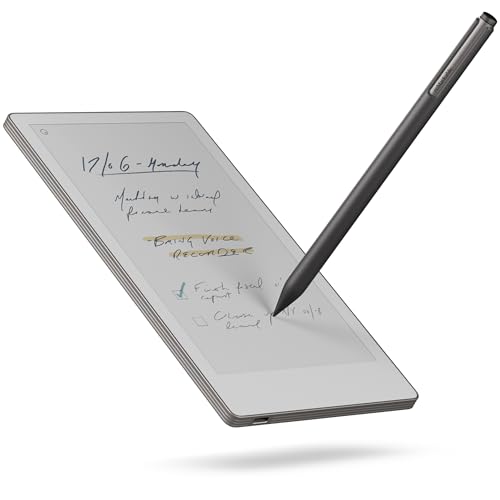
- Compact 7.3-inch Canvas Color display
- Includes Marker Plus and six spare tips
- Handwriting conversion, search, tags, and cloud sync
Best For: Traveling writers and professionals who prefer focused digital paper
Best for Mobile Digital Art

- 16,384-pressure-level stylus with 60-degree tilt
- 12.2-inch 2.2K AG display with 97% sRGB
- Standalone Android 14 tablet with 13-hour battery
Best For: Artists and illustrators who want portable, computer-free creation
Best Overall

- 11.8-inch color E Ink display
- Marker Plus with built-in eraser
- Folders, PDF markup, and handwriting conversion
Best For: Focused writing, sketching, reading, and document organization
Best Feature-Packed Android Option

- 10.3-inch 300-ppi E Ink screen
- Android 14 with 128GB storage
- AI transcription and third-party app support
Best For: Flexible reading, note-taking, and productivity workflows
Best Portable Pick

- Compact 7.3-inch color E Ink display
- Includes premium leather folio
- Handwriting conversion and cloud syncing
Best For: Meetings, travel, and focused note-taking on the go
Best Large-Screen Pick

- 14.3-inch 2.4K paper-like display
- 4096-level T-PEN stylus support
- 10,000mAh battery with Android multitasking
Best For: Large-screen writing, drawing, reading, and media use
Best Real-Paper Smart Notebook

- Digitizes writing on real A5 paper
- 8192 pressure levels with Bluetooth 5.3
- Offline notes with Android and iOS syncing
Best For: Paper-based note-taking, meetings, classes, and sketching
Best Focused E-Ink Notebook

- 10.3-inch high-contrast E Ink display
- 21 ms digital-ink response
- Handwriting conversion and document integrations
Best For: Focused writing, meetings, reading, and PDF markup
Best for Feature-Rich Note Taking – XPPen Magic Note Pad
For shoppers comparing high-performance electronic writing tablets, the XPPen Magic Note Pad stands out as a full Android tablet built around digital note taking. Its 10.95-inch AG nano-etched LCD combines a paper-like texture with a 90Hz refresh rate, while the included X3 Pro Pencil 2 supports highly responsive handwriting and annotation.
Best For: Students, meeting notes, PDF annotation, and users who want advanced note-taking tools in a conventional Android tablet.
Pros:
- 16,384 pressure levels, tilt support, a soft nib, and a magnetic pencil design.
- XPPen Notes supports handwriting-to-text conversion, audio recording, PDF editing, cloud uploads, and AI-assisted features after system updates.
- Three display modes, 90Hz refresh rate, 16.7 million colors, and AG anti-glare glass.
- Android 14 provides access to the broader Android app ecosystem.
Cons:
- This is a regular LCD Android tablet, not an E Ink device.
- Some MyScript and enhanced AI Notes functions require a system upgrade.
The Magic Note Pad is a strong fit when writing performance and digital organization matter more than an E Ink viewing experience. Its display and Android platform make it versatile, but buyers specifically seeking paper-like E Ink visuals should consider another category.
Best for Students – Lenovo Idea Tab with Pen
The Lenovo Idea Tab is a practical choice among high-performance electronic writing tablets for schoolwork, combining an 11-inch 2.5K IPS touchscreen with a MediaTek Dimensity 6300 processor, 8GB of memory, and 256GB of storage. Its included Tab Pen and learning apps make it ready for writing, organization, calculations, and everyday Android use.
Best For: College students who need one tablet for handwritten notes, assignments, web searches, streaming, and multitasking.
Pros:
- Sharp 2.5K display with a smooth 90Hz refresh rate and stylus support.
- Includes a Lenovo Tab Pen and folio case.
- Four learning-focused apps include Lenovo AI Note, Squid, Nebo, and MyScript Calculator.
- Up to 12 hours of YouTube playback and 20W charging support.
Cons:
- The display is an IPS LCD rather than an E Ink writing screen.
- Its 1.1-pound weight may be less pocketable than compact writing tablets.
With a fast-refresh display, capable midrange processor, generous storage, and bundled accessories, the Idea Tab is a well-rounded student tablet. It is better suited to mixed study and entertainment than to distraction-free paper simulation.
Best for Distraction-Free Writing – reMarkable Paper Pro Move
For buyers who prioritize focused handwriting over general tablet functions, the reMarkable Paper Pro Move offers a compact alternative in the high-performance electronic writing tablets category. Its 7.3-inch Canvas Color display is designed to look and feel like paper, and the included Marker Plus supports a focused, notification-free writing workflow.
Best For: Writers, professionals, and travelers who want a lightweight digital notebook for handwritten ideas, organization, and reading.
Pros:
- Ultraportable 7.3-inch color display with a paper-like writing experience and reading light.
- Marker Plus and six spare tips are included.
- Handwritten notes can be converted to typed text and synchronized with mobile and desktop apps.
- Tags, folders, and handwriting search help organize notes.
Cons:
- Its reMarkable OS is more specialized and less flexible than a general Android tablet.
- Searching handwritten notes requires a Connect subscription.
- The 7.3-inch screen is smaller than the displays on the other listed tablets.
The Paper Pro Move is compelling for focused writing, portability, and a paper-inspired experience. Choose it when minimizing interruptions matters more than installing a broad selection of apps or using the tablet for general entertainment.
Best for Mobile Digital Art – XPPen Magic Drawing Pad
The XPPen Magic Drawing Pad is built for creators who need high-performance electronic writing tablets with serious pen input and standalone operation. Its 12.2-inch AG-etched display offers 2,160 × 1,440 resolution, 97% sRGB coverage, and 16,384 pressure levels, so artists can draw without connecting a computer.
Best For: Digital artists, illustrators, animation students, and creators who want a portable Android drawing workstation.
Pros:
- Included X3 Pro Slim Stylus offers 16,384 pressure levels and 60-degree tilt recognition without charging or pairing.
- 12.2-inch paper-like AG display with 97% sRGB and 16.77 million colors.
- Android 14 supports Google Play apps, with Clip Studio Paint and ibis Paint X memberships available after activation.
- 8GB RAM, 256GB storage, microSD expansion up to 1TB, and an 8,000mAh battery.
Cons:
- It is optimized for drawing and Android use rather than dedicated paper-style note taking.
- At about 590g, it is less lightweight than the reMarkable Paper Pro Move.
This Magic Drawing Pad is the strongest choice here for pressure-sensitive creative work. Its standalone Android design, color accuracy, expandable storage, and long battery life make it notably more flexible than a conventional computer-dependent drawing tablet.
Best Overall – reMarkable Paper Pro
For shoppers seeking high-performance electronic writing tablets with a natural paper feel, the reMarkable Paper Pro combines an 11.8-inch color E Ink display, adjustable reading light, and Marker Plus stylus. Its large canvas suits handwritten notes, sketching, PDF markup, and comfortable reading.
Best For: Writers, students, designers, and remote professionals who want a spacious color paper tablet for focused work.
Pros:
- Large 11.8-inch color display supports writing, sketching, and reading.
- Marker Plus includes a built-in eraser and six spare tips.
- Folders, tags, PDF markup, and handwriting-to-text conversion help organize work.
- Low-glare E Ink and an adjustable reading light support daytime and nighttime reading.
Cons:
- Its 1.2-pound weight is less pocket-friendly than smaller writing tablets.
- The Linux-based reMarkable platform may be less flexible than an Android tablet.
The Paper Pro is a strong all-around choice when display size, color, and a paper-like writing experience matter more than broad app support.
Best Feature-Packed Android Option – Penstar eNote 2
The Penstar eNote 2 is one of the more versatile high-performance electronic writing tablets, pairing a 10.3-inch 300-ppi E Ink screen with Android 14, 128GB of storage, and 4GB of RAM. It is designed for readers and note-takers who want paper-like writing plus voice tools and third-party app support.
Best For: Users who want an E Ink notebook with expandable file support, split-screen reading, AI transcription, and Android apps.
Pros:
- 300-ppi display and 8,192 pressure levels support detailed reading and writing.
- Android 14, 128GB storage, and support for third-party apps add flexibility.
- AI voice-to-text, handwriting conversion, note summaries, and organization tools support productivity.
- Bundle includes two styluses, spare nibs, and a magnetic folio cover.
Cons:
- At 0.97 kg, it is substantially heavier than a compact paper tablet.
- Battery-life claims vary in the supplied specifications, ranging from up to four weeks to a two-week average.
- Its feature-rich Android design may feel less distraction-free than a dedicated writing platform.
The eNote 2 is the practical pick for buyers who value connectivity, file compatibility, and smart productivity features alongside a paper-like display.
Best Portable Pick – reMarkable Paper Pro Move
For high-performance electronic writing tablets that prioritize portability, the reMarkable Paper Pro Move packs a color E Ink display, Marker Plus, and reading light into a compact 7.3-inch design. The included black leather folio makes it especially convenient for meetings, travel, and quick note capture.
Best For: Professionals and students who want a lightweight digital notebook for face-to-face meetings, commuting, and on-the-go ideas.
Pros:
- Compact 488.4-gram design fits easily into a bag or jacket pocket.
- 7.3-inch color display offers up to 20,000 colors at 264 ppi.
- Marker Plus, leather folio, USB-C cable, and six spare tips are included.
- Handwriting conversion, cloud syncing, folders, and tags support organized work.
Cons:
- The smaller screen provides less room for large documents and detailed sketches.
- Searching handwritten notes requires a Connect subscription.
- Its focused reMarkable OS is less app-flexible than an Android tablet.
The Paper Pro Move is the most travel-friendly option here, trading workspace for a lightweight, meeting-ready format with color and handwriting-focused tools.
Best Large-Screen Pick – TCL NXTPAPER 14
The TCL NXTPAPER 14 is a versatile choice among high-performance electronic writing tablets, combining a large 14.3-inch paper-like display with a 4096-level T-PEN stylus. Its generous screen, Android 15 software, and multitasking features suit users who want one device for writing, drawing, reading, sheet music, and media.
Best For: Students, artists, musicians, and creators who want a large Android tablet for writing and multitasking.
Pros:
- 14.3-inch 2.4K NXTPAPER 3.0 display with glare reduction, blue-light filtering, and multiple viewing modes.
- 4096-level stylus support for drawing and note-taking.
- 8GB RAM, 256GB storage, split-screen support, and a 10,000mAh battery.
- Includes a stylus and adjustable flip case that doubles as a stand.
Cons:
- MicroSD expansion is not supported.
- Charger is not included.
- The large size may be less convenient for highly portable note-taking.
The TCL stands out when display size and all-around tablet functionality matter most. It is a strong fit for extended reading, creative work, and productivity, though buyers should plan around its fixed storage and separate charger requirement.
Best Real-Paper Smart Notebook – XPPen Note Plus
The XPPen Note Plus takes a different approach to high-performance electronic writing tablets: you write on real A5 paper with its matching ink pen, while Bluetooth 5.3 digitizes strokes to a phone. It is designed for people who prefer familiar paper but want searchable, shareable digital copies.
Best For: Students, teachers, professionals, and sketchers who prefer handwriting on physical paper with phone syncing.
Pros:
- Captures handwriting and sketches with 8192 levels of pressure sensitivity.
- Works offline and syncs automatically when reconnected to Android or iOS devices.
- Accepts any A5 notebook core up to 8mm thick, reducing dependence on proprietary refills.
- Offers 14 hours of continuous writing, 50-day standby, and PNG/PDF sharing.
Cons:
- It has no electronic writing display; notes require real paper and the included matching ink pen.
- Phone compatibility is limited to Android 10 or later and iOS 14 or later.
- Notes depend on the companion phone workflow for viewing and editing.
The Note Plus is especially practical for paper-first writers who want automatic digitization without scanning pages. Its flexible notebook-core support and offline storage make it useful for classes, meetings, and everyday sketching.
Best Focused E-Ink Notebook – reMarkable Paper Pure
The reMarkable Paper Pure is a distraction-minimizing option among high-performance electronic writing tablets, using a 10.3-inch black-and-white E Ink display for notes, document review, and sketches. Its 21 ms digital-ink response and streamlined software are geared toward focused writing rather than general tablet entertainment.
Best For: Writers, professionals, teachers, and meeting users who want a focused digital notebook for handwriting and document work.
Pros:
- 10.3-inch high-contrast black-and-white display with 21 ms digital-ink response.
- Supports handwriting, sketching, document markup, and numerous note-taking templates.
- Can convert handwriting to text and organize work with tags and folders.
- Works with documents and PDFs from Google Drive, Dropbox, Microsoft Word, and other services.
Cons:
- The display is black and white, so it is not intended for color artwork or media use.
- Some features, including expanded cloud functionality, require a Connect subscription.
- It runs reMarkable OS rather than a general-purpose Android tablet platform.
The Paper Pure is a compelling choice for focused writing and document workflows. Its light 360-gram design and paper-like interface favor concentration, while its app integrations add practical value for reviewing and sharing work.
How We Picked These High-Performance Electronic Writing Tablets
We focused on devices that support serious handwriting, annotation, sketching, or digital planning rather than basic entertainment tablets alone. Selection factors included writing feel, pen responsiveness, display quality, storage, portability, battery expectations, software flexibility, and the ability to export or sync notes. The lineup includes focused E Ink devices, color-capable creative tablets, and multifunction Android models to cover different work styles.
Specifications and bundled accessories can vary by configuration, so confirm the included pen, folio, storage, operating system, and connectivity before purchasing.
Quick Comparison
| Best For | Look For | Most Suitable Type |
|---|---|---|
| Distraction-free notes | Low-glare E Ink screen and long battery life | Digital notebook |
| Drawing and illustration | High pressure sensitivity, color, and low pen latency | Creative tablet |
| Apps and media | Android access, fast processor, and ample storage | Android tablet |
| Reading and annotation | Paper-like display, comfortable size, and stylus support | E Ink or NXTPAPER tablet |
| Mobile productivity | Lightweight design, folio protection, and easy syncing | Compact writing tablet |
Key Buying Factors for High-Performance Electronic Writing Tablets
Writing Feel and Pen Performance
Pressure sensitivity matters most for artists and anyone who varies line weight. For general notes, accurate palm rejection, low latency, a comfortable pen, and a naturally textured surface often matter more than the maximum pressure-level figure. Check whether the stylus is included and whether it needs charging or batteries.
Display Technology
E Ink is typically the best fit for focused reading and writing, especially in bright light, but it may refresh more slowly and offer limited color or video capability. LCD and paper-like Android displays are more versatile for apps, browsing, and media. Larger screens provide room for documents and drawings, while smaller tablets are easier to carry.
Software, Sync, and File Support
Consider how notes leave the device. Look for reliable cloud synchronization, PDF annotation, handwriting conversion, searchable notebooks, and export formats that work with your existing computer or phone. Android tablets offer broader app choice, while dedicated notebooks can provide a simpler, less distracting workflow.
Storage, Battery, and Accessories
Choose enough storage for notebooks, PDFs, reference files, and artwork. Battery life varies substantially by display and usage. Also account for the cost of a keyboard, replacement nibs, charger, screen protector, or folio if these are not included.
Who Should Buy Which High-Performance Electronic Writing Tablets?
Choose a dedicated E Ink notebook if your priority is handwriting, reading, meetings, and fewer distractions. These devices are especially appealing to students, writers, and professionals who want paper-like viewing and straightforward organization.
Choose a standalone drawing tablet if you create illustrations, concept art, or visual notes and need strong pressure sensitivity, color, and creative software. Confirm whether the model works independently or requires a computer.
Choose an Android tablet if you want one device for notes, productivity apps, browsing, streaming, and communication. This is the most flexible category, though it may offer more distractions and shorter battery life than E Ink alternatives.
Choose a compact or folio-equipped model if portability is central to your workflow. A protected, lightweight tablet is easier to carry daily, but make sure its screen size and storage meet your needs before prioritizing slimness.