Wireless electronic writing tablets make it easier to sketch, annotate, capture handwritten ideas, and work away from a fixed desk. The best option depends on whether you need a pressure-sensitive drawing tablet, a digital notebook that syncs with your phone, or a simple LCD pad for disposable notes.
We’ve selected 10 models covering creative work, remote teaching, office lists, and casual note-taking. Use the guide below to compare connectivity, pen performance, size, shortcuts, battery needs, and overall fit before you buy.
Best 10 Wireless Electronic Writing Tablets Picks for 2026
Best for Portable Wireless Drawing

- 10 x 6.25-inch active area with a clean, key-free design
- Bluetooth or USB-C connectivity with up to 24 hours of use
- Battery-free 8192-level stylus and mobile-device support
Best For: Portable drawing, sketching, and digital writing
Best for Paper-to-Phone Notes
XPPen Note Plus Digital Notebook

- Writes on real A5 paper while syncing strokes to a phone
- Bluetooth 5.3, offline storage, and 8192 pressure levels
- Supports replaceable A5 cores, search, editing, and PDF export
Best For: Digital note-taking, meetings, lectures, and sketches
Best for Simple Standalone Writing
12-Inch Rechargeable LCD Tablet

- Spacious 12-inch pressure-sensitive writing surface
- Slim 5.2mm body with a foldable protective cover
- Rechargeable USB-C design with one-touch erase and lock
Best For: Temporary notes, doodling, office memos, and paperless use
Best for Shortcut-Rich Wireless Drawing
XPPen Deco MW Wireless Drawing Tablet

- Bluetooth 5.0 supports cable-free creative work
- Eight customizable shortcut keys improve workflow
- Battery-free X3 stylus with 8192 pressure levels and tilt support
Best For: Digital art, design, online teaching, and shortcut-driven workflows
Best Compact Drawing Pick

- Battery-free PenTech 3.0 stylus
- Scroll wheel plus six shortcut keys
- Supports computers and compatible Android devices
Best For: Portable drawing, writing, signatures, and precise cursor control
Best Paper-Saving Value
TIQUS 8.5-Inch LCD Writing Tablets

- Three reusable LCD tablets in one package
- Thin and lightweight for portable notes
- Suitable for lists, reminders, and communication
Best For: Paper-free household, office, and kitchen writing
Best Wireless Creative Option
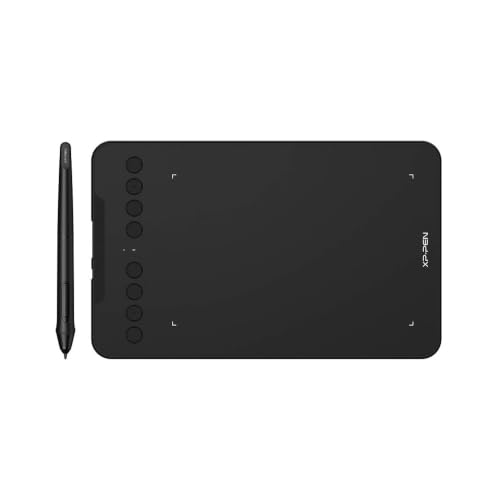
- Bluetooth 5.0 and wired USB connectivity
- 16,384 pressure levels with tilt support
- Eight customizable shortcut keys
Best For: Wireless drawing, online teaching, design, and remote work
Best Wireless Dial Tablet

- Bluetooth or USB-C connectivity with up to 18-hour battery life
- 16,384-level battery-free pen with 60° tilt support
- Dial plus eight customizable shortcut keys
Best For: Digital artists and productivity-focused creators
Best Compact Writing Tablet

- Compact Bluetooth tablet with USB-A backup connectivity
- Battery-free pen and four ExpressKeys
- Includes creative software access and online training
Best For: Students, beginners, and compact workspaces
Best Mobile-Compatible Tablet
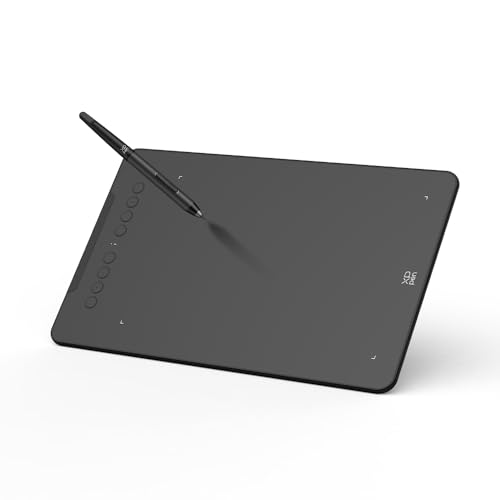
- Bluetooth 5.0 with up to 13 hours of wireless use
- 16,384-level pen with 60° tilt support
- Adjustable Android mapping and eight shortcut keys
Best For: Computer and Android creators needing mobile flexibility
Best for Portable Wireless Drawing – HUION Inspiroy Frego Medium
The HUION Inspiroy Frego Medium is a practical choice among wireless electronic writing tablets for artists who want a clean, shortcut-free surface with Bluetooth flexibility. Its 10 x 6.25-inch active area, battery-free stylus, and mobile support make it suitable for drawing, sketching, and digital writing across several devices.
Best For: Artists, students, and teachers who want a portable wireless tablet with a comfortable wrist-rest design.
Pros:
- Bluetooth or USB-C connectivity with up to 24 hours of use after charging.
- 8192 pressure levels, 60-degree tilt support, and a battery-free stylus with two programmable keys.
- Works with Windows, macOS, Linux, Android, iPhone, and iPad through supported apps.
- Symmetrical, portable design includes a built-in nylon pen holder.
Cons:
- The minimalist design has no physical shortcut keys on the tablet.
- Bluetooth compatibility is more limited on some operating systems than wired compatibility.
Choose the Frego Medium if portability, mobile compatibility, and a spacious drawing surface matter more to you than built-in shortcut buttons.
Best for Paper-to-Phone Notes – XPPen Note Plus Digital Notebook
The XPPen Note Plus takes a different approach to wireless electronic writing tablets: you write on real A5 paper while the notebook captures and syncs your work to a phone. Bluetooth 5.3, offline storage, and built-in editing tools make it useful for notes, meetings, lectures, and sketches.
Best For: Students, professionals, and anyone who prefers handwriting on paper but wants digital copies.
Pros:
- Captures handwriting and sketches through Bluetooth 5.3 with 8192 pressure levels.
- Works offline and automatically syncs after reconnecting to Android or iOS devices.
- Accepts any A5 notebook core up to 8mm thick, helping reduce refill restrictions.
- Supports tagging, search, editing, Google Cloud backup, and PNG/PDF sharing.
Cons:
- It has no electronic screen; writing requires real paper and the matching electronic pen.
- Phone compatibility is limited to Android 10 or later and iOS 14 or later.
This is a strong fit for buyers who want the tactile feel of a traditional notebook without giving up searchable, shareable digital notes.
Best for Simple Standalone Writing – 12-Inch Rechargeable LCD Tablet
For straightforward writing and doodling without a computer or phone, this 12-inch LCD tablet is one of the simpler wireless electronic writing tablets to consider. Its pressure-sensitive screen, rechargeable battery, protective cover, and one-touch erase function suit quick notes, drawings, and paperless everyday use.
Best For: Students, office workers, teachers, and creatives who need a standalone reusable writing surface.
Pros:
- Large 12-inch screen provides room for notes and drawings.
- Thin 5.2mm profile and foldable PU cover improve portability and protection.
- One-touch erase clears the screen, while the lock switch helps prevent accidental deletion.
- Rechargeable USB-C battery avoids disposable batteries and requires no connected device.
Cons:
- It has no Bluetooth, computer connection, or digital file-syncing features.
- The erase function clears the entire screen rather than selected content.
Select this model when you want an eye-friendly, paperless scratchpad for temporary writing—not a tablet for saving or transferring finished work.
Best for Shortcut-Rich Wireless Drawing – XPPen Deco MW Wireless Drawing Tablet
The XPPen Deco MW is designed for artists who want wireless electronic writing tablets with dedicated workflow controls. Its Bluetooth 5.0 connection, eight customizable shortcut keys, battery-free X3 stylus, and broad operating-system support make it a versatile computer graphics tablet.
Best For: Digital artists, designers, students, and online teachers who rely on customizable shortcuts.
Pros:
- Bluetooth 5.0 enables cable-free work and a cleaner creative setup.
- Eight customizable shortcut keys can speed up common commands.
- X3 stylus offers 8192 pressure levels, 60-degree tilt support, and battery-free operation.
- Compatible with Windows, macOS, Linux, Chrome OS, Android, and major art applications.
Cons:
- The 8 x 5-inch active area is smaller than the HUION Frego Medium’s working surface.
- As a graphics tablet, it requires a compatible connected device rather than functioning as a standalone screen.
The Deco MW is a well-rounded option when shortcut access and software compatibility are higher priorities than having the largest drawing area.
Best Compact Drawing Pick – HUION Inspiroy 2 Small
The HUION Inspiroy 2 Small is a versatile option among wireless electronic writing tablets for users who want a compact connected pad for drawing, digital notes, signatures, and precise cursor control. Its battery-free stylus, scroll wheel, six customizable keys, and Android support make it useful across creative and productivity tasks.
Best For: Beginners, students, designers, and remote workers who need a small tablet for drawing, writing, or signing documents.
Pros:
- PenTech 3.0 stylus is designed for precise, low-lag lines with reduced wobble.
- Scroll wheel and six programmable keys can be customized for different applications.
- Works with compatible Windows, Mac, Linux, ChromeOS, and Android devices.
- Compact design is easy to carry, and the tablet supports left-handed users.
Cons:
- It is not standalone and must connect to a compatible computer, laptop, or smartphone.
- The supplied notes do not indicate wireless connectivity.
Choose this HUION when portability, shortcut controls, and natural pen input matter more than having a self-contained screen. It is especially practical for computer-based creative work and everyday digital writing.
Best Paper-Saving Value – TIQUS 8.5-Inch LCD Writing Tablets
The TIQUS 8.5-inch LCD writing tablets are a straightforward choice among wireless electronic writing tablets for reusable notes, checklists, reminders, and everyday communication. This three-count package is designed for adults and users over 15 who want a lightweight alternative to paper and pens.
Best For: Home, office, kitchen, checklists, memorandums, and reusable handwritten communication.
Pros:
- Three tablets provide extra value and make sharing or organizing tasks convenient.
- Pressure-sensitive LCD screens are described as free from glare, blue light, and harmful radiation.
- Thin, lightweight construction is easy to carry around.
- Reusable design can reduce paper and pen use.
Cons:
- Recommended only for children over 15 and adults, according to the supplied warning.
- The notes do not list computer, smartphone, or app compatibility.
- Its stated use is writing rather than pressure-sensitive digital drawing.
This package makes sense when you need simple, repeatable handwriting surfaces rather than a computer-connected creative tablet. The three-pack is particularly useful for placing tablets in multiple rooms or sharing them at home or work.
Best Wireless Creative Option – XP-Pen Deco mini7W
The XP-Pen Deco mini7W is a strong fit for shoppers comparing wireless electronic writing tablets for drawing, teaching, editing, and remote work. It offers Bluetooth 5.0 or USB connectivity, a battery-free stylus with 16,384 pressure levels, tilt support, and eight customizable shortcut keys.
Best For: Artists, online teachers, designers, and users who want wireless flexibility with detailed pen control.
Pros:
- Supports Bluetooth 5.0 wireless use as well as wired USB connections.
- Battery-free pen provides 16,384 pressure levels and 60-degree tilt support.
- Eight customizable press keys can streamline creative and teaching workflows.
- Compatible with listed Windows, Mac, Android, ChromeOS, and Linux systems.
Cons:
- It requires a compatible connected device and is not described as a standalone display tablet.
- The active surface is 7 x 4 inches, which may feel compact for users wanting a larger workspace.
- Wireless operation depends on the included dongle or Bluetooth-compatible device.
For shoppers who specifically want wireless capability, this XP-Pen is the most flexible option in the group. Its high pressure sensitivity, tilt response, and shortcut controls make it better suited to expressive drawing and structured digital workflows than basic note-taking.
Best Wireless Dial Tablet – GAOMON WH851
The GAOMON WH851 is a strong choice among wireless electronic writing tablets for users who want generous shortcut controls and a larger 8 x 5-inch work area. Bluetooth 5.0, USB-C connectivity, and a battery-free pen make it suitable for drawing, annotation, signatures, and digital design.
Best For: Digital artists, teachers, students, and users who want a programmable dial with extensive shortcut controls.
Pros:
- Bluetooth or wired USB-C connectivity, with up to 18 hours of battery life.
- Battery-free pen with 16,384 pressure levels and 60° tilt support.
- Dial and eight customizable keys provide efficient canvas and tool controls.
- Works with Windows, macOS, and Android, with adjustable aspect ratios.
Cons:
- It has no built-in display, so you draw while viewing a separate screen.
- The larger control layout may be more than casual note-takers need.
Choose the WH851 if wireless flexibility, a larger active area, and tactile controls matter more than compact size. Its feature set is particularly useful for longer creative sessions and productivity-focused workflows.
Best Compact Writing Tablet – Wacom Intuos Small
The Wacom Intuos Small is a compact option for wireless electronic writing tablets, combining Bluetooth with USB-A connectivity in a portable design. Its battery-free pen and included software make it approachable for digital art, photo editing, online education, writing, and note-taking.
Best For: Students, teachers, beginners, and creators who need a compact tablet with dependable software support.
Pros:
- Battery-free Wacom pen is designed to provide a pen-on-paper feel.
- Bluetooth and USB-A connections support flexible use at a desk or elsewhere.
- Four ExpressKeys provide convenient shortcut access.
- Includes access to creative software and Wacom online training after registration.
Cons:
- The 6 x 3.7-inch active area is smaller than the other tablets in this roundup.
- Its pen offers 4,096 pressure levels rather than the higher levels listed for the other options.
- USB connectivity uses USB-A rather than USB-C.
The Intuos Small is a sensible pick when portability, simple controls, and an established software ecosystem are priorities. Its smaller drawing area makes it easy to fit into compact workspaces, though artists wanting more room may prefer a larger model.
Best Mobile-Compatible Tablet – XP-Pen Deco mini7W V2
The XP-Pen Deco mini7W V2 is a versatile wireless electronic writing tablet designed for computers and compatible Android devices. It pairs Bluetooth 5.0 with wired USB-C operation, a battery-free stylus, mobile screen-ratio mapping, and eight shortcut keys for drawing, teaching, editing, and digital note-taking.
Best For: Creators who want wireless computer use plus Android compatibility and mobile-friendly mapping controls.
Pros:
- Bluetooth 5.0 supports wireless use for up to 13 hours on a charge.
- Battery-free pen provides 16,384 pressure levels and 60° tilt support.
- Mobile mapping adjustment helps match the tablet area to an Android screen ratio.
- Supports Windows, macOS, Android, ChromeOS, Linux, and many creative or meeting applications.
Cons:
- iOS support is limited to ibis Paint according to the supplied notes.
- The compact 7 x 4.37-inch format offers less workspace than larger tablets.
- The tablet battery requires charging for Bluetooth use.
The Deco mini7W V2 stands out for users who move between a computer and Android device. Its mobile mapping feature and broad operating-system support add flexibility, while wired USB-C operation remains available for extended sessions.
How We Picked These Wireless Electronic Writing Tablets
We focused on tablets that offer wireless convenience through Bluetooth or another cordless workflow, while covering several distinct use cases. The lineup includes pressure-sensitive graphics tablets for PC and Mac, compact travel-friendly models, a phone-connected digital notebook, and rechargeable LCD writing pads for quick notes.
We also considered active-area size, stylus design, pressure-level claims, shortcut controls, portability, software compatibility, and whether the tablet requires charging. Because these products are not interchangeable, the right choice depends more on your workflow than on specifications alone.
Quick Comparison
- For serious digital art: Look at larger active areas, pressure-sensitive styluses, shortcut keys, and dial controls.
- For portability: Compact wireless models such as the Deco mini7W options are easier to carry and store.
- For beginner drawing: Wacom Intuos, HUION Inspiroy, and XPPen models provide familiar pen-tablet workflows without a built-in screen.
- For handwritten notes: The XPPen Note Plus is better suited to saving or syncing writing than a basic LCD memo pad.
- For lists and reminders: Rechargeable LCD writing tablets are simple, low-distraction tools for temporary notes.
Key Buying Factors for Wireless Electronic Writing Tablets
Connection and Device Compatibility
Check whether the tablet uses Bluetooth, a wireless adapter, or a phone-sync system, and confirm compatibility with your operating system and preferred creative apps. Wireless support may vary by device, so review the manufacturer’s requirements before purchase.
Active Area and Portability
A larger active area gives your hand more room for drawing and can feel more natural for detailed work. Smaller tablets take up less desk space and travel well, but may require more constrained strokes or frequent zooming.
Stylus and Pressure Sensitivity
Pressure sensitivity affects line width and opacity in supported software. Battery-free pens reduce charging interruptions, while higher reported pressure levels can provide finer input control, although software settings and pen feel matter just as much.
Controls, Battery, and Writing Surface
Shortcut keys, scroll wheels, and dials can speed up common commands. For LCD writing pads, focus instead on erase behavior, screen visibility, cover quality, and battery convenience. These pads are generally designed for temporary writing rather than permanent digital storage.
Who Should Buy Which Wireless Electronic Writing Tablets?
Choose a larger HUION, XPPen Deco MW, or GAOMON model if you draw regularly and want more workspace or physical controls. Choose a compact Deco mini7W, HUION Inspiroy 2 Small, or Wacom Intuos Small if portability and a smaller desk footprint matter most.
Choose the XPPen Note Plus if your priority is capturing handwritten notes and syncing them with a phone. Choose a 12-inch or multi-pack LCD writing tablet for grocery lists, household reminders, classroom notes, or office checklists where quick writing and easy erasing matter more than app integration.