If you’re looking to enhance your workspace, the right MacBook monitor mount can make a significant difference. These mounts not only free up desk space but also provide ergonomic benefits for your posture and productivity. With options that support screens up to 32 inches and various features like cable management, choosing the ideal mount is essential for a sleek setup. Let’s explore the best options available to elevate your workspace.
HUANUO Dual Monitor Stand – Adjustable Desk Mount for 13 to 32 Inch Screens

If you’re looking to elevate your workspace, the HUANUO Dual Monitor Stand is an excellent choice for MacBook users who need flexibility and ergonomic comfort. This adjustable desk mount supports screens from 13 to 32 inches, with a weight capacity of 4.4 to 19.8 lbs. Its unique structural design enhances stability, while the gas elastic system allows for easy adjustments. You can swivel, tilt, and rotate your monitors to find the perfect angle. Plus, it raises your screens to eye level, reducing neck strain and boosting productivity. Installation is simple with either a C-clamp or grommet base option.
Best For: Users seeking an ergonomic solution for dual monitor setups, particularly those with screens ranging from 13 to 32 inches.
Pros:
- Stable and secure: Unique structural design enhances stability compared to traditional mounts.
- Flexible adjustments: Gas elastic system allows for smooth swivel, tilt, and rotation for optimal viewing angles.
- Ergonomic benefits: Raises monitors to eye level, reducing neck strain and improving overall posture.
Cons:
- Material limitations: Only compatible with wooden desks, which may restrict installation options for some users.
- Weight constraints: Monitors must be within the 4.4 to 19.8 lbs weight limit, limiting compatibility for heavier screens.
- Installation requirements: Desks must have specific thickness and no cross beams, which might not be suitable for all setups.
HUANUO Adjustable Monitor Stand, Single Arm Desk Mount
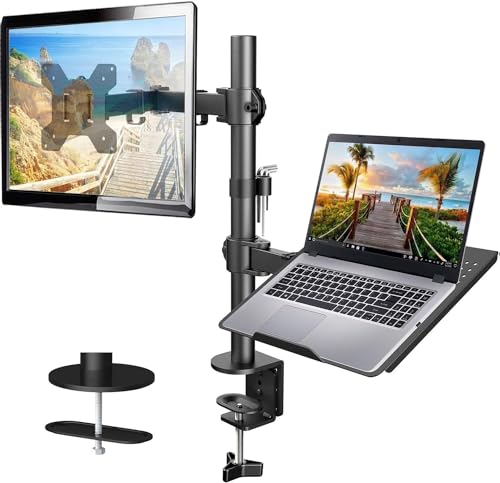
The HUANUO Adjustable Monitor Stand is an excellent choice for anyone looking to maximize their workspace, especially if you use both a laptop and a monitor. This single-arm desk mount supports screens up to 32 inches and a laptop weighing up to 22 lbs. Its flexible design allows for +/-90° tilt and swivel, plus 360° rotation, ensuring perfect positioning. You’ll appreciate the integrated cable management system that keeps your workspace tidy. Installation is straightforward with options for C-clamp or grommet mounting. Just make sure your desk is compatible, and you’ll enjoy a more organized and efficient workspace in no time!
Best For: The HUANUO Adjustable Monitor Stand is best for professionals and students who need to efficiently use both a laptop and a monitor in a limited workspace.
Pros:
- Flexible Adjustability: Offers +/-90° tilt, +/-90° swivel, and 360° rotation for optimal screen positioning.
- Integrated Cable Management: Keeps your workspace organized by neatly managing wires and cables.
- Straightforward Installation: Comes with C-clamp and grommet mounting options for easy setup on compatible wooden desks.
Cons:
- Weight Limit: Supports a maximum weight of 22 lbs, which may not accommodate heavier monitors or laptops.
- Desk Compatibility: Only compatible with wooden desks, limiting installation options for some users.
- Size Restrictions: Monitor must be between 13-32 inches and meet VESA standards, which may exclude some models.
WALI 2-in-1 Laptop Desk Mount (GSMP001NLP)

Looking for a versatile solution to enhance your workspace? The WALI 2-in-1 Laptop Desk Mount (GSMP001NLP) is a fantastic choice. It supports laptops up to 17 inches and monitors from 17 to 34 inches, with a maximum weight capacity of 22 lbs for laptops and 26.4 lbs for monitors. Enjoy ergonomic benefits with full motion adjustments, promoting better posture and reducing strain. Installation is straightforward, offering clamp or grommet options for various desk thicknesses. With a solid 4.5-star rating from over 2,600 users, you’ll appreciate its sturdy design and effective space utilization. Elevate your setup today!
Best For: Individuals seeking a versatile and ergonomic workspace solution for both laptops and monitors.
Pros:
- Sturdy design with high weight capacity, ensuring stability for laptops and monitors.
- Full motion adjustments promote ergonomic posture, reducing eye, shoulder, and neck strain.
- Easy installation with multiple mounting options to fit various desk thicknesses.
Cons:
- Limited instant adjustment capabilities may require more time to set up.
- Potential stability issues for laptops on the tray, which may concern some users.
- Additional tools required for installation may not be readily available to everyone.
SODI Continuity Camera Mount for Desktop Monitor & iMac

Transform your video conferencing experience with the SODI Continuity Camera Mount, designed specifically for those who want to elevate their iPhone (12 or later) into a top-tier webcam. This award-winning mount features adjustable tilt for the perfect angle and seamlessly attaches to desktop monitors, laptops, and TVs. With Center Stage and Desk View, your video calls will feel more engaging. The quick-release magnetic plate allows for easy detachment for charging, while silicone pads protect your surfaces. Users love the high-quality video, though some note stability concerns. Overall, it’s a sleek addition to your workspace that’s sure to impress.
Best For: Those seeking to upgrade their video conferencing setup by utilizing their iPhone as a high-quality webcam.
Pros:
- High-quality video from iPhone enhances video conferencing compared to traditional webcams.
- Versatile design allows for easy attachment to various devices like monitors, laptops, and TVs.
- Quick-release magnetic plate simplifies detachment for charging without hassle.
Cons:
- Some users report stability concerns due to the weight affecting monitor balance.
- Adjusting angles may present difficulty for some users.
- Compatibility issues with newer MagSafe chargers may limit usage options.
MOUNT PRO Laptop Arm Mount for Desk
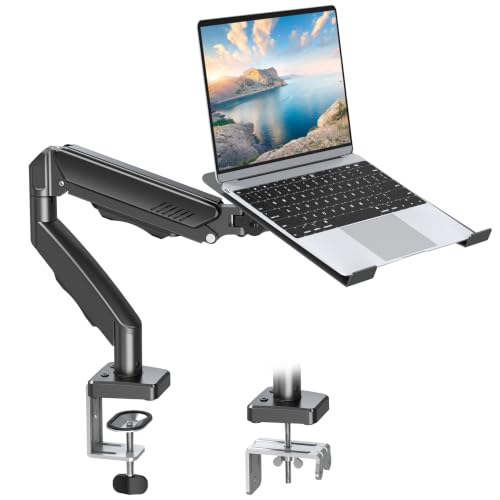
Ideal for professionals and students alike, the MOUNT PRO Laptop Arm Mount for Desk seamlessly combines functionality with ergonomic design. This versatile mount supports both laptops and monitors, accommodating screens up to 32 inches and laptops up to 17 inches. With full-motion adjustments, you can easily tilt, swivel, and rotate your device to enhance your workflow. It not only frees up desk space but also features internal cable management to keep your workspace tidy. Installation is a breeze with clamp or grommet options, ensuring a secure fit for various desk thicknesses. Experience improved posture and productivity with this essential mount.
Best For: Professionals and students seeking an ergonomic solution to improve workspace organization and productivity.
Pros:
- Versatile Design: Supports both laptops (up to 17″) and monitors (13-32″), making it suitable for various setups.
- Full Motion Adjustability: Offers -45° to +90° tilt, 180° swivel, and 360° rotation for optimal viewing angles.
- Space-Saving Features: Frees up desk space with internal cable management, creating a clean and organized work environment.
Cons:
- Limited Compatibility with Curved Screens: Not compatible with 1000R/1500R/1800R curved monitors.
- Weight Limit: Holds a maximum of 19.8lbs, which may limit use with larger or heavier devices.
- Desk Thickness Restrictions: Requires specific desk thicknesses for clamp or grommet mounting, which may not fit all setups.
HUANUO Dual Monitor Stand (17-32 Inch, Ergonomic Adjustable)

The HUANUO Dual Monitor Stand is perfect for those who want to maximize their workspace while enjoying ergonomic viewing angles. This stand supports monitors up to 32 inches and weighs between 4.4 and 19.8 pounds, ensuring compatibility with most setups. You can easily adjust the height up to 25.19 inches, providing comfort for taller users. With full motion capabilities, you can tilt, swivel, and rotate your screens for the best view. This stand also features integrated cable management to keep your workspace tidy, making it an excellent choice for a sleek and organized environment.
Best For: Individuals seeking an ergonomic dual monitor setup that maximizes workspace and provides customizable viewing angles.
Pros:
- Full motion capabilities allow for 90° tilt, 180° swivel, and 360° rotation, enhancing viewing comfort.
- Height adjustable up to 25.19 inches, accommodating taller users and different desk heights.
- Integrated cable management keeps your workspace organized and free of clutter.
Cons:
- Weight limit of 19.8 lbs may not support heavier monitors.
- Not suitable for glass desktops, limiting compatibility with certain desk types.
- Installation may require additional tools or assistance, especially for the clamp or grommet mounts.
Laptop Stand Desk Mount with 2 in 1 Function

For those seeking a versatile solution to enhance their workspace, the ErgoFocus Laptop Stand Desk Mount is an excellent choice. This 2-in-1 mount accommodates laptops up to 17 inches and monitors from 13 to 32 inches, holding up to 17.6 lbs. With full-motion gas spring arms, you can easily adjust the height, extension, and angle for ideal viewing. Its space-saving design frees up your desk while integrated cable management keeps everything tidy. Installation is a breeze, fitting desks up to 3.34 inches thick. Enjoy ergonomic comfort and a clutter-free workspace with this functional stand.
Best For: Individuals seeking an ergonomic and space-efficient solution for their laptop or monitor setup.
Pros:
- Full Motion Design: Offers extensive adjustability for optimal viewing angles and comfort.
- Space-Saving: Frees up valuable desk space and helps keep cables organized.
- Easy Installation: Compatible with a variety of desk thicknesses and mounting options for quick setup.
Cons:
- Adjustment Challenges: Some users report difficulties with leveling and making adjustments.
- Weight Limit: May not accommodate heavier laptops or monitors beyond the 17.6 lbs capacity.
- Grommet Hole Requirement: Requires specific grommet hole sizes for installation, which may limit options for some desks.
Magnetic Phone Holder for Laptop (Compatible with All Phones)

When you need a convenient way to keep your phone visible while working on your MacBook, the Magnetic Phone Holder for Laptop offers a practical solution. This adjustable mount allows for 180° rotation, making it easy to find the perfect angle. It’s compatible with all phones, including the latest iPhone models, thanks to a magnetic ring. The lightweight design guarantees portability, ideal for travel or meetings. With a strong adhesive base, installation is simple—just align it with the provided card and wait six hours. Enjoy quick access to texts and calls, enhancing your productivity throughout the day.
Best For: Professionals and students who need a convenient way to keep their phone visible while working on laptops or desktops.
Pros:
- Adjustable design allows for 180° rotation, enabling users to find the perfect viewing angle.
- Strong adhesive base ensures secure mounting, providing peace of mind during use.
- Lightweight and portable, making it easy to carry for travel, meetings, or business trips.
Cons:
- Some users have reported issues with the adhesive strength, especially with heavier phones.
- Requires a waiting period of six hours after installation before use, which can be inconvenient.
- Compatibility with non-MagSafe phones depends on the use of a magnetic ring, which may not be included for all phone models.
WALI Extra Tall Monitor Arm Mount for Desk (M001XL)

Looking to optimize your workspace? The WALI Extra Tall Monitor Arm Mount (M001XL) is an excellent choice. It supports monitors up to 32 inches and 22 lbs, allowing for adjustable height on a sturdy 31.5” pole. Installation’s a breeze, taking less than 10 minutes with minimal tools. Its two-stage locking system fits desks up to 3” thick, and you can easily tilt, swivel, or rotate your monitor. Users rave about its sturdiness and ergonomic benefits, reducing neck and eye strain. Plus, effective cable management keeps your setup neat. Experience enhanced productivity with this versatile mount!
Best For: Those seeking an ergonomic, space-efficient solution for mounting monitors up to 32 inches in a versatile workspace.
Pros:
- Sturdy construction ensures stability for monitors weighing up to 22 lbs.
- Easy installation takes less than 10 minutes with minimal tools required.
- Adjustable features such as tilt, swivel, and rotation promote optimal viewing angles and comfort.
Cons:
- May not be suitable for desks thicker than 3 inches without additional modifications.
- Limited to a single monitor setup, which might not cater to users with dual monitor requirements.
- Some users may prefer hydraulic pistons for smoother height adjustments.
CloudValley Magnetic Phone Holder for Laptop (Designed for iPhone 17/16/15/14/13/12 MagSafe)

The CloudValley Magnetic Phone Holder is an ideal choice for iPhone users seeking seamless integration with their MacBooks. This adjustable side mount easily attaches to your laptop or desktop, allowing you to access calls and messages without distraction. Weighing just 2.68 ounces and featuring a sleek aluminum design, it’s perfect for travel. With strong magnets and compatibility for both MagSafe and non-MagSafe phones, setup is straightforward. Just remove the protective tape, attach it to a smooth surface, and you’re ready to enhance your productivity. Users appreciate its functionality, with an average rating of 4.3 stars from over 1,700 reviews.
Best For: iPhone users looking for a portable and efficient way to manage calls and messages while using their laptops or desktops.
Pros:
- Strong magnet strength ensures secure attachment to devices, minimizing the risk of accidental drops.
- Lightweight and portable design makes it easy to carry for travel or meetings.
- Compatible with both MagSafe and non-MagSafe phones, enhancing versatility for various users.
Cons:
- Some users report difficulty in removing the mount, which may be inconvenient for frequent relocation.
- Potential interference with wireless charging for non-MagSafe devices, limiting usability.
- Installation may require careful alignment to ensure optimal magnetic hold and functionality.
Factors to Consider When Choosing a Macbook Monitor Mount
When choosing a MacBook monitor mount, you need to take into account several key factors. Think about compatibility with your devices, weight capacity, and adjustability features. Also, take into account the installation methods and ergonomic design benefits to guarantee a comfortable setup.
Compatibility With Devices
Choosing the right monitor mount for your MacBook involves several key factors to assure compatibility. First, confirm that the mount supports the VESA mounting patterns required by your MacBook model, typically 75x75mm or 100x100mm. Next, check that the mount can accommodate the size of your MacBook; some are designed for laptops up to 17 inches, while others work with larger screens. You’ll also want to take into account the desk thickness requirements, as most mounts need a thickness between 0.39 inches and 3.54 inches for secure installation. Finally, verify the mount features adjustable arm lengths and height settings, allowing you to position your MacBook ergonomically for a comfortable viewing angle during use.
Weight Capacity Considerations
After ensuring compatibility with your devices, it’s important to focus on weight capacity when selecting a monitor mount for your MacBook. Most mounts support weights ranging from 17.6 lbs to 26.4 lbs, so check the specifications carefully. Don’t just consider your MacBook’s weight; factor in any additional equipment, like monitors, to avoid instability. Uneven weight distribution can strain the mount and shorten its lifespan, so make sure to balance the load. Many mounts come with adjustable features that can handle varying weight capacities, ensuring you find one that meets your needs. Overall, evaluating the total weight of your MacBook and peripherals is essential for choosing the right monitor mount.
Adjustability Features Available
While you consider a monitor mount for your MacBook, adjustability features play an important role in enhancing your workspace ergonomics. Look for mounts that offer full motion adjustments, including tilt, swivel, and rotation capabilities, so you can customize your viewing angles and reduce neck strain. Height adjustment features are vital too, allowing you to position your screen at eye level for better posture. A wide range of extension options guarantees both your laptop and monitor are ideally placed for comfortable access. Additionally, consider models with gas spring or pneumatic systems for smooth, tool-free adjustments. Finally, integrated cable management solutions can keep your workspace organized and clutter-free, making your setup look sleek and professional.
Installation Methods Offered
Adjustability features can greatly enhance your workspace, but the installation method you choose is just as important. Most monitor mounts offer two main options: C-clamp and grommet. C-clamp mounts work well for desks between 0.39 to 3.54 inches thick, providing a secure grip without harming your desk surface. On the other hand, grommet mounts need a pre-drilled hole and accommodate thicknesses from 0.39 to 3.15 inches, making them perfect for desks that already have grommet holes. Many mounts come with a hardware kit for easy installation, often requiring just a Philips screwdriver. Keep in mind that your choice of installation can affect both the stability and overall aesthetics of your workspace, as grommet mounts offer a cleaner look.
Ergonomic Design Benefits
When you choose an ergonomic monitor mount for your MacBook, you’re not just elevating your screen; you’re also investing in your health and comfort. By raising your display to eye level, you greatly reduce neck and shoulder strain often caused by long hours at your computer. Adjustable mounts help maintain a natural posture, which enhances comfort and minimizes the risk of musculoskeletal disorders. With full-motion capabilities like tilt, swivel, and rotation, you can customize your viewing angle, promoting better visual alignment and less eye fatigue. An ergonomic setup can boost your work efficiency by up to 25%, encouraging healthier habits while freeing up desk space for a more organized and productive workspace.
Space Efficiency Requirements
Choosing the right monitor mount for your MacBook goes beyond aesthetics; it’s essential for optimizing your workspace. Start by evaluating your available desk space to avoid overcrowding. You’ll want a mount that fits comfortably while allowing efficient organization. Make sure it supports the size and weight of your MacBook and monitor for stability and safety. Adjustable mounts with full motion capabilities, like tilt and swivel, help you maximize ergonomic benefits without sacrificing space. Also, check compatibility with your desk’s thickness and material, as this affects installation and overall stability. By considering these factors, you’ll create a sleek, organized workspace that enhances productivity and comfort.
Cable Management Solutions
While optimizing your workspace with a monitor mount for your MacBook, don’t overlook the importance of effective cable management solutions. Look for mounts that feature integrated systems like clips or channels to keep your wires organized and prevent tangling. This not only enhances the aesthetic of your workstation but also improves functionality. Choosing a mount with space for excess cable length can help reduce strain on connectors, prolonging their lifespan. Additionally, consider options that come with adhesive cable management pads or hooks for extra flexibility in organizing your cables. A clean cable management system contributes to better airflow, reducing the risk of overheating and keeping your devices running smoothly.
Build Quality and Durability
A solid monitor mount can greatly enhance your MacBook setup, and build quality is a key factor in guaranteeing long-term satisfaction. Look for mounts made from high-grade materials like aluminum and steel, as they offer strength and durability. Verify the mount can securely support your monitor’s weight—most reliable options handle between 19.8 lbs and 26.4 lbs, preventing sagging. Pay attention to design; mounts with unique structural features provide better stability and minimize wobbling compared to traditional models. Check customer reviews for durability; products with ratings above 4.5 stars often indicate user satisfaction. Finally, consider the installation method—C-clamp or grommet bases on solid wooden desks provide better stability than those on plastic or glass surfaces.