A magnetic charger is only useful if it fits your MacBook Air. Older models use MagSafe 2, while many newer models use MagSafe 3—and a magnetic cable may still need a separate USB-C power adapter.
These eight options span replacement chargers, cables, and multiport adapters. Start with your MacBook Air’s model and charging port, then check what each option includes.
Best 8 Macbook Air Magnetic Charger Picks for 2026
Versatile USB-C Pick
Sehonor 96W Magnetic 3 Charger

- Magnetic and USB-C cables included
- 6.6-foot magnetic cable
- Listed outputs up to 96W
Best For: Compatible MacBook owners who also charge USB-C devices
Compact Travel Pick
100W Magnetic 3 Charger in Midnight
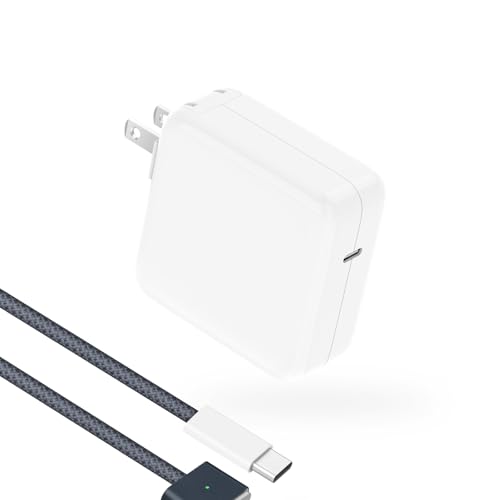
- Compact 100W adapter
- 6.6-foot braided cable
- LED indicator and 12-month warranty
Best For: Travel with a compatible Magnetic 3 MacBook
Older Air Pick

- For specified 2012–2017 Air models
- 45W T-tip magnetic connector
- Amber and green status LED
Best For: A compatible older MacBook Air needing a T-tip charger
Long-Cable Pick
T ATHINK 96W Magnetic 3 Charger

- Listed 96W adapter
- 6.6-foot braided cable
- LED charging-status indicator
Best For: A compatible Magnetic 3 MacBook used far from an outlet
Air-Focused Kit

- 70W adapter included
- 6.6-foot braided magnetic cable
- Charging-status LED
Best For: Compatible MacBook Air owners needing a complete kit
Apple Cable Pick

- Apple magnetic cable
- 2-meter woven design
- Adapter sold separately
Best For: Replacing a MagSafe 3 cable while keeping an existing adapter
Pro-Capable Adapter
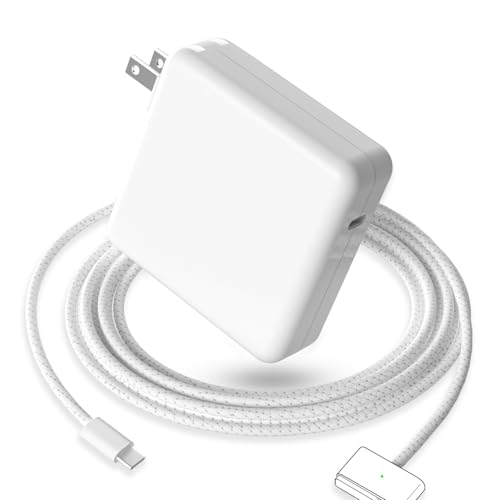
- 96W adapter and cable
- Lists Air and Pro compatibility
- One-year warranty
Best For: Charging compatible Air and Pro models with one kit
Two-Device Kit

- Two USB-C charging ports
- Magnetic 3 and USB-C cables
- Check Type I plug compatibility
Best For: Charging a compatible MacBook and a second USB-C device
Versatile USB-C Pick – Sehonor 96W Magnetic 3 Charger
If you want a macbook air magnetic charger that can also power USB-C devices, this Sehonor kit pairs a magnetic USB-C cable with a power adapter. The included 6.6-foot cable gives you room to work away from the outlet.
Best For: Owners of compatible magnetic-port MacBook Air or Pro models who also want USB-C charging flexibility.
Pros:
- Includes a 6.6-foot USB-C-to-magnetic cable and a USB-C-to-USB-C cable.
- Lists multiple USB-C Power Delivery outputs up to 96W.
- Built-in protections address overload, short circuits, and overheating.
Cons:
- The listing gives conflicting wattage figures, including 96W in the specifications and 85W in the details.
- Confirm your MacBook’s charging connector before ordering.
This is the flexible choice if you need both magnetic and USB-C cables, but check the exact output and connector against your laptop first.
Compact Travel Pick – 100W Magnetic 3 Charger in Midnight
For a macbook air magnetic charger that takes up less space in a bag, this 100W model emphasizes a compact adapter and includes a 6.6-foot braided USB-C-to-Magnetic 3 cable. It is listed for compatible 13.6- and 15-inch MacBook Air models, as well as 14- and 16-inch MacBook Pros.
Best For: Owners of compatible Magnetic 3 MacBooks who want a smaller adapter and a long braided cable.
Pros:
- Compact adapter design is suited to travel.
- 6.6-foot braided cable has an LED charging-status indicator.
- Listed 100W output and a 12-month warranty.
Cons:
- Not listed for pre-2021 MacBooks or MagSafe 2 connectors.
- The claimed 50% charge in 30 minutes will depend on the MacBook model and conditions.
Choose this one when portability matters, but verify that your MacBook has a Magnetic 3 port rather than relying on its screen size alone.
Older Air Pick – 45W MagSafe 2 T-Tip Charger
If your search for a macbook air magnetic charger is for an older laptop, this 45W replacement uses the T-shaped MagSafe 2 connector found on specified 11- and 13-inch MacBook Air models from 2012–2017. It is a different connector from the Magnetic 3 cables used by newer Air models.
Best For: Owners of a compatible 2012–2017 MacBook Air who need a 45W T-tip replacement.
Pros:
- Specified 14.85V, 3.05A output matches the listed 45W rating.
- Magnetic T-tip connector can disconnect if the cord is pulled.
- Amber and green LED signals show charging status.
Cons:
- Not suitable for newer Magnetic 3 MacBook Air models.
- Not intended for 13-inch high-power models that require a 60W adapter.
Connector shape is the deciding factor here: check your MacBook model and existing charger before buying.
Long-Cable Pick – T ATHINK 96W Magnetic 3 Charger
This macbook air magnetic charger combines a listed 96W adapter with a 6.6-foot braided USB-C-to-Magnetic 3 cable. It targets compatible 13- and 15-inch MacBook Air models and adds a cable-mounted LED to show charging status.
Best For: Owners of compatible Magnetic 3 MacBooks who want a long braided cable and a charging indicator.
Pros:
- 6.6-foot braided cable offers more placement flexibility.
- LED shows yellow while charging and green when charging is complete.
- Lists overheating and short-circuit safeguards plus a 12-month warranty.
Cons:
- Not listed for pre-2021 MacBooks or MagSafe 2.
- Battery-capacity and rapid-charging claims should not be treated as guaranteed results.
It is a practical option if cable reach and a visible status light matter most; confirm your laptop’s magnetic port before purchasing.
Air-Focused Kit – 70W Magnetic 3 Charger
This macbook air magnetic charger pairs a 70W power adapter with a 6.6-foot braided USB-C-to-Magnetic 3 cable. It is listed for MagSafe 3-equipped MacBook Air models from 2022 onward, making it a practical replacement when you need both the cable and wall adapter.
Best For: Owners of a compatible MacBook Air who want a complete, single-port charging kit with a longer cable.
Pros:
- Includes both a 70W adapter and a 6.6-foot braided cable.
- Cable LED indicates charging and full-charge status.
- Lists temperature monitoring and protections against overcharging and short circuits.
Cons:
- Not intended for pre-2021 MacBooks or MagSafe 2 ports.
- Only one USB-C charging port.
The longer cable adds flexibility at a desk or outlet, but check your MacBook’s charging-port type before ordering; this is a Magnetic 3 kit, not a universal magnetic connector.
Apple Cable Pick – USB-C to MagSafe 3 Cable
If you already have a compatible USB-C power adapter, this Apple cable offers a straightforward macbook air magnetic charger setup. Its 2-meter woven design connects to a Mac notebook’s MagSafe 3 port and shows charging status through an LED.
Best For: MacBook owners who need an Apple MagSafe 3 replacement cable, not another power adapter.
Pros:
- Magnetic connector guides the plug into place and can release if the cable is tripped over.
- 2-meter woven cable provides useful reach.
- LED glows amber while charging and green when fully charged.
Cons:
- USB-C power adapter is sold separately.
- Fast charging requires a compatible adapter.
This is the focused choice when your existing adapter still works. Factor in the cost of a compatible adapter if you are starting without one.
Pro-Capable Adapter – 96W Magnetic 3 Charger
This 96W kit is a macbook air magnetic charger option for shoppers who also use a compatible MacBook Pro. The listing pairs a USB-C-to-Magnetic 3 cable with a power adapter and names MacBook Air 13- and 15-inch models from 2022–2026 among its supported devices.
Best For: Households switching between listed MagSafe 3 MacBook Air and MacBook Pro models.
Pros:
- 96W adapter is included with the magnetic charging cable.
- Lists compatibility with 14- and 16-inch MacBook Pro models as well as newer MacBook Air models.
- Claims a nylon-woven cable and provides a one-year warranty.
Cons:
- Higher wattage may be unnecessary if you charge only a MacBook Air.
- Check your exact model and connector before relying on the broad compatibility list.
Its appeal is one charging kit for multiple listed Macs. Choose it for that flexibility rather than assuming every MacBook Air will charge at the adapter’s full 96W rating.
Two-Device Kit – Dual-Port 140W Charger
For a macbook air magnetic charger that can also serve other USB-C devices, this dual-port adapter includes both a 6.6-foot Magnetic 3 cable and a 6.6-foot USB-C-to-USB-C cable. The listing specifies up to 140W per port and notes that actual output depends on the connected device.
Best For: People who want to charge a compatible MagSafe 3 MacBook alongside another USB-C device.
Pros:
- Two USB-C ports support charging two devices from one adapter.
- Includes both magnetic and standard USB-C cables.
- Foldable plug helps with storage; magnetic cable has a charging-status LED.
Cons:
- Not every connected device supports 140W charging.
- Listing specifies a Type I plug; verify it fits outlets where you plan to use it.
The included cables make this a versatile desk or travel bundle, provided the plug suits your location. Check your MacBook’s port before choosing the Magnetic 3 cable over the included standard USB-C cable.
How We Picked These Macbook Air Magnetic Chargers
We organized the eight selected options around the decisions that matter most: connector generation, stated model compatibility, power output, and whether the listing describes a complete charger or only a cable or adapter. The selection includes a MagSafe 2 replacement for older Airs, several newer magnetic-charging options, Apple’s USB-C to MagSafe 3 cable, and a two-port USB-C adapter. A compatibility claim in a product title is a starting point, not a substitute for checking your exact model.
Quick Comparison: Which Type Do You Need?
- MacBook Air from roughly 2012–2017 with a MagSafe 2 port: Look for the 45W MagSafe 2 T-tip replacement. MagSafe 3 cables will not fit that port.
- MacBook Air with a MagSafe 3 port: Choose a compatible magnetic cable and a suitable USB-C power adapter, or a listing that clearly includes both.
- Already have a USB-C power adapter: Apple’s USB-C to MagSafe 3 cable may be all you need. It is a cable, not a wall charger.
- Want to power more than one device: The two-port 140W USB-C adapter may be useful, but check whether a magnetic cable is included and how output is shared between ports.
Key Buying Factors for a Macbook Air Magnetic Charger
Match the Connector to Your Model
MagSafe 2 and MagSafe 3 are different connectors. Check your MacBook Air’s model year and charging port before buying, especially if a listing mentions both MacBook Air and MacBook Pro. Some MacBook Air models charge through USB-C rather than a magnetic port; a magnetic cable cannot add a MagSafe socket they do not have.
Check What Is in the Box
Listings may call a cable, a power adapter, or a cable-and-adapter bundle a “charger.” Confirm that the package includes every part you need: a magnetic cable, a USB-C power adapter or older-style integrated adapter, and any required wall plug. Check cable length and whether the cable detaches if those details matter at your desk or in a travel bag.
Choose Appropriate Power, Not Just the Highest Number
A higher-wattage adapter does not force its full rated output into a MacBook Air; the computer draws supported power. Still, compare the adapter’s stated USB-C output with your MacBook Air’s charging requirements. If an adapter has two ports, its headline wattage may be shared when both are in use. High advertised wattage also does not establish that an included magnetic cable supports every fast-charging claim.
Who Should Buy Which Macbook Air Magnetic Charger?
For an older Air with a MagSafe 2 port, start with the dedicated 45W T-tip option and verify your model before ordering. For a newer Air with MagSafe 3 and an existing USB-C adapter, a standalone cable is the simpler purchase; Apple’s cable is the clearly identified first-party choice in this selection. If you need a full setup, compare the newer cable-and-adapter listings by included components, stated output, and return policy. Choose the two-port adapter if charging another USB-C device is a priority, but budget for a separate magnetic cable unless the listing explicitly includes one.